4 Best Practices for a Professional Email Signature with Logo
Integrating a professional email signature with a logo is essential for enhancing brand recognition and trust in digital communication. This integration is
Sophie Grant
Email Signature Specialist, Scribe
Introduction
Integrating a professional email signature with a logo is essential for enhancing brand recognition and trust in digital communication. This integration is crucial for enhancing brand recognition and trust. As organizations deal with the challenges of digital communication, the opportunity to create a memorable impression through well-crafted signatures becomes paramount. Many companies face challenges in maintaining consistency and professionalism, which can undermine their audience engagement.
How can businesses effectively leverage email signatures to not only convey their brand identity but also drive engagement and compliance? To achieve this, businesses must prioritize the strategic design of their email signatures, ensuring they effectively convey brand identity and drive engagement.
Incorporate Your Logo for Brand Recognition
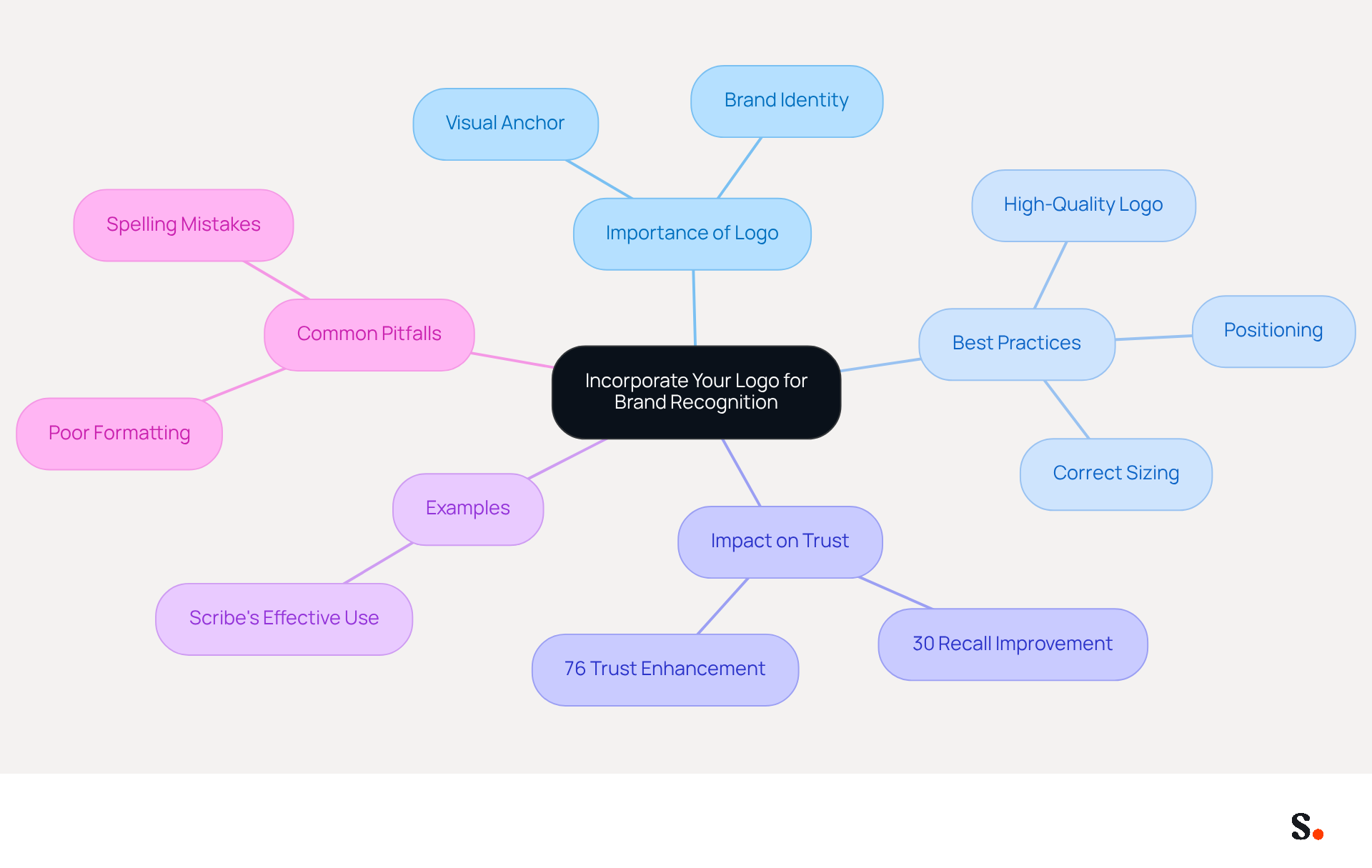
Integrating a professional email signature with logo into correspondence is not just a branding choice; it’s a strategic necessity for enhancing recognition and trust. A well-placed logo acts as a visual anchor, making your messages instantly recognizable. To maximize effectiveness, ensure your logo is high-quality and sized correctly; it should ideally not exceed 100 pixels in height for a clean look. Positioning the logo at the top or bottom of the message is recommended, as these locations are most commonly recognized by recipients.
For example, Scribe effectively employs its logo in digital correspondence, reinforcing brand identity and fostering increased customer trust and engagement. Research indicates that logos in correspondence can improve recall by up to 30%, making them essential for effective communication. In fact, 76% of recipients believe that branded identifiers enhance trust in the sender.
Moreover, using a transparent background for your logo helps it blend seamlessly with your message design, making it visually appealing. Consistent branding can lead to a 22% increase in response rates, underscoring the importance of maintaining a professional appearance. Furthermore, with Scribe's automated synchronization of messaging identifiers with Aircall, any modifications made in your Aircall setup will be reflected in your Scribe identifiers, ensuring brand consistency across all communications. This feature not only saves time but also ensures consistent branding, which is vital for fostering trust and recognition among your audience.
However, many companies struggle with maintaining professionalism due to common pitfalls like poor formatting or spelling mistakes, which can lead to consumer disengagement. By strategically incorporating your logo into a professional email signature with logo, you enhance communication effectiveness and solidify your brand's presence in the minds of your audience.
Design an Effective Layout and Content Strategy
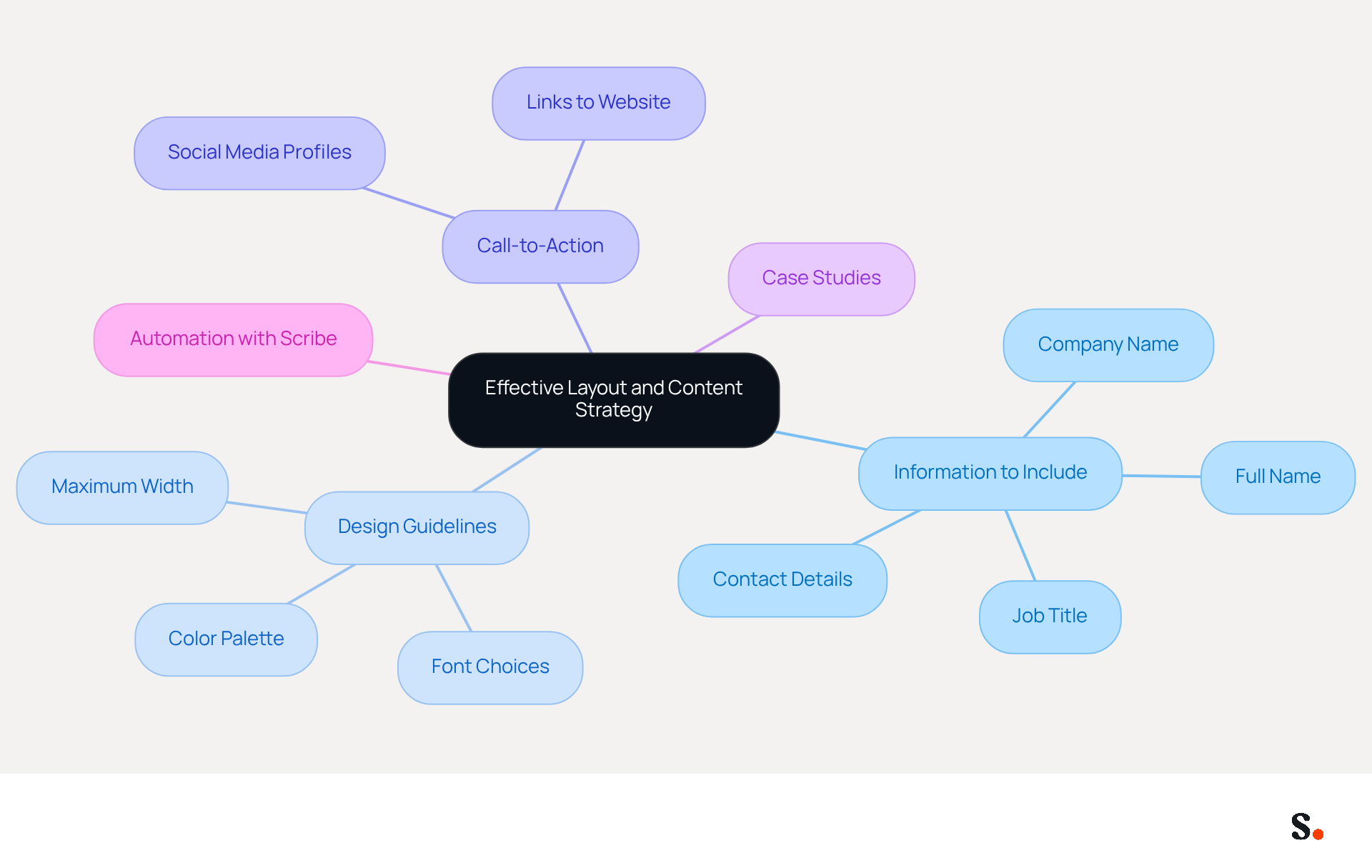
To create an effective digital correspondence footer, it is essential to prioritize clarity and organization in presenting key information. Include your full name, job title, company name, and contact details, using professional-standard fonts like Arial or Calibri in sizes 10-12pt for legibility. Limit your color palette to two or three colors that align with your brand's identity to maintain consistency and avoid distractions.
Adding a call-to-action (CTA) or links to your company’s website and social media profiles significantly enhances engagement. For instance, a marketing team might include a link to their latest campaign; this approach drives traffic and boosts visibility. Statistics indicate that electronic identifiers can achieve a click-through rate of 4%, which is significantly higher than conventional marketing messages, which average around 2.5%. This illustrates the potential of well-crafted autographs as subtle yet effective marketing tools.
Case studies show that companies employing strategic CTAs in their messages have experienced a 40% rise in conversions compared to standard links. Without regular evaluations, your digital identifiers may fail to convey the professionalism your brand deserves, with ratings rising from 6.2 to 8.5 out of 10 when consistent branding is upheld. Neglecting to craft a professional digital identifier could mean losing potential leads and brand loyalty.
Scribe allows you to automate how you manage your digital identifiers, ensuring that any modifications made in your business phone system are seamlessly reflected in your identifiers without requiring action from your teammates. This real-time synchronization not only saves time but also guarantees that your branding remains consistent across all communications. Moreover, Scribe's SOC 2 Type II compliance guarantees that your information is managed securely, providing you with reassurance as you improve your messaging strategy. Additionally, ensure that your message footer does not exceed a maximum width of 600 pixels for optimal readability on mobile devices.
Ensure Compatibility Across Email Clients
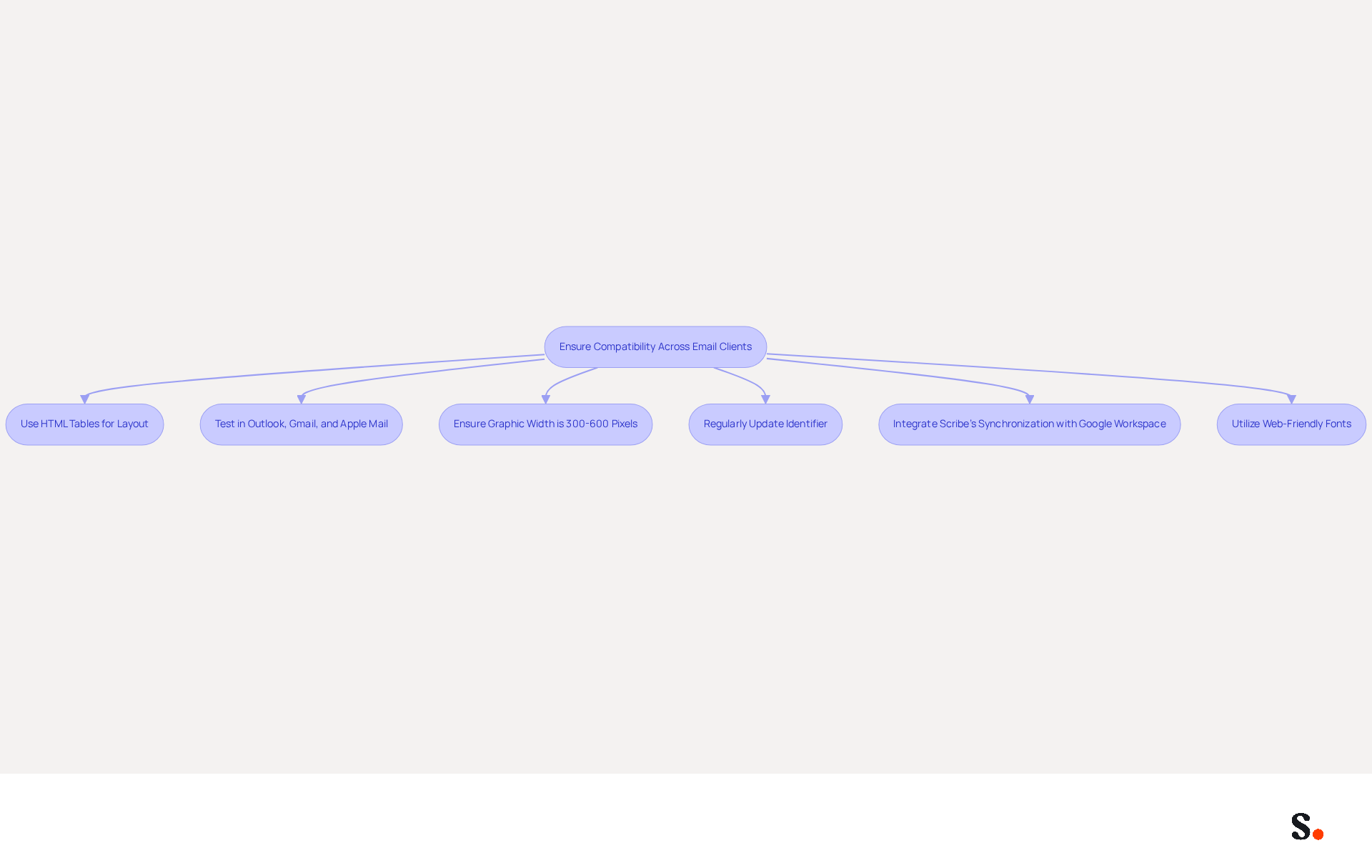
Ensuring that message identifiers are compatible with various communication clients is essential for maintaining a professional appearance in interactions. For this purpose, use HTML tables for layout rather than CSS, since tables render more consistently across various platforms. Testing your identifier in widely used messaging clients such as Outlook, Gmail, and Apple Mail is crucial to identify any discrepancies in appearance. To achieve the best display on both desktop and mobile devices, ensure the graphic width is between 300 and 600 pixels.
Regularly updating and evaluating your identifier is crucial to keep up with changes in client updates or user preferences. By integrating Scribe's one-click synchronization with Google Workspace, you can save time and ensure that any changes in your teammates' information - such as job positions or group assignments - are automatically reflected in their communication details. This streamlined method improves consistency and enables the automatic filling of attribute details, greatly decreasing manual entry.
A case study involving CityPath showed that implementing a centralized signature management system greatly enhanced consistency across various messaging clients, addressing challenges related to standardization. By prioritizing compatibility and compliance, you safeguard your professional image and enhance communication effectiveness. Moreover, utilizing web-friendly fonts that conform to guidelines is crucial for ensuring readability across various messaging clients. With Scribe's SOC 2 Type II compliance, you can be confident that your data is protected while you concentrate on creating impactful representations.
Automate Updates for Consistency and Compliance
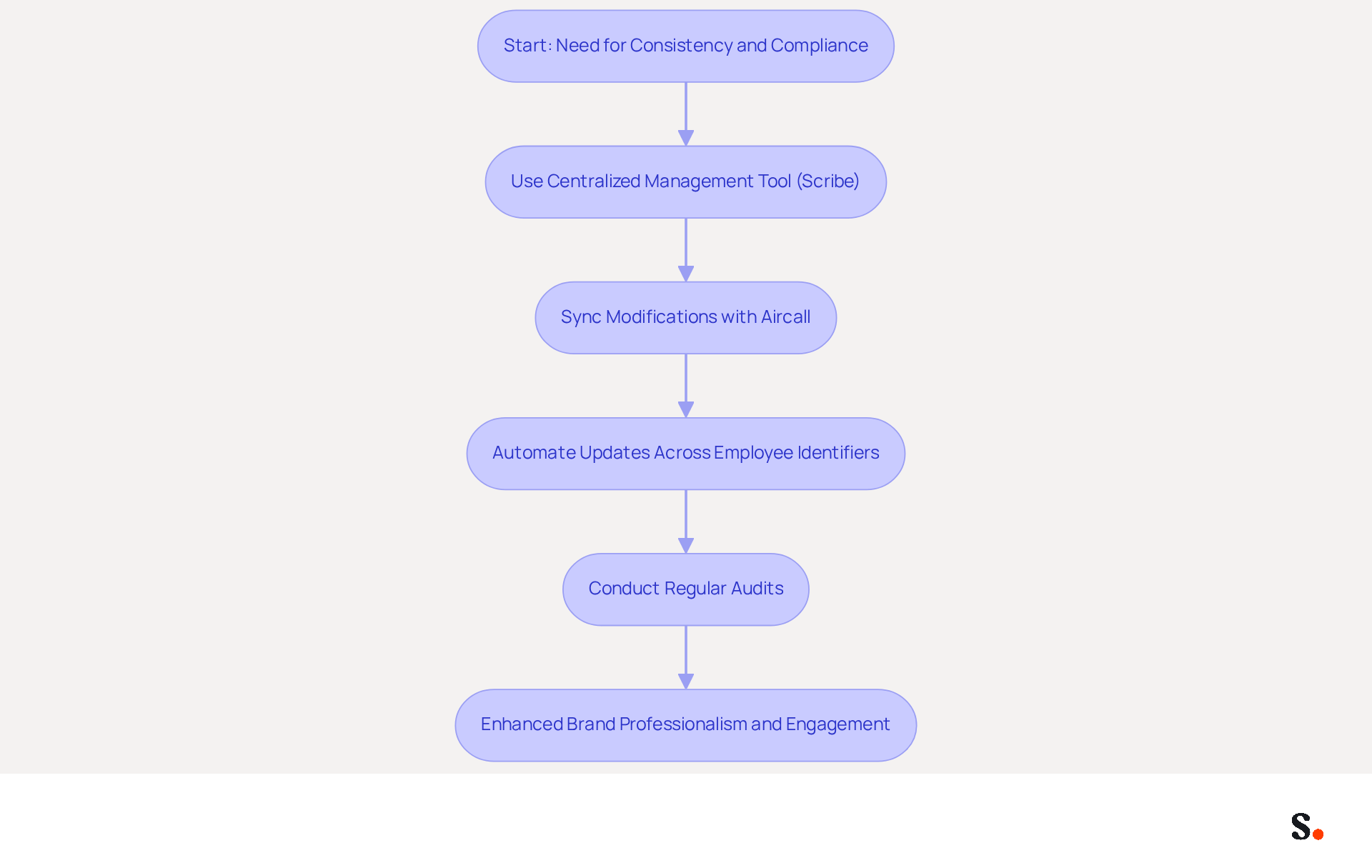
Inconsistent use of a professional email signature with logo can lead to significant branding issues and lost opportunities for engagement. To ensure consistency and compliance, automating email updates with a centralized management tool such as Scribe is essential. This method allows for quick updates across all employee identifiers, ensuring consistent use of the latest branding elements.
With Scribe's integration with Aircall, any modifications made in your Aircall setup will automatically sync to your Scribe configurations, further enhancing consistency. Automation minimizes the risk of human error, such as outdated contact details or incorrect logos, which can compromise your brand's professionalism. Regular audits of digital communication footers further enhance compliance with legal requirements and branding guidelines.
Organizations that have transitioned to automated document management report significant improvements in brand consistency, with research indicating that consistent branding can boost customer trust by up to 47%. Furthermore, IT and marketing teams frequently spend hours rectifying mistakes in correspondence identifiers, but by optimizing this process with Scribe, businesses can direct more resources towards strategic marketing efforts instead of administrative duties.
Moreover, organizations utilizing automated markings can experience a 22% increase in response rates, demonstrating the effectiveness of this automation. With Scribe's SOC 2 Type II certification and compliance with GDPR and CCPA, you can trust that your signature management is both secure and compliant.
As Billy Mahoney states, "Every message your team sends is more than just a communication." It’s an opportunity to communicate professionalism, reinforce your brand, and even drive engagement through the use of a professional email signature with logo in the thousands of emails your team sends daily. By embracing automation, organizations not only enhance their professionalism but also unlock the potential for greater customer engagement and trust.
Conclusion
A professional email signature with a logo is essential for establishing brand credibility and recognition. This strategic choice not only enhances brand visibility but also fosters trust among recipients. By ensuring that logos are high-quality and well-positioned, organizations can significantly improve their communication effectiveness and solidify their brand identity. The integration of a logo serves as a visual anchor, making messages instantly recognizable and reinforcing the sender's credibility.
Key practices discussed include:
- Designing an effective layout that prioritizes clarity
- Ensuring compatibility across various email clients
- Automating updates for consistency and compliance
Utilizing tools like Scribe allows marketing teams to manage email signatures independently, ensuring that branding remains consistent and up-to-date without burdening IT resources. Research shows that automated email signatures can boost response rates by up to 20%, significantly enhancing customer trust.
By prioritizing a professional email signature, organizations can significantly enhance their communication effectiveness and brand perception. Embracing automation and consistency not only presents a polished image but also drives engagement and fosters lasting relationships with their audience. Investing in these best practices is essential for any organization looking to maximize the effectiveness of their digital communications and reinforce their brand identity in every interaction.
Frequently Asked Questions
Why is it important to incorporate a logo into email correspondence?
Incorporating a logo into email correspondence enhances brand recognition and trust, making messages instantly recognizable and reinforcing brand identity.
What are the recommended specifications for a logo in an email signature?
The logo should be high-quality and ideally not exceed 100 pixels in height for a clean look. It is recommended to position the logo at the top or bottom of the message.
How does using a logo in emails affect recipient perception?
Research indicates that logos in correspondence can improve recall by up to 30%, and 76% of recipients believe that branded identifiers enhance trust in the sender.
What benefits can consistent branding provide in email communication?
Consistent branding can lead to a 22% increase in response rates, highlighting the importance of maintaining a professional appearance in communications.
How does Scribe ensure brand consistency across communications?
Scribe automates the synchronization of messaging identifiers with Aircall, ensuring that any modifications made in the Aircall setup are reflected in Scribe identifiers for consistent branding.
What common pitfalls should companies avoid when incorporating logos into email signatures?
Companies should avoid poor formatting and spelling mistakes, as these can lead to consumer disengagement and undermine professionalism.
List of Sources
- Incorporate Your Logo for Brand Recognition
- Why Are Email Signatures Key to Brand Awareness? | QuickMail (https://quickmail.com/role-of-email-signatures-in-brand-awareness)
- How email signatures can drive brand awareness and organic traffic - NEWOLDSTAMP (https://newoldstamp.com/blog/email-signature-brand-awareness)
- Research Recap: Branded Email Signatures Increase Company Recognition, Trust - Demand Gen Report (https://demandgenreport.com/industry-news/research-recap-branded-email-signatures-increase-company-recognition-trust/47252)
- The impact of email signatures on your branding (https://signitic.com/en/resources/the-impact-of-email-signatures-on-your-branding)
- "Email Signature Trends for 2026: What's In, What's Out" | Crossware posted on the topic | LinkedIn (https://linkedin.com/posts/crossware-ltd_new-year-new-trends-even-for-your-email-activity-7394554686046908416-vD_O)
- Design an Effective Layout and Content Strategy
- 4 Essential Email Signature Ideas to Boost Marketing Engagement (https://scribe-mail.com/en-US/blog/4-essential-email-signature-ideas-to-boost-marketing-engagement)
- Email signature statistics: Why every business should optimize their email signatures — Stripo.email (https://stripo.email/blog/email-signature-statistics-why-every-business-should-optimize-their-email-signatures)
- 10 ideas for marketing campaigns in email signatures (https://signitic.com/en/resources/10-ideas-for-marketing-campaigns-in-email-signatures)
- Email Signature Best Practices - NEWOLDSTAMP (https://newoldstamp.com/blog/email-signature-best-practices)
- Email signature marketing: everything you need to know (https://templafy.com/email-signature-marketing-everything-you-need-to-know)
- Ensure Compatibility Across Email Clients
- Email Signature: Best Practices, Examples, and Design Tips (https://learn.g2.com/email-signature-design)
- 100+ Email Signature Examples You'll Want to Copy (https://mailbakery.com/blog/email-signature-examples)
- Email Signature Best Practices Guide With Examples - MailerLite (https://mailerlite.com/blog/email-signature-best-practices)
- How to Standardize Email Signatures Across Different Email Clients and Devices | Email Signature Rescue Blog (https://emailsignaturerescue.com/blog/how-to-standardize-email-signatures-across-different-email-clients-and-devices)
- Ultimate guide to dynamic signatures (https://signitic.com/en/resources/ultimate-guide-to-dynamic-signatures)
- Automate Updates for Consistency and Compliance
- Best Practices for Email Signature O365 to Boost Brand Consistency (https://scribe-mail.com/en-US/blog/best-practices-for-email-signature-o365-to-boost-brand-consistency)
- Company-Wide Email Signature Management | CloudM (https://cloudm.io/resources/blog/optimize-your-process-with-company-wide-email-signature-management)
- Why Consistent Email Signatures Matter - and How to Achieve them (https://blog.grantmcgregor.co.uk/why-consistent-email-signatures-matter-and-how-to-achieve-them)
- Automating Email Signatures: How IT Teams Streamline Processes & Reduce Risk (https://exclaimer.com/blog/streamlining-it-processes-automated-email-signatures)
Get started with Scribe
Manage signatures across your whole team
Free 14-day trial — no credit card.