4 Best Practices for an Effective Admin Assistant Email Signature
Crafting an effective email signature is crucial for professional communication and brand representation, yet many professionals underestimate its
Sophie Grant
Email Signature Specialist, Scribe

Introduction
Crafting an effective email signature is crucial for professional communication and brand representation, yet many professionals underestimate its significance. A well-crafted signature not only boosts your credibility but also opens doors for new connections. Despite their importance, many professionals fail to recognize the critical role that email signatures play in effective communication. This oversight can lead to lost opportunities for connection and brand promotion.
What essential elements should be included, and how can they be tailored to maximize impact in various contexts?
Incorporate Essential Elements in Your Email Signature
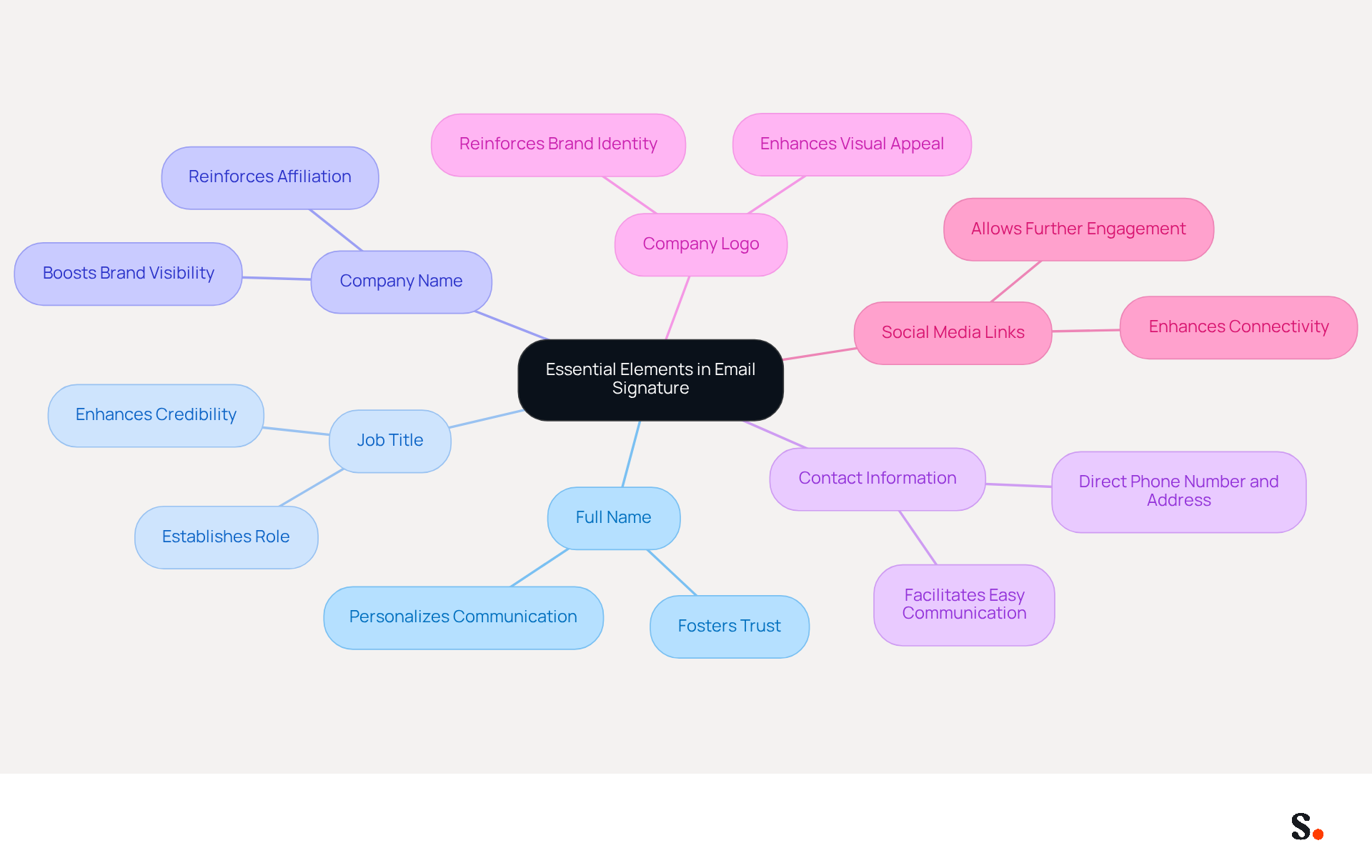
Incorporating essential elements into your email signature is crucial for fostering effective professional interactions. Here are the key components to include:
- Full Name: Clearly stating your name personalizes communication and fosters trust among recipients.
- Job Title: Including your title establishes your role and authority within the organization, enhancing credibility.
- Company Name: Mentioning the company you represent boosts brand visibility and reinforces your affiliation.
- Contact Information: Providing a direct phone number and contact address facilitates easy communication, ensuring recipients can reach you without hassle.
- Company Logo: Adding your company logo not only reinforces your brand identity but also enhances the visual appeal of your signature.
- Social Media Links: If applicable, including links to professional social media profiles enhances connectivity and allows recipients to engage with your brand further.
Studies indicate that including a well-structured message footer can enhance response rates by as much as 22%. Additionally, maintaining consistency in branding through these components can lead to a 15% higher click-through rate to your website.
To enhance the efficiency of your footers, consider utilizing a centralized management tool like Scribe, which automates the synchronization of footers with your business phone system, including syncing data from Aircall. This ensures that your teammates' identification information is always up-to-date without requiring any action from them. Scribe's SOC 2 Type II compliance ensures that your data is managed securely, offering peace of mind as you handle your email branding. Avoid common pitfalls like overloading your email with irrelevant details or neglecting to verify that all links are operational. By ensuring these elements are present and well-managed, including the admin assistant email signature, you create an identity that not only conveys professionalism but also facilitates effective communication, ultimately driving better results for your marketing efforts.
Utilize Effective Design and Formatting Techniques
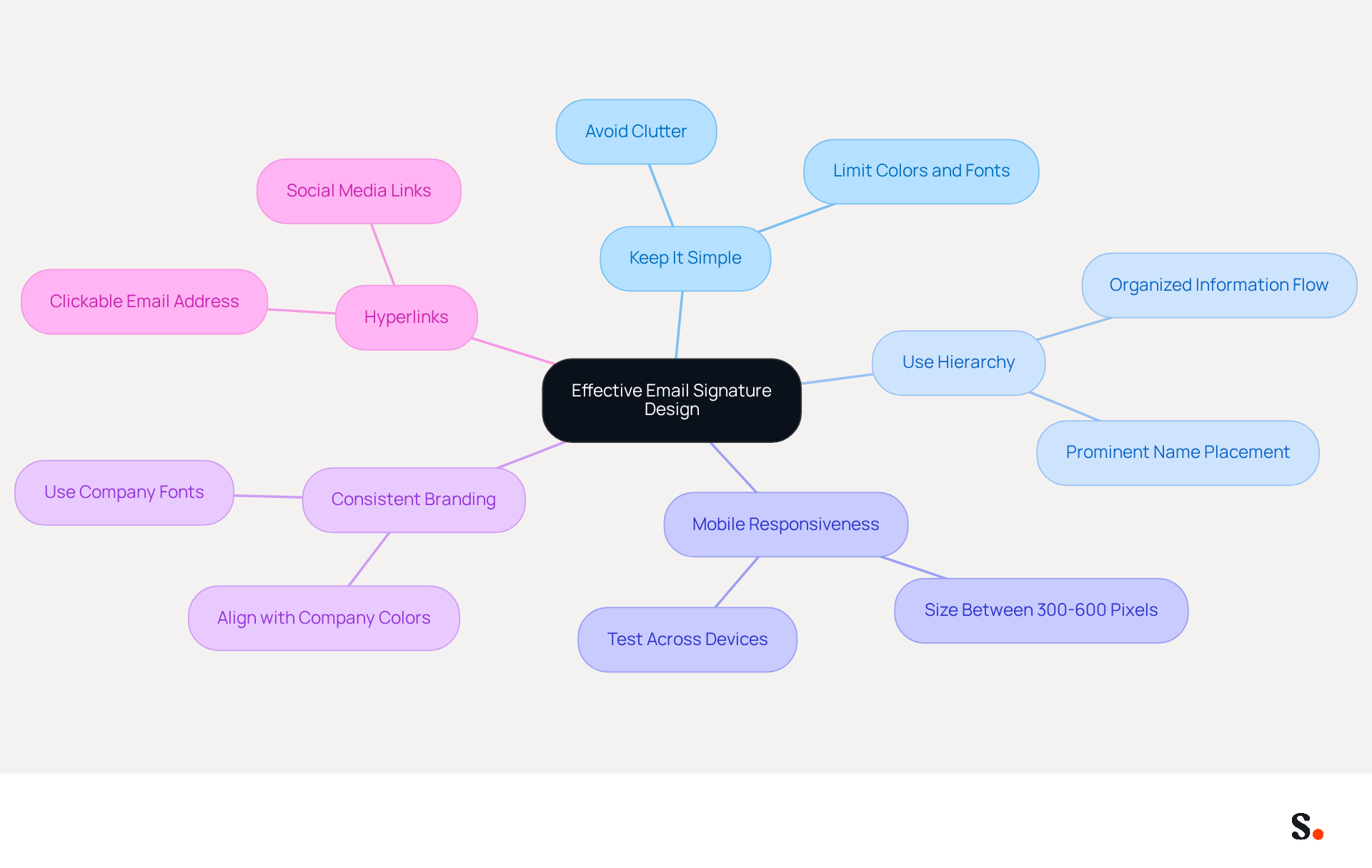
Creating a visually appealing admin assistant email signature is essential for establishing a professional identity. Consider the following design and formatting techniques:
- Keep It Simple: Avoid clutter by limiting the number of colors and fonts. Stick to a maximum of two colors and one or two font types.
- Use Hierarchy: Organize information in a way that guides the reader's eye. For example, your name should be the most prominent element, followed by your title and contact information.
- Mobile Responsiveness: Ensure your email footer looks good on mobile devices by keeping it within a reasonable size (300-600 pixels wide).
- Consistent Branding: Use colors and fonts that align with your company’s branding to maintain consistency across all communications. Scribe ensures that any changes in your Aircall setup are reflected in your correspondence labels, maintaining brand consistency. Moreover, Scribe's integration with Calendly enables automatic updates to your contact information, further improving brand consistency.
- Hyperlinks: Make your email address and social media links clickable to facilitate easy access.
Incorporating these elements can lead to improved engagement, with Scribe users experiencing an average click-through rate of 12% on branded banners included in their admin assistant email signature. Neglecting these design principles may result in missed opportunities for engagement and brand recognition.
Adapt Your Signature for Different Contexts
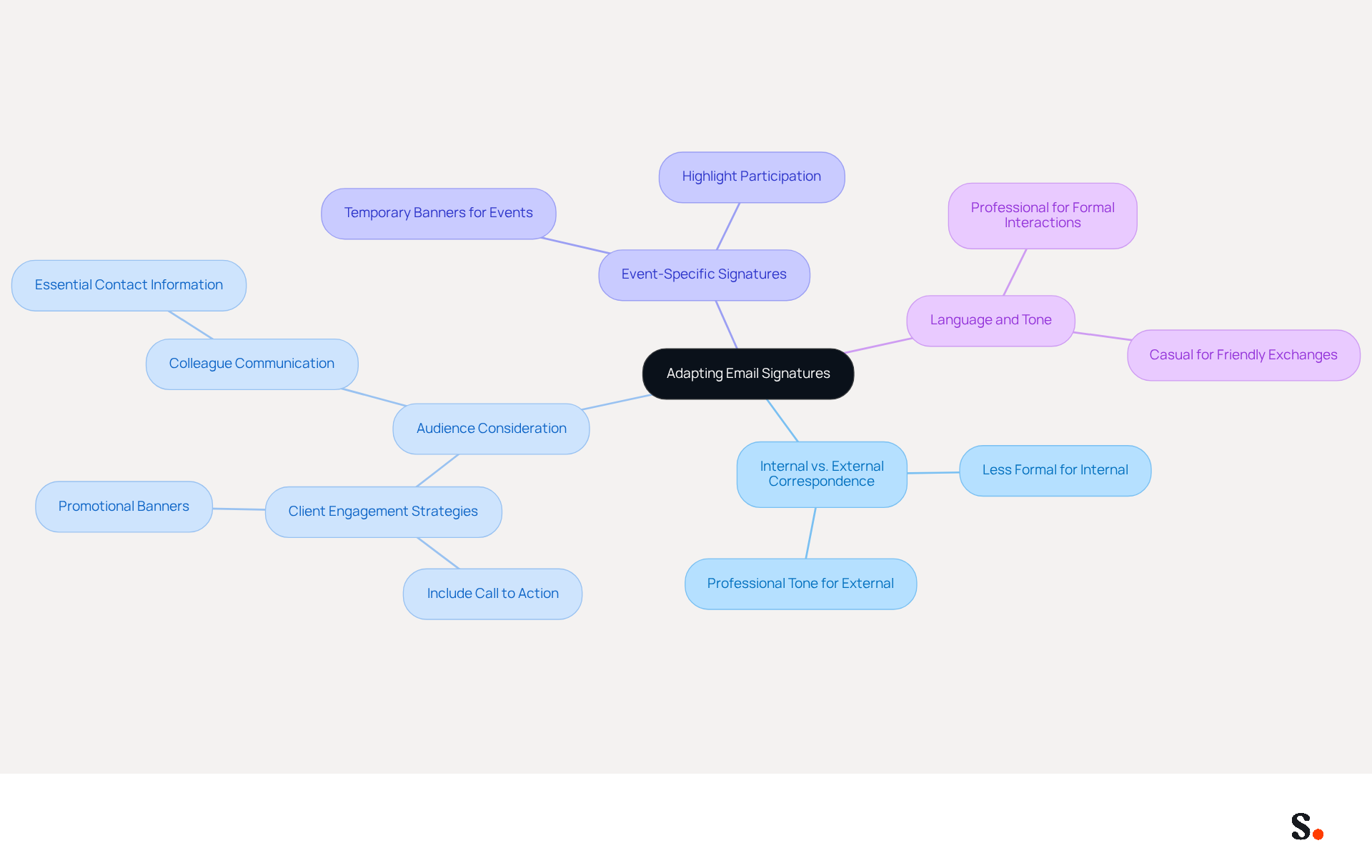
Customizing your admin assistant email signature for different contexts is essential for maximizing its impact. Here are some strategies:
- Internal vs. External Correspondence: For internal emails, consider including less formal elements, while external messages should maintain a professional tone. This approach fosters suitable communication styles and strengthens relationships.
- Audience Consideration: Adjust your sign-off based on the recipient. For instance, when emailing clients, including a call to action or promotional banner can drive engagement, while for colleagues, focusing on essential contact information suffices. This is supported by statistics showing that messages with branded identifiers achieve a 22% higher response rate, emphasizing the significance of context.
- Event-Specific Signatures: If you are attending a conference or event, consider adding a temporary banner that highlights your participation or a specific promotion related to the event. This approach can lead to a click rate 15 times greater than traditional display ads, capitalizing on existing trust between sender and recipient. Additionally, Scribe's branded banners have an average click-through rate of 12%, making them a powerful tool for engagement.
- Language and Tone: Adapt the language and tone of your signature to match the context of the email. For formal interactions, maintain a professional tone, while a more casual tone may be suitable for friendly exchanges. Being adaptable can really boost how relevant and effective your messages are.
By adjusting your personal mark to fit the context of your admin assistant email signature, you enhance its relevance and effectiveness, ultimately leading to better engagement and communication outcomes. Furthermore, integrating Scribe with Google Workspace streamlines this process; any changes in your Google Workspace, such as moving teammates from one group to another or updating their information, will be automatically reflected in Scribe without any input on your part. This not only conserves time but also guarantees that your messages are always current, improving their relevance and effectiveness. Ultimately, neglecting to tailor your signature could result in missed opportunities for engagement.
Leverage Email Signatures for Marketing Opportunities
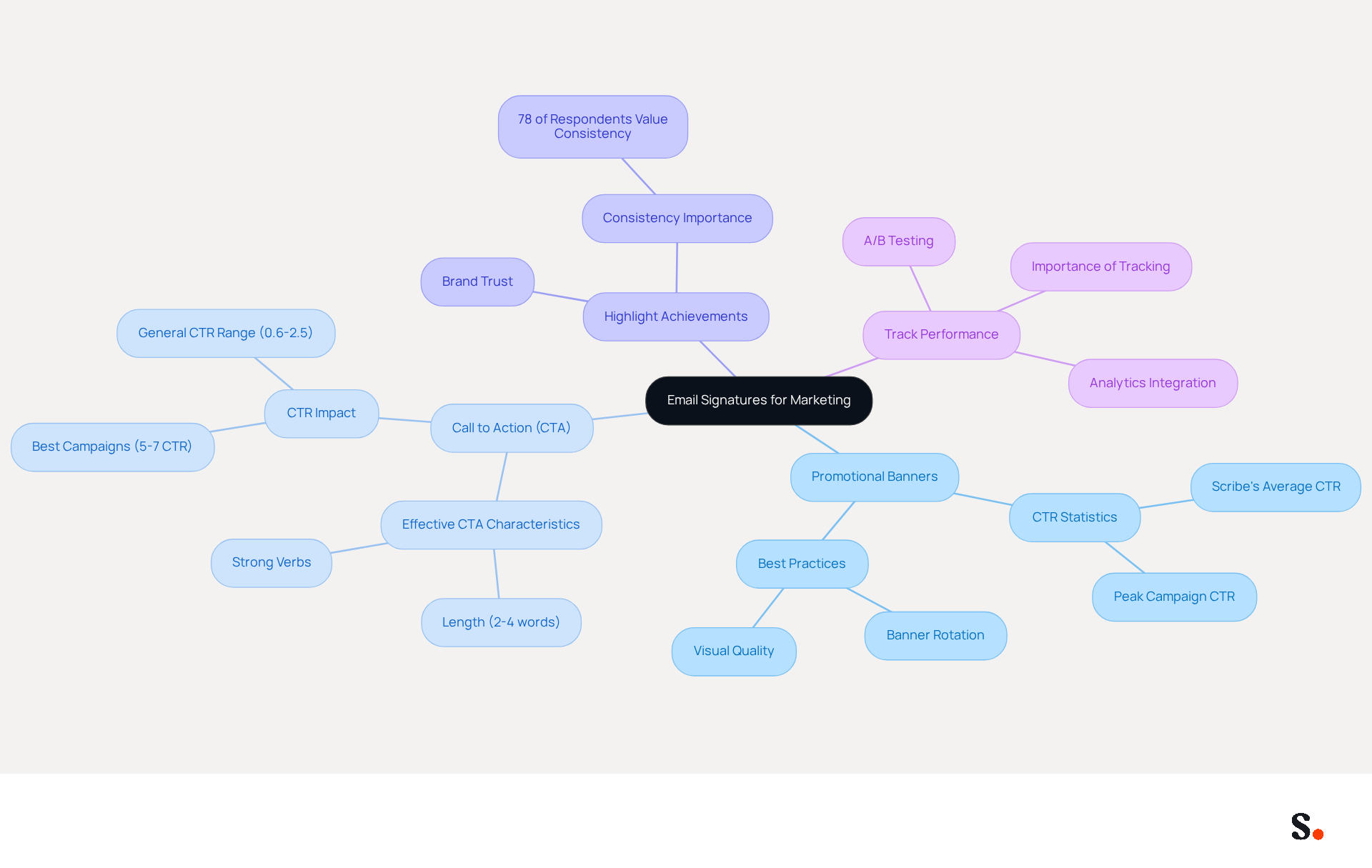
Email identifiers serve as potent marketing tools when leveraged strategically. Here are some strategies to maximize their effectiveness:
- Promotional Banners: Well-placed banners can effectively drive traffic and engagement from your messages, with CTAs achieving click-through rates (CTR) of up to 12%, based on Scribe's average performance.
- Call to Action (CTA): Include a clear CTA, such as links to sign up for newsletters or access special offers. Effective CTAs usually comprise 2 to 4 words and can greatly enhance engagement rates, with some campaigns achieving CTRs of 5% to 7%, demonstrating that a well-crafted CTA can achieve these engagement benchmarks.
- Highlight Achievements: Use your personal mark to showcase recent awards or recognitions Scribe has received, enhancing credibility and reinforcing brand trust. Consistent branding is essential, as 78% of respondents identified it as one of the most important aspects of email communication, highlighting the necessity for uniformity in messaging.
- Track Performance: Without tracking links, understanding engagement levels becomes challenging. This data can inform future marketing strategies, allowing for continuous optimization through A/B testing of visuals, copy, and CTAs.
Consistency across teams is crucial to ensure that all team members utilize a standardized format for their sign-off, including the admin assistant email signature, which incorporates marketing elements and reinforces brand messaging across all communications. Centralized management can assist in maintaining consistency and preventing outdated banners, maximizing the marketing potential of every message.
By integrating these marketing elements into your admin assistant email signature, you can turn every email into an opportunity for brand promotion, effectively supporting your overarching marketing objectives.
Conclusion
Incorporating best practices for an effective admin assistant email signature is crucial for enhancing professional communication and brand visibility. Focusing on key elements like essential contact information, a clear job title, and consistent branding allows administrative assistants to create signatures that convey professionalism and build trust with recipients.
The article highlights several strategies, including:
- The importance of effective design and formatting
- Adapting signatures for different contexts
- Leveraging email signatures as marketing tools
Utilizing tools like Scribe can streamline the management of these signatures, ensuring that they remain up-to-date and consistent across all communications. With an average click-through rate of 12% on branded banners, well-crafted email signatures can significantly enhance engagement.
These best practices turn email signatures from simple contact details into effective marketing tools. By embracing these strategies, administrative assistants can enhance their communication effectiveness, promote their brand, and contribute to their organization's marketing goals. Neglecting this aspect of communication could mean missing out on valuable opportunities for engagement and brand promotion.
Frequently Asked Questions
What are the essential elements to include in an email signature?
The essential elements to include in an email signature are your full name, job title, company name, contact information, company logo, and social media links.
Why is it important to include your full name in an email signature?
Including your full name personalizes communication and fosters trust among recipients.
How does including a job title in an email signature enhance credibility?
Including your job title establishes your role and authority within the organization, which enhances your credibility.
What is the benefit of mentioning the company name in an email signature?
Mentioning the company name boosts brand visibility and reinforces your affiliation with the organization.
Why should I provide contact information in my email signature?
Providing a direct phone number and contact address facilitates easy communication, ensuring recipients can reach you without hassle.
How does adding a company logo to an email signature help?
Adding a company logo reinforces your brand identity and enhances the visual appeal of your signature.
What is the advantage of including social media links in an email signature?
Including links to professional social media profiles enhances connectivity and allows recipients to engage with your brand further.
How can a well-structured email signature impact response rates?
Studies indicate that a well-structured message footer can enhance response rates by as much as 22%.
What tool can help manage email signatures efficiently?
A centralized management tool like Scribe can automate the synchronization of footers with your business phone system, ensuring that identification information is always up-to-date.
What compliance does Scribe offer regarding data management?
Scribe's SOC 2 Type II compliance ensures that your data is managed securely.
What common pitfalls should be avoided when creating an email signature?
Common pitfalls include overloading your email with irrelevant details and neglecting to verify that all links are operational.
List of Sources
- Incorporate Essential Elements in Your Email Signature
- Best practices for business email signatures in 2026 (https://bybrand.io/blog/best-practices)
- Email Signature Best Practices - NEWOLDSTAMP (https://newoldstamp.com/blog/email-signature-best-practices)
- Email Signature Design Trends in 2026: What Works and What to Drop (https://bulksignature.com/blog/email-signature-design-trends)
- Email Signature Best Practices for 2026 (+ 15 Pro Examples) (https://wavecnct.com/blogs/email-signature-best-practices-2026)
- 4 Best Practices for a Modern Email Signature That Engages (https://scribe-mail.com/en-US/blog/4-best-practices-for-a-modern-email-signature-that-engages)
- Utilize Effective Design and Formatting Techniques
- 4 Best Practices for a Modern Email Signature That Engages (https://scribe-mail.com/en-US/blog/4-best-practices-for-a-modern-email-signature-that-engages)
- Email Signature Best Practices for 2026 (+ 15 Pro Examples) (https://wavecnct.com/blogs/email-signature-best-practices-2026)
- Email Signature Design Trends in 2026: What Works and What to Drop (https://bulksignature.com/blog/email-signature-design-trends)
- WiseStamp Sets a New Standard for Email Signature Creation (https://prnewswire.com/news-releases/wisestamp-sets-a-new-standard-for-email-signature-creation-302689811.html)
- Email Signature Trends 2026: What Designers Are Actually Using (https://markaplugin.com/blog/email-signature-trends-2026)
- Adapt Your Signature for Different Contexts
- Research Recap: Branded Email Signatures Increase Company Recognition, Trust - Demand Gen Report (https://demandgenreport.com/industry-news/research-recap-branded-email-signatures-increase-company-recognition-trust/47252)
- 10 ideas for marketing campaigns in email signatures (https://signitic.com/en/resources/10-ideas-for-marketing-campaigns-in-email-signatures)
- 40+ Email Signature Statistics for 2026 (Data + Insights) (https://wavecnct.com/blogs/email-signature-statistics)
- How Email Signatures Can Boost Your Marketing Efforts | Crossware365 (https://crossware365.com/blog/how-email-signatures-can-boost-your-marketing-efforts)
- Email signature statistics: Why every business should optimize their email signatures — Stripo.email (https://stripo.email/blog/email-signature-statistics-why-every-business-should-optimize-their-email-signatures)
- Leverage Email Signatures for Marketing Opportunities
- Email Signature Banners: Turn Every Email Into a Marketing Channel (https://bulksignature.com/blog/email-signature-banners-turn-every-email-into-a-marketing-channel)
- Maximize Marketing Impact with Effective Email Signature Banners (https://scribe-mail.com/en-US/blog/maximize-marketing-impact-with-effective-email-signature-banners)
- Why Email Signatures Must Be In Your 2026 Marketing Plan | Rocketseed (https://rocketseed.com/blog/2026-marketing-plan-email-signatures)
- 12 email signature marketing examples that drive clicks (2026) (https://signitic.com/en/resources/12-email-signature-marketing-examples-that-actually-drive-clicks)
Get started with Scribe
See why teams switch to Scribe
Free 14-day trial — no credit card.