4 Best Practices for Office 365 Signature HTML That Boost Engagement
In today's competitive market, establishing a strong brand presence in digital communications is more important than ever. Optimizing Office 365 email
Sophie Grant
Email Signature Specialist, Scribe
Introduction
In today's competitive market, establishing a strong brand presence in digital communications is more important than ever. Optimizing Office 365 email signatures allows businesses to enhance professionalism and significantly increase engagement with recipients. Yet, many organizations find it challenging to keep their brand consistent and to use signatures effectively as marketing tools.
What best practices can organizations adopt to turn these overlooked elements into powerful communication and branding assets?
Establish Brand Consistency in Signature Design
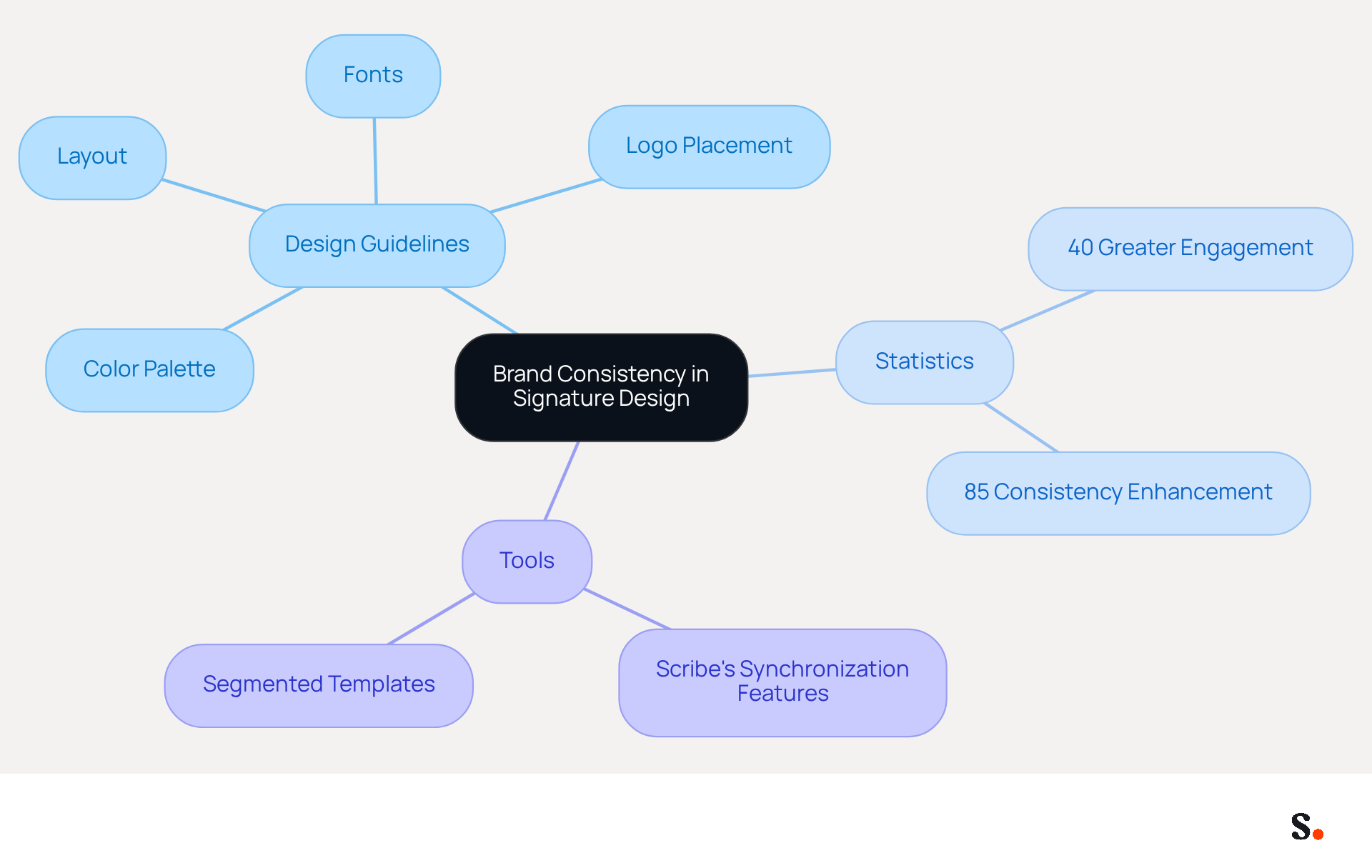
To ensure professionalism in your Office 365 signature HTML formats, it is essential to establish clear design guidelines that reflect your brand identity. This means choosing a color palette that aligns with your brand, selecting readable web-safe fonts, and prominently displaying your logo. A clean layout ensures all elements are easily readable and visually appealing. For instance, a sign-off might feature the sender's name in a bold font, followed by their title in a lighter font, and the company logo to the left. This approach not only boosts professionalism but also helps recipients recognize your brand with each message by utilizing an Office 365 signature HTML.
Statistics show that well-optimized sign-offs can lead to up to 40% greater engagement compared to standard closures. Furthermore, organizations that adopt centralized management of digital identifiers report an 85% enhancement in consistency across teams. By ensuring that all endorsements comply with these guidelines, you maintain a cohesive image that resonates with recipients, ultimately enhancing your marketing efforts.
With Scribe's automated synchronization features, any modifications made in your Aircall configuration will be automatically reflected in your correspondence, ensuring that all representations across the organization comply with these guidelines and maintain a cohesive brand image. Case studies show that organizations utilizing segmented templates customized for various roles or campaigns experience enhanced communication effectiveness. For instance, sales representatives utilizing sign-offs with clear calls to action, such as booking links, experience significantly higher engagement rates. As digital communication continues to evolve, organizations that prioritize brand consistency will be better positioned to engage their audiences effectively.
Implement HTML Best Practices for Office 365 Signatures
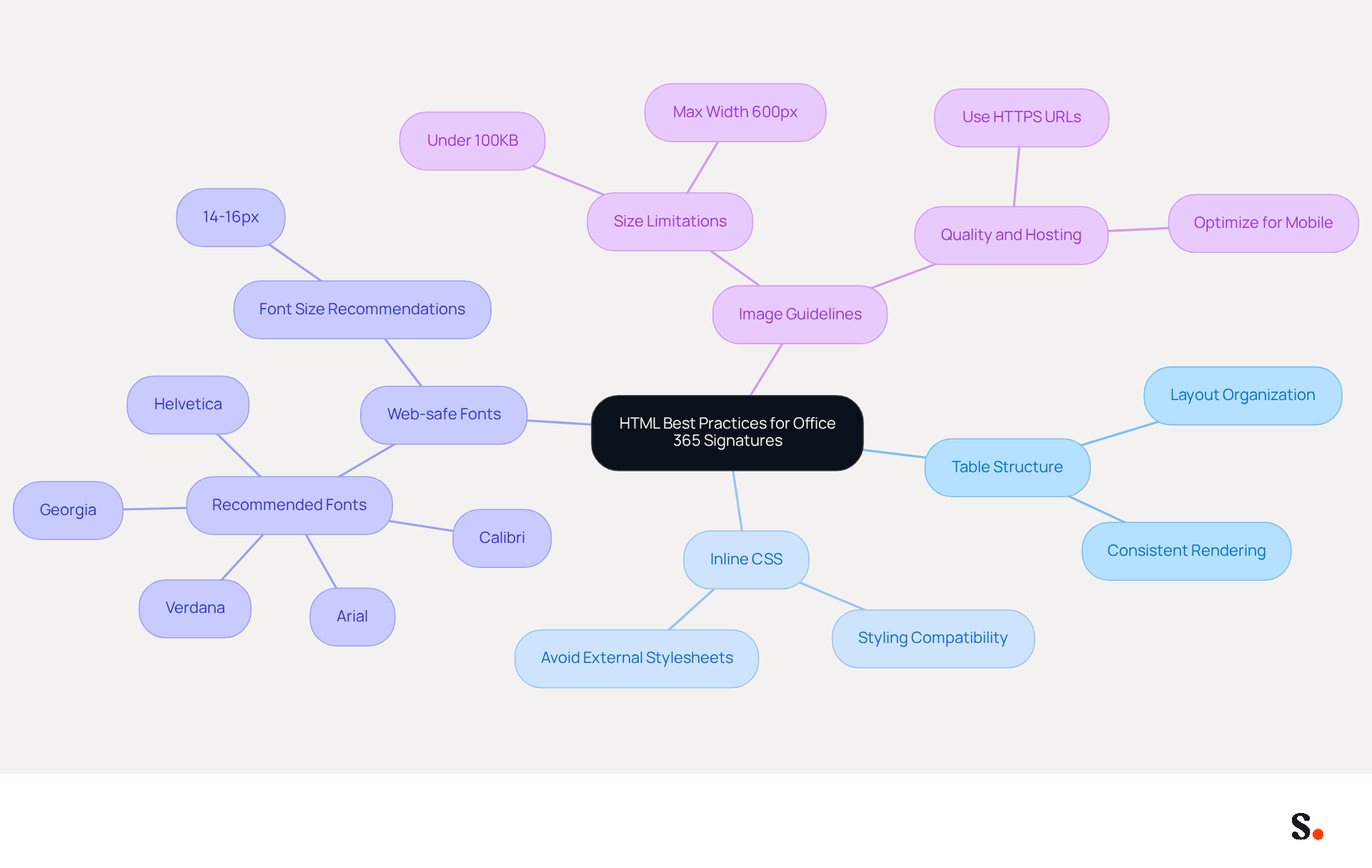
To ensure effective communication through email, implementing office 365 signature html best practices for message layouts is essential. Start by using a table structure for arrangement, as this ensures consistent rendering across different clients. Utilize inline CSS for styling, since many messaging clients do not support external stylesheets. Choose web-safe fonts to guarantee that your text appears as intended, and avoid using images that are too large or complex, as they may not display correctly. For example, a simple HTML structure might look like this:
<table>
  <tr>
    <td><img src='logo.png' alt='Company Logo' width='100'></td>
    <td>
      <p style='font-family: Arial, sans-serif; font-size: 14px;'>John Doe<br>Marketing Manager<br><a href='mailto:john.doe@example.com'>john.doe@example.com</a></p>
    </td>
  </tr>
</table>
Using this structure helps your signature look good and function well on different devices and email platforms.
Incorporate Marketing Elements to Boost Engagement
To maximize engagement in your Office 365 communications, incorporating a call to action (CTA) is essential. This could be a link to a current promotion, a newsletter signup, or an invitation to follow your company on social media. For instance, you might include a banner image that promotes a new product or service, along with a clickable link that directs users to a landing page. Ensure that these elements are visually distinct but still align with your overall design style. For example:
<a href='https://www.example.com/promotion'><img src='promo-banner.png' alt='Check out our latest offer!' width='300'></a>
By integrating CTAs, you transform each email into a strategic marketing tool that fosters interaction and drives conversions.
Utilize Automation for Efficient Signature Management
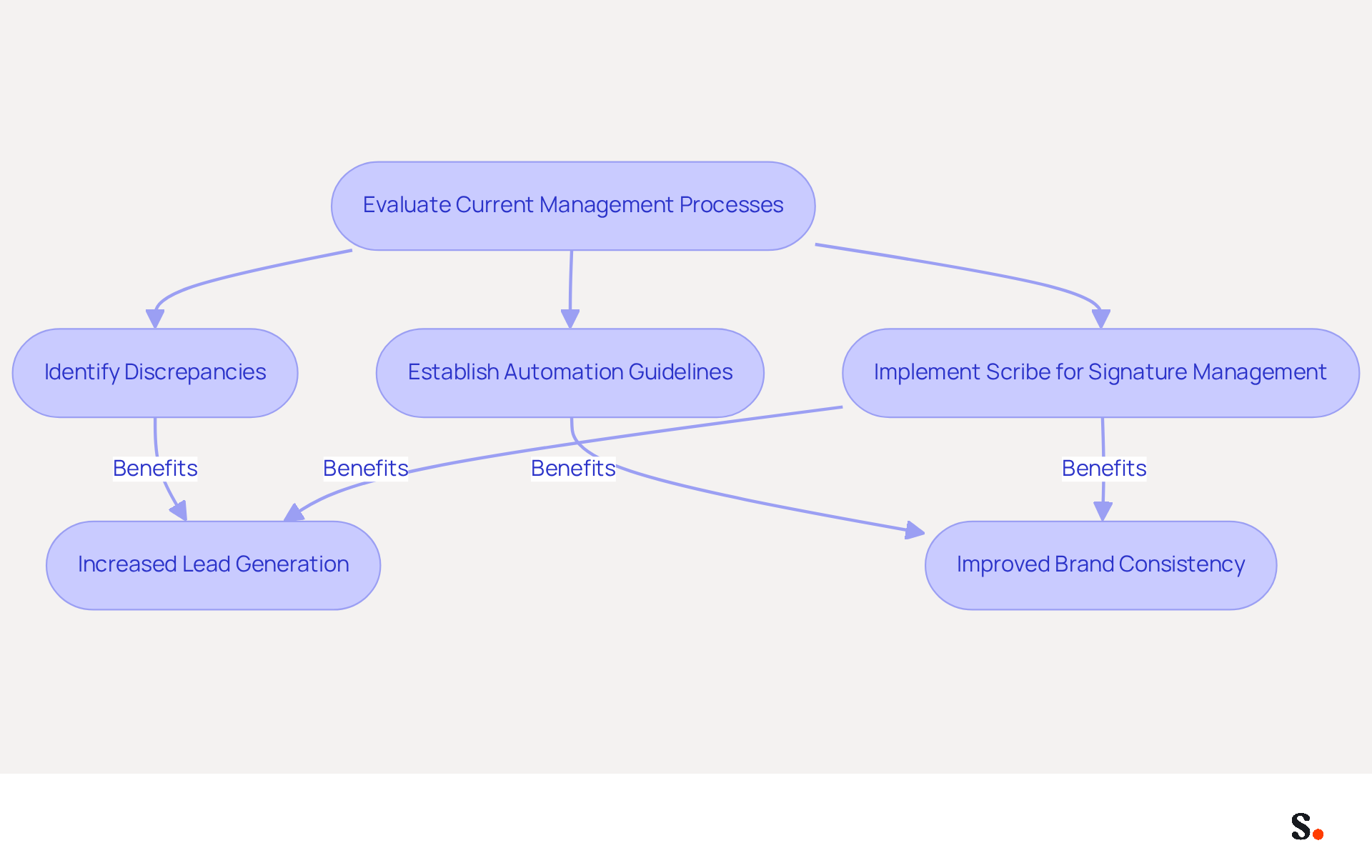
To effectively manage email identities in Office 365, organizations must prioritize automation through tools like Scribe. This platform enables organizations to easily create, update, and deploy Office 365 signature HTML for all users, thereby enhancing team collaboration. By integrating with HR systems, Scribe ensures that any changes in employee information, such as job titles or contact details, are automatically reflected in their email footers. For example, when an employee's title changes, Scribe can update their email signature without manual intervention, saving valuable time and maintaining consistency with branding guidelines.
In 2026, organizations are increasingly recognizing the importance of automated communication identifiers as essential tools for interaction. Businesses that utilize automated systems, like Scribe, experience a 14% increase in lead generation, demonstrating the power of effective email management in driving engagement. Furthermore, analytics tools within Scribe allow for monitoring engagement metrics associated with email signatures, promoting ongoing enhancement of strategic approaches. This method not only improves visibility but also ensures compliance with evolving marketing standards, making automation a vital component of modern communication. Additionally, with Scribe's quick setup and ease of use, even non-technical Marketing teams can take charge of their branding after IT gets them started, ensuring 100% brand consistency.
Evaluating current management processes for electronic communications is essential to identify discrepancies and establish automation guidelines, facilitating a seamless transition to automated systems. Manual management often leads to compliance risks and delays in updates, creating challenges for organizations. By addressing these potential pitfalls, organizations can fully appreciate the necessity of adopting automation in their Office 365 signature HTML strategies. This understanding compels organizations to adopt automation, ensuring efficiency and brand consistency.
Conclusion
In today's competitive digital landscape, effective Office 365 email signatures are essential for maximizing brand visibility and engagement. By focusing on brand consistency, implementing HTML best practices, incorporating marketing elements, and utilizing automation tools like Scribe, organizations can transform their email communications into powerful marketing assets. This approach not only presents a polished image but also builds stronger relationships with their audience.
Key insights from the article highlight the importance of:
- A cohesive design that reflects brand identity
- The necessity of adhering to HTML best practices for optimal rendering
- The strategic use of calls to action to drive engagement
Additionally, leveraging automation through Scribe allows for seamless updates and management of email signatures, ensuring that all communications remain consistent and compliant with branding guidelines.
Many organizations find it challenging to keep their email signatures aligned with their branding. In an era where digital communication plays a crucial role, organizations need to focus on these best practices to fully leverage their marketing potential. Embracing tools like Scribe not only streamlines the signature management process but also empowers marketing teams to maintain control over their branding efforts. By taking these steps, businesses can enhance their email engagement, drive conversions, and ultimately achieve a measurable return on investment from their email signature strategies.
Frequently Asked Questions
Why is brand consistency important in signature design?
Brand consistency in signature design is essential for professionalism and helps recipients recognize your brand with each message. It enhances your marketing efforts and can lead to greater engagement.
What elements should be included in an Office 365 signature for brand consistency?
An Office 365 signature should include a color palette that aligns with your brand, readable web-safe fonts, and prominently displayed logos. A clean layout is also important for readability and visual appeal.
How can the layout of a signature improve professionalism?
A well-structured layout, such as featuring the sender's name in a bold font followed by their title in a lighter font and the company logo, boosts professionalism and makes the signature visually appealing.
What impact do optimized sign-offs have on engagement?
Well-optimized sign-offs can lead to up to 40% greater engagement compared to standard closures.
How does centralized management of digital identifiers affect brand consistency?
Organizations that adopt centralized management of digital identifiers report an 85% enhancement in consistency across teams, ensuring all endorsements comply with established guidelines.
What role does Scribe play in maintaining brand consistency in signatures?
Scribe's automated synchronization features ensure that any modifications made in your Aircall configuration are automatically reflected in your correspondence, maintaining a cohesive brand image across the organization.
How can segmented templates improve communication effectiveness?
Organizations utilizing segmented templates customized for various roles or campaigns experience enhanced communication effectiveness, as they can tailor sign-offs to specific audiences, such as including clear calls to action for sales representatives.
Why should organizations prioritize brand consistency in digital communication?
Organizations that prioritize brand consistency are better positioned to engage their audiences effectively as digital communication continues to evolve.
List of Sources
- Establish Brand Consistency in Signature Design
- Email Signature Design Trends in 2026: What Works and What to Drop (https://bulksignature.com/blog/email-signature-design-trends)
- Email Signature Best Practices for 2026 (+ 15 Pro Examples) (https://wavecnct.com/blogs/email-signature-best-practices-2026)
- Top 10+ best practices for email signatures design in 2026 (https://mysignature.io/blog/email-signature-best-practices)
- Why Email Signatures Must Be In Your 2026 Marketing Plan | Rocketseed (https://rocketseed.com/blog/what-are-the-biggest-email-trends-for-2026)
- Streamlining Email Signature Management: Best Practices For Consistent Branding - Mutant Mail (https://blog.mutantmail.com/streamlining-email-signature-management-best-practices-for-consistent-branding)
- Implement HTML Best Practices for Office 365 Signatures
- Email Signature Best Practices for 2026 (+ 15 Pro Examples) (https://wavecnct.com/blogs/email-signature-best-practices-2026)
- 4 Best Practices for Your Outlook HTML Signature Template (https://scribe-mail.com/en-US/blog/4-best-practices-for-your-outlook-html-signature-template)
- 40+ Email Signature Statistics for 2026 (Data + Insights) (https://wavecnct.com/blogs/email-signature-statistics)
- The Complete Email Signature Guide 2026: Best Practices and Policy (https://opensense.com/complete-email-signature-guide)
- Exclaimer Research: 67% of Marketers Expect Email Signatures to Support With Lead Gen In 2023 (https://businesswire.com/news/home/20230612141095/en/Exclaimer-Research-67-of-Marketers-Expect-Email-Signatures-to-Support-With-Lead-Gen-In-2023)
- Incorporate Marketing Elements to Boost Engagement
- 10 ideas for marketing campaigns in email signatures (https://signitic.com/en/resources/10-ideas-for-marketing-campaigns-in-email-signatures)
- Email signature marketing: everything you need to know (https://templafy.com/email-signature-marketing-everything-you-need-to-know)
- 12 clever ways to use your email signature to support your marketing campaigns (https://blog.hubspot.com/blog/tabid/6307/bid/31054/10-clever-ways-your-email-signature-can-support-your-marketing.aspx)
- 4 Best Practices Using Email Signature Tools for Lead Generation (https://scribe-mail.com/en-US/blog/4-best-practices-using-email-signature-tools-for-lead-generation)
- Create Effective CTA Email Signatures (Examples & Templates) (https://wisestamp.com/examples/cta-email-signature)
- Utilize Automation for Efficient Signature Management
- Email Signature Trends 2026: Centralized Control & Automation | SIGNandGO posted on the topic | LinkedIn (https://linkedin.com/posts/signngo_email-signature-trends-to-watch-in-2026-activity-7401523471786217473-zAVL)
- Best Email Signature Management Software: Top 12 Tools (2026)
- NEWOLDSTAMP (https://newoldstamp.com/blog/email-signature-software)
- Why Scribe is the Best Email Signature Management Tool for Marketers (https://scribe-mail.com/en-US/blog/why-scribe-is-the-best-email-signature-management-tool-for-marketers)
- Automating Email Signatures: How IT Teams Streamline Processes & Reduce Risk (https://exclaimer.com/blog/streamlining-it-processes-automated-email-signatures)
- 5 Best Practices for Your Email Signature Marketing Platform (https://scribe-mail.com/en-US/blog/5-best-practices-for-your-email-signature-marketing-platform)
Get started with Scribe
Manage signatures across your whole team
Free 14-day trial — no credit card.