4 Best Practices for Your Office 365 Signature Template Strategy
In an era where digital communication defines brand identity, businesses face the challenge of ensuring their email signatures resonate with their audience
Sophie Grant
Email Signature Specialist, Scribe
On this page
- Introduction
- Establish Brand Consistency with On-Brand Signature Templates
- Leverage Scheduled Campaigns to Maximize Signature Impact
- Integrate with Popular Tools for Seamless Signature Management
- Utilize Automated Data Synchronization for Consistent Signatures
- Conclusion
- Frequently Asked Questions
- List of Sources
Introduction
In an era where digital communication defines brand identity, businesses face the challenge of ensuring their email signatures resonate with their audience. Establishing a strong brand presence in digital communications is crucial, especially as organizations navigate the complexities of remote work and global outreach. Crafting effective Office 365 signature templates not only enhances brand consistency but also transforms every email into a marketing opportunity.
So, how can businesses keep their signatures impactful and in line with changing branding strategies? Let’s delve into four best practices that can help marketing teams leverage Office 365 signatures effectively, ensuring every communication reflects their brand identity while maximizing engagement and compliance.
Establish Brand Consistency with On-Brand Signature Templates
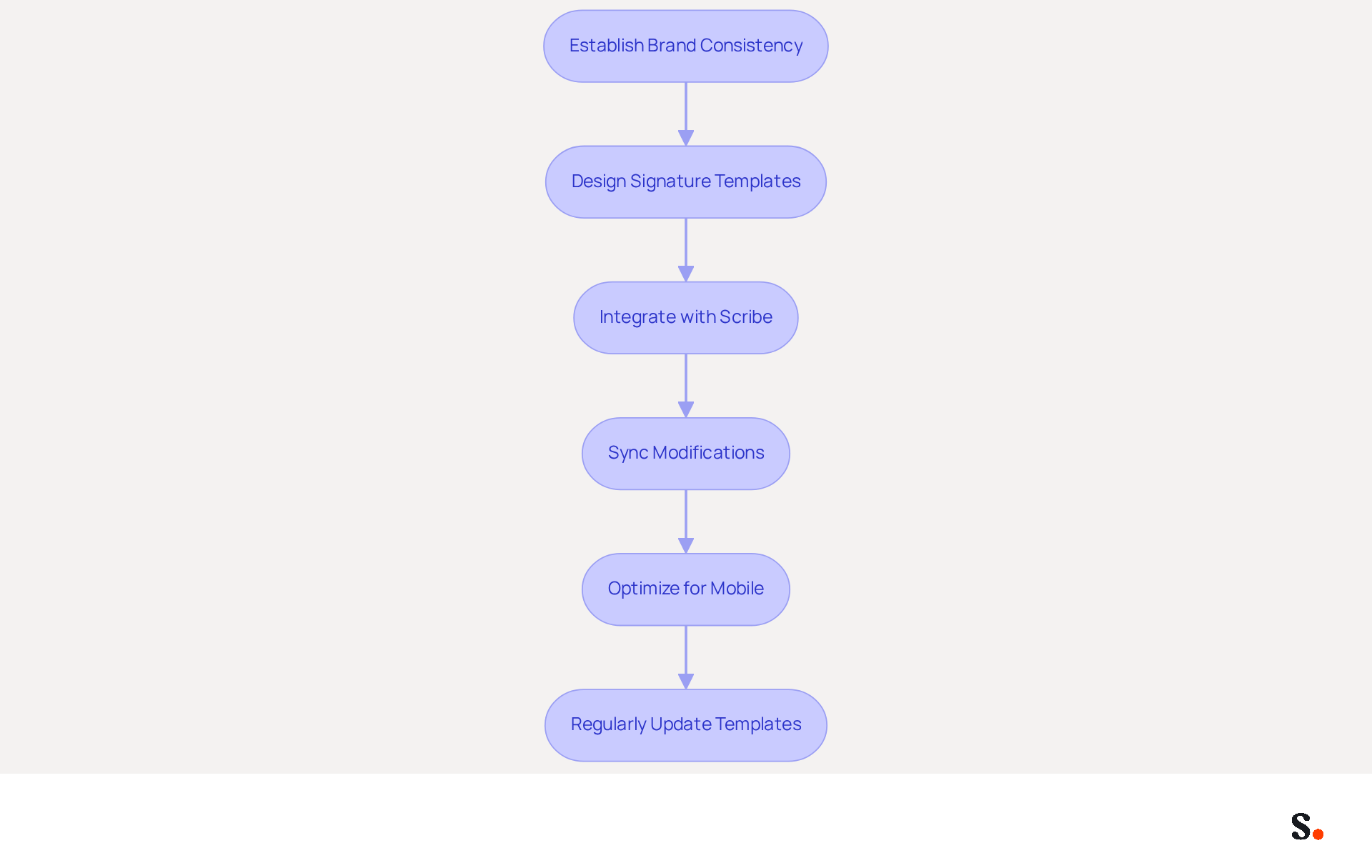
To ensure your communications reflect your brand identity, start by designing signature templates that prominently feature your company's logo, colors, and fonts. Scribe helps create templates that are both visually appealing and highly functional. With Scribe, any modifications made in your Aircall settings will automatically sync to your communication identifiers, improving consistency across all interactions.
Furthermore, Scribe integrates effortlessly with Calendly, ensuring that your contact details are always current with your latest scheduling information. Ensuring these templates are optimized for mobile devices is essential and should include vital contact information, such as the sender's name, title, and phone number.
For example, companies such as Nike and Headspace have effectively implemented distinctive elements, resulting in improved recognition and professionalism in their communications. Regularly updating these templates is vital to adapt to evolving branding strategies, ensuring your communications remain professional and cohesive.
Leverage Scheduled Campaigns to Maximize Signature Impact
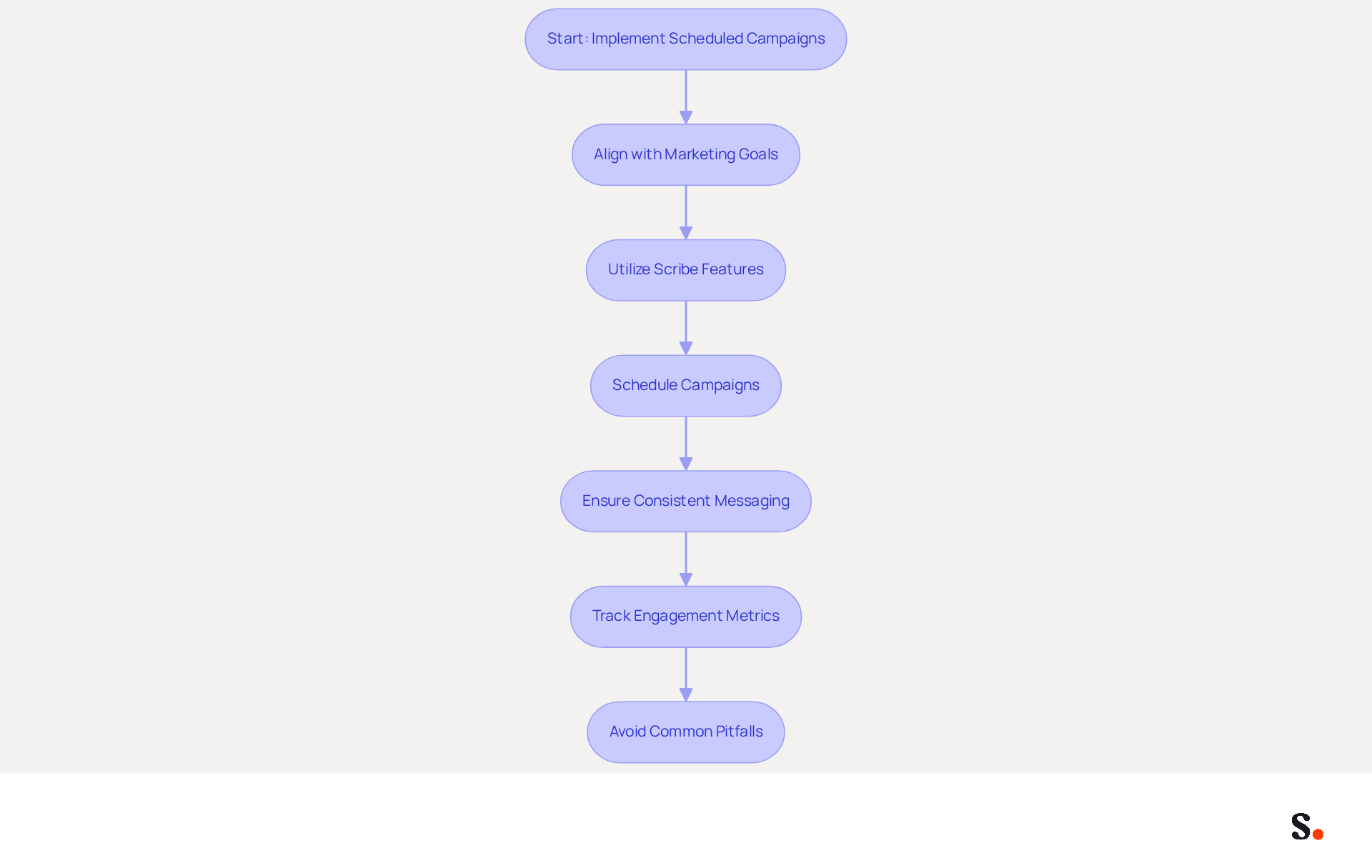
To maximize the impact of your digital identifiers, it is crucial to implement scheduled campaigns that align with your marketing goals. Utilize Scribe's features to establish campaigns that can be automatically refreshed in your correspondence, ensuring that your messaging remains consistent and relevant.
For example, if you have a seasonal promotion, schedule the campaign to run during that time, ensuring that every message sent includes the promotional banner. This method keeps your messaging current and enables precise tracking of engagement metrics.
Scribe automatically manages contact information, so your teammates' details sync with your business phone system without any effort on their part. Changes in your connected source will be automatically updated in Scribe, ensuring real-time synchronization.
For instance, Payfit has effectively used scheduled campaigns to enhance visibility and boost customer engagement. According to a survey, 82% of marketers utilize digital identifiers to enhance brand recognition, website traffic, and conversion rates.
However, it's essential to avoid common pitfalls, such as overloading your identifiers with too many promotions or failing to update them regularly, which can dilute your messaging. Without scheduled campaigns, businesses risk inconsistent messaging and missed marketing opportunities.
By strategically planning and executing these campaigns, businesses can transform every message into a powerful marketing opportunity while ensuring compliance with SOC 2 Type II standards for data safety. By leveraging Scribe's capabilities, businesses can ensure that every communication serves as a strategic marketing tool, enhancing brand presence and customer interaction.
Integrate with Popular Tools for Seamless Signature Management
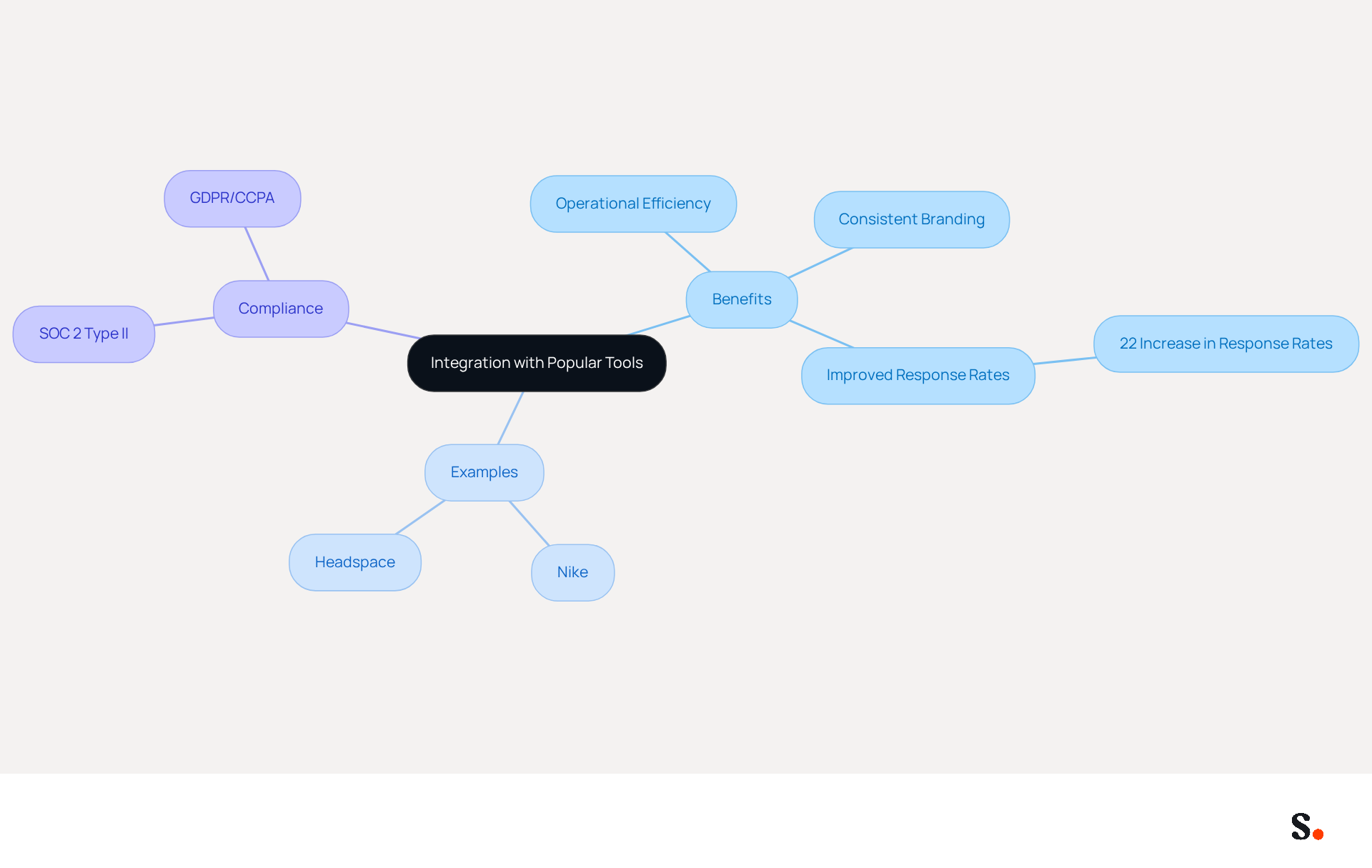
Integrating email management with tools like Google Workspace and Microsoft 365 can eliminate inconsistencies that hinder effective communication. This integration facilitates automatic updates, which helps maintain consistent identifiers throughout the organization.
For instance, companies that implement such integrations have reported significant improvements in operational efficiency and consistent branding. In fact, organizations utilizing standardized electronic communication identifiers have experienced a 22% rise in response rates, showcasing the tangible benefits of unified branding.
The platform's capabilities allow users to manage their Office 365 signature template directly from their email systems, including seamless synchronization with Aircall, which reduces manual updates and minimizes the risk of outdated information being sent out. The platform meets SOC 2 Type II compliance and adheres to GDPR/CCPA regulations, which guarantees secure handling of data.
Case studies show that companies like Nike and Headspace have effectively utilized these integrations, improving their overall communication efficiency and strengthening their identity. Ultimately, this integration empowers marketing teams to maintain a cohesive brand image while maximizing their outreach efforts.
Utilize Automated Data Synchronization for Consistent Signatures
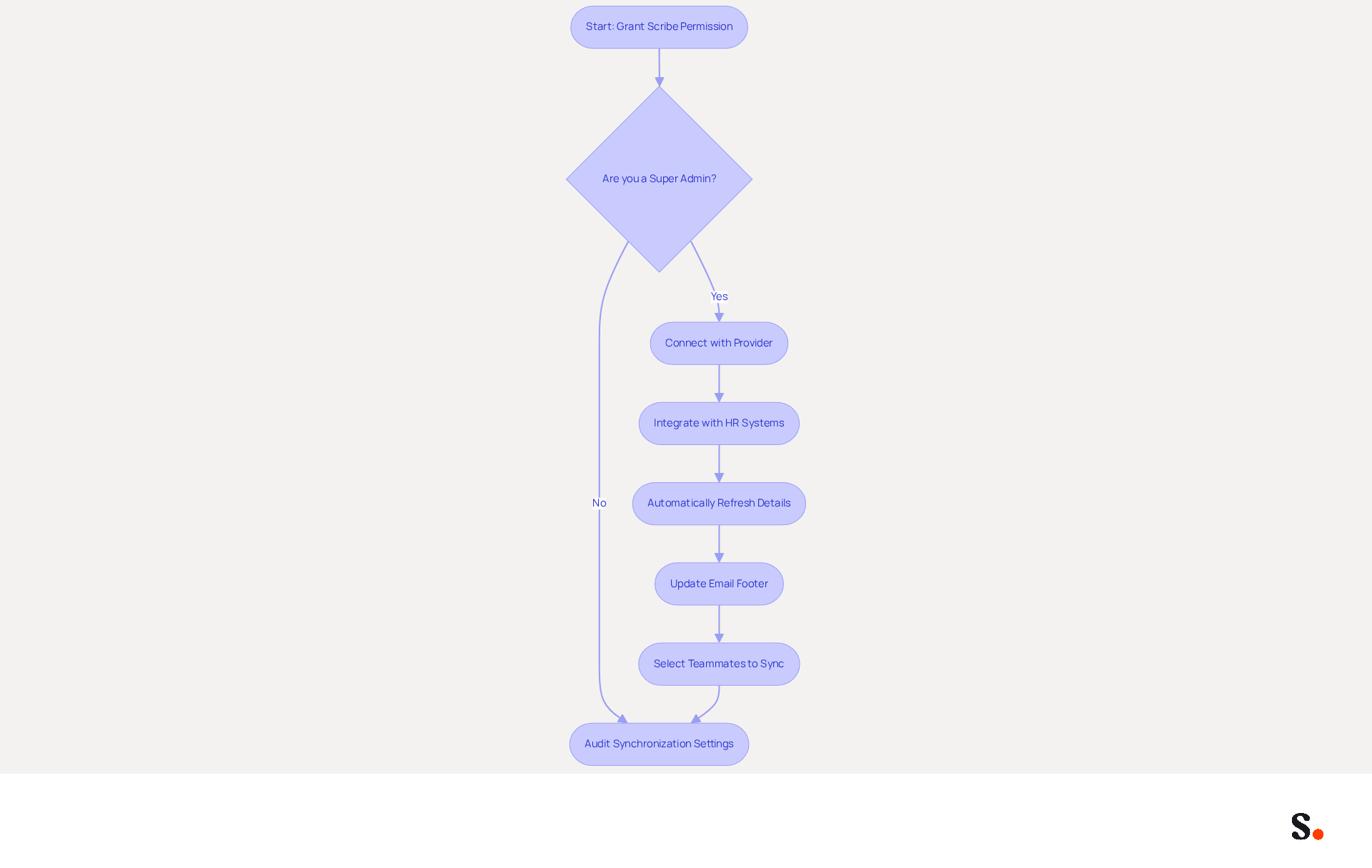
Automated data synchronization is crucial for maintaining up-to-date correspondence identifiers. For one-click synchronization, grant Scribe permission to connect with your provider, ensuring you are a Super Admin. The platform seamlessly integrates with HR systems, automatically refreshing details whenever employee information changes. When an employee's title or contact information changes, their email footer updates automatically, eliminating the need for manual changes.
You can choose which teammates to sync with the application, allowing for selective synchronization within your Google Workspace. For instance, Sprig has effectively utilized automated synchronization to maintain precise identifiers across their team, resulting in fewer errors and a more polished appearance in communications.
It's important to regularly audit your synchronization settings to ensure they align with your organization's needs, as organizations that utilize communication analytics report a 73% boost in campaign performance. Additionally, automating data synchronization not only enhances operational efficiency but also reinforces trust in your communications, as 76% of respondents confirm that maintaining professional communication formats enhances trust in the sender.
Scribe's SOC 2 Type II compliance guarantees the security of your data, making it an essential element of your messaging strategy. Training employees on the Office 365 signature template can further prevent inconsistencies, solidifying your brand's presence in every email. Ultimately, effective synchronization not only streamlines operations but also elevates your brand's credibility in every interaction.
Conclusion
A well-defined Office 365 signature template strategy is crucial for organizations aiming to enhance brand consistency and communication effectiveness. Utilizing tools like Scribe enables organizations to design email signatures that are not only visually appealing but also aligned with their brand identity, ensuring cohesive and professional communication.
Key practices discussed include:
- Designing on-brand signature templates
- Implementing scheduled campaigns for timely promotions
- Integrating with popular tools for seamless management
- Utilizing automated data synchronization to keep information current
These strategies not only improve operational efficiency but also enhance brand recognition and customer engagement, demonstrated by successful implementations at leading companies such as Nike and Headspace.
In a competitive landscape, prioritizing a well-structured email signature strategy can significantly impact marketing performance and brand perception. When organizations embrace these best practices, they can turn every email into a compelling marketing opportunity, ensuring that their communications resonate with recipients and drive measurable results. Ultimately, a strategic approach to email signatures can redefine how organizations engage with their audience, leading to lasting impressions and increased loyalty.
Frequently Asked Questions
What is the purpose of using on-brand signature templates?
The purpose of using on-brand signature templates is to ensure that communications reflect your brand identity by prominently featuring your company's logo, colors, and fonts.
How does Scribe assist in creating signature templates?
Scribe helps create signature templates that are visually appealing and highly functional, ensuring consistency across all interactions.
What feature does Scribe offer for syncing modifications?
Scribe allows any modifications made in your Aircall settings to automatically sync to your communication identifiers, improving consistency.
How does Scribe integrate with Calendly?
Scribe integrates effortlessly with Calendly, ensuring that your contact details are always current with your latest scheduling information.
Why is it important to optimize signature templates for mobile devices?
It is important to optimize signature templates for mobile devices to ensure that they are accessible and display correctly on various devices, while also including vital contact information.
What vital contact information should be included in signature templates?
Vital contact information that should be included in signature templates includes the sender's name, title, and phone number.
Can you provide examples of companies that have effectively implemented signature templates?
Companies such as Nike and Headspace have effectively implemented distinctive elements in their signature templates, resulting in improved recognition and professionalism in their communications.
Why is it necessary to regularly update signature templates?
Regularly updating signature templates is vital to adapt to evolving branding strategies, ensuring that communications remain professional and cohesive.
List of Sources
- Establish Brand Consistency with On-Brand Signature Templates
- Why Team Email Signatures Matter More Than You Think: The Hidden Impact on Brand Trust and Customer Experience (https://getmailbird.com/why-team-email-signatures-matter-brand-trust)
- 7 ways email signatures boost brand image (https://signitic.com/en/resources/7-ways-email-signatures-boost-brand-image)
- Branding statistics you need to know in 2026 (https://dash.app/blog/branding-statistics)
- The impact of email signatures on your branding (https://signitic.com/en/resources/the-impact-of-email-signatures-on-your-branding)
- Leverage Scheduled Campaigns to Maximize Signature Impact
- How to Leverage an Email Signature Marketing Campaign for CX (https://gorgias.com/blog/email-signature-marketing)
- Email Signature Campaigns - Letsignit (https://letsignit.com/email-signatures-campaigns)
- For this summer, schedule marketing campaigns in your email signature! (https://boostmymail.com/en/blog/for-this-summer-schedule-marketing-campaigns-in-your-email-signature)
- Email Signature Campaigns Belong in Your Marketing Calendar (https://bluechiptt.com/blog/email-signature-campaigns-marketing-calendar)
- Integrate with Popular Tools for Seamless Signature Management
- Best Practices for Email Signature Management in Google Workspace (https://scribe-mail.com/en-US/blog/best-practices-for-email-signature-management-in-google-workspace)
- Google Workspace Signature Management - MySignature (https://mysignature.io/google-workspace-email-signature-software)
- How to Benefit from Email Signature Software (https://bulksignature.com/blog/why-you-should-start-using-email-signature-software-now)
- Best Email Signature Management Software: Top 12 Tools (2026)
- NEWOLDSTAMP (https://newoldstamp.com/blog/email-signature-software)
- Master Managing Email Signatures in Office 365: A Step-by-Step Guide (https://scribe-mail.com/en-US/blog/master-managing-email-signatures-in-office-365-a-step-by-step-guide)
- Utilize Automated Data Synchronization for Consistent Signatures
- 4 Best Practices for Using Email Signature Software for Marketing (https://scribe-mail.com/en-US/blog/4-best-practices-for-using-email-signature-software-for-marketing)
- Syncing Email Signatures (https://support.cloudm.io/hc/en-us/articles/28821560823196-Syncing-Email-Signatures)
- 40+ Email Signature Statistics for 2026 (Data + Insights) (https://wavecnct.com/blogs/email-signature-statistics)
- Turn Email Signature Data into a Shared Win for IT & HR (https://exclaimer.com/resources/videos/email-signature-data-it-hr)
Get started with Scribe
Manage signatures across your whole team
Free 14-day trial — no credit card.