4 Best Practices for Your Automatic Response Email Template
Crafting automatic response email templates presents a unique challenge that can transform client communication. Implementing best practices ensures that
Sophie Grant
Email Signature Specialist, Scribe

Introduction
Crafting automatic response email templates presents a unique challenge that can transform client communication. Implementing best practices ensures that automated messages acknowledge inquiries while effectively engaging recipients. Many organizations overlook the potential of automated responses to strengthen client relationships. To achieve this, businesses must find the right balance between automation and personalization. This article outlines strategies for crafting impactful automatic responses that enhance client loyalty and satisfaction.
Define the Purpose and Context of Your Automatic Responses
Defining the purpose of the automatic response email template is crucial for effective communication and client satisfaction. Here are some best practices to consider:
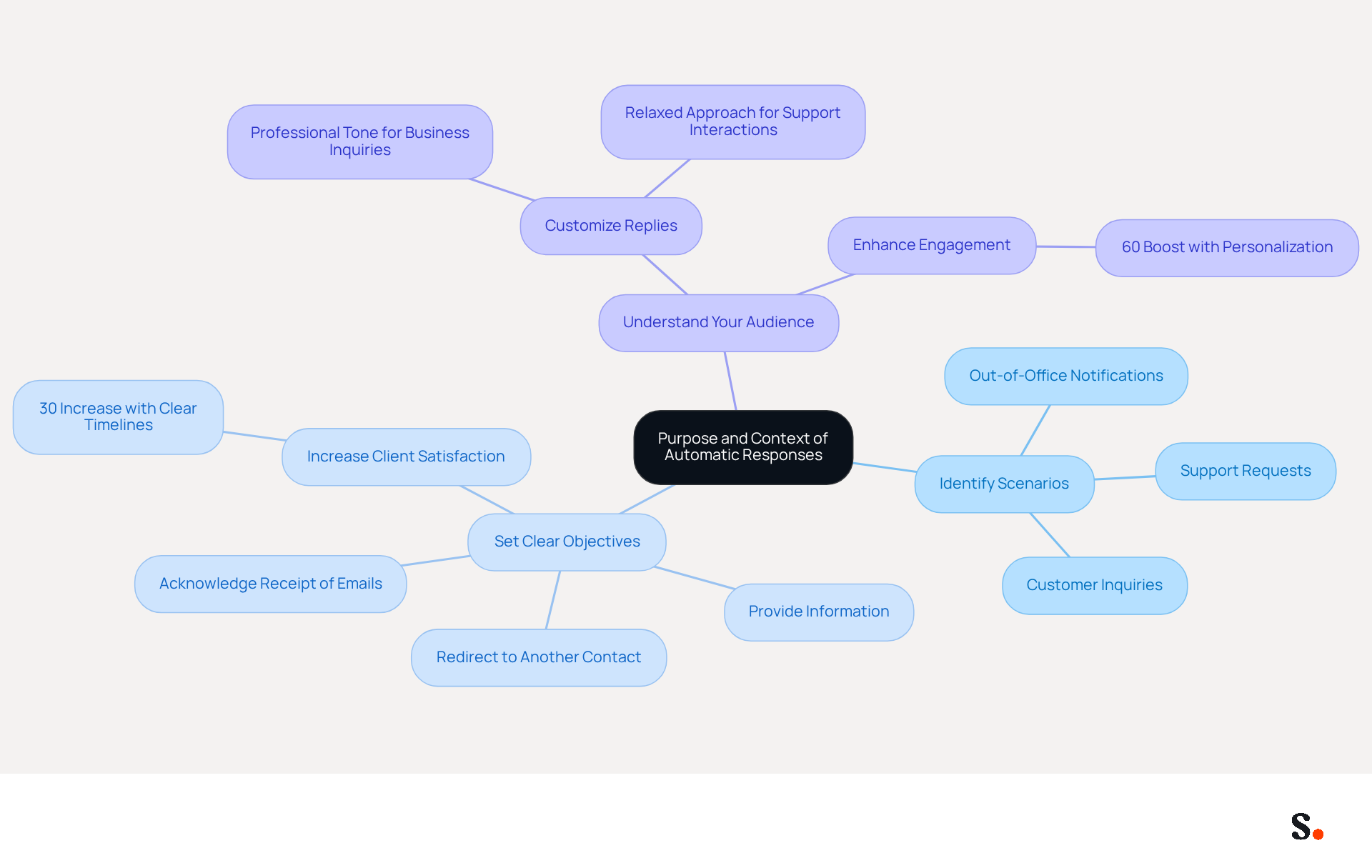
- Identify Scenarios: Determine the specific situations that will trigger an instant reaction, such as out-of-office notifications, customer inquiries, or support requests. This targeted approach ensures that messages address the recipient's needs effectively.
- Set Clear Objectives: Establish what you aim to achieve with your automated messages. Whether acknowledging receipt of an email, providing information, or redirecting the sender to another contact, an automatic response email template with clear objectives will guide the tone and content of your messages. Research shows that businesses with clear timelines for replies see a 30% increase in client satisfaction, highlighting the significance of clarity in communication.
- Understand Your Audience: Customize your replies based on the audience's expectations. For example, a professional tone may be appropriate for business inquiries, while a more relaxed approach might work for support interactions. Personalization in automated interactions can significantly enhance engagement, with studies showing that active personalization boosts engagement by 60%.
By prioritizing clarity and purpose, organizations can significantly enhance client loyalty and satisfaction.
Incorporate Key Elements for Clarity and Engagement
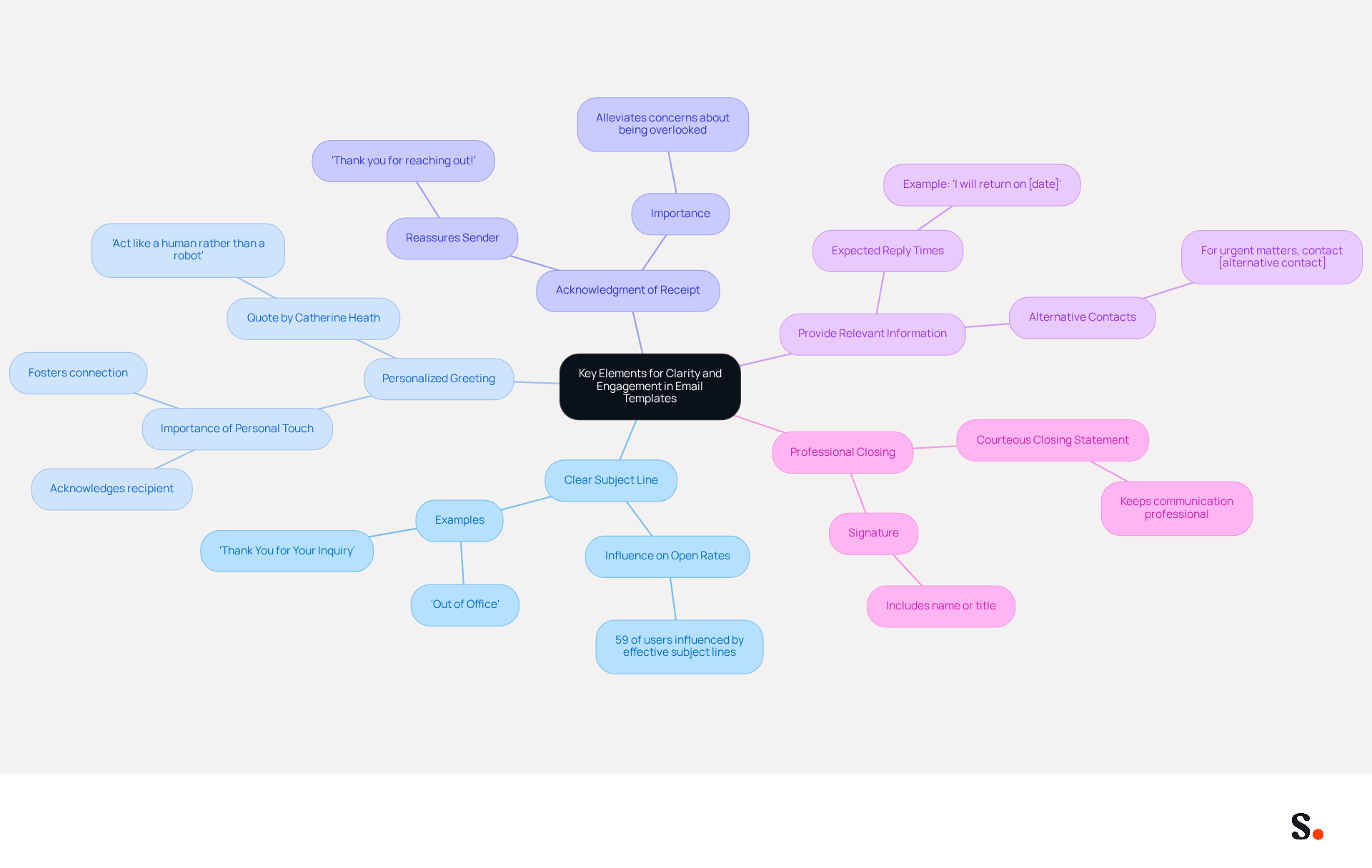
To create effective automatic response email templates, it is crucial to integrate elements that enhance clarity and engagement. Consider the following components:
- Clear Subject Line: Use a straightforward subject line that reflects the content of the message, such as 'Out of Office' or 'Thank You for Your Inquiry.' A clear subject line significantly influences open rates; 59% of users are swayed by an effective one. This highlights why crafting an attention-grabbing subject line is essential.
- Personalized Greeting: Start with a friendly greeting that acknowledges the recipient. Using their name can make the response feel more personal and engaging, fostering a connection that encourages further interaction. As Catherine Heath notes, "The key aim here is to act like a human rather than a robot - customers don’t want a thoughtless message from the system assuring them that their message is important."
- Acknowledgment of Receipt: Clearly state that you have received their email. For example, "Thank you for reaching out! We have received your message and will respond shortly." This helps alleviate any concerns the sender may have about their inquiry being overlooked.
- Provide Relevant Information: Include any necessary details, such as expected reply times or alternative contacts. For instance, "I am currently out of the office and will return on [date]. For urgent matters, please contact [alternative contact]." Without this clarity, trust can quickly erode. The case study on the 'Importance of Automatic Response Email Template' illustrates how using such templates for timely acknowledgment can enhance client perception of Scribe's responsiveness.
- Professional Closing: End with a courteous closing statement and your name or signature. This approach keeps things professional and helps your brand stand out.
Incorporating these elements can lead to more effective communication. By ensuring your automated messages are clear, engaging, and informative, you can significantly enhance satisfaction and loyalty among clients. Remember, automated replies can never substitute for human customer service, but they can help customers feel more patient while they wait for an agent to become available.
Personalize Your Messages to Enhance Recipient Engagement
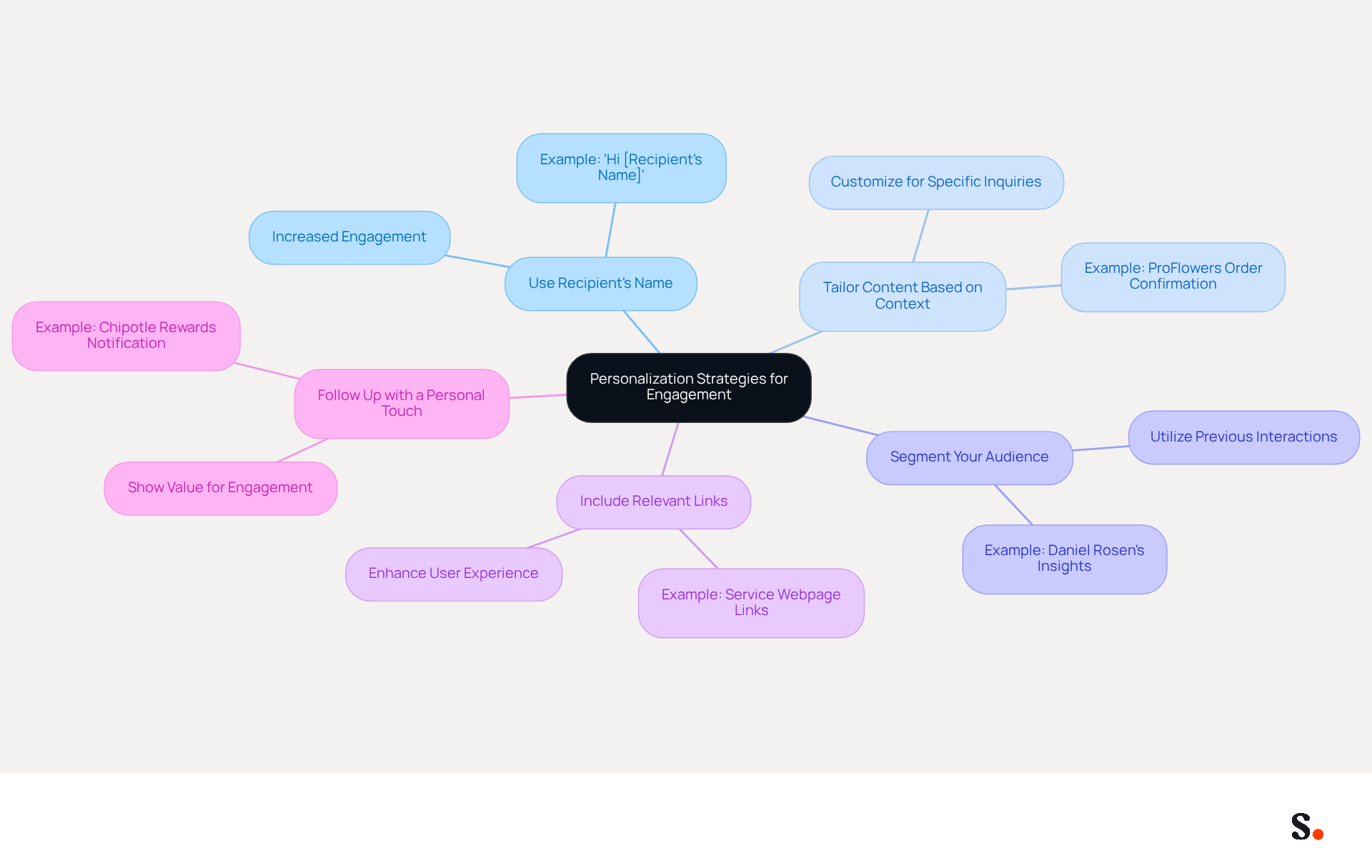
Effective personalization in an automatic response email template can significantly enhance recipient engagement. Here are some strategies to achieve this:
- Use Recipient's Name: Addressing the recipient by their name can significantly increase engagement. For example, starting with "Hi [Recipient's Name], thank you for your message!" creates a more personal connection. Personalized emails can increase click rates by 139% compared to static sends, underscoring the need for tailored communication.
- Tailor Content Based on Context: Customize your content according to the inquiry's context. If an individual inquires about a specific product, include pertinent details about that item to enhance the usefulness of the information. For instance, ProFlowers personalizes their order confirmation emails by including a 'thank you' message and product imagery, which reassures clients and adds a human touch.
- Segment Your Audience: Utilize audience segmentation based on previous interactions or inquiries. This enables the sending of more pertinent automated replies that resonate with various groups, improving the overall effectiveness of your communication. As noted by Daniel Rosen from Litmus, understanding user needs and preferences is crucial for effective personalization.
- Include Relevant Links: Providing links to helpful resources can improve the recipient's experience. For instance, if someone inquires about a service, include a link to that service's webpage for more detailed information. This approach enhances client satisfaction and drives website traffic.
- Follow Up with a Personal Touch: After sending an automatic response, consider a follow-up message offering further assistance or checking if their needs were met. This shows you value their engagement and are dedicated to excellent service. Chipotle effectively utilizes personalized messages to inform customers about their earned rewards points, fostering loyalty and encouraging return visits.
By implementing these personalization strategies, you can significantly enhance recipient engagement and foster a positive relationship with your audience through an automatic response email template. Furthermore, by prioritizing ethical data practices, you not only enhance engagement but also build lasting trust with your audience.
Test and Optimize Templates for Continuous Improvement
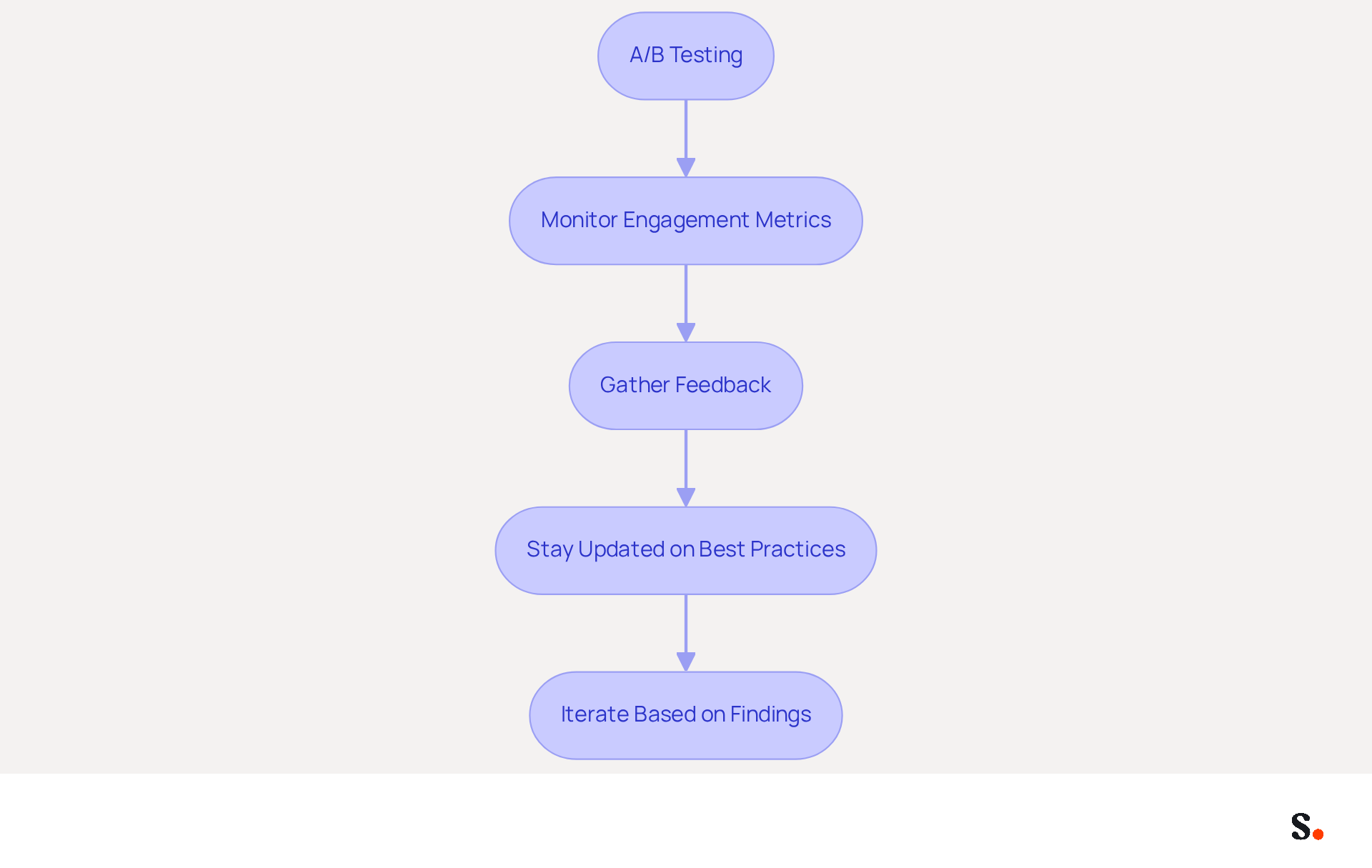
To maintain the effectiveness of your automated email templates, regular testing and enhancement are crucial. Here are some best practices for continuous improvement:
- A/B Testing: Experiment with various versions of your pre-set replies to determine which performs better. For example, test variations in tone, length, or content to see what resonates most with your audience.
- Monitor Engagement Metrics: Utilize analytics tools to track engagement metrics such as open rates, click-through rates, and reply times. Examining this information can provide insights into how effectively your automated reactions are functioning.
- Gather Feedback: Encourage recipients to share their thoughts on their experience with your automated replies. This can be done through follow-up surveys or direct inquiries. Use this feedback to make necessary adjustments.
- Stay Updated on Best Practices: Keep abreast of industry trends and best practices for email communication. Regularly review and update your templates to align with current standards and expectations.
- Iterate Based on Findings: Use the insights gained from testing and feedback to refine your templates. Ongoing iteration ensures that your automated interactions adapt to meet evolving client needs and preferences.
Implementing a solid testing and optimization strategy will boost the effectiveness of your automated responses and lead to better customer satisfaction. Neglecting these strategies could result in missed opportunities for engagement and satisfaction.
Conclusion
Effective communication hinges on the strategic use of automatic response email templates. Defining the purpose and context of these templates is essential for fostering effective communication and enhancing client satisfaction. By establishing clear objectives and tailoring responses to specific scenarios, organizations risk losing the connection with their recipients. This ensures that automated messages resonate with recipients, ultimately leading to improved engagement and loyalty.
Key strategies discussed include:
- The importance of clarity in subject lines
- Personalized greetings
- Relevant information that addresses the recipient's needs
Incorporating these elements not only enhances the effectiveness of automated replies but also helps maintain a professional tone that reflects positively on the brand. Furthermore, personalizing messages and continuously optimizing templates through testing and feedback are crucial for adapting to evolving client expectations.
Prioritizing these best practices for automatic response email templates is vital. This leads to increased loyalty and fosters long-term relationships. Ultimately, these practices not only enhance client interactions but also lay the groundwork for enduring brand loyalty.
Frequently Asked Questions
Why is it important to define the purpose of automatic responses?
Defining the purpose of automatic responses is crucial for effective communication and client satisfaction, as it helps ensure that messages address the recipient's needs effectively.
What scenarios should trigger automatic responses?
Specific situations that should trigger automatic responses include out-of-office notifications, customer inquiries, and support requests.
How can setting clear objectives improve automatic responses?
Establishing clear objectives for automated messages helps guide the tone and content, leading to better communication. Research indicates that businesses with clear timelines for replies see a 30% increase in client satisfaction.
How should automatic responses be tailored to the audience?
Automatic responses should be customized based on the audience's expectations, using a professional tone for business inquiries and a more relaxed approach for support interactions. Personalization can enhance engagement significantly, with studies showing a 60% boost in engagement through active personalization.
What is the overall benefit of prioritizing clarity and purpose in automatic responses?
By prioritizing clarity and purpose, organizations can significantly enhance client loyalty and satisfaction.
List of Sources
- Define the Purpose and Context of Your Automatic Responses
- 10 Automatic Response Samples to Boost Customer Engagement (https://scribe-mail.com/en-US/blog/10-automatic-response-samples-to-boost-customer-engagement)
- 4 Best Practices for Crafting Effective Auto Replies Templates (https://scribe-mail.com/en-US/blog/4-best-practices-for-crafting-effective-auto-replies-templates)
- Automated Email Responses: 2026 Guide for Sales Teams (https://tomba.io/blog/automated-email-responses)
- 50 Automated Email Response Examples to Make Life Easier | AI Assistants | Gmelius (https://gmelius.com/blog/automated-email-response-examples)
- Automated Email Responses: Best Practices (https://intercom.com/learning-center/automated-email-response)
- Incorporate Key Elements for Clarity and Engagement
- 7 tips for using an automatic email responder effectively (https://dailystory.com/blog/7-tips-for-using-an-automatic-email-responder-effectively)
- Automated Email Responses: Best Practices (https://intercom.com/learning-center/automated-email-response)
- What Makes a Good Automated Response Email? (https://keeping.com/content/automated-response-email)
- 50 Automated Email Response Examples to Make Life Easier | AI Assistants | Gmelius (https://gmelius.com/blog/automated-email-response-examples)
- 6 Automatic Email Response Examples For Customer Engagement (https://mailertogo.com/blog/automatic-email-response)
- Personalize Your Messages to Enhance Recipient Engagement
- Personalization 101: Effective Email Marketing Strategies - Propellant Media (https://propellant.media/personalization-effective-email-marketing-strategies)
- The Power of Personalized Emails: A Guide for Marketers | Mailjet (https://mailjet.com/blog/email-best-practices/personalized-emails)
- Your Guide for Personalized Email: Strategies, Tactics, Tools (https://litmus.com/personalized-email)
- Email marketing personalization improves customer engagement (https://business.adobe.com/blog/basics/personalized-email)
- Test and Optimize Templates for Continuous Improvement
- Email Marketing A/B Testing: A Complete Guide (2026) (https://salesforce.com/marketing/email/a-b-testing)
- How to Run A/B Tests on Your Emails (https://litmus.com/blog/email-ab-testing-how-to)
- A/B testing your email campaigns (+ examples) | Zapier (https://zapier.com/blog/ab-testing-email-marketing)
- The Complete Guide to Email A/B Testing Best Practices (https://truevoicegrowth.com/post/email-a-b-testing-best-practices)
- A/B Testing Ideas for Email Marketing: 102 Tests to Try | Knak (https://knak.com/blog/a-b-testing-email-marketing-ideas)
Get started with Scribe
Build a professional email signature
Free 14-day trial — no credit card.