4 Best Practices for Your Mail Signature on iPhone
Creating a professional email signature on an iPhone presents unique challenges that go beyond mere digital sign-offs. It’s a powerful branding tool that can
Sophie Grant
Email Signature Specialist, Scribe
Introduction
Creating a professional email signature on an iPhone presents unique challenges that go beyond mere digital sign-offs. It’s a powerful branding tool that can enhance communication and drive engagement. By following best practices, users can transform their signatures into effective marketing assets that reflect their brand identity and foster trust.
Navigating the complexities of design principles and management strategies can be daunting for many users. This article delves into the essential practices for crafting impactful email signatures on iPhone. By mastering these essential practices, users can unlock the full potential of their email signatures, turning them into powerful tools for communication and branding.
Set Up Email Signature Settings on iPhone
Creating a mail signature on iPhone is essential for effective communication. To set up your email signature, follow these steps:
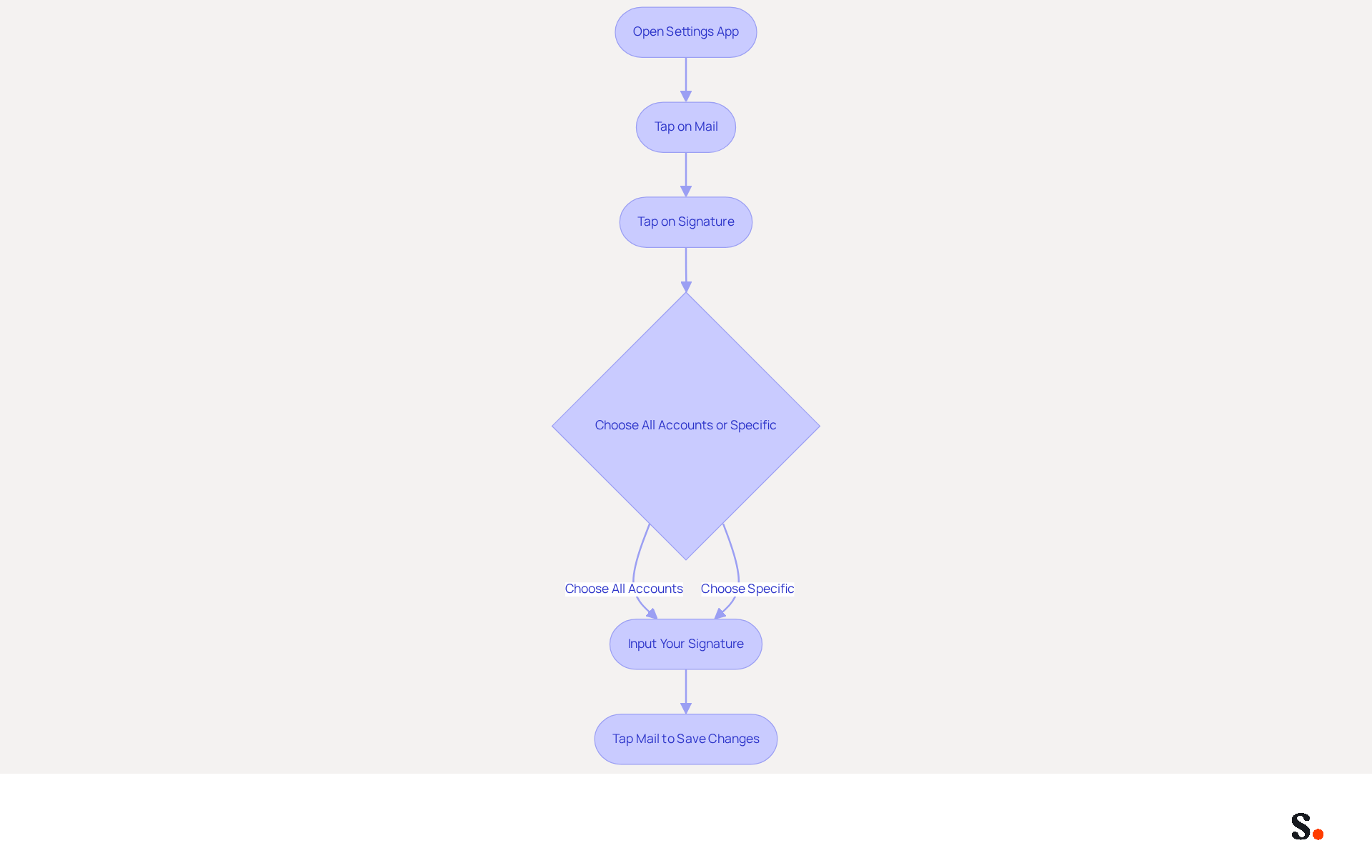
- Open the Settings app on your iPhone.
- Scroll down and tap on Mail.
- Under the Composing section, tap on Signature.
- You can choose to create a sign-off for all accounts or customize it for specific accounts.
- Tap the text field to input your desired signature. Include essential elements such as your name, title, company name, and contact information. Consider adding social media links or a call-to-action button to enhance engagement. Notably, 39.8% of users include social media calls to action in their emails, which can boost engagement.
- Once you have entered your signature, tap Mail at the top left to save your changes.
Following these steps helps you create a professional mail signature on iPhone that enhances your communication. Research shows that 76-80% of marketers believe branded email signatures increase sender trust, making it a crucial element of your marketing strategy. Furthermore, with Scribe, any modifications made in your communication settings will automatically sync, ensuring brand consistency across all interactions. Be mindful of any legal and compliance obligations for electronic communications, as these can differ by industry and location. Scribe's SOC 2 Type II certification also guarantees secure data management, making it a trustworthy option for handling your digital identifiers.
Apply Key Design Principles for Effective Signatures
To create an effective email signature, it is essential to adhere to key design principles that enhance professionalism and engagement:
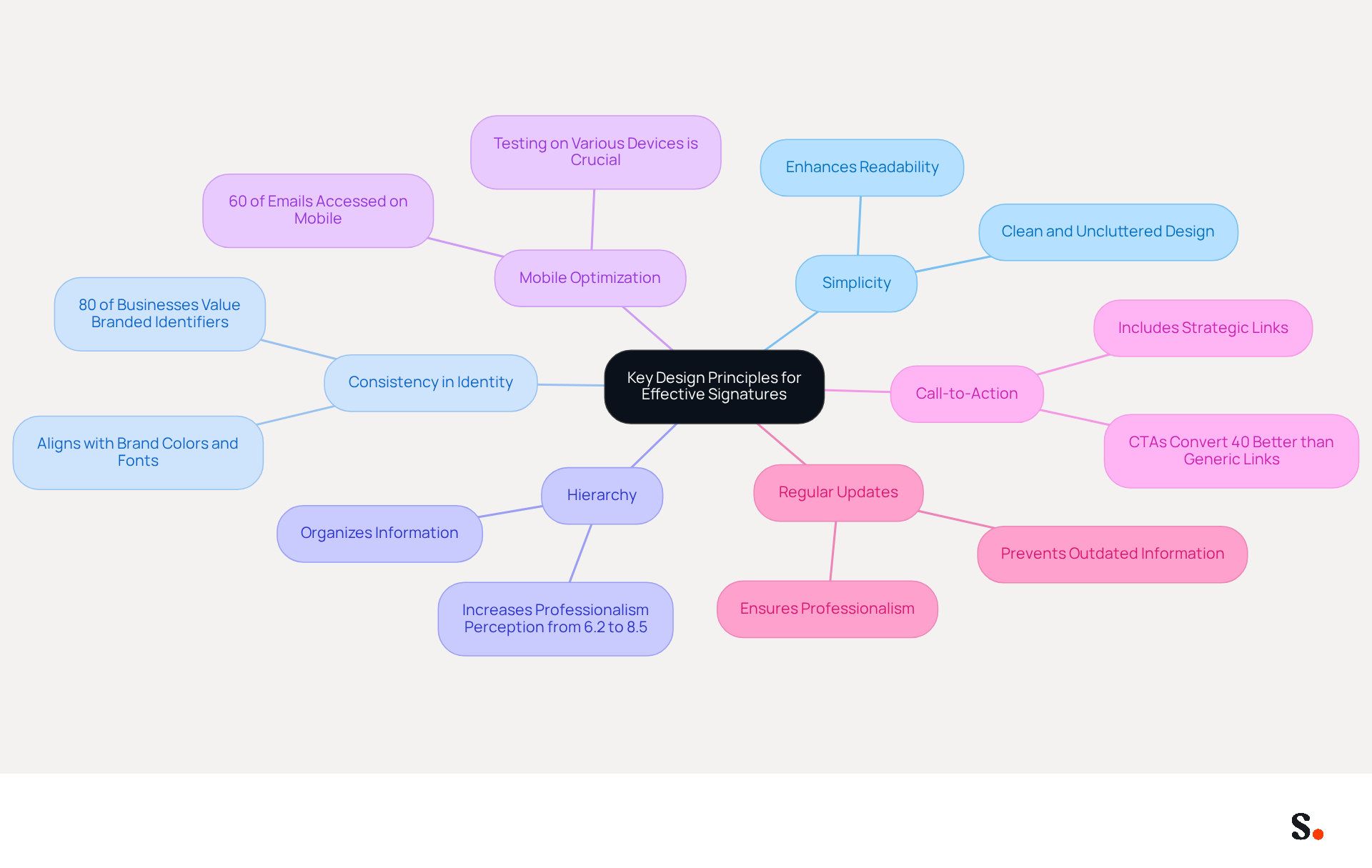
- Simplicity: Keep your mark clean and uncluttered. Limiting the number of elements enhances readability, allowing recipients to absorb key information quickly.
- Consistency in Identity: Use colors, fonts, and logos that align with your identity. This strengthens brand awareness, as 80% of businesses consider branded digital identifiers crucial for building trust.
- Hierarchy: Organize information to guide the reader's eye. Place the most important details, such as your name and title, at the top. Consistent visual elements can increase professionalism perception from 6.2 to 8.5 out of 10.
- Mobile Optimization: Ensure that your identifier appears well on mobile devices, as 60% of business correspondence is accessed on smartphones. Testing your mark on various devices is crucial for confirming its appearance.
- Call-to-Action: Include a strategic call-to-action (CTA), such as a link to your website or a promotional banner. Effective CTAs can drive engagement, with studies showing that strategic CTAs convert 40% better than generic links.
- Regular Updates: Outdated information can lead to missed opportunities and a lack of professionalism. Frequently review and refresh your contact information to reflect any changes in your role or company branding.
By applying these principles, you not only enhance your professional image but also increase your chances of engagement. With Scribe, you can automate the management of your correspondence identifiers, ensuring that they are always current and compliant with SOC 2 Type II standards. This indicates your team's identification information is automatically synced with your business phone system, requiring no action from your teammates, thus saving time and enhancing security. Over 10,000 teams in sales and IT globally rely on Scribe for their email management needs.
Leverage Signatures as Marketing Tools for Brand Growth
Email footers represent an underutilized opportunity for strategic marketing that can significantly enhance brand visibility. Here are effective ways to leverage them for brand growth:
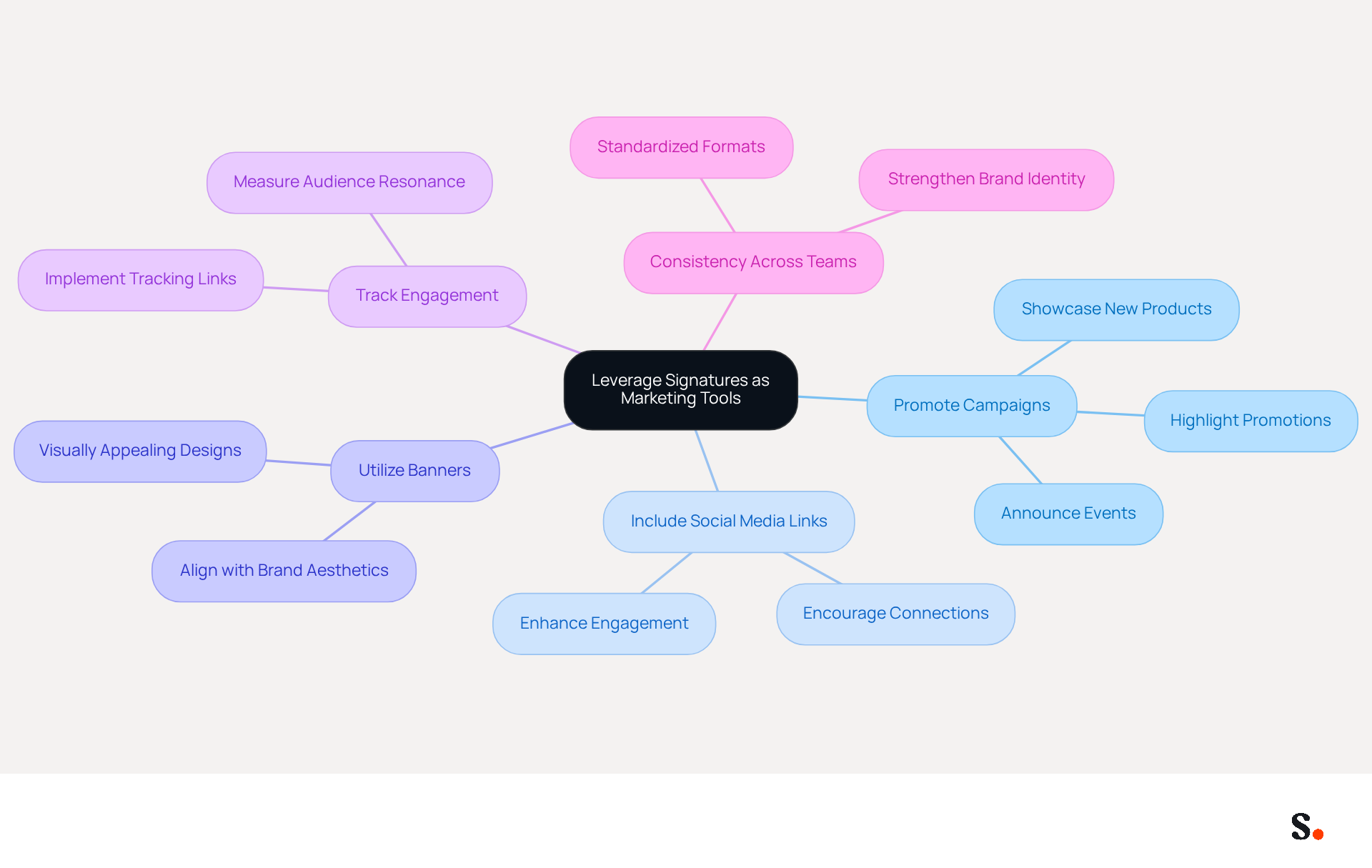
- Promote Campaigns: Highlight current promotions, events, or new products in your email footer. This approach can drive traffic and significantly increase conversions, as mail signatures on iPhone are often read by 95% of recipients.
- Include Social Media Links: Adding icons that link to your social media profiles encourages recipients to connect with Scribe across multiple platforms, enhancing overall engagement and visibility.
- Utilize Banners: Incorporate visually appealing banner images that promote specific campaigns or messages. Align these banners with your brand's aesthetics to maintain a cohesive look and feel.
- Track Engagement: Implement tracking links in your email to measure engagement effectively. This data provides insights into what resonates with your audience, allowing for adjustments in your marketing strategies.
- Consistency Across Teams: Ensure all team members use a standardized format for their sign-offs. This practice strengthens identity and professionalism in all communications, contributing to a cohesive image.
Using your contact information strategically can enhance your brand's visibility and encourage meaningful interactions with your audience, making it essential for your marketing strategy in 2026. Leveraging email footers effectively can transform them from mere signatures into dynamic marketing assets that drive engagement and growth.
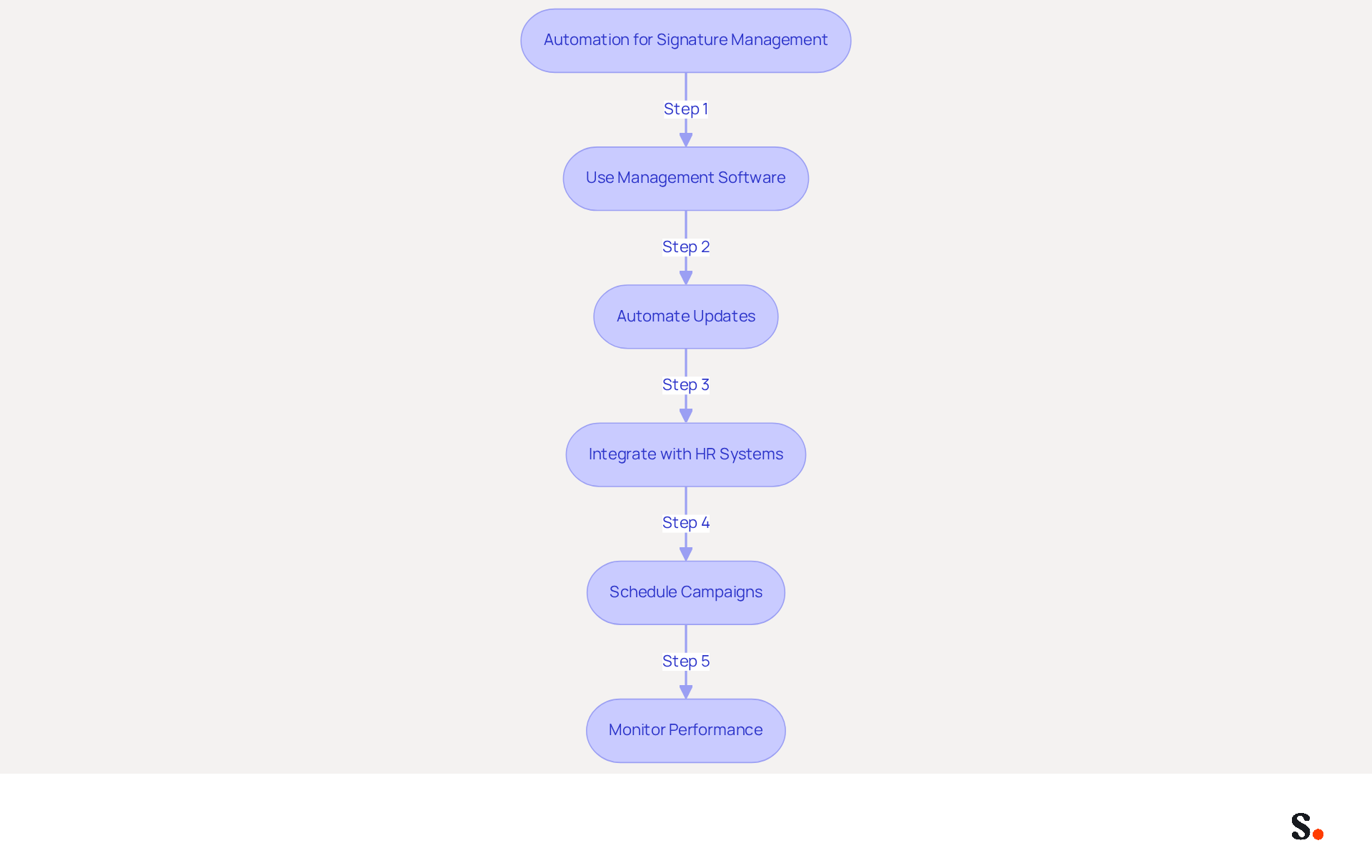
Utilize Automation for Consistent and Efficient Signature Management
To maintain brand consistency and streamline email signature management, automation is not just beneficial; it is essential:
- Use Management Software for Email: Invest in tools like Scribe that enable centralized management of email branding across your organization. This ensures consistency in branding and endorsements, leading to an 85% improvement in brand coherence. With Scribe, you can rest assured that your data is secure and compliant, thanks to its SOC 2 Type II certification and adherence to GDPR and CCPA.
- Automate Updates: Set up automated updates for identifiers when branding changes occur, such as logo updates or new marketing campaigns. Manual updates often lead to errors and inefficiencies, which automation can eliminate, enhancing overall efficiency.
- Integrate with HR Systems: Connect your management tool with HR systems to automatically update employee identifiers when individuals join or leave the company. This leads to a more streamlined and effective operational process, ensuring that all endorsements represent current personnel.
- Schedule Campaigns: Utilize automation to arrange promotional campaigns through digital identifiers. This allows you to promote specific messages at optimal times without manual intervention, which can lead to three times higher engagement in your campaigns.
- Monitor Performance: Utilize analytics tools to track the effectiveness of your messages. Scribe's average click-through rate on banners is 12%, offering valuable insights into user behavior and campaign effectiveness, guiding future strategies.
By utilizing automation, you can ensure that your email signatures are consistently professional and effective marketing tools, saving time and enhancing brand integrity. Additionally, by choosing Scribe, you are not only enhancing your brand integrity but also contributing to a sustainable future.
Conclusion
An effective email signature on iPhone is essential for enhancing professional communication and reinforcing brand identity. Implementing best practices in design and management ensures that email signatures are not only visually appealing but also strategically effective.
This article emphasizes that simplicity, consistency, and strategic calls-to-action are crucial for effective email signatures. Automating the management process with tools like Scribe can help organizations keep signatures current and compliant with security standards such as SOC 2 Type II. This approach not only saves time but also strengthens brand integrity across all communications.
Failing to manage email signatures effectively can lead to inconsistencies that undermine brand trust. Organizations are encouraged to adopt these best practices and consider automation solutions like Scribe to maximize their marketing potential. Embracing these strategies can turn a standard email footer into a vital component of your marketing strategy, fostering stronger connections and elevating your brand's visibility.
Frequently Asked Questions
How do I set up an email signature on my iPhone?
To set up your email signature on iPhone, open the Settings app, scroll down and tap on Mail, then under the Composing section, tap on Signature. You can create a signature for all accounts or customize it for specific accounts. Tap the text field to input your desired signature and include essential elements like your name, title, company name, and contact information. After entering your signature, tap Mail at the top left to save your changes.
What elements should I include in my email signature?
You should include essential elements such as your name, title, company name, and contact information. Additionally, consider adding social media links or a call-to-action button to enhance engagement.
Why is having a branded email signature important?
Research shows that 76-80% of marketers believe branded email signatures increase sender trust, making it a crucial element of your marketing strategy.
Can I customize my email signature for different accounts on my iPhone?
Yes, you can choose to create a sign-off for all accounts or customize it for specific accounts when setting up your email signature.
How does Scribe help with email signature management?
With Scribe, any modifications made in your communication settings will automatically sync, ensuring brand consistency across all interactions.
Are there any legal considerations for email signatures?
Yes, be mindful of any legal and compliance obligations for electronic communications, as these can differ by industry and location.
What security measures does Scribe have for handling digital identifiers?
Scribe's SOC 2 Type II certification guarantees secure data management, making it a trustworthy option for handling your digital identifiers.
List of Sources
- Set Up Email Signature Settings on iPhone
- Email signature statistics: Why every business should optimize their email signatures — Stripo.email (https://stripo.email/blog/email-signature-statistics-why-every-business-should-optimize-their-email-signatures)
- Email Signature Statistics: A Closer Look at Email Signatures in 2026 (https://mysignature.io/blog/email-signature-statistics)
- 40+ Email Signature Statistics for 2026 (Data + Insights) (https://wavecnct.com/blogs/email-signature-statistics)
- Set Up an Email Signature on iPhone or iPad - Kualo (https://kualo.com/knowledgebase/email-apple/setting-up-your-email-signature-on-your-iphone)
- Apply Key Design Principles for Effective Signatures
- Email Signature Best Practices for 2026 (+ 15 Pro Examples) (https://wavecnct.com/blogs/email-signature-best-practices-2026)
- The impact of email signatures on your branding (https://signitic.com/en/resources/the-impact-of-email-signatures-on-your-branding)
- Research Recap: Branded Email Signatures Increase Company Recognition, Trust - B2BMX INSIGHTS (https://demandgenreport.com/industry-news/research-recap-branded-email-signatures-increase-company-recognition-trust/47252)
- Why Email Signatures Must Be In Your 2026 Marketing Plan | Rocketseed (https://rocketseed.com/blog/2026-marketing-plan-email-signatures)
- "Email Signature Trends for 2026: What's In, What's Out" | Crossware posted on the topic | LinkedIn (https://linkedin.com/posts/crossware-ltd_new-year-new-trends-even-for-your-email-activity-7394554686046908416-vD_O)
- Leverage Signatures as Marketing Tools for Brand Growth
- Why Email Signatures Must Be In Your 2026 Marketing Plan | Rocketseed (https://rocketseed.com/blog/2026-marketing-plan-email-signatures)
- Email signature campaigns: boost your marketing (https://signitic.com/en/features/campaign)
- Using Email Signatures as a Marketing Tool: Ideas for Generating Leads and Promoting Business (https://blog.ringostat.com/en/using-email-signatures-as-a-marketing-tool-ideas-for-generating-leads-and-promoting-business)
- 12 clever ways to use your email signature to support your marketing campaigns (https://blog.hubspot.com/blog/tabid/6307/bid/31054/10-clever-ways-your-email-signature-can-support-your-marketing.aspx)
- 2026 Marketing Trends: Email Signatures as a Marketing Tool (https://bluechiptt.com/blog/5-marketing-trends-for-2026-and-how-your-email-signature-fits-in)
- Utilize Automation for Consistent and Efficient Signature Management
- Maximizing Efficiency with Automated Email Signatures for Internal and External Communications | Crossware365 (https://crossware365.com/blog/maximizing-efficiency-with-automated-email-signatures-for-internal-and-external-communications)
- Best Email Signature Management Software: Top 12 Tools (2026)
- NEWOLDSTAMP (https://newoldstamp.com/blog/email-signature-software)
- 4 Best Practices for Your Work Email Signature Strategy (https://scribe-mail.com/en-US/blog/4-best-practices-for-your-work-email-signature-strategy)
- Automating Email Signatures: How IT Teams Streamline Processes & Reduce Risk (https://exclaimer.com/blog/streamlining-it-processes-automated-email-signatures)
- WiseStamp Launches the Industry's First AI-Powered Email Signature Platform, Eliminating the Gap Between Brand Design and Instant Deployment (https://prnewswire.com/news-releases/wisestamp-launches-the-industrys-first-ai-powered-email-signature-platform-eliminating-the-gap-between-brand-design-and-instant-deployment-302774232.html)
Get started with Scribe
Create your signature in minutes
Free 14-day trial — no credit card.