4 Steps for Adding Email Signature to Gmail Effectively
While often underestimated, email signatures are essential in establishing a professional image and fostering trust in digital communications. By adding an
Sophie Grant
Email Signature Specialist, Scribe

Introduction
While often underestimated, email signatures are essential in establishing a professional image and fostering trust in digital communications. By adding an email signature in Gmail, professionals can share essential contact details while also using this space to enhance engagement and strengthen their brand identity. Many professionals struggle to create a signature that accurately represents their brand and maintains consistency across communications. What steps can professionals take to navigate Gmail's settings and create a signature that truly reflects their brand?
Understand the Importance of Email Signatures
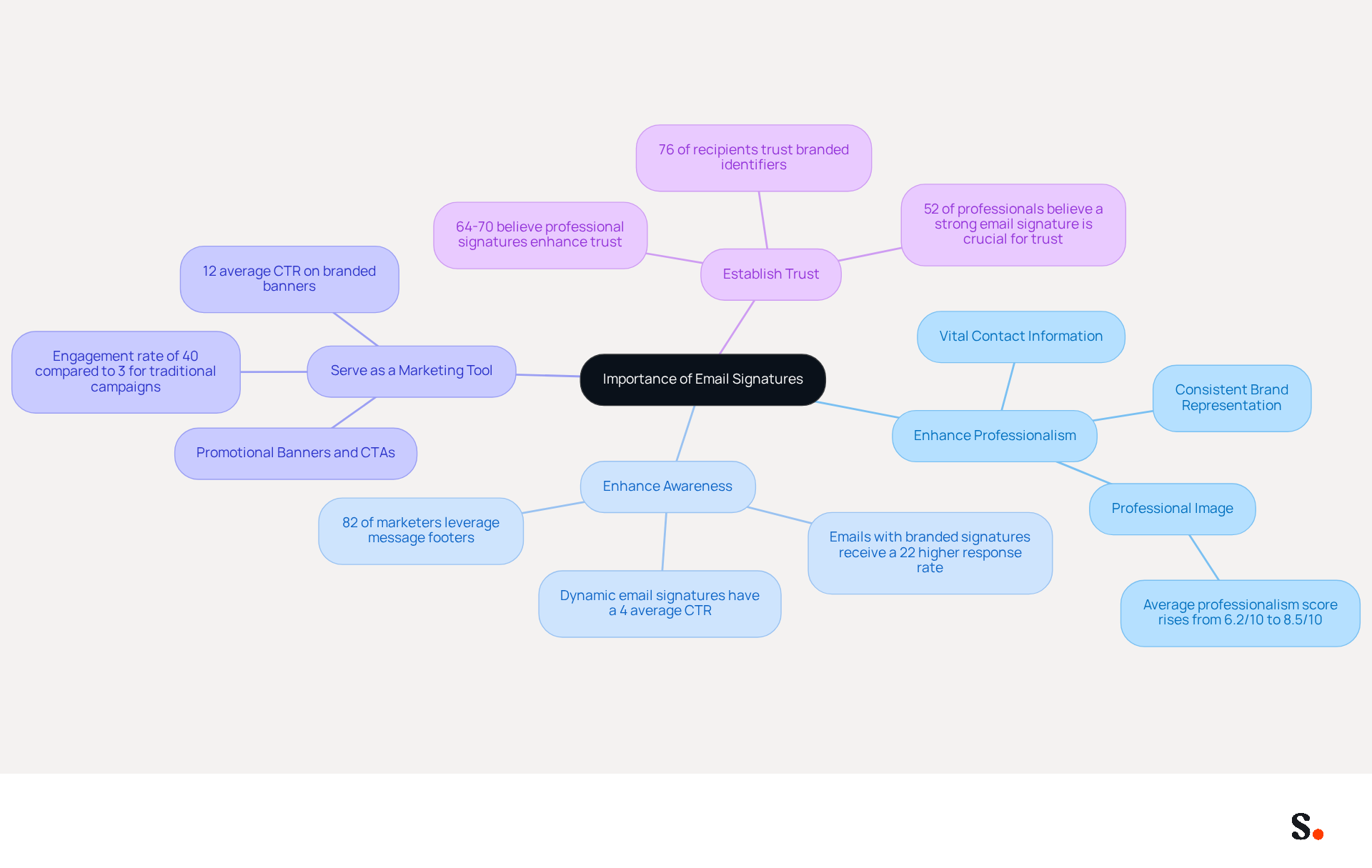
Email signatures are not just formalities; they are pivotal in shaping your professional identity and communication effectiveness. They serve multiple crucial functions:
- Enhance Professionalism: A well-crafted email signature provides vital contact information and consistently represents your brand, fostering a professional image. Scribe automatically updates and syncs your digital identifiers with your business phone system, keeping your team’s information current without manual effort.
- Enhance Awareness: Each message sent is an opportunity to strengthen your image and communication, with research showing that 82% of marketers leverage message footers to enhance visibility. Scribe’s automated synchronization with platforms such as Aircall guarantees that your brand remains consistent across all communications.
- Serve as a Marketing Tool: Incorporating promotional banners or calls to action can effectively drive traffic to your website or social media platforms, with dynamic digital identifiers currently achieving an average click-through rate of 4%, compared to 2.5% for standard marketing messages. This tool achieves a remarkable 12% average click-through rate on branded banners, underscoring its effectiveness in driving marketing engagement.
- Establish Trust: Professional identifiers enhance credibility, with 76% of recipients indicating that branded digital identifiers increase their trust in the sender, and 64-70% believing that a professional branded digital identifier enhances trust and credibility. Scribe’s SOC 2 Type II compliance guarantees that your data is managed securely, further building trust with your clients.
Many professionals struggle with adding email signature to gmail in a consistent and effective manner, which can impact their reputation and client engagement. Scribe makes it easy to connect with tools like Calendly, ensuring your contact details are always up to date. Investing time in creating an effective communication footer not only enhances your professional interactions but also greatly influences your reputation and engagement with clients. Moreover, electronic identifiers can act as subtle marketing avenues with high engagement levels, rendering them a valuable component for any marketing plan. With Scribe, you can manage your digital identifiers independently after the initial IT setup, ensuring 100% brand consistency and measurable marketing ROI.
Access Gmail Settings for Signature Setup
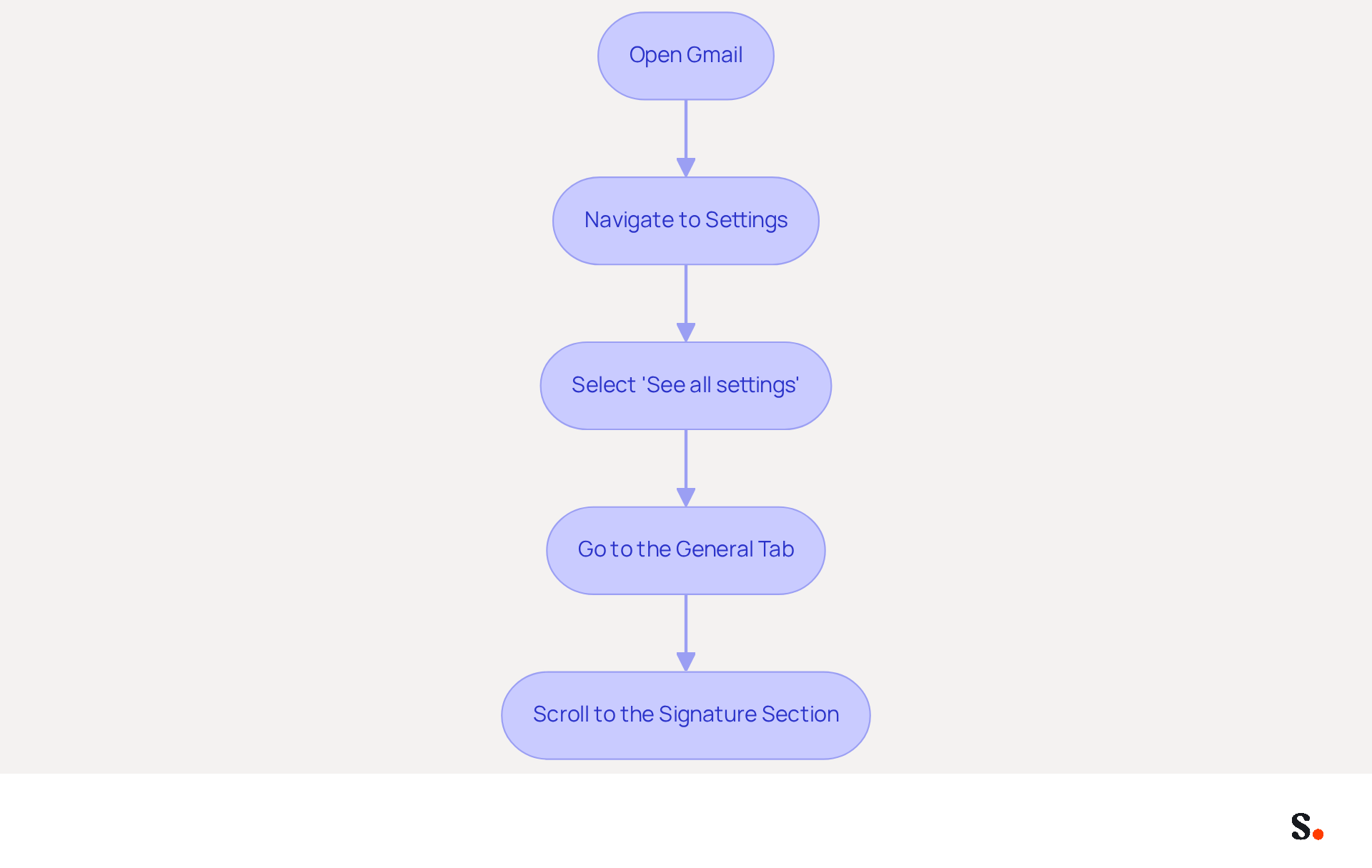
Creating a professional email signature in Gmail is essential for effective communication. To effectively add your email signature in Gmail, follow these straightforward steps:
- Open Gmail: Log into your Gmail account.
- Navigate to Settings: Click on the gear icon located in the top right corner of the Gmail interface.
- Select 'See all settings': From the dropdown menu, choose 'See all settings' to access the full settings menu.
- Go to the General Tab: Ensure you are in the 'General' tab, which is usually the default tab when you enter settings.
- Scroll to the Signature Section: Look for the 'Signature' section, which is located further down the page. This is where you will create and manage your message footer.
Following these steps will assist you in adding an email signature to Gmail, thereby improving your professional communication. Research shows that a significant majority of professionals believe a branded email signature is crucial for reinforcing a company's identity. Moreover, businesses utilizing consistent branded communication formats report over a 22% rise in response rates, transforming this arrangement into not merely a technical task but a strategic marketing opportunity.
With the tool, the process is even more efficient. By syncing your Google Workspace with the application, any changes made to your teammates' information-such as job positions or group assignments-are automatically reflected in their email signatures. This automation saves you time and keeps your branding consistent across all emails. Furthermore, Scribe's SOC 2 Type II certification and compliance with GDPR and CCPA guarantee that your data is handled securely and responsibly. As we look forward to 2024, the trend of personalization and dynamic content in digital identifiers is anticipated to increase, further boosting engagement and effectiveness.
Create and Customize Your Email Signature
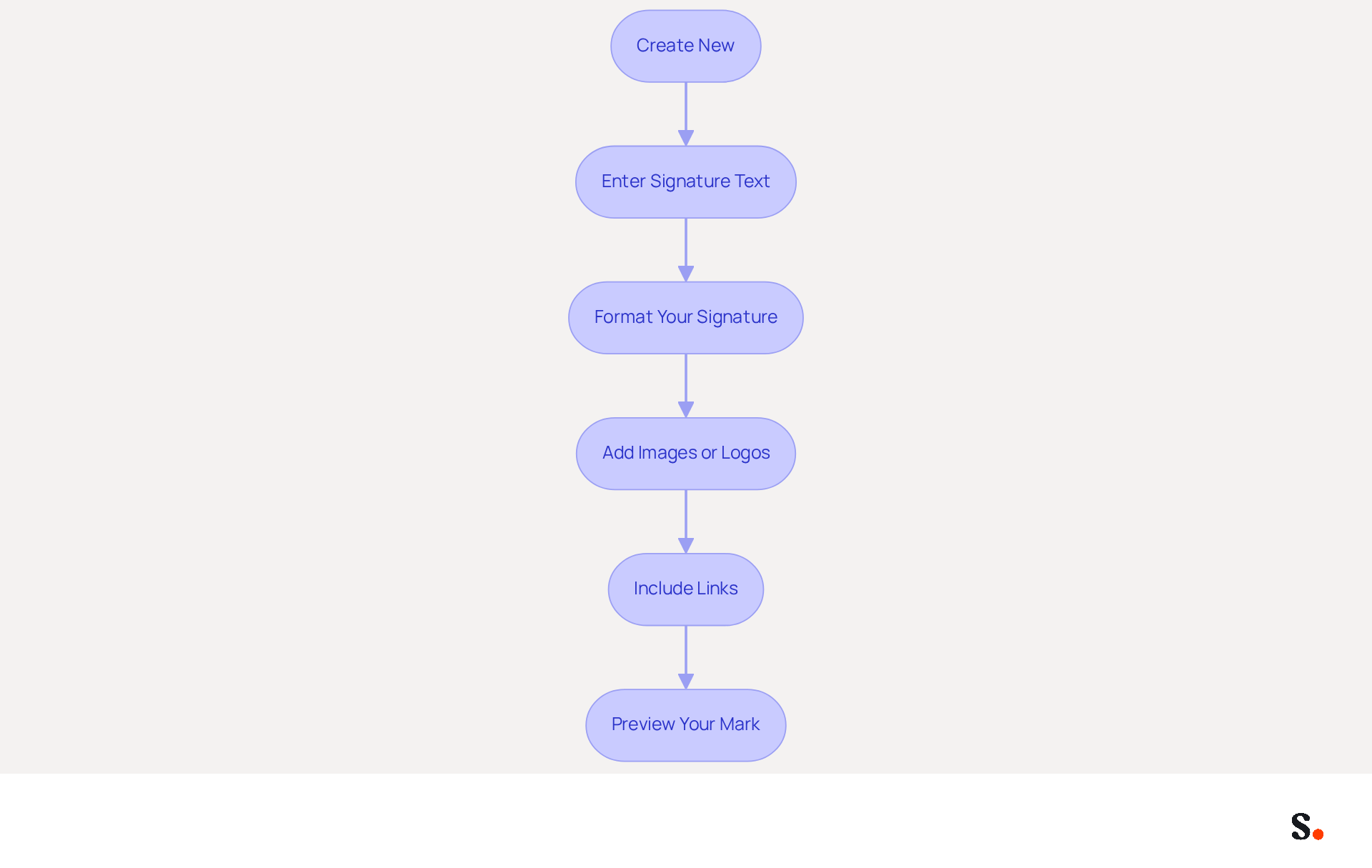
Adding an email signature to Gmail is essential for establishing your brand identity and enhancing communication. To create and customize your email signature in Gmail, follow these steps:
- Click 'Create New': In the Signature section, select the 'Create New' button to initiate the design process.
- Enter Signature Text: Input your name, job title, company name, and any other pertinent information you wish to include.
- Format Your Signature: Utilize the formatting tools to adjust the font, size, color, and style. Incorporating your brand colors will enhance consistency and recognition.
- Add Images or Logos: If desired, click on the 'Insert Image' icon to include your company logo or a professional photo. Ensure the image is optimized for email to prevent loading issues.
- Include Links: Hyperlink text or images to guide recipients to your website or social media profiles. Highlight the desired text or image, then click the link icon to insert the URL. Including social media links can drive traffic to your platforms and enhance engagement.
- Preview Your Mark: Review your mark in the preview pane, making necessary adjustments to ensure it appears polished and professional.
Following these steps for adding email signature to Gmail will help you create a signature that is both visually appealing and clearly communicates your professional identity. Keep in mind that a well-designed email signature can really boost engagement. Research shows that branded footers can lead to a 15% increase in click-through rates to company websites, underscoring their importance. Moreover, 70% of consumers show annoyance when a company does not incorporate an electronic identifier, emphasizing the necessity of having a well-crafted one.
Furthermore, with Scribe, any modifications made in your Aircall settings will automatically be shown in your digital identifiers, ensuring consistency in branding and seamless updates. This automated synchronization not only saves time but also supports SOC 2 Type II compliance and adheres to GDPR and CCPA regulations for secure data handling, making it an ideal solution for marketing managers looking to maintain a professional and cohesive brand image.
Save and Test Your Email Signature
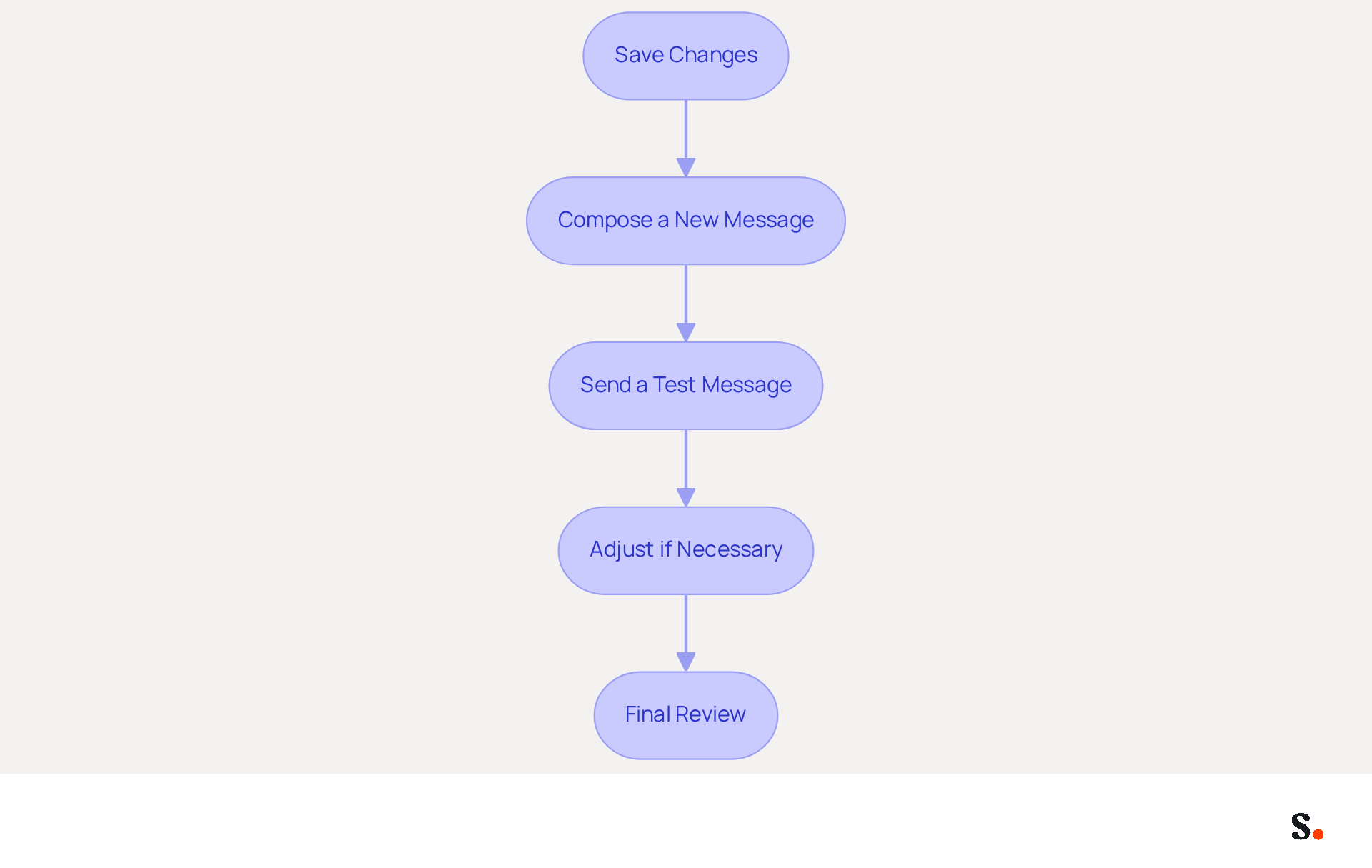
It is vital for maintaining a professional image to ensure that your email signature is saved and tested when adding an email signature to Gmail. After creating your email signature, follow these steps to ensure it functions effectively, especially since Scribe automatically syncs your signature with Google Workspace and Aircall for seamless updates:
- Save Changes: Scroll to the bottom of the settings page and click the 'Save Changes' button to apply your new sign-off.
- Compose a New Message: Click on 'Compose' to start a new message. Your mark should automatically show at the bottom of the message body, reflecting any updates made in Google Workspace.
- Send a Test Message: Dispatch a test message to yourself or a colleague to confirm how it appears in the recipient's inbox. This aspect is vital, as 42% of consumers have a negative perception of businesses that send messages without a branded mark, emphasizing the significance of a professional appearance.
- Adjust if Necessary: If you notice any formatting issues or broken links, remember that formatting issues can undermine your professional image, so it's essential to address them promptly. You can edit the text, change images, or modify links as needed. A/B testing various configurations can uncover which components are most effective, as 76-80% of marketers believe that branded digital identifiers enhance trust in the sender.
- Final Review: Once pleased with the appearance and functionality, you can confidently use your new communication identifier in all your correspondences. Ultimately, adding an email signature to Gmail can significantly influence how your communications are perceived. With Scribe, using automated synchronization saves time and helps maintain brand consistency in your communications.
Conclusion
Establishing a professional presence hinges on the effective use of email signatures in Gmail. By using this feature, individuals can share important contact information while also strengthening their brand identity and credibility. The integration of tools like Scribe simplifies this process, allowing for seamless updates and consistent branding across all communications.
Throughout the article, key steps were outlined to guide users in creating, customizing, and testing their email signatures. From accessing Gmail settings to ensuring that the signature is visually appealing and functional, each step plays a vital role in achieving a polished final product. Well-crafted signatures can significantly boost engagement, as highlighted throughout the article, showcasing the significant impact they can have on professional interactions.
Taking the time to create an effective email signature goes beyond looks; it’s a smart strategy to build trust and engage clients. As organizations continue to seek ways to improve their communication strategies, leveraging tools like Scribe can provide the necessary support for achieving 100% brand consistency and measurable marketing ROI. In a competitive landscape, a well-crafted email signature can be the differentiator that sets you apart.
Frequently Asked Questions
Why are email signatures important?
Email signatures are crucial for shaping professional identity and enhancing communication effectiveness. They enhance professionalism, awareness, serve as marketing tools, and establish trust.
How do email signatures enhance professionalism?
A well-crafted email signature provides vital contact information and consistently represents your brand, fostering a professional image. Scribe automatically updates and syncs digital identifiers with your business phone system, keeping information current without manual effort.
How can email signatures enhance awareness?
Each email sent is an opportunity to strengthen your image and communication. Research shows that 82% of marketers use message footers to enhance visibility. Scribe’s synchronization with platforms like Aircall ensures brand consistency across communications.
In what ways can email signatures serve as a marketing tool?
Incorporating promotional banners or calls to action in email signatures can drive traffic to websites or social media. Dynamic digital identifiers achieve an average click-through rate of 4%, while branded banners can reach a remarkable 12% average click-through rate.
How do email signatures establish trust?
Professional identifiers enhance credibility, with 76% of recipients indicating that branded digital identifiers increase their trust in the sender. Scribe’s SOC 2 Type II compliance ensures secure data management, further building trust with clients.
What challenges do professionals face with email signatures?
Many professionals struggle with adding email signatures to Gmail consistently and effectively, which can impact their reputation and client engagement.
How does Scribe help with email signatures?
Scribe simplifies the process of managing email signatures by connecting with tools like Calendly, ensuring contact details are always up to date. It allows users to manage digital identifiers independently after initial IT setup, ensuring brand consistency and measurable marketing ROI.
List of Sources
- Understand the Importance of Email Signatures
- The impact of email signatures on your branding (https://signitic.com/en/resources/the-impact-of-email-signatures-on-your-branding)
- Email signature statistics: Why every business should optimize their email signatures — Stripo.email (https://stripo.email/blog/email-signature-statistics-why-every-business-should-optimize-their-email-signatures)
- 40+ Email Signature Statistics for 2026 (Data + Insights) (https://wavecnct.com/blogs/email-signature-statistics)
- Exclaimer Research: 67% of Marketers Expect Email Signatures to Support With Lead Gen In 2023 (https://businesswire.com/news/home/20230612141095/en/Exclaimer-Research-67-of-Marketers-Expect-Email-Signatures-to-Support-With-Lead-Gen-In-2023)
- Access Gmail Settings for Signature Setup
- Email signature statistics and trends in 2024 (https://wisestamp.com/blog/email-signature-statistics)
- 40+ Email Signature Statistics for 2026 (Data + Insights) (https://wavecnct.com/blogs/email-signature-statistics)
- Email Signature Essentials: Key Statistics to Know for 2023 (https://blog.hubspot.com/marketing/email-signature-statistics)
- Email Signature Statistics: A Closer Look at Email Signatures in 2026 (https://mysignature.io/blog/email-signature-statistics)
- Email signature statistics: Why every business should optimize their email signatures — Stripo.email (https://stripo.email/blog/email-signature-statistics-why-every-business-should-optimize-their-email-signatures)
- Create and Customize Your Email Signature
- Email Signature Statistics: A Closer Look at Email Signatures in 2026 (https://mysignature.io/blog/email-signature-statistics)
- Email signature statistics: Why every business should optimize their email signatures — Stripo.email (https://stripo.email/blog/email-signature-statistics-why-every-business-should-optimize-their-email-signatures)
- Research Recap: Branded Email Signatures Increase Company Recognition, Trust - Demand Gen Report (https://demandgenreport.com/industry-news/research-recap-branded-email-signatures-increase-company-recognition-trust/47252)
- 40+ Email Signature Statistics for 2026 (Data + Insights) (https://wavecnct.com/blogs/email-signature-statistics)
- How to Create an Email Signature in 2024: The Ultimate Guide (https://linkedin.com/pulse/how-create-email-signature-2024-ultimate-guide-helga-zabalkanska-ncerf)
- Save and Test Your Email Signature
- Email Signature Statistics: A Closer Look at Email Signatures in 2026 (https://mysignature.io/blog/email-signature-statistics)
- 40+ Email Signature Statistics for 2026 (Data + Insights) (https://wavecnct.com/blogs/email-signature-statistics)
- The effectiveness of the email signature as a “point of contact” (https://signitic.com/en/resources/the-effectiveness-of-the-email-signature-as-a--point-of-contact)
- Did You Know Your Email Signature Could be a Security Weak Point? - Oklahoma Society of CPAs (https://oscpa.com/news/990e5e16-6ad4-4ff4-91bb-236c7634b1f6:did-you-know-your-email-signature-could-be-a-security-weak-point)
- Research Recap: Branded Email Signatures Increase Company Recognition, Trust - Demand Gen Report (https://demandgenreport.com/industry-news/research-recap-branded-email-signatures-increase-company-recognition-trust/47252)
Get started with Scribe
Create your signature in minutes
Free 14-day trial — no credit card.