4 Steps to Make a HTML Signature for Effective Marketing
HTML email signatures hold untapped potential as marketing tools, yet many organizations fail to leverage them effectively. By incorporating essential elements
Sophie Grant
Email Signature Specialist, Scribe

Introduction
HTML email signatures hold untapped potential as marketing tools, yet many organizations fail to leverage them effectively. By incorporating essential elements like logos, contact information, and social media links, businesses can transform every email into a branding opportunity. Despite their potential, many organizations find it challenging to create signatures that effectively engage their audience. Addressing these challenges is crucial for maximizing the impact of every email sent.
Understand the Importance of HTML Email Signatures
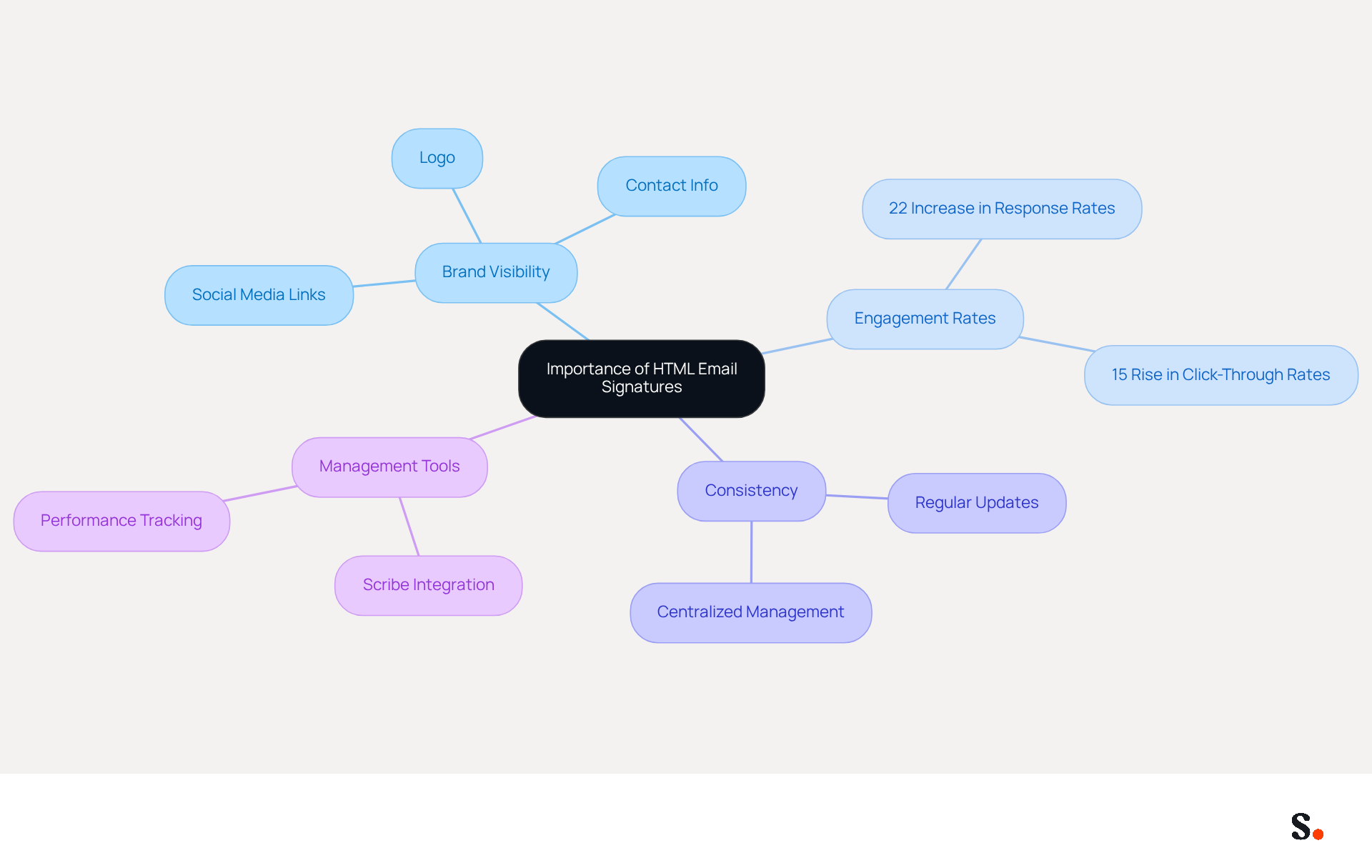
HTML digital representations are essential marketing tools that significantly impact your brand's visibility and credibility. By incorporating elements such as your logo, contact information, and social media links, each message becomes a branding opportunity. Research indicates that professional branding in messages leads to higher engagement rates, making it a critical component of effective communication.
Branded formats drive a 22% increase in response rates and a 15% rise in click-through rates to company websites. Moreover, 76% of recipients indicate that customized identifiers increase their confidence in the sender, emphasizing the necessity for businesses to invest in effective HTML identifiers that align with their identity and marketing goals. Centralized management of these identifiers ensures consistency across communications, particularly for larger organizations.
However, many organizations overlook the importance of regularly updating their digital identifiers, risking brand inconsistency. Regular updates are crucial, as 31% of users only refresh their identifiers every few years.
With Scribe, every modification made in your Aircall setup is automatically reflected in your digital identifiers, ensuring seamless synchronization and brand consistency without requiring action from your teammates. Furthermore, with Scribe's integration with Calendly, your email footers update automatically, saving you time and effort.
Scribe's SOC 2 Type II compliance ensures that your data is protected, making it a trustworthy option for organizations aiming to improve their management of digital signatures. Case studies indicate that organizations employing consistent branded communication footers report significant enhancements in perceived professionalism and engagement.
Investing in effective digital identifiers is not just an option; it is a necessity for maintaining brand integrity and enhancing engagement.
Gather Essential Tools for HTML Signature Creation
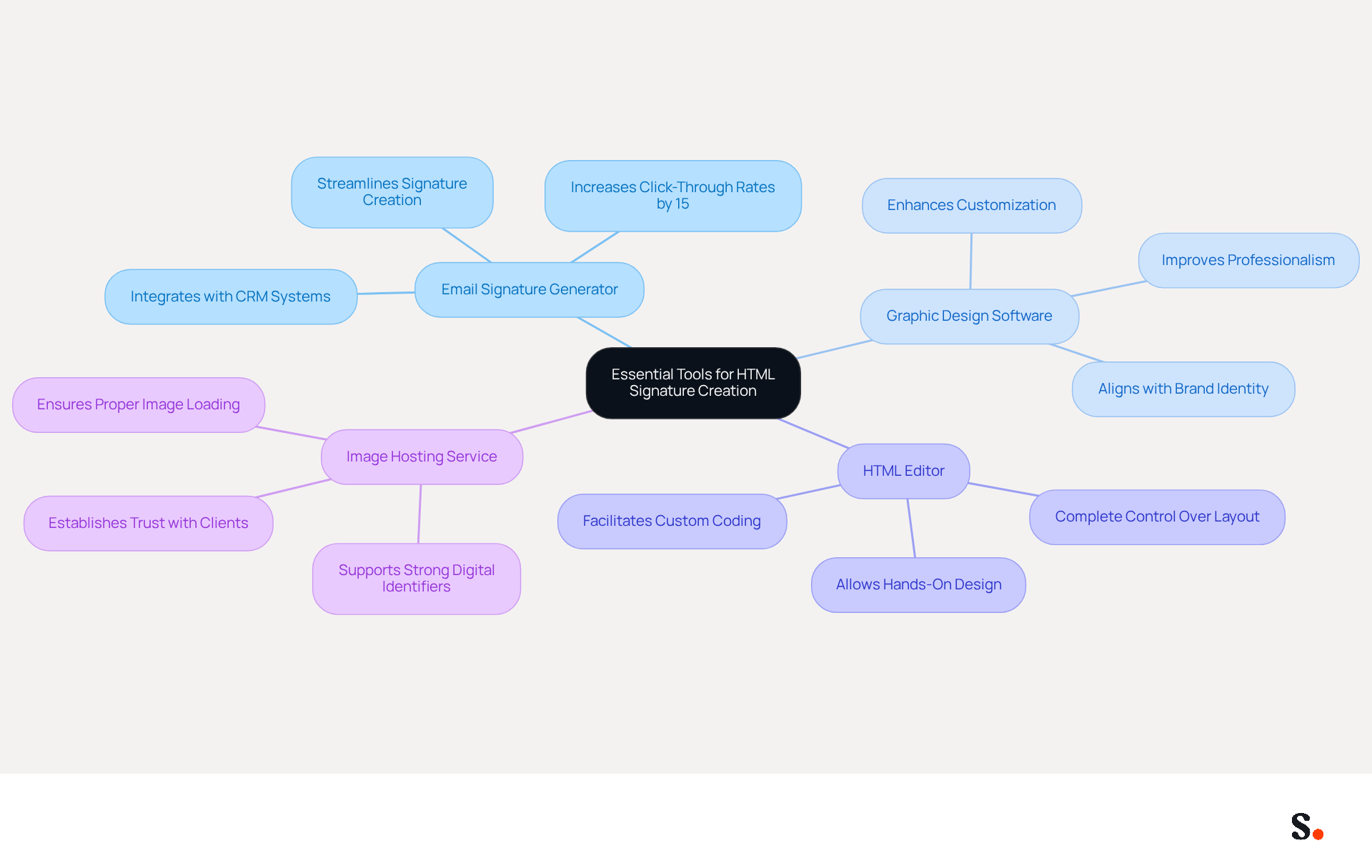
To create an effective HTML email signature, it is essential to have the right tools at your disposal:
- Email Signature Generator: Utilize online platforms like HubSpot's Email Signature Generator to streamline the process. Branded footers can lead to a 15% increase in click-through rates, underscoring the importance of this tool for effective marketing.
- Graphic Design Software: For enhanced customization, utilize tools such as Canva or Adobe Spark. These applications allow you to design logos and banners that align with your brand identity, enhancing visual appeal. A carefully planned design can greatly enhance the professionalism of your correspondence footer.
- HTML Editor: If you prefer a hands-on approach, an HTML editor such as Notepad++ or Visual Studio Code can be beneficial for coding your design from scratch, giving you complete control over the layout.
- Image Hosting Service: Utilize platforms such as Imgur or your own site to store images, ensuring they load properly in messages. This is crucial, as strong digital identifiers are essential for establishing trust and communication with clients, with 52% of professionals highlighting their importance.
Equipping yourself with these tools will streamline the creation process, helping you understand how to make a html signature that enhances your brand's visibility and engagement. Furthermore, think about adding personal invitations or discounts in your contact details, as this can enhance audience engagement and promote interaction.
Create Your HTML Email Signature: Step-by-Step Process
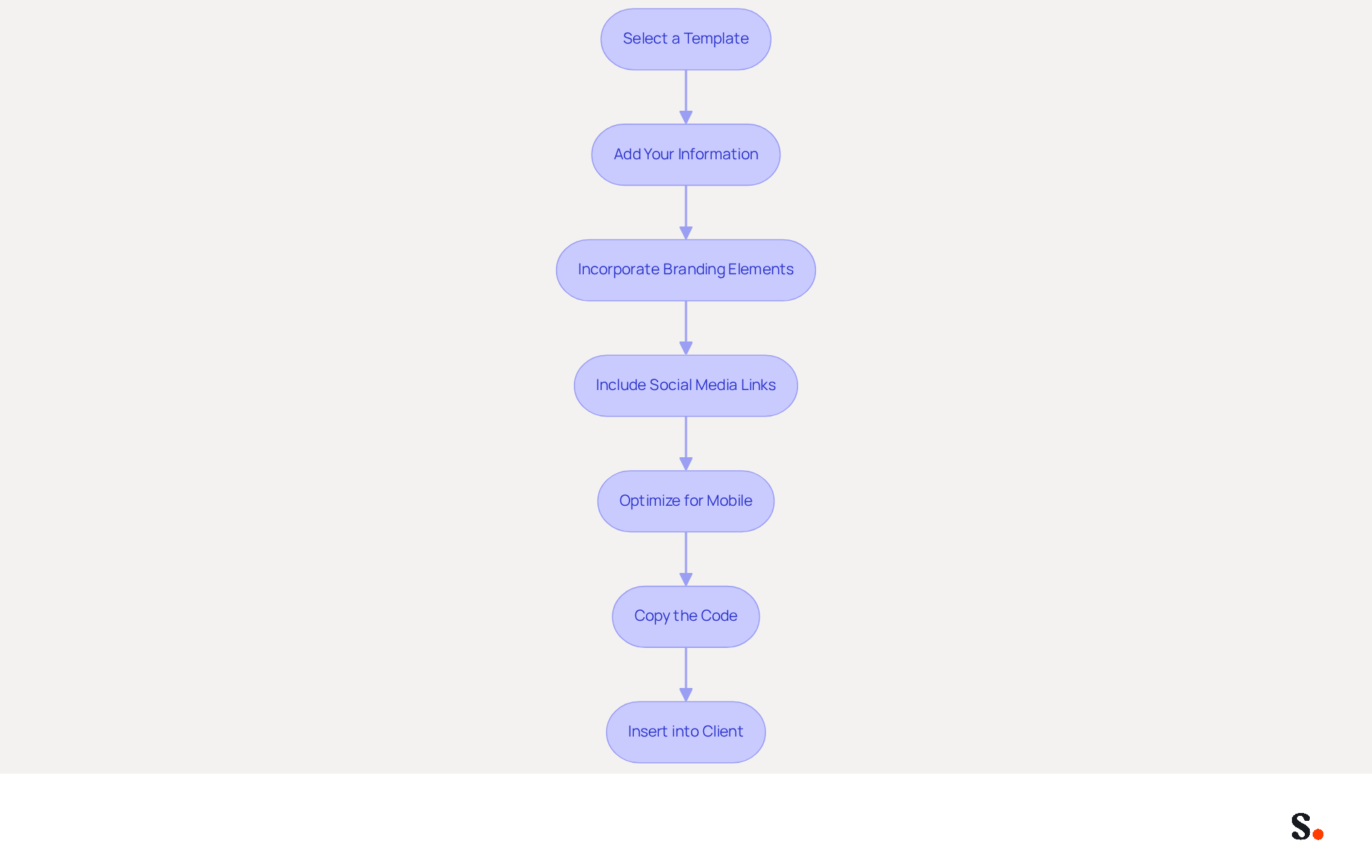
Understanding how to make a html signature is crucial for creating an effective HTML email signature and establishing a professional digital presence. Follow these steps to ensure your email signature reflects your brand and engages your audience:
- Select a Template that Aligns with Your Brand: Start by choosing a template that reflects your brand's aesthetic. Many email footer generators offer customizable options to suit your needs.
- Add Your Information: Make sure your information is accurate and up-to-date; after all, 76% of recipients trust senders who use branded identifiers. Include essential details such as your name, title, company name, phone number, and website.
- Incorporate Branding Elements: Add your logo and select company colors to maintain consistency. Utilize high-quality images hosted online to avoid broken links. A well-crafted email footer can enhance professionalism, elevating the average perception score from 6.2 to 8.5 out of 10.
- Include Social Media Links: Add icons linking to your social media profiles to encourage recipients to connect with you across platforms. This can greatly enhance brand visibility, as 52% of prospects prefer using messages as their primary communication channel.
- Optimize for Mobile: Ensure your email footer is mobile-friendly. Test it on various devices to confirm proper display, as 52% of U.S. workers are hybrid and access messages on different platforms.
- Copy the Code: Once your mark appears refined, copy the code provided by the generator or your code editor.
- Insert into Client: Navigate to your client settings (like Gmail or Outlook) and paste the code into the section for your personal mark. Save your changes to complete your endorsement.
Ultimately, understanding how to make a html signature can transform your digital communication and significantly impact your professional image.
Troubleshoot Common Issues in HTML Signature Creation
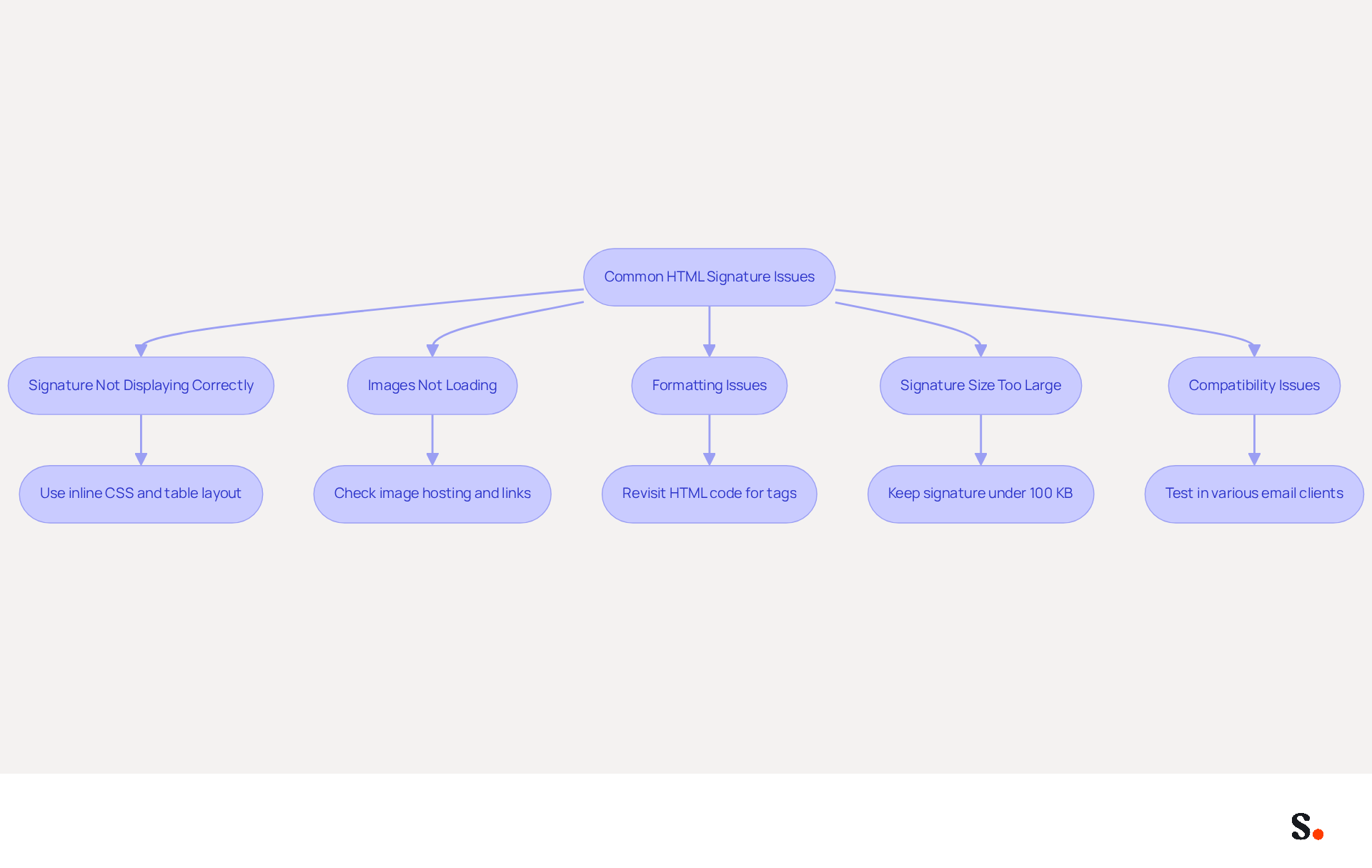
Designing a digital communication identifier can present challenges that, if not addressed, may impact your professional image. Here are some common problems and how to troubleshoot them:
- Signature Not Displaying Correctly: If your signature looks different in various email clients, use inline CSS for styling and a table layout to maintain consistency across platforms.
- Images Not Loading: If your images aren't showing up, check that they're hosted online and that the links are accurate. Avoid using local file paths, as they will not work for recipients.
- Formatting Issues: If your signature appears misaligned, revisit the HTML code to ensure that all tags are properly closed and that there are no unnecessary spaces or line breaks that could disrupt the layout.
- Signature Size Too Large: Keep your signature under 100 KB to ensure quick loading times. Optimize images for web use to reduce file size without sacrificing quality.
- Compatibility Issues: Test your signature in various messaging clients, such as Gmail, Outlook, and Apple Mail, to identify any rendering problems. Modify the markup code as needed to address these issues.
Failure to resolve these issues may lead to miscommunication and a lack of professionalism. By proactively addressing these common issues, you can enhance the effectiveness of your email signature and ensure clear communication.
Conclusion
An effective HTML email signature serves as more than just a technical element; it is a vital marketing tool that can elevate brand visibility and engagement. By utilizing specific tools such as email signature generators and graphic design software, organizations can ensure that their email signatures reflect their brand identity while fostering trust and professionalism in every communication.
Throughout this guide, key steps have been outlined, from understanding the importance of HTML signatures to troubleshooting common issues. Many organizations struggle to maintain brand consistency and optimize for mobile devices, which can hinder engagement. The emphasis on using the right resources highlights the necessity of equipping oneself with the tools that facilitate these goals.
In a world where digital communication is paramount, investing in a well-crafted HTML email signature is essential for any organization aiming to stand out. Organizations that overlook the potential of a well-crafted email signature may find themselves at a disadvantage in a competitive digital landscape. By adopting best practices and using solutions like Scribe, they can ensure updates are seamless and security standards are met. Embrace the power of effective email signatures to transform your communication strategy and drive meaningful engagement with your audience.
Frequently Asked Questions
Why are HTML email signatures important for businesses?
HTML email signatures are essential marketing tools that enhance brand visibility and credibility. They turn each message into a branding opportunity by incorporating elements like logos, contact information, and social media links.
What impact do branded email signatures have on engagement rates?
Branded formats can drive a 22% increase in response rates and a 15% rise in click-through rates to company websites, highlighting their effectiveness in communication.
How do customized identifiers affect recipient confidence?
Research shows that 76% of recipients feel more confident in the sender when they see customized identifiers, underscoring the importance of effective HTML identifiers for businesses.
What is the significance of centralized management of digital identifiers?
Centralized management ensures consistency across communications, which is particularly important for larger organizations to maintain a cohesive brand image.
How often do organizations typically update their digital identifiers?
Many organizations overlook the importance of regular updates, with 31% of users only refreshing their identifiers every few years, risking brand inconsistency.
How does Scribe help with managing digital identifiers?
With Scribe, any modifications made in your Aircall setup are automatically reflected in your digital identifiers, ensuring seamless synchronization and brand consistency without requiring additional action from teammates.
What integration does Scribe offer to simplify email footer updates?
Scribe integrates with Calendly, allowing your email footers to update automatically, which saves time and effort in managing digital signatures.
What compliance does Scribe have to ensure data protection?
Scribe is SOC 2 Type II compliant, ensuring that your data is protected and making it a trustworthy option for organizations looking to improve their management of digital signatures.
What benefits do organizations report from using consistent branded communication footers?
Case studies indicate that organizations with consistent branded communication footers experience significant enhancements in perceived professionalism and engagement.
Why is investing in effective digital identifiers considered a necessity?
Investing in effective digital identifiers is crucial for maintaining brand integrity and enhancing engagement, making it an essential component of modern business communication.
List of Sources
- Understand the Importance of HTML Email Signatures
- Why Every Business Needs a Professional HTML Email Signature in 2026 (https://nasirportfolio.github.io/email-marketing-articles/professional-html-email-signature.html)
- 40+ Email Signature Statistics for 2026 (Data + Insights) (https://wavecnct.com/blogs/email-signature-statistics)
- The impact of email signatures on your branding (https://signitic.com/en/resources/the-impact-of-email-signatures-on-your-branding)
- Why Are Email Signatures Key to Brand Awareness? | QuickMail (https://quickmail.com/role-of-email-signatures-in-brand-awareness)
- Exclaimer Research: 67% of Marketers Expect Email Signatures to Support With Lead Gen In 2023 (https://businesswire.com/news/home/20230612141095/en/Exclaimer-Research-67-of-Marketers-Expect-Email-Signatures-to-Support-With-Lead-Gen-In-2023)
- Gather Essential Tools for HTML Signature Creation
- Email signature statistics: Why every business should optimize their email signatures — Stripo.email (https://stripo.email/blog/email-signature-statistics-why-every-business-should-optimize-their-email-signatures)
- 10 Best Email Signature Makers Free for Boosting Your Brand (https://scribe-mail.com/en-US/blog/10-best-email-signature-makers-free-for-boosting-your-brand)
- WiseStamp Sets a New Standard for Email Signature Creation (https://prnewswire.com/news-releases/wisestamp-sets-a-new-standard-for-email-signature-creation-302689811.html)
- 10 Best Email Signature Software Reviewed In 2026 (https://thecmo.com/tools/best-email-signature-software)
- 40+ Email Signature Statistics for 2026 (Data + Insights) (https://wavecnct.com/blogs/email-signature-statistics)
- Create Your HTML Email Signature: Step-by-Step Process
- 40+ Email Signature Statistics for 2026 (Data + Insights) (https://wavecnct.com/blogs/email-signature-statistics)
- The impact of email signatures on your branding (https://signitic.com/en/resources/the-impact-of-email-signatures-on-your-branding)
- Email Signature Best Practices Guide With Examples - MailerLite (https://mailerlite.com/blog/email-signature-best-practices)
- Troubleshoot Common Issues in HTML Signature Creation
- Why HTML Email Signatures Break When People Reply | IT Support Essex | Trichromic LLP (https://trichromic.co.uk/news/why-html-email-signatures-break-when-people-reply)
- How to solve problems with email signatures in Microsoft 365? (https://mail-signatures.com/articles/problems-email-signatures-office-365)
- Email Signature Troubleshooting - Problems & Solutions - Gimmio (https://blog.gimm.io/email-signature-troubleshooting)
- 4 Steps to Fix Your Outlook Signature Not Showing Issues (https://scribe-mail.com/en-US/blog/4-steps-to-fix-your-outlook-signature-not-showing-issues)
Get started with Scribe
See why teams switch to Scribe
Free 14-day trial — no credit card.