Best Dimensions for Email Signature: Optimize Your Marketing Strategy
In an era where digital communication shapes first impressions, defining optimal dimensions for email signatures is essential. By adhering to best practices in
Sophie Grant
Email Signature Specialist, Scribe

Introduction
In an era where digital communication shapes first impressions, defining optimal dimensions for email signatures is essential. By adhering to best practices in size and design, organizations can enhance their marketing strategies and ensure brand consistency across all communications.
Businesses often struggle to maintain a consistent brand image across different platforms, which raises the question of how to effectively balance aesthetics and functionality in their email signatures. This article explores the best dimensions and practices for email signatures, empowering marketing teams to optimize their digital presence and engage their audience more effectively.
Addressing these challenges is vital for maximizing audience engagement and reinforcing brand identity.
Define Optimal Pixel Dimensions for Email Signatures
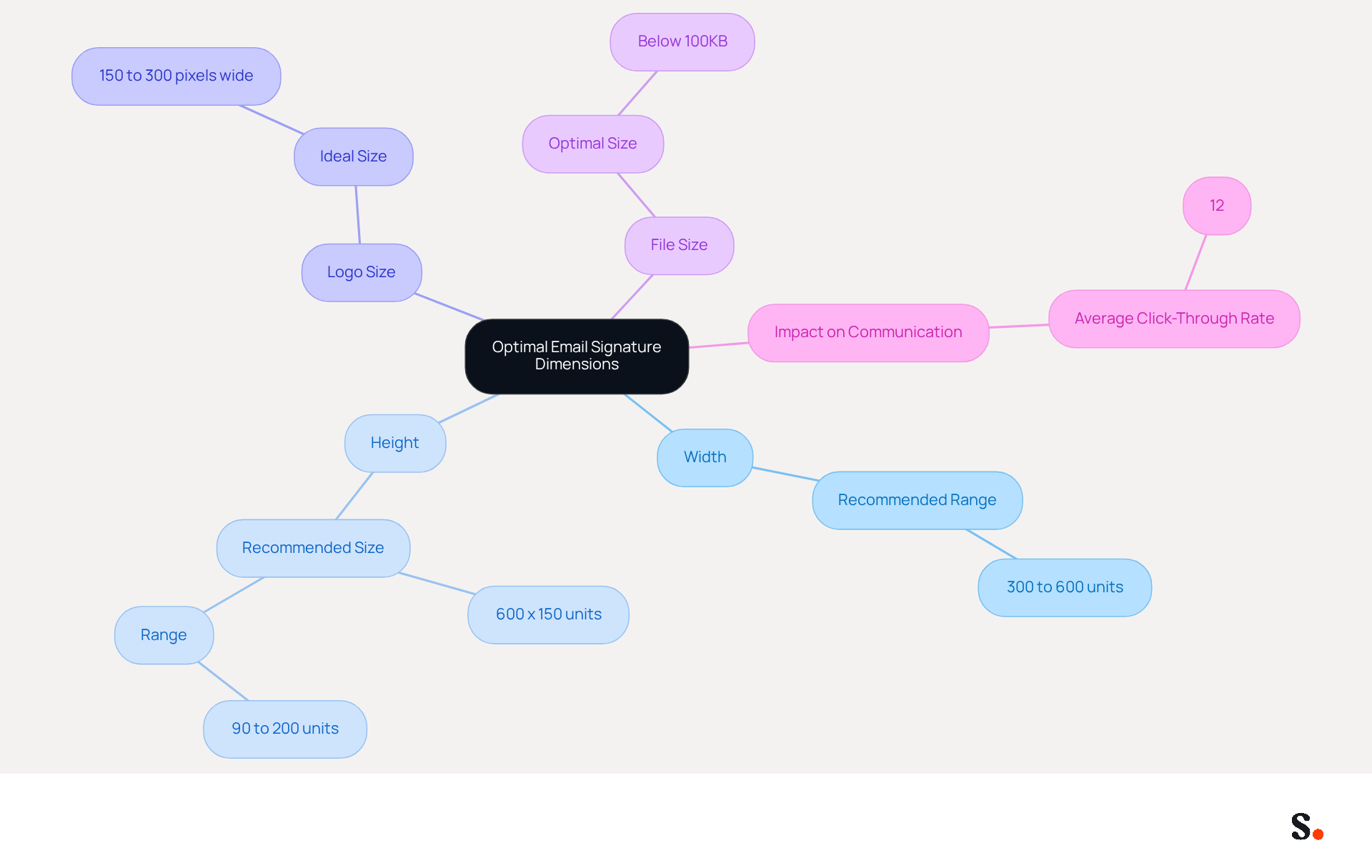
Defining the best dimensions for email signature is essential for effective email communication. The best dimensions for email signature typically vary in width from 300 to 600 units, while the height should range between 90 and 200 units. This range helps ensure signatures are sized correctly, preventing display issues in various email clients and maintaining readability.
The best dimensions for email signature are commonly set at a width of 600 units and a height of 150 units. This size effectively balances visibility and aesthetics, allowing for the inclusion of logos, contact information, and social media links without overwhelming the recipient. Logos should ideally be sized between 150 and 300 pixels wide to maintain clarity and professionalism. Maintaining the total file size below 100KB is crucial for fast loading times, as exceeding this limit may lead to slower email loading times and increased chances of being flagged as spam. Following these guidelines can lead to measurable improvements in recipient interaction, with case studies showing an average click-through rate of 12% on custom banners. By implementing these best practices, businesses can significantly enhance their email communication effectiveness.
Establish Ideal File Size for Efficient Email Signatures
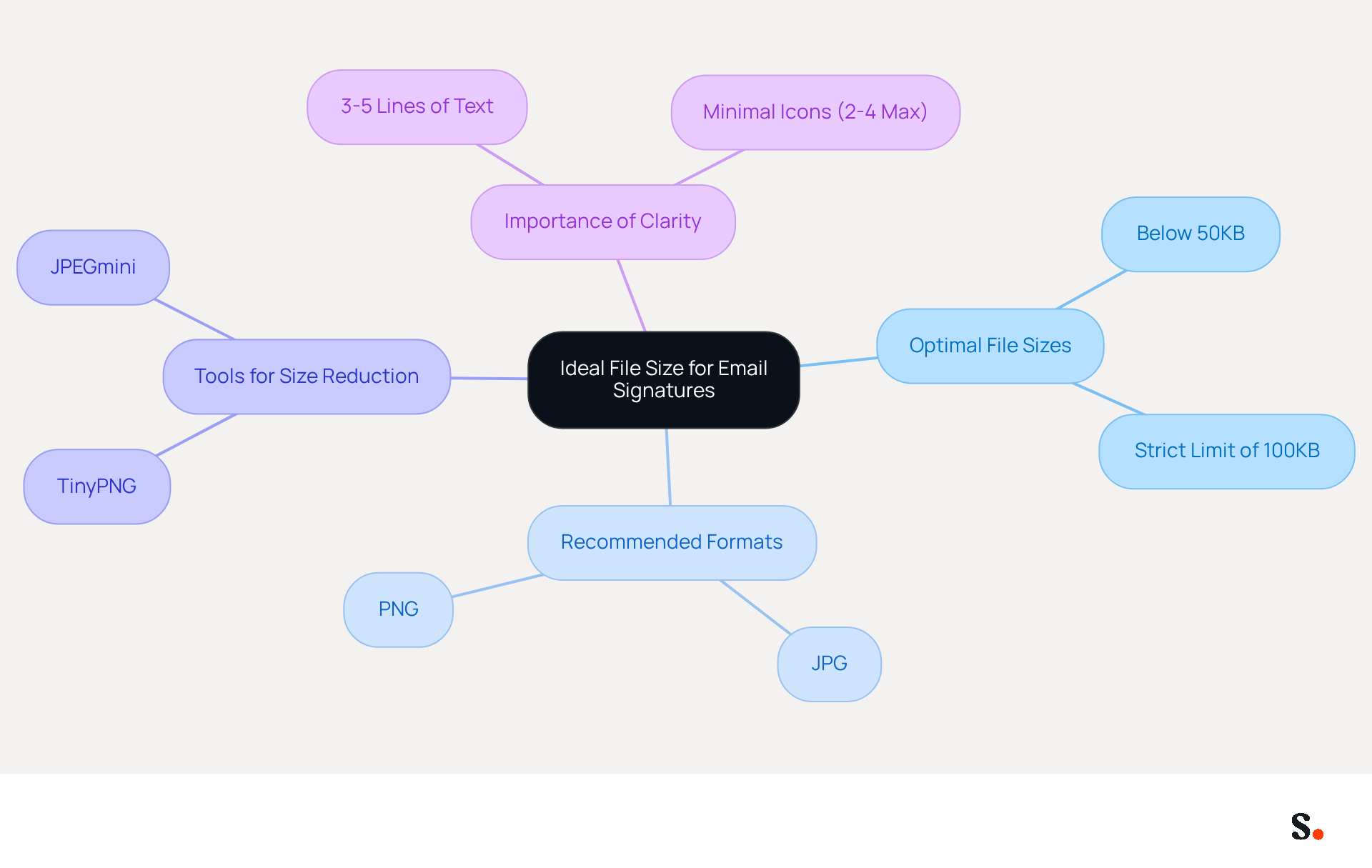
Establishing the right file size for digital identifiers is essential for effective online communication. The optimal file size for images in correspondence should be below 50KB, with a strict limit of 100KB. This limitation is crucial for ensuring fast loading times, especially on mobile devices, where most messages today are accessed.
For optimal file sizes, use formats like JPG or PNG, which balance quality and size effectively. Reducing the size of images before incorporating them into your message can greatly decrease their file size without sacrificing visual quality. Tools like TinyPNG or JPEGmini effectively reduce image sizes, ensuring that images remain lightweight and effective.
Moreover, maintaining visually compact identifiers, comprising 3-5 lines of text and minimal icons (2-4 max), is essential for clarity and professionalism. Oversized images can detract from the professionalism of your communication.
As Jitendra Sheth, Founder of Scribe, emphasizes, "Your electronic identifier is more than a digital business card - it is a final touchpoint for your credibility." Adhering to these guidelines ensures that your communications are both effective and professional. A well-optimized digital communication footer contributes to a positive user experience, reinforcing professionalism and brand integrity.
Optimize Email Signatures for Mobile Responsiveness
To maximize the effectiveness of email identifiers, ensuring mobile responsiveness is crucial. Here are some best practices:
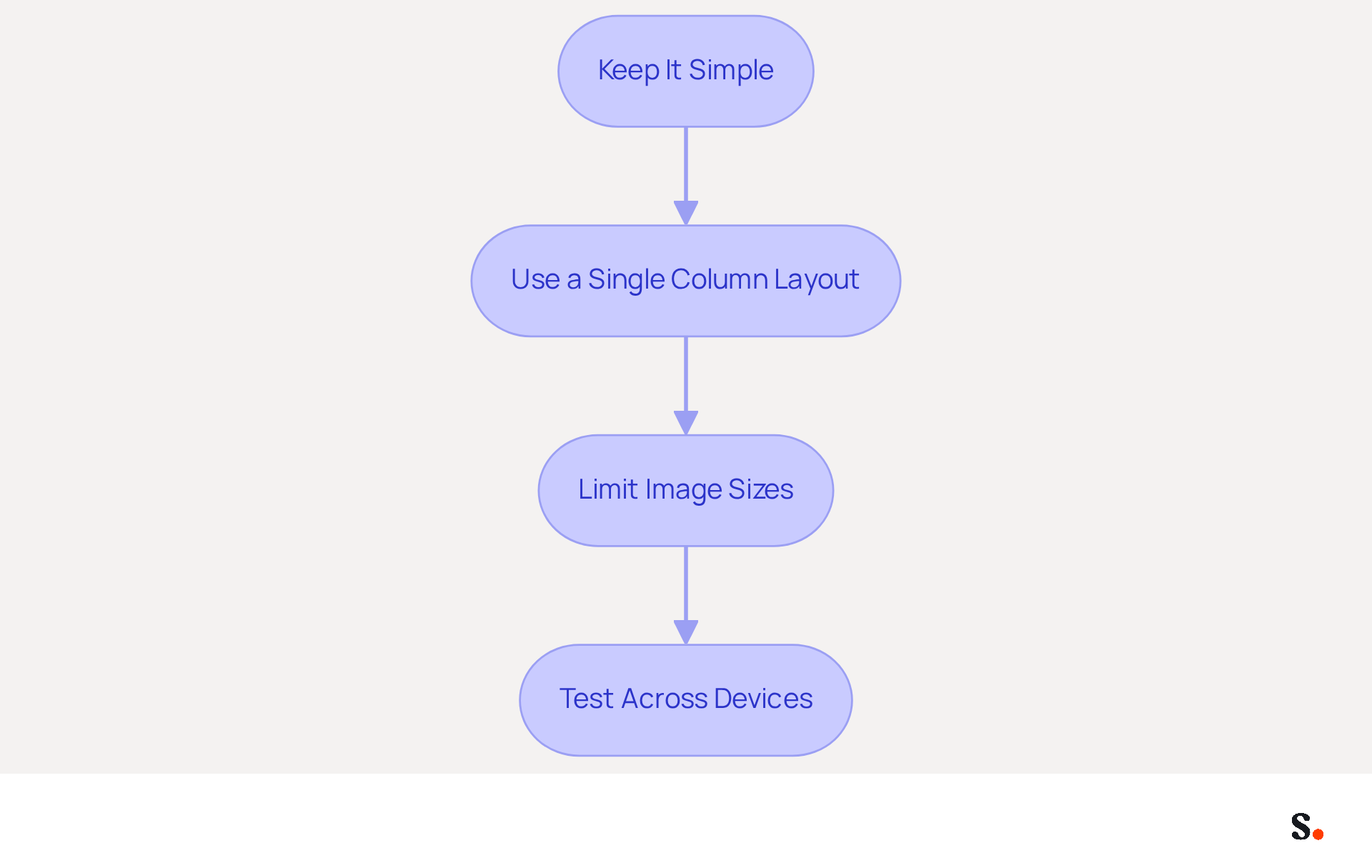
- Keep It Simple: Limit the amount of text and images in your email footer. A cluttered email footer can hinder readability on smaller screens, making simplicity essential for clarity.
- Use a Single Column Layout: A vertical layout is more suitable for mobile devices, allowing users to scroll easily without needing to zoom in, thus improving user experience.
- Limit Image Sizes: Ensure that images are not too large; ideally, they should be no wider than 320 pixels. This prevents horizontal scrolling and ensures that the footer fits well on the screen, accommodating mobile users effectively.
- Test Across Devices: Always test your message footer on various mobile devices and messaging clients to ensure it displays correctly. Utilizing tools such as Litmus ensures accurate simulation of how your email footer will display across various platforms, ensuring compatibility and functionality.
By following these guidelines, businesses can create digital identifiers that are not only visually appealing but also functional on mobile devices, significantly enhancing user engagement. Neglecting mobile optimization could lead to missed opportunities in engaging a significant portion of your audience.
Ensure Brand Consistency with Standardized Signature Dimensions
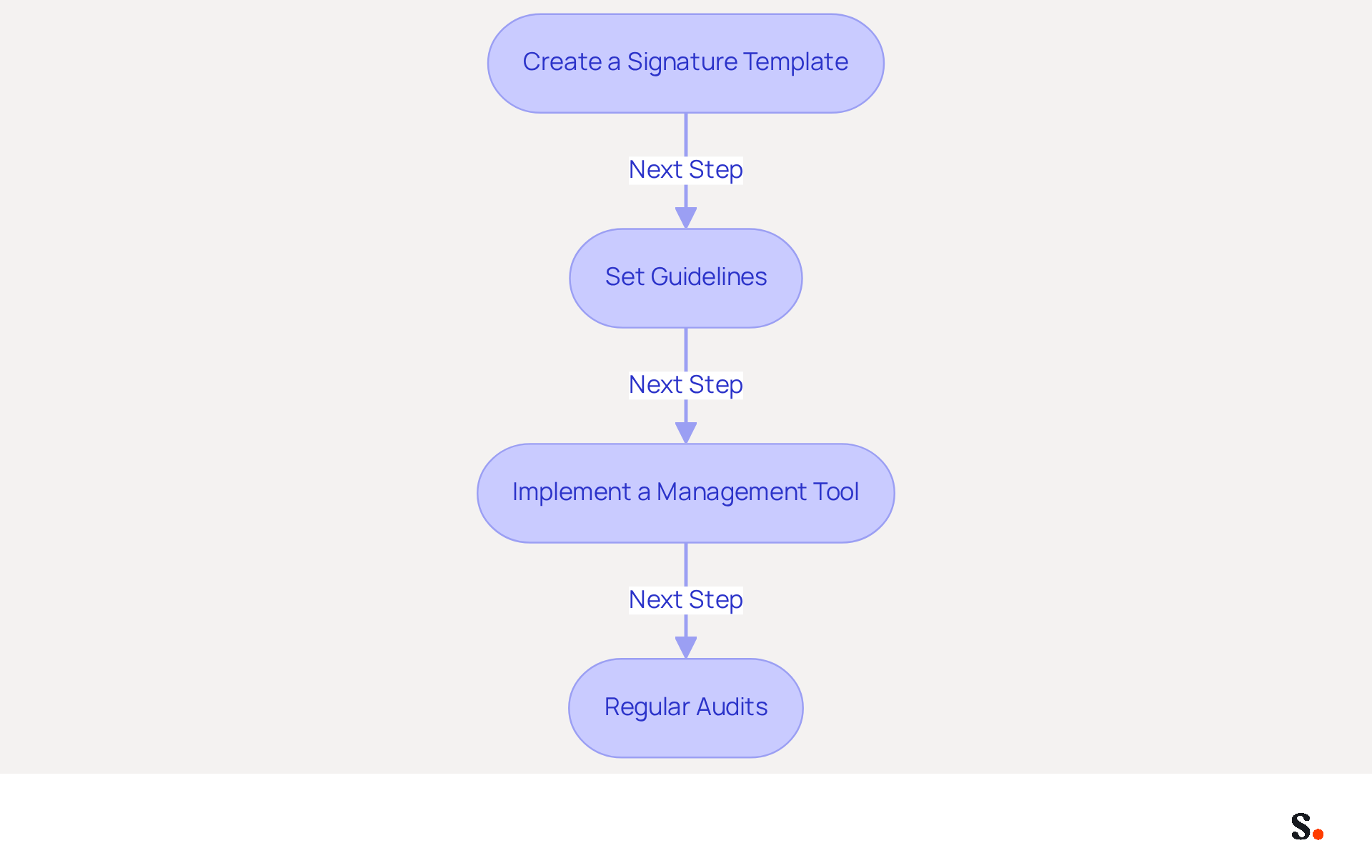
To maintain a professional image, consistency in standardized dimensions across your organization is crucial. Here are effective steps to achieve this:
- Create a Signature Template: Develop a standardized template that incorporates your logo, colors, and fonts. This ensures that all employees utilize the same design elements, reinforcing brand identity.
- Set guidelines by clearly outlining the best dimensions for email signature and the appropriate file sizes for email branding. For example, indicate that all marks should be 600 pixels wide and 150 pixels tall, with images not exceeding 100KB. This uniformity is essential for maintaining brand recognition.
- Implement a Management Tool: Consider using a tool like Scribe to automate signature management in your correspondence. This enables smooth updates and ensures that all approvals remain consistent throughout the organization, significantly reducing the potential for errors. Scribe is SOC 2 Type II certified and compliant with GDPR and CCPA, ensuring that your email signature management is secure and trustworthy. Organizations that utilize centralized management tools like Scribe report 85% better consistency in their identity and significantly higher engagement rates. Additionally, by joining Scribe's Affiliate Program, you can earn a 50% commission while promoting consistency, making it a win-win for your marketing efforts.
- Regular Audits: Periodically review digital communication identifiers to ensure compliance with branding guidelines. This practice helps identify discrepancies and allows for timely corrections, maintaining a cohesive and professional identity. Without automated communication footers, businesses risk damaging customer relationships and undermining their brand identity.
By implementing these practices, businesses can enhance their brand image and ensure that every message sent reflects a unified and professional identity. Ultimately, a cohesive email signature strategy can be a game-changer in how your brand is perceived. Additionally, 80% of businesses consider branded email signatures a key element of communication, underscoring their significance in marketing strategies.
Conclusion
Many organizations overlook the importance of email signature dimensions, leading to ineffective communication and missed marketing opportunities. Defining the optimal dimensions for email signatures is essential for enhancing communication and marketing strategies. By adhering to specific width and height guidelines, organizations can ensure their signatures are visually appealing and functional across various email clients. This meticulous approach enhances readability and strengthens brand identity, making a significant impact on recipient engagement.
Key insights from the article highlight the importance of maintaining ideal file sizes and mobile responsiveness. Keeping images below 100KB and utilizing formats like JPG or PNG ensures quick loading times, particularly on mobile devices. Additionally, implementing a single-column layout and testing across different platforms can significantly enhance user experience. Standardizing signature dimensions across an organization further solidifies brand consistency, which is essential for professional communication.
Optimizing email signatures goes beyond aesthetics; it’s a strategic approach that can yield tangible marketing results. By leveraging tools like Scribe, which offers fast deployment and compliance with security standards, organizations can achieve 100% brand consistency and improve engagement rates. By prioritizing these strategies, organizations can transform their email signatures into powerful tools for engagement and brand recognition.
Frequently Asked Questions
What are the optimal pixel dimensions for email signatures?
The best dimensions for email signatures typically vary in width from 300 to 600 units and in height from 90 to 200 units. The commonly recommended size is a width of 600 units and a height of 150 units.
Why is it important to define the dimensions of email signatures?
Defining the dimensions of email signatures is essential for effective email communication as it helps prevent display issues in various email clients and maintains readability.
What is the ideal size for logos in email signatures?
Logos should ideally be sized between 150 and 300 pixels wide to maintain clarity and professionalism.
What is the recommended total file size for email signatures?
It is crucial to maintain the total file size of email signatures below 100KB for fast loading times, as exceeding this limit may lead to slower email loading and increased chances of being flagged as spam.
How can following these email signature guidelines impact recipient interaction?
Following these guidelines can lead to measurable improvements in recipient interaction, with case studies showing an average click-through rate of 12% on custom banners.
List of Sources
- Define Optimal Pixel Dimensions for Email Signatures
- What Size Should Email Signature Be? Key Insights for Marketers (https://scribe-mail.com/en-US/blog/what-size-should-email-signature-be-key-insights-for-marketers)
- The comprehensive guide to email signature sizes (https://signature.email/guides/comprehensive-guide-email-signature-sizes)
- Email Signature Size and Image Best Practices (https://maileditor.net/blog/email-signature-size-and-image-best-practices)
- What Is The Best Email Signature Size? | Rocketseed (https://rocketseed.com/resources/email-design-guidelines)
- Email Signature Size and Layout Tips (https://linkedin.com/pulse/email-signature-size-layout-tips-bulksignature-nuy7f)
- Establish Ideal File Size for Efficient Email Signatures
- The comprehensive guide to email signature sizes (https://signature.email/guides/comprehensive-guide-email-signature-sizes)
- What Is the Ideal Email Signature Size? (https://oppora.ai/blog/email-signature-size)
- Email Signature Size and Layout Tips (https://linkedin.com/pulse/email-signature-size-layout-tips-bulksignature-nuy7f)
- Optimize Email Signatures for Mobile Responsiveness
- 40+ Email Signature Statistics for 2026 (Data + Insights) (https://wavecnct.com/blogs/email-signature-statistics)
- Top 10+ best practices for email signatures design in 2026 (https://mysignature.io/blog/email-signature-best-practices)
- Ensure Brand Consistency with Standardized Signature Dimensions
- The impact of email signatures on your branding (https://signitic.com/en/resources/the-impact-of-email-signatures-on-your-branding)
- Research Recap: Branded Email Signatures Increase Company Recognition, Trust - Demand Gen Report (https://demandgenreport.com/industry-news/research-recap-branded-email-signatures-increase-company-recognition-trust/47252)
- Maximize Marketing Impact with Automated Email Signatures Best Practices (https://scribe-mail.com/en-US/blog/maximize-marketing-impact-with-automated-email-signatures-best-practices)
- Why Email Signatures Must Be In Your 2026 Marketing Plan | Rocketseed (https://rocketseed.com/blog/2026-marketing-plan-email-signatures)
Get started with Scribe
Manage signatures across your whole team
Free 14-day trial — no credit card.