Best Font for Outlook Signature: Key Practices for Marketing Managers
Selecting the right font for an Outlook signature can be a daunting task, as it significantly impacts communication effectiveness and brand perception
Sophie Grant
Email Signature Specialist, Scribe
On this page
Introduction
Selecting the right font for an Outlook signature can be a daunting task, as it significantly impacts communication effectiveness and brand perception. Marketing managers must navigate the complexities of readability, compatibility, and brand identity to choose fonts that resonate with their audience while maintaining professionalism.
With numerous options available, determining which fonts enhance clarity and reinforce brand consistency can be challenging. We will explore best practices for selecting fonts in email signatures, providing insights to elevate your digital communications and boost engagement.
Prioritize Readability and Compatibility in Font Selection
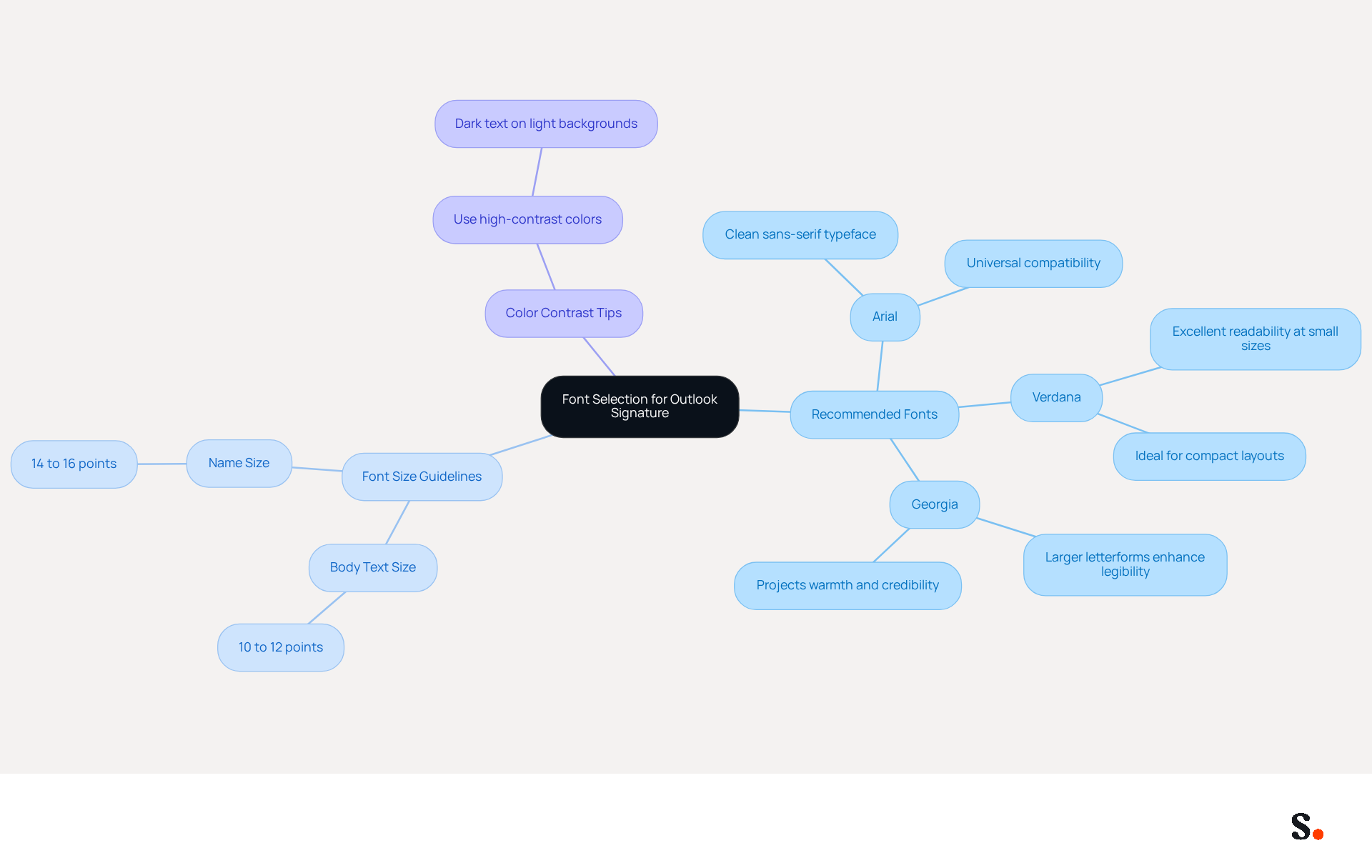
Choosing the best font for outlook signature is crucial for ensuring clear and effective communication. To ensure clarity and universal support across major email clients, prioritize readability and compatibility by selecting typefaces like:
- Arial
- Verdana
- Georgia
These are considered the best font for outlook signature.
- Arial is often considered the best font for outlook signature because it is a clean sans-serif typeface that is particularly suitable for professional communications due to its modern appearance and its installation on virtually every operating system, allowing it to work at any size.
- Verdana is often regarded as the best font for outlook signature because it excels in readability, especially at smaller sizes, making it ideal for compact layouts.
- Georgia is considered the best font for outlook signature because its larger letterforms and generous spacing enhance legibility on screens, projecting warmth and credibility.
To ensure readability, the best font for outlook signature should have a size of:
- 10 to 12 points for body text
- 14 to 16 points for names
This range strikes a balance between clarity and space efficiency, making it the best font for outlook signature to ensure that your message is easily accessible. Additionally, utilize high-contrast colors, such as dark text on light backgrounds, to ensure that the best font for outlook signature maintains professionalism and readability.
It's important to test your emails on different devices and platforms, including dark mode, to spot any display issues and make necessary adjustments for a consistent look, especially when using the best font for outlook signature. Adhering to these guidelines will enhance your email communications and solidify your brand's reputation.
Identify Key Characteristics of Effective Email Signature Fonts
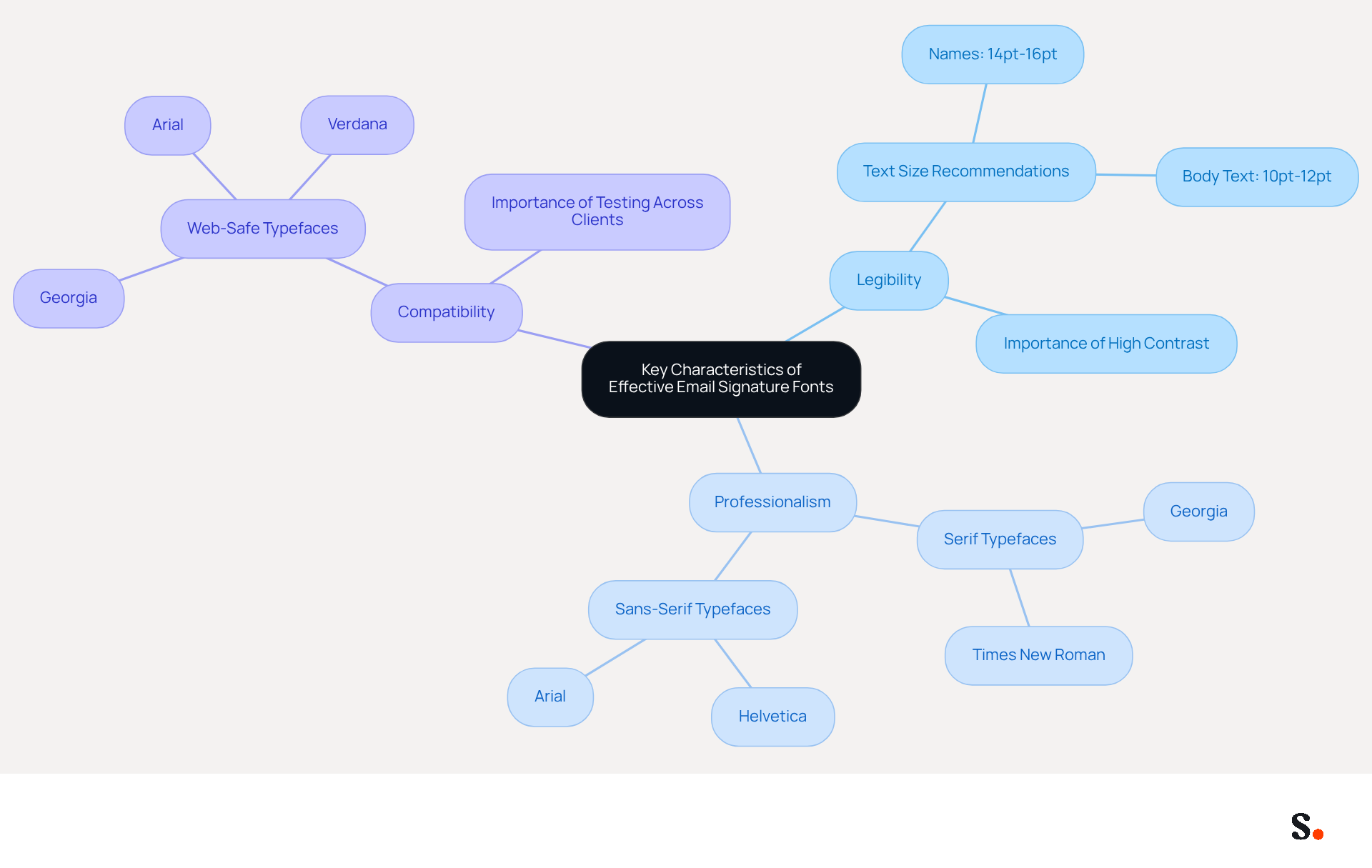
Selecting the best font for outlook signature is more than just a design choice; it can significantly impact communication effectiveness. The best font for outlook signature must embody several key characteristics:
- Legibility
- Professionalism
- Compatibility
Legibility is paramount, ensuring that text remains easily readable, even at smaller sizes. Studies show that keeping text size between 10pt and 12pt makes it easier to read on various devices, while larger sizes (14-16pt) for names create a visual hierarchy.
Professionalism is achieved through clean, simple designs that utilize the best font for outlook signature to mirror the brand's image. Serif typefaces like Georgia and Times New Roman suggest formality and stability, making them suitable for traditional industries. In contrast, sans-serif typefaces such as Helvetica and Arial are considered the best font for outlook signature, providing a modern aesthetic that appeals to tech-savvy audiences.
Compatibility is essential, as the best font for outlook signature must display correctly across different messaging clients and devices. Utilizing web-safe typefaces such as Arial, Georgia, and Verdana is considered the best font for outlook signature, as it guarantees uniform display and avoids unforeseen substitutions that could interfere with presentation.
Additionally, it is essential to maintain high contrast between text and background colors for optimal readability. Testing message identifiers across various clients is also crucial to ensure uniform rendering. Ultimately, choosing the best font for outlook signature not only enhances readability but also reinforces brand identity in every digital interaction.
Align Font Choices with Brand Identity for Consistency
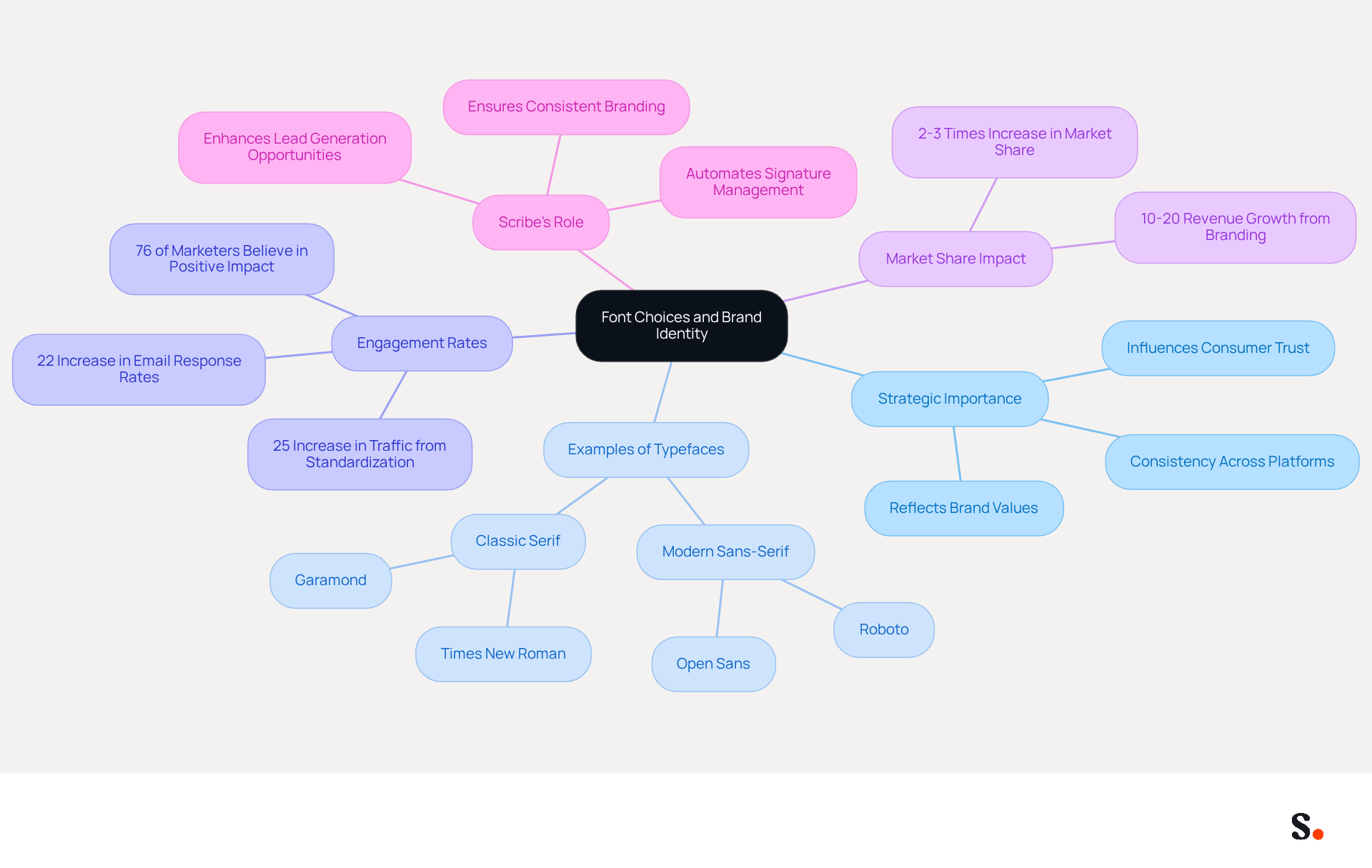
Selecting the right typefaces for digital communication is not just a design choice; it’s a strategic decision that reflects your brand identity. Typefaces should embody your values and principles. For instance, a tech organization might choose modern sans-serif styles like Roboto or Open Sans, while a law firm may prefer classic serif styles such as Times New Roman or Garamond to convey professionalism and trust. Consistency in type usage across all marketing platforms, including correspondence identifiers, strengthens brand awareness and promotes a unified image that resonates with your audience.
Yet, many marketers still face challenges in achieving consistent engagement rates. Research shows that 76% of marketers believe that digital identifiers positively influence engagement rates, underscoring the importance of branding consistency. A research analysis involving a multinational corporation revealed that standardizing its electronic correspondence identifiers resulted in a 25% increase in traffic to specific landing pages, demonstrating how strategic text alignment can drive measurable results. Furthermore, expert insights indicate that achieving consistency in identity can lead to a 2-3 times increase in market share, highlighting the significance of careful typeface selection.
Scribe automates digital signature management, eliminating the hassle of manual updates and ensuring every message showcases consistent professional branding. This not only enhances the visual appeal of communications but also maximizes lead generation opportunities. By using typefaces that align with your identity, you enhance professionalism and foster trust with recipients, as 64% of consumers agree that a professionally branded message boosts their confidence in the sender. Considering the potential revenue boost from Scribe's services, evaluating your typeface choices becomes essential for effective communication and brand representation.
Implement Web-Safe Fonts and Fallback Options for Consistency
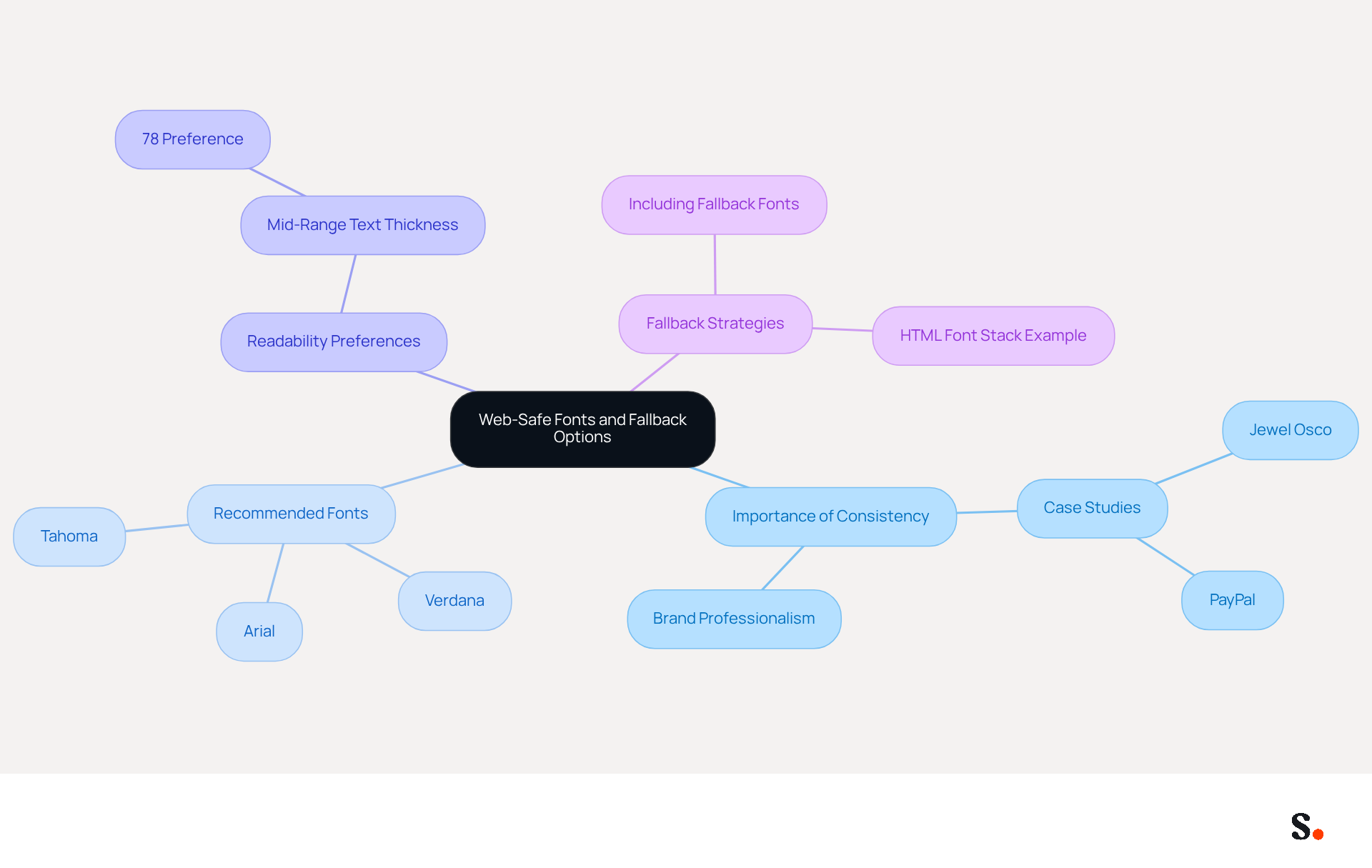
Inconsistent email signature displays can undermine your brand's professionalism, making it essential to use web-safe typefaces like Arial, Verdana, and Tahoma. These typefaces are universally supported, greatly decreasing the chances of rendering issues. Research shows that clarity in type selection is vital, as 78% of individuals prefer mid-range text thickness for readability. Additionally, always include fallback options in your typeface stack. For example, if you choose a custom typeface, indicate a fallback like font-family: CustomFont, Arial, sans-serif; in your HTML email. This guarantees that if the custom typeface is not present on the recipient's device, the client will revert to a web-safe typeface, preserving the signature's integrity and professionalism.
Case studies, such as those from Jewel Osco and PayPal, highlight the effectiveness of using web-safe fonts and fallback strategies to ensure consistent branding and readability across various platforms. Neglecting these practices could lead to a disjointed brand image, ultimately affecting your professional reputation.
Conclusion
Selecting the right font for an Outlook signature is crucial for conveying professionalism and reinforcing brand identity. When marketing managers focus on readability and compatibility, they can make their messages clear and visually appealing on any device or email client.
Research shows that using web-safe fonts like Arial and Verdana can significantly improve readability and brand consistency. Additionally, implementing fallback options in font stacks is essential for preserving the integrity of email signatures, ensuring they display correctly regardless of the recipient's device. The strategic alignment of font choices with brand identity can significantly impact engagement rates and overall communication effectiveness.
Choosing the right font for Outlook signatures goes beyond just aesthetics; it’s about making a lasting impression. By leveraging tools like Scribe, organizations can automate signature management, ensuring consistent branding and maximizing marketing ROI. Embracing these best practices not only elevates the professionalism of email communications but also positions brands for greater success in their digital interactions. The right font choice can elevate your brand's presence and ensure your communications are taken seriously.
Frequently Asked Questions
Why is font selection important for an Outlook signature?
Font selection is crucial for ensuring clear and effective communication in email signatures, as it affects readability and compatibility across major email clients.
What are the recommended fonts for an Outlook signature?
The recommended fonts for an Outlook signature are Arial, Verdana, and Georgia.
What are the characteristics of Arial as a font for Outlook signatures?
Arial is a clean sans-serif typeface that is modern in appearance, widely installed on operating systems, and works well at any size, making it suitable for professional communications.
Why is Verdana considered a good font for Outlook signatures?
Verdana excels in readability, especially at smaller sizes, making it ideal for compact layouts in email signatures.
What makes Georgia a suitable font for Outlook signatures?
Georgia features larger letterforms and generous spacing, which enhance legibility on screens and project warmth and credibility.
What is the recommended font size for body text in an Outlook signature?
The recommended font size for body text in an Outlook signature is between 10 to 12 points.
What font size should be used for names in an Outlook signature?
The recommended font size for names in an Outlook signature is between 14 to 16 points.
How can color contrast affect the readability of an Outlook signature?
Utilizing high-contrast colors, such as dark text on light backgrounds, helps maintain professionalism and readability in an Outlook signature.
Why is it important to test emails on different devices and platforms?
Testing emails on different devices and platforms, including dark mode, helps identify any display issues and ensures a consistent look for the Outlook signature.
How can following these font selection guidelines benefit email communications?
Adhering to these guidelines enhances email communications and solidifies your brand's reputation by ensuring clarity and professionalism.
List of Sources
- Prioritize Readability and Compatibility in Font Selection
- Best fonts for Email Signatures: 7 Email-Safe Options (https://wisestamp.com/guides/what-are-the-best-fonts-for-email-signatures)
- The Best Fonts for Email Signatures: A Professional Guide (https://linkedin.com/pulse/best-fonts-email-signatures-professional-guide-bulksignature-tmvuf)
- The Best Fonts for Email Signatures That Look Clean and Professional (https://bulksignature.com/blog/the-best-fonts-for-email-signatures)
- How to Choose Best Email Signature Fonts for Professionalism - NEWOLDSTAMP (https://newoldstamp.com/blog/how-to-choose-the-best-email-signature-fonts-to-make-your-email-look-professional)
- 10 Best Fonts for Email Signature That Enhance Professionalism (https://scribe-mail.com/en-US/blog/10-best-fonts-for-email-signature-that-enhance-professionalism)
- Identify Key Characteristics of Effective Email Signature Fonts
- Professional Fonts for Email: Choosing a Font for Business Emails | iContact (https://icontact.com/blog/blog-professional-fonts-for-email)
- 4 Best Practices for Choosing a Professional Email Signature Font (https://scribe-mail.com/en-US/blog/4-best-practices-for-choosing-a-professional-email-signature-font)
- The Best Fonts for Email Signatures That Look Clean and Professional (https://bulksignature.com/blog/the-best-fonts-for-email-signatures)
- How to Choose Best Email Signature Fonts for Professionalism - NEWOLDSTAMP (https://newoldstamp.com/blog/how-to-choose-the-best-email-signature-fonts-to-make-your-email-look-professional)
- Best fonts for Email Signatures: 7 Email-Safe Options (https://wisestamp.com/guides/what-are-the-best-fonts-for-email-signatures)
- Align Font Choices with Brand Identity for Consistency
- Research Recap: Branded Email Signatures Increase Company Recognition, Trust - Demand Gen Report (https://demandgenreport.com/industry-news/research-recap-branded-email-signatures-increase-company-recognition-trust/47252)
- Email Signature Branding: Consistency and Impact | Crossware365 (https://crossware365.com/blog/mastering-email-signature-branding-market-presence)
- The impact of email signatures on your branding (https://signitic.com/en/resources/the-impact-of-email-signatures-on-your-branding)
- The ROI of Branding: Building Brand Value, Backed by Stats (https://fuelforbrands.com/the-roi-of-branding-a-story-of-building-brand-value-backed-by-statistics)
- Exclaimer Research: 67% of Marketers Expect Email Signatures to Support With Lead Gen In 2023 (https://businesswire.com/news/home/20230612141095/en/Exclaimer-Research-67-of-Marketers-Expect-Email-Signatures-to-Support-With-Lead-Gen-In-2023)
- Implement Web-Safe Fonts and Fallback Options for Consistency
- The Ultimate Guide to Web Safe Fonts for Email Marketing (https://litmus.com/blog/the-ultimate-guide-to-web-fonts)
- Will Microsoft's New Outlook Finally Support Any Font in HTML Email Signatures? | Email Signature Rescue Blog (https://emailsignaturerescue.com/blog/will-microsofts-new-outlook-finally-support-any-font-in-html-email-signatures)
- Best fonts for email signatures (Outlook, Mac) (https://support.xink.io/support/solutions/articles/1000047729-which-fonts-should-i-use-in-email-signatures-)
- Everything You Need to Know About Email Fonts (https://emailonacid.com/blog/article/email-development/best-font-for-email-everything-you-need-to-know-about-email-safe-fonts)
- Choose the Best Email Signature Font for Brand Consistency (https://scribe-mail.com/en-US/blog/choose-the-best-email-signature-font-for-brand-consistency)
Get started with Scribe
Signatures for every role on your team
Free 14-day trial — no credit card.