Best Practices for a Post Grad Email Signature That Impresses
An email signature is not merely a digital sign-off; it is a critical element that can define professionalism and enhance communication. Despite its
Sophie Grant
Email Signature Specialist, Scribe

Introduction
An email signature is not merely a digital sign-off; it is a critical element that can define professionalism and enhance communication. Despite its importance, many individuals overlook the essential components and design principles that can elevate their signatures from mundane to memorable. Identifying effective strategies is crucial to ensure that an email signature conveys information while leaving a lasting impression.
Get started with Scribe
Manage signatures across your whole team
Free 14-day trial — no credit card.
Identify Essential Components of an Email Signature
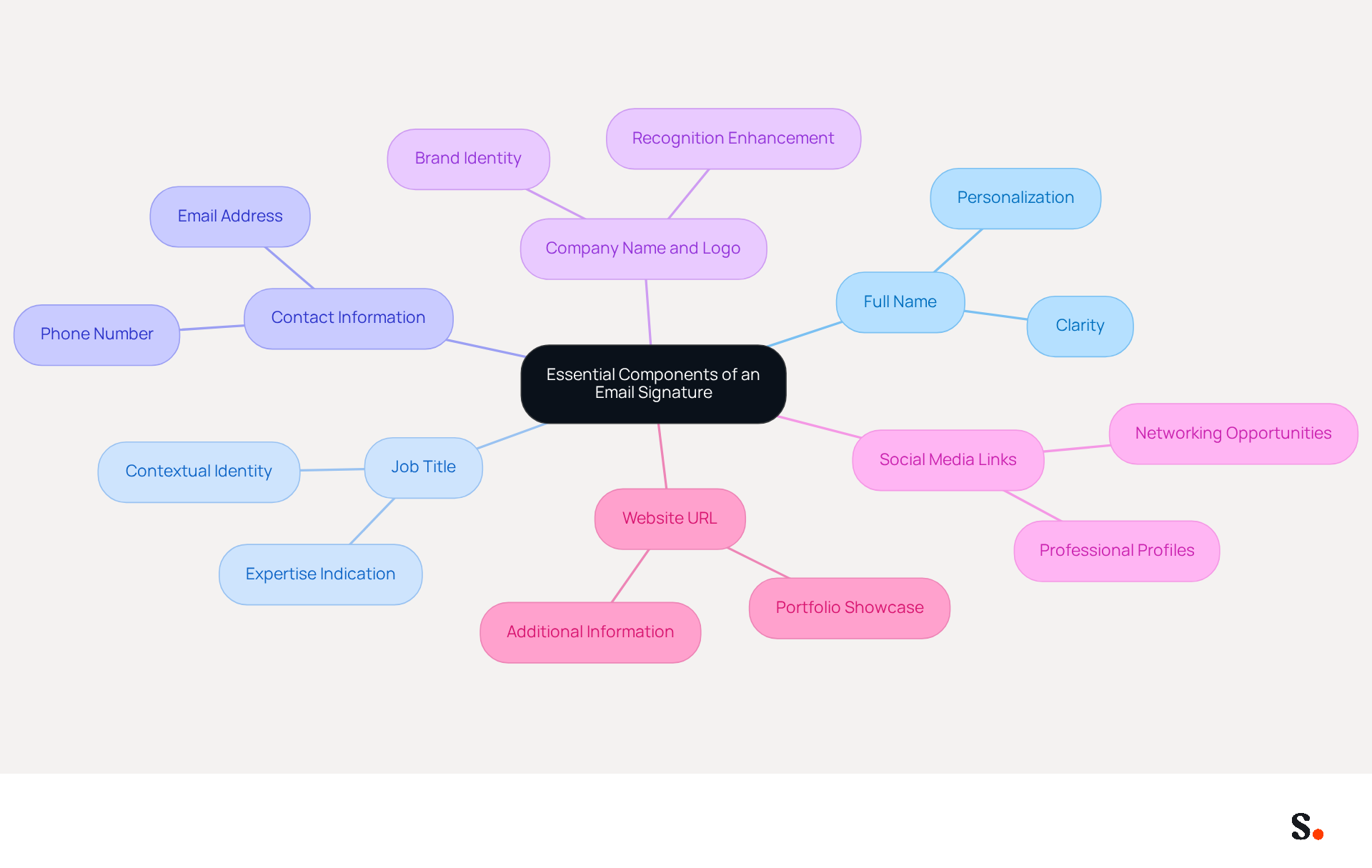
A well-crafted post grad email signature is crucial for establishing professionalism and ensuring effective communication. It should include the following essential components:
- Full Name: Clearly state your full name to personalize your communication, establishing a direct connection with the individual.
- Job Title: Include your current position or role to provide context about your identity, which helps readers understand your expertise.
- Contact Information: This should include your phone number and email address, making it easy for individuals to reach you without needing to search for your details.
- Company Name and Logo: If applicable, include your company name and logo to reinforce brand identity and enhance recognition in communications.
- Social Media Links: Consider adding links to work-related social media profiles, such as LinkedIn, to enhance networking opportunities and facilitate connections.
- Website URL: If you have a personal or business website, include the link to guide viewers to more information about you or your work, showcasing your portfolio or accomplishments.
These elements contribute to your post grad email signature being informative and professional, leaving a positive impression on recipients. Best practices for 2026 emphasize the importance of clarity and simplicity; sign-offs should be concise, ideally no longer than seven lines, to avoid clutter. Additionally, maintaining a consistent layout across all devices enhances readability and engagement. In fact, adding a call-to-action (CTA) can significantly boost engagement, with studies indicating a 371% increase in clicks. Regular evaluations of digital identifiers assist in preserving brand integrity and adhering to evolving regulations, ensuring that all information stays up-to-date and pertinent. However, many professionals struggle with outdated information and cluttered signatures, which can lead to miscommunication. Neglecting these elements could hinder your professional image and limit your networking potential.
With Scribe, you can automate the synchronization of your communication identifiers with your business phone system, ensuring that any modifications made in your connected source, such as Aircall or Google Workspace, are automatically updated in Scribe without any manual input. With this feature, you save time and keep your brand consistent across all communications. By syncing with Google Workspace, for instance, any updates to your teammates' information-like job titles or contact details-are reflected in real-time, eliminating the need for manual adjustments. Scribe's SOC 2 Type II compliance guarantees that your data is secure while managing these documents efficiently.
Incorporate Branding for Consistency and Impact
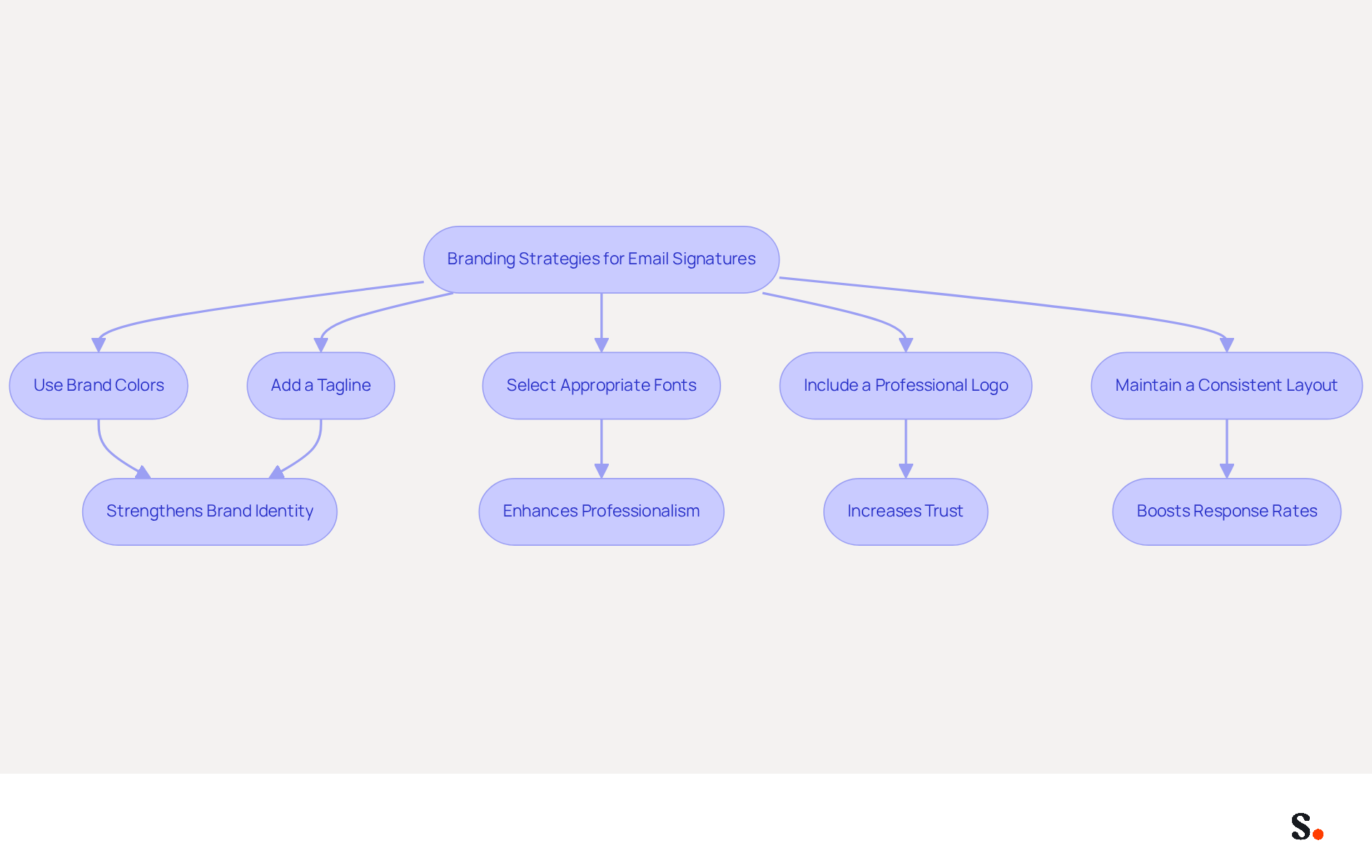
To create a cohesive and impactful email signature, it is essential to implement effective branding strategies:
- Use Brand Colors: Incorporate your company’s color palette to maintain consistency across all communications. This strengthens brand identity; 80% of businesses view a branded email footer as essential for building trust.
- Select Appropriate Fonts: Choose fonts that align with your brand’s style. Ensure they are easy to read and professional, as a well-designed mark can enhance the professionalism score from 6.2 to 8.5 out of 10.
- Include a Professional Logo: If you represent a company, incorporate its logo in your email footer. This not only improves brand visibility but also adds a layer of professionalism, contributing to a 76% increase in trust among those receiving it.
- Maintain a Consistent Layout: Use a uniform structure for your signature across all platforms. Consistency aids recipients in recognizing your messages easily, resulting in a 22% rise in response rates for communications with branded elements.
- Add a Tagline: If applicable, include a brief tagline that encapsulates your ethos or your company’s mission. This helps organizations foster stronger relationships with clients.
Furthermore, with Scribe, any modifications made in your Aircall configuration will automatically be reflected in your correspondence identifiers, ensuring that your branding remains consistent and current across all communications. By prioritizing these branding elements, you can significantly enhance your professional image and communication effectiveness.
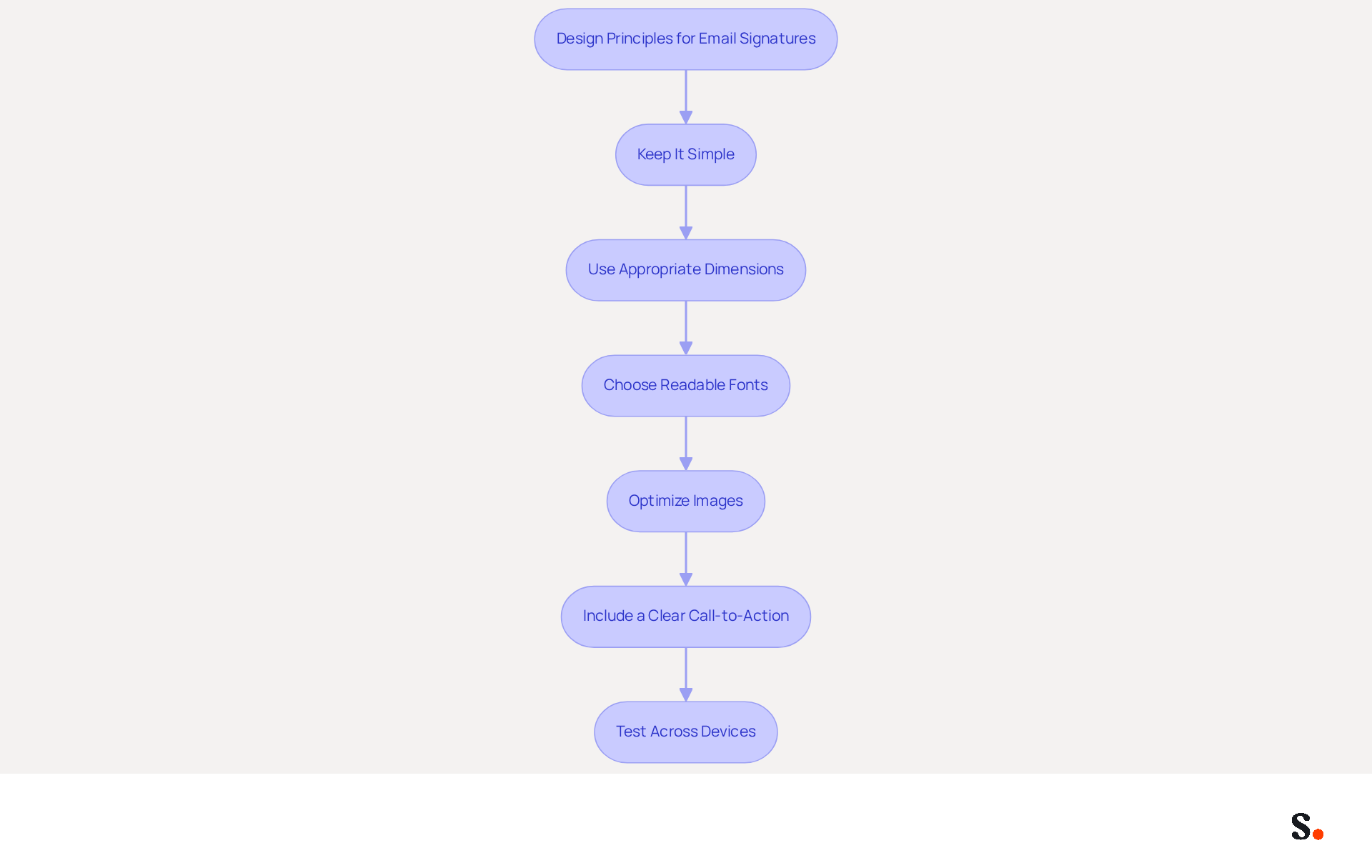
Apply Effective Formatting and Design Principles
To create an effective email signature that captures attention and drives engagement, it is essential to follow key design principles:
- Keep It Simple: Limit the number of elements in your sign-off to avoid clutter. A clean design makes it easier for recipients to read and understand key information quickly.
- Use Appropriate Dimensions: Aim for a size of 300-600 pixels wide and 150-200 pixels high. This size is ideal for visibility without overwhelming the email content, ensuring that your closing complements rather than distracts from your message.
- Choose Readable Fonts: Select fonts that are easy to read on all devices. Avoid overly decorative fonts that may detract from the professionalism of your signature. Recommended font sizes are between 14-16px for body text, ensuring legibility across various platforms.
- Optimize Images: If you include images, ensure they are optimized for web use to prevent slow loading times. Use formats like PNG or JPEG for logos and photos, and keep image sizes small to enhance loading speed and maintain a professional appearance.
- Include a Clear Call-to-Action (CTA): Including a clear call-to-action can really boost engagement. Consider adding links to your calendar, digital business card, or relevant resources to encourage recipients to take action.
- Test Across Devices and Messaging Platforms: Always preview your identifier on different devices and messaging platforms to ensure it displays correctly. Ensuring your email signature displays correctly on mobile devices is crucial, as many recipients may access your emails on their phones. Specific recommendations include checking compatibility with popular clients like Outlook, Gmail, and Apple Mail.
Ultimately, a thoughtfully designed post grad email signature can significantly influence your professional interactions and opportunities. Furthermore, research shows that a well-designed digital sign-off can significantly influence sales outcomes.
Leverage Email Signatures for Marketing and Networking
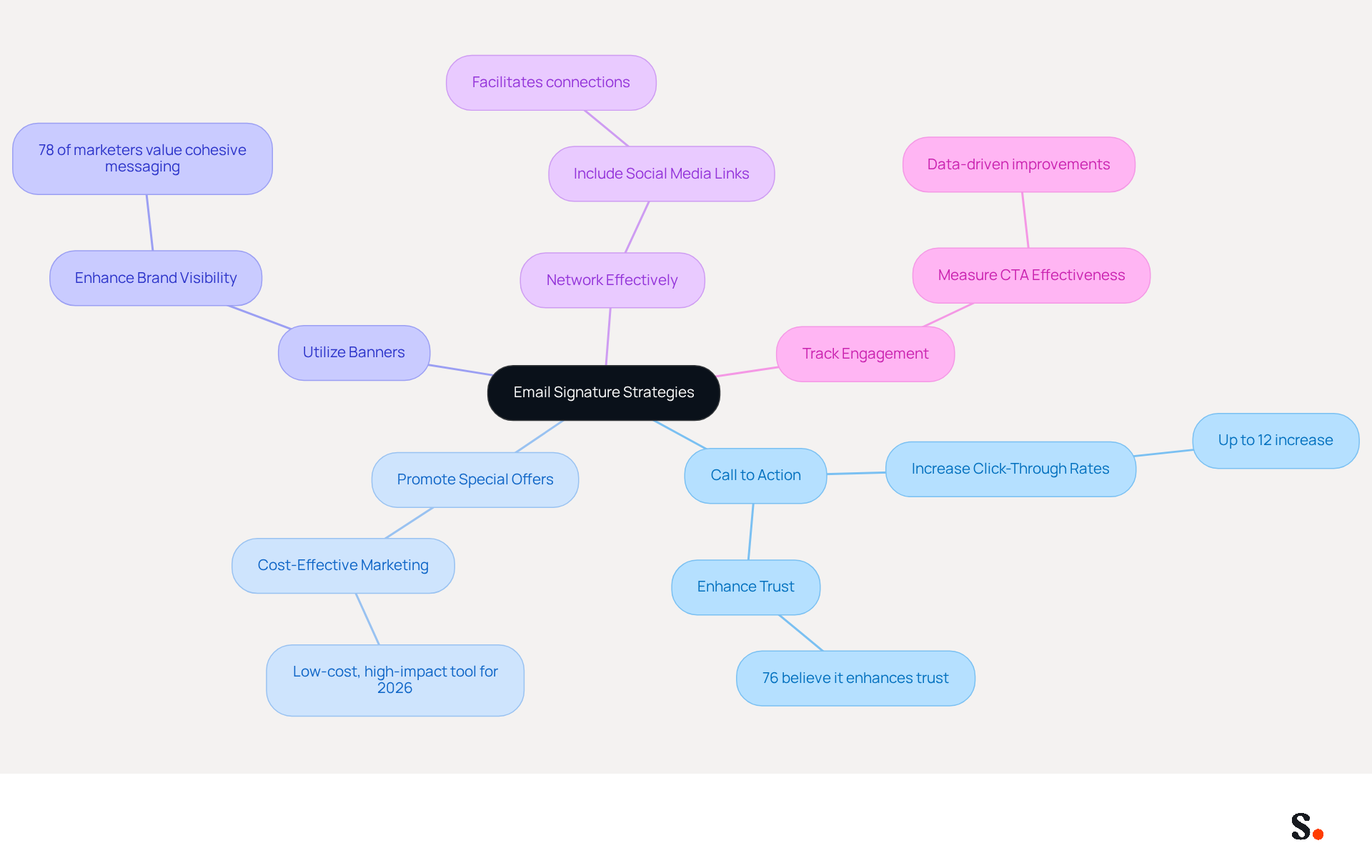
To fully leverage your email signature as a marketing and networking asset, it is essential to adopt strategic approaches:
- Include a Call to Action: Incorporate a clear call to action (CTA) in your email footer, such as a link to your portfolio, a recent blog post, or an upcoming event. This encourages recipients to engage more, as strategically placed CTAs can increase click-through rates by as much as 12%. Notably, 76% of participants believe a work message footer enhances trust in the sender, underscoring the importance of including CTAs.
- Promote Special Offers: Use your personal mark to highlight any promotions or events. Many marketers struggle to find cost-effective ways to drive traffic and generate leads, making this method particularly valuable, as email footers are recognized as low-cost, high-impact marketing tools for 2026.
- Utilize Banners: Adding a visually appealing banner to your signature can promote specific campaigns or initiatives. This not only enhances brand visibility but also aligns with the branding standards that 78% of marketers deem crucial for cohesive messaging.
- Network Effectively: Facilitate networking by including links to your LinkedIn profile or other professional social media accounts. This makes it easy for individuals to connect with you, reinforcing the importance of consistent branding across all communications.
- Track Engagement: Implement tracking links in your email to measure engagement with your CTAs. This data-driven approach allows for continuous improvement and helps tailor follow-ups based on recipient interactions. For example, the case analysis on 'Measurable Results from Digital Communication' illustrates how monitoring engagement can enhance strategies and confirm the effectiveness of digital communication as marketing tools.
Incorporating these strategies can redefine the role of your post grad email signature, turning it into a pivotal element of your marketing efforts. As Holly Linden states, "A good email signature helps establish trust and credibility," making it an essential component of your communication strategy.
Conclusion
Many professionals overlook the impact of a well-crafted email signature on their communication and branding. By incorporating essential components such as your full name, job title, contact information, and branding elements, you can create a signature that not only reflects your identity but also reinforces your professional image. Clarity, simplicity, and consistency are crucial for how recipients perceive your communication.
Key strategies discussed include the effective use of branding through colors, fonts, and logos, which can enhance trust and recognition. Additionally, applying design principles such as simplicity and appropriate dimensions ensures that your signature is visually appealing and easy to read. Leveraging your email signature for marketing and networking by including calls to action and tracking engagement can further amplify its effectiveness, transforming it into a valuable asset for your professional endeavors.
Taking the time to craft an impressive email signature can truly pay off in building your brand and expanding your network. By utilizing tools like Scribe, which automates updates and ensures compliance with security standards, professionals can maintain a polished and effective email signature that stands out in a crowded digital landscape. Embrace these best practices to elevate your communication and make a lasting impression in your post-graduate journey.
Frequently Asked Questions
What are the essential components of a post grad email signature?
A well-crafted post grad email signature should include your full name, job title, contact information (phone number and email address), company name and logo (if applicable), social media links (like LinkedIn), and a website URL.
Why is it important to have a professional email signature?
A professional email signature establishes professionalism, ensures effective communication, and leaves a positive impression on recipients.
What are the best practices for creating an email signature in 2026?
Best practices emphasize clarity and simplicity, with sign-offs ideally no longer than seven lines. Maintaining a consistent layout across devices enhances readability, and adding a call-to-action (CTA) can significantly boost engagement.
How can outdated information in an email signature affect communication?
Outdated information can lead to miscommunication and hinder your professional image, limiting your networking potential.
How does Scribe help with managing email signatures?
Scribe automates the synchronization of your communication identifiers with your business phone system, ensuring that any modifications made in connected sources, like Aircall or Google Workspace, are automatically updated in Scribe without manual input.
What security measures does Scribe provide for managing email signatures?
Scribe's SOC 2 Type II compliance guarantees that your data is secure while managing email signatures and other documents efficiently.
List of Sources
- Identify Essential Components of an Email Signature
- Best practices for business email signatures in 2026 (https://bybrand.io/blog/best-practices)
- Email Signature Best Practices for 2026 (+ 15 Pro Examples) (https://wavecnct.com/blogs/email-signature-best-practices-2026)
- Email Signature Best Practices - NEWOLDSTAMP (https://newoldstamp.com/blog/email-signature-best-practices)
- 4 Best Practices for an Effective Email Signature with Address (https://scribe-mail.com/en-US/blog/4-best-practices-for-an-effective-email-signature-with-address)
- The Complete Email Signature Guide 2026: Best Practices and Policy (https://opensense.com/complete-email-signature-guide)
- Incorporate Branding for Consistency and Impact
- The impact of email signatures on your branding (https://signitic.com/en/resources/the-impact-of-email-signatures-on-your-branding)
- Why Email Signatures Must Be In Your 2026 Marketing Plan | Rocketseed (https://rocketseed.com/blog/what-are-the-biggest-email-trends-for-2026)
- "Email Signature Trends for 2026: What's In, What's Out" | Crossware posted on the topic | LinkedIn (https://linkedin.com/posts/crossware-ltd_new-year-new-trends-even-for-your-email-activity-7394554686046908416-vD_O)
- Master Corporate Email Signature Management for Brand Consistency (https://scribe-mail.com/en-US/blog/master-corporate-email-signature-management-for-brand-consistency)
- Why Consistent Email Signatures Matter More Than You Think - Signite (https://signite.io/blog/consistent-email-signatures-matter-more-than-you-think)
- Apply Effective Formatting and Design Principles
- Best practices for business email signatures in 2026 (https://bybrand.io/blog/best-practices)
- Email Signature Best Practices for 2026 (+ 15 Pro Examples) (https://wavecnct.com/blogs/email-signature-best-practices-2026)
- Email Signature Design Guide: Best Practices and Examples (https://designmodo.com/email-signature)
- Top 10+ best practices for email signatures design in 2026 (https://mysignature.io/blog/email-signature-best-practices)
- The Complete Email Signature Guide 2026: Best Practices and Policy (https://opensense.com/complete-email-signature-guide)
- Leverage Email Signatures for Marketing and Networking
- 2026 Marketing Trends: Email Signatures as a Marketing Tool (https://bluechiptt.com/blog/5-marketing-trends-for-2026-and-how-your-email-signature-fits-in)
- 4 Best Practices for Your Work Email Signature Strategy (https://scribe-mail.com/en-US/blog/4-best-practices-for-your-work-email-signature-strategy)
- Using Email Signatures as a Marketing Tool: Ideas for Generating Leads and Promoting Business (https://blog.ringostat.com/en/using-email-signatures-as-a-marketing-tool-ideas-for-generating-leads-and-promoting-business)
- Why Email Signatures Must Be In Your 2026 Marketing Plan | Rocketseed (https://rocketseed.com/blog/2026-marketing-plan-email-signatures)
- How to Use Email Signatures for Branding & Lead Generation - Signite (https://signite.io/blog/use-signatures-for-branding-lead-generation)
Get started with Scribe
Manage signatures across your whole team
Free 14-day trial — no credit card.