Best Practices for an Effective Email Signature for Administrative Assistants
Crafting an effective email signature is a challenge that many administrative assistants face, as it must balance professionalism with creativity. An email
Sophie Grant
Email Signature Specialist, Scribe
Introduction
Crafting an effective email signature is a challenge that many administrative assistants face, as it must balance professionalism with creativity. An email signature serves as a vital communication tool that reflects professionalism and enhances interaction. By incorporating essential elements such as full names, job titles, and company logos, these professionals can create signatures that convey their identity while reinforcing brand consistency.
Many administrative assistants struggle to balance professionalism with creativity in their email signatures. However, failing to create a standout signature can lead to missed opportunities for professional engagement. By mastering these best practices, administrative assistants can ensure their email signatures not only reflect their identity but also enhance their professional interactions.
Incorporate Essential Elements in Your Email Signature
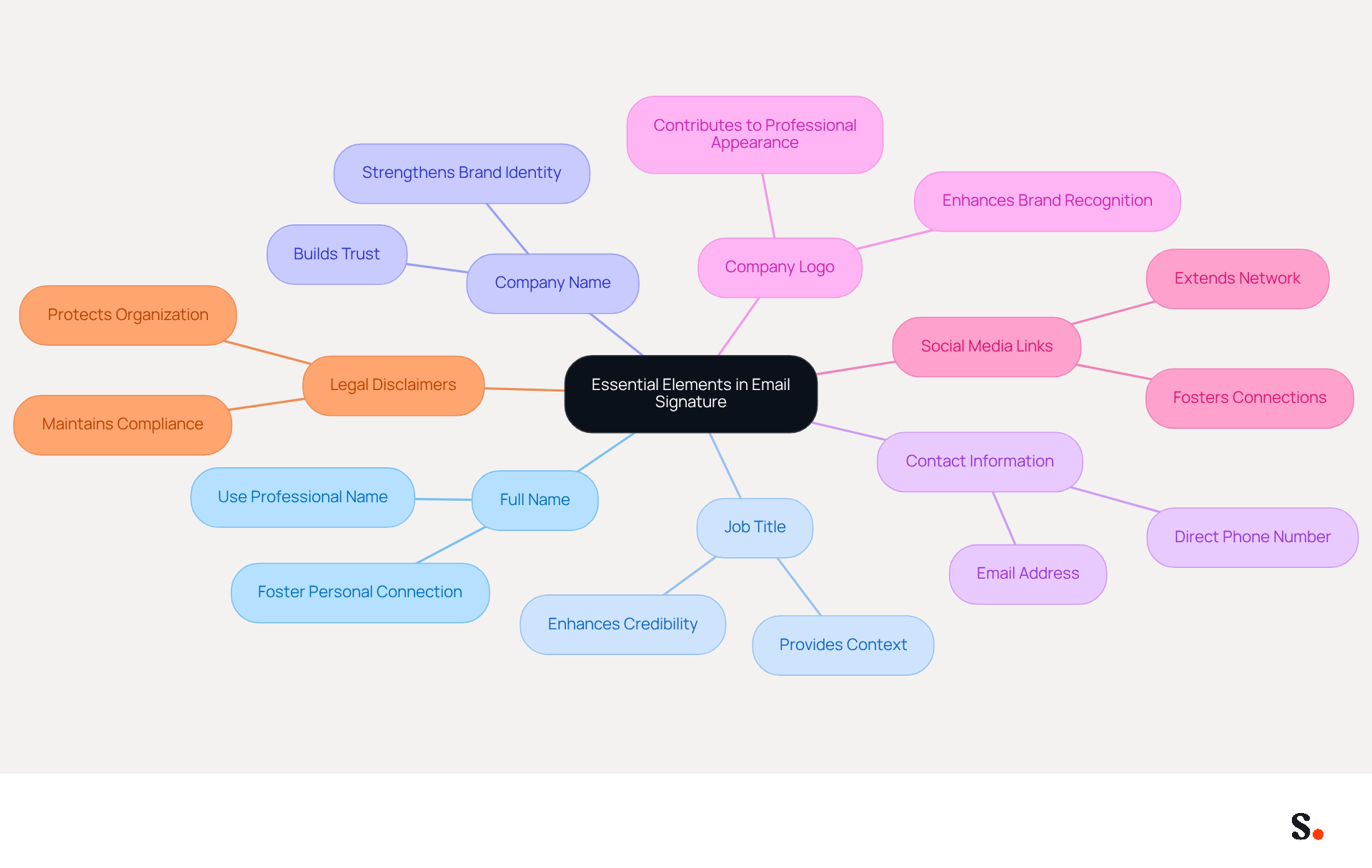
An effective email signature for administrative assistants is crucial, as it serves as a key communication tool that reflects professionalism and facilitates interaction. Essential elements include:
- Full Name: Use your professional name as it appears in your workplace to foster a personal connection with recipients.
- Job Title: Clearly state your position, which helps recipients understand your role and enhances credibility.
- Company Name: Including the name of the organization strengthens brand identity and trust, as 42% of consumers feel negatively toward businesses lacking a distinct mark.
- Contact Information: Provide your direct phone number and contact details for easy interaction, facilitating accessibility for recipients.
- Company Logo: Adding the logo enhances brand recognition and professionalism, contributing to a polished appearance.
- Social Media Links: If applicable, include links to professional social media profiles to foster connections and extend your network.
- Legal Disclaimers: Depending on your industry, consider including any necessary legal disclaimers to protect your organization and maintain compliance.
Including these elements allows administrative assistants to create an email signature for administrative assistant that conveys professionalism and promotes effective communication. Regularly updating contact information is vital, as 44.4% of users fail to do so, which can lead to missed opportunities and hinder effective communication. Utilizing centralized management solutions such as Scribe can enhance brand uniformity by up to 85%, ensuring that elements remain pertinent and effective. To enable seamless updates, you must grant permission for Scribe to connect with your service provider. Scribe's automated synchronization with Google Workspace enables instant updates, meaning any modifications in your directory-such as job position or team changes-are automatically reflected in your correspondence. This saves time and boosts security compliance, thanks to Scribe's SOC 2 Type II certification, which safeguards your data. Ultimately, leveraging Scribe's solutions not only streamlines communication but also fortifies your organization's professional image in the digital landscape.
Utilize Effective Design and Formatting Techniques
Creating a visually appealing email signature requires careful consideration of design and formatting techniques:
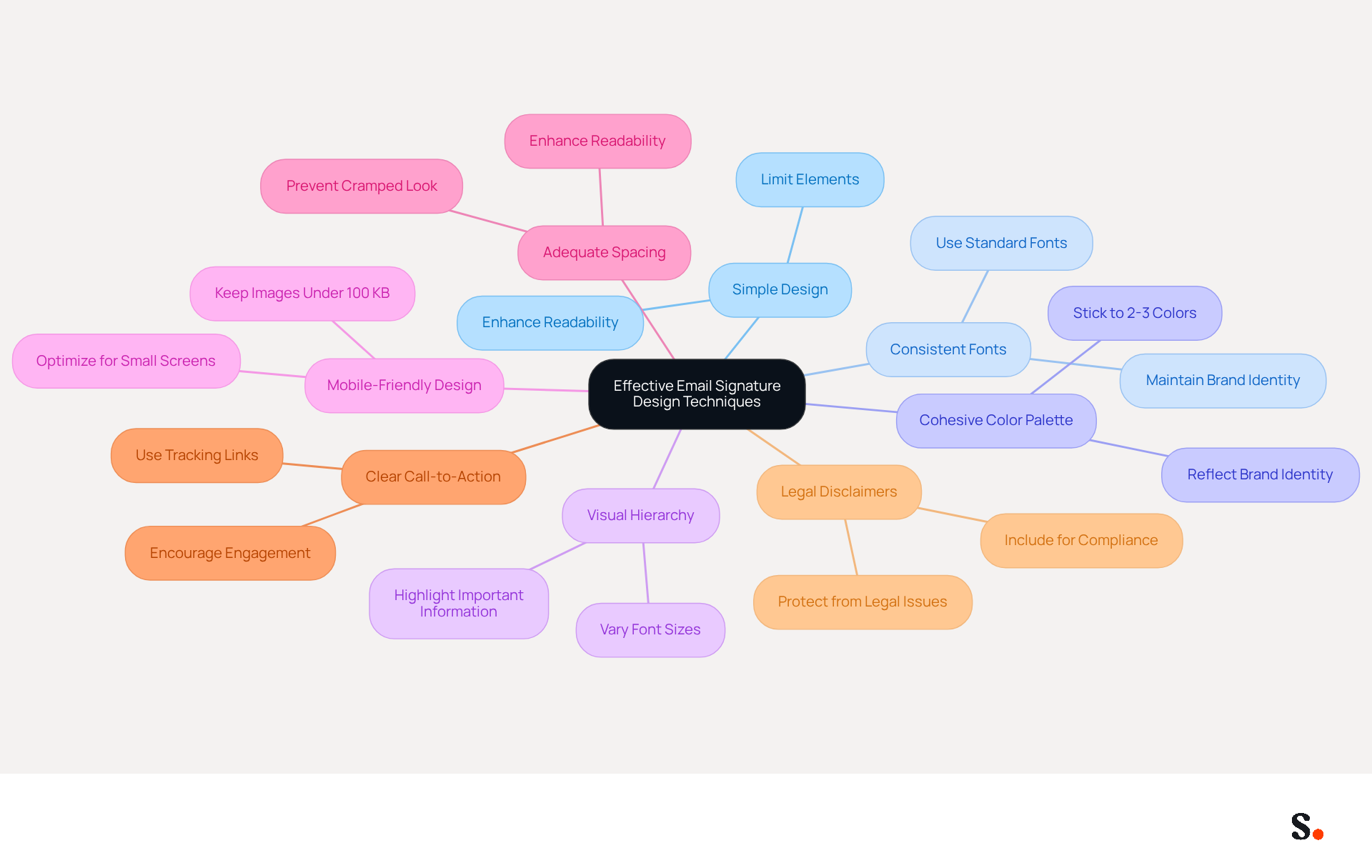
- A simple design is crucial for an effective email signature. Limit the number of elements in your sign-off to avoid clutter. A clean design in an email signature for administrative assistant enhances effectiveness and readability.
- Using consistent fonts is essential for maintaining brand identity in an email signature for administrative assistant. Standard fonts like Arial or Times New Roman are recommended for optimal readability.
- Choosing a cohesive color palette reinforces your brand identity in the email signature for administrative assistant. Stick to two or three colors that reflect your brand identity to maintain a professional appearance and reinforce brand recognition.
- Establishing a visual hierarchy is key to ensuring your name and title stand out in an email signature for administrative assistant. Vary font sizes and styles to make important information easily identifiable.
- A mobile-friendly design is vital for ensuring your email signature for administrative assistant looks great on all devices. Avoid overly large images (ideally under 100 KB) and test for compatibility to ensure responsiveness.
- Adequate spacing between elements enhances readability in an email signature for administrative assistant. Incorporate sufficient spacing to prevent a cramped look.
- Incorporating a clear call-to-action in your email signature for administrative assistant can significantly boost engagement. A well-placed CTA encourages recipients to take the next step, maximizing marketing opportunities.
- It is important for compliance in certain industries to include legal disclaimers in the email signature for administrative assistant. Depending on your field, a legal disclaimer can help protect your company from potential legal issues.
Integrating your Google Workspace with Scribe streamlines the management of your email signatures. This integration saves time by automatically updating your teammates' information, ensuring that any changes in Google Workspace-such as job position updates or group changes-are reflected in the application without manual input. This feature not only improves efficiency but also ensures that your email signatures reflect your brand consistently across all communications. Moreover, Scribe's adherence to security standards such as SOC 2 Type II, GDPR, and CCPA guarantees that your data is managed securely, while the average click-through rate of 12% on banners illustrates the effectiveness of this strategy in enhancing engagement.
Adapt Your Signature for Different Contexts
To enhance effectiveness and professionalism, administrative assistants must adapt their digital identifiers based on the context of their interactions. Here are key scenarios to consider:
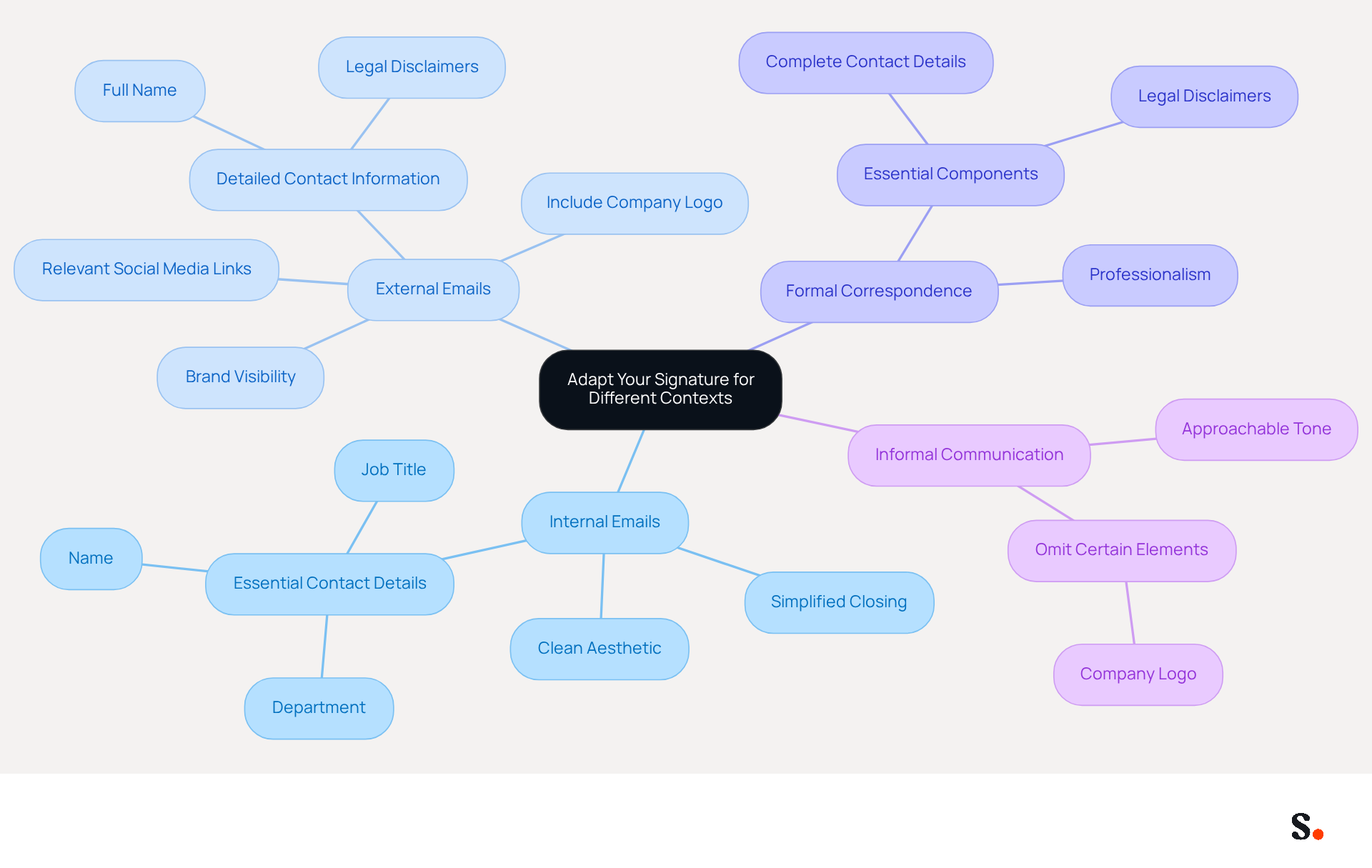
- Internal Emails: For interactions within the organization, a simplified closing is often adequate. Focus on essential contact details, such as your name, title, and department, while omitting the company logo to maintain a clean aesthetic. Using simpler identifiers for internal messages helps keep discussion threads clear and uncluttered.
- External Emails: When reaching out to clients or partners, it’s crucial to include the company logo and relevant social media links. This not only enhances brand visibility but also reinforces credibility and trust with external stakeholders. External communications should incorporate detailed identifiers that represent the brand's visual identity and credibility. With Scribe, every modification made in your Aircall setup will automatically be shown in your email branding, ensuring brand consistency across all exchanges. Additionally, Scribe's SOC 2 Type II compliance and adherence to GDPR and CCPA ensure secure data handling, further enhancing trust with your audience.
- Formal Correspondence: In formal interactions, ensure your sign-off includes all essential components, such as your title, complete contact details, and any legal disclaimers. This demonstrates professionalism and adherence to corporate standards. According to the Nielsen Norman Group, incorporating a human face in interactions can significantly enhance trust and engagement, making exchanges feel more personal.
- Informal Communication: For less formal interactions, it is important to find the right tone for informal communication. You might choose to omit certain elements like the logo, allowing for a more approachable and friendly style of interaction. This flexibility in design can foster stronger professional relationships.
By customizing identifiers to suit these various situations, administrative assistants can create an effective email signature for administrative assistant that ensures their interactions are not only suitable but also impactful, promoting better relationships and clearer messaging. In a world where billions of messages are exchanged daily, the role of effective communication identifiers becomes increasingly critical.
Avoid Common Mistakes in Signature Creation
To enhance the effectiveness of your email signature, it is crucial to avoid common pitfalls that can undermine your professionalism:
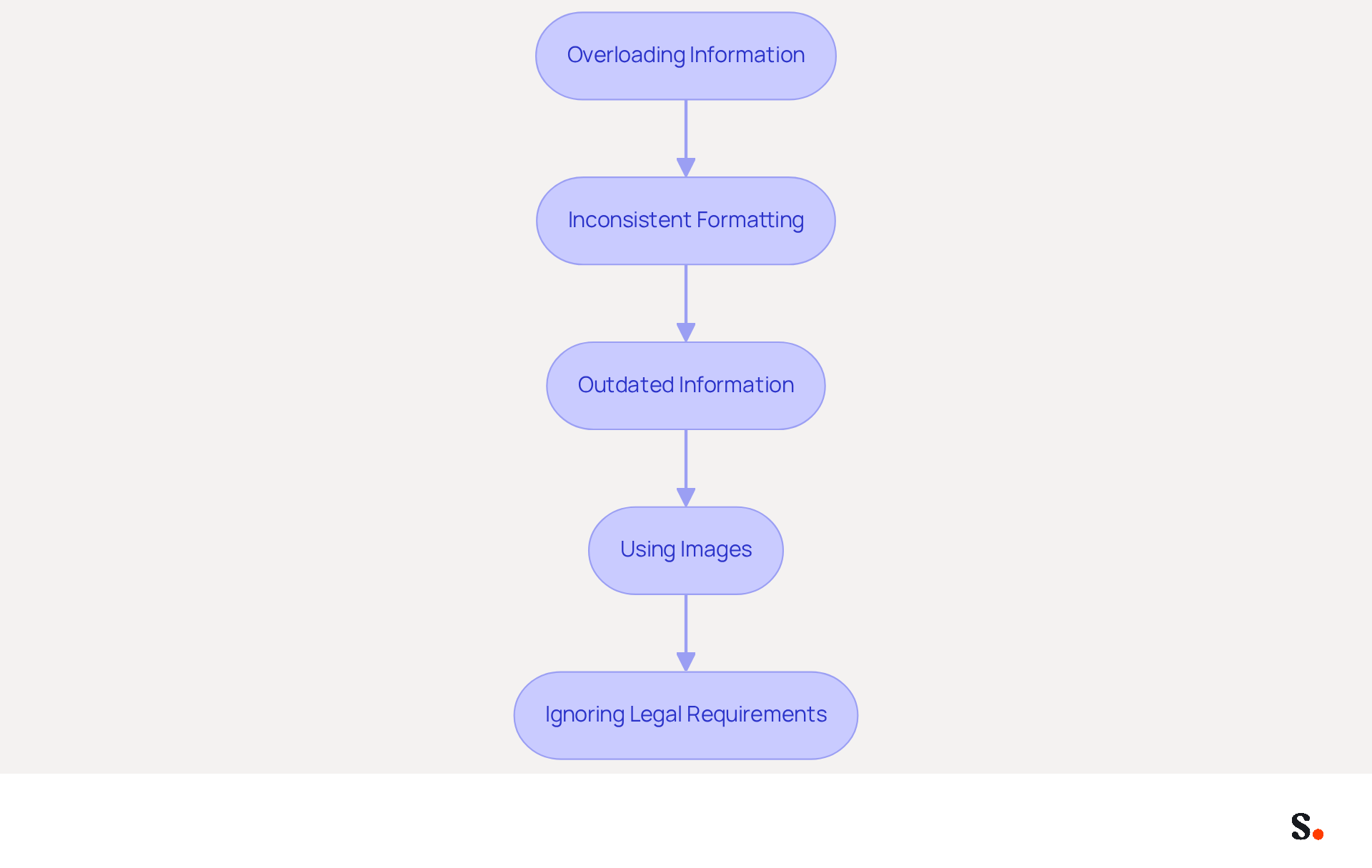
- Overloading Information: Too much information can lead to confusion and miscommunication. Stick to essential elements such as your name, job title, company name, and contact information.
- Inconsistent Formatting: Maintain uniformity in fonts, colors, and sizes that align with your company’s branding. Inconsistent formatting can create a disjointed appearance, undermining professionalism.
- Outdated Information: Regularly update your personal mark to reflect any changes in your role or contact details. Research shows that many professionals update their contact details just a few times a year, leading to potential branding inconsistencies. With Scribe, syncing your Google Workspace guarantees that any modifications in your team’s information are automatically shown in your correspondence, saving time and ensuring uniformity. Additionally, Scribe's adherence to SOC 2 Type II and GDPR/CCPA ensures that your email identifiers fulfill essential legal obligations.
- Using Images: Avoid making images the primary component of your mark. Image-heavy email footers can trigger spam filters and may not display correctly across all devices, reducing deliverability. Case studies indicate that companies using plain text formats experience better inbox placement and engagement.
- Ignoring Legal Requirements: Ensure that any necessary disclaimers are included, especially if your industry mandates specific legal language. Failing to do so can lead to compliance issues and potential fines. Scribe simplifies the management of these requirements, ensuring compliance and professionalism.
By keeping these common mistakes in mind, you can create an email signature for administrative assistants that truly reflects your professionalism and enhances your communication. Additionally, leveraging Scribe’s automated synchronization with tools like Aircall can further enhance brand consistency and streamline the management of email signatures across your organization.
Conclusion
In today's fast-paced business environment, a well-crafted email signature is essential for administrative assistants. It serves as more than just a digital sign-off; it’s a crucial tool that showcases professionalism and ensures smooth communication. By incorporating key elements such as full name, job title, company name, and contact information, administrative professionals can create a signature that enhances their credibility and fosters connections. Utilizing solutions like Scribe ensures that these signatures remain consistent and up-to-date, reflecting the organization's brand identity while adhering to security standards.
Throughout the article, we have discussed key strategies for crafting an impactful email signature. These include:
- Effective design techniques
- The importance of adapting signatures for different contexts
- Avoiding common pitfalls that can detract from professionalism
With Scribe, administrative assistants can efficiently manage their email signatures, ensuring they are always professional and up-to-date, while also complying with legal requirements and enhancing brand consistency across all communications.
In a world where clear communication matters, a polished email signature is key for administrative assistants. They are encouraged to embrace these best practices and utilize tools like Scribe to optimize their email signatures. This transformation can significantly enhance how administrative assistants represent themselves and their organizations.
Frequently Asked Questions
Why is an effective email signature important for administrative assistants?
An effective email signature is crucial as it serves as a key communication tool that reflects professionalism and facilitates interaction.
What essential elements should be included in an email signature?
Essential elements include your full name, job title, company name, contact information, company logo, social media links, and legal disclaimers if applicable.
How does including a company name in an email signature benefit communication?
Including the company name strengthens brand identity and trust, as 42% of consumers feel negatively toward businesses lacking a distinct mark.
What role does a company logo play in an email signature?
Adding a company logo enhances brand recognition and professionalism, contributing to a polished appearance.
Why is it important to regularly update contact information in an email signature?
Regularly updating contact information is vital because 44.4% of users fail to do so, which can lead to missed opportunities and hinder effective communication.
How can Scribe help with managing email signatures?
Scribe can enhance brand uniformity by up to 85% and allows for seamless updates by connecting with your service provider, ensuring that any modifications in your directory are automatically reflected in your correspondence.
What is the benefit of Scribe's automated synchronization with Google Workspace?
Scribe's automated synchronization enables instant updates, meaning changes in job position or team are automatically reflected in your emails, saving time and boosting security compliance.
How does Scribe ensure data security?
Scribe is SOC 2 Type II certified, which safeguards your data and ensures security compliance while managing email signatures.
List of Sources
- Incorporate Essential Elements in Your Email Signature
- 7 Essential Elements of a Professional Email Signature | Chillisign (https://chillisign.io/blog/crafting-signatures)
- Best Practices for a Professional Formal Email Signature (https://scribe-mail.com/en-US/blog/best-practices-for-a-professional-formal-email-signature)
- 4 Best Practices for an Effective Email Signature for Executive Assistants (https://scribe-mail.com/en-US/blog/4-best-practices-for-an-effective-email-signature-for-executive-assistants)
- An assistant's guide to professional email signatures | Signitic (https://signitic.com/en/resources/email-signature-assistant)
- Executive Assistant Email Signature Examples + Tips (https://executiveassistantinstitute.com/executive-assistant-email-signature-examples)
- Utilize Effective Design and Formatting Techniques
- Email Signature Best Practices - NEWOLDSTAMP (https://newoldstamp.com/blog/email-signature-best-practices)
- 20 best email signature design examples for 2026 — Stripo.email (https://stripo.email/blog/10-best-email-signature-design-examples)
- 20 Tips for Creating an Effective Email Signature — SitePoint (https://sitepoint.com/creating-an-effective-email-signature)
- Top 10+ best practices for email signatures design in 2026 (https://mysignature.io/blog/email-signature-best-practices)
- Email Signature Best Practices Guide With Examples - MailerLite (https://mailerlite.com/blog/email-signature-best-practices)
- Adapt Your Signature for Different Contexts
- Email signature statistics: Why every business should optimize their email signatures — Stripo.email (https://stripo.email/blog/email-signature-statistics-why-every-business-should-optimize-their-email-signatures)
- 7 Reasons You Need Multiple Email Signatures (https://wisestamp.com/guides/why-you-need-multiple-versions-of-your-email-signature)
- External And Internal Email Signatures: Differences And Best Practices (https://letsignit.com/blog/external-internal-email-signatures)
- Internal Email Signatures: The Best Tips and Examples - NEWOLDSTAMP (https://newoldstamp.com/blog/internal-email-signatures-best-tips-and-examples)
- Maximizing Efficiency with Automated Email Signatures for Internal and External Communications | Crossware365 (https://crossware365.com/blog/maximizing-efficiency-with-automated-email-signatures-for-internal-and-external-communications)
- Avoid Common Mistakes in Signature Creation
- Email signature statistics: Why every business should optimize their email signatures — Stripo.email (https://stripo.email/blog/email-signature-statistics-why-every-business-should-optimize-their-email-signatures)
- Worst email signature mistakes and how to avoid them (https://mail-signatures.com/articles/worst-email-signature-mistakes)
- 11 Common Email Signature Mistakes to Avoid - Gimmio (https://blog.gimm.io/email-signature-mistakes)
- Why avoid image-based email signatures (https://linkedin.com/top-content/writing/email-writing-best-practices/why-avoid-image-based-email-signatures)
- 5 Common Mistakes You’re Making With Your Email Signature (https://fastcompany.com/3025208/5-common-mistakes-youre-making-with-your-email-signature)
Get started with Scribe
See why teams switch to Scribe
Free 14-day trial — no credit card.