Best Practices for an Effective Email Signature for Company Owners
Crafting an effective email signature presents a unique challenge for company owners, as it must convey professionalism while navigating complex compliance
Sophie Grant
Email Signature Specialist, Scribe
Introduction
Crafting an effective email signature presents a unique challenge for company owners, as it must convey professionalism while navigating complex compliance requirements. Incorporating key elements like contact information, logos, and calls-to-action can really boost communication impact. However, many business leaders struggle to keep their signatures compliant with evolving regulations. Balancing a polished image with legal compliance is crucial for maximizing the effectiveness of email signatures in today’s regulatory landscape.
Identify Key Elements for an Effective Email Signature
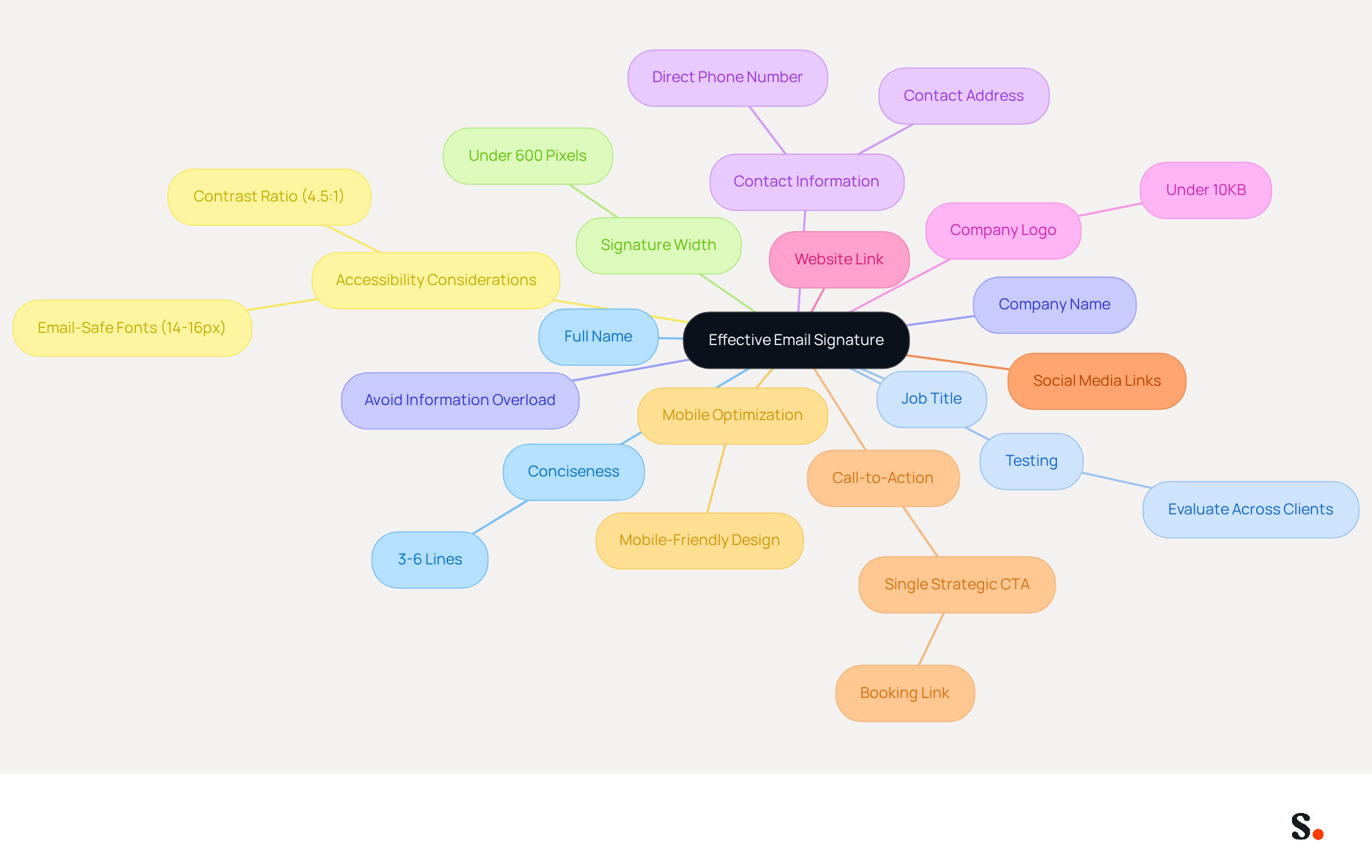
An effective email signature for company owner is crucial for establishing professionalism and fostering engagement in business communications. It should incorporate the following key elements to maximize its impact:
- Full Name: Always start with your full name to ensure the recipient knows who the message is from.
- Job Title: Clearly state your position to establish authority and context.
- Company Name: Include your company's name to reinforce identity.
- Contact Information: Provide a direct phone number and contact address for easy communication.
- Company Logo: Adding a logo enhances brand visibility and professionalism, ensuring it is under 10KB for optimal loading.
- Website Link: Include a link to your company’s website to drive traffic and provide more information.
- Social Media Links: If applicable, add links to professional social media profiles to encourage further engagement.
- Call-to-Action (CTA): Incorporate a single strategic CTA, such as a booking link, which can achieve a click-through rate of 26%, facilitating easy scheduling of meetings.
- Mobile Optimization: Ensure the identifier is mobile-friendly, as over 60% of business communications are accessed on mobile devices, with large enough icons and buttons for easy tapping.
- Accessibility Considerations: Use email-safe fonts sized between 14-16px and maintain a contrast ratio of at least 4.5:1 to ensure readability for all recipients.
- Signature Width: Maintain the maximum width of the sign-off under 600 pixels to ensure proper display across messaging clients.
- Conciseness: Aim to keep the closing statement between 3-6 lines to avoid being flagged by spam filters.
- Testing: Regularly evaluate your email footer across various clients and devices to ensure functionality and formatting.
- Avoid Information Overload: Be mindful of not cramming too much information into the closing, as this can detract from its effectiveness.
When you bring these elements together, you’re not just sharing information; you’re making a connection that resonates. Furthermore, with Scribe's automated synchronization features, any modifications made in your Aircall configuration will be automatically reflected in your communications, ensuring consistency across all interactions. Ultimately, a well-designed email signature for company owner can be the difference between a missed opportunity and a successful connection.
Design Your Signature to Reflect Brand Identity
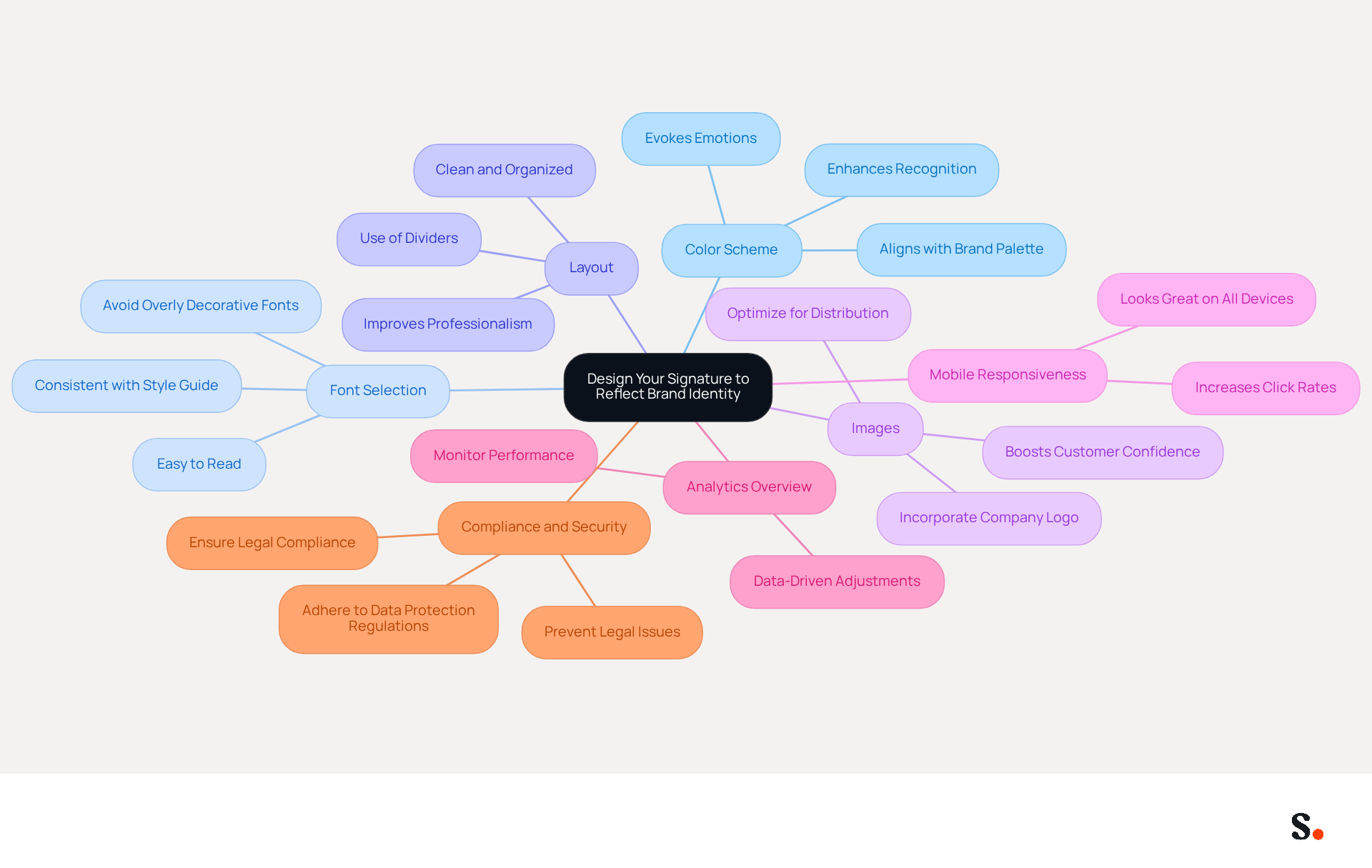
Creating an email signature for company owner that aligns with your brand identity while ensuring compliance can be a complex task. Consider the following essential elements:
- Color Scheme: Choosing the right colors can evoke emotions and enhance recognition; for instance, blue conveys trust while green suggests growth. Utilize colors that align with your organization's palette to create a cohesive and recognizable look.
- Font Selection: Choose fonts that are easy to read and consistent with your style guide. Avoid overly decorative fonts that may distract from the message. A clean sans-serif font conveys modernity, while a classic serif font embodies tradition and reliability.
- Layout: Maintain a clean and organized layout. Utilize dividers to distinguish various sections of the document, ensuring it is easy to read. A well-organized email signature for company owner can greatly improve professionalism and clarity, thereby strengthening your image.
- Images: Incorporate your company logo and any relevant visuals, ensuring they are optimized for distribution to avoid loading issues. Incorporating a logo can enhance brand identity and boost customer confidence, as 76% of recipients indicate that branded communications increase their trust in the sender.
- Mobile Responsiveness: Make sure your signature looks great on both desktop and mobile devices, given that over half of all emails are opened on mobile devices. A well-optimized signature can increase click rates to websites by up to 15%.
- Analytics Overview: Incorporate analytics to monitor performance and enhance key elements. This data-driven method enables you to comprehend how your messages are performing and make necessary adjustments to improve engagement.
- Compliance and Security: Navigating data protection regulations can be challenging for organizations. Ensure that your electronic correspondence identifiers adhere to data protection regulations such as GDPR and CCPA. Scribe’s automated management system for electronic correspondence not only simplifies updates but also ensures SOC 2 Type II compliance, guaranteeing that your data is handled securely. Not adhering to these regulations can result in legal issues and erode customer trust.
By concentrating on these design elements and utilizing Scribe's capabilities for automated updates and compliance, you can create a mark that not only appears professional but also strengthens your brand identity, ultimately boosting engagement and nurturing stronger relationships with your audience.
Integrate Your Signature into Popular Email Clients
Integrating the email signature for company owner into popular email clients is essential for maintaining a professional image. Follow these steps to ensure your signature is effectively implemented:
-
Gmail:
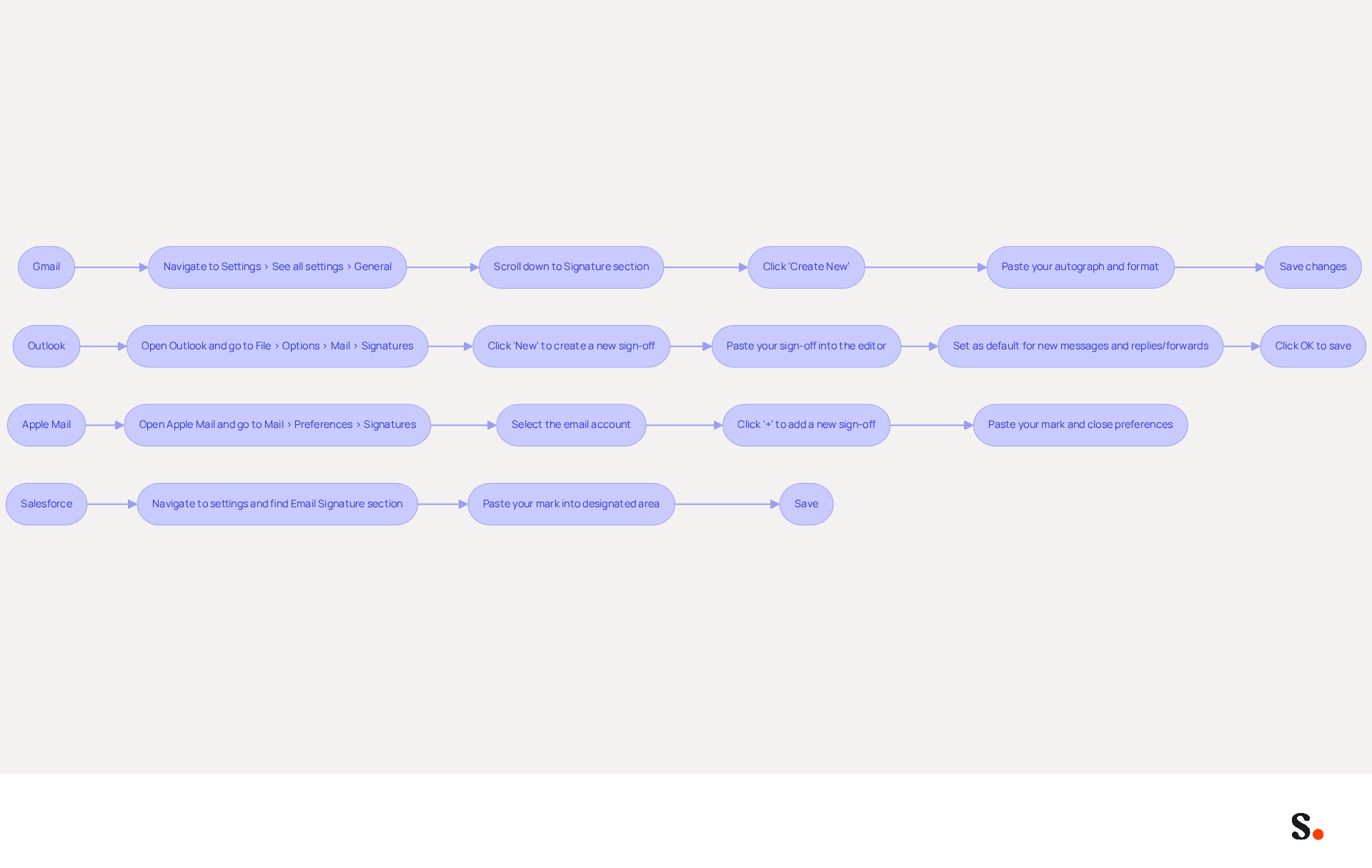
- Navigate to Settings > See all settings > General.
- Scroll down to the Signature section and click on 'Create New'.
- Paste your autograph into the text box and format it as needed.
- Save changes.
-
Outlook:
- Open Outlook and go to File > Options > Mail > Signatures.
- Click 'New' to create a new sign-off and paste your sign-off into the editor.
- Set it as the default for new messages and replies/forwards.
- Click OK to save.
-
Apple Mail:
- Open Apple Mail and go to Mail > Preferences > Signatures.
- Select the email account and click the '+' button to add a new sign-off.
- Paste your mark and close the preferences window.
-
Salesforce:
- Navigate to your settings and find the Email Signature section.
- Paste your mark into the designated area and save.
Following these steps ensures that the email signature for company owner is consistently applied across all platforms. This enhances your brand visibility. With over 70% of message openings attributed to popular clients like Gmail and Outlook, maintaining a professional closing is crucial for effective communication and lead generation. Neglecting to update your email signature can result in missed marketing opportunities. Such oversights can significantly reduce your brand's visibility and effectiveness.
To enable one-click synchronization with Scribe, you must grant permission for Scribe to connect with your provider. Ensure you have Super Admin access to provide these permissions. Once established, all modifications made in your provider directory will automatically sync with Scribe, simplifying the management of your digital identifiers. This feature saves time and helps maintain consistent branding across your organization. Scribe's SOC 2 Type II compliance ensures that your data stays protected while you manage your correspondence efficiently. Regularly updating the email signature for company owner is not just a best practice; it’s a strategic move that can significantly enhance your brand's presence.
Maintain and Update Your Email Signature Regularly
To ensure your email signature remains an effective communication tool, it's crucial to adopt best practices for maintenance and updates:
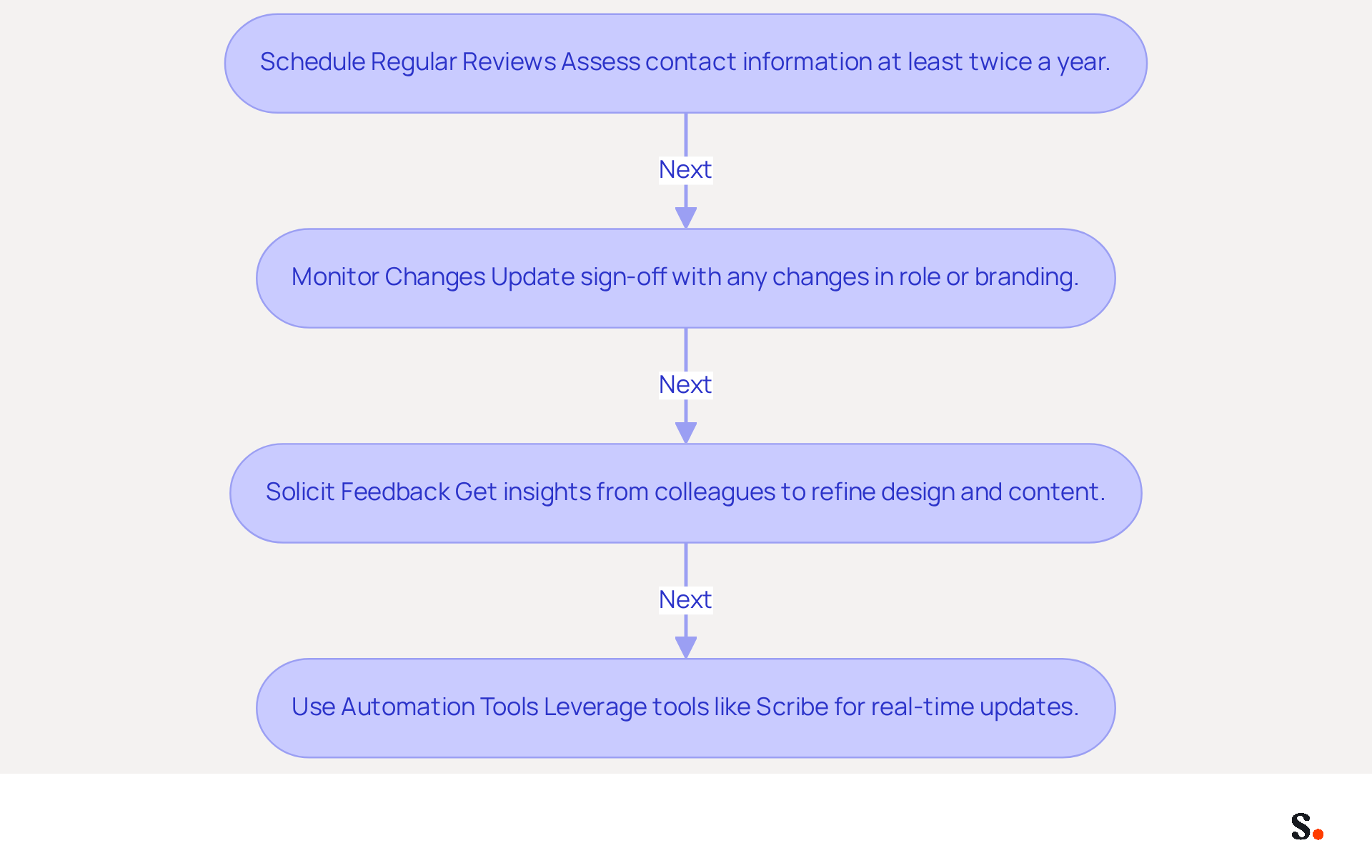
- Schedule Regular Reviews: Establish a routine to assess your contact information at least twice a year. This practice ensures that all information, including job titles, contact details, and branding elements, remains current. Many users neglect to update their email signatures regularly, leading to potential miscommunication.
- Monitor Changes: Update your sign-off promptly whenever there are changes in your role, company branding, or contact information. This proactive approach helps avoid sharing outdated information and ensures you meet legal requirements, including necessary disclaimers and unsubscribe options.
- Solicit Feedback: Getting feedback from colleagues can help you refine your email signature's design and content. Their insights can help you assess how well it communicates your brand and whether any adjustments are needed. This collaborative method can enhance the effectiveness of your email signature.
- Use Automation Tools: Leverage tools like Scribe to automate the updating process across your organization. With Scribe, you can effortlessly synchronize your Google Workspace, ensuring that any modifications in your team’s information are automatically reflected in their correspondence. This not only guarantees consistency but also saves valuable time, allowing your team to focus on more strategic initiatives. Scribe's one-click synchronization feature eliminates the need for manual updates, enhancing branding while ensuring compliance with security standards like SOC 2 Type II. Furthermore, with over 80% of messages viewed on mobile devices, ensure that your correspondence is optimized for mobile viewing to enhance readability and engagement.
Implementing these strategies not only enhances your brand's visibility but also fosters trust and engagement with your audience.
Conclusion
Many professionals overlook the potential of their email signatures, missing out on a key branding opportunity. An effective email signature is more than just a sign-off; it’s a branding tool that enhances professional communication. By incorporating essential elements such as your full name, job title, company logo, and contact information, company owners can create a signature that conveys professionalism and fosters engagement and trust with recipients.
Throughout the article, key practices for designing and maintaining an impactful email signature have been highlighted. These include:
- Aligning the signature with brand identity through thoughtful color schemes and font choices
- Ensuring mobile optimization
- Integrating the signature seamlessly into popular email clients like Gmail and Outlook
Regular updates and the use of automation tools like Scribe can further streamline the process, ensuring that all communications remain current and compliant with regulations such as GDPR and CCPA.
This oversight can lead to missed opportunities for engagement and brand recognition. Investing time in a well-designed email signature can lead to greater brand visibility and stronger connections with your audience. Embrace these best practices to transform your email signature into a strategic asset that not only represents your brand but also drives meaningful connections with your audience.
Frequently Asked Questions
Why is an effective email signature important for a company owner?
An effective email signature is crucial for establishing professionalism and fostering engagement in business communications.
What are the key elements to include in an email signature?
Key elements include your full name, job title, company name, contact information, company logo, website link, social media links, a call-to-action (CTA), mobile optimization, accessibility considerations, signature width, conciseness, testing, and avoiding information overload.
How should I format my full name in the email signature?
Always start with your full name to ensure the recipient knows who the message is from.
What role does the job title play in an email signature?
Clearly stating your job title establishes authority and context for the recipient.
Why is it important to include the company name in the email signature?
Including your company's name reinforces identity and helps the recipient recognize the organization you represent.
What contact information should be provided in the email signature?
You should provide a direct phone number and contact address for easy communication.
How does adding a company logo benefit the email signature?
A company logo enhances brand visibility and professionalism, but it should be under 10KB for optimal loading.
What is the purpose of including a website link in the email signature?
Including a link to your company’s website drives traffic and provides more information to the recipient.
Should I add social media links to my email signature?
Yes, if applicable, adding links to professional social media profiles encourages further engagement.
What is a call-to-action (CTA) and why is it important in an email signature?
A CTA is a strategic prompt, such as a booking link, that can achieve a click-through rate of 26%, facilitating easy scheduling of meetings.
How can I ensure my email signature is mobile-friendly?
Ensure the signature is mobile-friendly by using large enough icons and buttons for easy tapping, as over 60% of business communications are accessed on mobile devices.
What accessibility considerations should I keep in mind for my email signature?
Use email-safe fonts sized between 14-16px and maintain a contrast ratio of at least 4.5:1 to ensure readability for all recipients.
What is the maximum width for an email signature?
The maximum width of the sign-off should be under 600 pixels to ensure proper display across messaging clients.
How long should the closing statement in the email signature be?
Aim to keep the closing statement between 3-6 lines to avoid being flagged by spam filters.
Why is it important to regularly test the email signature?
Regularly evaluating your email footer across various clients and devices ensures functionality and formatting.
What should I avoid when creating my email signature?
Avoid cramming too much information into the closing, as this can detract from its effectiveness.
List of Sources
- Identify Key Elements for an Effective Email Signature
- 4 Best Practices for a Typical Email Signature That Boosts Marketing (https://scribe-mail.com/en-US/blog/4-best-practices-for-a-typical-email-signature-that-boosts-marketing)
- Email Signature Design Trends in 2026: What Works and What to Drop (https://bulksignature.com/blog/email-signature-design-trends)
- Best Email Signature Examples (2026) (https://signatureforemail.com/blog/view/best-email-signature-examples-2026)
- 20 best email signature design examples for 2026 — Stripo.email (https://stripo.email/blog/10-best-email-signature-design-examples)
- Email Signature Best Practices for 2026 (+ 15 Pro Examples) (https://wavecnct.com/blogs/email-signature-best-practices-2026)
- Design Your Signature to Reflect Brand Identity
- Email Signature Branding: Consistency and Impact | Crossware365 (https://crossware365.com/blog/mastering-email-signature-branding-market-presence)
- 20 best email signature design examples for 2026 — Stripo.email (https://stripo.email/blog/10-best-email-signature-design-examples)
- The impact of email signatures on your branding (https://signitic.com/en/resources/the-impact-of-email-signatures-on-your-branding)
- Email Signature Design Guide: Best Practices and Examples (https://designmodo.com/email-signature)
- Integrate Your Signature into Popular Email Clients
- Salesforce email signatures, managed centrally (https://syncsignature.com/integrations/salesforce)
- Email Signature Management: an Actionable Step-by-Step Guide - NEWOLDSTAMP (https://newoldstamp.com/blog/email-signature-management-guide)
- Email Client Market Share & Apple MPP Statistics - Rejoiner (https://rejoiner.com/resources/email-client-market-share)
- Add Your Email Signature to Salesforce Email Templates (https://cirrusinsight.com/blog/how-to-put-your-email-signature-into-a-salesforce-email-template)
- Maintain and Update Your Email Signature Regularly
- Email Signature Best Practices (https://uschamber.com/co/grow/thrive/email-signature-best-practices)
- Email signature statistics: Why every business should optimize their email signatures — Stripo.email (https://stripo.email/blog/email-signature-statistics-why-every-business-should-optimize-their-email-signatures)
- Email Signature Statistics: A Closer Look at Email Signatures in 2026 (https://mysignature.io/blog/email-signature-statistics)
- 5 Reasons to Regularly Update Your Email Signature (https://gsignature.com/blog-post/5-reasons-why-you-should-update-your-email-signature-regularly)
- 4 Best Practices to Enhance Your Signature Client Engagement (https://scribe-mail.com/en-US/blog/4-best-practices-to-enhance-your-signature-client-engagement)
Get started with Scribe
Manage signatures across your whole team
Free 14-day trial — no credit card.