Best Practices for an Effective Executive Assistant Email Signature
An effective email signature is crucial for establishing professionalism and reinforcing brand identity in digital communication. For executive assistants, a
Sophie Grant
Email Signature Specialist, Scribe
Introduction
An effective email signature is crucial for establishing professionalism and reinforcing brand identity in digital communication. For executive assistants, a well-designed email signature enhances clarity, fosters trust, and serves as a marketing asset. Navigating the complexities of email signature design can be daunting for executive assistants.
In this article, we will explore best practices for creating an impactful email signature that meets the needs of executive assistants, examining:
- Essential components
- Design techniques
- Strategies to leverage this often-overlooked aspect of professional communication
Incorporate Essential Elements in Your Email Signature
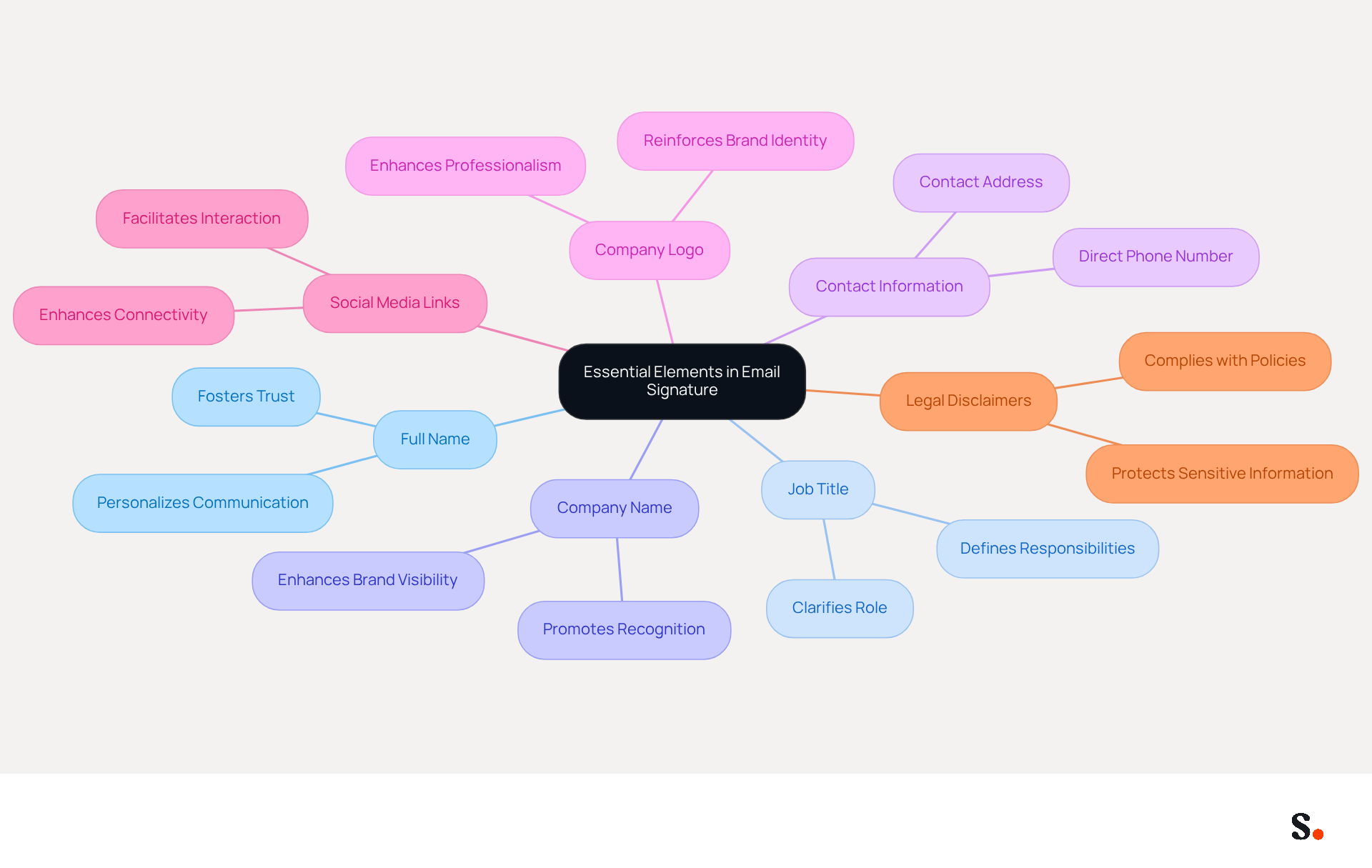
To create an effective email signature, it is essential to include specific elements that enhance professionalism and communication clarity:
- Full Name: Clearly state your full name to personalize communication and foster trust.
- Job Title: Include your title as Executive Assistant in your executive assistant email signature, clarifying your role and responsibilities.
- Company Name: Mention the company you represent to enhance brand visibility and recognition.
- Contact Information: Provide a direct phone number and contact address for easy access, ensuring recipients can reach you without hassle.
- Company Logo: Incorporate the company logo to reinforce brand identity and professionalism in every correspondence.
- Social Media Links: If applicable, add links to professional social media profiles to enhance connectivity and interaction with recipients.
- Legal Disclaimers: Include any necessary legal disclaimers to comply with company policies and protect sensitive information.
These elements convey professionalism and provide recipients with the information they need to connect with you easily. As we move into 2026, keeping your email signature under 100KB is vital for optimal performance and security. Furthermore, utilizing high-quality images and ensuring the design is mobile-friendly can greatly enhance engagement rates, as over 60% of business correspondence is now accessed on mobile devices. Regularly updating your executive assistant email signature is essential for maintaining a strong professional presence in your communications.
Utilize Effective Design and Formatting Techniques
To enhance the professionalism and effectiveness of your email signature, implementing strategic design and formatting techniques is essential:
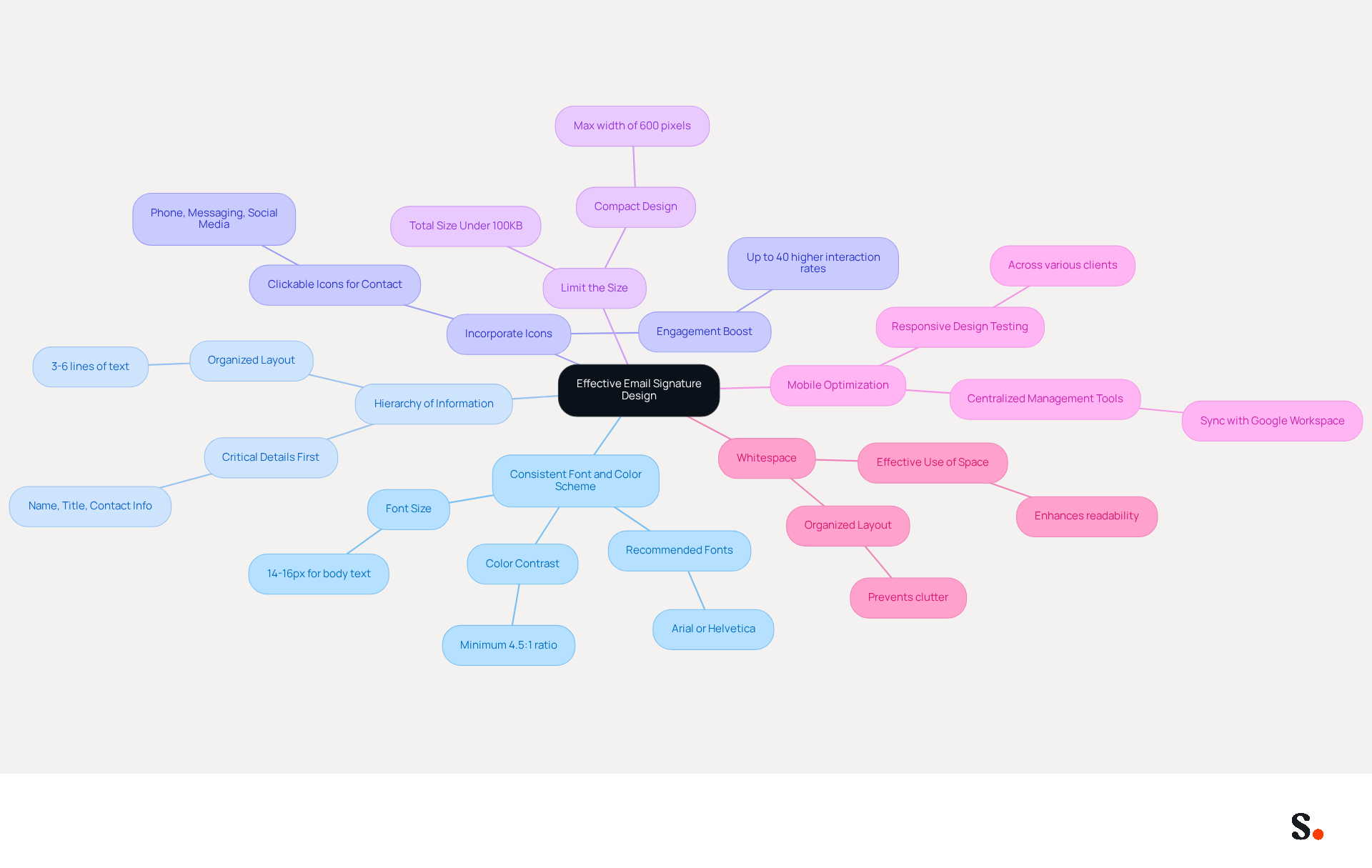
- Consistent Font and Color Scheme: Utilize fonts and colors that align with your company’s branding to maintain a cohesive identity across communications. Recommended fonts include Arial or Helvetica at sizes between 14-16px for optimal readability.
- Hierarchy of Information: Organize information strategically, placing the most critical details - such as your name, title, and contact information - at the top. This approach ensures that recipients can quickly grasp essential information included in the executive assistant email signature.
- Incorporate icons for phone, messaging, and social media links to create an interactive and visually appealing footer. This not only improves aesthetics but also promotes interaction, as elements with clickable features can significantly boost interaction rates. Research indicates that well-optimized digital identifiers, including an executive assistant email signature with strategic calls to action, can achieve engagement rates up to 40% higher than those with generic sign-offs.
- Limit the Size: Keep the sign-off compact, ideally within 3-5 lines, to avoid overwhelming the recipient. A well-organized sign-off should not surpass a maximum width of 600 pixels to ensure proper display on mobile devices, where over 60% of business correspondence is accessed.
- Mobile Optimization: Ensure that the sign-off is mobile-friendly, as many users access messages on their smartphones. Testing across various messaging clients is crucial to catch any rendering issues before deployment. Consider utilizing Scribe’s centralized management tool for maintaining brand consistency throughout your organization, enabling automatic updates when syncing with Google Workspace. This feature saves time by ensuring that any changes in your Google Workspace, such as moving teammates or updating their information, are automatically reflected in Scribe without manual input. Furthermore, Scribe enables Marketing teams to manage their electronic identifiers independently after the initial IT setup, improving operational efficiency.
- Whitespace: Utilize whitespace effectively to prevent clutter and enhance readability. An organized layout with adequate spacing can enhance the overall presentation and make the mark more inviting.
By avoiding common pitfalls, organizations can ensure that their executive assistant email signature effectively represents their brand and facilitates clear communication.
Leverage Email Signatures for Marketing Opportunities
Transforming your email signature into a marketing asset requires strategic implementation of effective techniques:
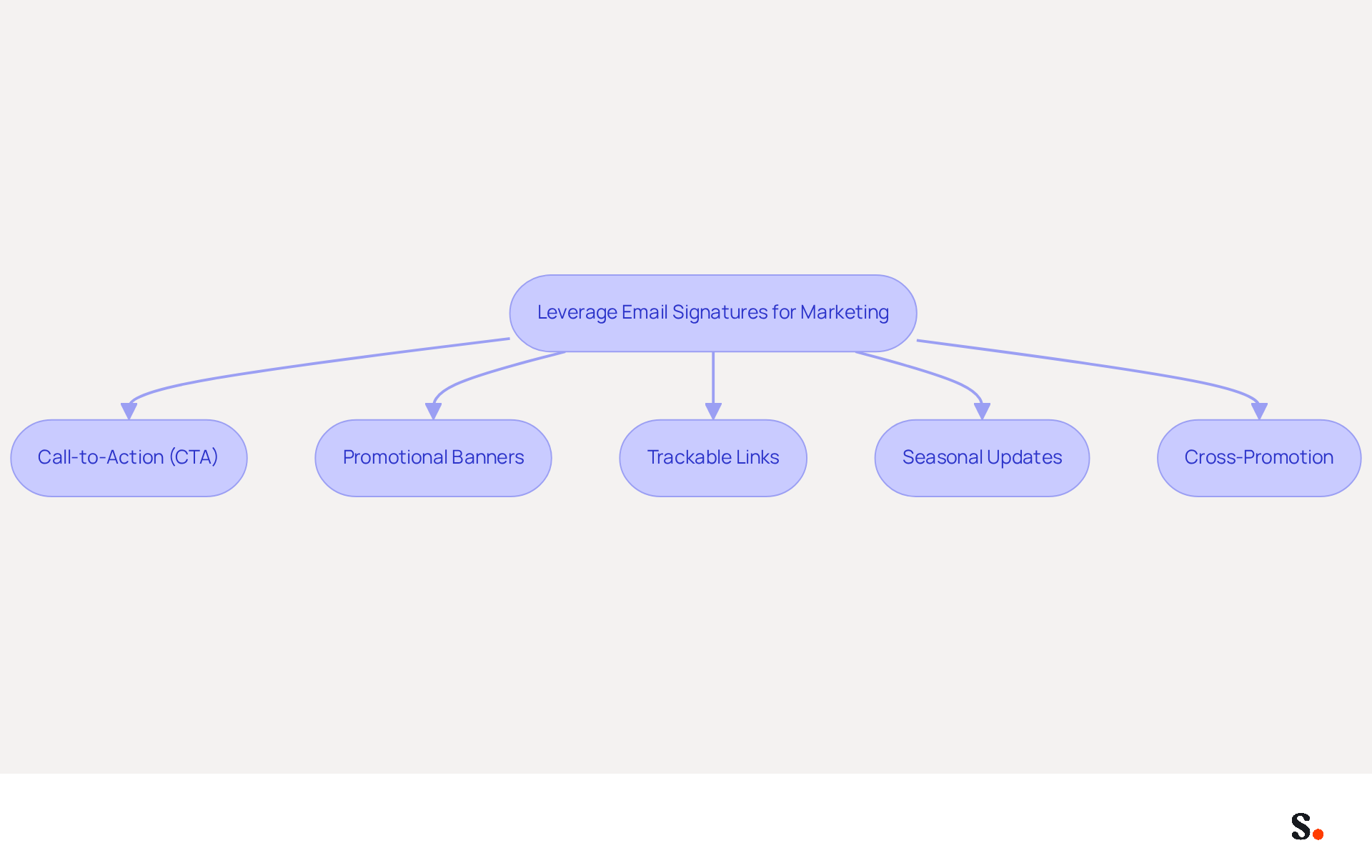
- Call-to-Action (CTA): Incorporate a clear and compelling CTA, such as a link to a current promotion, upcoming event, or new product launch. This prompts recipients to act quickly; research indicates that personalized CTAs can improve conversion rates by 202% compared to standard ones, as noted by Yuliia Savchuk, a content writer at Stripo.
- Promotional Banners: Utilize visually striking banner images to highlight special offers or company news. Interactive banners in message footers can greatly enhance interaction, with a promotional banner achieving a 7.02% click-through rate from 228 views, demonstrating their ability to engage recipients effectively.
- Trackable Links: Implement UTM parameters in your links to track engagement and measure the effectiveness of your email marketing efforts. Without proper tracking, understanding the impact of your email marketing efforts can be challenging.
- Seasonal Updates: Regularly refresh your branding to reflect seasonal promotions or campaigns. Neglecting to refresh your branding may result in diminished engagement and missed marketing opportunities.
- Cross-Promotion: Promote other departments or initiatives within your organization when applicable. This fosters collaboration and raises awareness of various company efforts, enhancing overall brand visibility.
By using these strategies, executive assistants can enhance the marketing impact of their communications, ensuring that each message, including the executive assistant email signature, becomes a chance for engagement and conversion.
Adapt Your Signature for Different Contexts
To enhance the effectiveness of your email signature, it is crucial to adapt it for different contexts:
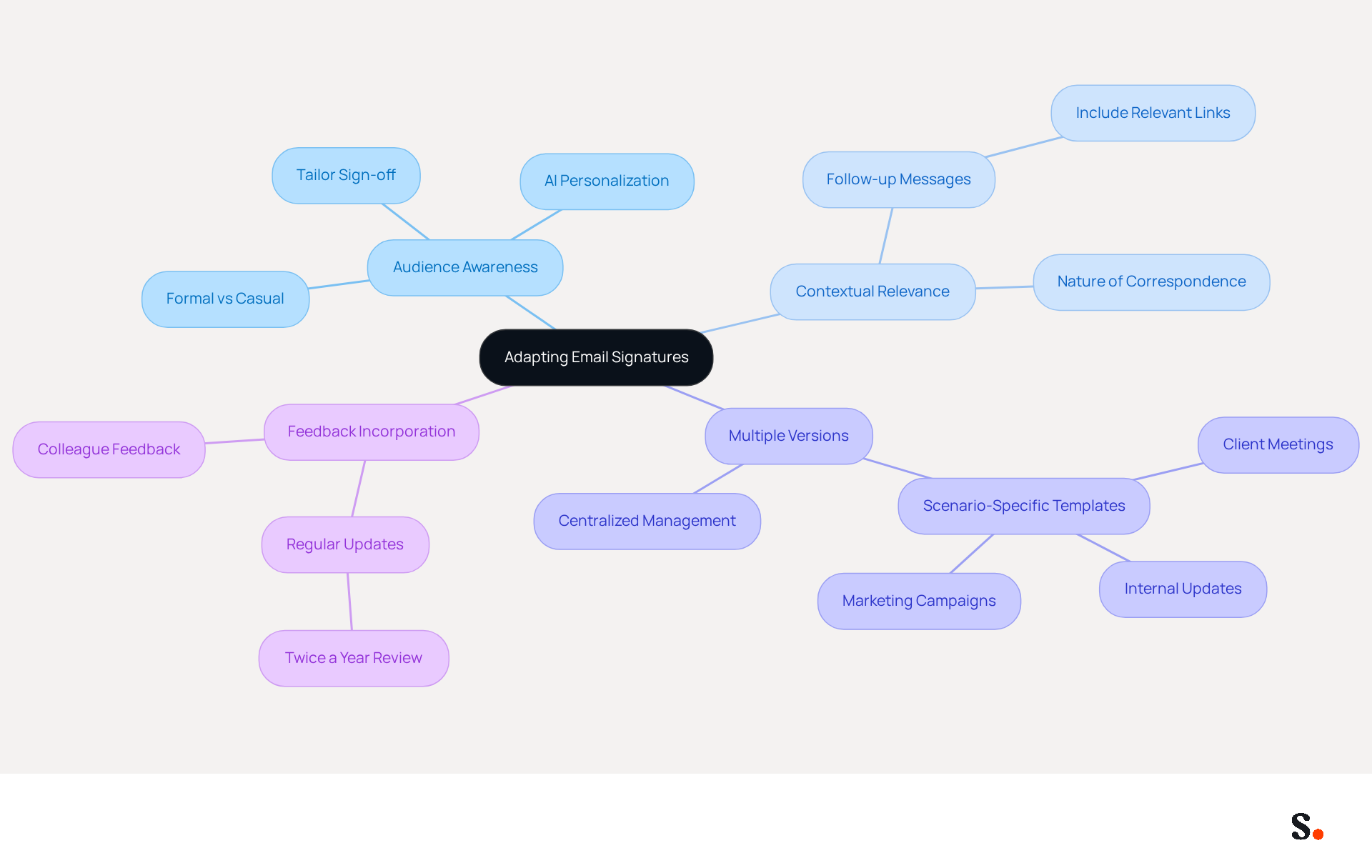
- Audience Awareness: Tailor your sign-off based on the recipient’s role and relationship with you. A formal mark may be suitable for external clients, while a more casual one can enhance internal communications. Nearly half of organizations recognize that AI enhances engagement through personalized communication, highlighting the importance of tailoring your approach to audience preferences.
- Contextual Relevance: Modify the content of your sign-off based on the nature of the correspondence. For example, if you are sending a follow-up message after a meeting, including a link to a relevant document or resource can provide added value. This approach aligns with findings that recipients respond more favorably to personalized emails.
- Multiple Versions: Create different variations of your sign for various scenarios, such as client meetings, internal updates, or marketing campaigns. This strategy ensures that your mark remains relevant and effective across different contexts. Organizations that implement segmented email templates based on role or department have reported improved engagement. With Scribe, you can streamline this process by syncing your Google Workspace, allowing for automatic updates and ensuring that any changes, such as job positions or group assignments, are reflected in your profiles without manual input. This not only saves time but also improves brand consistency across all messages.
- Feedback Incorporation: Be open to feedback from colleagues or supervisors regarding the effectiveness of your mark. Many professionals struggle to keep their email signatures current, risking outdated information. Regularly updating your signature - at least twice a year - can help maintain its relevance and accuracy, ensuring it reflects current branding and contact information. Furthermore, integrating tools like Aircall with Scribe guarantees that any modifications made in your settings are automatically reflected in your branding elements, improving brand consistency across all interactions.
By adjusting your executive assistant email signature for different situations, you can enhance your communication and increase the likelihood of receiving positive responses. Ultimately, a well-crafted email signature can be a powerful tool for driving engagement and reinforcing your brand identity.
Conclusion
Many executive assistants find it challenging to create email signatures that reflect their professional identity while also engaging recipients effectively. Incorporating key elements like full name, job title, company name, and contact information, along with thoughtful design, can significantly enhance an executive assistant's professional image and engagement with recipients.
The article highlights several best practices, including:
- The importance of maintaining brand consistency through design
- Utilizing effective formatting techniques
- Leveraging email signatures for marketing opportunities
By adapting signatures for different contexts and audiences, executive assistants can ensure their communications are relevant and impactful. Additionally, tools like Scribe facilitate the management of these signatures, allowing for quick updates and ensuring brand integrity across all communications.
A well-designed email signature goes beyond a simple sign-off; it serves as a vital opportunity to reinforce brand identity and foster engagement. By embracing these strategies, executive assistants not only enhance their individual communications but also contribute significantly to their organization's success.
Frequently Asked Questions
What are the essential elements to include in an email signature?
The essential elements to include in an email signature are your full name, job title, company name, contact information, company logo, social media links, and legal disclaimers.
Why is it important to include your full name in an email signature?
Including your full name personalizes communication and fosters trust between you and the recipient.
How does mentioning your job title in an email signature benefit communication?
Including your job title clarifies your role and responsibilities, helping recipients understand your position.
What role does the company name play in an email signature?
Mentioning the company name enhances brand visibility and recognition in your communications.
Why should you provide contact information in your email signature?
Providing a direct phone number and contact address allows recipients to easily reach you without hassle.
How does incorporating a company logo in an email signature help?
Including the company logo reinforces brand identity and professionalism in every correspondence.
Should I include social media links in my email signature?
Yes, adding links to professional social media profiles can enhance connectivity and interaction with recipients.
What is the purpose of including legal disclaimers in an email signature?
Legal disclaimers are included to comply with company policies and protect sensitive information.
What is the recommended file size for an email signature as we approach 2026?
It is vital to keep your email signature under 100KB for optimal performance and security.
Why is it important to ensure that your email signature design is mobile-friendly?
A mobile-friendly design enhances engagement rates, as over 60% of business correspondence is accessed on mobile devices.
How often should I update my email signature?
Regularly updating your email signature is essential for maintaining a strong professional presence in your communications.
List of Sources
- Incorporate Essential Elements in Your Email Signature
- Email Signature Best Practices for 2026 (+ 15 Pro Examples) (https://wavecnct.com/blogs/email-signature-best-practices-2026)
- Not Using Email Signatures? 5 Reasons You Should Reconsider (https://opensense.com/blog/not-using-email-signatures-5-reasons-you-should-reconsider)
- The effectiveness of the email signature as a “point of contact” (https://signitic.com/en/resources/the-effectiveness-of-the-email-signature-as-a--point-of-contact)
- 20 best email signature design examples for 2026 — Stripo.email (https://stripo.email/blog/10-best-email-signature-design-examples)
- Utilize Effective Design and Formatting Techniques
- Email Signature Best Practices for 2026 (+ 15 Pro Examples) (https://wavecnct.com/blogs/email-signature-best-practices-2026)
- Email Signature Design Trends in 2026: What Works and What to Drop (https://bulksignature.com/blog/email-signature-design-trends)
- Email Signature Best Practices - NEWOLDSTAMP (https://newoldstamp.com/blog/email-signature-best-practices)
- Best practices for business email signatures in 2026 (https://bybrand.io/blog/best-practices)
- 20 best email signature design examples for 2026 — Stripo.email (https://stripo.email/blog/10-best-email-signature-design-examples)
- Leverage Email Signatures for Marketing Opportunities
- Why Email Signatures Must Be In Your 2026 Marketing Plan | Rocketseed (https://rocketseed.com/blog/2026-marketing-plan-email-signatures)
- Email call to action best practices: The complete guide [2026] — Stripo.email (https://stripo.email/blog/email-call-action-best-practices-examples)
- The Ultimate Guide to Email Signature Call-to-Action - NEWOLDSTAMP (https://newoldstamp.com/blog/the-ultimate-guide-to-email-signature-call-to-action)
- Email Marketing Trends 2026: Here's What to Keep an Eye on (https://mailjet.com/blog/email-best-practices/email-marketing-trends-2026)
- Maximize Marketing Impact with an Email Signature Template Generator (https://scribe-mail.com/en-US/blog/maximize-marketing-impact-with-an-email-signature-template-generator)
- Adapt Your Signature for Different Contexts
- Email Signature Design Trends in 2026: What Works and What to Drop (https://bulksignature.com/blog/email-signature-design-trends)
- Email Signature Trends in Numbers: Infographic [2026] (https://mailtrap.io/blog/email-signature-trends)
- 12 email signature marketing examples that drive clicks (2026) (https://signitic.com/en/resources/12-email-signature-marketing-examples-that-actually-drive-clicks)
- Email Signature Trends 2026: Centralized Control & Automation | SIGNandGO posted on the topic | LinkedIn (https://linkedin.com/posts/signngo_email-signature-trends-to-watch-in-2026-activity-7401523471786217473-zAVL)
Get started with Scribe
See why teams switch to Scribe
Free 14-day trial — no credit card.