Best Practices for an Effective Founder Email Signature
An effective email signature is not merely a digital sign-off; it is a strategic branding tool that enhances professionalism and drives engagement. For
Sophie Grant
Email Signature Specialist, Scribe

On this page
- Introduction
- Identify Essential Components of a Founder Email Signature
- Incorporate Branding Elements for Consistency and Recognition
- Utilize Calls-to-Action to Enhance Engagement and Drive Conversions
- Implement Technical Solutions for Efficient Signature Management
- Conclusion
- Frequently Asked Questions
- List of Sources
Introduction
An effective email signature is not merely a digital sign-off; it is a strategic branding tool that enhances professionalism and drives engagement. For founders, a well-designed email signature reflects their identity and communicates their brand's values and offerings. Many founders fail to recognize the potential of their email signatures as marketing tools. This oversight can lead to missed opportunities for brand engagement and conversion. Founders must ensure their email signatures are both informative and effective in driving engagement and conversions.
Get started with Scribe
Manage signatures across your whole team
Free 14-day trial — no credit card.
Identify Essential Components of a Founder Email Signature
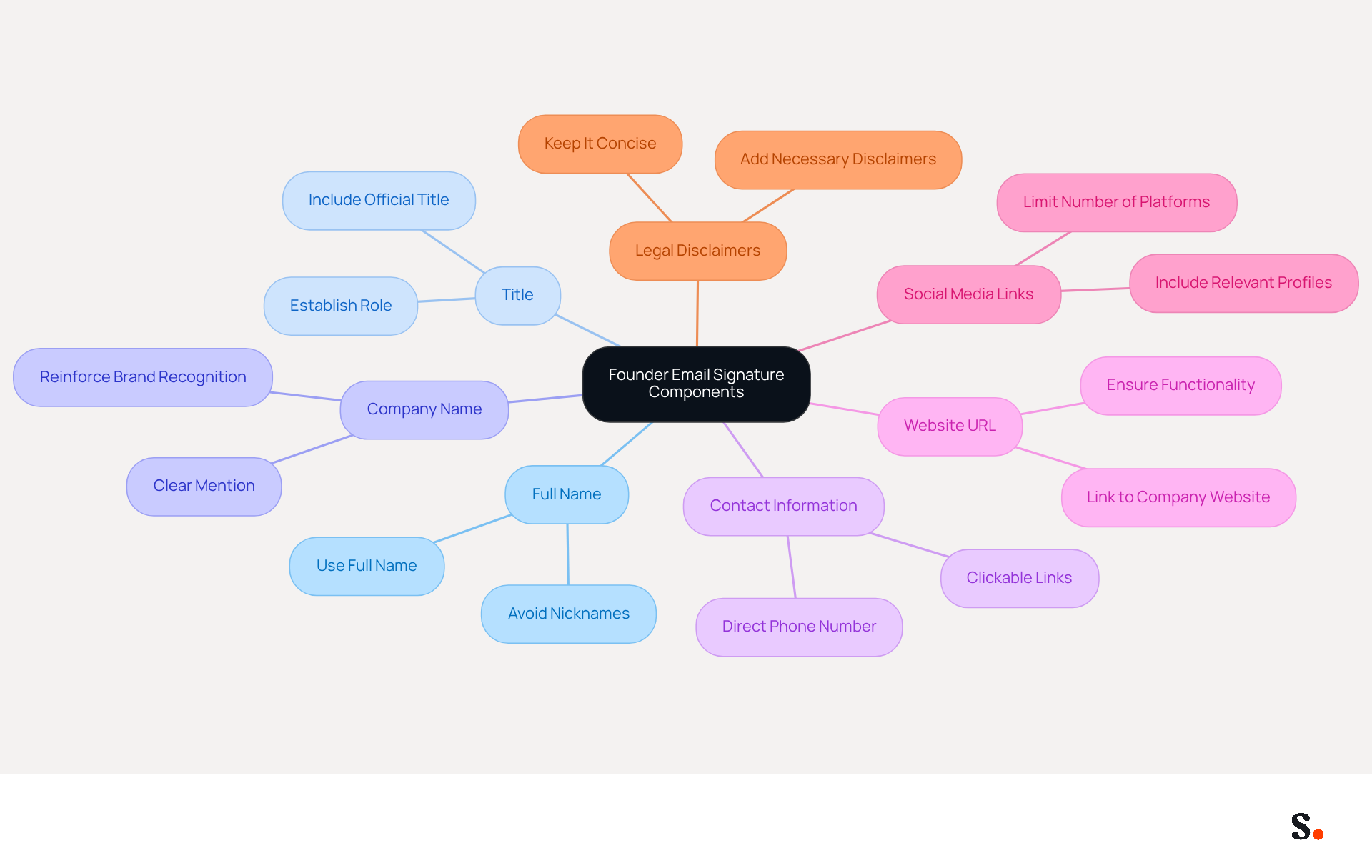
A well-crafted founder email signature is crucial for establishing professionalism and promoting brand identity. An effective founder email signature should encompass several key components to enhance professionalism and serve as a marketing tool for the brand:
- Full Name: Clearly state your full name to personalize communication. Avoid nicknames unless they are widely recognized.
- Title: Include your official title, such as 'Founder' or 'CEO', to establish your role within the company.
- Company Name: Clearly mention the name of your company to reinforce brand recognition.
- Contact Information: Provide a direct phone number and contact address to facilitate easy communication. Clickable links for these details enhance accessibility.
- Website URL: Link to your company’s website to direct recipients to more information about your business, ensuring the link is easily identifiable and functional.
- Social Media Links: Include links to professional social media profiles (e.g., LinkedIn) to enhance connectivity and networking opportunities. Limit the number of platforms to maintain clarity and relevance.
- Legal Disclaimers: If applicable, add any necessary legal disclaimers to comply with industry regulations, ensuring they are concise to avoid cluttering the closing.
These elements not only enhance professionalism but also transform your email footer into a strong branding tool, particularly through your founder email signature. Manually updating email signatures can lead to inconsistencies and wasted time, but with Scribe, organizations can automate the synchronization of signatures, ensuring that any changes made in the service provider are reflected in real-time. To enable this one-click synchronization, you must grant permission for the application to connect with your email provider, which requires Super Admin access. This feature not only keeps your brand consistent but also saves time by syncing teammate data automatically every day at your local time. Additionally, Scribe is SOC 2 Type II compliant, ensuring the safety of your data. Research shows that using high-quality logos and professional headshots in email footers can increase response rates by around 32%, highlighting the importance of a well-crafted footer in effective communication. Regularly updating your email signature ensures that your communication remains effective and relevant, ultimately enhancing your brand's credibility.
Incorporate Branding Elements for Consistency and Recognition
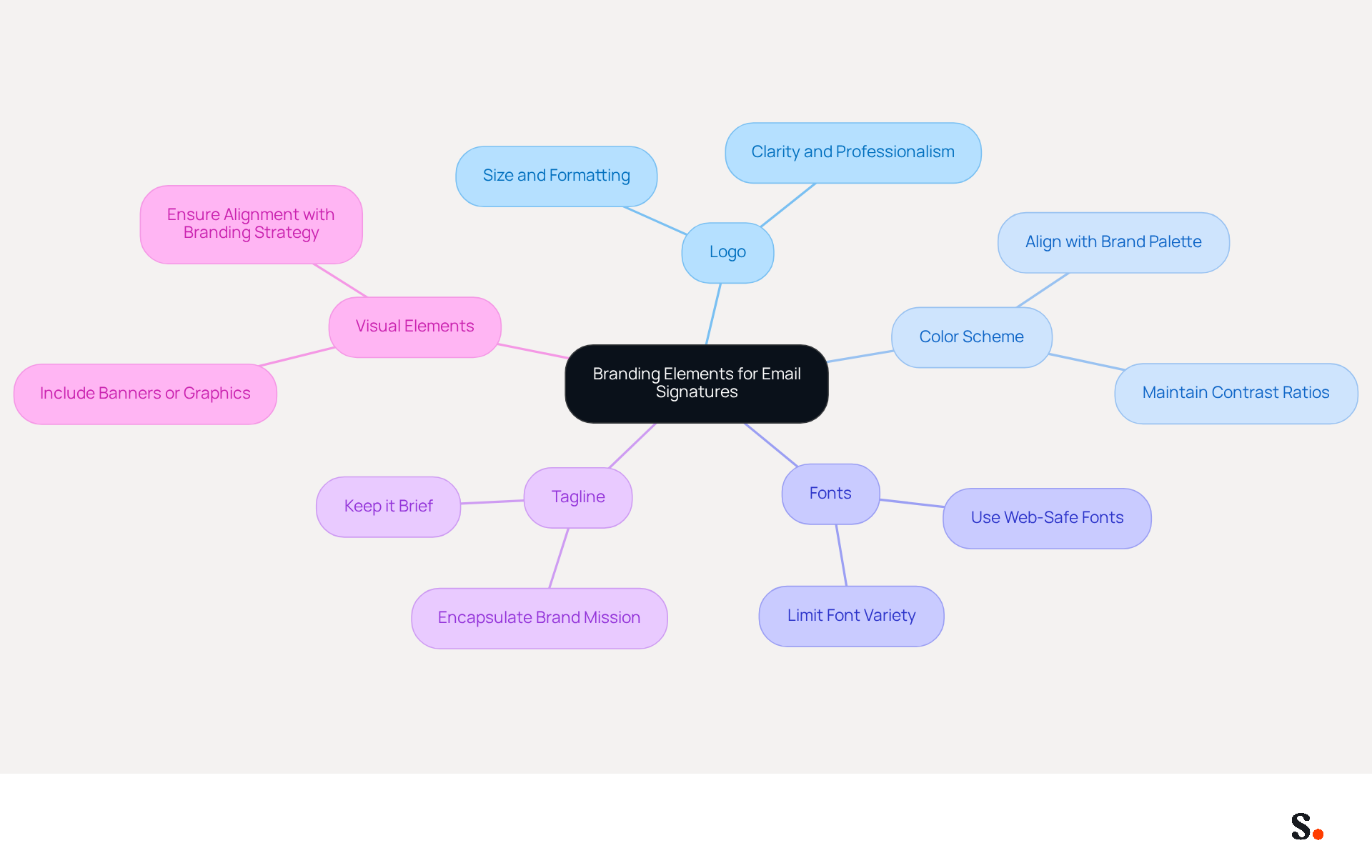
To effectively convey your brand identity through email signatures, it is crucial to incorporate specific branding elements:
- Logo: Including your company logo is essential for improving recognition. Ensure it is suitably sized and formatted for communication to maintain clarity and professionalism.
- Color Scheme: Utilize colors that align with your organization's palette to create a cohesive look. This consistency helps reinforce identity across all communications, making your emails instantly recognizable.
- Fonts: Choose typefaces that comply with your guidelines. Limiting the number of different fonts used will help maintain a clean and professional appearance, which is essential for effective communication.
- Tagline: If applicable, include a brief tagline that encapsulates your organization's mission or value proposition. This can serve as a quick reminder of what your brand stands for.
- Visual Elements: Consider adding a banner or promotional graphic that highlights current campaigns or initiatives. Studies indicate that using dynamic banners in email footers can increase click rates by 22%, which enhances engagement and encourages action. Ensure that these elements align with your overall branding strategy to maximize their effectiveness.
Furthermore, every modification made in your Aircall configuration will automatically be reflected in your Scribe documents, as we are syncing the data from there. This automated synchronization not only streamlines the process but also ensures that your branding remains consistent across all communications.
By incorporating these elements, you not only create a professional impression but also reinforce your brand identity with every email you send. Data reveals that businesses with consistent messaging formats see a 22% increase in response rates, making it a strategic investment in your marketing initiatives. Moreover, aligning messaging with social media and other platforms enhances campaign recall, further boosting the effectiveness of your communications. Ultimately, neglecting these elements could hinder your brand's visibility and impact in the digital landscape.
Utilize Calls-to-Action to Enhance Engagement and Drive Conversions
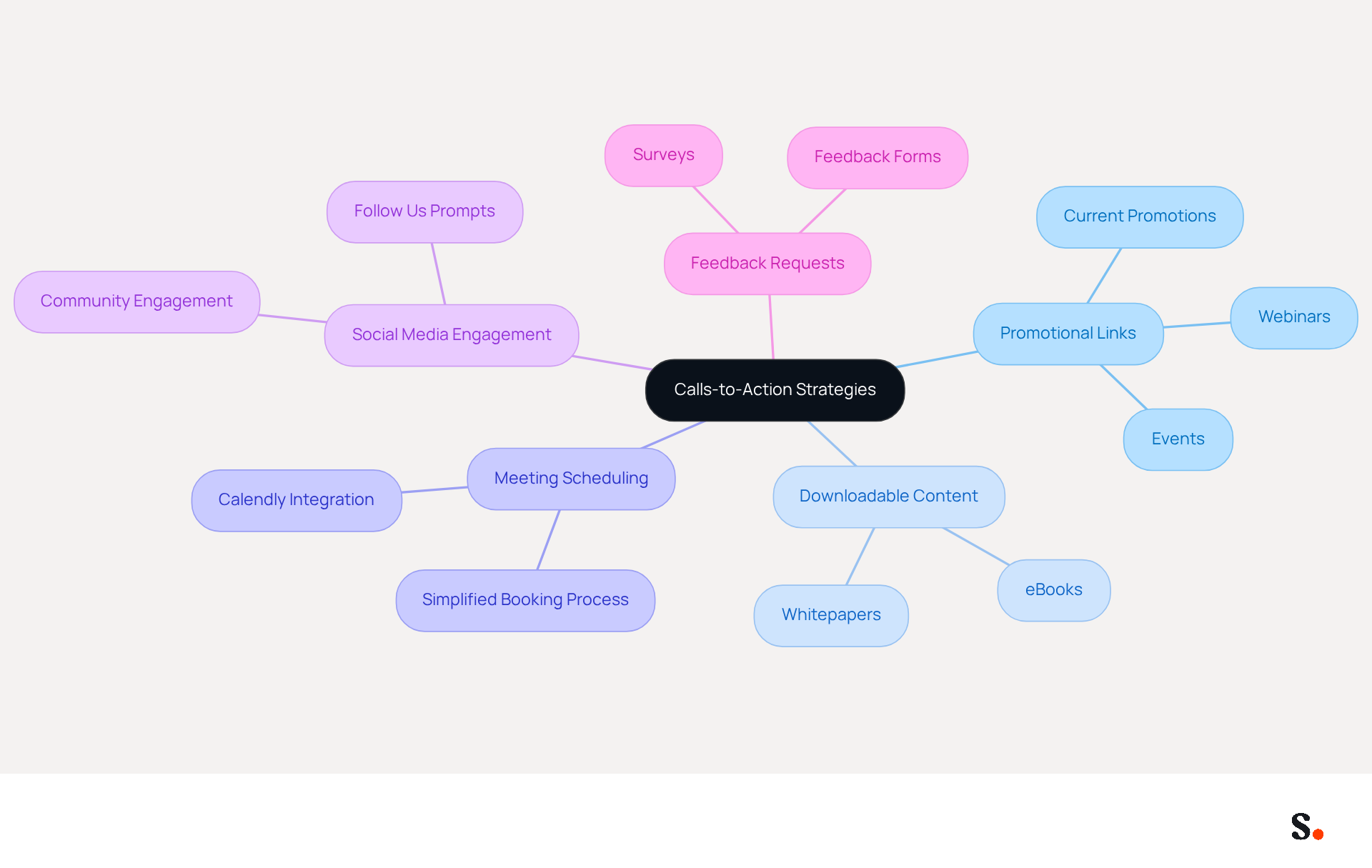
Effective calls-to-action (CTAs) in your founder email signature are essential for maximizing engagement and driving conversions. Here are some strategies to consider, especially when utilizing Scribe's automated synchronization features with Aircall and Calendly:
- Promotional Links: Include links to current promotions, webinars, or events that encourage recipients to learn more or participate. This not only informs your audience but also drives traffic to your offerings.
- Downloadable Content: Offer valuable resources such as eBooks or whitepapers that recipients can download by clicking a link in your founder email signature. This not only showcases your expertise but also gives your audience something valuable to take away.
- Meeting Scheduling: Use a link to a scheduling tool, like Calendly, to allow recipients to easily book a meeting with you. This simplifies the process for potential clients and increases the likelihood of engagement, especially with Scribe's smooth integration that ensures your availability is always current.
- Social Media Engagement: Encourage recipients to follow your company on social media by including links to your profiles with a prompt like 'Follow us for updates!'. This can enhance your online presence and foster community engagement.
- Feedback Requests: If applicable, include a link to a survey or feedback form to gather insights from your audience. This not only shows that you value their opinions but also helps you improve your offerings.
Statistics indicate that personalized CTAs can yield 202% better conversion rates than standard ones, emphasizing the importance of tailoring your messages. Furthermore, a strategically positioned CTA can greatly enhance click-through rates, with 35% of marketing experts recognizing interactive buttons as the most effective components in communications. By implementing these strategies, you can transform your email footers, including your founder email signature, into powerful tools for driving engagement and conversions. By leveraging Scribe's automated synchronization capabilities, you can ensure your CTAs are not only effective but also consistently aligned with your brand messaging.
Implement Technical Solutions for Efficient Signature Management
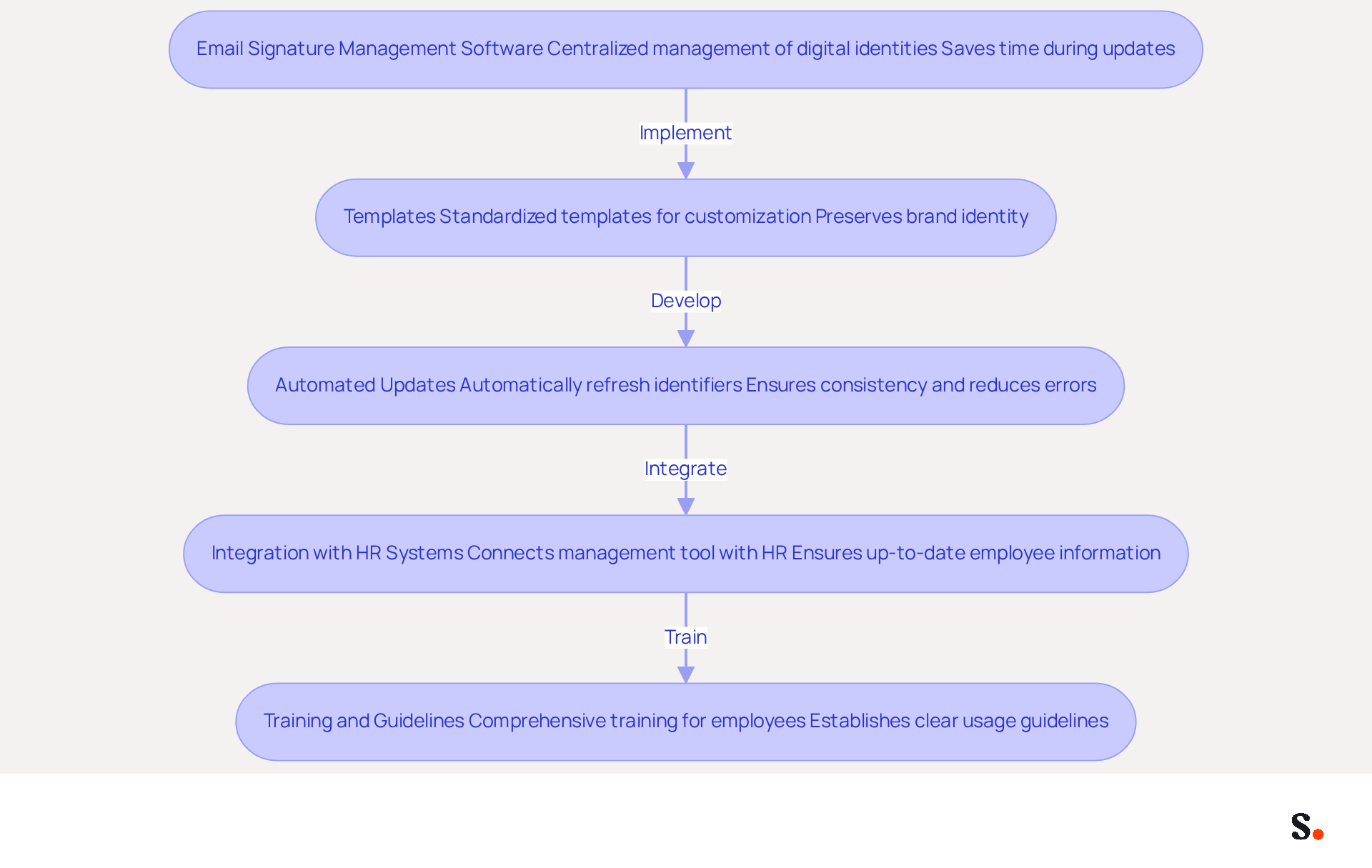
To enhance email signature management, organizations must adopt effective technical solutions that streamline processes and ensure consistency:
- Email Signature Management Software: Utilize platforms like Scribe that enable centralized management of digital identities across your organization. This method maintains consistent identities and saves time during updates; 25.1% of organizations prioritize uniform corporate communication through email signatures. With Scribe's SAML single sign-on integration, employees can easily access the platform through their identity provider, enhancing security and streamlining the process.
- Templates: Develop standardized templates that can be easily customized for different team members while preserving brand identity. Branded email footers can lead to a 12% average click-through rate on banner displays, highlighting the importance of cohesive design.
- Automated Updates: Implement systems that automatically refresh identifiers when changes occur, such as new branding or employee information. Manual updates often lead to errors, creating inconsistencies in communication, but automated systems ensure that 44.4% of professionals can update their credentials effortlessly. Scribe's capabilities enable effortless synchronization of messaging identifiers, ensuring that all team members represent the latest branding.
- Integration with HR Systems: Connect your management tool for electronic signatures with HR systems to ensure that employee information stays up-to-date and precise. This integration supports GDPR compliance, ensuring that your organization adheres to data protection regulations and assists the 89.9% of individuals who utilize a single primary electronic identifier, ensuring consistency across communications.
- Training and Guidelines: Provide comprehensive training for employees on utilizing the management system for sign-offs and establish clear guidelines for usage. A strong professional closing is considered vital for establishing trust by 52% of experts, making it necessary to uphold professionalism in every correspondence.
Ultimately, embracing these solutions not only enhances brand representation but also drives measurable results in marketing efforts.
Conclusion
A professional founder email signature is not just an accessory; it is a critical component of effective communication and brand strategy. Incorporating key elements like your full name, title, company name, and contact information makes the signature a vital communication tool and a marketing opportunity. Utilizing Scribe's automated synchronization features ensures that these signatures remain consistent and up-to-date, reflecting the latest branding and messaging across all communications.
Key strategies discussed include the integration of branding elements like logos, color schemes, and taglines, which enhance recognition and create a cohesive look. Additionally, effective calls-to-action can significantly boost engagement and drive conversions. Using Scribe's email signature management software helps teams keep their branding consistent and compliant with standards like GDPR and CCPA.
In conclusion, the importance of a professional founder email signature cannot be overstated. It is not merely a digital footer but a strategic element that can enhance brand visibility and engagement. Many organizations struggle to maintain consistent branding across email communications, but tools like Scribe can help achieve 100% brand consistency and measurable marketing ROI. Ultimately, neglecting the power of a well-crafted email signature could mean falling behind in a competitive market.
Frequently Asked Questions
Why is a well-crafted founder email signature important?
A well-crafted founder email signature is crucial for establishing professionalism and promoting brand identity.
What are the essential components of a founder email signature?
The essential components include your full name, official title, company name, contact information, website URL, social media links, and legal disclaimers if applicable.
How should I format my full name in the email signature?
Clearly state your full name and avoid using nicknames unless they are widely recognized.
What title should I include in my email signature?
Include your official title, such as 'Founder' or 'CEO', to establish your role within the company.
Why is it important to include the company name in the email signature?
Mentioning the company name reinforces brand recognition.
What contact information should I provide in my email signature?
Provide a direct phone number and contact address, ensuring they are clickable for easy communication.
How can I enhance my email signature with a website URL?
Link to your company’s website to direct recipients to more information about your business, ensuring the link is easily identifiable and functional.
Should I include social media links in my email signature?
Yes, include links to professional social media profiles, such as LinkedIn, but limit the number of platforms to maintain clarity and relevance.
What are legal disclaimers, and should I include them in my email signature?
Legal disclaimers are necessary statements to comply with industry regulations, and they should be concise to avoid cluttering the closing of your email.
How can Scribe help with managing email signatures?
Scribe allows organizations to automate the synchronization of email signatures, ensuring any changes made are reflected in real-time, which saves time and maintains brand consistency.
What access is required to enable one-click synchronization with Scribe?
You must grant permission for the application to connect with your email provider, which requires Super Admin access.
What compliance does Scribe adhere to regarding data safety?
Scribe is SOC 2 Type II compliant, ensuring the safety of your data.
How can high-quality logos and professional headshots impact email communication?
Using high-quality logos and professional headshots in email footers can increase response rates by around 32%, highlighting their importance in effective communication.
Why is it important to regularly update my email signature?
Regularly updating your email signature ensures that your communication remains effective and relevant, ultimately enhancing your brand's credibility.
List of Sources
- Identify Essential Components of a Founder Email Signature
- Email Signature Best Practices for 2026 (+ 15 Pro Examples) (https://wavecnct.com/blogs/email-signature-best-practices-2026)
- Why email signature for CEO matters and how to create the best one - MySignature (https://mysignature.io/professional-email-signatures/ceo)
- Best Practices for Email Signatures for Business Owners (https://scribe-mail.com/en-US/blog/best-practices-for-email-signatures-for-business-owners)
- Email Signature Best Practices Guide With Examples - MailerLite (https://mailerlite.com/blog/email-signature-best-practices)
- Best practices for business email signatures in 2026 (https://bybrand.io/blog/best-practices)
- Incorporate Branding Elements for Consistency and Recognition
- Email Signature Design Trends in 2026: What Works and What to Drop (https://bulksignature.com/blog/email-signature-design-trends)
- 40+ Email Signature Statistics for 2026 (Data + Insights) (https://wavecnct.com/blogs/email-signature-statistics)
- The impact of email signatures on your branding (https://signitic.com/en/resources/the-impact-of-email-signatures-on-your-branding)
- Why Email Signatures Must Be In Your 2026 Marketing Plan | Rocketseed (https://rocketseed.com/blog/2026-marketing-plan-email-signatures)
- 20 best email signature design examples for 2026 — Stripo.email (https://stripo.email/blog/10-best-email-signature-design-examples)
- Utilize Calls-to-Action to Enhance Engagement and Drive Conversions
- All the Best Email Signature Practices for Marketing Success (https://scribe-mail.com/en-US/blog/all-the-best-email-signature-practices-for-marketing-success)
- Email call to action best practices: The complete guide [2026] — Stripo.email (https://stripo.email/blog/email-call-action-best-practices-examples)
- CTAs lead the way in email engagement tactics (https://emarketer.com/content/ctas-lead-way-email-engagement-tactics)
- Why and how to add an effective CTA to your email signature? (https://signitic.com/en/resources/why-and-how-to-add-an-effective-cta-to-your-email-signature)
- The Ultimate Guide to Email Signature Call-to-Action - NEWOLDSTAMP (https://newoldstamp.com/blog/the-ultimate-guide-to-email-signature-call-to-action)
- Implement Technical Solutions for Efficient Signature Management
- Email signature statistics: Why every business should optimize their email signatures — Stripo.email (https://stripo.email/blog/email-signature-statistics-why-every-business-should-optimize-their-email-signatures)
- 40+ Email Signature Statistics for 2026 (Data + Insights) (https://wavecnct.com/blogs/email-signature-statistics)
- Email Signature Trends 2026: Centralized Control & Automation | SIGNandGO posted on the topic | LinkedIn (https://linkedin.com/posts/signngo_email-signature-trends-to-watch-in-2026-activity-7401523471786217473-zAVL)
Get started with Scribe
Manage signatures across your whole team
Free 14-day trial — no credit card.