Best Practices for Crafting Effective Military Email Signatures
Crafting a military email signature presents unique challenges that extend beyond mere aesthetics; it serves as a vital communication tool that reflects
Sophie Grant
Email Signature Specialist, Scribe
Introduction
Crafting a military email signature presents unique challenges that extend beyond mere aesthetics; it serves as a vital communication tool that reflects professionalism and clarity. With the unique demands of military correspondence, understanding the key components and design best practices is essential for ensuring that every message conveys authority and respect.
Military personnel often struggle to ensure uniformity in email signatures across various units. This inconsistency can lead to misunderstandings and diminish the professionalism of military correspondence.
This guide provides essential best practices for creating effective military email signatures, offering insights into crafting impactful signatures that uphold the standards of the armed forces. Ultimately, a well-crafted email signature can significantly enhance the professionalism of military communications.
Identify Key Components of Military Email Signatures
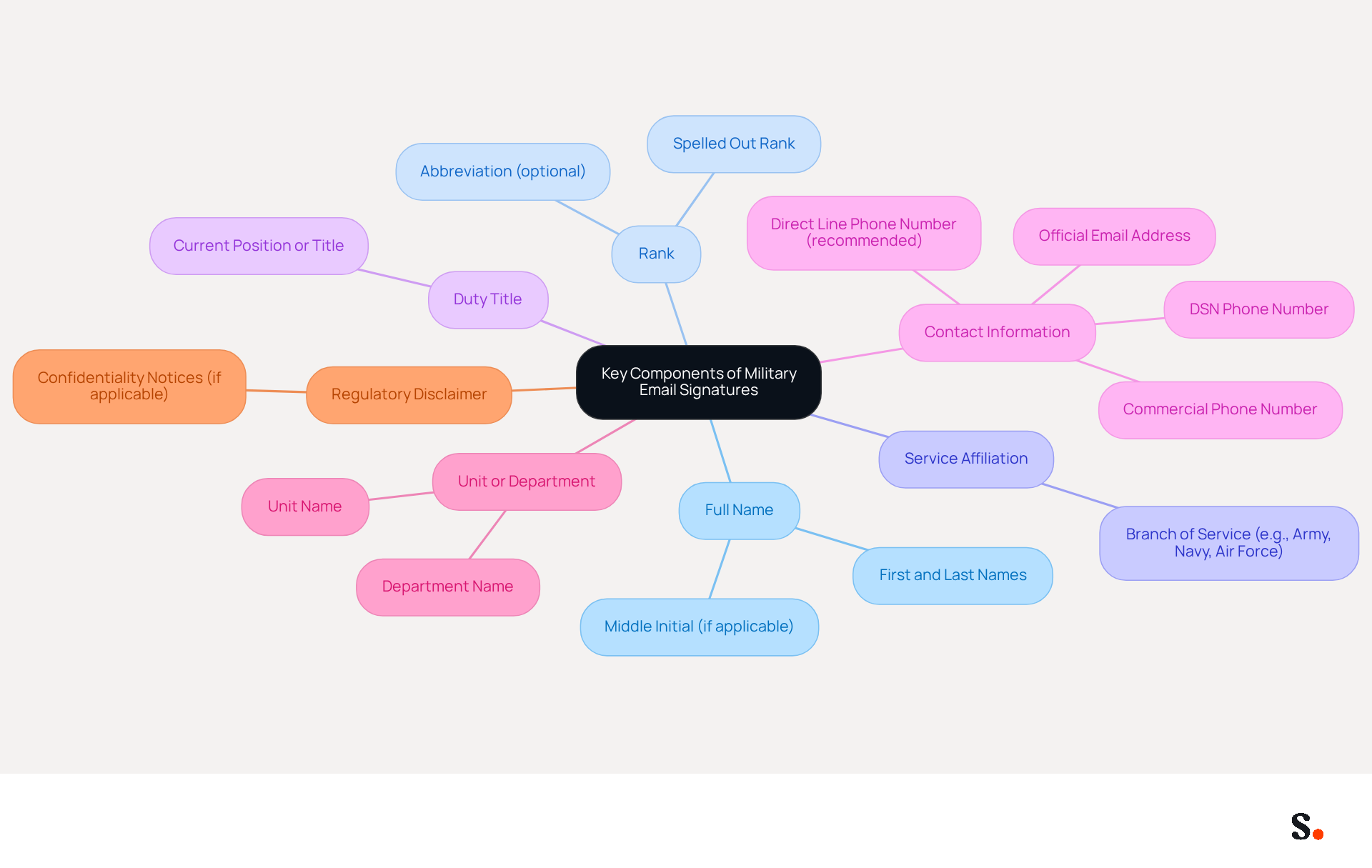
Military email signatures must convey essential information clearly and professionally to ensure effective communication. These components typically encompass:
- Full Name: Always include both first and last names, and consider adding a middle initial if commonly used, as this enhances professionalism.
- Rank: Clearly state your rank, spelling it out to establish authority and context within the military hierarchy, which is essential for interaction.
- Service Affiliation: Indicate your branch of service (e.g., Army, Navy, Air Force) to provide context to the recipient, reinforcing your identity.
- Duty Title: Include your current position or title to clarify your role, helping recipients understand your responsibilities.
- Contact Information: Provide both DSN (Defense Switched Network) and commercial phone numbers, along with your official email address, ensuring recipients can reach you easily. It is recommended to include a direct line phone number for better reachability.
- Unit or Department: Mention your unit or department to help recipients understand your operational context, which is essential for effective interaction.
- Regulatory Disclaimer: If applicable, include any necessary disclaimers or confidentiality notices as required by defense protocol, maintaining compliance with regulations.
Incorporating these elements ensures that personnel's digital identifiers, such as their military email signature, are informative and uphold the standards of armed forces interaction. Without a well-organized message footer, communication can lack clarity and professionalism, leading to misunderstandings. An exceptional correspondence footer conveys extensive information clearly, which is essential for effective communication. Furthermore, it's crucial to acknowledge that 42% of consumers indicate feeling negatively toward a business when they receive a message lacking a branded closing, highlighting the critical need for professionalism in all forms of communication.
Apply Design Best Practices for Clarity and Professionalism
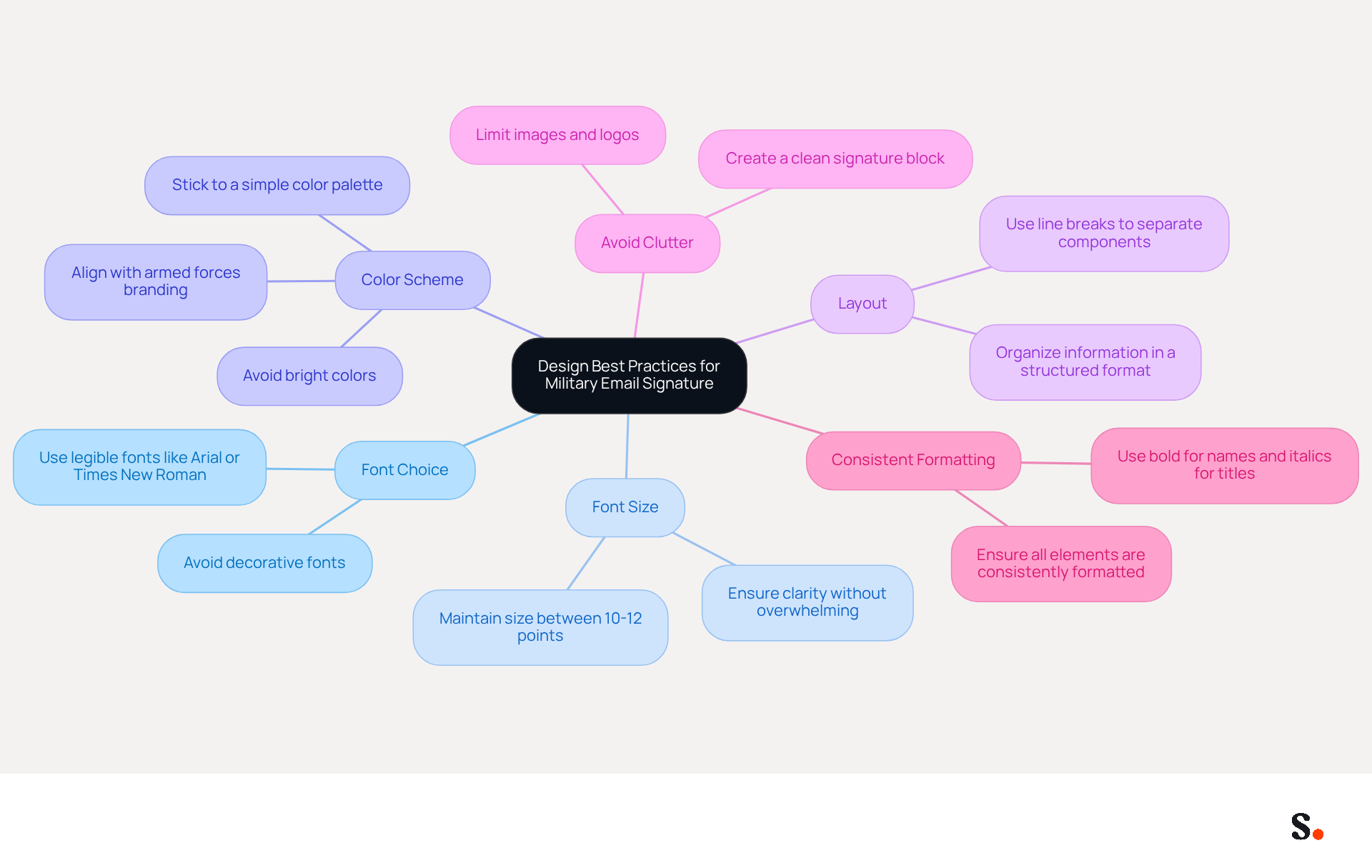
Creating a military email signature that reflects professionalism and clarity is essential for effective communication. To achieve this, consider the following design best practices:
- Font Choice: Use legible fonts such as Arial or Times New Roman, avoiding decorative fonts that may hinder readability.
- Font Size: Maintain a font size between 10-12 points to ensure clarity without overwhelming the recipient.
- Color Scheme: Stick to a simple color palette that aligns with armed forces branding. Bright colors should be avoided as they can distract from the content.
- Layout: Organize information in a structured format, using line breaks to separate different components. This enhances readability and allows for quick scanning.
- Avoid Clutter: Limit the use of images, logos, or excessive text. A clean block for signing is more professional and easier to read.
- Consistent Formatting: Ensure that all elements are consistently formatted (e.g., bold for names, italics for titles) to create a cohesive look.
By following these design principles, service members can ensure their correspondence, including their military email signature, conveys professionalism and clarity, reflecting the standards of communication in the armed forces. Ultimately, a well-crafted email signature serves as a vital tool in establishing credibility and professionalism in all correspondence.
Ensure Consistency Across Military Email Signatures
To achieve a cohesive approach to military email signatures, implementing standardized strategies is essential:
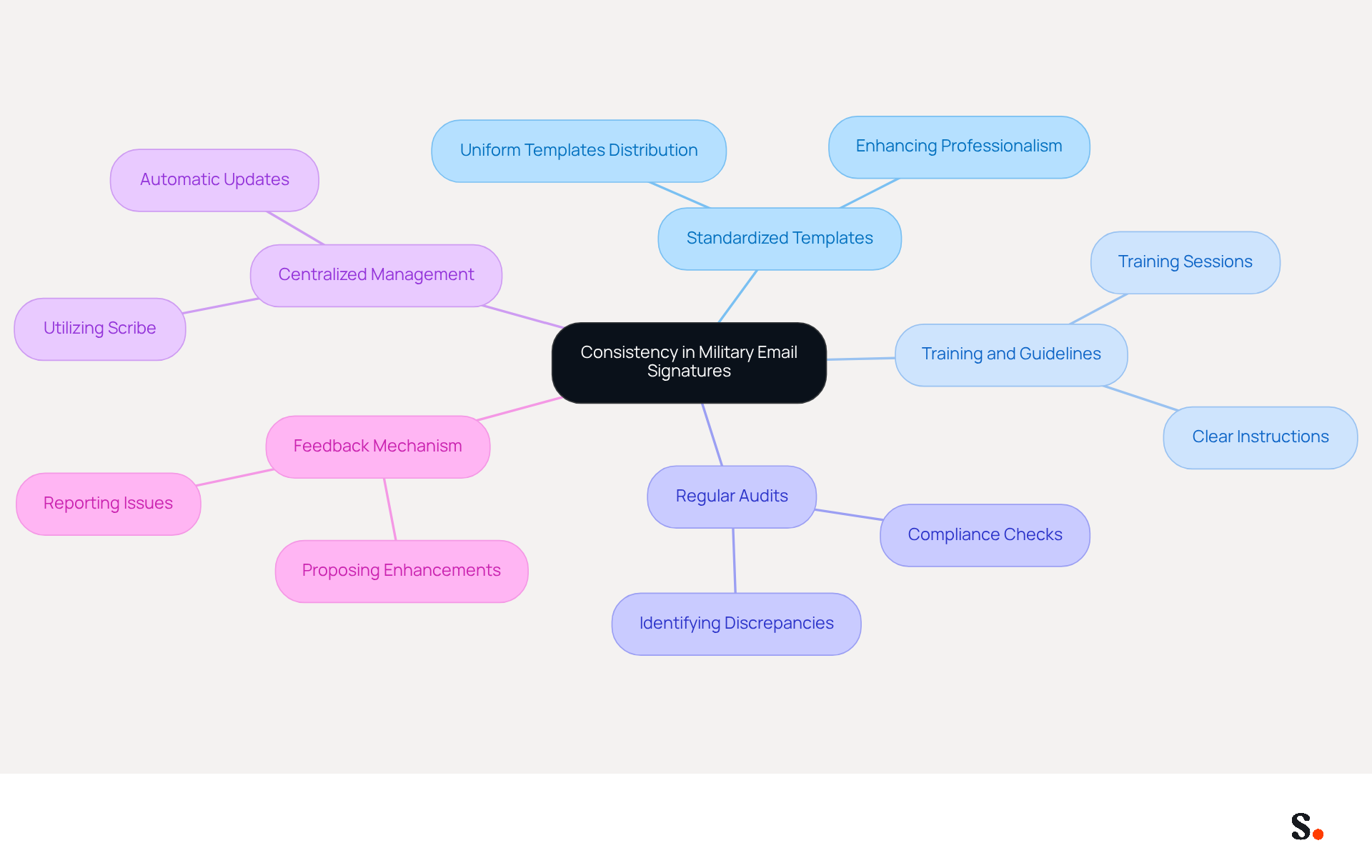
- Standardized Templates: Create and distribute uniform templates for electronic correspondence that all personnel must utilize. This ensures uniformity across the organization and enhances professionalism in communications.
- Training and Guidelines: Provide training sessions and clear instructions on how to create and implement electronic correspondence identifiers. Workshops or instructional materials can help personnel understand the importance of consistency and compliance.
- Regular Audits: Regular audits are crucial for maintaining compliance with established standards, as they help identify discrepancies and areas for improvement. This practice fosters a culture of accountability within the organization.
- Centralized Management: Utilize centralized email footer management tools like Scribe, which allow for easy updates and enforcement of footer standards across the organization. With Scribe, any modifications made in your Google Workspace will automatically sync, ensuring that all personnel have the most up-to-date information in their email details. This reduces the risk of outdated or inconsistent markings being used and saves valuable time for your team.
- Feedback Mechanism: Create a system for personnel to report issues or propose enhancements regarding electronic identifiers. When users share their thoughts, it can really help improve practices and boost engagement.
Implementing these strategies not only ensures that all correspondence formats, such as the military email signature, are consistent and professional but also reflects the military's values and standards. Statistics show that branded digital identifiers can enhance response rates by 22%, highlighting the significance of a cohesive strategy in improving effectiveness. Moreover, case studies indicate that defense organizations that implement standardized electronic communication formats maintain a cohesive and professional appearance, which is essential for building trust and credibility in their interactions. By utilizing Scribe's automated synchronization features, defense organizations can ensure that their correspondence identifiers are consistently current and compliant with SOC 2 Type II standards, ultimately streamlining the management process and enhancing overall efficiency.
Leverage Automation for Efficient Email Signature Management
To enhance professionalism and compliance in military communications, managing the military email signature through automation is essential.
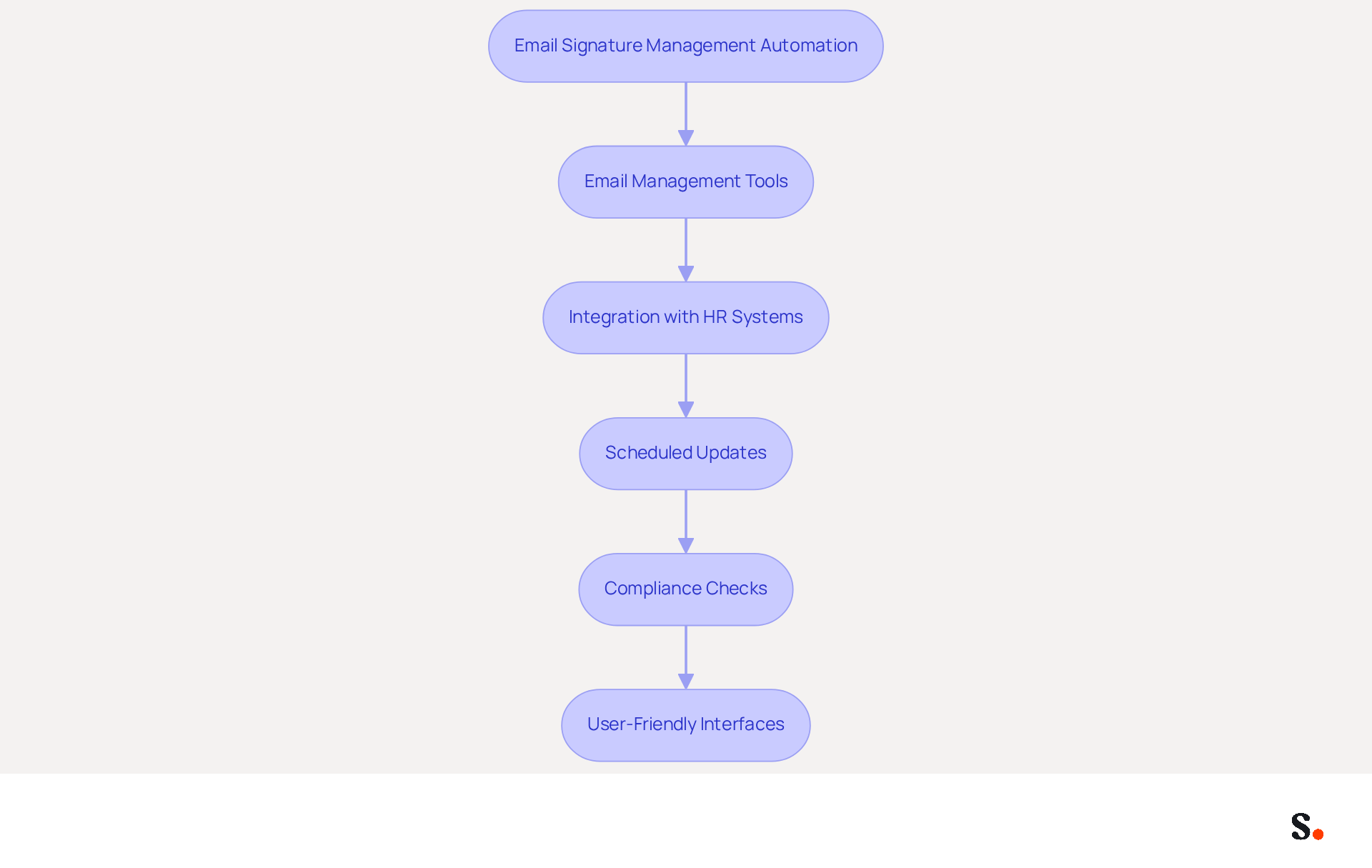
- Email Management Tools: Invest in robust email management software like Scribe that provides centralized control over all email footers. This allows for swift updates and ensures compliance with military standards, enhancing professionalism in communications.
- Integration with HR Systems: Seamlessly connect Scribe with HR systems to automatically update credentials whenever personnel changes occur. This ensures that all approvals remain current without the need for manual intervention, reducing the risk of outdated information.
- Scheduled Updates: Utilize automation to arrange regular updates for email identifiers, such as incorporating new campaigns or modifying contact information. Without regular updates, organizations risk miscommunication and outdated information. This proactive approach ensures that all interactions reflect the latest organizational messaging.
- Compliance Checks: Implement automated compliance evaluations with Scribe to ensure that all approvals adhere to defense guidelines and standards, as well as Scribe's compliance with SOC 2 Type II and GDPR/CCPA. This reduces the risk of non-compliance and strengthens the integrity of armed forces messaging.
- User-Friendly Interfaces: Select tools like Scribe that feature user-friendly interfaces requiring minimal technical expertise. This allows staff to easily manage their signatures, fostering professionalism across the organization.
By utilizing automation, military organizations can optimize their management processes for digital identifiers, ensuring efficiency, compliance, and professionalism in all interactions. This statistic underscores the importance of a unified strategy in maintaining consistent corporate messaging. Moreover, automated digital identifiers can save IT teams considerable time, enabling them to concentrate on higher-value projects while maintaining brand consistency across all communications. For example, dynamic digital identifiers can generate a 22% rise in click-through rates, illustrating the effectiveness of well-managed formats in boosting engagement. Additionally, marketing managers can join Scribe's Affiliate Program to earn a 50% commission while promoting brand consistency in email signatures, further enhancing their marketing strategies. Ultimately, embracing automation in military email signature management can redefine how military organizations communicate, ensuring clarity and consistency.
Conclusion
Effective military email signatures are essential for ensuring professionalism and clarity in communications. Incorporating key elements like full names, ranks, service affiliations, and contact information helps military personnel ensure their digital identifiers convey the right information while meeting armed forces standards. A well-structured email signature enhances communication and reinforces the sender's authority and identity.
The article highlights several best practices for designing military email signatures, including:
- The use of legible fonts
- A simple color scheme
- Consistent formatting
These design principles contribute to a professional appearance, making it easier for recipients to engage with the content. Furthermore, implementing standardized templates and centralized management tools like Scribe can streamline the process, ensuring uniformity across all communications. Without regular audits and training, compliance can falter, leading to potential issues.
Ultimately, leveraging automation in email signature management can significantly enhance efficiency and professionalism. By using tools that work well with existing systems, military organizations can ensure that their email signatures remain current and compliant with regulations such as SOC 2 Type II and GDPR/CCPA. Neglecting these practices risks undermining the credibility and trustworthiness of military personnel. A cohesive strategy for email signatures is crucial for enhancing communication and achieving operational success in military contexts.
Frequently Asked Questions
What are the key components of a military email signature?
The key components of a military email signature include Full Name, Rank, Service Affiliation, Duty Title, Contact Information, Unit or Department, and Regulatory Disclaimer.
Why is it important to include your full name in a military email signature?
Including your full name enhances professionalism and ensures clear identification in communications.
How should rank be presented in a military email signature?
Rank should be clearly stated and spelled out to establish authority and context within the military hierarchy.
What does service affiliation refer to in a military email signature?
Service affiliation indicates the branch of service (e.g., Army, Navy, Air Force) to provide context and reinforce the sender's identity.
Why is it necessary to include a duty title in a military email signature?
Including a duty title clarifies the sender's role and responsibilities, helping recipients understand their position.
What contact information should be provided in a military email signature?
The signature should include both DSN (Defense Switched Network) and commercial phone numbers, along with the official email address, preferably with a direct line for better reachability.
What is the significance of mentioning the unit or department in a military email signature?
Mentioning the unit or department helps recipients understand the operational context of the sender, which is essential for effective interaction.
When should a regulatory disclaimer be included in a military email signature?
A regulatory disclaimer should be included if applicable, to maintain compliance with defense protocol and confidentiality requirements.
What are the consequences of not having a well-organized military email signature?
Without a well-organized signature, communication can lack clarity and professionalism, potentially leading to misunderstandings.
How does a professional email signature impact consumer perception?
A professional email signature is crucial as 42% of consumers feel negatively toward a business when they receive a message lacking a branded closing, highlighting the importance of professionalism in communication.
List of Sources
- Identify Key Components of Military Email Signatures
- Military Email Signature Examples & Tips (https://wisestamp.com/examples/military-email-signature)
- Military Email Signature for Professional Communication - NEWOLDSTAMP (https://newoldstamp.com/email-signature-examples/military-email-signature)
- 40+ Email Signature Statistics for 2026 (Data + Insights) (https://wavecnct.com/blogs/email-signature-statistics)
- army company commander email signature block examples (https://siebel-db.siebelinstitute.com/project/army-company-commander-email-signature-block-examples)
- Apply Design Best Practices for Clarity and Professionalism
- army company commander email signature block examples (https://siebel-db.siebelinstitute.com/project/army-company-commander-email-signature-block-examples)
- Email Signature Statistics: A Closer Look at Email Signatures in 2026 (https://mysignature.io/blog/email-signature-statistics)
- 40+ Email Signature Statistics for 2026 (Data + Insights) (https://wavecnct.com/blogs/email-signature-statistics)
- Military Email Signature for Professional Communication - NEWOLDSTAMP (https://newoldstamp.com/email-signature-examples/military-email-signature)
- The vital role of email signatures in the military & defense sector (https://bybrand.io/blog/military-defense-sector)
- Ensure Consistency Across Military Email Signatures
- The vital role of email signatures in the military & defense sector (https://bybrand.io/blog/military-defense-sector)
- Email signature statistics: Why every business should optimize their email signatures — Stripo.email (https://stripo.email/blog/email-signature-statistics-why-every-business-should-optimize-their-email-signatures)
- Coming soon: All Coast Guard emails must have a digital signature (https://mycg.uscg.mil/News/Article/3290841/coming-soon-all-coast-guard-emails-must-have-a-digital-signature)
- 40+ Email Signature Statistics for 2026 (Data + Insights) (https://wavecnct.com/blogs/email-signature-statistics)
- Leverage Automation for Efficient Email Signature Management
- 40+ Email Signature Statistics for 2026 (Data + Insights) (https://wavecnct.com/blogs/email-signature-statistics)
- WiseStamp Sets a New Standard for Email Signature Creation (https://prnewswire.com/news-releases/wisestamp-sets-a-new-standard-for-email-signature-creation-302689811.html)
- Email Signature Management tool | CloudM (https://cloudm.io/blog/email-signature-management-tool)
- Automating Email Signatures: How IT Teams Streamline Processes & Reduce Risk (https://exclaimer.com/blog/streamlining-it-processes-automated-email-signatures)
- Email signature statistics: Why every business should optimize their email signatures — Stripo.email (https://stripo.email/blog/email-signature-statistics-why-every-business-should-optimize-their-email-signatures)
Get started with Scribe
Manage signatures across your whole team
Free 14-day trial — no credit card.