Best Practices for Social Media Icon Email Signature Integration
In an era where email serves as a primary communication tool, integrating social media icons into email signatures is essential for enhancing brand visibility
Sophie Grant
Email Signature Specialist, Scribe

Introduction
In an era where email serves as a primary communication tool, integrating social media icons into email signatures is essential for enhancing brand visibility and engagement. By thoughtfully selecting platforms that resonate with target audiences and ensuring cohesive branding, organizations can significantly boost their communication effectiveness.
Navigating the complexities of design and audience preferences can be daunting for businesses. How can they ensure their social media icons are both visually appealing and effective in driving interactions?
This article provides actionable insights on best practices for effectively integrating social media icons into email signatures, offering strategies to elevate digital correspondence.
Select Relevant Social Media Platforms for Your Audience
To enhance your correspondence footer, it's crucial to identify the social media platforms that resonate with your audience and incorporate a social media icon email signature. Conduct thorough audience research to discern their preferences and behaviors. For instance, if your audience primarily consists of professionals, platforms like LinkedIn may yield better results than Instagram. Utilize analytics tools to gather insights on where your audience spends their time online, ensuring your communication directs recipients to the most relevant social platforms, thereby enhancing engagement and brand visibility.
Syncing your Google Workspace with Scribe simplifies the management of your correspondence identifiers. This integration saves time by automatically updating your teammates' information, such as their social media links, without manual input. Any modifications in your Google Workspace, such as relocating teammates from one group to another or updating their job roles, will be reflected in Scribe, ensuring your communication identifiers are always up-to-date and consistent. This feature allows marketing managers to manage their messaging identifiers independently once IT has set it up, improving operational efficiency.
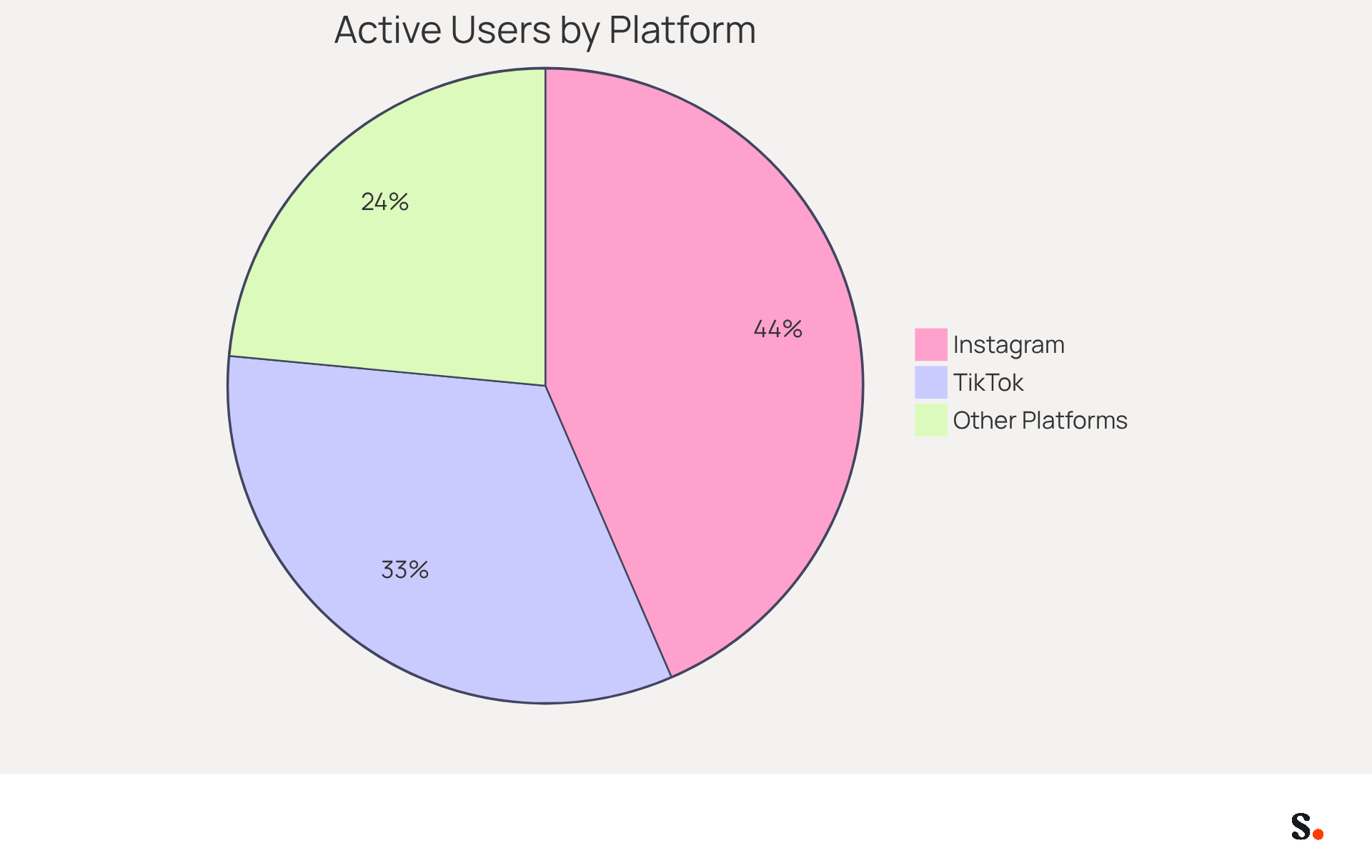
Current statistics indicate that 87% of users are active on Instagram, with 60% relying on it for product research, highlighting its significance in professional contexts. Additionally, 66% of users engage with TikTok for product discovery, emphasizing the platform's growing role in brand engagement. Notably, 76% of consumers feel more loyal to brands that reply to comments or direct messages, reinforcing the importance of engagement on these platforms. By utilizing Scribe, you can ensure that your correspondence identifiers, such as your social media icon email signature, are not only current but also strategically aligned with your audience's preferences, maximizing engagement potential.
Actionable Tip: Limit your selection to 2-4 platforms to avoid overwhelming recipients. Concentrate on those that align with your brand's messaging and audience engagement strategies. This focused approach not only simplifies your digital identifier but also maximizes its effectiveness in driving engagement, as 51% of consumers find brands that respond to customers memorable.
Design and Generate Cohesive Social Media Icons
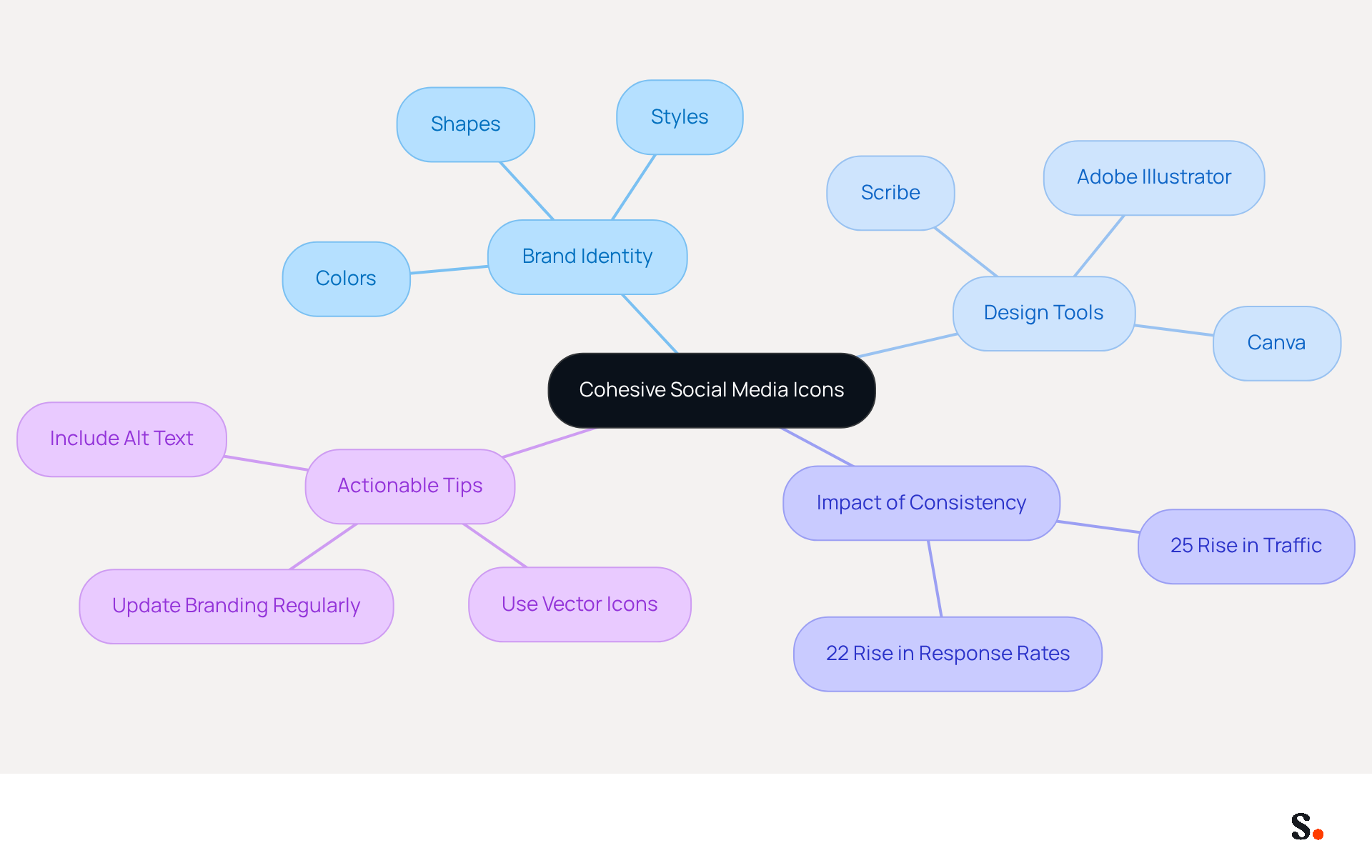
To effectively represent your brand in social media graphics, alignment with your overall brand identity is crucial. Consistency in colors, shapes, and styles that reflect your brand's visual guidelines is essential. Utilizing tools like Canva or Adobe Illustrator can facilitate the creation of custom icons that resonate with your branding. Scribe offers an easy setup for managing these identifiers, and with the integration of Calendly, updates to your email branding can be automated, ensuring seamless brand consistency. Each modification made in your Aircall configuration will automatically be reflected in your Scribe branding, enhancing your brand's presence. Ensure high-quality graphics are sized appropriately, ideally between 20 and 25 pixels square, to maintain clarity and not overshadow other branding elements.
Incorporating social media graphics can greatly improve engagement, as research shows that consistent branding in digital communications can result in a 22% rise in response rates. Furthermore, a multinational corporation that standardized its electronic correspondence identifiers worldwide saw a 25% rise in traffic to particular landing pages, demonstrating the impact of cohesive branding. Trackable links in your correspondence help you gauge engagement and the effectiveness of your marketing efforts, highlighting the importance of these symbols.
Actionable Tip: Consider using vector icons for scalability and clarity across different devices. Always include alt text for accessibility and to enhance SEO, ensuring that your contact information remains effective across various platforms and devices. Consistently updating your branding in communication headers keeps content engaging and pertinent for recipients. By prioritizing brand consistency, organizations can significantly enhance their digital communication effectiveness and audience engagement.
Integrate Social Media Icons into Your Email Signature
Integrating a social media icon email signature can enhance audience engagement and professionalism. To effectively integrate these icons, follow these steps:
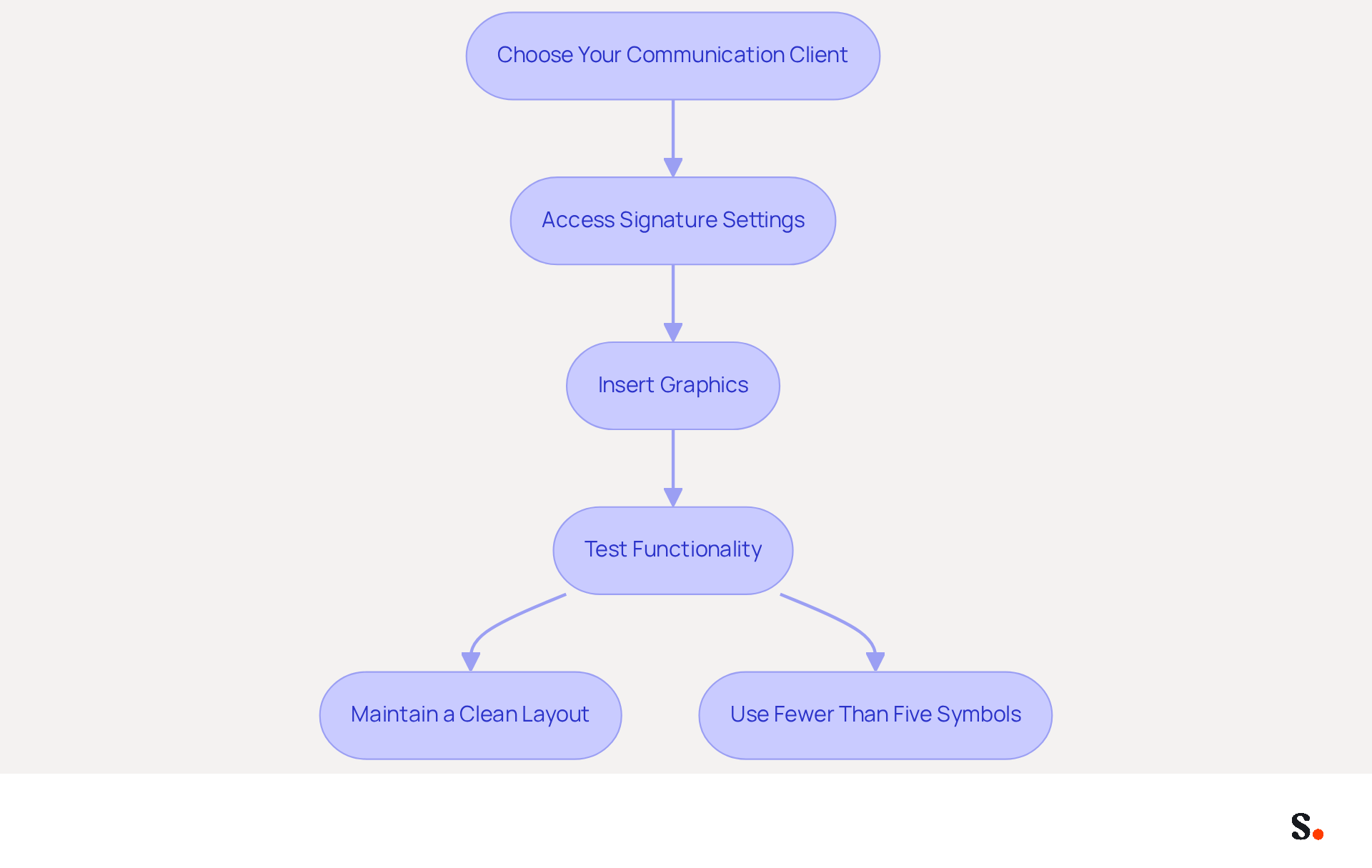
- Choose Your Communication Client: The integration process may differ based on whether you use Gmail, Outlook, or another communication client.
- Access Signature Settings: Navigate to the settings section of your email client and locate the signature settings.
- Insert Graphics: Use the insert image option to add your social media graphics. Ensure that each graphic is hyperlinked to the corresponding social media profile, as failing to hyperlink graphics can lead to missed opportunities for audience engagement.
- Test Functionality: Send a test message to yourself to confirm that the graphics are clickable and lead to the correct pages.
- Actionable Tip: Maintain a clean and organized layout. Arrange the symbols in a way that enhances the overall design, usually at the bottom or side of the layout.
- Statistics to Consider: Using fewer than five social media symbols is recommended to avoid clutter and ensure that your signature remains professional. Furthermore, having fewer symbols helps eliminate the Gmail character limit, which can improve deliverability. Icons should be optimized for mobile devices, with dimensions around 24x24 pixels, and provided at double the size for retina readiness to ensure quality. Moreover, ensuring that graphics are under 50KB in size helps avoid messages from being flagged as spam.
- Case Studies: Research indicates that implementing mobile-friendly social media symbols significantly increases engagement, as recipients can easily tap on these elements without frustration. A research analysis highlights the significance of maintaining uniform graphic sizes and alignments, which enhances the professionalism of digital correspondences and contributes to a cohesive brand image. Proper placement of a social media icon email signature, such as positioning it beneath contact information, can also enhance visibility and user engagement. Ultimately, a well-structured email signature can serve as a powerful tool for brand visibility and audience connection.
Test and Optimize Icons for Compatibility Across Platforms
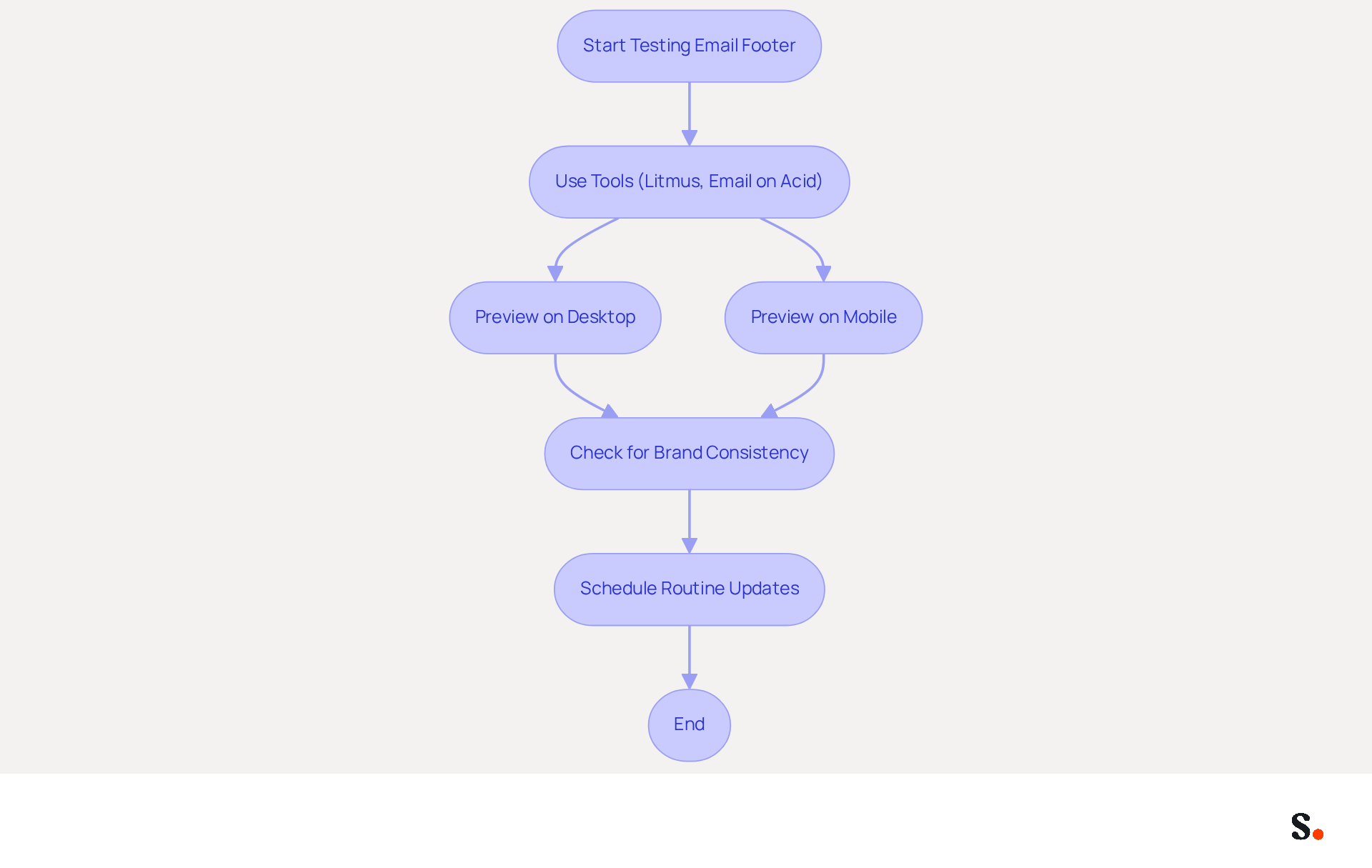
While incorporating social media graphics into your email footer is essential, ensuring their compatibility across various email clients and devices is equally critical. Tools like Litmus or Email on Acid can assist you in previewing how your email footer appears in different environments. You must verify how the icons render in both desktop and mobile views to ensure a seamless user experience. Furthermore, with Scribe's automated synchronization with Aircall, any modifications made to your correspondence identifier will be reflected instantly, ensuring brand consistency across all communications.
Statistics show that 42% of all messages are accessed on mobile devices, making it essential for message footers to be adaptable and visually appealing across platforms. Without regular testing, your branding may not accurately reflect your identity, leading to potential confusion among users, particularly after updates to social media profiles or changes in branding.
Actionable Tip: Schedule routine updates and tests for your email signature to maintain its effectiveness and ensure it continues to serve as a powerful branding tool, especially after making changes to your social media profiles or branding.
Conclusion
In today's digital landscape, the integration of social media icons into email signatures is not just beneficial; it is essential for enhancing brand visibility and audience engagement. By selecting the right platforms and ensuring cohesive design, organizations can create a powerful digital identifier that resonates with their target audience. This integration reflects professionalism and builds a connection with recipients, encouraging them to engage with the brand across multiple channels.
The article highlights the critical role of audience research, cohesive branding, and technical integration. Selecting 2-4 relevant social media platforms, designing icons that align with brand identity, and ensuring compatibility across email clients are essential steps in this process. Using tools like Scribe makes it easier to manage these icons, ensuring that any updates are automatically applied, which helps maintain brand consistency and boosts engagement.
By embracing this practice, organizations can significantly enhance their digital communication and strengthen their competitive edge in the market.
Frequently Asked Questions
Why is it important to select relevant social media platforms for my audience?
Selecting relevant social media platforms is crucial because it enhances engagement and brand visibility by directing communication to the platforms where your audience is most active.
How can I determine which social media platforms resonate with my audience?
You can determine which platforms resonate with your audience by conducting thorough audience research and utilizing analytics tools to gather insights on their preferences and online behaviors.
What role does Scribe play in managing social media identifiers?
Scribe simplifies the management of correspondence identifiers by syncing with Google Workspace, automatically updating teammates' information, including social media links, ensuring consistency and saving time.
What are the current statistics regarding social media usage for product research?
Current statistics indicate that 87% of users are active on Instagram, with 60% using it for product research, and 66% of users engage with TikTok for product discovery.
How does engagement on social media platforms affect brand loyalty?
Engagement on social media platforms significantly affects brand loyalty, as 76% of consumers feel more loyal to brands that reply to comments or direct messages.
What is a recommended strategy for selecting social media platforms?
It is recommended to limit your selection to 2-4 platforms that align with your brand's messaging and audience engagement strategies to avoid overwhelming recipients and maximize effectiveness.
What percentage of consumers find brands that respond to customers memorable?
51% of consumers find brands that respond to customers memorable, highlighting the importance of engagement in driving brand recognition.
List of Sources
- Select Relevant Social Media Platforms for Your Audience
- 12 Major Social Media Trends in 2026 (https://coursera.org/articles/social-media-trends)
- 2026 Social Media Trends Small Businesses Should Leverage (https://sbdc.uh.edu/sbdc/2026-social-media-trends-small-business.asp)
- 2026 State of Social: Key Trends Shaping the New Social Funnel (https://powerdigitalmarketing.com/blog/social-media-trends-2026)
- Social Media Trends in 2026: What's Next | National University (https://nu.edu/blog/social-media-trends)
- Social Media Trends 2026 Hootsuite (https://hootsuite.com/research/social-trends?srsltid=AfmBOorpNwADd6VJDroQjy98mHEQDbBYQgGeKO9lzaQQlGX8v36PoX3x)
- Design and Generate Cohesive Social Media Icons
- 4 Best Practices for a Personal Email Signature That Boosts Branding (https://scribe-mail.com/en-US/blog/4-best-practices-for-a-personal-email-signature-that-boosts-branding)
- The impact of email signatures on your branding (https://signitic.com/en/resources/the-impact-of-email-signatures-on-your-branding)
- How to Create and Add Social Media Icons to Your Email Signature Like a Pro | Email Signature Rescue Blog (https://emailsignaturerescue.com/blog/how-to-add-social-media-icons-to-your-email-signature)
- The 17 DOs and DON’Ts of Email Signatures | Exclaimer (https://exclaimer.com/email-signature-handbook/the-17-email-signature-dos-and-donts)
- Social Media Icons for Email Signatures - Gimmio (https://blog.gimm.io/social-media-icons-for-email-signatures)
- Integrate Social Media Icons into Your Email Signature
- How to Create and Add Social Media Icons to Your Email Signature Like a Pro | Email Signature Rescue Blog (https://emailsignaturerescue.com/blog/how-to-add-social-media-icons-to-your-email-signature)
- Best Practices for Using Social Icons in Email Signatures - Gimmio (https://blog.gimm.io/best-practices-for-using-social-icons-in-email-signatures)
- How to Add Social Media Icons to Gmail Signature (https://wisestamp.com/guides/how-to-add-social-icons-to-gmail-signature)
- Social Media Icons for Email Signatures - Gimmio (https://blog.gimm.io/social-media-icons-for-email-signatures)
- How to add social media icons to your email signature and email footer — Stripo.email (https://stripo.email/blog/add-social-media-icons-email-signature)
- Test and Optimize Icons for Compatibility Across Platforms
- What are the restrictions in email signature coding | Email Signature Rescue Blog (https://emailsignaturerescue.com/blog/what-are-the-restrictions-in-email-signature-coding)
- Industry Leading Email Testing | Litmus (https://litmus.com/email-testing)
- 40+ Email Signature Statistics for 2026 (Data + Insights) (https://wavecnct.com/blogs/email-signature-statistics)
- Email Signature Best Practices for 2026 (+ 15 Pro Examples) (https://wavecnct.com/blogs/email-signature-best-practices-2026)
Get started with Scribe
See why teams switch to Scribe
Free 14-day trial — no credit card.