Best Practices for Using an Email Signature Banner Maker Effectively
An effective email signature serves as more than a mere sign-off; it acts as a vital marketing asset that can elevate brand presence and foster engagement
Sophie Grant
Email Signature Specialist, Scribe

Introduction
An effective email signature serves as more than a mere sign-off; it acts as a vital marketing asset that can elevate brand presence and foster engagement. Using an email signature banner maker, organizations can create templates that not only showcase their brand but also encourage action through compelling calls-to-action.
Many organizations struggle to keep their email signatures uniform across various platforms. Failure to maintain consistency can lead to brand dilution and confusion among recipients.
How can businesses effectively utilize these tools to maximize their marketing impact while maintaining brand integrity?
Create On-Brand Signature Templates
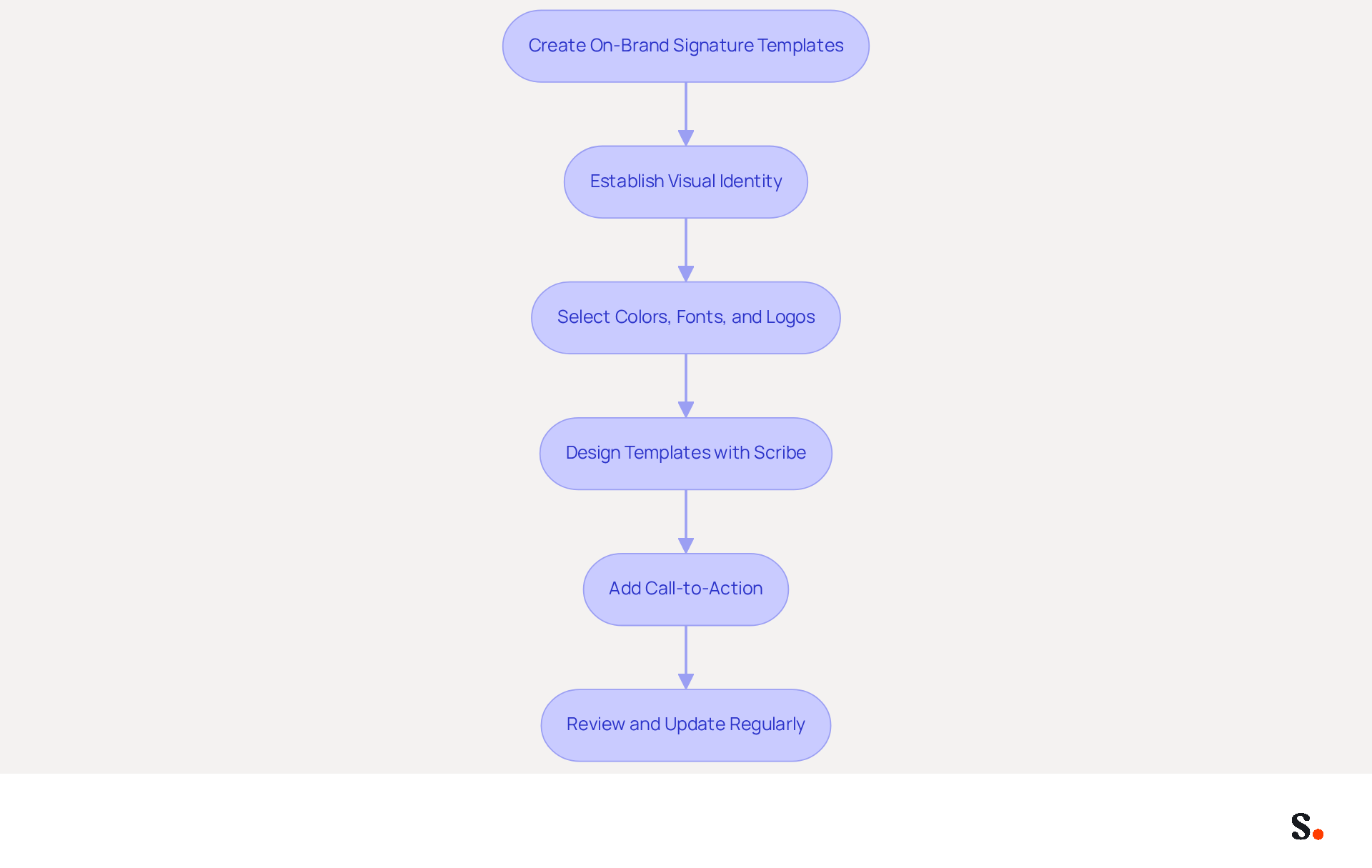
To effectively communicate your brand's identity through email, start by establishing a cohesive visual identity. This involves selecting appropriate colors, fonts, and logos. Consistency in these elements across all email formats is crucial for enhancing recognition of your brand. Utilizing tools like an email signature banner maker, such as Scribe, enables you to design templates that reflect your brand's personality, ensuring that every team member's signature aligns with the company's branding. For example, a technology firm might choose sleek, modern fonts paired with a minimalist design, while a creative agency could opt for vibrant colors and artistic elements.
Adding a call-to-action (CTA) in your email footer - like a link to your latest blog post or a promotional offer - can greatly boost engagement. Research indicates that using branded digital identifiers can increase trust by 76% and boost response rates by 22%. Regularly reviewing and updating these templates is essential to keep them fresh and relevant, ensuring they reflect any changes in your branding strategy or marketing campaigns. Failing to keep templates updated can lead to a disconnect between your branding and audience expectations. By leveraging Scribe's capabilities, you not only enhance your brand's visibility but also ensure compliance and security in your email communications.
Schedule Marketing Campaigns Effectively
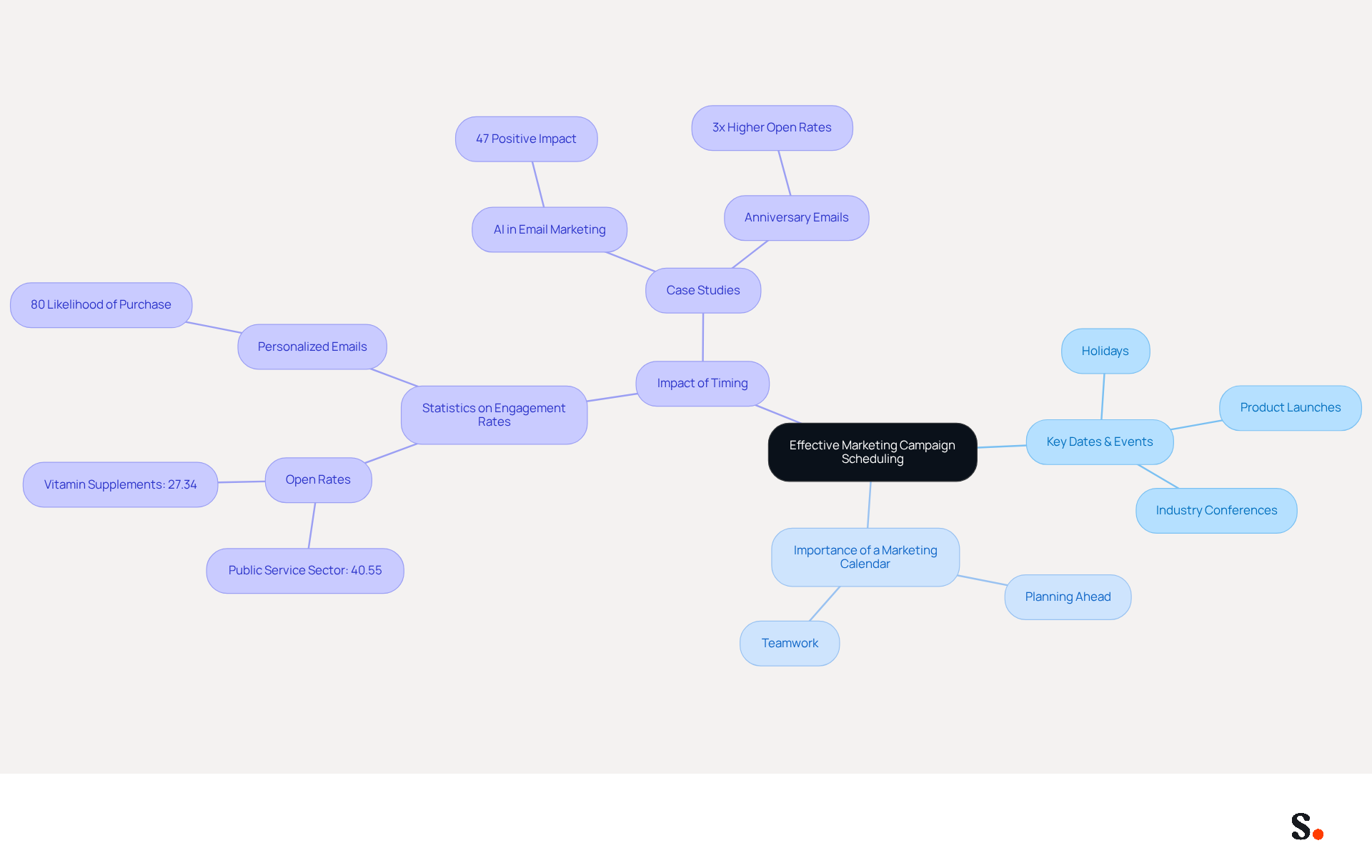
To effectively engage your audience, it is crucial to schedule marketing campaigns around key dates and events that resonate with them, such as:
- Holidays
- Product launches
- Industry conferences
A marketing calendar is vital for planning campaigns ahead of time, allowing for better preparation and teamwork. With tools like Scribe, you can automate scheduling, making sure your messages always feature the latest promotional banners at just the right time. For instance, if you have a seasonal sale, align your signature updates to coincide with the sale's launch, maximizing visibility and engagement.
Statistics show that well-timed campaigns can boost engagement rates, with messages sent during peak times achieving open rates as high as 40.55% in sectors like public service. In contrast, poorly timed communications may see rates drop to 27.34% in industries such as vitamin supplements. Evaluating previous campaign results is essential; it assists in identifying the optimal times to send messages for maximum engagement.
Case studies indicate that companies utilizing automated scheduling tools have experienced a significant enhancement in their campaign effectiveness, with some reporting up to a 300% increase in ROI through timely and relevant interactions. By prioritizing strategic scheduling, you position your campaigns for success, ensuring they resonate with your audience when it matters most.
Integrate with Popular Tools for Seamless Management
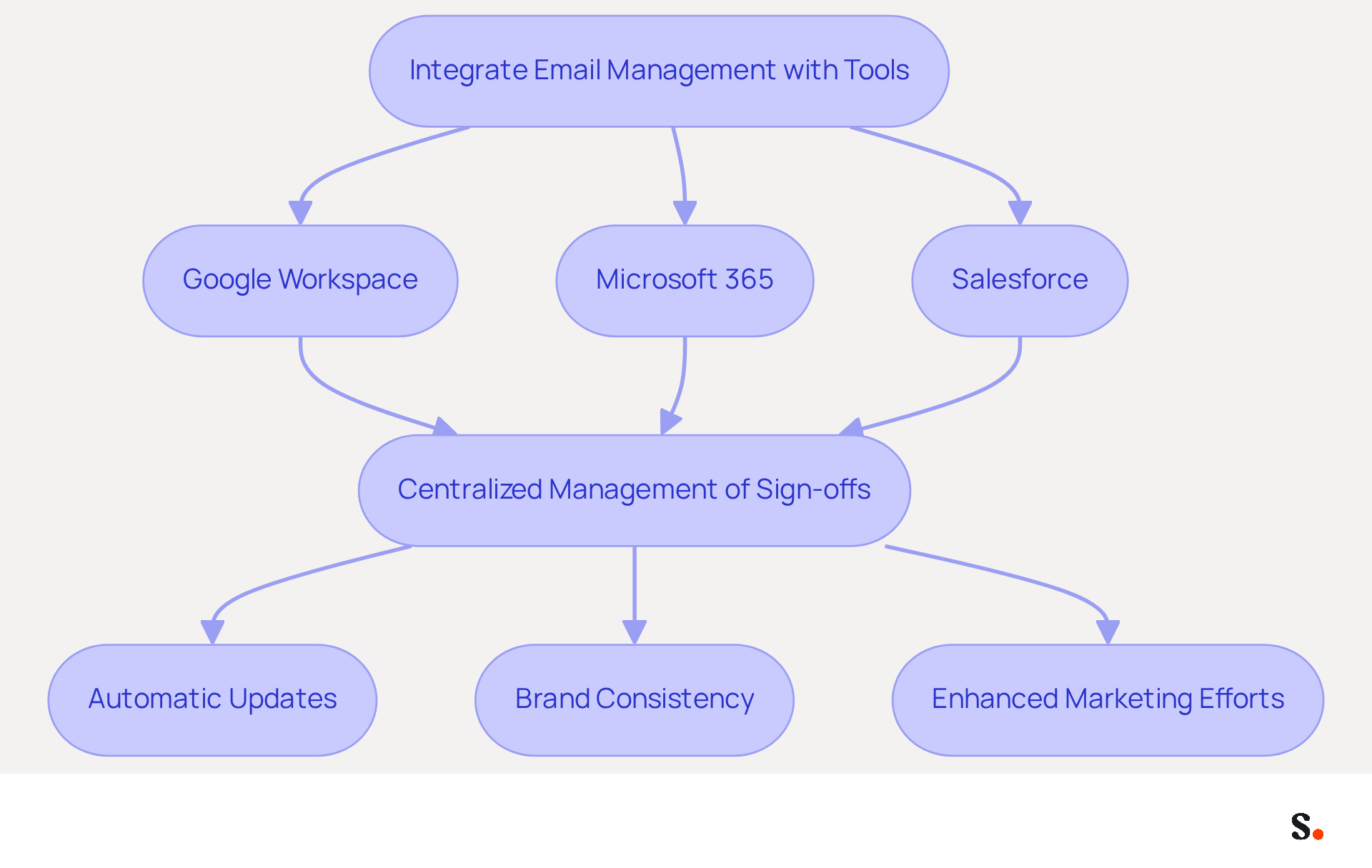
Integrating email management with popular tools is crucial for achieving consistency and efficiency within your organization. Scribe offers seamless integration with platforms such as Google Workspace, Microsoft 365, and Salesforce, enabling centralized management of sign-offs. This integration allows automatic updates across all user accounts, so any template changes are quickly reflected. For example, if your company launches a new product, you can easily utilize an email signature banner maker to update the banner for promotion without the need for manual changes to each employee's email footer. Furthermore, modifications made in your Aircall configuration will automatically be reflected in your Scribe profiles, enhancing brand consistency through synchronized data.
Statistics show that while 25% of businesses use software to standardize their marks, the majority do not, indicating a significant gap for those not yet utilizing these solutions. Additionally, a company with 100 employees can produce around 60,000-80,000 branded impressions each month, based on 30-40 outbound messages per worker per day over 20 working days, highlighting the significant visibility that these identifiers can offer. Interestingly, Scribe sees an average click-through rate of 12% on banners, further emphasizing the marketing potential of an email signature banner maker for effective management of digital signatures.
Furthermore, utilizing analytics tools to track the performance of your messages can provide valuable insights into which campaigns are most effective. Research indicates that 42% of organizations do not track email signature performance, creating a blind spot in measuring engagement. By integrating your existing tools with Scribe, you can not only maintain brand consistency but also enhance your marketing efforts through data-driven decision-making. Additionally, Scribe's SOC 2 Type II certification and adherence to GDPR and CCPA guarantee that your data handling is secure and dependable. Moreover, 76% of marketers believe that branded electronic identifiers enhance trust in the sender, emphasizing the significance of using Scribe's management solutions for them.
Automate Data Synchronization for Consistency
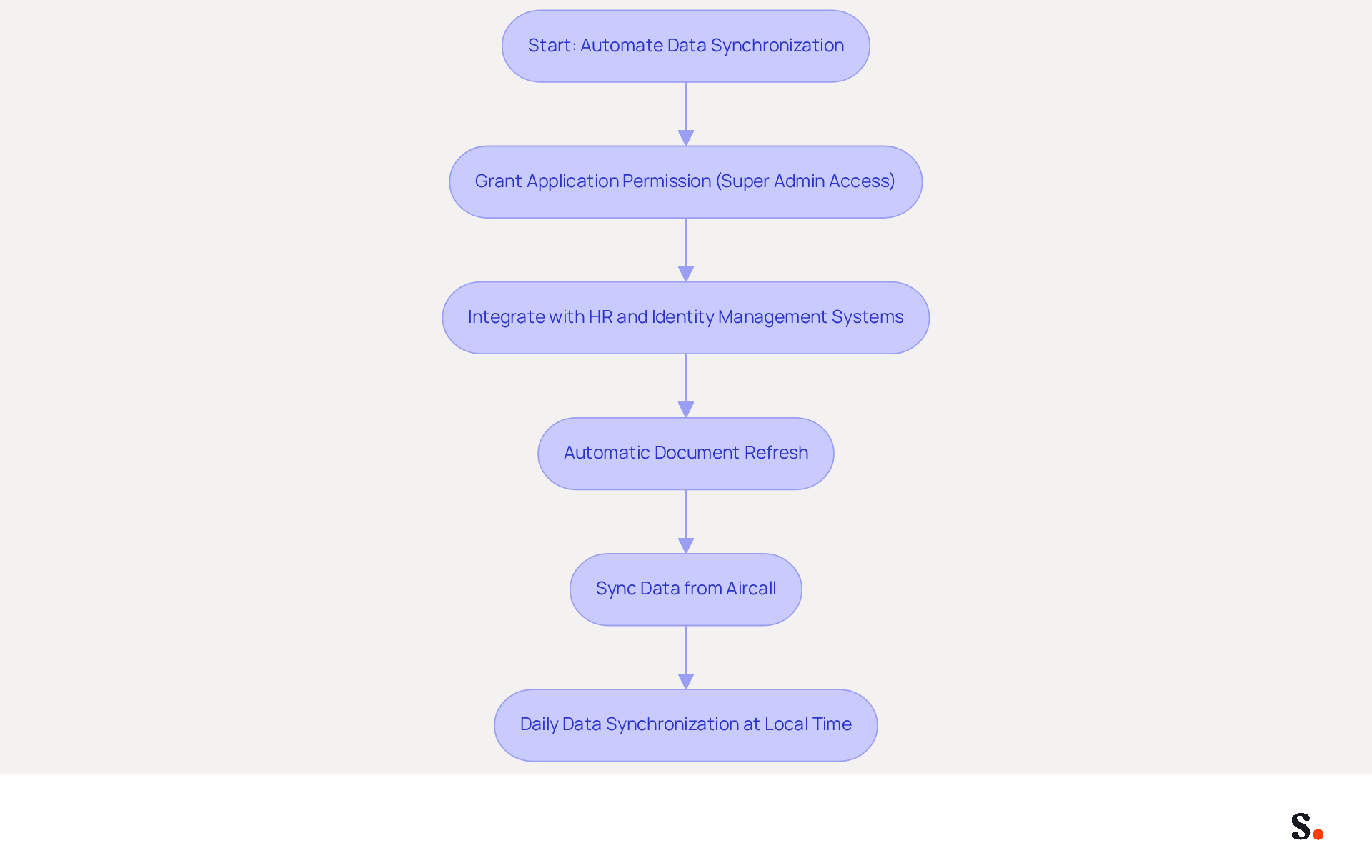
Ensuring consistent messaging branding across your organization is essential for professional communication. Automating data synchronization is crucial for maintaining this uniformity. To enable one-click synchronization, you must grant the application permission to connect with your email provider, requiring Super Admin access. By integrating with HR and identity management systems, Scribe can automatically refresh documents with the latest employee information, including job titles and contact details. This automation saves time and ensures that all approvals are accurate and current.
For instance, when an employee alters their role, the application can promptly refresh their contact information without needing manual assistance. Furthermore, the platform effortlessly synchronizes data from services such as Aircall, ensuring that any modifications made in your Aircall setup are automatically reflected in your correspondence, enhancing brand consistency. Scribe automatically syncs teammate data from your service provider daily at your local time.
Without regular evaluations, inconsistencies in branding may arise, undermining the professional image. Research shows that organizations using centralized management solutions experience an 85% improvement in identity consistency, and 76% of participants feel that a work communication footer increases trust in the sender. This emphasizes the critical role of automated synchronization in preserving a professional image in all communications.
In a high-volume communication environment, where more than 9 billion emails are sent daily in the United States, effective email signature management becomes even more critical. In a landscape where effective email signature management is paramount, Scribe, as an email signature banner maker, stands out as a reliable solution for achieving brand consistency.
Conclusion
Effective email signatures serve as a strategic tool for enhancing brand visibility and engagement. By utilizing an email signature banner maker like Scribe, organizations can ensure that their email communications consistently reflect their brand identity while also driving marketing objectives. This approach enhances brand recognition and cultivates trust among recipients, ultimately leading to improved response rates and engagement.
Key insights from this article highlight the importance of:
- On-brand signature templates
- Strategic scheduling of marketing campaigns
- Seamless integration with popular tools
- Automation of data synchronization
Each of these elements plays a crucial role in maintaining a professional image and maximizing the impact of email communications. For instance, aligning email signature updates with marketing campaigns can significantly boost visibility, while automated data synchronization ensures that all communications are accurate and up-to-date.
Effective communication is essential for organizations today, and leveraging tools like Scribe can transform how they manage their email signatures. By prioritizing brand consistency and utilizing data-driven insights, companies can enhance their marketing efforts and achieve measurable ROI. By adopting these strategies, organizations can significantly elevate their email communications and achieve a competitive edge.
Frequently Asked Questions
What is the purpose of creating on-brand signature templates?
The purpose of creating on-brand signature templates is to effectively communicate your brand's identity through email by establishing a cohesive visual identity that enhances brand recognition.
What elements should be considered when establishing a visual identity for email signatures?
When establishing a visual identity for email signatures, you should consider selecting appropriate colors, fonts, and logos, ensuring consistency across all email formats.
How can Scribe assist in designing email signature templates?
Scribe provides tools like an email signature banner maker that enables you to design templates reflecting your brand's personality, ensuring that every team member's signature aligns with the company's branding.
Can you give an example of how different brands might approach their email signature design?
A technology firm might choose sleek, modern fonts paired with a minimalist design, while a creative agency could opt for vibrant colors and artistic elements in their email signatures.
What is the benefit of adding a call-to-action (CTA) in email footers?
Adding a call-to-action (CTA) in email footers, such as a link to a blog post or promotional offer, can significantly boost engagement with recipients.
How do branded digital identifiers impact trust and response rates?
Research indicates that using branded digital identifiers can increase trust by 76% and boost response rates by 22%.
Why is it important to regularly review and update email signature templates?
Regularly reviewing and updating email signature templates is essential to keep them fresh and relevant, ensuring they reflect any changes in your branding strategy or marketing campaigns.
What can happen if email signature templates are not kept updated?
Failing to keep templates updated can lead to a disconnect between your branding and audience expectations, potentially harming brand perception.
How does Scribe enhance brand visibility and compliance in email communications?
By leveraging Scribe's capabilities, you enhance your brand's visibility and ensure compliance and security in your email communications.
List of Sources
- Create On-Brand Signature Templates
- Email Signature Best Practices - NEWOLDSTAMP (https://newoldstamp.com/blog/email-signature-best-practices)
- The impact of email signatures on your branding (https://signitic.com/en/resources/the-impact-of-email-signatures-on-your-branding)
- 40+ Email Signature Statistics for 2026 (Data + Insights) (https://wavecnct.com/blogs/email-signature-statistics)
- Elevate Your Brand with Professional Email Signatures (https://holickycorporation.com/blog/elevate-your-brand-with-professional-email-signatures)
- 15 Ways Email Signatures Can Boost Your Brand | Rocketseed (https://rocketseed.com/blog/15-ways-email-signature-branding-can-boost-your-brand)
- Schedule Marketing Campaigns Effectively
- Email Marketing Calendar: Templates & Best Practices (https://inboxarmy.com/blog/email-marketing-calendar)
- 49 Top Email Marketing Statistics (https://forbes.com/advisor/business/software/email-marketing-statistics)
- Email Marketing Benchmarks & Industry Statistics | Mailchimp (https://mailchimp.com/resources/email-marketing-benchmarks)
- Email Campaign Planning in 2026: Strategy, Calendar & Content Ideas (https://hustlermarketing.com/email-campaign-planning-in-2026-strategy-calendar-content-ideas)
- Up Your Email Campaign Potential: Proven Strategies for 2026 (https://litmus.com/blog/how-to-plan-your-email-campaign-strategy)
- Integrate with Popular Tools for Seamless Management
- 40+ Email Signature Statistics for 2026 (Data + Insights) (https://wavecnct.com/blogs/email-signature-statistics)
- Which Is the Best Email Signature Software with Salesforce Integration (https://rocketseed.com/blog/best-email-signature-software-salesforce-integration)
- Email Signature Management for Google Workspace & Microsoft 365 (https://bulksignature.com)
- BoldSign Launches Salesforce Integration to Streamline Agreement Workflows (https://globenewswire.com/news-release/2026/05/14/3295085/0/en/boldsign-launches-salesforce-integration-to-streamline-agreement-workflows.html)
- Salesforce Connector: Now Live! (https://letsignit.com/blog/salesforce-integration)
- Automate Data Synchronization for Consistency
- Email Signature Synchronization (https://support.templafy.com/hc/en-us/articles/4582306536733-Email-Signature-Synchronization)
- How to Automate Email Signature Updates | Exclaimer (https://exclaimer.com/email-signature-handbook/automate-email-signature-updates)
- 4 Best Practices for Your Work Email Signature Strategy (https://scribe-mail.com/en-US/blog/4-best-practices-for-your-work-email-signature-strategy)
- Why you should be using an email signature manager (https://blinq.me/blog/why-you-should-be-using-an-email-signature-manager)
- One moment, please... (https://paayatech.com/blog/5-effective-ways-to-manage-email-signatures)
Get started with Scribe
Build a professional email signature
Free 14-day trial — no credit card.