Best Practices for Your Android Email HTML Signature Management
A professional email signature on Android serves as a crucial element of brand identity and communication. Over 10,000 marketing and IT teams use Scribe
Sophie Grant
Email Signature Specialist, Scribe

On this page
- Introduction
- Understand Key Components of an HTML Email Signature for Android
- Implement Design Best Practices for Visual Appeal and Branding
- Leverage Automation Tools for Efficient Email Signature Management
- Test and Optimize Email Signatures for Cross-Platform Consistency
- Conclusion
- Frequently Asked Questions
- List of Sources
Introduction
A professional email signature on Android serves as a crucial element of brand identity and communication. Over 10,000 marketing and IT teams use Scribe, highlighting just how crucial effective email signature management is. This article delves into best practices that not only enhance visual appeal but also ensure consistency across devices, empowering organizations to maintain a polished image. Many businesses struggle with the technical aspects of HTML email signatures on Android, which can hinder engagement and brand recognition. Without a strategic approach to email signature management, businesses risk undermining their brand's visibility and impact.
Understand Key Components of an HTML Email Signature for Android
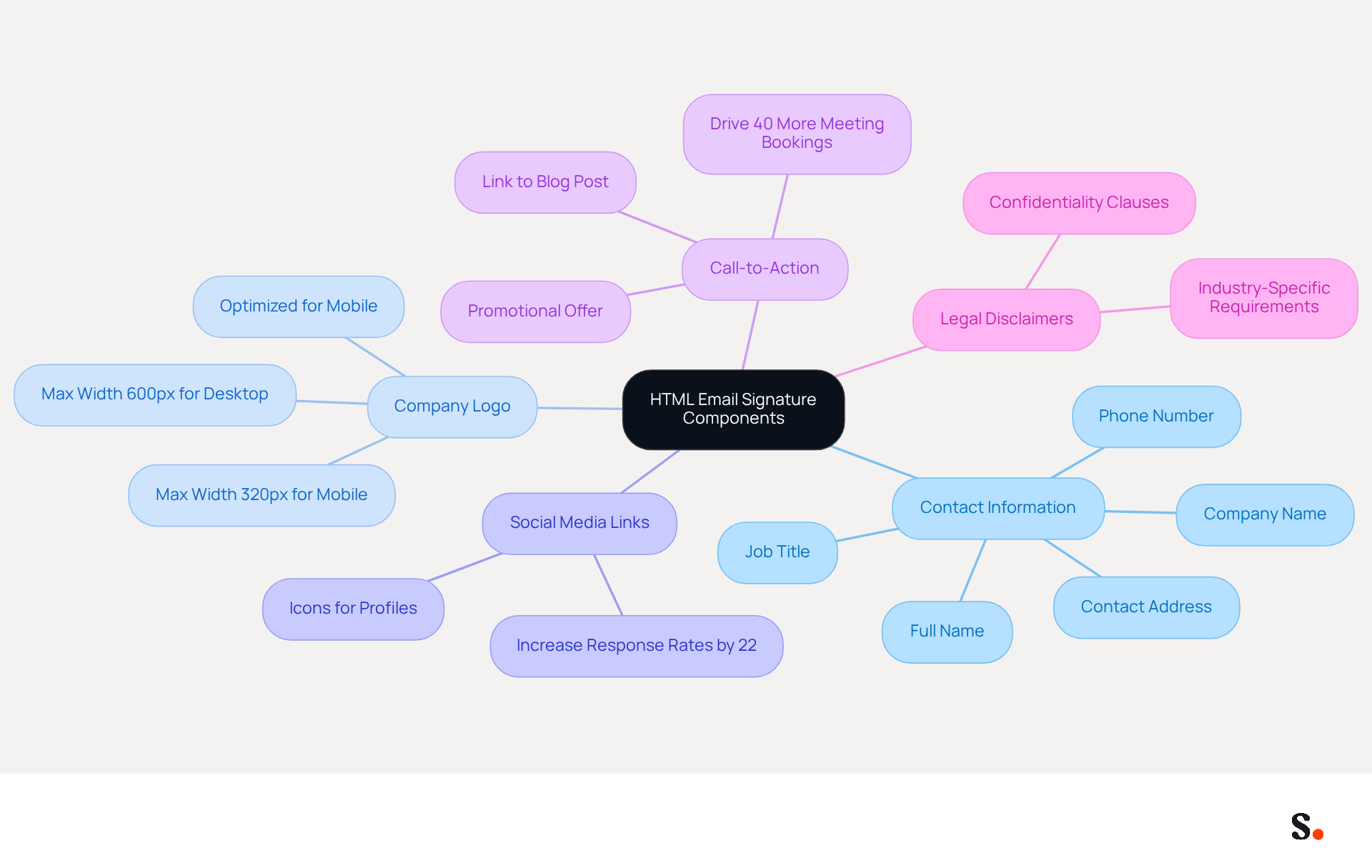
Creating an effective android email html signature is crucial for ensuring clear and professional communication. It is essential to include the following key components:
- Contact Information: Always include your full name, job title, company name, phone number, and contact address. This information helps recipients connect with you effortlessly.
- Company Logo: Incorporating your company logo enhances brand recognition. Ensure the logo is optimized for viewing on handheld devices to avoid loading issues, as 70% of business correspondence is now accessed on such devices. The standard width for email signatures should be a maximum of 600px for desktop and 320px for mobile to ensure mobile-friendliness.
- Social Media Links: Including icons that connect to your professional social media profiles can enhance interaction and offer additional avenues for recipients to reach out to you. Relevant links can drive traffic effectively, with firms seeing over a 22% increase in response rates when using consistent branded identifiers.
- Call-to-Action (CTA): Including a simple CTA, such as a link to your latest blog post or a promotional offer, can drive traffic and engagement. Studies indicate that messages with strategic CTAs drive 40% more meeting bookings than those without.
- Legal Disclaimers: If necessary, include any legal disclaimers relevant to your industry to protect your organization. This is particularly important in regulated sectors where compliance is essential.
HTML Structure: Use <table> elements for layout in your android email html signature, as they are more dependable across various messaging clients. Avoid complex CSS and stick to inline styles for better compatibility, ensuring your email displays correctly across platforms.
Furthermore, consider adding a professional headshot, as this can boost response rates by 32%. By incorporating these elements, you not only enhance your professional image but also improve engagement with your audience.
Implement Design Best Practices for Visual Appeal and Branding
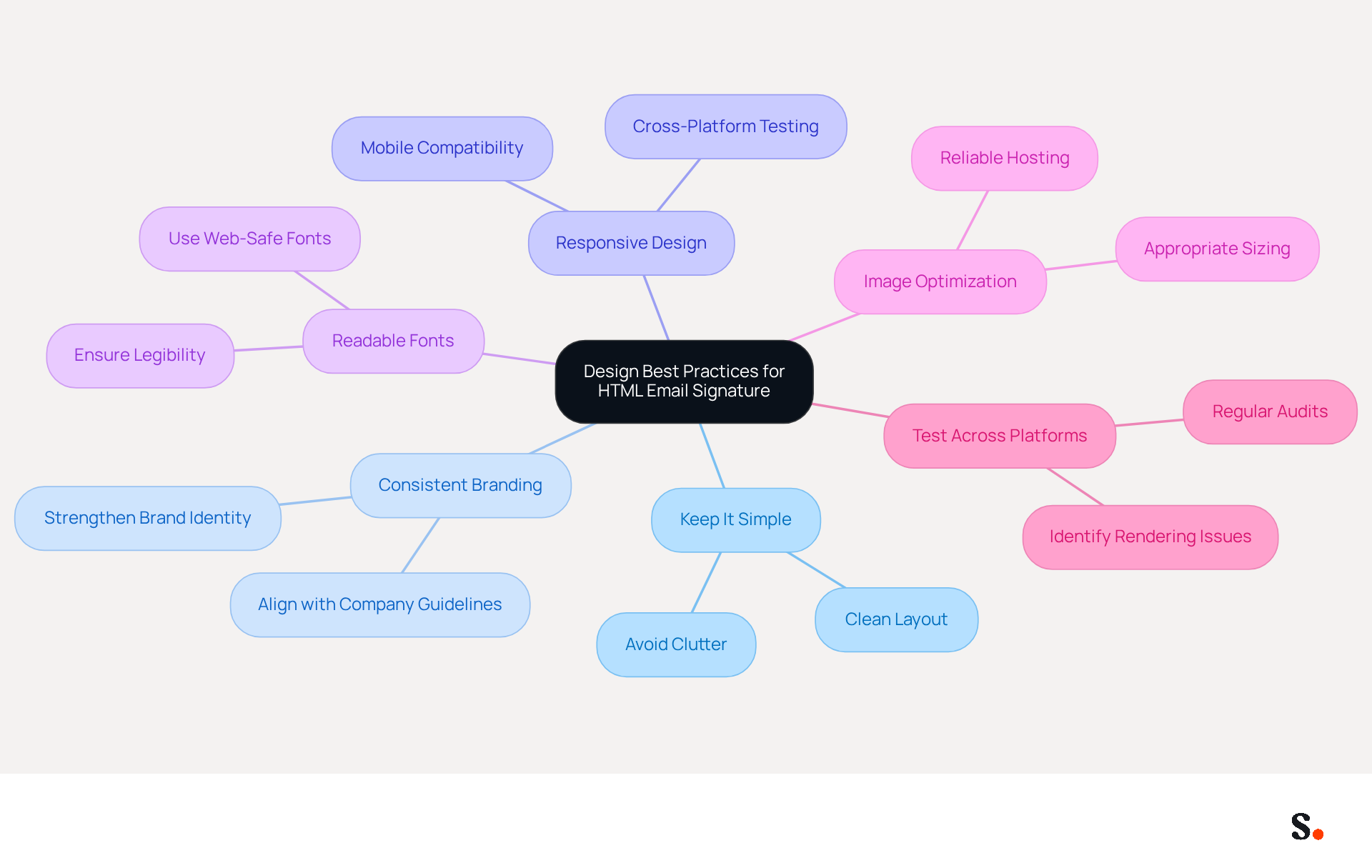
To create an effective HTML email signature, it is crucial to adhere to design best practices that enhance both aesthetics and functionality:
- Keep It Simple: A clean and straightforward layout is essential. Avoid cluttering the mark with excessive information or graphics, as simplicity enhances readability and professionalism.
- Consistent Branding: Utilize colors, fonts, and styles that align with your company’s branding guidelines. Consistency in branding strengthens brand identity and recognition, with studies showing that 76% of recipients are more likely to trust senders who use consistent branding.
- Responsive Design: Since more than 60% of business emails are viewed on mobile devices, it is vital to test your signature across different platforms to ensure proper display without horizontal scrolling.
- Readable Fonts: Choose fonts that are easy to read on mobile devices. Sticking to standard web-safe fonts helps avoid rendering issues, ensuring that your message is communicated effectively.
- Image Optimization: Use appropriately sized images to prevent slow loading times. Images should be hosted on reliable servers to avoid broken links, as excessive image use may lead to emails being marked as spam, which can hinder effective communication.
- Test Across Platforms: Not testing your signature can lead to inconsistencies that damage your professional image. Regular audits can assist in identifying and rectifying potential issues in managing electronic correspondence identifiers.
Following these design principles will help you create a polished android email html signature that effectively communicates your brand’s message and builds trust with recipients.
Leverage Automation Tools for Efficient Email Signature Management
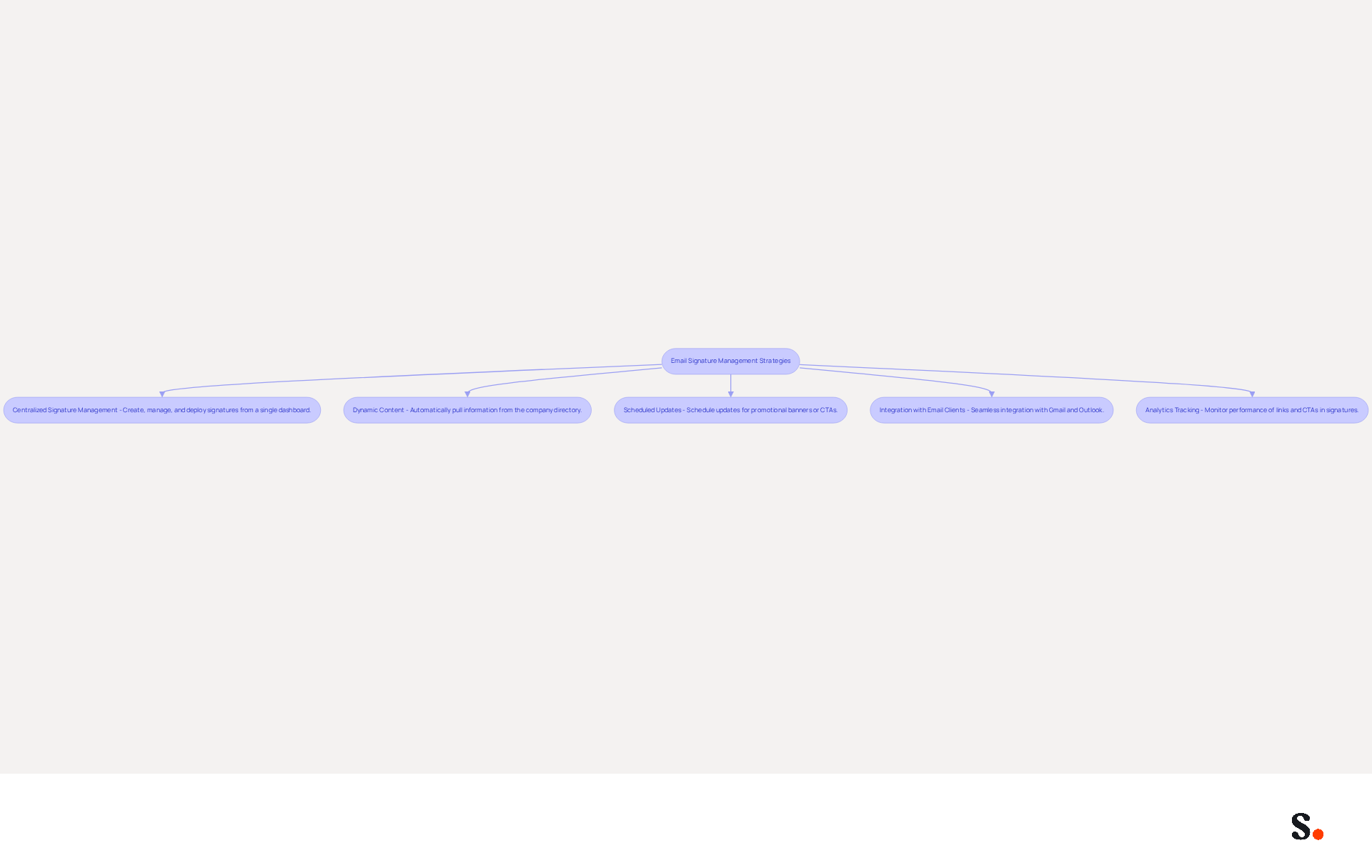
To enhance your email signature management, consider implementing effective automation tools and strategies:
- Centralized Signature Management: Utilize platforms like Scribe that enable the creation, management, and deployment of email identifiers across your organization from a single dashboard. This method maintains brand consistency while saving time on updates.
- Dynamic Content: Implement dynamic fields in your email footers that automatically pull information from your company’s directory, such as employee names and titles. This automation reduces manual updates and lowers the chances of mistakes, ensuring that all approvals are current and precise. Manual updates often lead to errors and inconsistencies, which can undermine brand integrity.
- Scheduled Updates: Leverage tools that allow you to schedule updates for promotional banners or calls-to-action (CTAs) in your signatures. This keeps your marketing messages fresh and relevant, making it easier for recipients to engage.
- Integration with Email Clients: Opt for automation tools that seamlessly integrate with popular email clients like Gmail and Outlook. This integration ensures that markings are applied automatically without needing user involvement, further streamlining the process.
- Analytics Tracking: Incorporate analytics to monitor the performance of links and CTAs in your email footers. Tracking these metrics provides valuable insights that can help refine your strategies and improve overall engagement rates. This leads to higher response rates and a more professional image.
By adopting these strategies, organizations can not only improve their branding but also mitigate risks associated with outdated information. Centralized management not only conserves time but also enhances professionalism, as standardized markings have been shown to boost response rates by 22%. Furthermore, organizations that adopt such systems can avoid legal liabilities associated with outdated or incorrect information, thereby enhancing their professional image and communication effectiveness.
Test and Optimize Email Signatures for Cross-Platform Consistency
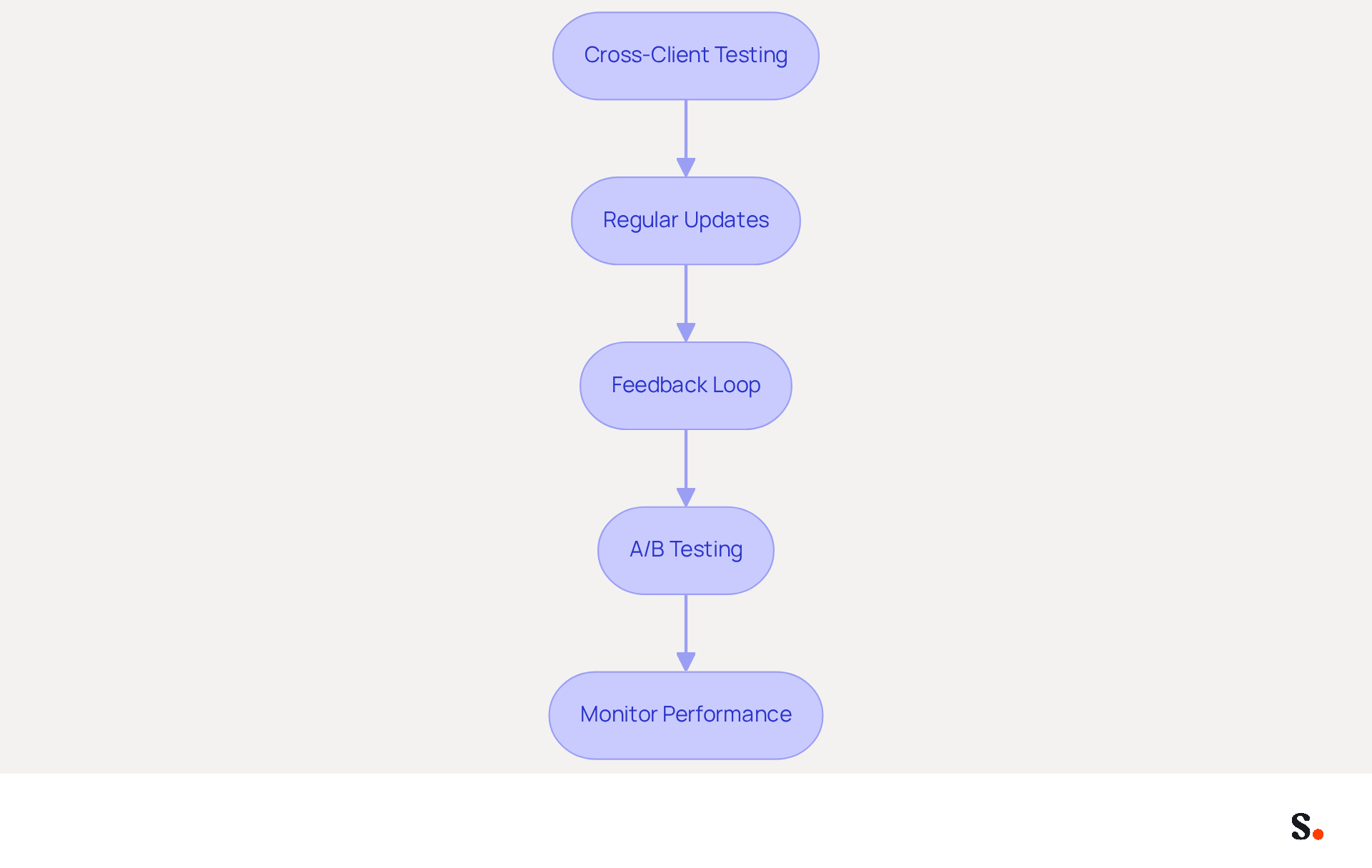
To achieve effective email signatures that resonate across platforms, organizations must adopt rigorous testing and optimization practices:
- Cross-Client Testing: Evaluate your message formats across various clients such as Gmail, Outlook, and Apple Mail, as well as on different devices including desktops and tablets. This helps identify any rendering issues that could affect user experience. With 42% of messages accessed on mobile devices, ensuring mobile compatibility is crucial. Scribe's automated synchronization with Aircall ensures that any changes made in your Aircall settings are reflected in your messages.
- Regular Updates: Schedule consistent reviews of your correspondence identifiers to ensure that all information is current and that design elements remain effective. Research shows that organizations refreshing their digital identifiers 2-4 times a year see a significant increase in engagement rates, with branded versions resulting in a 22% boost in response rates. Additionally, Scribe's SOC 2 Type II compliance ensures that your data handling remains secure during these updates.
- Feedback Loop: It's important to get feedback from your team about how email identifiers look and work. This collaborative method can assist in recognizing problems that may not be visible during testing, ensuring that designs meet the needs of all users. Many organizations struggle with maintaining brand consistency and optimizing for mobile devices, leading to ineffective android email html signatures.
- A/B Testing: Conduct A/B tests on different design variations or calls to action (CTAs) to determine which versions yield better engagement rates. Research indicates that customized CTAs can enhance click-through rates by up to 5%, and dynamic banners in message footers can result in a 22% rise in CTR. Use the data collected to refine your approach and enhance overall effectiveness.
- Monitor Performance: Utilize analytics tools to track the performance of links and CTAs in your email footers. Adjust your strategies based on the data to improve effectiveness. Organizations that track their message branding performance often observe a notable rise in engagement, with branded elements being the most impactful factor in how recipients view a message.
By adopting these strategies, organizations can enhance their email signature effectiveness and overall brand perception.
Conclusion
In today's digital landscape, a well-crafted Android email HTML signature is vital for professional communication and brand visibility. By focusing on key components such as contact information, company branding, and strategic calls-to-action, organizations can ensure their email signatures convey necessary information while effectively engaging recipients.
The article highlights several best practices, including the importance of:
- A clean design
- Consistent branding
- The use of automation tools like Scribe for efficient management
These strategies help simplify the signature creation process while ensuring that every communication accurately reflects the organization's identity. Regular testing and optimization across various platforms further enhance the effectiveness of email signatures, leading to higher engagement rates and a more professional image for the organization.
In a world where digital communication is paramount, investing in well-designed and consistently managed email signatures is crucial. Organizations should leverage tools that allow for easy updates and integration with existing systems, ensuring that their branding remains cohesive and impactful. By prioritizing effective email signatures, organizations can not only enhance their communication but also build lasting relationships with their audience.
Frequently Asked Questions
What are the key components of an HTML email signature for Android?
The key components include contact information, company logo, social media links, a call-to-action (CTA), legal disclaimers, and a professional headshot.
Why is it important to include contact information in an email signature?
Including contact information such as your full name, job title, company name, phone number, and contact address helps recipients connect with you effortlessly.
How does a company logo benefit an email signature?
A company logo enhances brand recognition and should be optimized for viewing on handheld devices to avoid loading issues, as a significant portion of business correspondence is accessed on such devices.
What is the recommended width for email signatures on different devices?
The standard width for email signatures should be a maximum of 600px for desktop and 320px for mobile to ensure mobile-friendliness.
How can social media links in an email signature enhance interaction?
Including icons that connect to your professional social media profiles can offer additional avenues for recipients to reach out, and firms have seen over a 22% increase in response rates when using consistent branded identifiers.
What is the purpose of including a call-to-action (CTA) in an email signature?
A simple CTA, such as a link to your latest blog post or a promotional offer, can drive traffic and engagement, with studies indicating that messages with strategic CTAs drive 40% more meeting bookings.
Why are legal disclaimers important in an email signature?
Legal disclaimers are necessary to protect your organization, especially in regulated sectors where compliance is essential.
What HTML structure is recommended for an Android email signature?
It is recommended to use
How can adding a professional headshot impact response rates?
Incorporating a professional headshot can boost response rates by 32%, enhancing your professional image and engagement with your audience.
List of Sources
- Understand Key Components of an HTML Email Signature for Android
- Master Gmail Signature HTML: Best Practices for Marketing Success (https://scribe-mail.com/en-US/blog/master-gmail-signature-html-best-practices-for-marketing-success)
- Email Signature Best Practices - NEWOLDSTAMP (https://newoldstamp.com/blog/email-signature-best-practices)
- Email Signature Best Practices for 2026 (+ 15 Pro Examples) (https://wavecnct.com/blogs/email-signature-best-practices-2026)
- The Complete Email Signature Guide 2026: Best Practices and Policy (https://opensense.com/complete-email-signature-guide)
- Best practices for business email signatures in 2026 (https://bybrand.io/blog/best-practices)
- Implement Design Best Practices for Visual Appeal and Branding
- The impact of email signatures on your branding (https://signitic.com/en/resources/the-impact-of-email-signatures-on-your-branding)
- Why Are Email Signatures Key to Brand Awareness? | QuickMail (https://quickmail.com/role-of-email-signatures-in-brand-awareness)
- Research Recap: Branded Email Signatures Increase Company Recognition, Trust - Demand Gen Report (https://demandgenreport.com/industry-news/research-recap-branded-email-signatures-increase-company-recognition-trust/47252)
- Email Signature Design Trends in 2026: What Works and What to Drop (https://bulksignature.com/blog/email-signature-design-trends)
- Leverage Automation Tools for Efficient Email Signature Management
- Company-Wide Email Signature Management | CloudM (https://cloudm.io/blog/optimize-your-process-with-company-wide-email-signature-management)
- 5 Benefits of Using Centrally Managed Email Signatures | Crossware365 (https://crossware365.com/blog/5-benefits-of-using-centrally-managed-email-signatures)
- WiseStamp Sets a New Standard for Email Signature Creation (https://prnewswire.com/news-releases/wisestamp-sets-a-new-standard-for-email-signature-creation-302689811.html)
- Why Email Signature Management Software is Essential for Marketing Success (https://scribe-mail.com/en-US/blog/why-email-signature-management-software-is-essential-for-marketing-success)
- Email Signature Trends 2026: Centralized Control & Automation | SIGNandGO posted on the topic | LinkedIn (https://linkedin.com/posts/signngo_email-signature-trends-to-watch-in-2026-activity-7401523471786217473-zAVL)
- Test and Optimize Email Signatures for Cross-Platform Consistency
- 4 Best Practices for a Modern Email Signature That Engages (https://scribe-mail.com/en-US/blog/4-best-practices-for-a-modern-email-signature-that-engages)
- 40+ Email Signature Statistics for 2026 (Data + Insights) (https://wavecnct.com/blogs/email-signature-statistics)
- Exclaimer Research: 67% of Marketers Expect Email Signatures to Support With Lead Gen In 2023 (https://businesswire.com/news/home/20230612141095/en/Exclaimer-Research-67-of-Marketers-Expect-Email-Signatures-to-Support-With-Lead-Gen-In-2023)
- A/B Testing for Email Signature Marketing | Signitic (https://signitic.com/en/resources/ab-testing-email-signature-marketing)
Get started with Scribe
Manage signatures across your whole team
Free 14-day trial — no credit card.