Boost Engagement with Outlook Signature Christmas Best Practices
Crafting an email signature during the festive season presents a unique challenge for businesses aiming to engage their audience while adhering to compliance
Sophie Grant
Email Signature Specialist, Scribe

Introduction
Crafting an email signature during the festive season presents a unique challenge for businesses aiming to engage their audience while adhering to compliance standards. Incorporating thoughtful design elements and seasonal themes can enhance brand visibility and foster deeper connections with your audience. Many businesses struggle to find the right balance between creativity and compliance in their email signatures, which may result in diminished audience engagement and lost marketing potential.
In this article, we will delve into effective strategies for crafting Christmas email signatures that resonate with your audience, providing insights into:
- Design fundamentals
- Festive enhancements
- Strategic marketing integration
to elevate your holiday communications.
Establish Design Fundamentals for Christmas Signatures
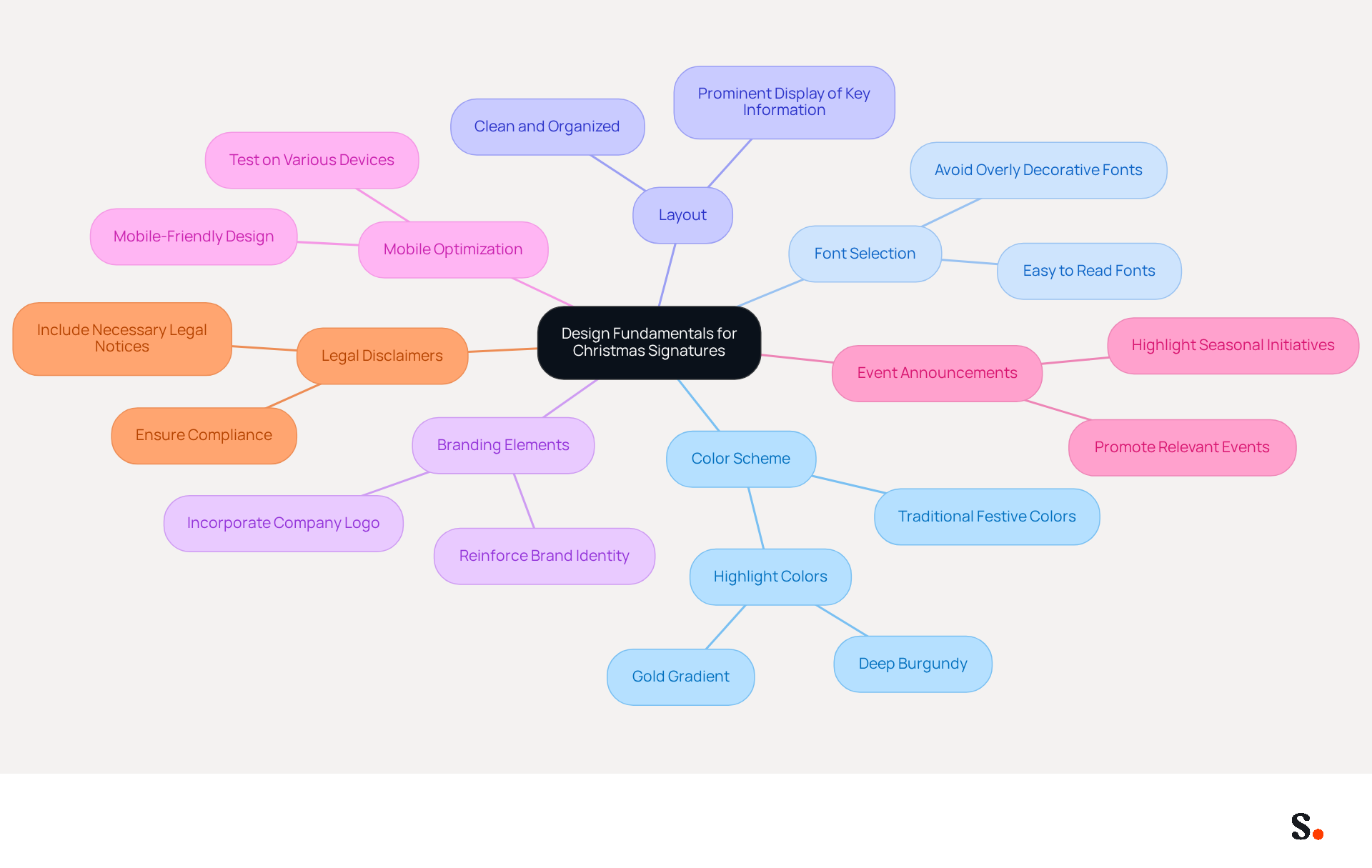
To create impactful Christmas email signatures, it is essential to follow key design fundamentals that enhance visibility and engagement:
- Color Scheme: Utilize traditional festive colors such as red, green, and gold. These colors evoke the spirit of the season and should align with your brand's color palette to maintain consistency. For instance, using a temporary highlight color like deep burgundy or a gold gradient can enhance visual appeal.
- Font Selection: Choose fonts that are easy to read and reflect the festive theme. Avoid overly decorative fonts that may hinder readability, ensuring that your message remains clear and accessible.
- Layout: Keep the layout clean and organized. Ensure that key information such as your name, title, and contact details are prominently displayed. A well-organized sign-off allows recipients to quickly find essential information without clutter.
- Branding Elements: Incorporate your company logo and other branding elements to reinforce brand identity while celebrating the holiday season. This not only enhances recognition but also strengthens the emotional connection with recipients.
- Mobile Optimization: Make sure your email footer is mobile-friendly. Many recipients will check emails on their smartphones. Test the mark on various devices to confirm its appearance and functionality. Furthermore, uphold AAA contrast ratios on text and links for accessibility, particularly in seasonal designs. Testing color tokens and image transparency for readability in both light and dark modes is also crucial.
- Event Announcements: Promoting relevant events or campaigns in your emails can boost engagement. Utilize your contact information to highlight seasonal events or initiatives, such as fundraisers or gala dates.
- Legal Disclaimers: Include necessary legal notices in your correspondence to ensure compliance and maintain professional communication, especially during the festive season.
By establishing these design fundamentals, you create a strong visual identity that enhances interaction and promotes a festive atmosphere in your communications, including your Outlook signature Christmas. By implementing these design fundamentals, you not only enhance your brand's visibility but also foster a deeper connection with your audience during the festive season.
Incorporate Festive Elements to Enhance Engagement
To effectively engage your audience this holiday season, consider enhancing your email signatures with festive elements that resonate with your brand identity:
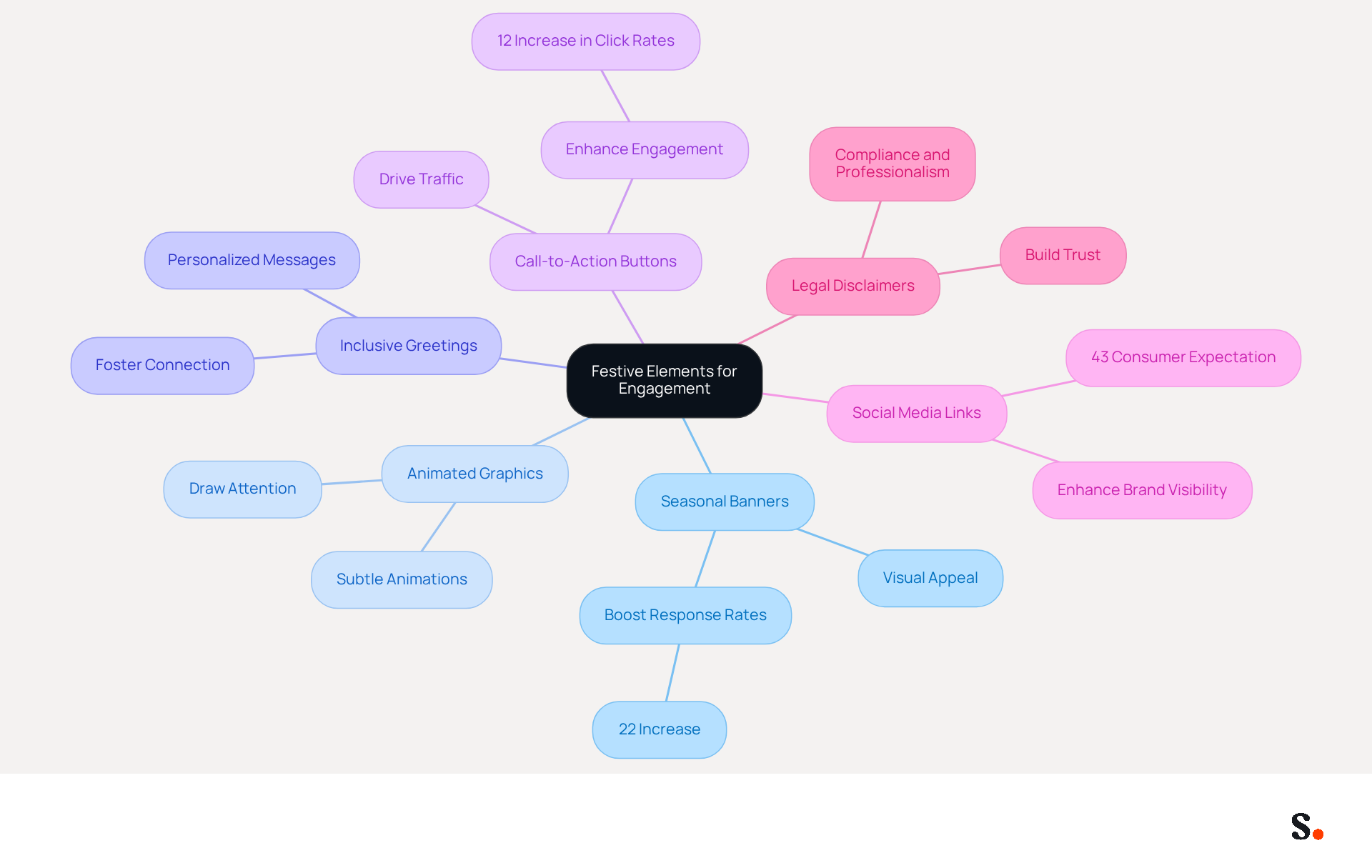
- Seasonal Banners: Adding a festive banner that reflects the seasonal theme can significantly boost engagement. Incorporating images of Christmas trees, snowflakes, or seasonal greetings in your Outlook signature enhances visual appeal and aligns with the festive spirit. Research indicates that branded messages can boost response rates by 22%, highlighting the need to balance brand integrity with festive creativity.
- Animated Graphics: Subtle animations, such as falling snowflakes or twinkling lights, can draw attention without overwhelming the recipient. These features can really grab attention and invite recipients to engage.
- Inclusive Greetings: Personalizing your Outlook signature with inclusive seasonal greetings like 'Happy Holidays' or 'Season's Greetings' resonates with a diverse audience, fostering a sense of connection and warmth.
- Call-to-Action Buttons: Including buttons for seasonal promotions or events, such as 'Shop Now' or 'Join Our Seasonal Event', can drive traffic and encourage engagement. Incorporating strong calls-to-action can significantly enhance engagement, driving clicks and interactions. According to Sophie Grant, an Email Signature Specialist, "Using seasonal banners can increase click rates by 12%, according to effective design strategies."
- Social Media Links: Updating your social media icons to reflect the festive theme makes it easy for recipients to connect with your brand across platforms. Research shows that 43% of consumers anticipate seeing social media links in footer sections, enhancing brand visibility.
- Legal Disclaimers: Incorporating legal disclaimers in your festive communication footers is essential for compliance and professionalism. Balancing festive creativity with legal compliance can be challenging for brands during the holiday season, ensuring that your communications adhere to regulations while maintaining trust with your audience.
By thoughtfully incorporating these festive elements into your Outlook signature, you can create a unique mark that conveys essential information while also spreading holiday cheer and encouraging interaction. Ultimately, these thoughtful additions can transform your email signatures into powerful tools for connection and engagement during the festive season.
Implement and Manage Signatures Effectively in Outlook
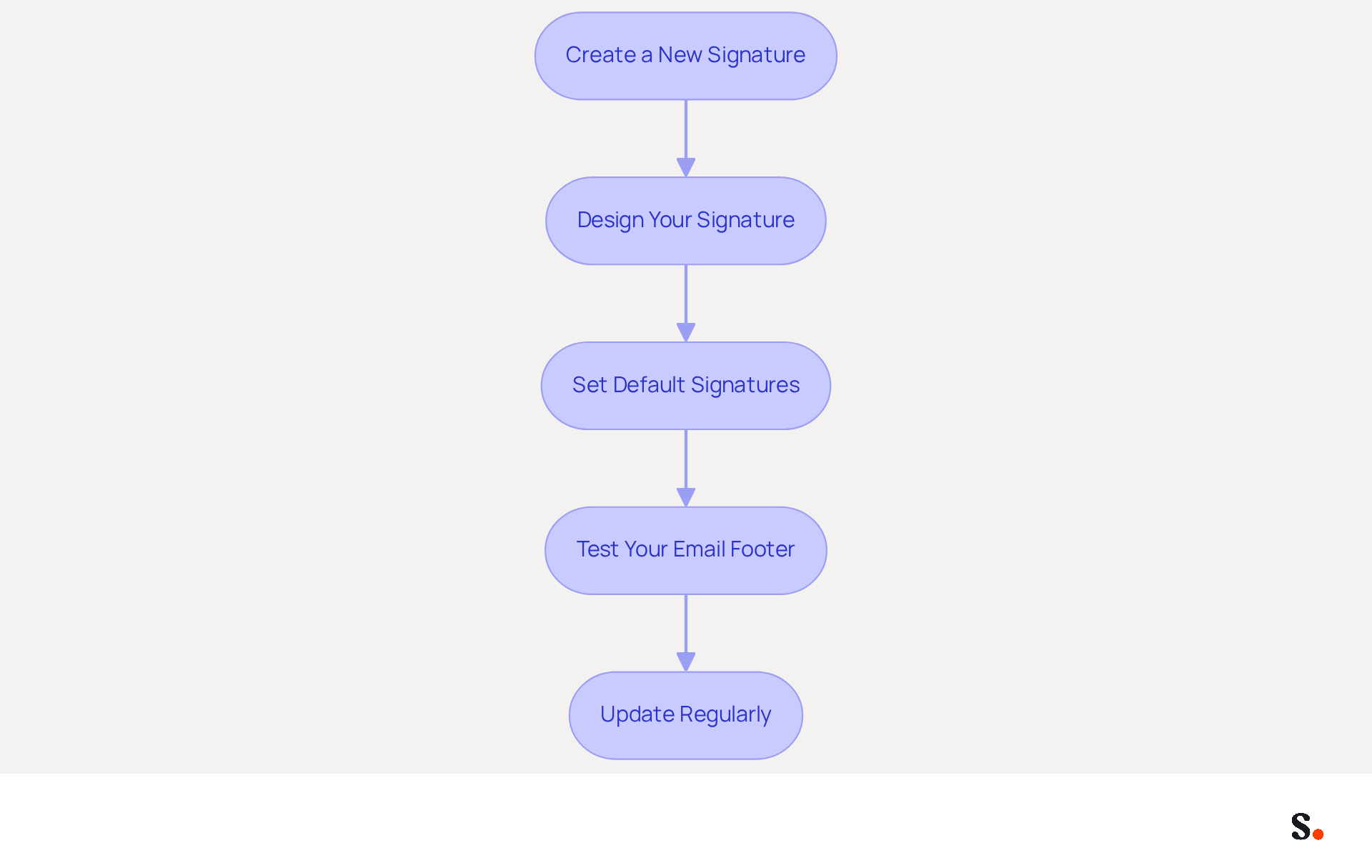
To effectively manage your Christmas email signatures in Outlook with Scribe, a systematic approach is essential:
- Create a New Signature: Open Outlook and navigate to 'File' > 'Options' > 'Mail' > 'Signatures'. Click 'New' to create a new sign-off.
- Design Your Signature: Utilize the signature editor to format your signature. Incorporate established design principles along with festive elements to capture the holiday spirit. Make sure your design is mobile-friendly. The Outlook signature Christmas theme is a great way to celebrate the holiday season. 6% of message openings in 2023 occurred on mobile devices, highlighting the importance of effective communication.
- Set Default Signatures: Designate your new Outlook signature Christmas as the default for new messages and replies/forwards to ensure consistency across communications. With Scribe, any modifications made in your Google Workspace will automatically sync, ensuring your personal mark remains current without manual input. Additionally, Scribe's integration with Aircall enhances brand consistency by reflecting any updates in real-time.
- Test Your Email Footer: Send test emails to yourself and colleagues to verify how the footer, including the Outlook signature Christmas, appears on various devices and email clients, ensuring it looks professional and festive.
- Update Regularly: As the holiday season unfolds, updating your branding with new promotions or messages can enhance relevance and engagement. Incorporating dynamic content in your email footers can boost engagement, as this trend is anticipated to grow in 2024. The Outlook signature Christmas theme is a great way to celebrate the holiday season. Scribe's automated updates ensure that any modifications in your team’s information will be reflected in your identifiers seamlessly, all while maintaining compliance with SOC 2 Type II and GDPR for secure data handling.
By leveraging Scribe's capabilities, you can elevate your brand's visibility and engagement during the holiday season.
Leverage Signatures as Marketing Tools for Holiday Campaigns
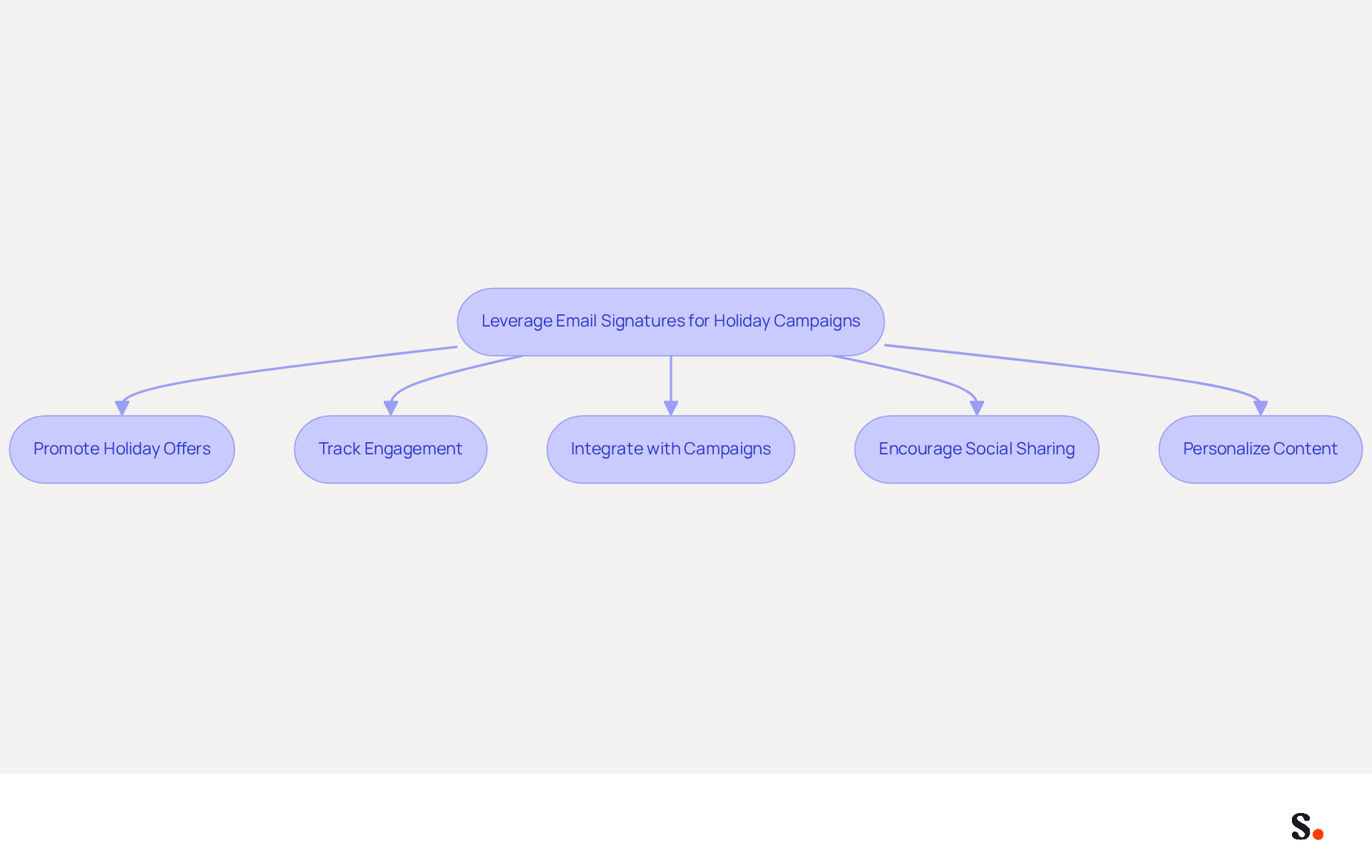
Many businesses overlook the potential of email signatures as marketing tools, missing out on valuable engagement opportunities. To maximize the effectiveness of your Christmas email signatures, consider the following strategies:
- Promote Holiday Offers: Highlight special holiday promotions, discounts, or events in your email. Clear calls-to-action can drive traffic to your website or landing pages, enhancing visibility and interaction.
- Track Engagement: Make sure to use tracking links in your emails to see how well they’re engaging your audience. This data can inform future marketing strategies and campaigns, allowing for continuous improvement. Brands that implement clear tracking can better understand their audience's interactions, leading to more effective campaigns.
- Integrate with Campaigns: Align your email signature with broader seasonal marketing campaigns. Consistent messaging across all channels creates a cohesive brand experience, reinforcing your marketing efforts. Early planning and execution are essential for maximizing the impact of your seasonal campaigns.
- Encourage Social Sharing: Include links to your social media profiles and encourage recipients to share your holiday promotions with their networks. This can enhance your reach and promote community involvement.
- Personalize Content: Tailor your unique content based on the recipient's preferences or past interactions. Personalization enhances relevance and interaction, making your communications more impactful. Studies show that personalized communications achieve conversion rates up to 60%, highlighting the importance of this strategy.
Implementing these strategies can turn your email signatures, such as an outlook signature christmas, into powerful marketing assets that not only drive sales but also enhance brand loyalty. Effective email signatures can significantly improve client engagement and recognition, with Scribe's average click-through rate on banners being 12%, further demonstrating the potential of well-crafted email signatures.
Conclusion
The Christmas season offers a unique opportunity for brands to enhance their visibility and connect meaningfully with their audience through engaging email signatures. By thoughtfully designing and incorporating festive elements, organizations can leverage their Outlook signatures as effective marketing tools that resonate with recipients and promote engagement.
Key strategies discussed include:
- Establishing a cohesive design that reflects the holiday spirit while maintaining brand integrity.
- Utilizing seasonal banners and animations to capture attention.
- Ensuring mobile optimization for accessibility.
- Leveraging email signatures for holiday marketing campaigns, such as promoting special offers and encouraging social sharing, which can significantly boost interaction rates.
With Scribe's capabilities, including automated updates and compliance with SOC 2 Type II, GDPR, and CCPA, managing these signatures becomes seamless and efficient.
Ultimately, the holiday season presents a unique chance for brands to connect with their audience in a meaningful way. By strategically optimizing email signatures, brands can ensure that their communications resonate and leave a lasting impression during the holiday season. This approach guarantees that every email sent contributes to a cohesive brand experience, maximizing both visibility and impact.
Frequently Asked Questions
What are the key design fundamentals for creating impactful Christmas email signatures?
The key design fundamentals include using a festive color scheme, selecting readable fonts, maintaining a clean layout, incorporating branding elements, ensuring mobile optimization, promoting event announcements, and including legal disclaimers.
What color scheme should be used for Christmas email signatures?
Traditional festive colors such as red, green, and gold should be utilized, aligning with your brand's color palette. Temporary highlight colors like deep burgundy or gold gradients can also enhance visual appeal.
How should fonts be selected for Christmas email signatures?
Fonts should be easy to read and reflect the festive theme. It is important to avoid overly decorative fonts that may hinder readability, ensuring that the message remains clear and accessible.
What layout considerations should be made for Christmas email signatures?
The layout should be clean and organized, with key information such as your name, title, and contact details prominently displayed. A well-organized sign-off allows recipients to quickly find essential information without clutter.
How can branding elements be incorporated into Christmas email signatures?
Incorporate your company logo and other branding elements to reinforce brand identity while celebrating the holiday season. This enhances recognition and strengthens the emotional connection with recipients.
Why is mobile optimization important for Christmas email signatures?
Mobile optimization is crucial because many recipients check emails on their smartphones. It is important to test the signature on various devices to confirm its appearance and functionality, ensuring accessibility with appropriate contrast ratios.
How can event announcements be included in Christmas email signatures?
Promoting relevant events or campaigns in your emails can boost engagement. Utilize your contact information to highlight seasonal events or initiatives, such as fundraisers or gala dates.
What legal considerations should be included in Christmas email signatures?
Necessary legal notices should be included in correspondence to ensure compliance and maintain professional communication, especially during the festive season.
List of Sources
- Establish Design Fundamentals for Christmas Signatures
- Best Practices for Effective Christmas Signatures in Marketing (https://scribe-mail.com/en-US/blog/best-practices-for-effective-christmas-signatures-in-marketing)
- Make This Season Shine: Giving Your Email Marketing a Holiday Glow-Up (https://community.constantcontact.com/news/post/make-this-season-shine-giving-your-email-marketing-a-holiday-glow-up-EhxEHQEfyWA6prH)
- Free Christmas email signature templates for your emails (https://mail-signatures.com/articles/holiday-email-signatures)
- Holiday Email Signatures: Creative Tips & Inspiring Examples (https://emailmavlers.com/blog/design-holiday-email-signatures)
- Incorporate Festive Elements to Enhance Engagement
- What are the benefits of seasonal email marketing? | iContact (https://icontact.com/knowledgebase/what-are-the-benefits-of-seasonal-email-marketing)
- Best Practices for Effective Christmas Signatures in Marketing (https://scribe-mail.com/en-US/blog/best-practices-for-effective-christmas-signatures-in-marketing)
- Boost Engagement with Email Signature Christmas Images and Best Practices (https://scribe-mail.com/en-US/blog/boost-engagement-with-email-signature-christmas-images-and-best-practices)
- How to Use Seasonal Email Signatures to Power Your Next Campaign (https://exclaimer.com/email-signature-handbook/seasonal-email-signatures-marketing-campaigns)
- Engagement window shortens for holiday email marketing, study finds (https://marketingdive.com/news/engagement-window-shortens-for-holiday-email-marketing-study-finds/567314)
- Implement and Manage Signatures Effectively in Outlook
- Email signature statistics and trends in 2024 (https://wisestamp.com/blog/email-signature-statistics)
- The Best Way to Manage Email Signatures in Microsoft 365 | Rocketseed (https://rocketseed.com/blog/best-way-to-manage-email-signatures-in-microsoft-365)
- 40+ Email Signature Statistics for 2026 (Data + Insights) (https://wavecnct.com/blogs/email-signature-statistics)
- Email Signature Trends 2026: What Designers Are Actually Using (https://markaplugin.com/blog/email-signature-trends-2026)
- Email Signature Best Practices - NEWOLDSTAMP (https://newoldstamp.com/blog/email-signature-best-practices)
- Leverage Signatures as Marketing Tools for Holiday Campaigns
- Holiday email marketing strategy: 7 expert tips + examples - Klaviyo (https://klaviyo.com/blog/holiday-email-marketing-campaign-examples)
- Email Marketing Campaign Strategies for Holidays 2026 (https://krishtechnolabs.com/blog/email-marketing-strategies-for-holiday-season-2026)
- 12 email signature marketing examples that drive clicks (2026) (https://signitic.com/en/resources/12-email-signature-marketing-examples-that-actually-drive-clicks)
- Best Practices for Effective Christmas Signatures in Marketing (https://scribe-mail.com/en-US/blog/best-practices-for-effective-christmas-signatures-in-marketing)
- Holiday Email Marketing Guide (2026) | FireDrum (https://firedrumemailmarketing.com/email-marketing-blog/2026-holiday-email-marketing-guide)
Get started with Scribe
Create your signature in minutes
Free 14-day trial — no credit card.