Choose the Best File Format for Your Email Signature Today
In an era where digital communication is paramount, the choice of email signature file format can significantly influence brand perception and engagement
Sophie Grant
Email Signature Specialist, Scribe

Introduction
In an era where digital communication is paramount, the choice of email signature file format can significantly influence brand perception and engagement. Email signatures play a crucial role in shaping branding and marketing strategies. Organizations often face challenges in selecting the most effective format due to the diverse strengths and weaknesses of each option. This guide delves into the nuances of email signature file formats, offering insights that empower marketing and IT teams to enhance their digital presence while maintaining compliance and brand consistency. Understanding these nuances is essential for organizations aiming to optimize their digital presence and uphold brand consistency in every communication.
Understand Email Signatures and Their Importance
Digital sign-offs are not merely acknowledgments; they serve as crucial branding tools in every communication. A well-designed digital sign-off can enhance your professional image, provide key contact information, and serve as an effective marketing tool. Here are key considerations:
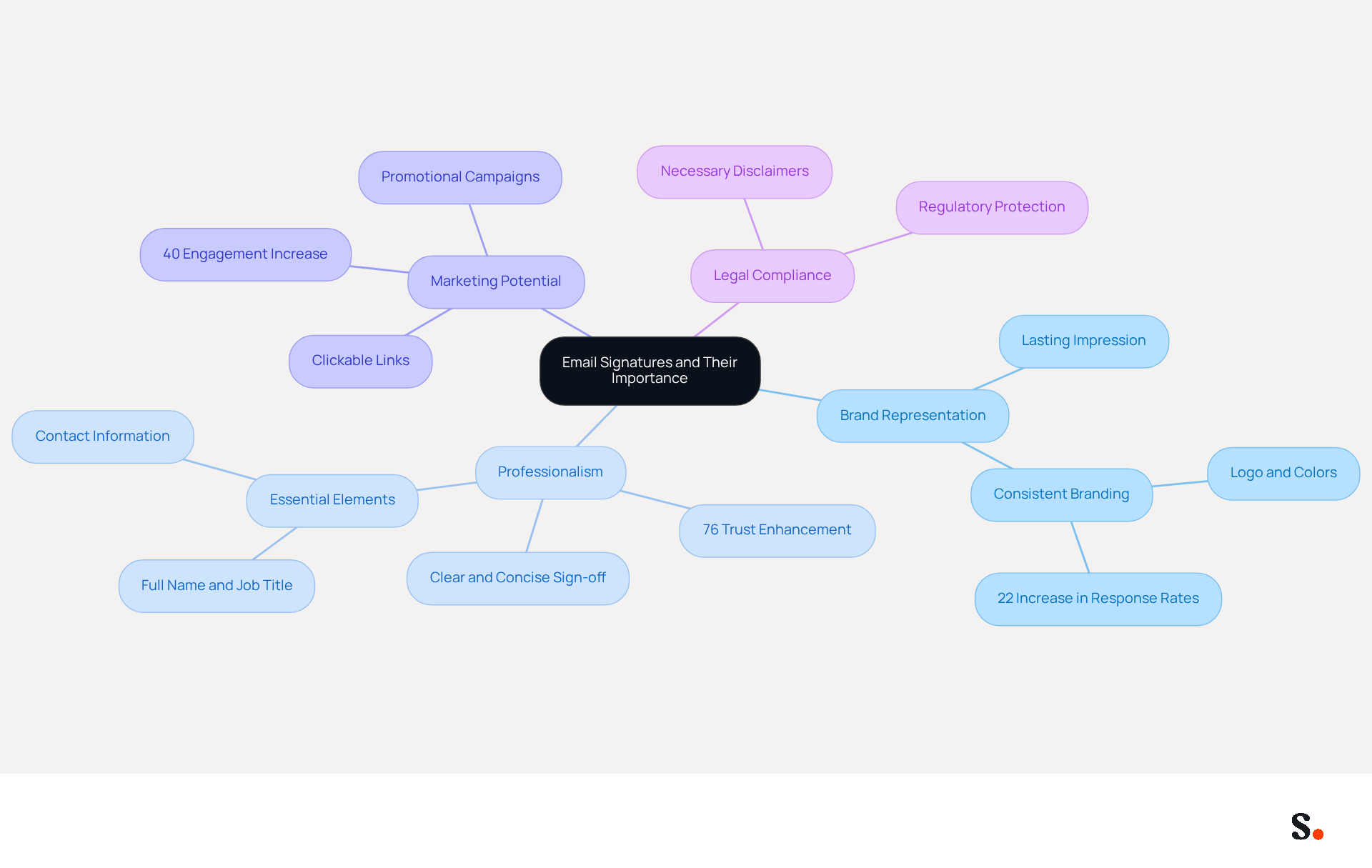
- Brand Representation: Your email signature is often the last impression a recipient has, making it a prime opportunity to reinforce your brand identity. Incorporating your logo, company colors, and consistent fonts is crucial for maintaining brand recognition. Research shows that consistent electronic communication identifiers can lead to a 22% increase in response rates, highlighting their significance in brand representation.
- Professionalism: A clear and concise sign-off conveys professionalism. Essential elements include your full name, job title, company name, and direct contact details, ensuring recipients can easily reach you. Studies indicate that 76% of recipients believe that branded sign-offs enhance trust in the sender, emphasizing the importance of professionalism in email communications.
- Marketing Potential: Email footers can be powerful marketing tools. By integrating links to your website, social media profiles, or promotional campaigns, you can drive traffic and engagement. For example, organizations that employ strategic calls to action in their email footers have noticed engagement increases of up to 40%. This shows how well-crafted email footers can support your marketing objectives.
- Legal Compliance: Depending on your industry, including necessary disclaimers or legal information in your email may be essential for regulatory compliance. This not only protects your organization but also reinforces your commitment to professionalism and transparency.
Understanding these elements will help you select the right type of digital sign-off that aligns with your brand and communication goals. As we approach 2026, the strategic use of digital identifiers will be pivotal in enhancing brand visibility and fostering engagement.
Explore Common File Formats for Email Signatures
Selecting the best file format for email signature is essential for ensuring both compatibility and visual impact. The most common file formats used include:
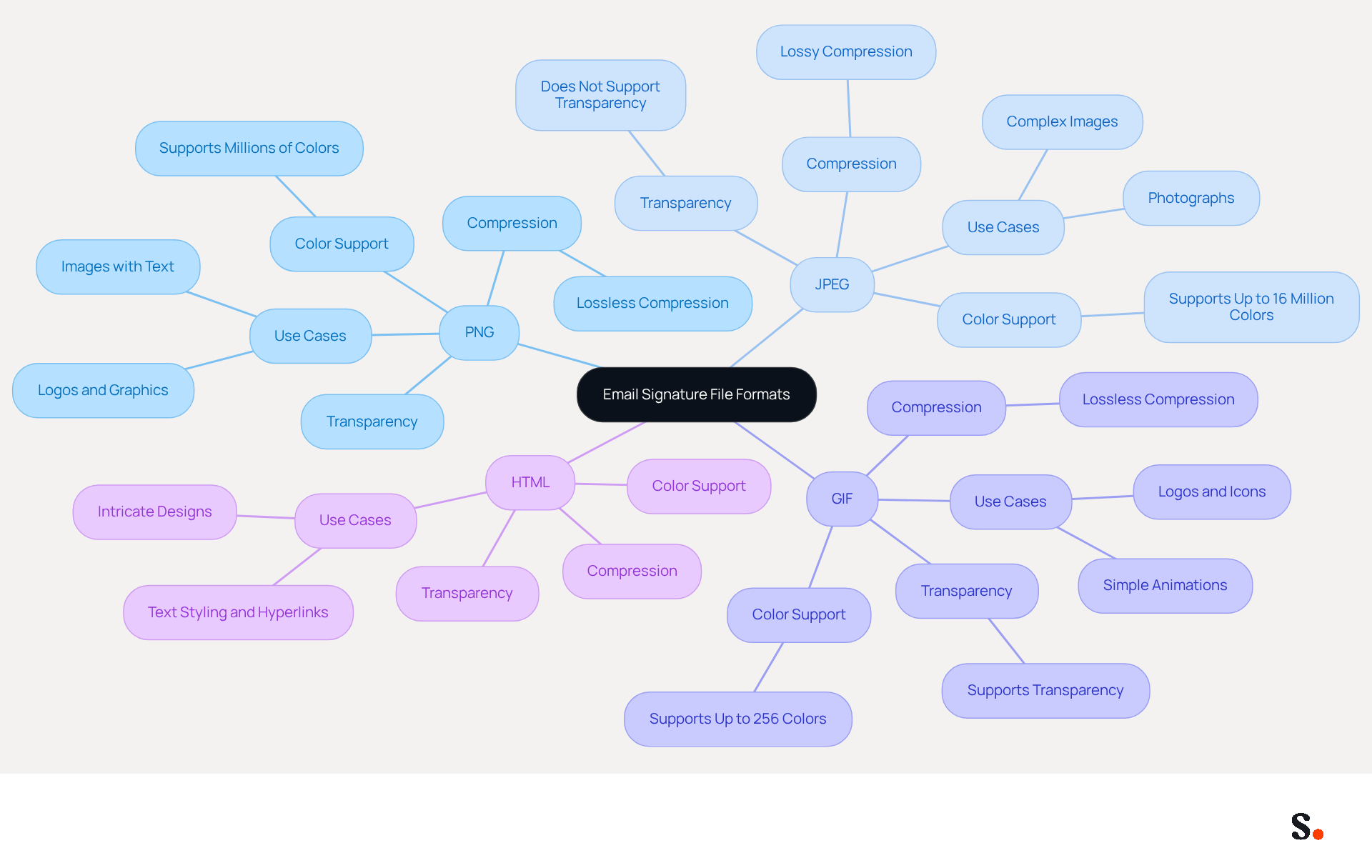
- PNG (Portable Network Graphics): Ideal for logos and images with transparent backgrounds, PNG files maintain high quality and are widely supported across email clients. Their lossless compression ensures clarity, making them a preferred choice for sharp graphics.
- JPEG (Joint Photographic Experts Group): Best suited for photographs and images with gradients, JPEG formats are compressed to reduce size, which can affect quality. Their smaller file size makes them practical for digital use where loading speed is crucial, though they do not support transparency.
- GIF (Graphics Interchange Format): Useful for simple graphics and animations, GIFs can add a dynamic element to your email footer. However, they support only up to 256 colors, which may limit their use for detailed images. Animated GIFs may not display correctly in all messaging clients, so ensure the first frame is meaningful.
- HTML (HyperText Markup Language): Although not a type for images, HTML signatures enable intricate designs, including text styling and hyperlinks. They offer versatility but may require technical knowledge to implement effectively. Utilizing HTML tables for layout is advised to ensure compatibility across various messaging clients.
Each format offers distinct advantages and disadvantages, depending on your needs for image quality, file size, and compatibility with email clients, which is crucial when selecting the best file format for email signature. A recent study by Exclaimer found that 45% of individuals prioritize complete contact information in business emails, underscoring the importance of format selection. Syncing your Google Workspace with Scribe streamlines how you manage these identifiers, automatically updating any changes made to your teammates' information, thus saving time and ensuring brand consistency across all communications. This integration enables marketing teams to manage their digital identifiers independently after the initial IT setup, improving efficiency and control.
Select the Best File Format for Your Email Signature
Choosing the best file format for email signature is crucial for maximizing its effectiveness. Here are key factors to consider:
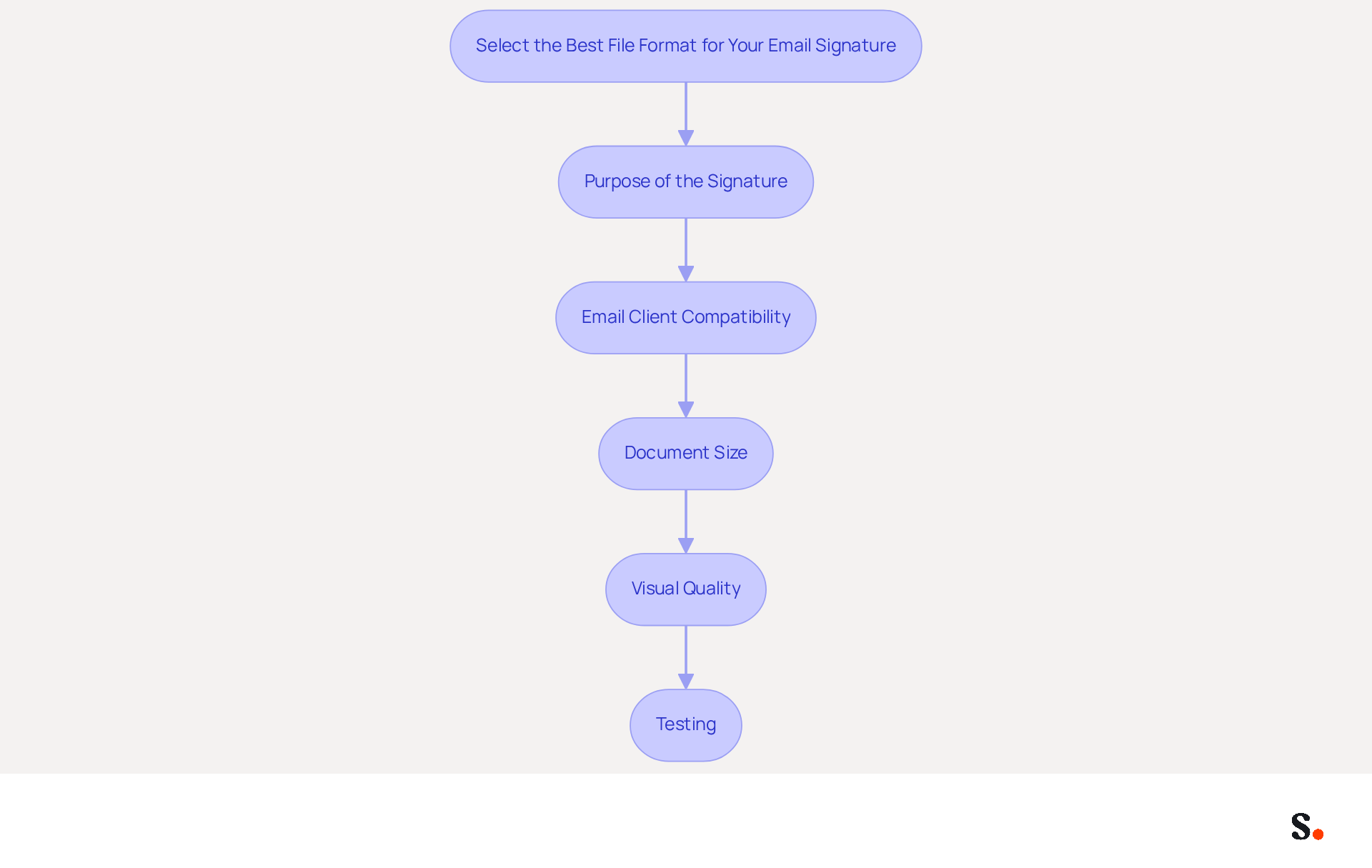
- Purpose of the Signature: Identify the primary function of your signature-whether it's for branding, sharing contact information, or promoting a campaign. For branding purposes, PNG is often preferred due to its superior quality and transparency capabilities.
- Email Client Compatibility: Ensure that the selected type is compatible with the email clients your recipients are likely to use. PNG and JPEG formats are generally reliable across most platforms, making them safe choices.
- Document Size: Keep the total size of your mark under 100KB to ensure quick loading times. Large file sizes can lead to delivery failures or truncation, risking the visibility of your signature.
- Visual Quality: Assess the visual quality of the images you plan to use. PNG files offer lossless compression, preserving image quality, while JPEGs may lose detail due to compression. Choose based on how essential image clarity is for your mark.
- Testing: Testing ensures your signature displays correctly, protecting your professional image. After choosing a style, evaluate your mark across different messaging clients and devices to ensure it appears correctly. This step is vital to avoid any issues that could undermine your professional image.
By thoroughly assessing these elements, you can select the best file format for email signature that aligns with your branding objectives and enhances the overall impact of your digital representation. Furthermore, integrating Scribe with Google Workspace can greatly enhance your management of messaging identifiers. By syncing your Google Workspace with Scribe, you save time as your teammates' data is automatically updated. Scribe's adherence to SOC 2 Type II, GDPR, and CCPA guarantees that your data is managed securely, further improving your management of digital signatures. This ensures your digital identifiers not only reflect your brand accurately but also enhance your overall marketing efforts.
Address Challenges and Considerations in Implementation
Creating a cohesive electronic correspondence footer presents several challenges that can impact brand perception and communication effectiveness. Here are common issues and strategies to address them:
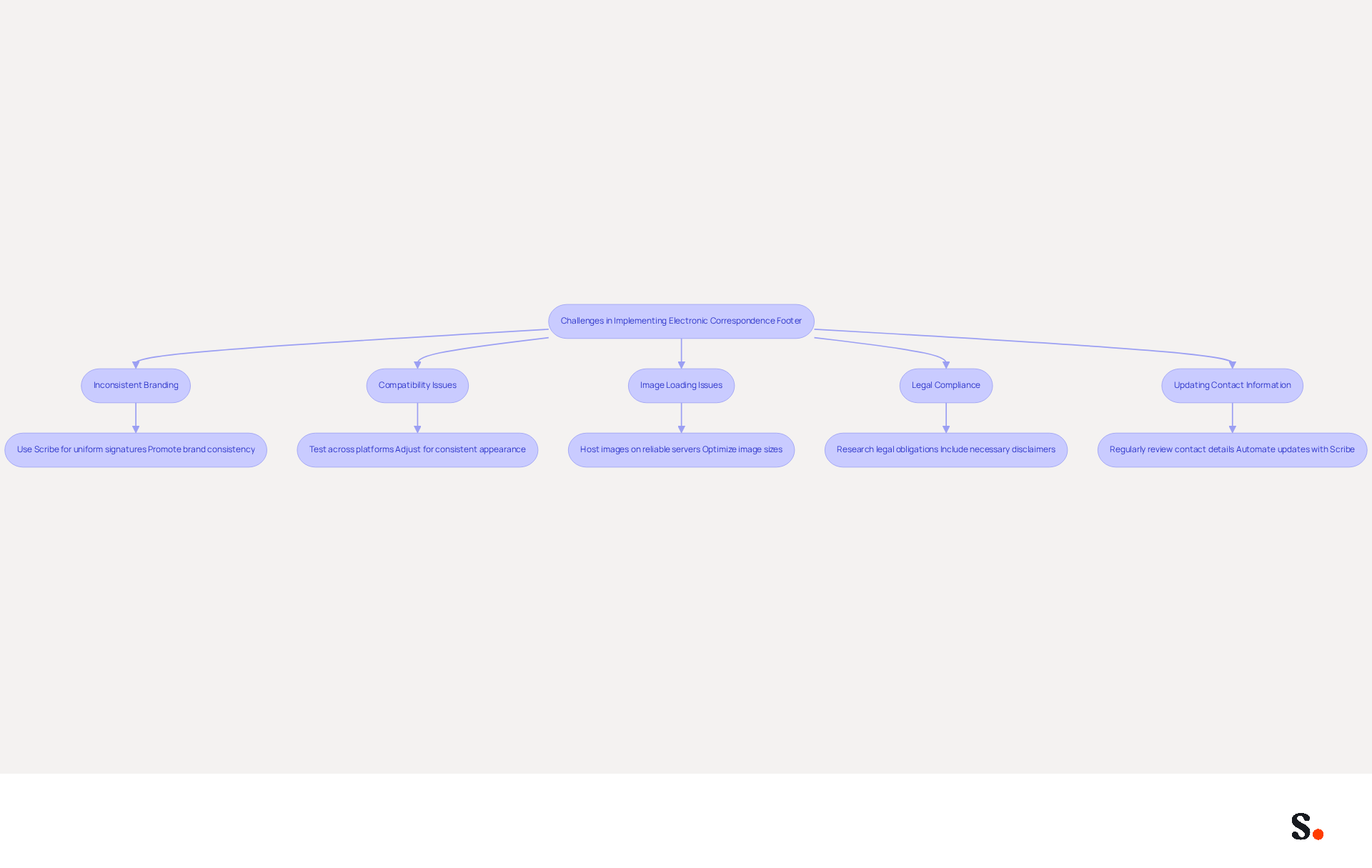
- Inconsistent Branding: To maintain brand consistency, it is crucial that all team members utilize the same signature format. Automated management solutions like Scribe can enforce uniformity across your organization, ensuring that every message reflects your brand identity. Inconsistent branding can lead to confusion among clients and dilute brand identity. By standardizing signatures, organizations can enhance their brand image and potentially increase revenue by up to 33%. Joining Scribe's Affiliate Program allows you to promote brand consistency while earning a 50% commission, benefiting both your organization and yourself.
- Compatibility Issues: Various messaging clients may display signatures differently. Testing your sign-off across platforms such as Outlook, Gmail, and Apple Mail can help identify discrepancies. Adjustments may be necessary to ensure a consistent appearance.
- Image Loading Issues: If images in your branding fail to load, confirm that they are hosted on a dependable server and that the file format is compatible with the client. Avoid using excessively large images, as they may be blocked or take too long to load, impacting user experience.
- Legal Compliance: Depending on your industry, specific disclaimers or legal information may be necessary in your email. Research your legal obligations to ensure compliance with relevant regulations, such as GDPR and CCPA, which mandate clear sender identification and privacy policy links. With Scribe's SOC 2 Type II certification, you can trust that your digital identifiers are secure and compliant, reducing risks associated with unregulated identifiers.
- Updating Contact Information: Regularly reviewing and refreshing your correspondence details is essential to reflect any changes in contact information or branding. Automating this process with a tool like Scribe can save time and ensure that your marks remain precise and compliant. By syncing your Google Workspace with Scribe, you can auto-fill your teammates' information, saving time and ensuring that any changes in your organization are automatically reflected in your correspondence.
By proactively addressing these challenges, you can create a professional and effective email signature that enhances your communication and branding efforts. Addressing these challenges not only enhances your email signature but also strengthens your overall brand presence in the digital landscape.
Conclusion
Selecting the right file format for email signatures is critical for effective branding and communication. An effective email signature enhances professionalism and acts as a strong marketing tool. By understanding the various file formats available - such as PNG, JPEG, GIF, and HTML - organizations can make informed decisions that align with their branding objectives and communication strategies.
Key considerations include:
- The purpose of the signature
- Compatibility with email clients
- File size
- Visual quality
Choosing the right format can be challenging due to varying strengths and weaknesses, and testing across different platforms is crucial to maintain a professional image. Additionally, leveraging tools like Scribe can streamline the management of email signatures, ensuring that all team members adhere to a consistent format while also complying with legal requirements such as GDPR and CCPA.
Given the rise of digital communication, the importance of a well-designed email signature is clear. Organizations should prioritize the selection of the right file format to enhance their branding efforts and improve engagement. By adopting best practices and utilizing solutions like Scribe, businesses can not only achieve 100% brand consistency but also measure the marketing ROI from their email signatures, ultimately transforming them into a strategic asset for any organization.
Frequently Asked Questions
What is the purpose of an email signature?
An email signature serves as a crucial branding tool, enhancing your professional image, providing key contact information, and acting as an effective marketing tool in every communication.
How does an email signature represent a brand?
An email signature reinforces brand identity by incorporating elements such as your logo, company colors, and consistent fonts, which are essential for maintaining brand recognition.
What impact does a well-designed email signature have on response rates?
Research indicates that consistent electronic communication identifiers can lead to a 22% increase in response rates, highlighting the significance of a well-designed email signature in brand representation.
What elements should be included in a professional email signature?
A professional email signature should include your full name, job title, company name, and direct contact details to ensure recipients can easily reach you.
How do branded email signatures affect trust?
Studies show that 76% of recipients believe that branded sign-offs enhance trust in the sender, emphasizing the importance of professionalism in email communications.
Can email signatures be used for marketing purposes?
Yes, email footers can be powerful marketing tools by integrating links to your website, social media profiles, or promotional campaigns, which can drive traffic and engagement.
What is the potential increase in engagement from strategic calls to action in email footers?
Organizations that employ strategic calls to action in their email footers have noticed engagement increases of up to 40%, demonstrating the marketing potential of well-crafted email signatures.
Why is legal compliance important in email signatures?
Including necessary disclaimers or legal information in your email may be essential for regulatory compliance, protecting your organization and reinforcing professionalism and transparency.
How will the use of digital identifiers evolve by 2026?
As we approach 2026, the strategic use of digital identifiers will be pivotal in enhancing brand visibility and fostering engagement in communications.
List of Sources
- Understand Email Signatures and Their Importance
- Why Email Signatures Must Be In Your 2026 Marketing Plan | Rocketseed (https://rocketseed.com/blog/2026-marketing-plan-email-signatures)
- Why Team Email Signatures Matter More Than You Think: The Hidden Impact on Brand Trust and Customer Experience (https://getmailbird.com/why-team-email-signatures-matter-brand-trust)
- The impact of email signatures on your branding (https://signitic.com/en/resources/the-impact-of-email-signatures-on-your-branding)
- 2026 Marketing Trends: Email Signatures as a Marketing Tool (https://bluechiptt.com/blog/5-marketing-trends-for-2026-and-how-your-email-signature-fits-in)
- Best Practices for a Standard Email Signature That Boosts Marketing ROI (https://scribe-mail.com/en-US/blog/best-practices-for-a-standard-email-signature-that-boosts-marketing-roi)
- Explore Common File Formats for Email Signatures
- Email Signature Format: Best Practices & Examples | Exclaimer (https://exclaimer.com/email-signature-handbook/email-signature-format)
- The Complete Email Signature Guide 2026: Best Practices and Policy (https://opensense.com/complete-email-signature-guide)
- Best image formats for email signatures: Compatibility guide (https://set-outlooksignatures.com/blog/2026/03/05/image-formats)
- Best Image Formats for Email Signatures - Gimmio (https://blog.gimm.io/best-image-formats-for-email-signatures)
- What Is the Best Image Format for the Email Signature? - NEWOLDSTAMP (https://newoldstamp.com/blog/best-image-format-for-email-signature)
- Select the Best File Format for Your Email Signature
- Email Signature Best Practices for 2026 (+ 15 Pro Examples) (https://wavecnct.com/blogs/email-signature-best-practices-2026)
- Email Signature Design Trends in 2026: What Works and What to Drop (https://bulksignature.com/blog/email-signature-design-trends)
- What Is the Best Image Format for the Email Signature? - NEWOLDSTAMP (https://newoldstamp.com/blog/best-image-format-for-email-signature)
- Best Format for Email Signature? Examples & Tools (https://publicate.it/blog/best-format-for-email-signature)
- Top 10+ best practices for email signatures design in 2026 (https://mysignature.io/blog/email-signature-best-practices)
- Address Challenges and Considerations in Implementation
- Why Team Email Signatures Matter More Than You Think: The Hidden Impact on Brand Trust and Customer Experience (https://getmailbird.com/why-team-email-signatures-matter-brand-trust)
- Company Email Branding Across All Departments | Rocketseed (https://rocketseed.com/blog/company-email-branding-alignment)
- Email signature do’s & don’ts: from chaos to consistency and performance in every send (https://marketingtechnews.net/news/email-signature-dos-donts-from-chaos-to-consistency-and-performance-in-every-send)
- "Email Signature Trends for 2026: What's In, What's Out" | Crossware posted on the topic | LinkedIn (https://linkedin.com/posts/crossware-ltd_new-year-new-trends-even-for-your-email-activity-7394554686046908416-vD_O)
Get started with Scribe
See why teams switch to Scribe
Free 14-day trial — no credit card.