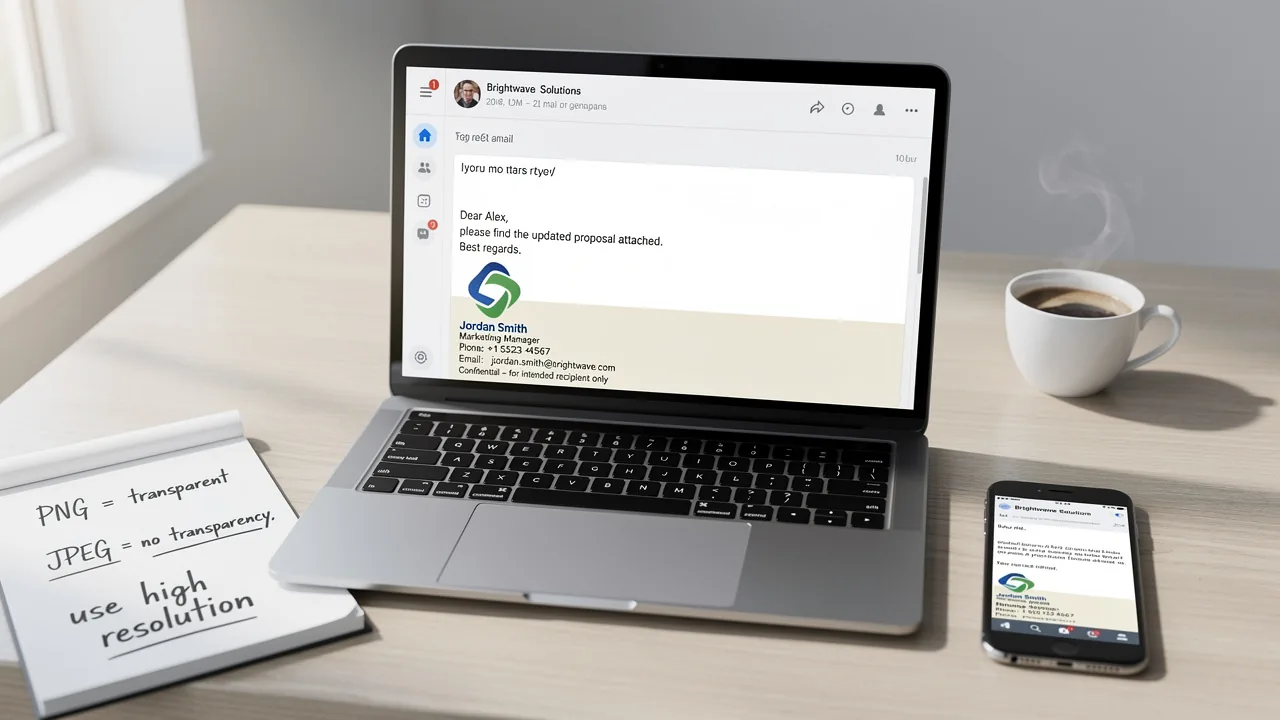
Choose the Best File Type for Your Email Signature Effectively
Selecting the appropriate file type for an email signature is essential for effective professional branding and communication. With various formats available
Sophie Grant
Email Signature Specialist, Scribe

Introduction
Selecting the appropriate file type for an email signature is essential for effective professional branding and communication. With various formats available, each offering unique advantages and disadvantages, organizations must carefully consider their options. The file type selected can significantly impact how recipients perceive a business. Choosing the wrong file type can lead to miscommunication and a negative impression.
This guide outlines key criteria for selecting the most effective file type for email signatures, empowering marketing and IT teams to optimize their digital communication strategies. By selecting the right file type, organizations can enhance their professional image and improve communication effectiveness.
Understand the Importance of Email Signatures
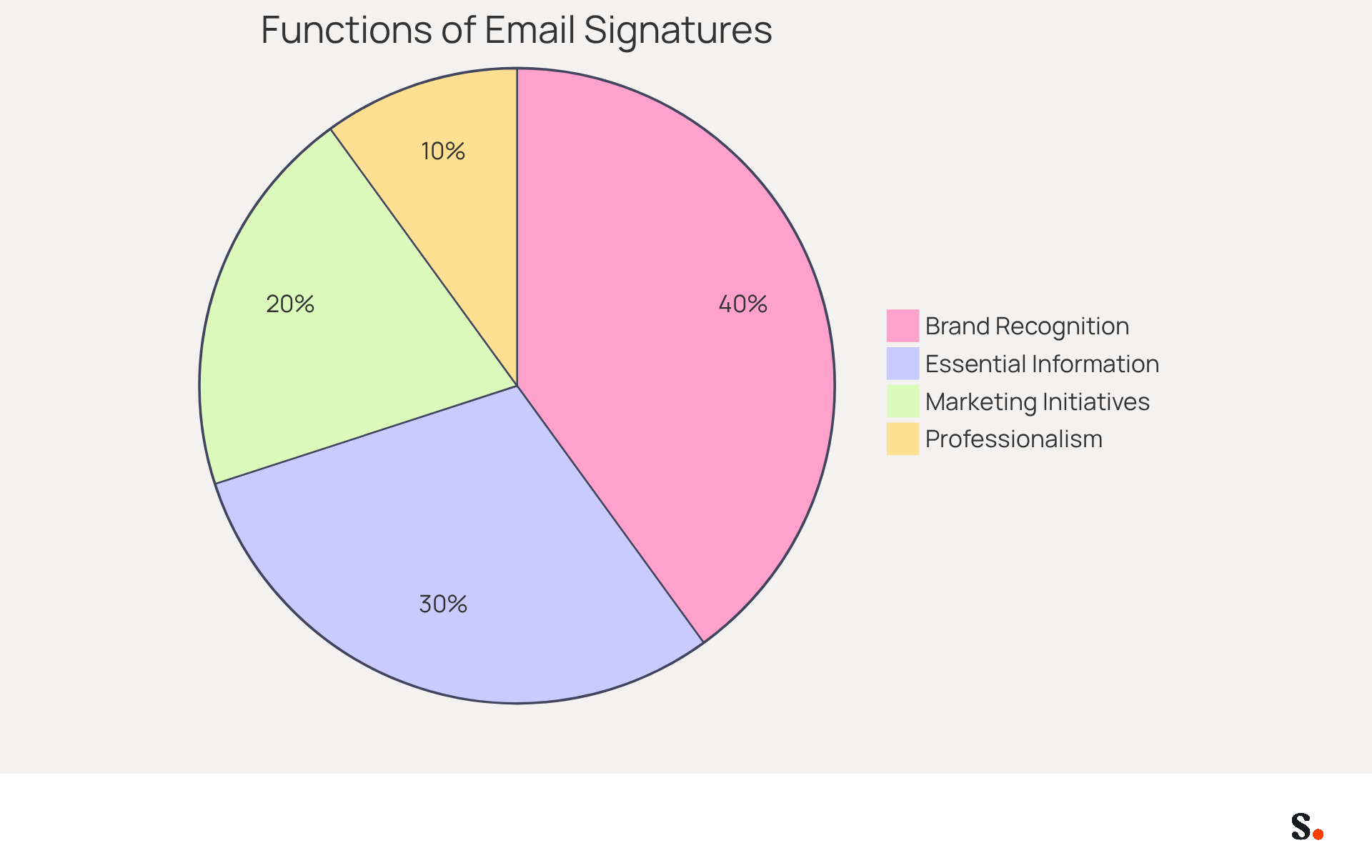
Email identifiers serve as vital components of your professional identity, extending beyond mere sign-offs. A well-crafted email signature serves multiple essential functions:
- Enhance Brand Recognition: Each email sent is an opportunity to reinforce your brand identity. Including your logo and consistent branding elements ensures that recipients remember your company. This is underscored by the fact that 80% of businesses consider a branded message footer crucial for their brand identity, with 76% of recipients indicating increased trust in the sender when a branded footer is utilized.
- Provide Essential Information: Signatures typically include your full name, job title, company name, and contact details, making it easy for recipients to reach you. This clarity is essential, as 64% of consumers prefer that contact details be included, ensuring they can reach the appropriate individual swiftly.
- Promote Marketing Initiatives: By incorporating links to your website or social media, you can drive traffic and engagement directly from your communications. Branded digital identifiers can result in a 22% boost in response rates and a 15% rise in click-through rates to company websites, demonstrating their efficiency as marketing tools.
- Establish Professionalism: A polished mark reflects your attention to detail and professionalism, positively influencing how clients and partners perceive your business. Interestingly, 57% of consumers tend to trust messages from businesses that use branded identifiers, emphasizing their importance in establishing credibility.
In conclusion, electronic identifiers are not merely formalities; they are powerful tools for communication and marketing. Choosing the best file type for email signature, along with the right design and format, can significantly impact your brand's perception and effectiveness in communication.
Explore Different File Types for Email Signatures
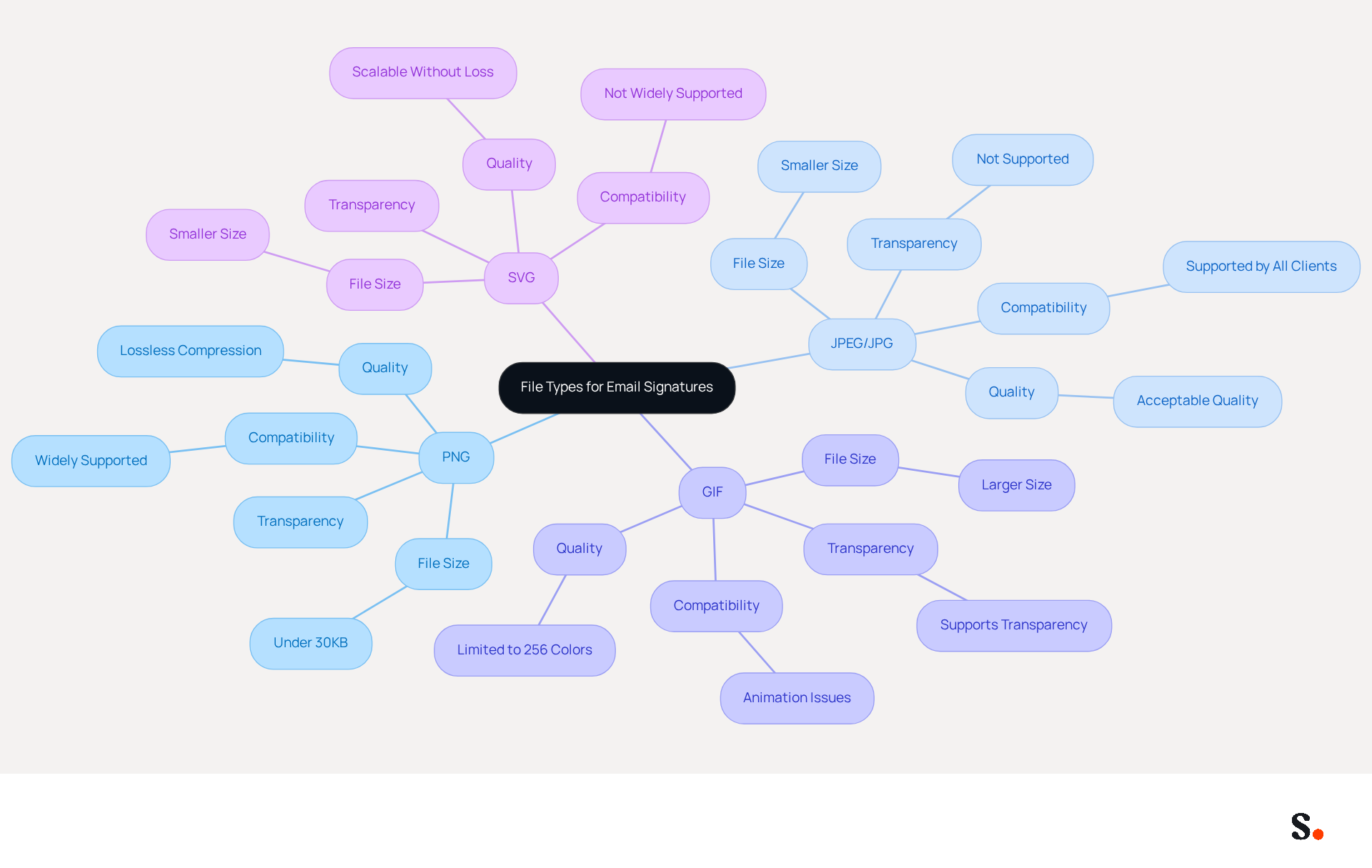
Choosing the best file type for email signature is crucial for ensuring both compatibility and visual appeal. Here are the most common file types:
- PNG (Portable Network Graphics): Ideal for logos and images requiring transparency, PNG files maintain high quality and are widely supported across email clients. Their lossless compression guarantees clear visuals, making them suitable for professional branding. Keeping the file size under 30KB ensures quick loading and reduces the risk of messages being flagged as spam.
- JPEG/JPG (Joint Photographic Experts Group): Best for photographs and visuals with gradients, JPEG files are smaller in size but do not support transparency, which can be a drawback for logos. This format is popular due to its effective compression while maintaining acceptable quality, making it a reliable choice for email signatures. JPEG files can support over 16 million colors, making them suitable for vibrant photos.
- GIF (Graphics Interchange Format): Suitable for simple animations or visuals with limited colors, GIFs can increase viewer interaction through dynamic visuals. However, GIFs often present challenges in size and compatibility, potentially leading to display issues in various messaging clients, with some only showing the first frame of an animated GIF. Their use should be strategic to avoid compatibility issues, as GIFs support only up to 256 colors, making them less suitable for full-color photographs. Additionally, GIFs cannot be upscaled without pixelation, which can affect image quality.
- SVG (Scalable Vector Graphics): While SVGs are excellent for web use due to their scalability and smaller file sizes, they are not supported in many messaging clients and should generally be avoided for signatures. Consequently, relying on SVGs for signatures may result in communication breakdowns. It is also advisable to avoid newer image formats like WebP, HEIF, and AVIF due to potential compatibility issues.
Choosing the best file type for email signature ensures that your correspondence looks professional and functions correctly across various platforms. A well-structured message footer not only boosts brand identity but also grabs the reader's attention, with 42.3% of users rating marketing through messages as excellent for driving engagement. By prioritizing compatibility and visual clarity, organizations can maintain a consistent and effective communication strategy. Furthermore, adding alt text for images in digital formats is essential for accessibility, ensuring that screen readers can effectively announce the content of images. Moreover, syncing your Google Workspace with Scribe simplifies management of your communication identifiers by automatically updating your teammates' details, conserving time and ensuring brand consistency across all interactions.
Evaluate Criteria for Choosing the Right File Type
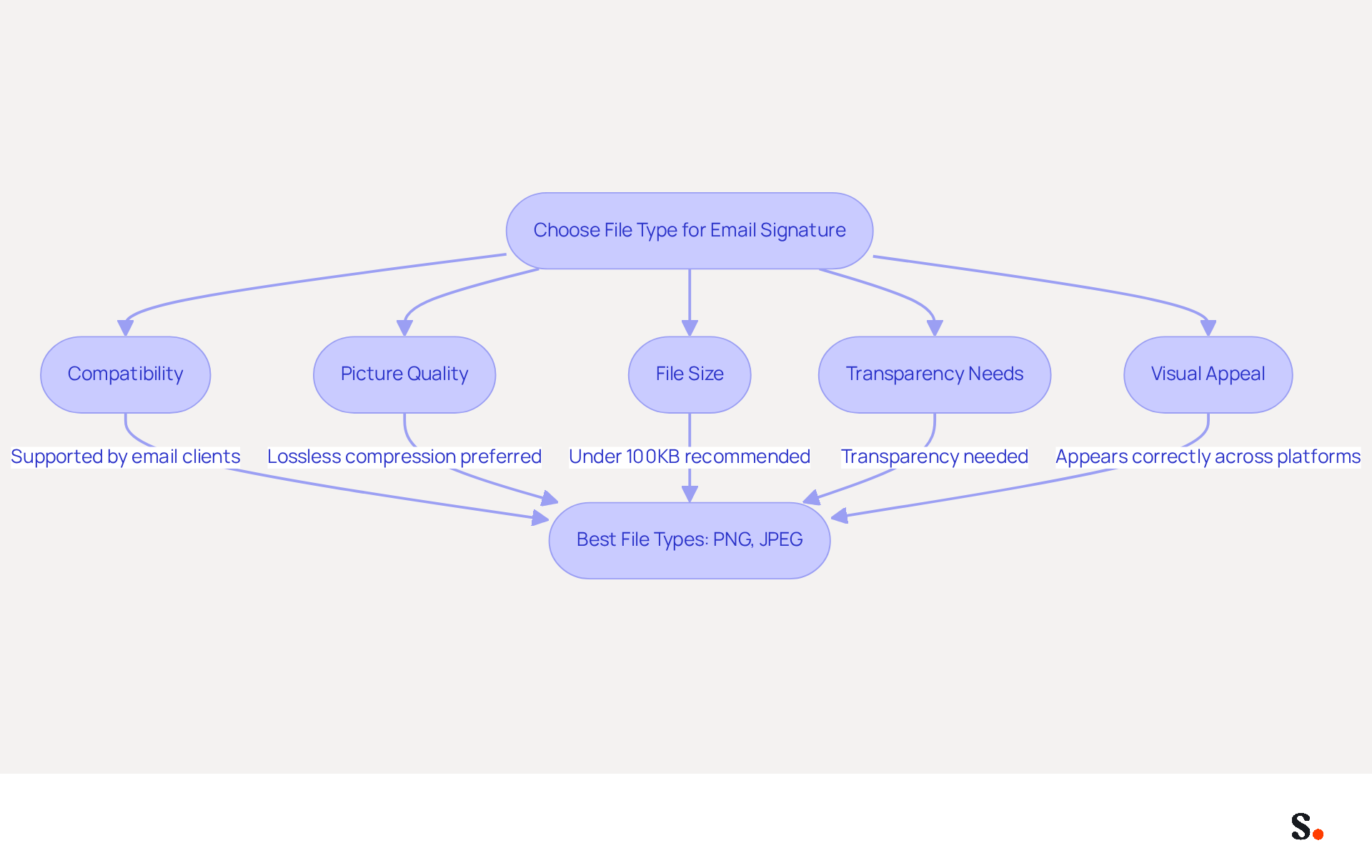
Selecting the best file type for email signature is crucial for ensuring compatibility and maintaining a professional image. When choosing a file type, consider the following criteria:
- Compatibility: Ensure the file type is supported by the email clients your recipients are likely to use. PNG and JPEG are generally safe choices, as they are widely accepted across various platforms.
- Picture Quality: Choose a format that preserves the integrity of your visuals. PNG is preferred for logos due to its lossless compression, which maintains quality without increasing file size. PNG is regarded as one of the finest formats for signatures because of its adaptability and lossless compression.
- File Size: Keep your images under 100KB to ensure quick loading times and avoid issues with message deliverability. Larger files can slow down loading and may be flagged as spam, negatively affecting user experience.
- Transparency Needs: If your logo requires a transparent background, PNG is the best option, as JPEG does not support transparency. This is essential for maintaining a professional appearance in various communication environments.
- Visual Appeal: Consider how the image will look in different email clients. Testing your signature across platforms ensures it appears as intended, enhancing brand consistency and professionalism.
Taking these criteria into account helps you select the best file type for email signature that aligns with your brand and technical requirements. For example, companies that have adopted PNG for their logos have reported enhanced visual consistency and engagement in their communications. Furthermore, dynamic digital identifiers have an average click-through rate (CTR) of 4%, whereas standard marketing communications average around 2.5%. Understanding these factors not only enhances your email signature's effectiveness but also reinforces your brand's professionalism in every communication.
Implement Your Chosen File Type in Email Signatures
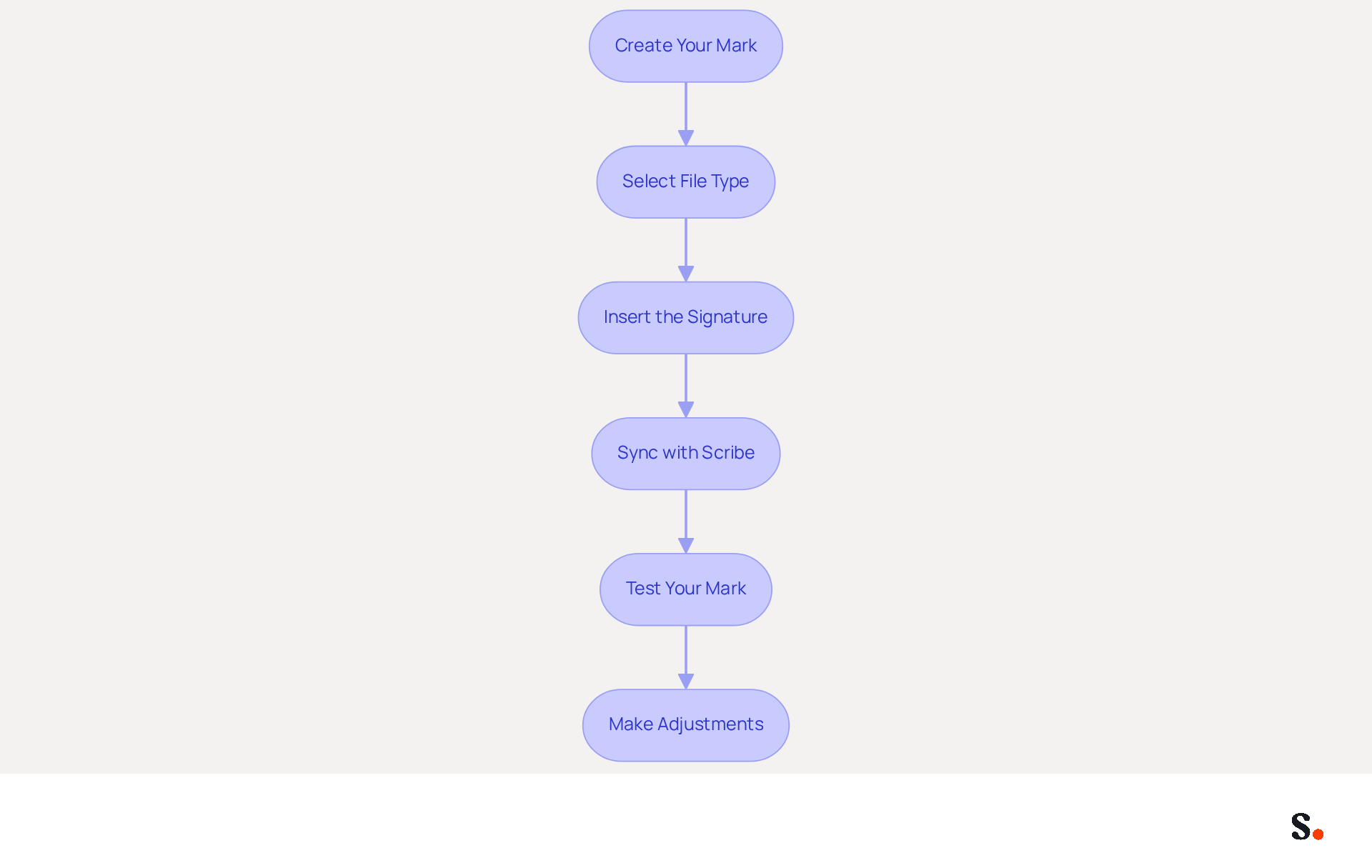
Implementing your chosen file type in your email signature is crucial for maintaining professionalism and brand consistency. To do this using Scribe, follow these steps:
- Create Your Mark: Utilize an email signature generator or design software to craft your layout, ensuring it includes your logo and vital contact details.
- Select the best file type for email signature by saving your images in the appropriate format (PNG, JPEG, or GIF) based on the earlier evaluation criteria. PNG is often preferred for its transparency and quality, especially in dark mode settings.
- Insert the Signature:
- For Outlook: Navigate to File > Options > Mail > Signatures. Click 'New' to create a new mark, then paste your mark into the editor. Use the 'Insert Picture' option to add your logo, ensuring it is optimized for quick loading.
- For Gmail: Click on the gear icon, select 'See all settings', and scroll to the 'Signature' section. Paste your mark into the box and use the 'Insert Image' option to add your logo, ensuring it is appropriately sized for visibility.
- Sync with Scribe: To streamline the process, sync your Google Workspace with Scribe. This enables automatic updates of your teammates' information, ensuring that any modifications made in your provider are reflected in Scribe without manual input. This feature streamlines processes and ensures uniformity in branding throughout your organization.
- Test Your Mark: Send test messages to yourself and colleagues to verify that the mark displays correctly across various messaging clients. This step is essential, as messages with professionally branded signatures can make recipients feel 37% more inclined to respond, as reported by a recent study from XYZ Research. Testing across different devices and email clients is essential to ensure compatibility and effectiveness.
- Make Adjustments: You may encounter issues with image display that require adjustments to size or format. Remember, not following this guideline could lead to your emails being flagged as spam, so it's crucial to choose the best file type for email signature. Furthermore, ensure adherence to data management and privacy regulations when implementing your electronic identification, as Scribe is SOC 2 Type II compliant, guaranteeing the security of your data.
A well-crafted signature not only enhances visibility but also significantly impacts engagement rates, making it a vital component of your communication strategy.
Conclusion
Selecting the appropriate file type for an email signature is crucial for effective communication and a polished professional image. The significance of email signatures extends beyond mere contact information; they serve as powerful branding tools that enhance recognition, establish credibility, and promote marketing initiatives. By choosing the right file type, organizations can ensure that their signatures are visually appealing and compatible across various email clients, ultimately reinforcing their brand identity.
Throughout the article, key file types such as PNG, JPEG, GIF, and SVG were explored, highlighting their respective advantages and limitations. Choosing the right file type can be challenging due to various factors that need consideration, including compatibility, picture quality, file size, and transparency needs. Additionally, the importance of testing signatures across different platforms and syncing with tools like Scribe was underscored to ensure consistency and professionalism in every communication.
A well-crafted email signature can significantly influence engagement and response rates. Organizations are encouraged to prioritize the selection of the best file type for their email signatures, leveraging tools like Scribe to streamline the process and maintain brand consistency. Ultimately, the right file type not only enhances communication but also strengthens the organization's brand identity.
Frequently Asked Questions
What is the importance of email signatures in professional communication?
Email signatures are vital components of professional identity, serving to enhance brand recognition, provide essential information, promote marketing initiatives, and establish professionalism.
How do email signatures enhance brand recognition?
A well-crafted email signature reinforces brand identity by including logos and consistent branding elements, which helps recipients remember the company. Studies show that 80% of businesses consider a branded message footer crucial for brand identity.
What essential information should be included in an email signature?
An email signature typically includes your full name, job title, company name, and contact details, making it easy for recipients to reach you. This clarity is important, as 64% of consumers prefer contact details to be included.
How can email signatures promote marketing initiatives?
By incorporating links to your website or social media in your email signature, you can drive traffic and engagement directly from your communications. Branded digital identifiers can lead to a 22% boost in response rates and a 15% increase in click-through rates to company websites.
What role do email signatures play in establishing professionalism?
A polished email signature reflects attention to detail and professionalism, positively influencing how clients and partners perceive your business. Research indicates that 57% of consumers tend to trust messages from businesses that use branded identifiers.
What should be considered when designing an email signature?
Choosing the best file type, along with the right design and format for your email signature, can significantly impact your brand's perception and effectiveness in communication.
List of Sources
- Understand the Importance of Email Signatures
- 40+ Email Signature Statistics for 2026 (Data + Insights) (https://wavecnct.com/blogs/email-signature-statistics)
- The benefits of a branded email signature (https://bybrand.io/blog/branded-email-signature)
- Research Recap: Branded Email Signatures Increase Company Recognition, Trust - Demand Gen Report (https://demandgenreport.com/industry-news/research-recap-branded-email-signatures-increase-company-recognition-trust/47252)
- The impact of email signatures on your branding (https://signitic.com/en/resources/the-impact-of-email-signatures-on-your-branding)
- Explore Different File Types for Email Signatures
- What Is the Best Image Format for the Email Signature? - NEWOLDSTAMP (https://newoldstamp.com/blog/best-image-format-for-email-signature)
- Email Signature Format: Best Practices & Examples | Exclaimer (https://exclaimer.com/email-signature-handbook/email-signature-format)
- Best image formats for email signatures: Compatibility guide (https://set-outlooksignatures.com/blog/2026/03/05/image-formats)
- Best Image Formats for Email Signatures - Gimmio (https://blog.gimm.io/best-image-formats-for-email-signatures)
- The Complete Email Signature Guide 2026: Best Practices and Policy (https://opensense.com/complete-email-signature-guide)
- Evaluate Criteria for Choosing the Right File Type
- Email signature statistics: Why every business should optimize their email signatures — Stripo.email (https://stripo.email/blog/email-signature-statistics-why-every-business-should-optimize-their-email-signatures)
- Best Image Formats for Email Signatures - Gimmio (https://blog.gimm.io/best-image-formats-for-email-signatures)
- Best image formats for email signatures: Compatibility guide (https://set-outlooksignatures.com/blog/2026/03/05/image-formats)
- Choose the Best File Format for Your Email Signature Today (https://scribe-mail.com/en-US/blog/choose-the-best-file-format-for-your-email-signature-today)
- Image Requirements for Email Signatures | Email Signature Support & Knowledge Base I Crossware (https://support.crossware365.com/microsoft-365/features/managing-images-in-the-image-library/image-requirements-for-email-signatures)
- Implement Your Chosen File Type in Email Signatures
- Email Signature Trends 2026: What Designers Are Actually Using (https://markaplugin.com/blog/email-signature-trends-2026)
- 40+ Email Signature Statistics for 2026 (Data + Insights) (https://wavecnct.com/blogs/email-signature-statistics)
- The ultimate guide to email signatures in 2026 (https://signitic.com/en/resources/email-signature)
- 20 best email signature design examples for 2026 — Stripo.email (https://stripo.email/blog/10-best-email-signature-design-examples)
- "Email Signature Trends for 2026: What's In, What's Out" | Crossware posted on the topic | LinkedIn (https://linkedin.com/posts/crossware-ltd_new-year-new-trends-even-for-your-email-activity-7394554686046908416-vD_O)
Get started with Scribe
See why teams switch to Scribe
Free 14-day trial — no credit card.