Compare Email Signature Software with Analytics: Features & ROI Insights
Many businesses fail to recognize the marketing potential of email signatures, viewing them merely as formalities in communication. By leveraging advanced
Sophie Grant
Email Signature Specialist, Scribe

On this page
Introduction
Many businesses fail to recognize the marketing potential of email signatures, viewing them merely as formalities in communication. By leveraging advanced analytics and integration capabilities, organizations can transform these digital footers into powerful tools for engagement and lead generation.
However, with numerous email signature software options available, how can organizations discern which solution will deliver the best return on investment and align with their marketing goals?
We will explore the key features and benefits of leading email signature software, helping you make informed decisions to enhance your marketing strategies.
Key Features of Email Signature Software with Analytics
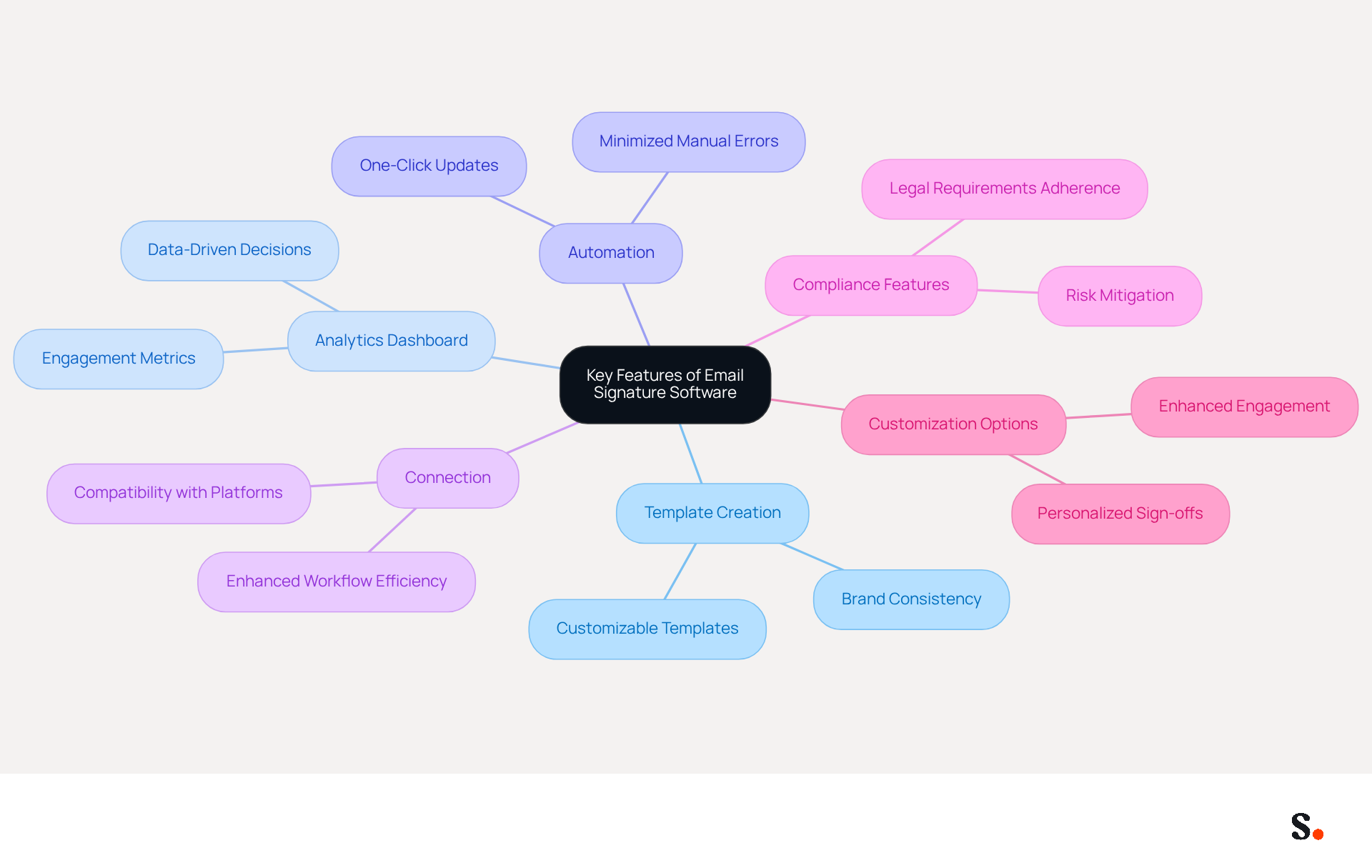
When assessing email signature software, identifying key features is crucial for optimizing marketing effectiveness:
- Template Creation: With Scribe, you can create customizable templates that keep your branding consistent across all communications, boosting brand recognition.
- Analytics Dashboard: Advanced analytics capabilities provided by email signature software with analytics enable businesses to monitor engagement metrics, such as click-through rates (CTR) and conversions. This functionality is essential for evaluating the effectiveness of email campaigns, enabling data-driven decisions.
- Automation: Automation features simplify the process of updating signatures across teams, minimizing manual errors and ensuring timely updates. The tool excels with its one-click update functionality, making it easy to maintain brand consistency.
- Connection: Seamless compatibility with platforms like Google Workspace and Microsoft 365 enhances workflow efficiency. Scribe's strong integration capabilities enable seamless synchronization with existing systems, enhancing operations.
- Compliance Features: Adhering to legal requirements and brand guidelines is essential. Leading solutions incorporate built-in compliance features to mitigate risks associated with email communications.
- Customization Options: Personalizing sign-offs with banners and calls-to-action can significantly enhance engagement. Scribe provides options for customized marketing messages within email footers, driving higher interaction rates.
Together, these features allow businesses to turn their email footers into effective marketing tools, making every message an opportunity for engagement and lead generation. As the digital landscape evolves, businesses that leverage these features will be better positioned to engage their audience and drive conversions.
Integration Capabilities: Enhancing Workflow Efficiency
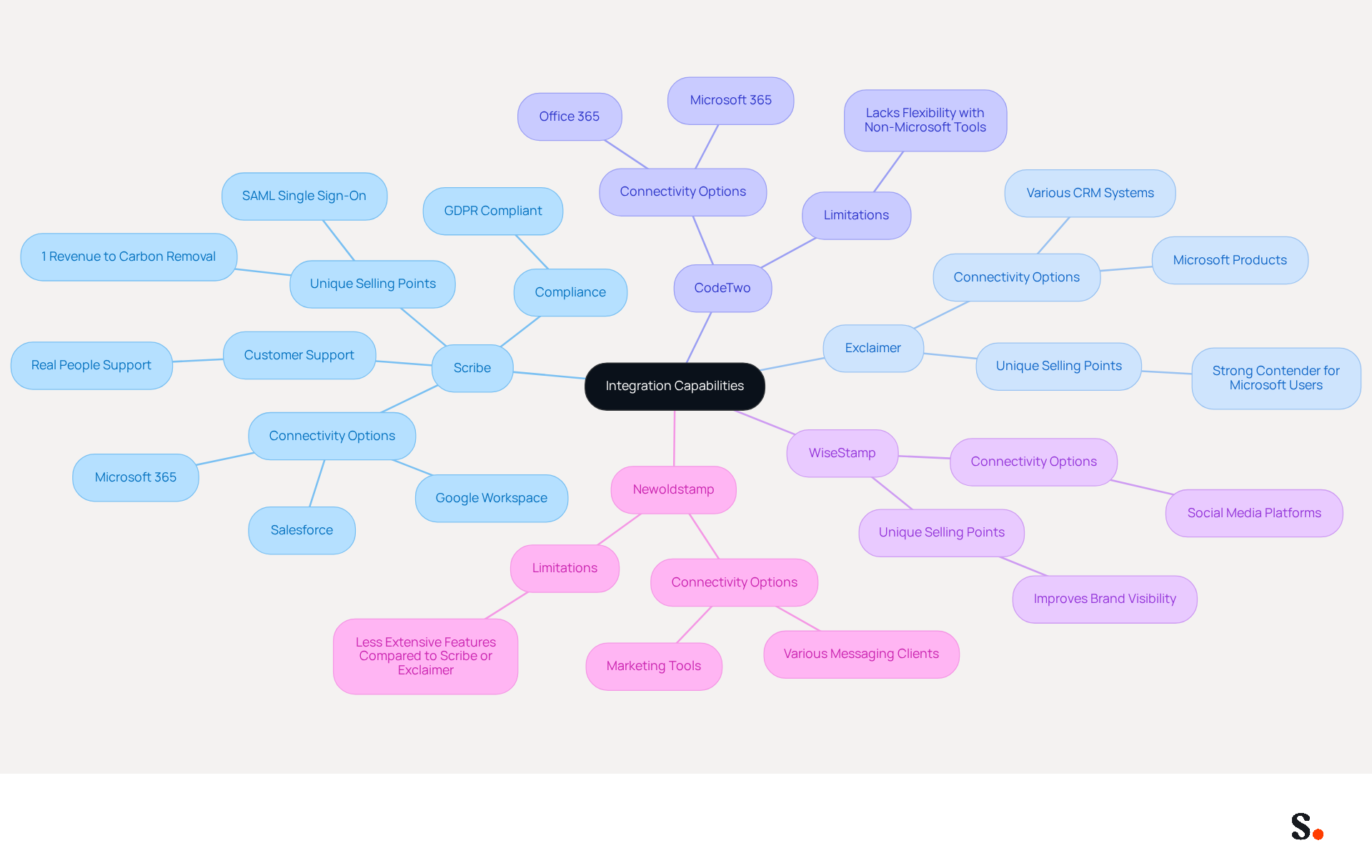
Integration capabilities are essential for maximizing the effectiveness of email branding software, impacting both workflow efficiency and marketing outcomes. Here’s a comparative overview of leading solutions:
- Scribe excels with smooth connectivity to popular tools like Google Workspace, Microsoft 365, and Salesforce. Such integrations facilitate automatic updates and synchronization of employee signatures. This significantly enhances operational efficiency and ensures brand consistency across communications. Additionally, Scribe offers SAML single sign-on, enabling employees to access it securely via their identity provider, which is crucial for organizations emphasizing security. Furthermore, Scribe is GDPR compliant, ensuring that data handling practices meet stringent privacy standards. Businesses can typically transition to automated email signatures in under an hour. This quick adaptation helps them respond to changing needs. Scribe is committed to exceptional customer support, ensuring that users can talk to real people rather than robots. Moreover, it directs 1% of its revenue to help scale emerging carbon removal technologies through Stripe Climate, demonstrating its dedication to environmental sustainability.
- Exclaimer: Known for its robust connection with Microsoft products, Exclaimer also supports various CRM systems. For businesses that rely heavily on Microsoft products, this solution is a strong contender for streamlined signature management.
- CodeTwo: While providing excellent connection options for Microsoft 365 and Office 365, CodeTwo may lack flexibility when it comes to non-Microsoft tools. Businesses may struggle to integrate CodeTwo with non-Microsoft tools, limiting their options. Its centralized management capabilities are advantageous, but businesses seeking wider connectivity might find it restrictive.
- WiseStamp: This solution highlights connection with social media platforms, allowing users to add social media icons into their signatures. While this improves brand visibility, it may not offer the same level of enterprise connectivity as Scribe or Exclaimer.
- Newoldstamp: Although it provides connections with various messaging clients and marketing tools, Newoldstamp's features may not align with the extensive options available with Scribe or Exclaimer.
In conclusion, Scribe distinguishes itself through its extensive connectivity features, making it the preferred option for businesses looking to optimize communication management while preserving current workflows. The significance of governance and ownership in managing digital identifiers cannot be overstated, as it ensures compliance and branding consistency across all communications. Utilizing Scribe's advanced connectivity features can lead to significant improvements in marketing effectiveness and operational efficiency.
Pros and Cons of Leading Email Signature Solutions
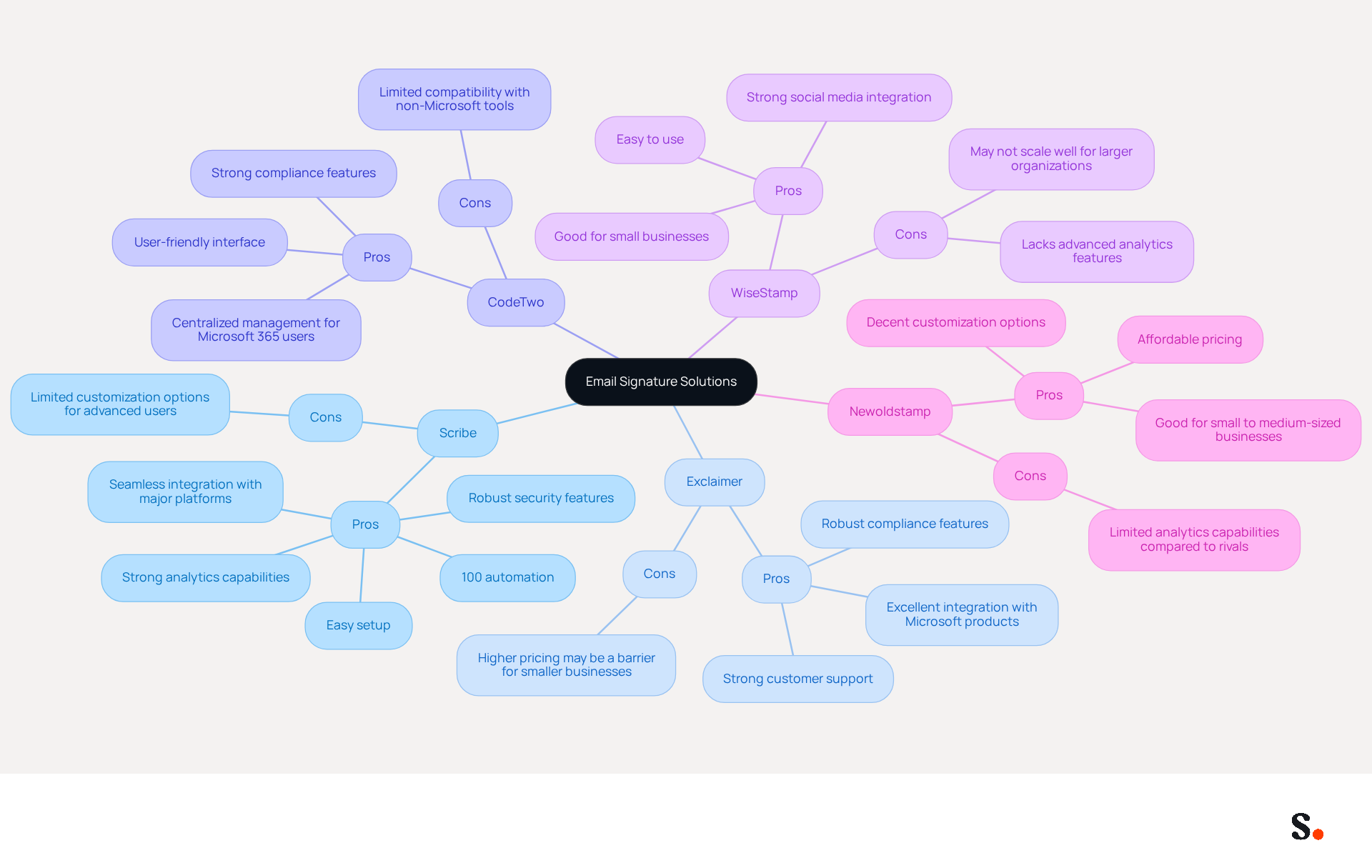
When assessing email signature software, it is essential to consider the unique strengths and limitations of each option available:
-
Scribe
- Pros: Offers 100% automation, easy setup, strong analytics capabilities, seamless integration with major platforms like Google Workspace and Microsoft 365, automated synchronization with Aircall and Calendly, and robust security features including SAML single sign-on integration, GDPR compliance, and SOC 2 Type II certification for secure email signature management.
- Cons: Limited customization options for advanced users may restrict creative freedom.
-
Exclaimer
- Pros: Excellent integration with Microsoft products, robust compliance features, and strong customer support.
- Cons: Higher pricing may be a barrier for smaller businesses.
-
CodeTwo
- Pros: Centralized management for Microsoft 365 users, strong compliance features, and user-friendly interface.
- Cons: Limited compatibility with non-Microsoft tools may hinder flexibility.
-
WiseStamp
- Pros: Easy to use, good for small businesses, and strong social media integration.
- Cons: Lacks advanced analytics features and may not scale well for larger organizations.
-
Newoldstamp
- Pros: Affordable pricing, good for small to medium-sized businesses, and decent customization options.
- Cons: Limited analytics capabilities compared to rivals like Scribe.
Ultimately, the choice of email signature software with analytics should align with the specific operational requirements and budgetary constraints of the organization.
Measuring ROI: Impact of Email Signature Software on Marketing Success
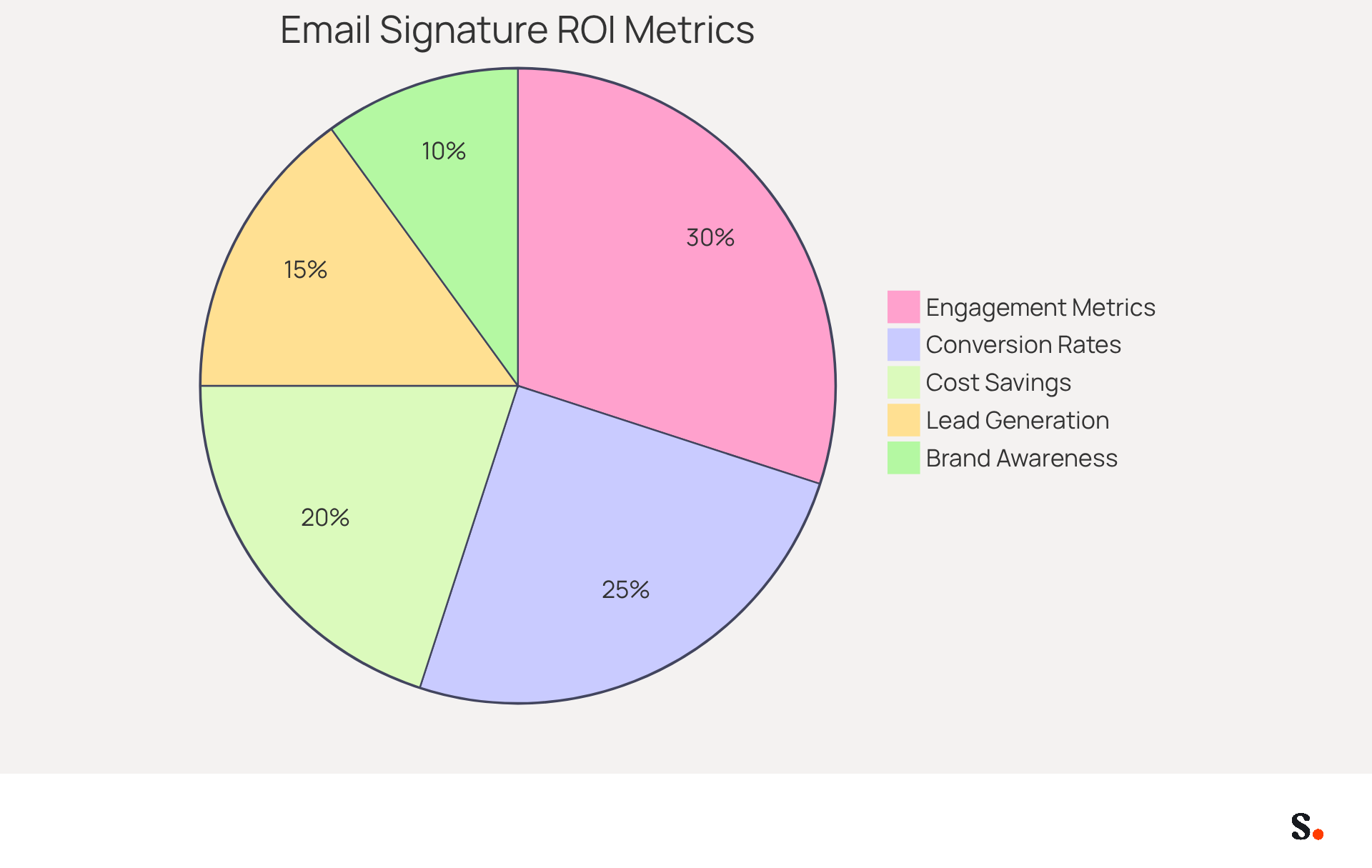
To accurately measure the ROI of email signature software, a comprehensive analysis of key performance metrics is essential:
- Engagement Metrics: Monitoring click-through rates (CTR) on links within email footers is essential for understanding how effectively these footers drive traffic to landing pages. With the email signature software with analytics from Scribe, you can track these metrics in real-time and gain valuable insights into how users engage.
- Conversion Rates: It is crucial to assess how many clicks lead to conversions. For instance, if a campaign generates 100 clicks resulting in 10 conversions, the conversion rate stands at 10%. This metric is essential for assessing the impact of marketing initiatives and justifying investments in digital solutions.
- Cost Savings: Manual updates consume valuable time and resources, hindering productivity. Automating email management can yield significant cost reductions. Scribe’s automation capabilities save organizations hours of administrative tasks, allowing teams to focus on strategic initiatives that drive growth.
- Lead Generation: Email footers can serve as effective lead generation tools. Case studies show that companies using Scribe have seen up to a 14% rise in leads generated through campaigns, demonstrating how digital footers can be a powerful marketing asset.
- Brand Awareness: Consistent branding through digital identifiers enhances brand recognition. Research indicates that professional communication footers can greatly enhance trust and credibility, resulting in increased engagement rates and better customer perceptions.
Ultimately, leveraging the email signature software with analytics empowers businesses to make informed decisions that enhance their marketing strategies.
Conclusion
In an era where digital communication is paramount, Scribe emerges as a pivotal solution for email signature management. By enabling marketing teams to manage email signatures independently after initial IT setup, Scribe empowers organizations to maintain brand consistency while optimizing their marketing efforts. This unique approach boosts efficiency and turns every email into a chance for engagement and lead generation.
Throughout the article, key features such as customizable templates, advanced analytics dashboards, and seamless integration capabilities have been highlighted. Scribe's ability to automate updates and provide real-time engagement metrics allows businesses to make data-driven decisions that significantly impact their marketing strategies. Furthermore, the emphasis on compliance with GDPR and CCPA, along with Scribe's SOC 2 Type II certification, underscores the importance of security and trust in managing digital communications.
In a competitive landscape, the choice of email signature software can greatly influence marketing success. Organizations are encouraged to leverage the insights and capabilities offered by Scribe to transform their email signatures into powerful marketing tools. By doing so, they can not only enhance brand visibility but also drive measurable ROI, ultimately leading to unprecedented growth.
Frequently Asked Questions
What is the purpose of email signature software with analytics?
The purpose of email signature software with analytics is to optimize marketing effectiveness by allowing businesses to monitor engagement metrics and evaluate the effectiveness of email campaigns.
What key feature does Scribe offer for template creation?
Scribe offers customizable templates that help maintain consistent branding across all communications, which boosts brand recognition.
How does the analytics dashboard benefit businesses using email signature software?
The analytics dashboard enables businesses to monitor engagement metrics such as click-through rates (CTR) and conversions, facilitating data-driven decisions regarding email campaigns.
What automation features does Scribe provide?
Scribe provides automation features that simplify the process of updating signatures across teams, minimizing manual errors and ensuring timely updates with a one-click update functionality.
How does Scribe enhance workflow efficiency?
Scribe enhances workflow efficiency through seamless compatibility with platforms like Google Workspace and Microsoft 365, allowing for easy synchronization with existing systems.
What compliance features are included in leading email signature software?
Leading email signature software includes built-in compliance features that help adhere to legal requirements and brand guidelines, mitigating risks associated with email communications.
How can customization options in Scribe improve engagement?
Customization options in Scribe allow for personalized sign-offs with banners and calls-to-action, significantly enhancing engagement and driving higher interaction rates within email footers.
What overall advantage do these features provide to businesses?
Together, these features allow businesses to turn their email footers into effective marketing tools, making every message an opportunity for engagement and lead generation.
List of Sources
- Key Features of Email Signature Software with Analytics
- 2026 Marketing Trends: Email Signatures as a Marketing Tool (https://bluechiptt.com/blog/5-marketing-trends-for-2026-and-how-your-email-signature-fits-in)
- Why Email Signatures Must Be In Your 2026 Marketing Plan | Rocketseed (https://rocketseed.com/blog/what-are-the-biggest-email-trends-for-2026)
- Email Signature Analytics: Unlocking Potential for Business Growth (https://wisestamp.com/blog/email-signature-analytics)
- Why Email Signatures Must Be In Your 2026 Marketing Plan | Rocketseed (https://rocketseed.com/blog/2026-marketing-plan-email-signatures)
- Email Signature Trends 2026: Centralized Control & Automation | SIGNandGO posted on the topic | LinkedIn (https://linkedin.com/posts/signngo_email-signature-trends-to-watch-in-2026-activity-7401523471786217473-zAVL)
- Integration Capabilities: Enhancing Workflow Efficiency
- Automating Email Signatures: How IT Teams Streamline Processes & Reduce Risk (https://exclaimer.com/blog/streamlining-it-processes-automated-email-signatures)
- The Hidden Power Behind Email Signature Management | Black Pearl Mail (https://blackpearlmail.com/blog/the-hidden-power-behind-email-signature-management)
- Integrating Email Signature Management Tools with Office 365 - Microsoft Q&A (https://learn.microsoft.com/en-us/answers/questions/4703110/integrating-email-signature-management-tools-with)
- Best Email Signature Management Software (Evaluated May 2026) (https://wisestamp.com/guides/best-email-signature-management-software)
- Best Email Signature Management Software: Top 12 Tools (2026)
- NEWOLDSTAMP (https://newoldstamp.com/blog/email-signature-software)
- Pros and Cons of Leading Email Signature Solutions
- Compare 5 Software for Email Signature: Features and Benefits for Marketers (https://scribe-mail.com/en-US/blog/compare-5-software-for-email-signature-features-and-benefits-for-marketers)
- Best Email Signature Management Software: Top 12 Tools (2026)
- NEWOLDSTAMP (https://newoldstamp.com/blog/email-signature-software)
- Top 10 Email Signature Management Tools in 2026 (Compared) (https://mailbutler.io/blog/email/email-signature-management-tools)
- Best Email Signature Management Software (Evaluated May 2026) (https://wisestamp.com/guides/best-email-signature-management-software)
- Measuring ROI: Impact of Email Signature Software on Marketing Success
- Cost effective email signature marketing | Rocketseed (https://rocketseed.com/blog/email-signature-marketing-cost-effectiveness)
- 40+ Email Signature Statistics for 2026 (Data + Insights) (https://wavecnct.com/blogs/email-signature-statistics)
- Research Recap: Branded Email Signatures Increase Company Recognition, Trust - Demand Gen Report (https://demandgenreport.com/industry-news/research-recap-branded-email-signatures-increase-company-recognition-trust/47252)
Get started with Scribe
Build a professional email signature
Free 14-day trial — no credit card.