Compare Email Signatures for Business Owners vs. Personal Use
Many business owners underestimate the impact of a well-crafted email signature on their professional image, yet it plays a crucial role in effective
Sophie Grant
Email Signature Specialist, Scribe
On this page
Introduction
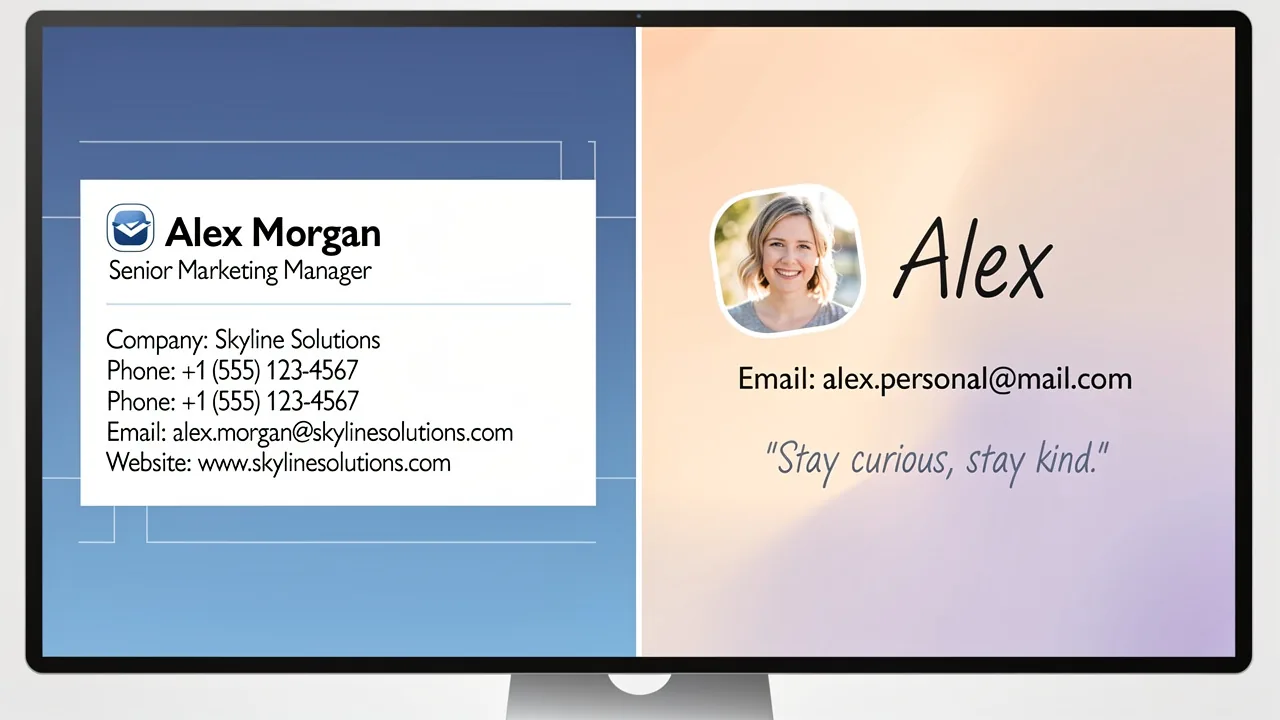
Many business owners underestimate the impact of a well-crafted email signature on their professional image, yet it plays a crucial role in effective communication. For business owners, a well-crafted email signature acts as a digital business card. It is also a powerful branding tool that enhances credibility and fosters client relationships. In contrast, personal email signatures often reflect individual personality and casualness. They typically lack the formal structure that businesses require. Entrepreneurs must navigate these distinct styles to ensure their communications resonate effectively with their intended audiences. This article explores the critical differences between business and personal email signatures. It offers insights and best practices to optimize each for maximum impact.
Get started with Scribe
See why teams switch to Scribe
Free 14-day trial — no credit card.
Distinguish Between Business Owner and Personal Email Signatures
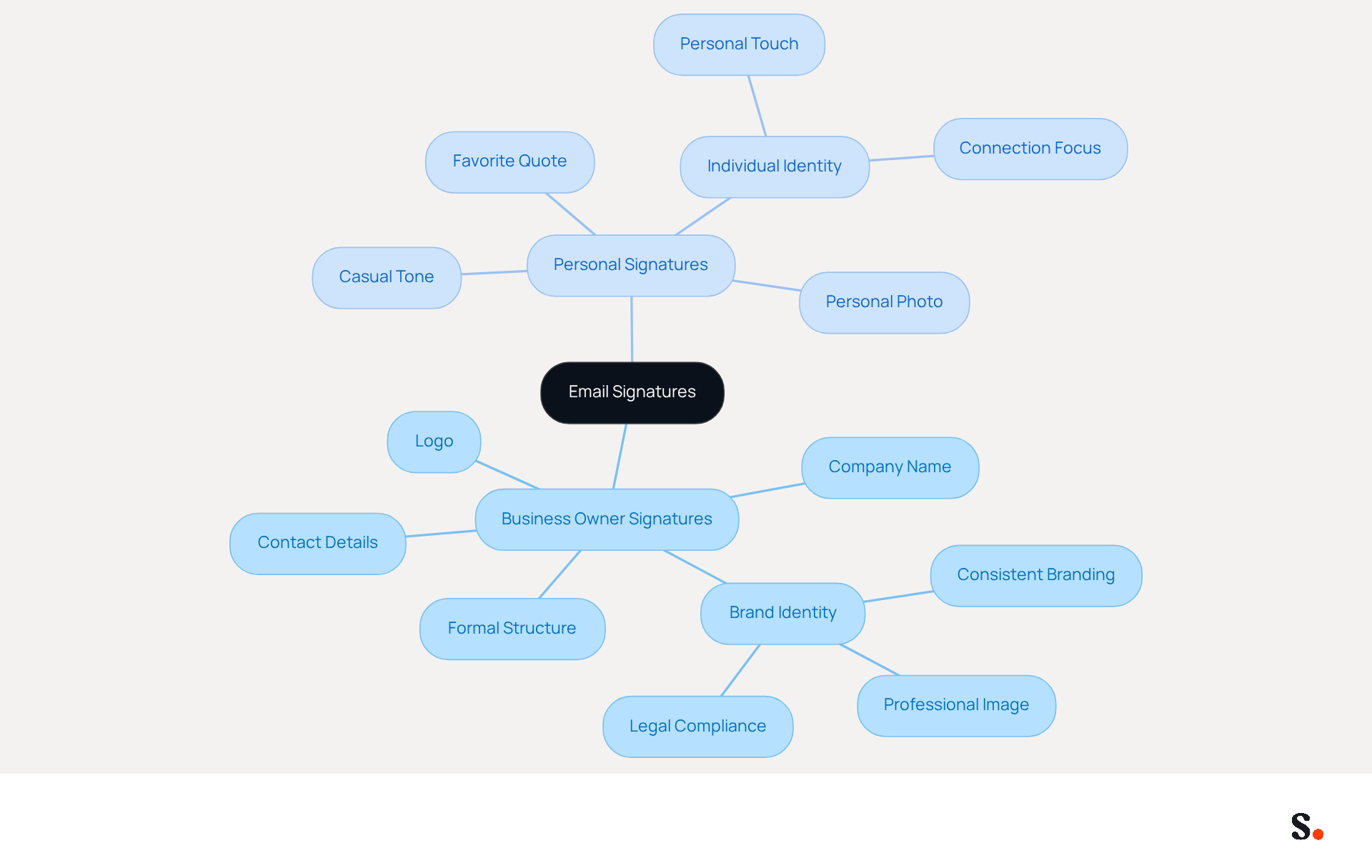
Effective communication hinges on the balance between professionalism and personal touch. An email signature for business owner communication identifiers is typically formal and structured, designed to convey professionalism and reinforce brand identity. These endorsements often include crucial components such as the company name, logo, and contact details, effectively functioning as a digital card. This method boosts the company's image and builds credibility with clients and partners. Organizations that maintain consistent branding in their correspondence see a 22% increase in response rates, emphasizing the significance of a well-designed closing.
In contrast, personal messages tend to be more casual and may incorporate individual touches like a favorite quote or a personal photo. They primarily focus on individual identity rather than corporate branding. An owner might include their title and organization name, while a personal contact might simply display the individual's name and a personal address. This distinction is essential for effective communication; without clear branding, messages may fail to resonate with the intended audience.
Case studies illustrate the impact of these differences. For example, an effective email signature for business owner can boost credibility and create a lasting impression, transforming each correspondence into a chance for promotion. On the other hand, personal correspondences, although more casual, may lack the professional refinement required in corporate communications. This can result in missed opportunities in professional settings. Understanding these differences helps entrepreneurs tailor their correspondence, improving engagement while maintaining a professional image.
Identify Essential Components for Each Signature Type
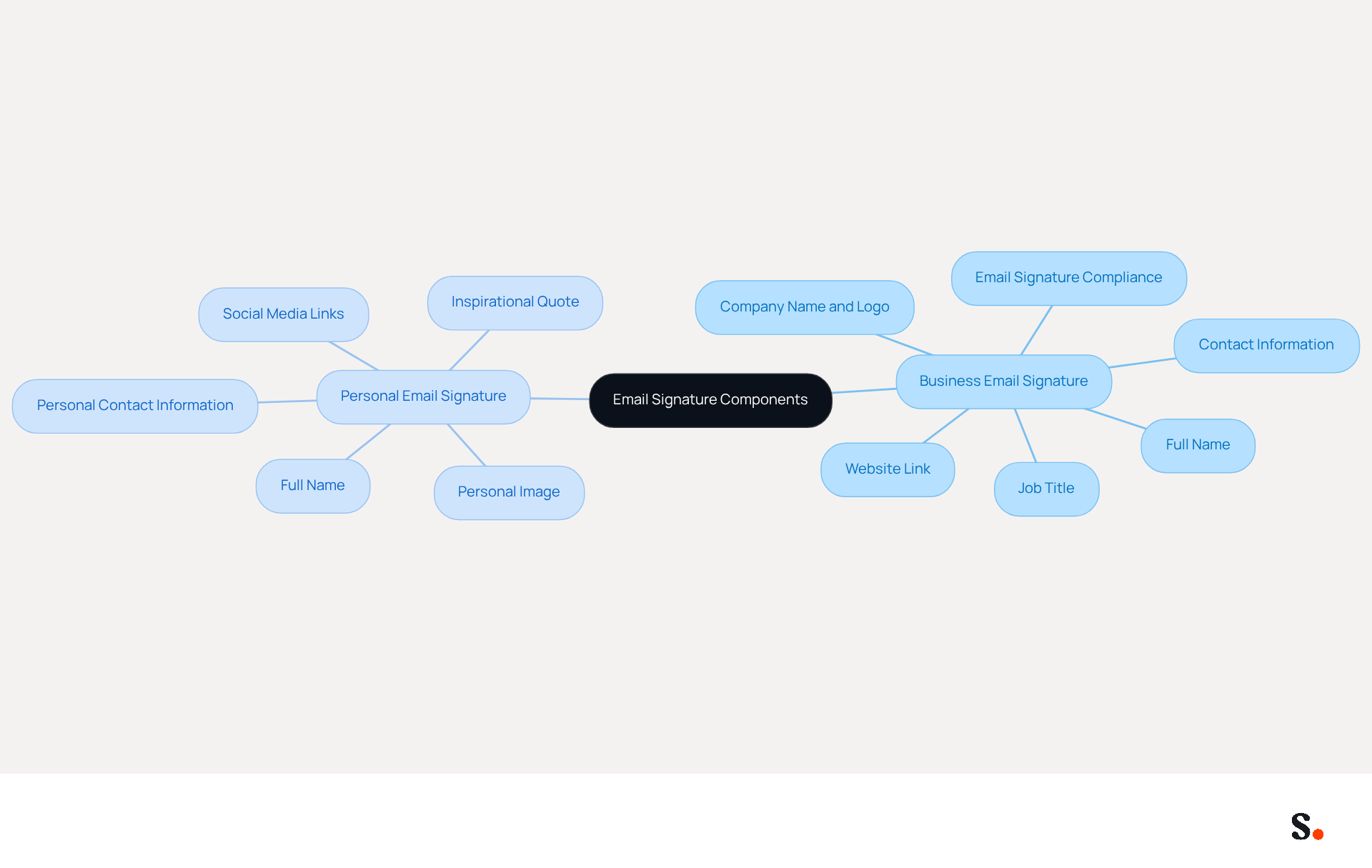
Creating effective email signatures is crucial for both business and personal communication, yet many overlook essential components that enhance professionalism and relatability. For business owner email signatures, essential components typically include:
- Full Name: Clearly states the sender's identity.
- Job Title: Indicates the sender's role within the company, which is important to include in an email signature for business owner.
- Company Name and Logo: Strengthens brand identity and boosts trust, as 52% of professionals believe that an effective email signature for business owner is essential for developing client relationships.
- Contact Information: An email signature for business owner includes phone number and address, making it easy for recipients to get in touch.
- Website Link: The email signature for business owner directs recipients to Scribe’s online presence, which can drive traffic and enhance engagement rates. Companies using branded elements see a 15% increase in website click-through rates.
- Email signature for business owner: This ensures compliance and confidentiality where required, which is essential for professionalism.
Personal email signatures should focus on creating a relatable and engaging communication style, incorporating elements such as:
- Full Name: Personalizes communication, making it more relatable.
- Personal Contact Information: Such as a personal phone number or email, facilitating direct connections.
- Social Media Links: Optional, to connect on personal platforms, enhancing networking opportunities.
- Personal Image: Adds a human touch to the mark, helping to build stronger relationships.
- Inspirational Quote: Reflects personal values or interests, making the mark unique and memorable.
Understanding these components assists users in creating designs that are not only visually appealing but also functional, enhancing communication effectiveness. Regular evaluations of digital identifiers can ensure that they remain consistent and current, addressing common problems such as inaccuracies and brand inconsistency. Moreover, failing to update email signatures can lead to miscommunication and a lack of brand consistency. Monitoring metrics related to the sign-off is crucial for comprehending recipient engagement and insights, further enhancing the effectiveness of well-designed sign-offs.
Moreover, connecting Scribe with tools like Google Workspace, Calendly, and Aircall enables automated synchronization of email signatures. Any changes made in Google Workspace, such as moving teammates from one group to another or updating their information, will be automatically reflected without any effort on your part. This seamless integration not only saves time but also maintains brand consistency across all communications, aligning with Scribe's commitment to providing effortless updates and secure data handling, supported by SOC 2 Type II compliance.
Implement Best Practices for Effective Email Signatures
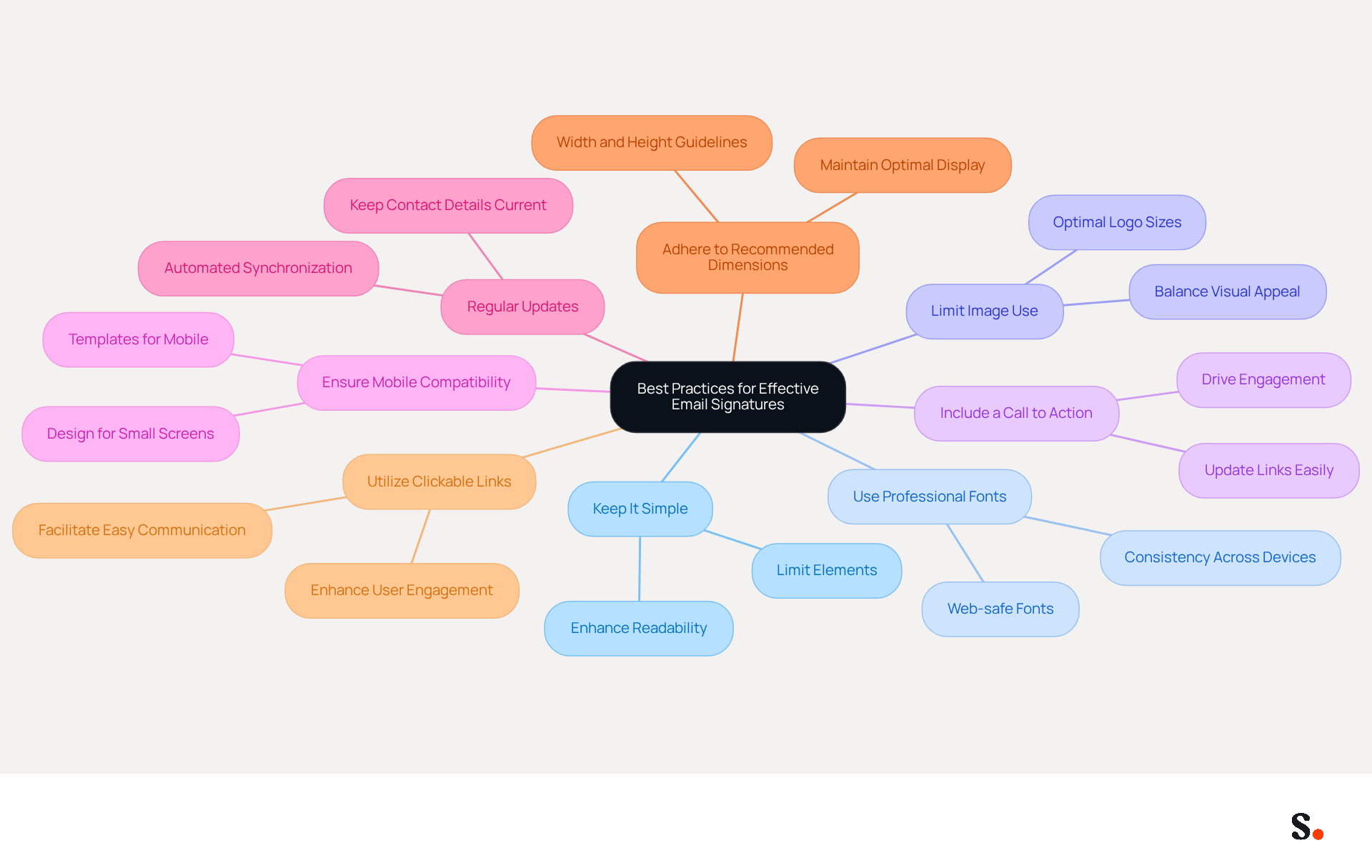
To create effective email signatures, it is essential to follow best practices that enhance clarity and professionalism:
- Keep It Simple: Limit the number of elements in the signature to avoid clutter. A clean design enhances readability and ensures that essential information stands out. With Scribe's automated synchronization, you can ensure that only the most relevant information appears.
- Use Professional Fonts: Stick to web-safe fonts like Arial or Verdana, which are easy to read across devices and maintain a professional appearance. This application supports these fonts, ensuring consistency across all signatures.
- Limit Image Use: While logos can enhance branding, too many images can cause your email signature to display incorrectly, leading to potential miscommunication. Aim for a balance that maintains visual appeal without compromising functionality. The platform facilitates straightforward management of logo sizes to guarantee optimal display.
- Include a Call to Action: For business email footers, consider adding a call to action, such as a link to a recent blog post or a promotional offer. This can drive engagement and direct traffic to relevant content. The features provided allow you to effortlessly update these links as necessary.
- Ensure Mobile Compatibility: With mobile clients accounting for 41.6% of email opens, email footers should be designed to display well on smaller screens, ensuring accessibility for all users. You’ll find that Scribe's templates are designed to look great on mobile devices.
- Regular Updates: Keep contact details current by refreshing them with any changes in information or branding elements. Failing to update your contact details can lead to outdated information, damaging your professional image. Scribe's automated synchronization with Google Workspace guarantees that any modifications in your directory are shown in real-time, conserving you time and effort.
- Adhere to Recommended Dimensions: Ensure that email footers are between 300px-600px in width and 150px-200px in height for optimal display across devices. Guidelines are provided to assist in maintaining these dimensions.
- Utilize Clickable Links: Include clickable links for contact details to facilitate easy communication and enhance user engagement. Scribe makes it easy to manage these links across all email footers.
By implementing these strategies, you not only improve your email signature for business owners but also enhance your overall brand presence. Significantly, 80% of businesses consider branded communication formats as crucial for their branding, and organizations that utilize consistent branded communication identifiers experience a 22% rise in response rates. Furthermore, with Scribe's SOC 2 Type II compliance, you can trust that your data is secure while managing digital identifiers efficiently.
Compare Automated vs. Manual Email Signature Management
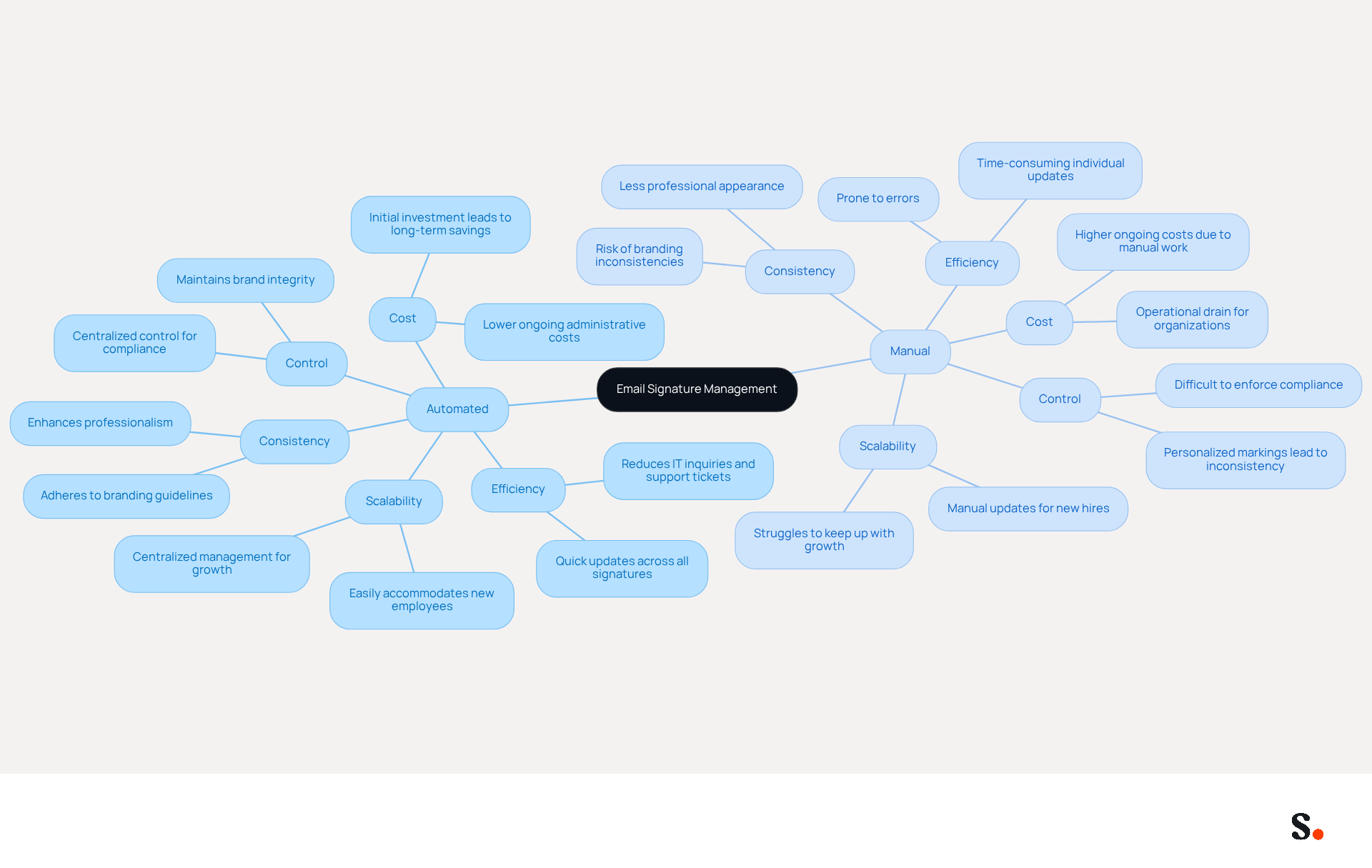
When evaluating email signature management methods, the contrast between automated and manual approaches reveals significant operational implications.
- Efficiency: Automated management allows for quick updates across all employee signatures with minimal effort. In contrast, manual management requires individual updates, which can be time-consuming and prone to errors. Research shows that utilizing email branding software can decrease inquiries to IT and result in fewer support tickets, significantly streamlining the process. Manual updates can lead to delays and errors, creating frustration for employees and IT departments alike.
- Consistency: Automated systems ensure that all approvals adhere to Scribe's branding guidelines, reducing the risk of inconsistencies that can occur with manual updates. This uniformity enhances professionalism and builds trust with clients, as demonstrated by organizations that have successfully implemented automated solutions.
- Scalability: As businesses grow, automated systems can easily scale to accommodate new employees, whereas manual systems may struggle to keep up with increasing demands. For example, automated email management can provide identifiers for new employees in seconds, ensuring that branding remains consistent across the organization. This operational drain can hinder growth and innovation within the organization.
- Cost: Investing in automated solutions may require initial expenditure, but the long-term savings from reduced manual updates and fewer errors are substantial. The ongoing administrative costs for automated systems are typically lower than those associated with manual management, which can become an operational drain for mid-sized and enterprise organizations.
- Control: Manual management allows for more personalized markings, but this can lead to a lack of uniformity across the organization. Automated systems provide centralized control, ensuring that all approvals reflect the latest branding and compliance requirements. By centralizing control, organizations can maintain brand integrity while also making it easier to comply with legal standards, which helps avoid fines and protects their reputation.
In summary, while manual management may offer some flexibility, automated systems provide significant advantages in terms of efficiency, consistency, and scalability. Ultimately, the choice between manual and automated systems can significantly impact an organization's efficiency and brand integrity, shaping its future success.
Conclusion
The effectiveness of communication hinges on understanding the differences between business and personal email signatures. Business email signatures project professionalism and reinforce brand identity, while personal signatures are more casual and focused on individual expression. When you differentiate between the two, you make sure your message is clear and resonates with your audience.
Key components of business email signatures include:
- The sender's full name
- Job title
- Company name
- Logo
- Contact information
All of these contribute to a professional image. In contrast, personal email signatures may incorporate elements like:
- Personal contact details
- Social media links
- Inspirational quotes
These reflect the sender's personality. For instance, keeping signatures simple and mobile-friendly can significantly improve engagement.
Choosing the wrong management method can result in inconsistent branding and lost opportunities. Automated solutions, like those offered by Scribe, provide seamless updates and maintain uniformity across all communications, which is essential for building trust and credibility. Investing in effective email signature management is not just a choice; it is a necessity for maintaining a strong brand identity.
Frequently Asked Questions
What is the purpose of a business owner email signature?
A business owner email signature is designed to convey professionalism and reinforce brand identity. It typically includes the company name, logo, and contact details, functioning as a digital business card to boost the company's image and build credibility with clients and partners.
How does consistent branding in email signatures affect response rates?
Organizations that maintain consistent branding in their email correspondence see a 22% increase in response rates, highlighting the importance of a well-designed email signature.
What are the key components of a business email signature?
Key components of a business email signature include the company name, logo, contact details, and the owner's title, all structured to present a formal and professional image.
How do personal email signatures differ from business email signatures?
Personal email signatures tend to be more casual and may include individual touches like a favorite quote or personal photo, focusing on individual identity rather than corporate branding. They may simply display the individual's name and personal address.
Why is it important to distinguish between business and personal email signatures?
Distinguishing between business and personal email signatures is essential for effective communication. Without clear branding, messages may fail to resonate with the intended audience, potentially leading to missed opportunities in professional settings.
What impact can an effective business email signature have?
An effective business email signature can boost credibility and create a lasting impression, transforming each correspondence into an opportunity for promotion.
List of Sources
- Distinguish Between Business Owner and Personal Email Signatures
- Email signature statistics: Why every business should optimize their email signatures — Stripo.email (https://stripo.email/blog/email-signature-statistics-why-every-business-should-optimize-their-email-signatures)
- Best Practices for Email Signatures for Business Owners (https://scribe-mail.com/en-US/blog/best-practices-for-email-signatures-for-business-owners)
- Business vs. personal email signatures (with examples) (https://bybrand.io/blog/business-vs-personal)
- Business Owner Email Signature: Tips & Examples - NEWOLDSTAMP (https://newoldstamp.com/email-signature-examples/business-owner-email-signature)
- Email signature for business owner: Templates & tips - MySignature (https://mysignature.io/professional-email-signatures/business-owner)
- Identify Essential Components for Each Signature Type
- Personal Email Signature: Key Benefits, Tips & Examples | Newoldstamp - NEWOLDSTAMP (https://newoldstamp.com/blog/personal-email-signature)
- Email signature statistics: Why every business should optimize their email signatures — Stripo.email (https://stripo.email/blog/email-signature-statistics-why-every-business-should-optimize-their-email-signatures)
- Crafting the Perfect Email Signature: Tips, Types, and Best Practices for Today's Professionals - Frey Design (https://freydesigngroup.com/blog/crafting-the-perfect-email-signature)
- Business vs. personal email signatures (with examples) (https://bybrand.io/blog/business-vs-personal)
- What to Include in a Business Email Signature (https://rocketseed.com/blog/email-signature-what-to-include)
- Implement Best Practices for Effective Email Signatures
- Email Signature Best Practices Guide With Examples - MailerLite (https://mailerlite.com/blog/email-signature-best-practices)
- 4 Best Practices for Using an Email Signature Editor Effectively (https://scribe-mail.com/en-US/blog/4-best-practices-for-using-an-email-signature-editor-effectively)
- Email Signature Best Practices for 2026 (+ 15 Pro Examples) (https://wavecnct.com/blogs/email-signature-best-practices-2026)
- Best practices for business email signatures in 2026 (https://bybrand.io/blog/best-practices)
- Email Signature Best Practices - NEWOLDSTAMP (https://newoldstamp.com/blog/email-signature-best-practices)
- Compare Automated vs. Manual Email Signature Management
- Automating Email Signatures: How IT Teams Streamline Processes & Reduce Risk (https://exclaimer.com/blog/streamlining-it-processes-automated-email-signatures)
- Why you should be using an email signature manager (https://blinq.me/blog/why-you-should-be-using-an-email-signature-manager)
- MSP Guide to Choosing the Right Email Signature Management Solution (https://channelpronetwork.com/2025/09/21/email-signature-management-msp-guide)
- The costly reality of manual email signature management for IT teams (https://signitic.com/en/resources/costs-email-signature-management)
- Automated vs Manual Email Signature Management (https://wisestamp.com/guides/automated-vs-manual-email-signature-management)
Get started with Scribe
See why teams switch to Scribe
Free 14-day trial — no credit card.