Craft Your Very Respectfully Email Signature in 5 Simple Steps
Crafting a professional email signature is crucial, as it shapes perceptions and influences communication effectiveness in the business realm. By incorporating
Sophie Grant
Email Signature Specialist, Scribe

On this page
Introduction
Crafting a professional email signature is crucial, as it shapes perceptions and influences communication effectiveness in the business realm. By incorporating the phrase "Very Respectfully" (V/R) into email signatures, professionals can convey a sense of deference and respect, particularly when addressing superiors or clients. Miscommunication can arise if this sign-off is used incorrectly, making it essential to know when and how to apply it.
This guide will outline key strategies for crafting a polished and respectful email signature that not only enhances professionalism but also reinforces brand consistency across all communications.
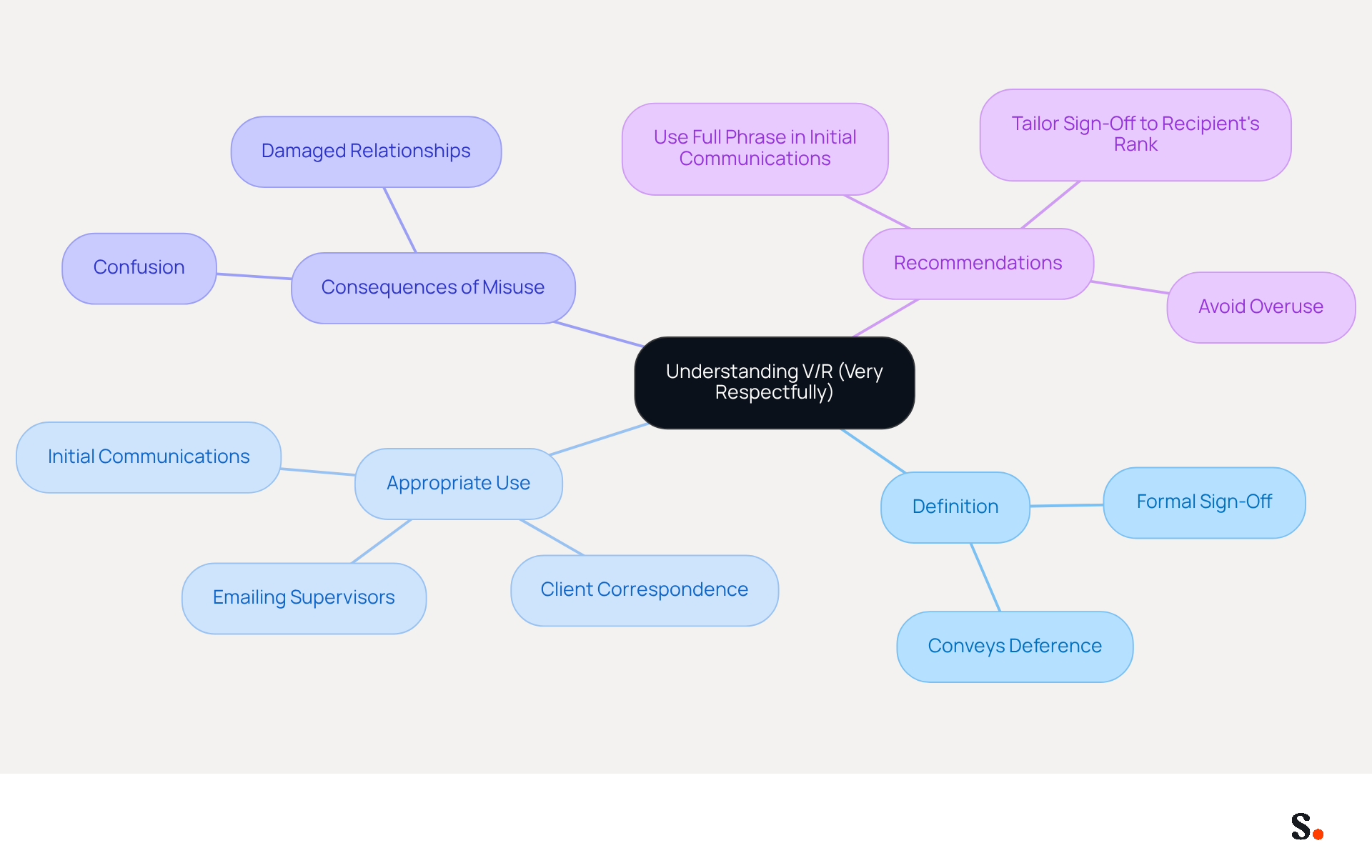
Understand the Meaning of 'Very Respectfully' (V/R)
The phrase 'Very Respectfully' (V/R) serves as a formal sign-off that is crucial in military and professional correspondence. It conveys a sense of deference and respect, particularly when addressing someone of higher rank or authority. The appropriate use of V/R is vital for effective communication.
In general, V/R is appropriate in situations where the recipient holds a senior position relative to the sender. This sign-off conveys professionalism and reinforces a respectful tone in correspondence. For example, if you are emailing a supervisor or a client, using V/R can enhance the perception of your professionalism and respect for their position.
However, using V/R inappropriately can create confusion and diminish the intended respect in communication, potentially damaging professional relationships. The SECNAV Manual recommends using the full phrase 'Very respectfully email signature' in initial communications to ensure clarity and respect.
Therefore, understanding the appropriate contexts for V/R is vital to maintaining professionalism and clarity in communication.
Apply Guidelines for Effective V/R Usage
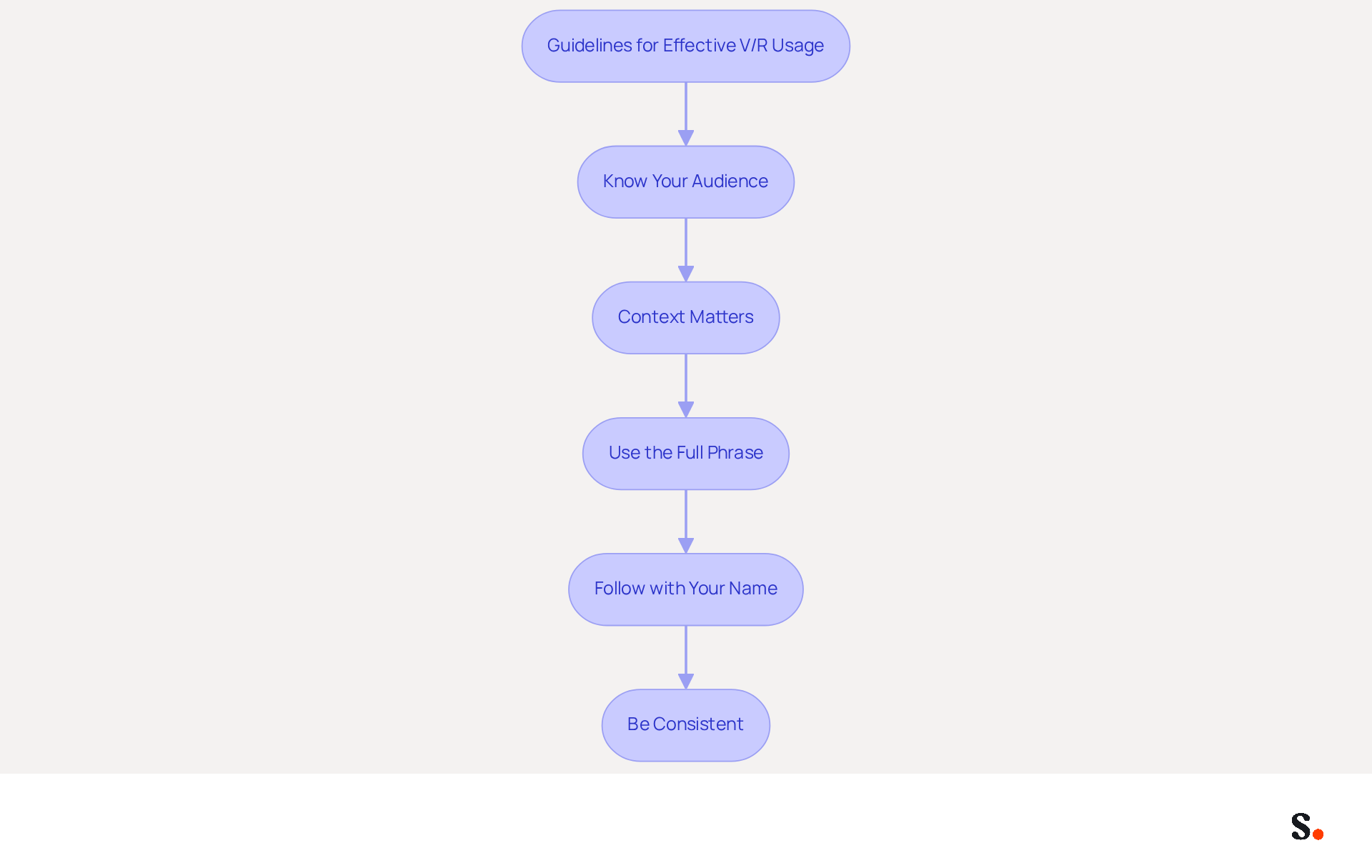
Using a 'very respectfully email signature' in emails can significantly enhance your professional communication. To effectively use 'Very Respectfully' in your email communications, adhere to the following guidelines:
- Know Your Audience: Utilize V/R when addressing individuals of higher rank or authority, such as managers or clients, to convey respect and professionalism.
- Context Matters: Reserve V/R for formal communications. In less formal settings, opt for alternatives like 'Best regards' or 'Sincerely' to maintain clarity and approachability.
- Use the Full Phrase: In initial communications, always write out 'Very Respectfully' instead of abbreviating it to V/R. This shows your commitment to professionalism.
- Follow with Your Name: After the sign-off, include your name along with any relevant titles or positions. For example, you should format it as a 'very respectfully email signature: [Your Name], [Your Title].' This helps establish who you are professionally.
- Be Consistent: If you start using V/R in your correspondence, continue to apply it in subsequent messages with the same recipient. Consistency in your sign-off helps maintain a professional tone and strengthens your communication.
Research shows that messages featuring respectful sign-offs like V/R achieve a response rate of 65.7%, highlighting the effectiveness of courteous communication. Furthermore, using V/R appropriately can enhance professional relationships, particularly in formal industries, making it a valuable tool in your communication strategy.
Create Your V/R Email Signature
Creating a very respectfully email signature is crucial for maintaining a professional image in digital communications.
-
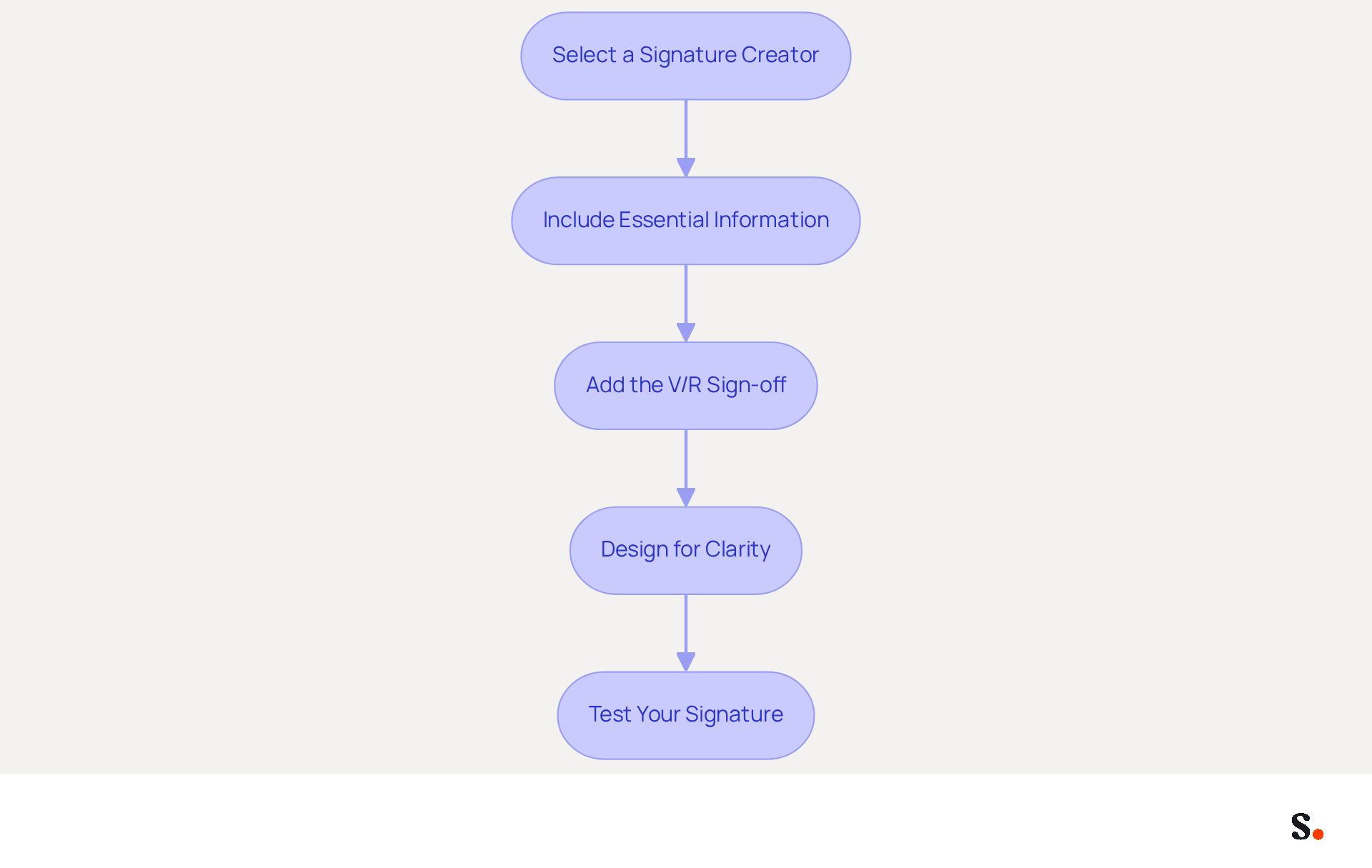
Select a Signature Creator: Grant permission for the application to connect with your email provider to enable one-click synchronization; this requires Super Admin access. Utilize Scribe's digital signature creator to streamline the design process and ensure brand consistency.
-
Include Essential Information: Your signature should contain your full name, job title, company name, and contact information. For example:
- John Doe
- Marketing Manager
- Scribe
- johndoe@scribe.com
- (123) 456-7890
-
Add the V/R Sign-off: At the end of your name, include 'Very Respectfully,' followed by your name. For example:
- Very Respectfully,
- John Doe
-
Design for Clarity: Make sure your signature looks good and is easy to read. Use a clean font, limit your color palette to two or three colors, and avoid clutter to maintain professionalism. With Scribe's automated management, any changes in your connected data sources are updated in real-time, ensuring consistent branding.
-
Test Your Signature: Send a test message to yourself or a colleague to confirm that the signature displays correctly across different messaging clients. Many professionals struggle with ensuring their email signatures display correctly, which can lead to miscommunication. This step is vital, as 44.4% of users modify their electronic correspondences 2-4 times annually, highlighting the necessity for consistent updates. Failing to test your signature can result in branding inconsistencies. With Scribe's SOC 2 Type II compliance, you can be confident that your data is secure while managing your messaging branding efficiently. Ultimately, a well-crafted very respectfully email signature can significantly enhance your professional credibility and communication effectiveness.
Avoid Common Pitfalls and Follow Best Practices
To enhance the effectiveness and professionalism of your email signature, it is essential to avoid common pitfalls:
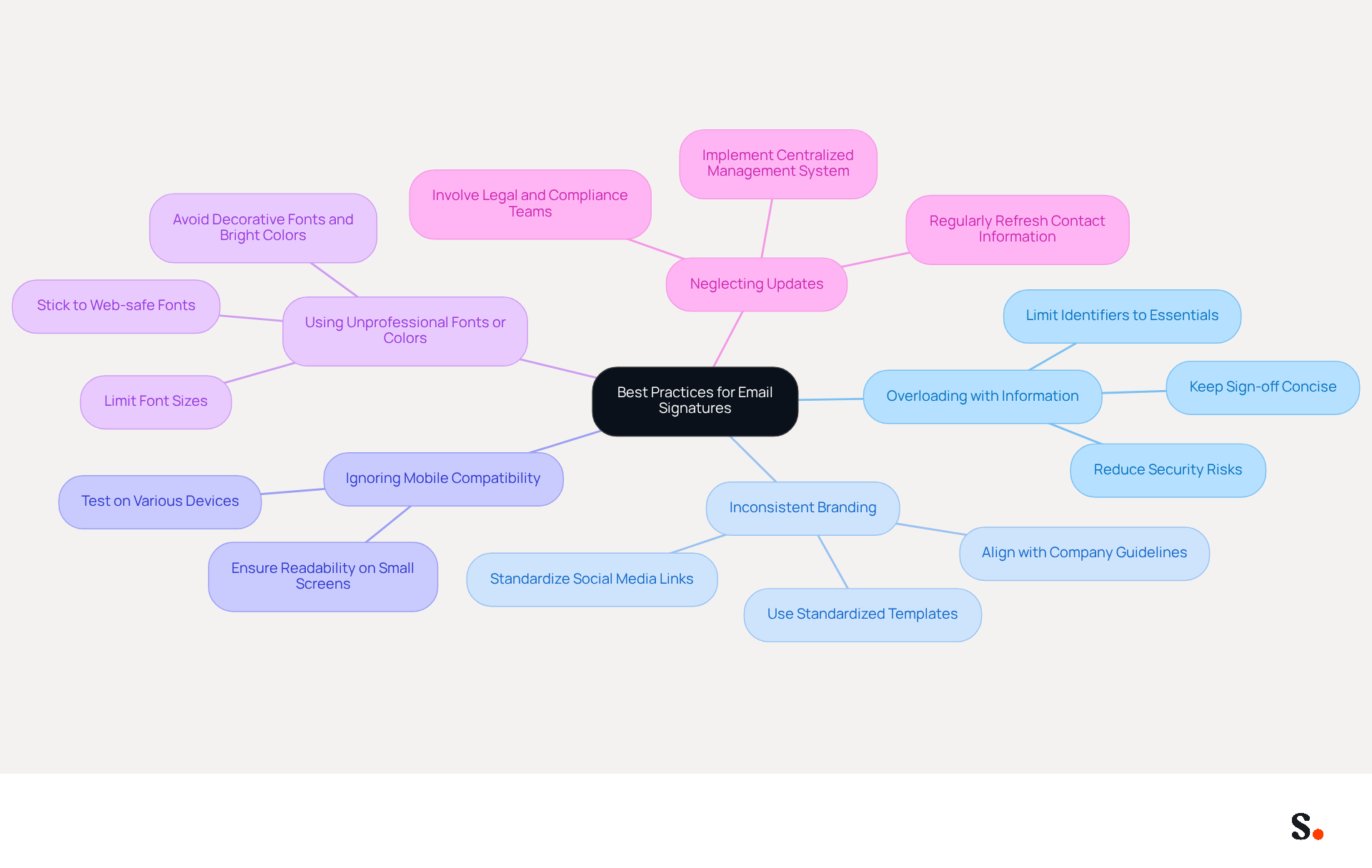
- Overloading with Information: Keep your sign-off concise. Including excessive details can clutter your sign-off and overwhelm the recipient. Reducing security risks and improving readability can be achieved by limiting identifiers to essential contact details in the very respectfully email signature.
- Inconsistent Branding: Ensure that your mark aligns with your company's branding guidelines. Inconsistent logos, fonts, and layouts can weaken trust and create an unprofessional impression. Using standardized templates can help maintain a cohesive brand identity across all communications, such as the very respectfully email signature. Additionally, standardizing social media links is crucial for presenting a unified brand image.
- Ignoring Mobile Compatibility: With over 60% of emails opened on mobile devices, it’s crucial to test your email footer on various devices to ensure it displays correctly. If your signature doesn’t fit on smaller screens, it risks becoming unreadable, which could mean lost opportunities.
- Using Unprofessional Fonts or Colors: Stick to standard web-safe fonts like Arial or Helvetica that reflect professionalism. Avoid overly decorative fonts or bright colors that may distract from your message. A clean design that incorporates a very respectfully email signature using one or two font sizes enhances clarity and professionalism.
- Neglecting Updates: Regularly refresh your personal mark to reflect any changes in your contact information or job title. An outdated mark can lead to confusion and erode trust with recipients. This proactive approach safeguards your professional image. Implementing a centralized management system can ensure that all signatures are current and accurate, preventing the use of outdated information. The one-click synchronization process allows for automatic updates, ensuring that any modifications in your Google Workspace are reflected in real-time. Furthermore, involving legal, compliance, and data privacy teams in determining necessary disclaimers is essential to mitigate compliance risks. Scribe's SOC 2 Type II compliance guarantees robust data security, reinforcing brand consistency across all communications. Additionally, Scribe's auto-fill attribute feature saves time by automatically filling in information for signatories, enhancing efficiency for over 10,000 marketing and IT teams worldwide. By prioritizing these elements, you not only enhance your communication but also reinforce your professional credibility.
Utilize Tools for Streamlined Email Signature Management
Effectively managing the very respectfully email signature is crucial for maintaining brand consistency and enhancing marketing efforts. To achieve this, consider utilizing the following tools:
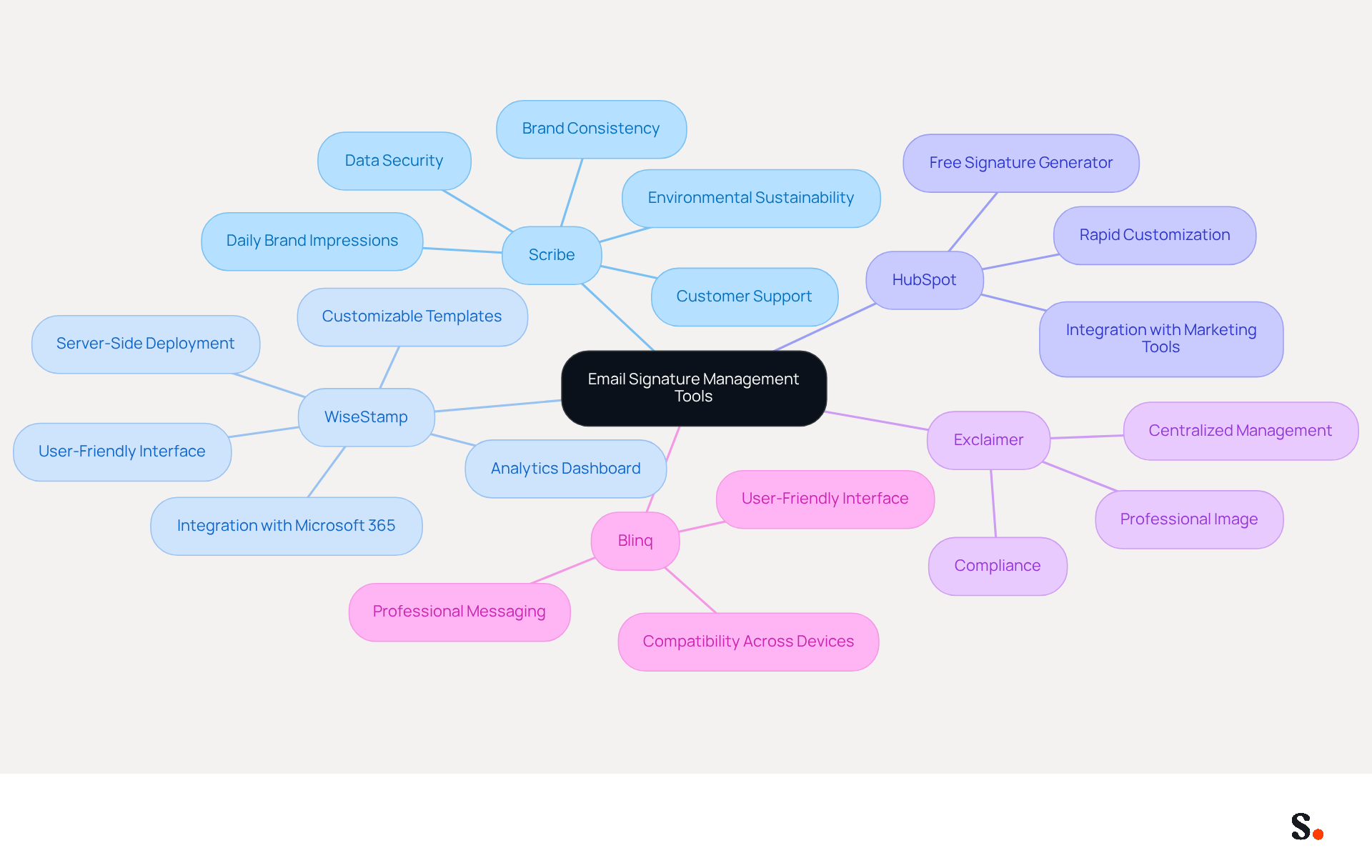
- This innovative platform streamlines the creation and management of email signatures, allowing for organization-wide updates with just one click. It generates 15 million daily brand impressions and is used by over 10,000 companies for email signature management, ensuring brand consistency and transforming every email into a marketing touchpoint that enhances engagement and lead generation. With this service, you also benefit from hands-on customer support, ensuring you can speak to a human when you need assistance, rather than navigating through automated systems. Additionally, the organization is committed to environmental sustainability, allocating 1% of its revenue to support carbon removal technologies through Stripe Climate. Significantly, Scribe is SOC 2 Type II compliant, ensuring your data is secure, and boasts an average click-through rate of 12% on banner ads, making it a powerful tool for marketing effectiveness.
- WiseStamp: Recognized for its customizable templates, this manager integrates seamlessly with various clients, making it easy to create professional designs that reflect your brand identity.
- HubSpot: Provides a complimentary generator for digital signatures that facilitates rapid customization, enabling users to design their identifiers in line with their marketing strategies.
- Exclaimer: A robust solution designed for managing electronic communications across organizations, Exclaimer ensures compliance and consistency, which is crucial for maintaining a professional image.
- Blinq: This tool offers a user-friendly interface for creating professional messages that are compatible across all devices and platforms.
Using these tools, businesses can effectively manage their very respectfully email signature, ensuring it remains current and aligned with their brand image. Centralized management of digital identifiers not only saves time but also enhances marketing effectiveness, as consistent branding across all communications can lead to increased engagement rates and improved customer trust. In fact, research indicates that businesses utilizing digital identifiers as marketing tools have experienced engagement rates increase by 40%, highlighting the importance of adopting a strong email signature management strategy. Embracing a robust very respectfully email signature management strategy can transform your communications into powerful marketing assets.
Conclusion
Crafting a professional email signature that incorporates the phrase 'Very Respectfully' (V/R) is crucial for effective communication in professional settings. This guide has outlined the importance of using V/R appropriately, ensuring that it conveys the right level of respect and professionalism, particularly when addressing individuals in positions of authority. Following these steps helps you create a signature that truly represents you and boosts your professional image.
Key insights discussed include:
- The significance of knowing your audience
- Maintaining consistency in your sign-off
- Avoiding common pitfalls, such as overloading your signature with information or neglecting mobile compatibility
Utilizing tools like Scribe can streamline the process, ensuring that email signatures are not only visually appealing but also compliant with security standards such as SOC 2 Type II, GDPR, and CCPA. This method reinforces brand consistency and turns each email into a marketing opportunity, boasting an average click-through rate of 12% on signature banners.
In conclusion, a well-crafted email signature is more than just a digital sign-off; it is a powerful tool for professional communication and branding. By applying the strategies discussed and utilizing tools like Scribe, professionals can enhance their credibility and foster stronger relationships. Ultimately, refining your email signature strategy can significantly impact how you are perceived in your professional interactions.
Frequently Asked Questions
What does the phrase 'Very Respectfully' (V/R) mean?
'Very Respectfully' (V/R) is a formal sign-off used in military and professional correspondence that conveys deference and respect, especially when addressing someone of higher rank or authority.
When is it appropriate to use V/R?
V/R is appropriate when the recipient holds a senior position relative to the sender, such as a supervisor or client, as it reinforces professionalism and respect in communication.
What can happen if V/R is used inappropriately?
Inappropriate use of V/R can create confusion and diminish the intended respect in communication, potentially damaging professional relationships.
What does the SECNAV Manual recommend regarding V/R?
The SECNAV Manual recommends using the full phrase 'Very respectfully email signature' in initial communications to ensure clarity and respect.
What guidelines should be followed for effective V/R usage?
To use V/R effectively, know your audience, reserve it for formal communications, use the full phrase in initial messages, follow with your name and title, and maintain consistency in subsequent messages.
How does using V/R impact response rates in communication?
Research shows that messages featuring respectful sign-offs like V/R achieve a response rate of 65.7%, indicating the effectiveness of courteous communication.
Why is consistency important when using V/R?
Consistency in using V/R helps maintain a professional tone and strengthens communication with the same recipient.
List of Sources
- Understand the Meaning of 'Very Respectfully' (V/R)
- Master V/R Email Signature: Best Practices for Effective Communication (https://scribe-mail.com/en-US/blog/master-v-r-email-signature-best-practices-for-effective-communication)
- Learn What V/r Means in an Email and How to Use It Properly (https://tabular.email/blog/what-does-vr-mean-in-email)
- What Does V/R Mean in an Email Signature? (https://bulksignature.com/blog/what-does-v-r-mean-in-an-email-signature)
- Master the V/R Email Sign Off: Enhance Your Professional Communication (https://scribe-mail.com/en-US/blog/master-the-v-r-email-sign-off-enhance-your-professional-communication)
- What V/R Email Sign Off Means and When to Use It (https://designmodo.com/v-r-email-sign-off)
- Apply Guidelines for Effective V/R Usage
- What V/R Email Sign Off Means and When to Use It (https://designmodo.com/v-r-email-sign-off)
- What Does V/R Mean in an Email Signature? (https://bulksignature.com/blog/what-does-v-r-mean-in-an-email-signature)
- 100 Compelling Email Statistics for 2026 | PGM Solutions (https://porchgroupmedia.com/blog/100-compelling-email-statistics-to-inform-your-strategy-in-2023)
- Master V/R Email Signature: Best Practices for Effective Communication (https://scribe-mail.com/en-US/blog/master-v-r-email-signature-best-practices-for-effective-communication)
- Latest Email Statistics for 2026: Every Figure Verified to Its Source (https://dragapp.com/blog/email-statistics)
- Create Your V/R Email Signature
- 12 Best Email Signature and Disclaimer Practices (https://cloud-awards.com/12-tips-for-effective-use-of-email-signatures-and-disclaimers)
- signitic.com (https://signitic.com/en/resources/professional-signature-best-practices-the-guide-to-signing-your-corporate-emails)
- 40+ Email Signature Statistics for 2026 (Data + Insights) (https://wavecnct.com/blogs/email-signature-statistics)
- Email Signature Best Practices - NEWOLDSTAMP (https://newoldstamp.com/blog/email-signature-best-practices)
- Email Signature Best Practices Guide With Examples - MailerLite (https://mailerlite.com/blog/email-signature-best-practices)
- Avoid Common Pitfalls and Follow Best Practices
- 11 Common Email Signature Mistakes to Avoid - Gimmio (https://blog.gimm.io/email-signature-mistakes)
- 10 Common Email Signature Mistakes IT Teams Make (And How to Fix Them) (https://bulksignature.com/blog/10-common-email-signature-mistakes-it-teams-make-and-how-to-fix-them)
- 5 Common email signature mistakes (and how to avoid them) (https://adsigner.com/en/blog/5-common-email-signature-mistakes)
- 10 Email Signature Mistakes IT Teams Make and the One Fix Behind Most of Them (https://linkedin.com/pulse/10-email-signature-mistakes-teams-make-one-fix-behind-most-ozdff)
- Utilize Tools for Streamlined Email Signature Management
- Why Email Signature Management Software is Essential for Marketing Success (https://scribe-mail.com/en-US/blog/why-email-signature-management-software-is-essential-for-marketing-success)
- Email signature tools to manage company signatures centrally (https://mail-signatures.com/tools)
- Email Signature Manager for Any Scale | WiseStamp (https://wisestamp.com)
- Company-Wide Email Signature Management | CloudM (https://cloudm.io/blog/optimize-your-process-with-company-wide-email-signature-management)
- Why you should be using an email signature manager (https://blinq.me/blog/why-you-should-be-using-an-email-signature-manager)
Get started with Scribe
Manage signatures across your whole team
Free 14-day trial — no credit card.