Create an Effective Email Signature for Software Developers with Scribe
Many developers underestimate the impact of their email signatures, which can significantly influence how they are perceived in the tech industry. A
Sophie Grant
Email Signature Specialist, Scribe
On this page
- Introduction
- Understand the Importance of an Effective Email Signature for Software Developers
- Identify Key Elements to Include in Your Email Signature
- Create Your Email Signature Using Scribe's Platform
- Test and Optimize Your Email Signature for Different Platforms
- Explore Additional Tools and Resources for Email Signature Management
- Conclusion
- Frequently Asked Questions
- List of Sources
Introduction
Many developers underestimate the impact of their email signatures, which can significantly influence how they are perceived in the tech industry. A professional email signature is more than just a digital sign-off; it serves as a powerful branding tool that can shape perceptions and enhance communication for software developers.
By crafting an effective signature, developers can:
- Establish credibility
- Promote their work
- Streamline interactions with clients and colleagues
This guide explores the essential elements that contribute to an impactful email signature and how developers can utilize tools like Scribe to enhance their effectiveness. By understanding and implementing these best practices, developers can transform their email signatures into a strategic asset that enhances their professional presence.
Get started with Scribe
Manage signatures across your whole team
Free 14-day trial — no credit card.
Understand the Importance of an Effective Email Signature for Software Developers
A well-crafted email closing is not merely a sign-off; it is a vital component of your professional identity that can significantly influence perceptions. For software developers, a well-crafted signature can:
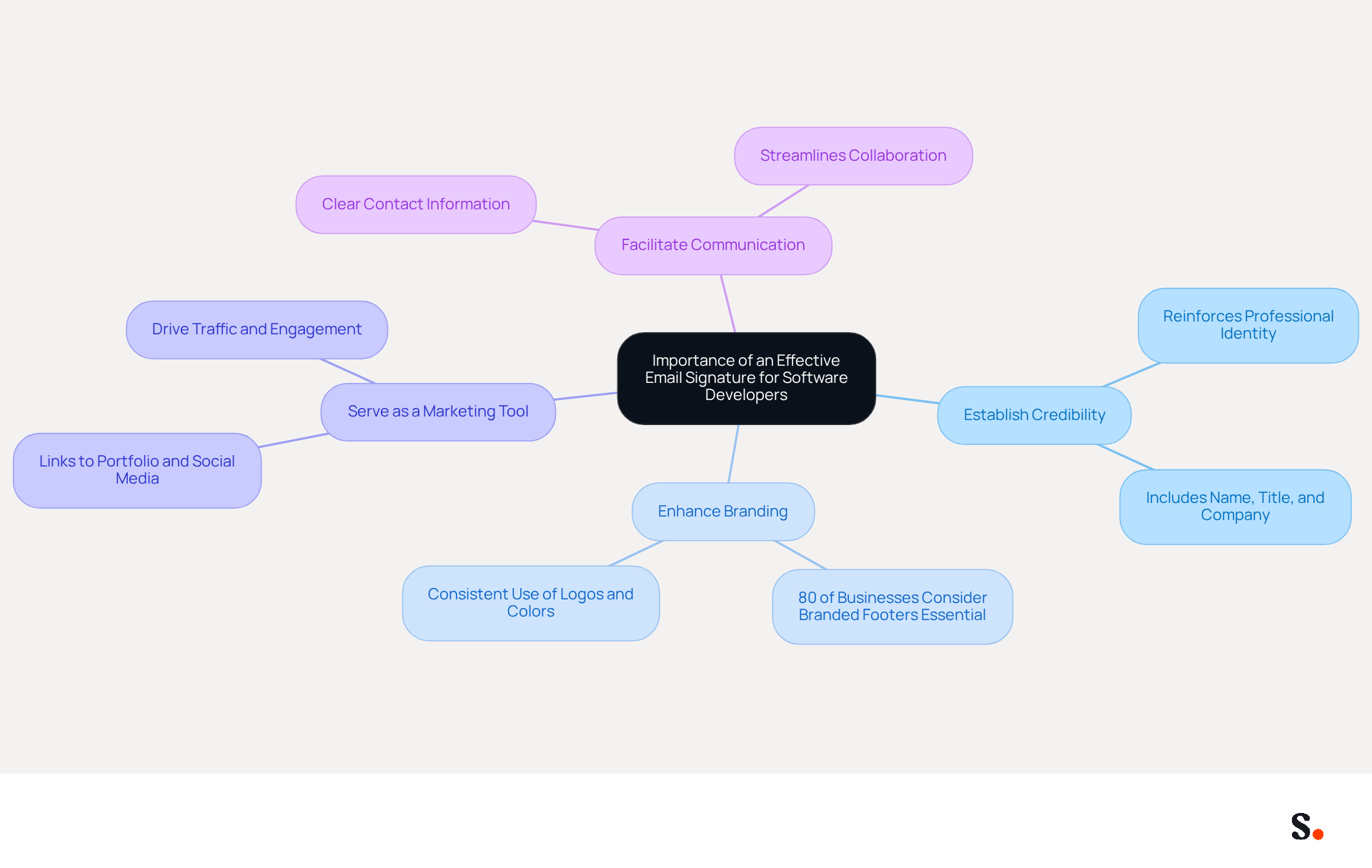
- Establish Credibility: Including your name, title, and company reinforces your professional identity, making it easier for clients and colleagues to recognize your role.
- Enhance Branding: Consistent use of logos and company colors fosters recognition, which is crucial in a competitive market where first impressions matter. Scribe automatically syncs your digital identifiers with your business phone system, so any changes in your Aircall configuration are updated in real-time, enhancing brand consistency effortlessly.
- Serve as a Marketing Tool: By incorporating links to your portfolio or social media profiles, you can drive traffic and engagement, showcasing your work and expertise effectively.
- Facilitate Communication: Clear contact information ensures that clients and colleagues can reach you easily, streamlining communication and collaboration.
In fact, 80% of businesses consider a branded message footer essential for their branding efforts, underscoring its importance. Additionally, 76% of recipients express heightened trust in the sender when a professional footer is included. Organizations that implement consistent messaging formats experience a 22% rise in response rates, highlighting the significance of a well-crafted format in boosting engagement.
Scribe's automated management of your identifiers ensures they are consistently current without needing input from your teammates. This effortless update process, combined with Scribe's SOC 2 Type II compliance, ensures that your data is managed securely. Significantly, Scribe allows Marketing teams to manage their digital identifiers independently after the initial IT setup, offering enhanced control and flexibility. Case studies show that organizations utilizing effective email formats experience enhanced professionalism and trust, resulting in improved business outcomes. For example, a study revealed that 47% of prospects believe that professional endorsements enhance their trust, while 43% develop a more positive perception of the brand. Additionally, Scribe's average click-through rate on banners is 12%, highlighting its effectiveness as a marketing performance metric.
By optimizing your email signature for software developers, you enhance your professional image and create lasting impressions that can lead to meaningful business relationships.
Identify Key Elements to Include in Your Email Signature
Creating an effective email signature for software developers is essential to establish credibility and foster professional relationships. When crafting an email signature, developers should include several key elements:
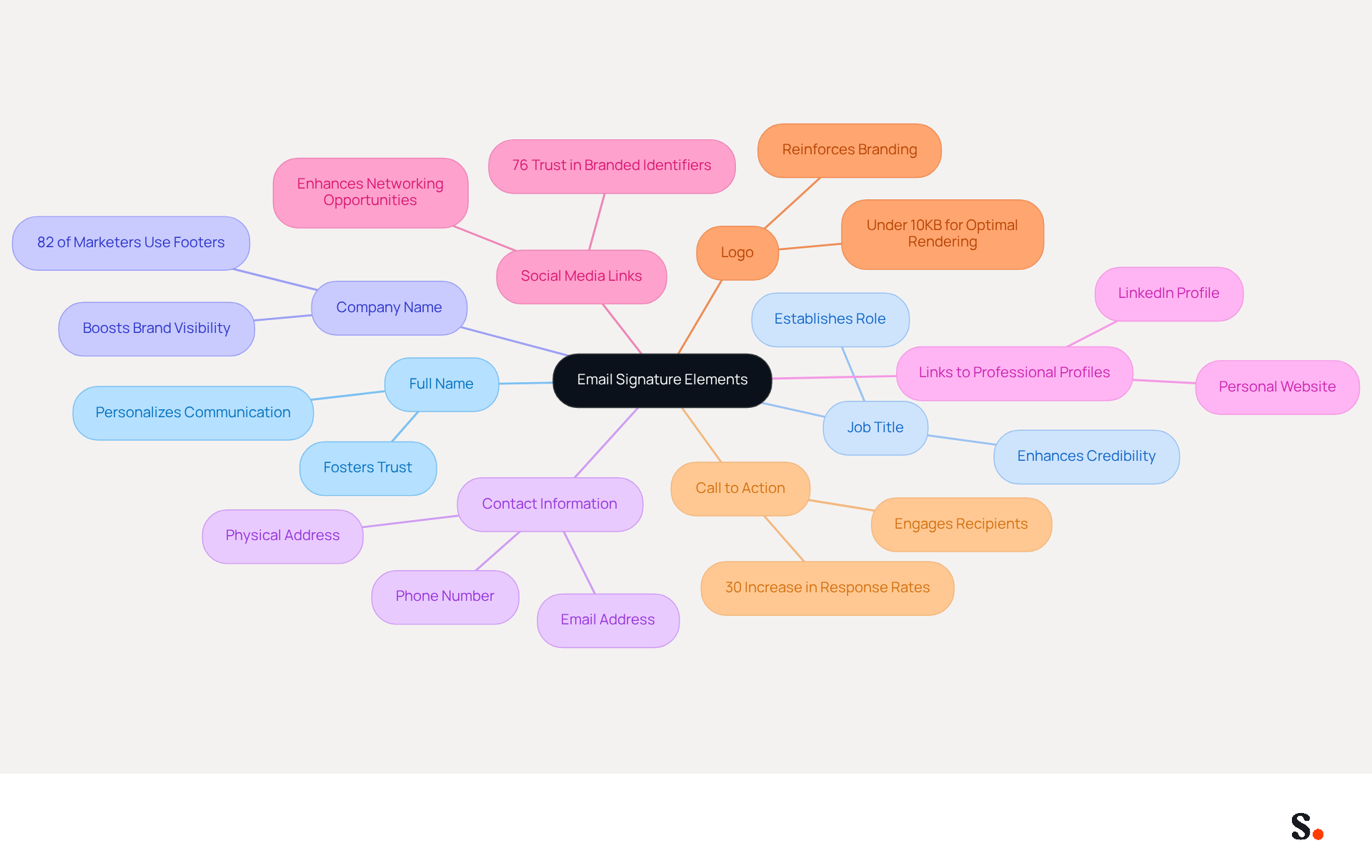
- Full Name: Clearly state your name to personalize communication, fostering trust and rapport with recipients.
- Job Title: Including your title establishes your role and expertise, enhancing your credibility.
- Company Name: Mentioning your company boosts brand visibility, as 82% of marketers utilize electronic footers to enhance awareness of their identity.
- Contact Information: Provide your phone number and contact address for easy access, ensuring recipients can reach out without hassle.
- Links to Professional Profiles: Include links to your LinkedIn profile or personal website to showcase your work and professional achievements.
- Social Media Links: If relevant, add links to professional social media accounts to enhance networking opportunities, as 76% of recipients indicate heightened trust in senders who utilize branded identifiers.
- Logo: Incorporate your company logo to reinforce branding, ensuring it is under 10KB for optimal rendering.
- Call to Action: Consider adding a call to action, such as a link to your latest project or blog post, to engage recipients further. Research indicates that messages with branded footers can enhance response rates by up to 30%, demonstrating the effectiveness of well-placed CTAs.
Incorporating these components allows developers to create an email signature for software developers that clearly conveys their professional identity. With Scribe's automated email signature management, you can keep these elements updated effortlessly. With seamless integration from Google Workspace and Calendly, any changes made to your team’s information will automatically sync, saving time and maintaining brand consistency. Additionally, Scribe's SOC 2 Type II compliance ensures that your data is managed securely, enabling you to concentrate on creating impactful communications that resonate with your audience.
Create Your Email Signature Using Scribe's Platform
Creating an email signature for software developer with Scribe is a straightforward process that enhances your communication.
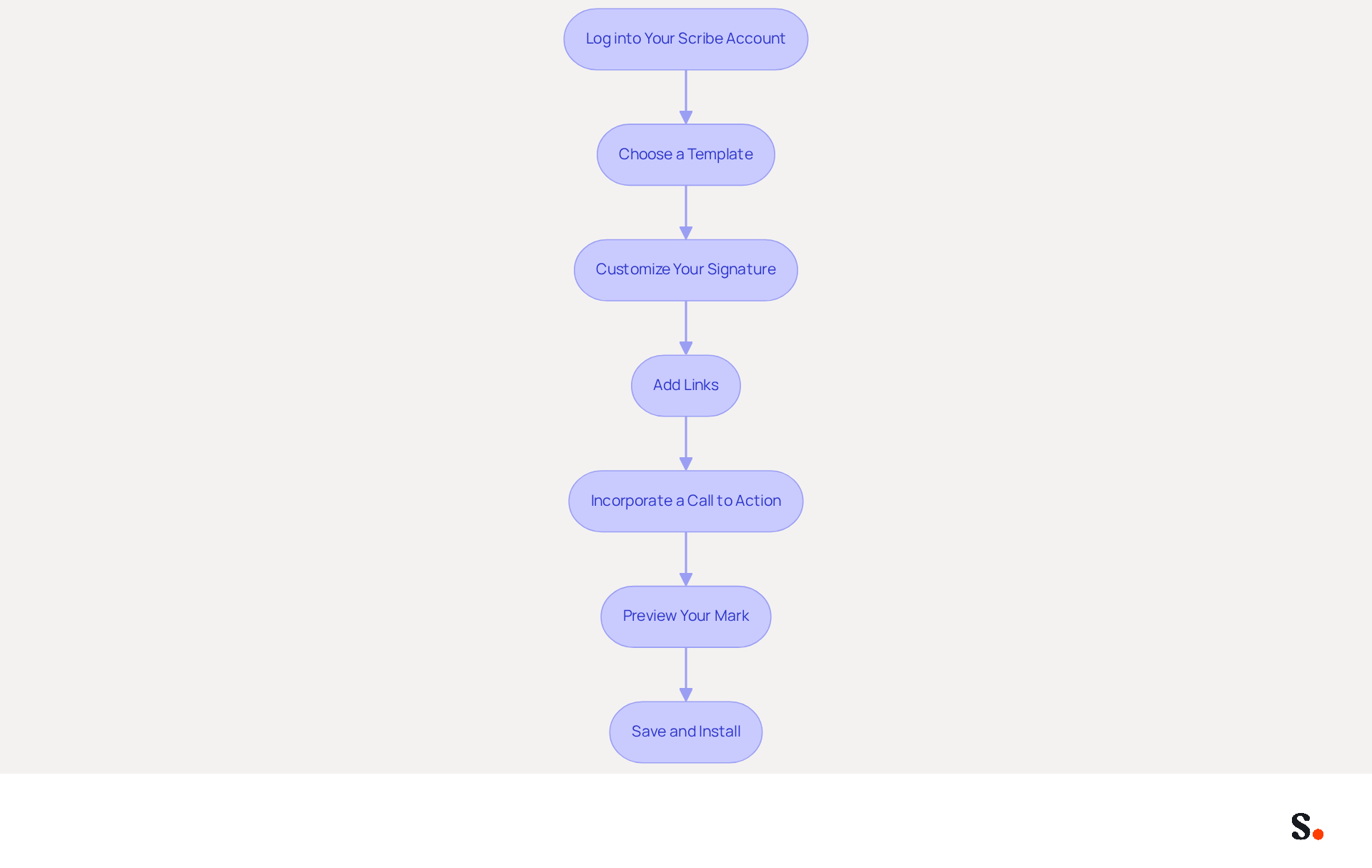
- Log into Your Scribe Account: Access your account on the Scribe platform.
- Choose a Template: Select from a variety of pre-designed templates that correspond with your identity.
- Customize Your Signature: Enter your personal information, including your name, job title, and contact details. Upload your company logo and adjust the colors to reflect your brand.
- Add Links: Include hyperlinks to your professional profiles and relevant projects or social media accounts. Notably, Instagram links are included in 69.3% of digital communications, highlighting their significance.
- Incorporate a Call to Action: Enhance engagement by adding a call to action button that directs recipients to your portfolio or a specific project. Including CTAs can drive a 22% increase in response rates.
- Preview Your Mark: Utilize the preview feature to see how your mark will appear in messages, ensuring it meets your expectations.
- Save and Install: Once satisfied, save your mark and follow the instructions to install it across your messaging clients.
Make sure you have Super Admin permissions to enable one-click synchronization easily. By utilizing Scribe's user-friendly platform, you can create an email signature for software developer that improves communication and strengthens your brand. With Scribe's streamlined one-click synchronization, your teammates' identification information is automatically updated from your connected sources, ensuring brand consistency across all communications. Regularly updating your signature not only reflects professionalism but also keeps your network engaged and informed. Plus, with Scribe's SOC 2 Type II compliance, you can trust that your data is secure throughout the process.
Test and Optimize Your Email Signature for Different Platforms
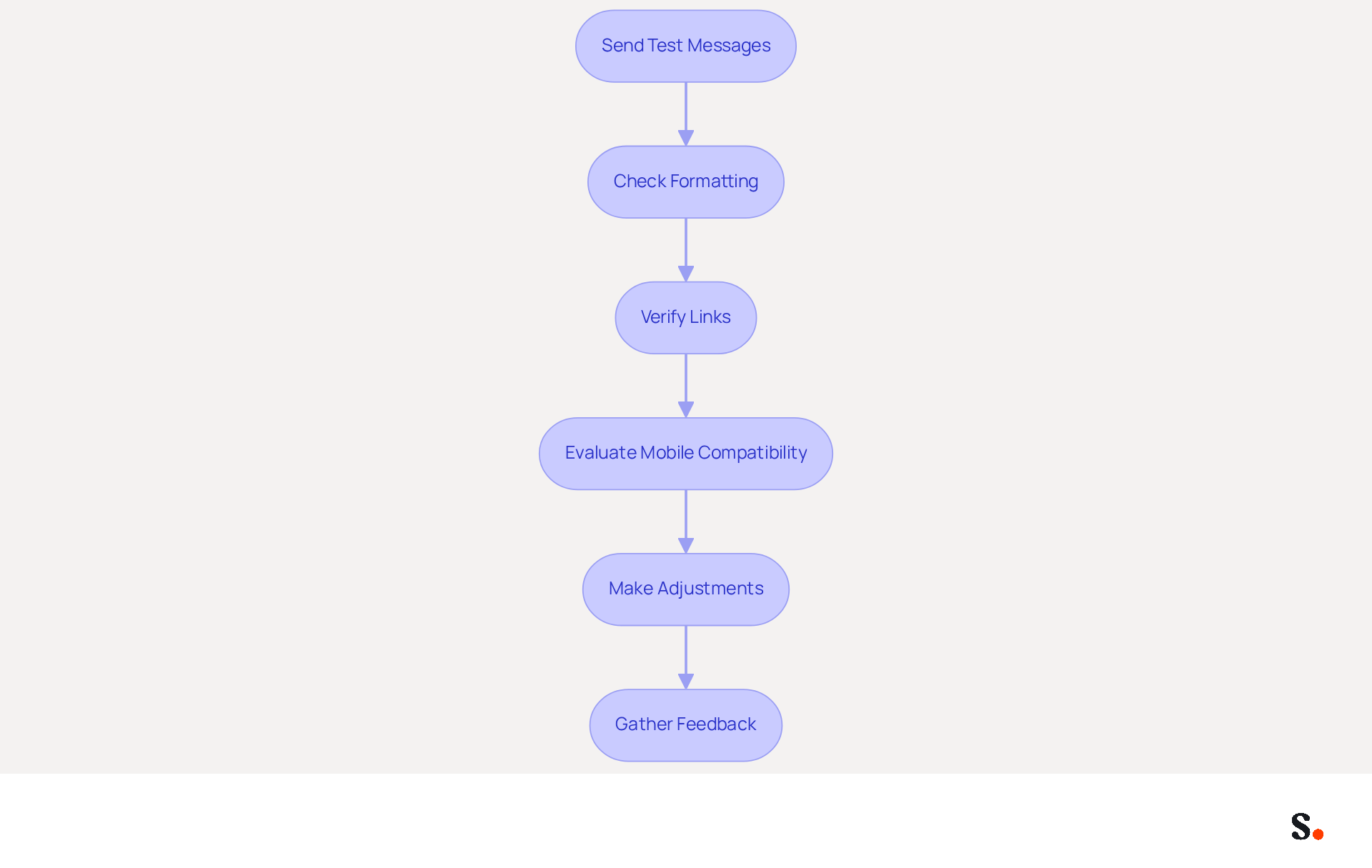
Testing your message footer is essential to ensure it performs effectively across various messaging platforms. Follow these steps to enhance your signature's performance:
- Send Test Messages: Dispatch messages to yourself and colleagues using various communication clients such as Gmail, Outlook, and Apple Mail to observe how the sign-off appears across platforms.
- Check Formatting: Verify that the formatting remains consistent. Look for any misalignments, missing elements, or discrepancies in font sizes that could affect readability.
- Verify Links: Click on all hyperlinks to ensure they direct to the correct pages, enhancing user experience and functionality.
- Evaluate Mobile Compatibility: Since many users check messages on mobile devices, ensure your signature displays correctly on smartphones. Aim for a design that fits well within a 400-pixel width to avoid layout issues. Additionally, use high-resolution images to prevent pixelation when viewed on mobile devices.
- Make Adjustments: Based on your testing, adjust the design or content as necessary to improve compatibility and appearance across different platforms.
- Gather Feedback: Solicit input from colleagues regarding the appearance and functionality of the document to identify any areas for improvement. Consider accessibility by ensuring text is readable for individuals with visual impairments.
By syncing your Google Workspace with Scribe, you save time by automatically updating your teammates' contact details. This seamless integration enhances consistency and allows for effortless updates, ensuring compliance with security standards like SOC 2 Type II. Ultimately, thorough testing and optimization can significantly enhance your professional image and communication effectiveness.
Explore Additional Tools and Resources for Email Signature Management
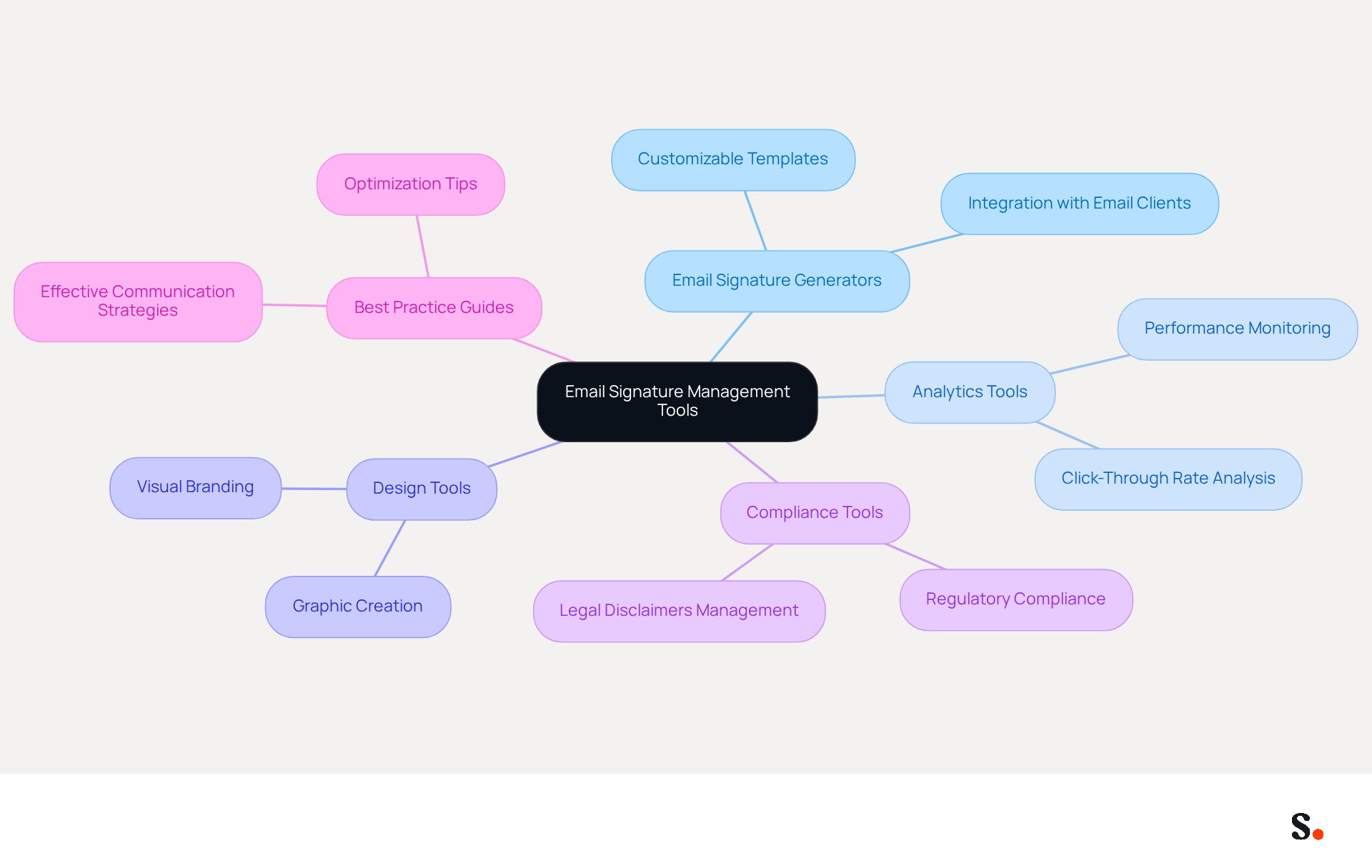
Effectively managing an email signature for software developer is crucial for maintaining brand consistency and maximizing engagement. In addition to Scribe, consider exploring these tools and resources to enhance your email signature management:
- Email Signature Generators: These tools offer customizable templates and seamless integration with various email clients, allowing you to create professional signatures that accurately reflect your brand.
- Analytics Tools: Implement analytics platforms to monitor the performance of your email identifiers, focusing on key metrics such as click-through rates on links to gauge engagement.
- Design Tools: Leverage platforms like Canva to craft visually appealing graphics for your branding, including banners and logos that enhance brand visibility.
- Compliance Tools: Ensure your endorsements adhere to legal requirements by utilizing tools that assist in managing disclaimers and legal notices effectively.
- Best Practice Guides: Refer to resources like Scribe's blog for expert tips on optimizing communication identifiers for marketing and branding, ensuring your messages are both effective and compliant.
By integrating these tools, organizations can enhance their email signature for software developer communications while also strengthening their overall communication strategy.
Conclusion
For software developers, an effective email signature is not just a formality; it is a critical component of professional communication and branding. By utilizing Scribe, developers can craft signatures that accurately represent their professional identity while enhancing engagement and building connections with clients and colleagues.
Key elements such as full name, job title, company name, and contact information are crucial in building a professional image. Incorporating links to portfolios and social media profiles further showcases expertise, while a well-placed call to action can significantly boost response rates. Scribe's automated management ensures that these elements remain current and consistent, allowing developers to focus on their work without the hassle of manual updates.
A well-crafted email signature does more than look good; it serves as a vital tool in professional communication and branding. By leveraging tools like Scribe, software developers can optimize their email signatures for various platforms, ensuring they leave a lasting impression. By prioritizing their email signatures, developers can significantly enhance their professional image and contribute to their organization's branding success.
Frequently Asked Questions
Why is an effective email signature important for software developers?
An effective email signature is crucial for software developers as it establishes credibility, enhances branding, serves as a marketing tool, and facilitates communication. It helps clients and colleagues recognize your role and fosters trust.
What are the key benefits of using Scribe for email signature management?
Scribe automatically syncs digital identifiers with your business phone system, ensuring brand consistency. It allows for effortless updates, is SOC 2 Type II compliant for secure data management, and enables Marketing teams to manage their identifiers independently after initial IT setup.
What elements should be included in an email signature for software developers?
Key elements to include are your full name, job title, company name, contact information, links to professional profiles, social media links, company logo, and a call to action.
How does a branded email signature impact trust and engagement?
A branded email signature can enhance trust, with 76% of recipients expressing heightened trust in senders who use professional footers. Additionally, organizations that implement consistent messaging formats experience a 22% rise in response rates.
What is the significance of including a call to action in an email signature?
Including a call to action can engage recipients further and research indicates that messages with branded footers can enhance response rates by up to 30%.
How does Scribe ensure that email signatures remain current?
Scribe's automated management keeps digital identifiers updated without requiring input from teammates, ensuring that any changes are reflected in real-time.
What are the advantages of incorporating a company logo in an email signature?
Including a company logo reinforces branding and boosts brand visibility, as 82% of marketers utilize electronic footers to enhance awareness of their identity. The logo should be under 10KB for optimal rendering.
How can an effective email signature lead to better business outcomes?
Effective email signatures enhance professionalism and trust, leading to improved business outcomes. Studies show that 47% of prospects believe professional endorsements enhance trust, while 43% develop a more positive perception of the brand.
List of Sources
- Understand the Importance of an Effective Email Signature for Software Developers
- The impact of email signatures on your branding (https://signitic.com/en/resources/the-impact-of-email-signatures-on-your-branding)
- 40+ Email Signature Statistics for 2026 (Data + Insights) (https://wavecnct.com/blogs/email-signature-statistics)
- Research Recap: Branded Email Signatures Increase Company Recognition, Trust - B2BMX INSIGHTS (https://demandgenreport.com/industry-news/research-recap-branded-email-signatures-increase-company-recognition-trust/47252)
- Why Are Email Signatures Key to Brand Awareness? | QuickMail (https://quickmail.com/role-of-email-signatures-in-brand-awareness)
- Identify Key Elements to Include in Your Email Signature
- 20 Examples of Professional Email Signatures | Letsignit (https://letsignit.com/blog/professional-email-signature)
- What's a Good Email Signature? Key Components vs. Common Mistakes (https://scribe-mail.com/en-US/blog/what-s-a-good-email-signature-key-components-vs-common-mistakes)
- 20 best email signature design examples for 2026 — Stripo.email (https://stripo.email/blog/10-best-email-signature-design-examples)
- 20 Tips for Creating an Effective Email Signature — SitePoint (https://sitepoint.com/creating-an-effective-email-signature)
- Create Your Email Signature Using Scribe's Platform
- 40+ Email Signature Statistics for 2026 (Data + Insights) (https://wavecnct.com/blogs/email-signature-statistics)
- Email signature statistics: Why every business should optimize their email signatures — Stripo.email (https://stripo.email/blog/email-signature-statistics-why-every-business-should-optimize-their-email-signatures)
- Office 365 Email Signatures: How to Manage Them Centrally (2026 Guide) (https://scribe-mail.com/en-US/blog/master-email-signature-management-in-office-365-a-step-by-step-guide)
- Test and Optimize Your Email Signature for Different Platforms
- Optimizing Mobile Email Signatures: Best Practices for Seamless Communication | MySignature (https://mysignature.io/blog/optimizing-mobile-email-signatures)
- 40+ Email Signature Statistics for 2026 (Data + Insights) (https://wavecnct.com/blogs/email-signature-statistics)
- How to Optimize Your Email Signature for Mobile Devices - Gimmio (https://blog.gimm.io/how-to-optimize-your-email-signature-for-mobile-devices)
- Optimise Your Email Signature for Mobile Devices (https://globalbankingandfinance.com/why-optimising-brand-email-signatures-for-mobile-devices-is-essential-for-hybrid-working)
- Explore Additional Tools and Resources for Email Signature Management
- Email Signature Analytics: Tracking Performance and Engagement | Crossware365 (https://crossware365.com/blog/email-signature-analytics-tracking-performance-and-roi)
- Email Signature Manager for Any Scale | WiseStamp (https://wisestamp.com)
- Email Signature Analytics: Unlocking Potential for Business Growth (https://wisestamp.com/blog/email-signature-analytics)
- Best Email Signature Management Software: Top 12 Tools (2026)
- NEWOLDSTAMP (https://newoldstamp.com/blog/email-signature-software)
- What Email Signature Software Provides the Best Analytics & Tracking (https://rocketseed.com/blog/email-signature-marketing-best-analytics-tracking)
Get started with Scribe
Manage signatures across your whole team
Free 14-day trial — no credit card.