Create an Email Signature for Graduate Students: A Step-by-Step Guide
In a competitive job market, a professional email signature can be the difference between being noticed and being overlooked. By incorporating essential
Sophie Grant
Email Signature Specialist, Scribe

Introduction
In a competitive job market, a professional email signature can be the difference between being noticed and being overlooked. By incorporating essential components such as contact information, academic credentials, and personal branding elements, students can enhance their visibility and credibility. Many students struggle to keep their signatures current and functional, which can hinder their professional image.
How can graduate students effectively design, integrate, and maintain their email signatures to maximize their impact? This guide offers a step-by-step approach to crafting an email signature that stands out and supports professional growth.
Identify Essential Components of Your Email Signature
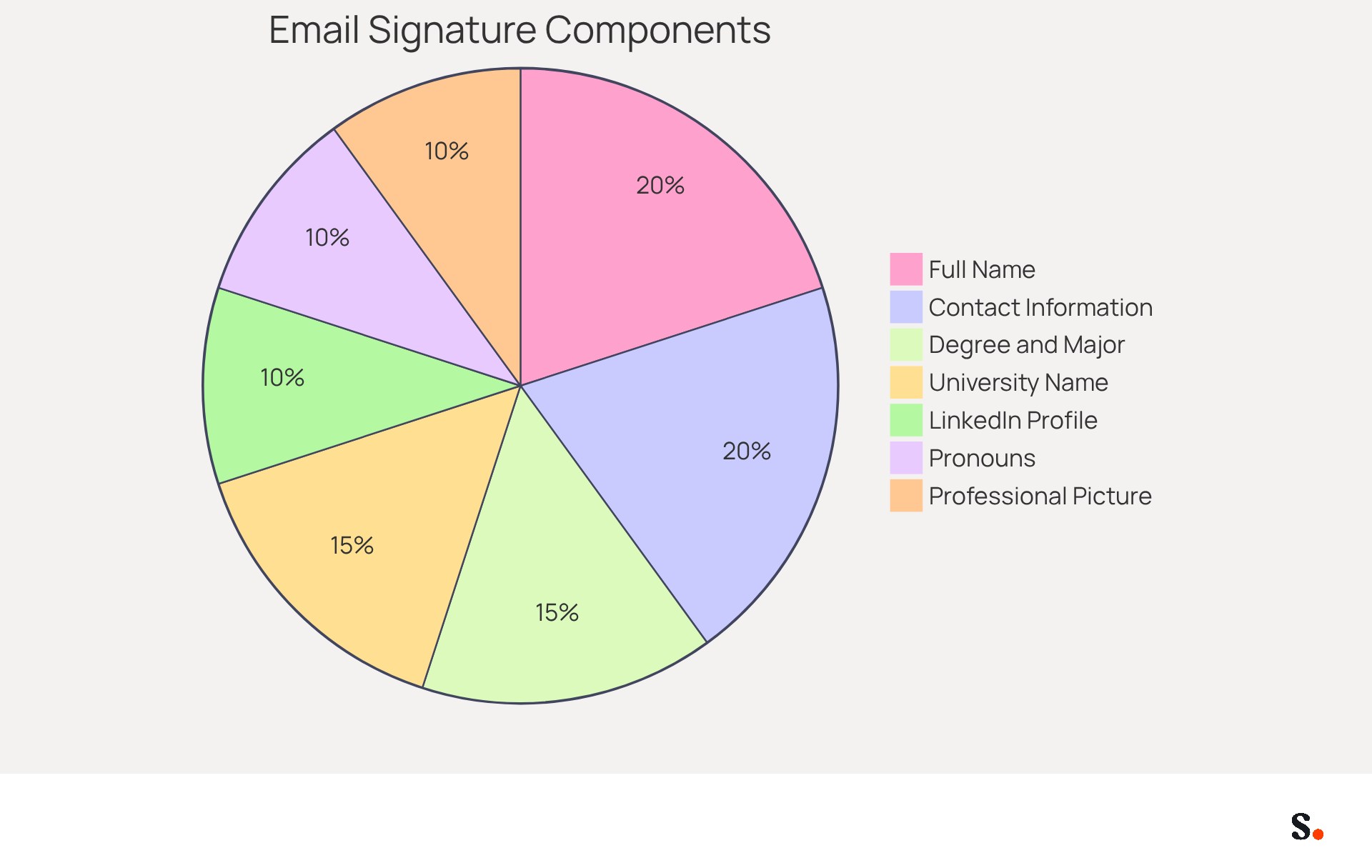
In a competitive job market, how can an email signature graduate student ensure their email signatures make a lasting impression? To create an effective email signature, graduate students should include the following essential components:
- Full Name: Clearly state your first and last name to establish your identity.
- Degree and Major: Include your current degree (e.g., MA, PhD) and major or field of study to provide context about your academic background.
- University Name: Mention the name of your institution to enhance credibility.
- Contact Information: Provide your email address and phone number for easy communication.
- LinkedIn Profile or Portfolio: Optionally, include a link to your LinkedIn profile or a personal portfolio to showcase your work and career background.
- Pronouns: If comfortable, add your preferred pronouns to promote inclusivity.
- Professional Picture or Logo: Consider including a professional photo or your university logo to enhance the visual appeal of your email.
These elements enhance your professionalism and make your email signature as a graduate student stand out in a competitive job market. A well-designed digital identifier can create a memorable impact on prospective employers and academic connections, facilitating their ability to identify and contact you. For example, students who have employed effective communication identifiers report enhanced clarity in their interactions, which is vital when seeking employment or networking opportunities. Furthermore, reviewing your contact information is essential to prevent errors and guarantee precision. By keeping your sign-off informative yet concise, you can make a positive impression on recipients. Ultimately, a well-crafted email signature graduate student can be the key differentiator in your professional journey. Significantly, over 500,000 digital identifiers have been created by university students and school pupils using MySignature, highlighting the significance of a professional digital identifier in academic and professional environments.
Design Your Signature with Branding and Personalization
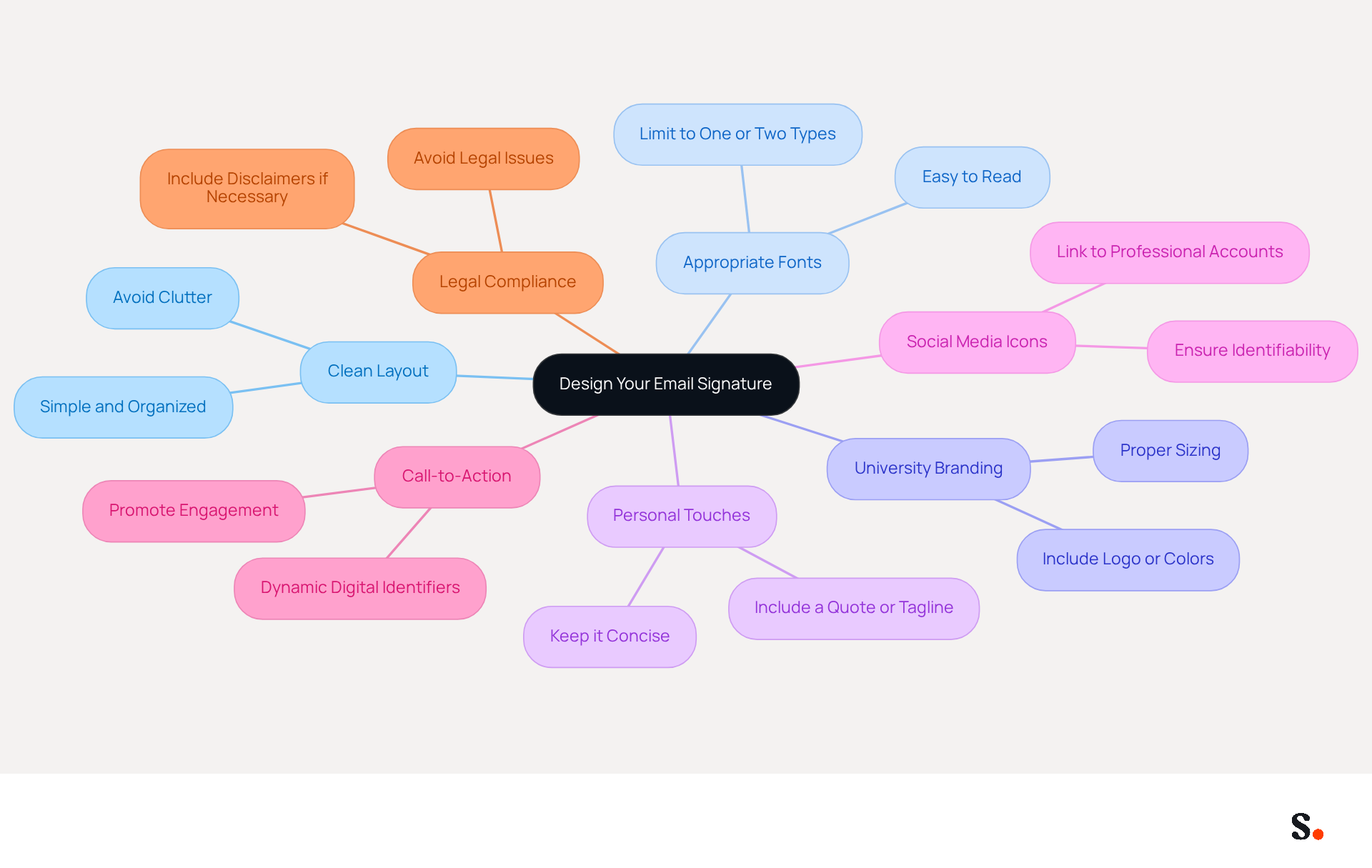
For a graduate student, designing an effective email signature is crucial for establishing a professional identity. When creating your email signature, consider the following tips:
- Choose a Clean Layout: Opt for a simple, organized layout that enhances readability. Avoid cluttering the signature with excessive information, as a streamlined design fosters professionalism.
- Select Appropriate Fonts: Use suitable fonts that are easy to read. Limiting yourself to one or two font types helps maintain visual consistency and reinforces your personal brand.
- Incorporate University Branding: If permitted, include your university's logo or colors to align with institutional branding. Ensure that these elements are appropriately sized and do not overshadow your personal details.
- Add Personal Touches: Consider including a personal quote or a brief tagline that reflects your academic or career philosophy. Keep it concise to maintain focus on your core information.
- Use Social Media Icons: If relevant, add icons linking to your professional social media accounts. Ensure these icons are identifiable and do not distract from the overall design.
- Include a Call-to-Action: Adding a call-to-action in your contact information, such as links to your website or social media, promotes further engagement from recipients. Research shows that dynamic digital identifiers can achieve a click-through rate (CTR) of 4%, which is significantly better than typical marketing emails.
- Consider Legal Compliance: Depending on your field, including legal disclaimers or confidentiality notices may be necessary to avoid potential legal issues.
When students apply these design principles, they create an email signature that authentically reflects their personal brand and professionalism. A well-crafted email signature not only enhances your professional image but also fosters meaningful connections.
Integrate Your Signature into Email Clients
For a professional image, it is essential for a graduate student to integrate their email signature into popular email clients.
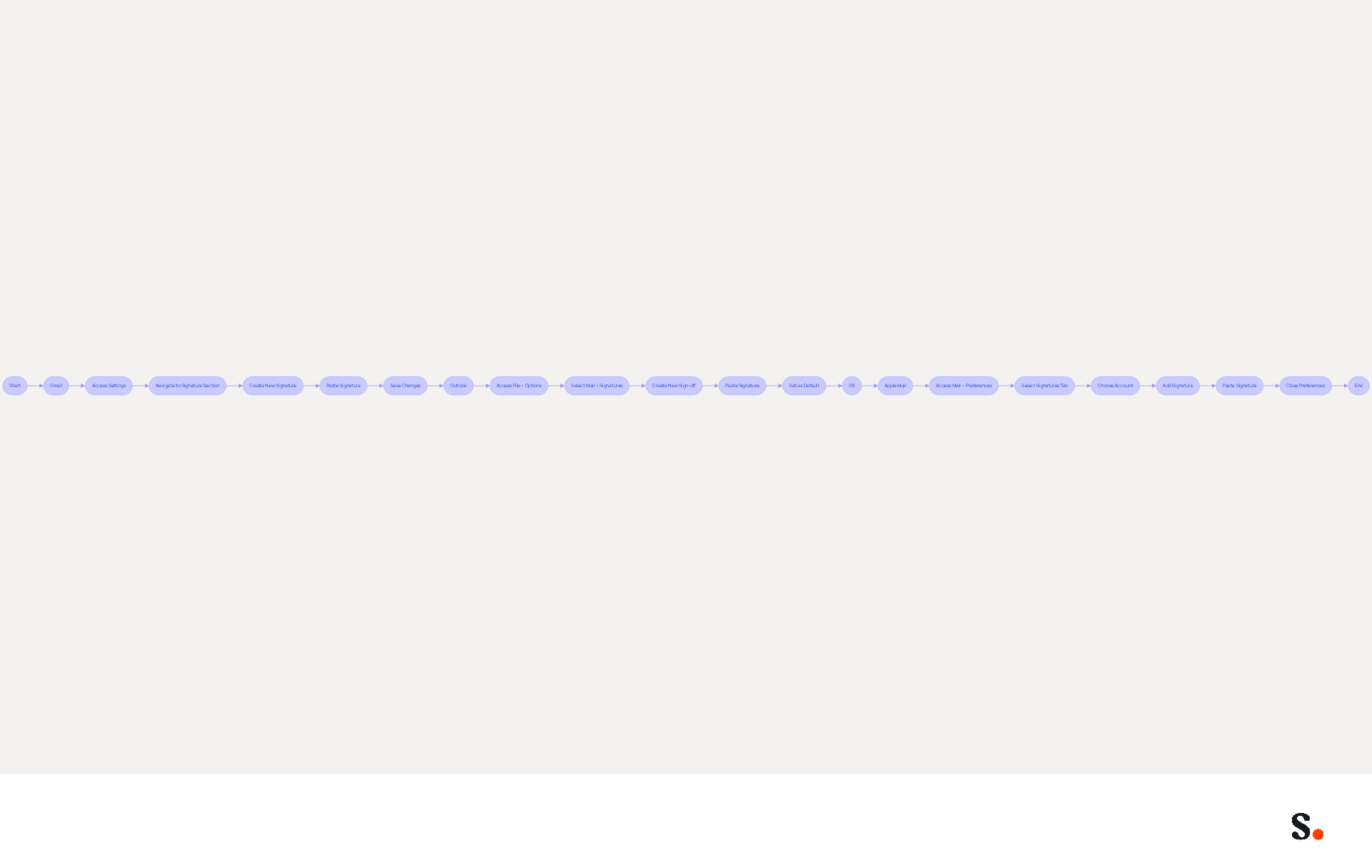
For Gmail:
- Open Gmail and click on the gear icon in the top right corner to access Settings.
- In the 'General' tab, scroll down to the 'Signature' section.
- Click 'Create new' and enter a name for your mark.
- Paste your designed mark into the text box.
- Scroll down and click 'Save Changes'.
For Outlook:
- Open Outlook and click on 'File' > 'Options'.
- Select 'Mail' and then click on 'Signatures'.
- Click 'New' to create a new sign-off and name it.
- Paste your mark into the editing box.
- Set it as the default designation for new messages and replies/forwards if desired, then click 'OK'.
For Apple Mail:
- Open Apple Mail and go to 'Mail' > 'Preferences'.
- Click on the 'Signatures' tab.
- Choose the account you wish to add the sign-off to and click the '+' button.
- Paste your autograph into the right-hand box.
- Close the preferences window to save changes.
Following these steps ensures your email signature is included in every message, thereby enhancing your professional image. With 89% of Americans over 15 utilizing electronic communication, research shows that an email signature can significantly impact how recipients perceive your professionalism. Furthermore, personalized messages are six times more likely to drive conversions, making this a valuable investment in your communication strategy.
Syncing Google Workspace with Scribe saves you time by automatically updating your teammates' information. Any changes in your Google Workspace, such as moving teammates from one group to another or updating their information, will be reflected in Scribe without any manual input. This automated management ensures brand consistency and compliance with SOC 2 Type II standards, providing secure data handling. Remember to enhance your email signature for mobile devices, as 75% of Gmail users access their messages on smartphones or tablets. Incorporating web-safe fonts and limiting colors will ensure your mark displays correctly across all devices. Including links to your social media profiles or website can further enhance engagement and visibility. Neglecting to optimize your email signature could hinder your professional communication efforts.
Maintain and Update Your Email Signature Regularly
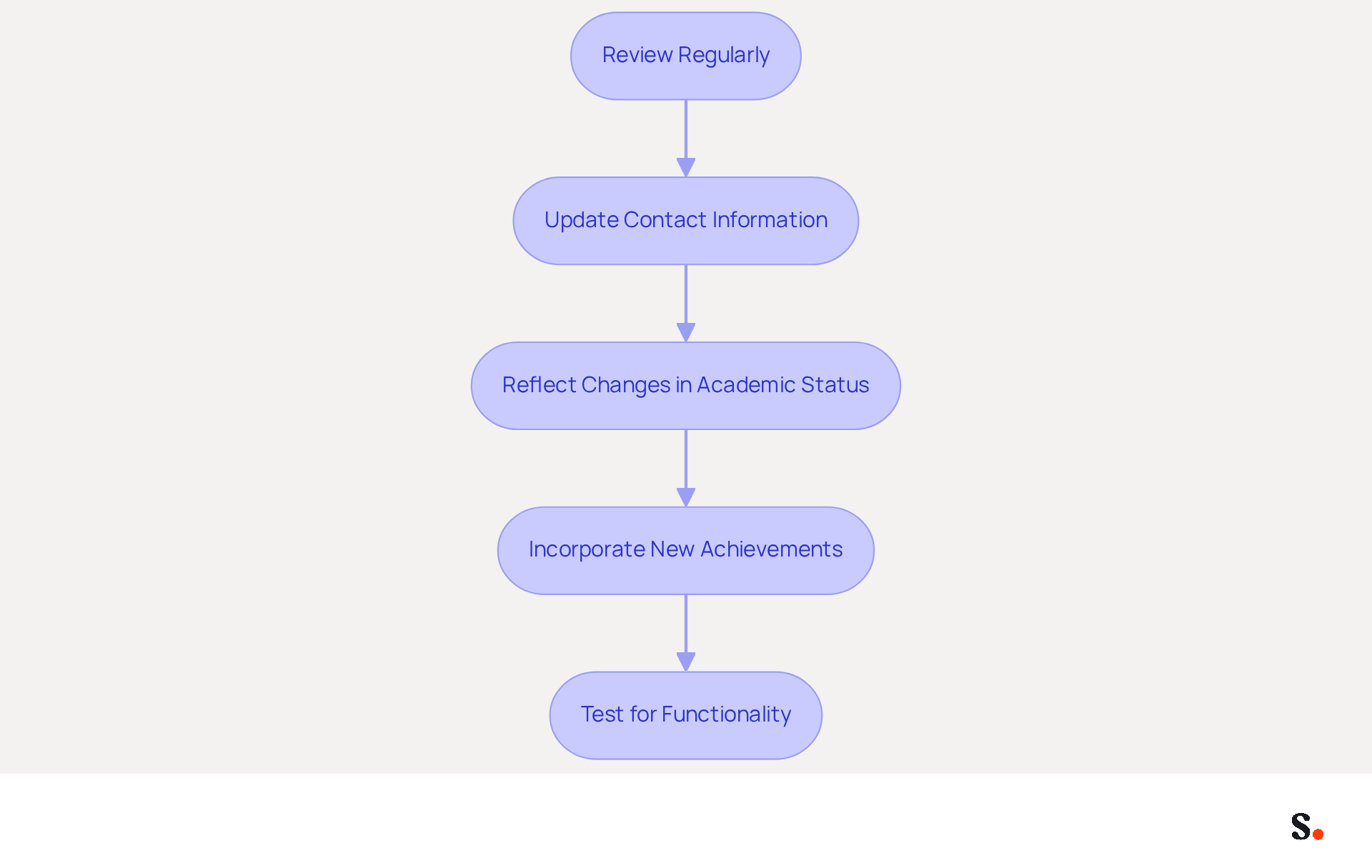
To maintain a professional image, it is essential to regularly update your email signature.
- Review Regularly: Schedule a reminder to assess your endorsement at least once every semester or whenever there are significant changes in your academic or professional status. Regular audits ensure your endorsement stays current and effective.
- Update Contact Information: Promptly revise your details if your phone number, email address, or any other contact information changes. Neglecting to update your contact details can result in missed opportunities and hinder effective communication.
- Reflect Changes in Academic Status: If you graduate or change your degree program, ensure your identification reflects your new status. This not only keeps your mark relevant but also enhances your professional image.
- Incorporate New Achievements: Regularly add any new awards, publications, or relevant experiences to your email footer. An updated email footer enhances your professional image and credibility.
- Test for Functionality: Periodically send test messages to yourself or friends to ensure that all links and formatting appear correctly. This step is crucial for maintaining professionalism in your communications.
An email signature graduate student that is well-maintained not only reflects your current status but also enhances your credibility in professional interactions.
Conclusion
For graduate students, a professional email signature is not just an accessory; it is a critical component of effective communication. Creating a professional email signature is an essential step for graduate students aiming to make a strong impression in their academic and professional communications. By incorporating key elements such as your full name, degree, university affiliation, and contact information, students can establish credibility and facilitate connections with potential employers and academic peers. A well-crafted signature boosts professionalism and acts as a digital identifier, shaping how recipients view your communication.
Throughout this guide, the importance of design and personalization has been emphasized. A clean layout, appropriate fonts, and the inclusion of university branding can elevate your signature's effectiveness. Additionally, integrating your signature into popular email clients like Gmail and Outlook ensures that it is consistently presented across all communications. Regular maintenance and updates to your signature are crucial for reflecting your current academic status and achievements, thereby enhancing your professional image.
In a competitive job market, a thoughtfully designed email signature can be a powerful tool for graduate students. It is not just about aesthetics; it is about creating a lasting impression that fosters engagement and opens doors to new opportunities. By implementing these best practices, students can enhance their branding and communication strategies, paving the way for future success.
Frequently Asked Questions
What are the essential components of an effective email signature for graduate students?
An effective email signature for graduate students should include the following components: full name, degree and major, university name, contact information (email address and phone number), a link to a LinkedIn profile or personal portfolio, preferred pronouns (if comfortable), and a professional picture or logo.
Why is it important for graduate students to have a well-designed email signature?
A well-designed email signature enhances professionalism and helps graduate students stand out in a competitive job market. It creates a memorable impact on prospective employers and academic connections, facilitating easier identification and communication.
How can including a LinkedIn profile or portfolio in an email signature benefit graduate students?
Including a LinkedIn profile or personal portfolio in an email signature allows graduate students to showcase their work and career background, providing additional context about their qualifications and experiences to recipients.
What role do pronouns play in an email signature?
Adding preferred pronouns in an email signature promotes inclusivity and helps recipients address the sender correctly, fostering a respectful communication environment.
How can a professional picture or logo enhance an email signature?
A professional picture or university logo can enhance the visual appeal of an email signature, making it more engaging and memorable for recipients.
What should graduate students do to ensure their contact information is accurate in their email signature?
Graduate students should review their contact information regularly to prevent errors and ensure precision, which is crucial for effective communication.
How can a well-crafted email signature impact a graduate student's professional journey?
A well-crafted email signature can be a key differentiator in a graduate student's professional journey, as it contributes to clear communication and a positive impression on recipients, which is vital for networking and job seeking.
List of Sources
- Identify Essential Components of Your Email Signature
- Email signatures for students in 2026: tips and real templates (https://mysignature.io/blog/why-do-students-need-personal-email-signatures)
- How to Create a Professional College, Master’s, or Graduate Student Email Signature | Scribendi (https://scribendi.com/academy/articles/college_student_email_signature.en.html)
- How to create a student email signature | mail.com blog (https://mail.com/blog/posts/student-email-signature/275)
- Email Signatures for College & Uni Students | Rocketseed (https://rocketseed.com/blog/email-signatures-for-students)
- A student's guide to professional email signatures | Signitic (https://signitic.com/en/resources/email-signature-student)
- Design Your Signature with Branding and Personalization
- Email signature statistics: Why every business should optimize their email signatures — Stripo.email (https://stripo.email/blog/email-signature-statistics-why-every-business-should-optimize-their-email-signatures)
- Email Signature Design Trends in 2026: What Works and What to Drop (https://bulksignature.com/blog/email-signature-design-trends)
- The impact of email signatures on your branding (https://signitic.com/en/resources/the-impact-of-email-signatures-on-your-branding)
- The benefits of a branded email signature (https://bybrand.io/blog/branded-email-signature)
- Why Are Email Signatures Key to Brand Awareness? | QuickMail (https://quickmail.com/role-of-email-signatures-in-brand-awareness)
- Integrate Your Signature into Email Clients
- 100 Compelling Email Statistics for 2026 | PGM Solutions (https://porchgroupmedia.com/blog/100-compelling-email-statistics-to-inform-your-strategy-in-2023)
- Professional Email Signatures - The Ultimate Guide (https://boostit.com.au/the-ultimate-guide-for-a-professional-business-email-signature)
- Email Signature Best Practices - NEWOLDSTAMP (https://newoldstamp.com/blog/email-signature-best-practices)
- Make Your Brand Stand Out: Easily Add an HTML Email Signature to Gmail and Outlook.
Here at Legal Growth, we help to make your brand stand out in customer emails. Add a professionally designed flare to each email sent from Gmail and Outlook with HTML email signatures. They can help promote important information such as contact details. Read on to learn how adding an HTML signature to your business emails is easy.
What HTML email signatures are and why they matter
HTML email signatures are necessary because they allow you to include stylised text and images in your email signature. It helps promote your brand or website or add personality to your emails. Additionally, HTML email signatures can include clickable links, making it easy for recipients to contact or visit your website. A good example is when you get an email from one of us here at Legal Growth.
Create an HTML email signature, Simply today.
When it comes to creating an HTML email signature, there are a few simple steps that you need to follow. To get started, you'll need to create a file called signature.html and then save it in your email signature folder. In this file, you can include any text or images you'd like to appear in your signature.
Next, you'll need to add the following code to your email template:
Your HTML content goes here.
Be sure to replace "Your HTML content goes here." with the actual content of your signature. You can also customise the appearance of your signature by adding some CSS styling. For example, you can add the following code to create a border around your signature:
.signature {
border: 1px solid black;
}
How to add an HTML email signature in Outlook and Gmail
Adding an HTML email signature in Outlook and Gmail is a great way to show your brand personality and add some flair to your emails. It can also be a great way to promote your business or website. This post will show you how to add an HTML email signature in Outlook and Gmail.
To add an HTML email signature in Outlook, follow these steps:
1. Open Outlook and click on the File tab.
2. Select Options from the menu.
3. Click on the Mail tab.
4. Select the Signature option and click on the Edit button in the Signature section.
5. In the Edit Signature window, enter your signature text in the text box and click on the OK button.
6. Click the OK button in the Options window to save your changes.
To add an HTML email signature in Gmail, follow these steps:
1. Open Gmail and click on the Settings gear icon.
2. Select Settings from the menu.
3. Click on the General tab.
4. In the Signature section, type your signature text in the text box and click on the Save Changes button.
Of course, if you are struggling to follow any of these tips or tricks, then please email or phone one of our team at Legal Growth, where we can take all the stress of it, smooth the process out and get you a professional-looking Signature that fits your brand the best.
Here are some tips for creating an HTML email signature:
-Keep your signature file size small. Large files can slow down the loading of your email messages.
-Include a link to your website or social media profile. It will help your contacts learn more about you and your business.
-Include a tagline that expresses who you are and what you do.
-Make sure your signature looks good on all devices. Test it on different devices and browsers to ensure that it looks correct.
Following these simple steps will help you create an HTML email signature that is both stylish and professional. If you want to learn more about adding an HTML email signature in Outlook and Gmail, check out our other post.
— Legal Growth (https://legalgrowth.co.uk/news/make-your-brand-stand-out-easily-add-an-html-email-signature-to-gmail-and-outlook) - The ultimate guide to email signatures in 2026 (https://signitic.com/en/resources/email-signature)
- Maintain and Update Your Email Signature Regularly
- Email signature statistics: Why every business should optimize their email signatures — Stripo.email (https://stripo.email/blog/email-signature-statistics-why-every-business-should-optimize-their-email-signatures)
- The impact of email signatures on your branding (https://signitic.com/en/resources/the-impact-of-email-signatures-on-your-branding)
- 4 Best Practices for a Personal Email Signature That Boosts Branding (https://scribe-mail.com/en-US/blog/4-best-practices-for-a-personal-email-signature-that-boosts-branding)
- Email Signature Best Practices (https://uschamber.com/co/grow/thrive/email-signature-best-practices)
Get started with Scribe
See why teams switch to Scribe
Free 14-day trial — no credit card.