Create an Email Signature with Master's Degree Example Using Scribe
Many professionals underestimate the significance of an email signature in their communication strategy, yet it holds the power to establish credibility and
Sophie Grant
Email Signature Specialist, Scribe
Introduction
Many professionals underestimate the significance of an email signature in their communication strategy, yet it holds the power to establish credibility and enhance brand recognition. With the right elements, such as a master's degree, an email signature can transform into a strategic marketing tool that not only conveys professionalism but also engages recipients effectively.
Understanding how to make signatures stand out while ensuring brand consistency and compliance is crucial for professionals. This guide outlines the essential components of an impactful email signature and illustrates how Scribe can streamline the creation and management process, empowering users to optimize their digital identifiers for maximum effect.
Understand the Importance of Email Signatures
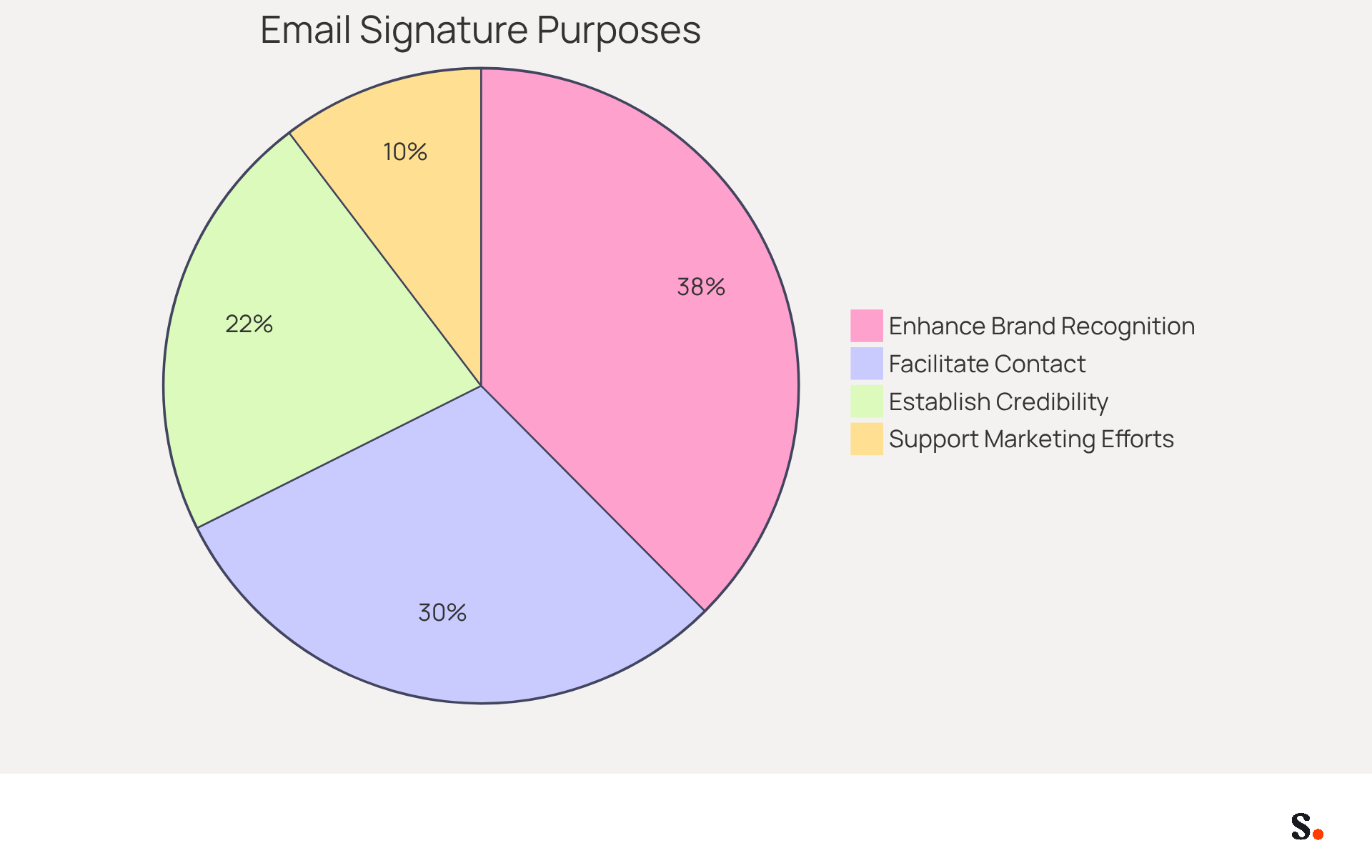
Many professionals underestimate the strategic importance of email footers in their communication efforts. A well-crafted email signature serves several key purposes, including:
- Establish Credibility: Including qualifications, such as a master's degree, signals expertise and professionalism to recipients. Research shows that 47% of prospects believe that professional endorsements enhance their trust in a brand, emphasizing the significance of displaying credentials.
- Enhance Brand Recognition: Consistent use of logos and branding elements in your correspondence strengthens brand identity with every message sent. Indeed, 80% of companies consider branded footers essential for establishing trust, and consistent branding can result in a 22% rise in response rates.
- Facilitate Contact: An endorsement provides essential contact information, making it easier for recipients to reach you. This accessibility is vital, as 64% of consumers anticipate contact information in correspondence, ensuring seamless communication.
- Support Marketing Efforts: Digital identifiers can incorporate promotional banners or calls to action, turning every message into a marketing opportunity. Using interactive banners can boost click rates by 22%, making digital identifiers a powerful tool for enhancing engagement and traffic.
Recognizing the strategic role of digital identifiers can significantly enhance your communication effectiveness and marketing outcomes.
Identify Key Components of an Effective Email Signature
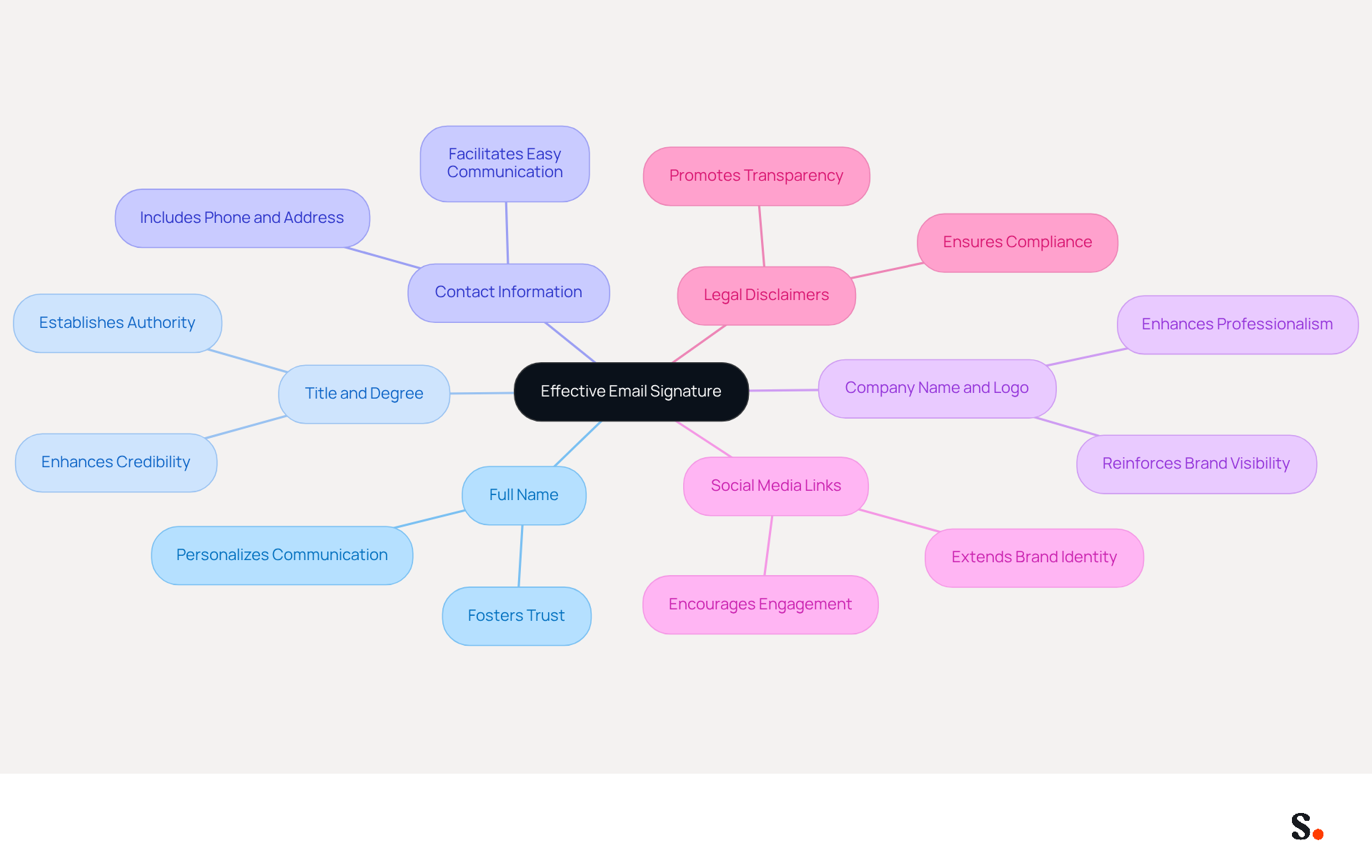
An effective email signature is crucial for establishing professionalism and enhancing brand representation. It should encompass several key components:
- Full Name: Clearly state your first and last name to personalize communication and foster trust.
- Title and Degree: To establish authority and credibility in your field, include your job title and relevant degrees (e.g., Jane Doe, MPA) in your email signature with master's degree example.
- Contact Information: Provide essential contact details, such as your phone number and contact address, ensuring recipients can easily reach you.
- Company Name and Logo: Incorporate your company’s name and logo to reinforce brand visibility and recognition in every communication.
- Social Media Links: Add recognizable social media icons instead of text links to enhance visual appeal and encourage networking and engagement with your audience.
- Legal Disclaimers: If applicable, include any necessary legal disclaimers relevant to your industry to ensure compliance and transparency.
Additionally, Scribe simplifies the management of digital identifiers with one-click synchronization. However, only Super Admins can grant these permissions, which may limit access for some users. All modifications made in your connected data sources, such as your business phone system or Aircall, will be automatically reflected in your identifiers. This streamlined process not only saves time but also ensures that your brand remains consistent across all communications. With Scribe's SOC 2 Type II compliance, you can feel confident that your data is secure while managing your digital identifiers. It is essential to test your message footer across different devices to ensure responsiveness and proper display. Studies indicate that teams with centralized message management see an 85% boost in identity consistency, emphasizing the significance of preserving a unified brand image across all interactions. By implementing these strategies, you can elevate your email signature with master's degree example from a simple sign-off to a strategic branding tool.
Utilize Scribe to Create and Manage Your Email Signature
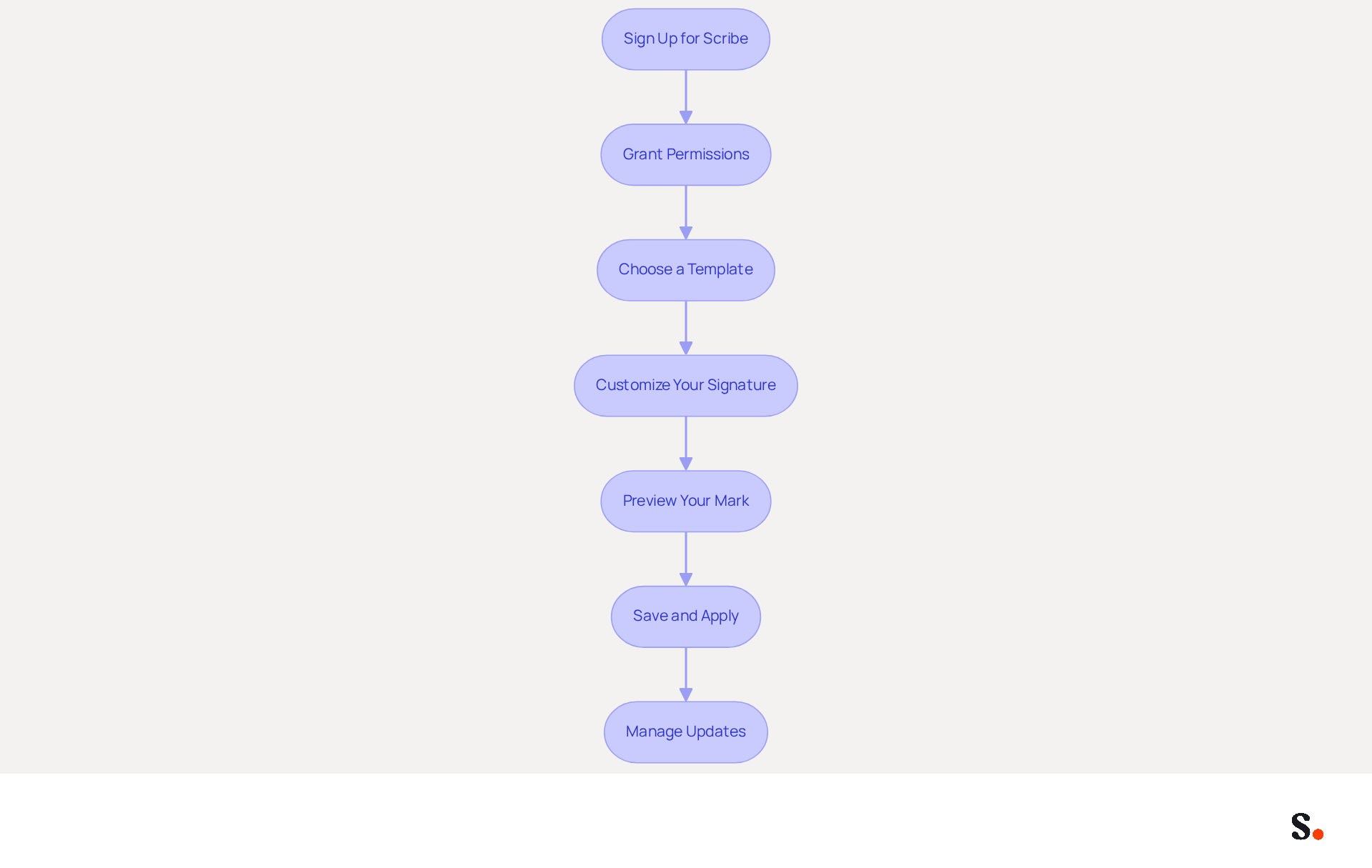
Creating an email signature with master's degree example is essential for effective communication and branding. To create and manage your email signature using Scribe, follow these steps:
- Sign Up for Scribe: Visit the website and create an account to get started.
- Grant Permissions: As a Super Admin of your provider, grant Scribe permission to connect with your account for one-click synchronization.
- Choose a Template: Select from a variety of professionally designed templates that align with your brand identity.
- Customize Your Signature: Input your details, including your full name, current position, contact information, and any additional elements like social media links or promotional banners. Incorporating these elements can significantly enhance your professional image and networking opportunities.
- Preview Your Mark: Utilize the preview feature to observe how your mark will appear across various messaging clients, ensuring it looks refined and professional.
- Save and Apply: Once you are satisfied with your design, store your mark and follow the instructions to apply it across your platforms. This ensures uniformity in all interactions.
- Manage Updates: Utilize Scribe’s management features to easily modify your identifier whenever necessary, keeping it aligned with your current role and any promotional content. With daily automatic syncing of teammate information, you can keep your communications fresh and relevant. For immediate updates, simply click 'Refresh' in the Teammates tab.
Using Scribe makes it easier to create an email signature with master's degree example, maintain a polished appearance in your emails, and turn your signature into a powerful marketing asset. By 2026, it's expected that 48% of marketers will use signature management tools to boost traffic, highlighting the growing importance of this strategy in digital marketing. Additionally, Scribe is SOC 2 Type II compliant, ensuring data security while managing digital identifiers. As digital marketing evolves, ensuring your email signature is optimized will be crucial for maintaining a competitive edge.
Test and Optimize Your Email Signature for All Platforms
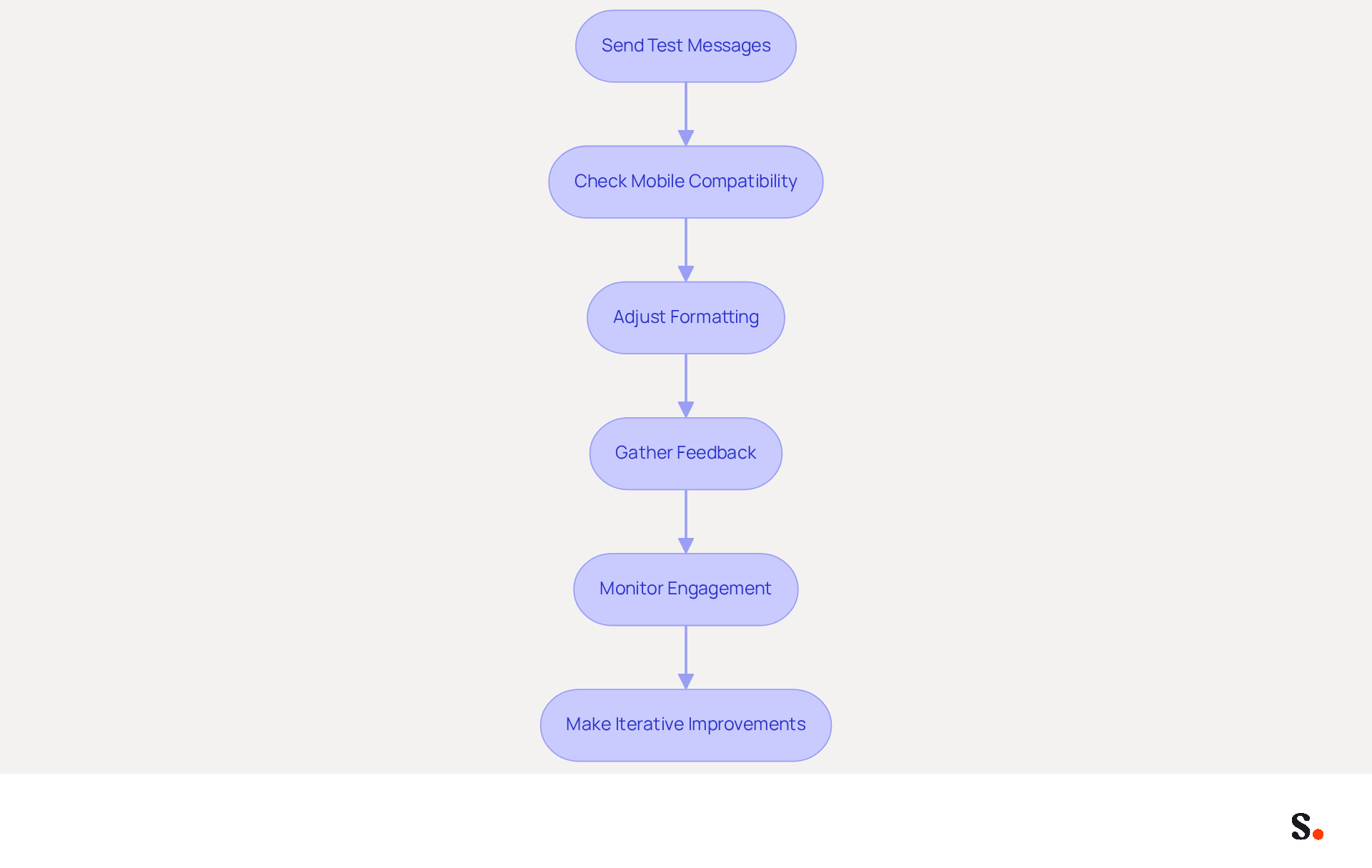
To ensure your email signature maintains its professionalism across all platforms, it is essential to follow these testing and optimization steps:
- Send Test Messages: Distribute messages to yourself and colleagues using various communication clients, such as Gmail and Outlook, to assess how the sign-off appears across different platforms.
- Check Mobile Compatibility: Review your mark on mobile devices to confirm it is responsive and visually appealing, keeping in mind that mobile screens typically have a width of around 400 pixels. Wider signatures can lead to readability issues, making it crucial to stay within mobile width limits.
- Adjust Formatting: If elements appear misaligned or distorted, modify the formatting in Scribe and resend test notifications until you achieve the desired look. To allow one-click synchronization, grant Scribe permission to connect with your service provider; this requires Super Admin access. This will enable modifications made in your Google Workspace to automatically appear in your communication identifiers, saving you time and ensuring brand consistency.
- Gather Feedback: Ask your colleagues for their thoughts on how the document looks and works to spot any potential issues. Documenting their feedback and your hypotheses will be crucial for future reference in A/B testing.
- Monitor Engagement: Utilize analytics tools to track engagement metrics related to your email footer, such as click-through rates on links or banners. A/B tests should run for a minimum of 14 days to account for statistical noise, ensuring reliable data. Scribe's average click-through rate on banners is 12%, demonstrating its effectiveness in enhancing engagement.
- Make Iterative Improvements: Based on the feedback and analytics data, implement necessary adjustments to further optimize your mark. Keep in mind that the operational expense of conducting A/B tests without a management platform can surpass the value of the test by a factor of 10 to 20, making it an effective option for this process. Additionally, Scribe's SOC 2 Type II compliance ensures that your data remains secure throughout this process.
By prioritizing these optimization steps, you can elevate your email signature's effectiveness and strengthen your brand's presence.
Conclusion
An effective email signature is more than just a visual element; it is a crucial component of professional communication and brand representation. By utilizing Scribe, professionals can create a polished email signature that showcases their qualifications, such as a master's degree, while ensuring brand consistency and compliance with security standards like SOC 2 Type II.
The article highlights the essential components of a successful email signature, including:
- Personal details
- Company branding
- Contact information
It emphasizes the importance of testing and optimizing signatures across various platforms to maintain professionalism and engagement. Scribe makes it easy to keep your email signature up to date with its user-friendly features, like one-click synchronization and management tools.
Leveraging tools like Scribe to create and manage email signatures can significantly enhance your branding and marketing efforts. By adopting best practices and utilizing Scribe's capabilities, professionals can transform their email signatures into powerful marketing assets that not only enhance credibility but also drive engagement and response rates. By refining your email signature, you not only enhance your professional image but also unlock new opportunities for engagement and connection.
Frequently Asked Questions
What is the importance of email signatures in professional communication?
Email signatures are strategically important as they establish credibility, enhance brand recognition, facilitate contact, and support marketing efforts.
How do email signatures establish credibility?
Including qualifications, such as a master's degree, signals expertise and professionalism, which can enhance trust in a brand. Research indicates that 47% of prospects believe professional endorsements increase their trust.
How can email signatures enhance brand recognition?
Consistent use of logos and branding elements in email signatures strengthens brand identity. 80% of companies consider branded footers essential for establishing trust, and consistent branding can lead to a 22% increase in response rates.
Why is it important to facilitate contact through email signatures?
Email signatures provide essential contact information, making it easier for recipients to reach you. 64% of consumers expect contact information in correspondence, which ensures seamless communication.
How can email signatures support marketing efforts?
Email signatures can include promotional banners or calls to action, turning every message into a marketing opportunity. Using interactive banners can boost click rates by 22%, enhancing engagement and traffic.
List of Sources
- Understand the Importance of Email Signatures
- The impact of email signatures on your branding (https://signitic.com/en/resources/the-impact-of-email-signatures-on-your-branding)
- Why Email Signatures Must Be In Your 2026 Marketing Plan | Rocketseed (https://rocketseed.com/blog/2026-marketing-plan-email-signatures)
- Research Recap: Branded Email Signatures Increase Company Recognition, Trust - Demand Gen Report (https://demandgenreport.com/industry-news/research-recap-branded-email-signatures-increase-company-recognition-trust/47252)
- 12 clever ways to use your email signature to support your marketing campaigns (https://blog.hubspot.com/blog/tabid/6307/bid/31054/10-clever-ways-your-email-signature-can-support-your-marketing.aspx)
- Why Are Email Signatures Key to Brand Awareness? | QuickMail (https://quickmail.com/role-of-email-signatures-in-brand-awareness)
- Identify Key Components of an Effective Email Signature
- Email Signature Best Practices Guide With Examples - MailerLite (https://mailerlite.com/blog/email-signature-best-practices)
- The Importance Of Email Signatures | Email Marketing Blog | Mail Blaze (https://mailblaze.com/thinking/email-signatures-in-email-marketing)
- What's a Good Email Signature? Key Components vs. Common Mistakes (https://scribe-mail.com/en-US/blog/what-s-a-good-email-signature-key-components-vs-common-mistakes)
- What to Include in a Business Email Signature (https://rocketseed.com/blog/email-signature-what-to-include)
- Crafting the Perfect Email Signature: Tips, Types, and Best Practices for Today's Professionals - Frey Design (https://freydesigngroup.com/blog/crafting-the-perfect-email-signature)
- Utilize Scribe to Create and Manage Your Email Signature
- Why Email Signature Management Software is Essential for Marketing Success (https://scribe-mail.com/en-US/blog/why-email-signature-management-software-is-essential-for-marketing-success)
- 40+ Email Signature Statistics for 2026 (Data + Insights) (https://wavecnct.com/blogs/email-signature-statistics)
- Master Setting Up Email Signatures with Scribe: A Step-by-Step Guide (https://scribe-mail.com/en-US/blog/master-setting-up-email-signatures-with-scribe-a-step-by-step-guide)
- Scribe vs. Competitors: Best Email Signature Management Tools Compared (https://scribe-mail.com/en-US/blog/scribe-vs-competitors-best-email-signature-management-tools-compared)
- Best Practices for Email Signatures: Tips for Recent Graduates (https://scribe-mail.com/en-US/blog/best-practices-for-email-signatures-tips-for-recent-graduates)
- Test and Optimize Your Email Signature for All Platforms
- Optimise Your Email Signature for Mobile Devices (https://globalbankingandfinance.com/why-optimising-brand-email-signatures-for-mobile-devices-is-essential-for-hybrid-working)
- Email Signature A/B Testing: Methodology, UTM and GA4 Guide (https://signitic.com/en/resources/a-b-testing-your-email-signature-methodology-and-kpis)
- How to Optimize Your Email Signature for Mobile Devices - Gimmio (https://blog.gimm.io/how-to-optimize-your-email-signature-for-mobile-devices)
- Seeing Is Believing: Eye-Tracking Test Shows What Works In Email Signatures (https://mediapost.com/publications/article/416520/seeing-is-believing-eye-tracking-test-shows-what.html)
Get started with Scribe
Build a professional email signature
Free 14-day trial — no credit card.