Create Digital Signatures: A Step-by-Step Guide for Marketers
Despite the critical role of digital communication, many professionals struggle with ensuring secure and trustworthy interactions. Digital signatures are
Sophie Grant
Email Signature Specialist, Scribe

Introduction
Despite the critical role of digital communication, many professionals struggle with ensuring secure and trustworthy interactions. Digital signatures are essential tools for marketers, ensuring the authenticity and integrity of electronic documents while enhancing customer trust. However, despite their importance, many professionals find the creation process challenging. Marketers need effective strategies to navigate the digital signature landscape, streamlining processes and enhancing brand integrity. This guide will walk you through mastering digital signatures, helping marketers leverage this technology for better operational efficiency and customer engagement.
Understand Digital Signatures and Their Importance
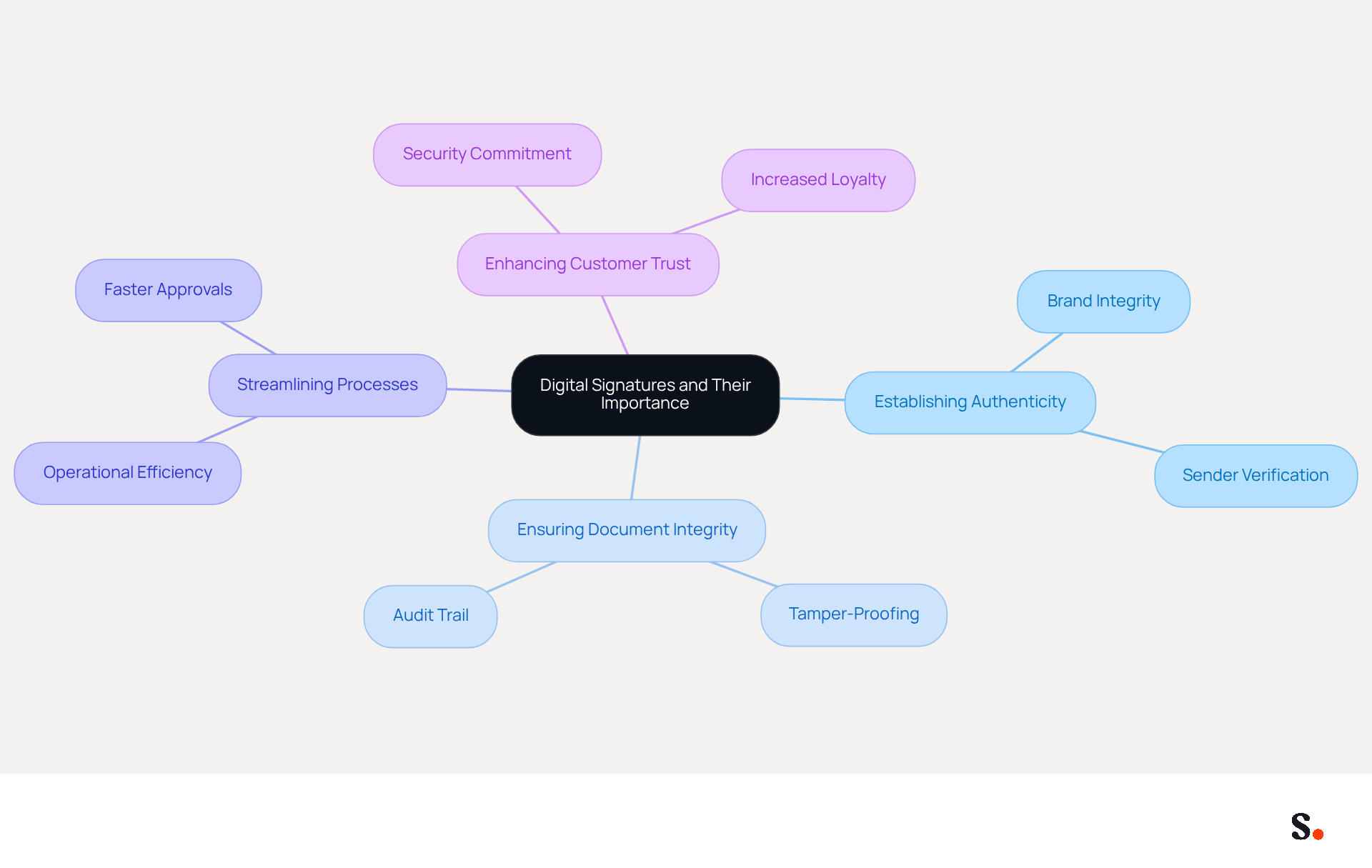
In an era where digital communication is paramount, ensuring the authenticity and integrity of electronic messages is more critical than ever. Electronic identifiers employ cryptographic methods to confirm the authenticity and integrity of electronic messages or documents, functioning as a virtual fingerprint that ensures the document remains unchanged after signing. In the marketing environment, electronic endorsements are crucial for building trust and security, greatly influencing customer relationships. They contribute to:
- Establishing Authenticity: By confirming the sender's identity, digital signatures play a crucial role in maintaining brand integrity, reassuring customers that communications are legitimate.
- Ensuring Document Integrity: Without electronic endorsements, documents are vulnerable to tampering, which can undermine trust and reliability.
- Streamlining Processes: Digital endorsements facilitate quicker approvals and transactions, significantly reducing the time spent on paperwork and enhancing operational efficiency. Scribe integrates seamlessly with Google Workspace, allowing automatic updates of email identifiers to save time and maintain brand consistency.
- Enhancing Customer Trust: The implementation of electronic identifiers enables businesses to demonstrate a commitment to security, assuring customers that their interactions are safeguarded. Moreover, Scribe's seamless integration with Calendly guarantees that any modifications made to your scheduling setup automatically sync with your email branding, further enhancing brand consistency.
Scribe meets SOC 2 Type II compliance and follows GDPR and CCPA standards, ensuring your data is secure. Research shows that [organizations using electronic identifiers see a significant rise in customer confidence](https://finance departments use digital documentation tools at 53%.), translating into increased loyalty and repeat business for organizations that adopt these technologies. Moreover, the electronic authentication market is anticipated to reach 613 billion USD in 2023, emphasizing the increasing significance of this technology in the marketing arena. Furthermore, 36% of companies intend to expand or upgrade their electronic document process solutions, reflecting a trend towards improved security and efficiency. Real-world applications show that companies utilizing electronic methods not only enhance their brand integrity but also improve customer satisfaction by minimizing friction in transactions. As electronic endorsements become a standard practice, marketers must comprehend their significance in fostering trust and ensuring secure communications, particularly when using Scribe for automated email endorsement management. Notably, Scribe's distinctive banners achieve an average click-through rate of 12%, showcasing their effectiveness in driving engagement. As the reliance on electronic endorsements grows, businesses that prioritize these solutions will likely see enhanced customer loyalty and operational efficiency.
Explore Tools for Creating Digital Signatures
In the evolving landscape of electronic identifiers, several applications distinguish themselves through unique features and benefits. Here are some of the most popular options:
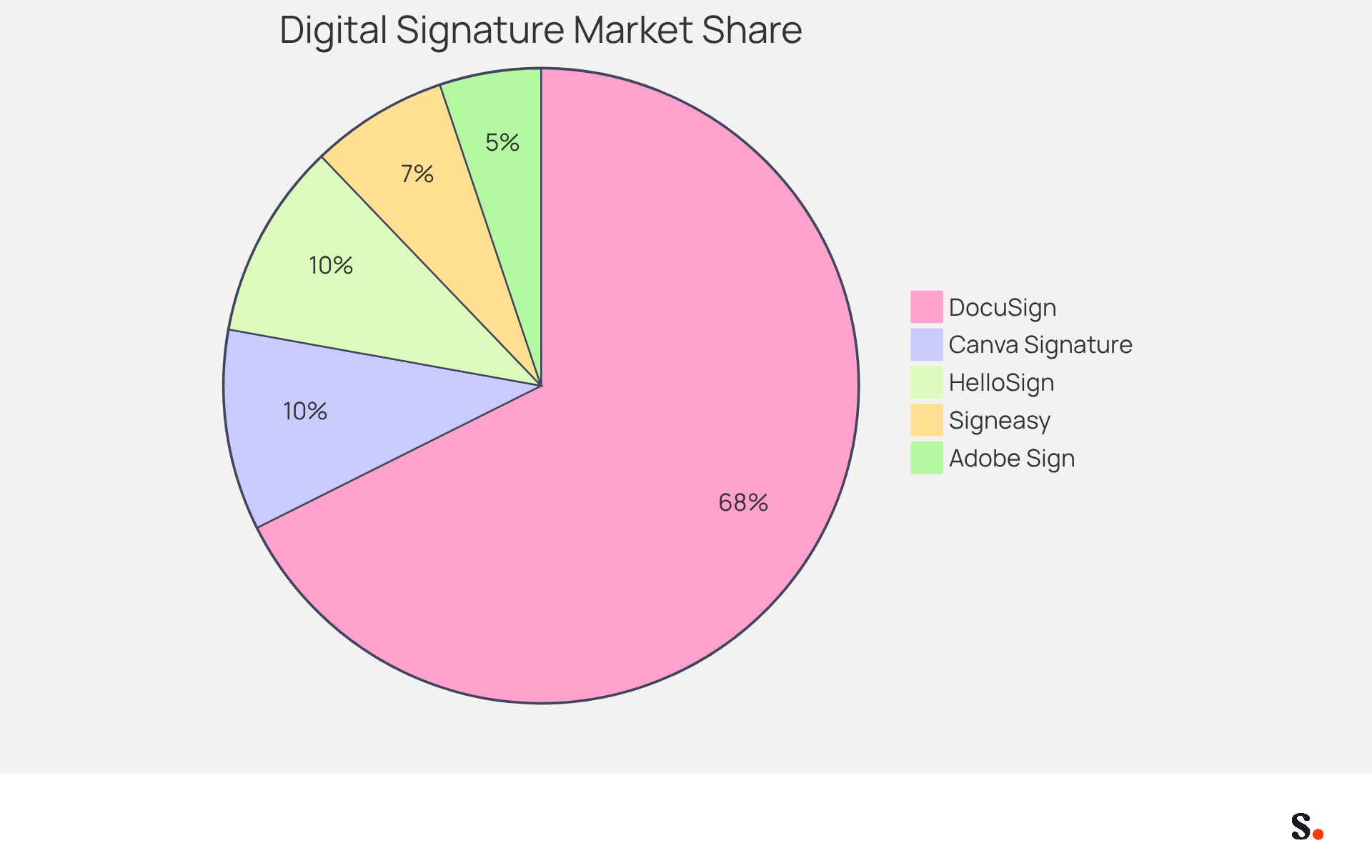
- DocuSign: Renowned for its user-friendly interface, DocuSign allows businesses to create and manage digital signatures effortlessly. It offers a variety of templates and integrates seamlessly with numerous applications, making it a preferred choice for many organizations. Notably, DocuSign holds a substantial market share of 67.62%, reflecting its strong position in the e-signature industry.
- Adobe Sign: As part of the Adobe suite, Adobe Sign is known for its robust security features and compliance with industry standards. It offers extensive resources for generating electronic identifiers, guaranteeing that files are both secure and legally enforceable. Adobe Sign's pricing starts at $12.99 per month per user, making it accessible for various business needs.
- HelloSign: This application is particularly user-friendly, allowing users to create signature digital signatures quickly. Many users appreciate its ease of use, which stands out as a significant advantage. HelloSign also integrates with popular platforms like Google Drive, enhancing its utility for marketers.
- Signeasy: Designed with mobile users in mind, Signeasy allows for convenient signing of documents on the go, making it ideal for professionals who require flexibility in their signing processes. This application is especially beneficial for professionals who need to manage their workflows remotely.
- Canva Signature Generator: A free option, this resource allows users to create electronic marks by drawing or typing their names, which can then be easily downloaded for use. This is a great choice for individuals or small businesses looking for a cost-effective solution.
The electronic authentication market is anticipated to grow considerably, with the U.S. sector expected to increase at a CAGR of 37.6% from 2024 to 2030. As the market expands, businesses will increasingly depend on electronic signing solutions to streamline their operations and ensure compliance. When selecting an electronic signing solution, it's crucial to evaluate user-friendliness, integration capabilities, and security features, as these factors can significantly influence your marketing objectives. Ultimately, the right electronic signing solution can significantly impact your operational efficiency and compliance in a rapidly changing market.
Follow Step-by-Step Instructions to Create Your Digital Signature
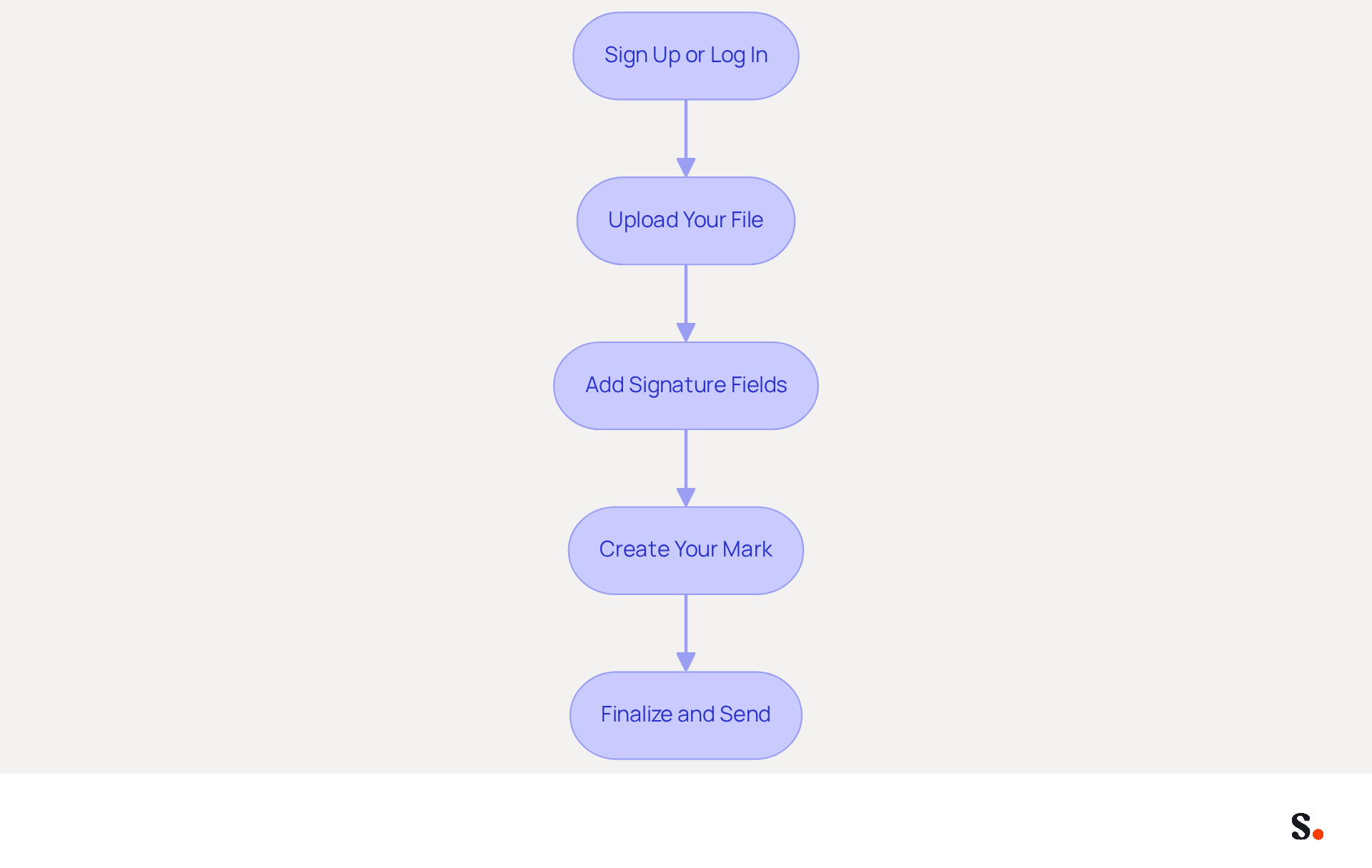
Many professionals struggle with the complexities of digital signatures, leading to delays in document processing. Here’s how to create a digital mark using DocuSign as an example:
- Sign Up or Log In: Create an account on DocuSign or log in if you already have one.
- Upload Your File: Click on 'New' and select 'Send an Envelope' to upload the file you want to sign.
- Add Signature Fields: Drag and drop the signing field onto the document where you want your mark to appear.
- Create Your Mark: Click on the field for your mark, and you will be prompted to create your mark. You can draw it, type it, or upload an image of your handwritten mark.
- Finalize and Send: Once you’re satisfied with your mark, click 'Finish' to save it. You can then send the file for signing or download it for your records.
Following these steps will help you create signature digital marks that not only streamline your workflow but also boost the integrity of your communications. Statistics indicate that utilizing electronic approvals can enhance conversion rates and reduce the sales cycle by as much as 400%, according to Drysign. Additionally, 83% of users cite [security as the primary benefit of e-signatures](https://finance departments use digital documentation tools at 53%.), as noted by DocuSign, further emphasizing their importance in maintaining trust with clients. Furthermore, adopting e-signatures contributes positively to environmental sustainability, as companies can save significant resources by reducing paper usage. Real-world instances show that marketers who utilize electronic methods experience enhanced efficiency and customer satisfaction, reinforcing their position in contemporary marketing strategies. Embracing e-signatures not only streamlines your workflow but also fortifies your brand's trustworthiness in the eyes of clients.
Troubleshoot Common Issues in Digital Signature Creation
While creating digital identifiers is generally straightforward, users often face challenges that can hinder the process. Here are solutions to help troubleshoot these problems:
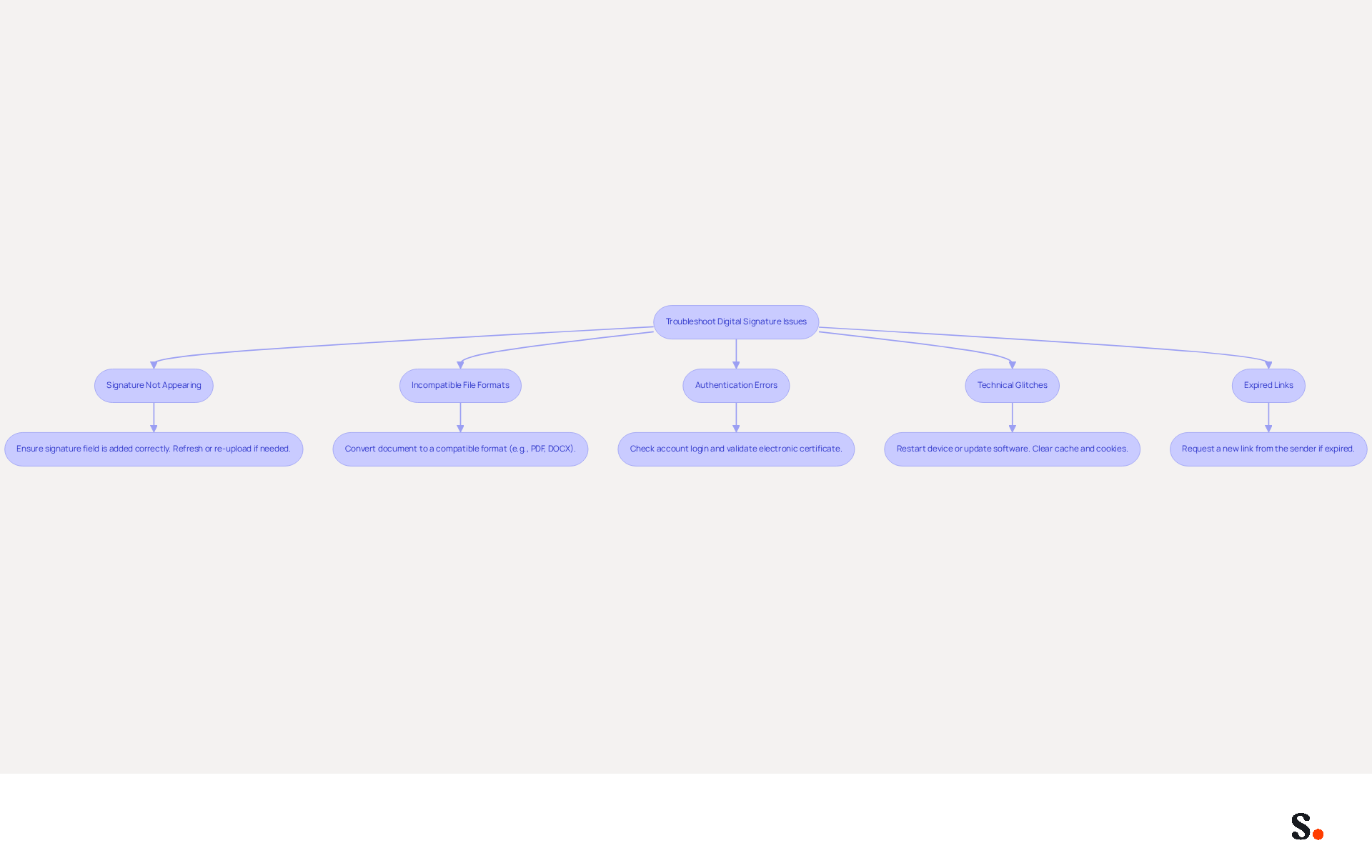
- Signature Not Appearing: Ensure that you have added the signature field correctly in your document. If it still doesn’t show up, try refreshing the page or re-uploading the file.
- Incompatible File Formats: Make sure the document you are trying to sign is in a compatible format (e.g., PDF, DOCX). If not, convert it to a supported format before uploading.
- Authentication Errors: Authentication errors can disrupt your signing process, leading to frustration. Ensure you are logged into the correct account and that your electronic certificate is valid. A Docusign survey reveals that 75% of electronic signing users find the process easy, underscoring the importance of proper authentication.
- Technical Glitches: Restart your device or update your software to the latest version to resolve any technical issues that may arise. Clearing your browser's cache and cookies can also help resolve many common eSignature problems.
- Expired Links: If you are using a link to access a document for signing, ensure that the link has not expired. If it has, request a new link from the sender.
By addressing these common issues, you not only streamline your signing process but also enhance your operational efficiency. Additionally, companies can save an average of $28 for each signed agreement, making it worthwhile to troubleshoot effectively. The number of global e-signature transactions has climbed from 198 million to 4,754 million, highlighting the growing importance of resolving these common issues.
Conclusion
In an era where digital communication is paramount, the role of digital signatures in marketing cannot be overstated. Digital signatures serve as a powerful tool for businesses, enhancing brand integrity and streamlining processes while fostering customer trust. As the digital landscape continues to evolve, marketers face challenges in adapting to these changes, making it crucial to understand digital signatures for maintaining a competitive advantage.
Throughout this guide, we have explored the importance of digital signatures in marketing, the various tools available for creating them, and a step-by-step process for implementation. From establishing authenticity to ensuring document integrity, the benefits of digital signatures are clear. Additionally, troubleshooting common issues can significantly improve operational efficiency, allowing marketers to focus on their core objectives.
Organizations must prioritize the adoption of digital signatures to boost customer loyalty and improve operational efficiency. This adoption leads to improved client relationships and a more robust marketing strategy. By using tools like Scribe, which offers fast deployment and ease of use, marketers can easily leverage the benefits of digital signatures, ensuring brand consistency and a clear return on investment. Organizations that fail to adopt digital signatures risk falling behind in a competitive market, jeopardizing both efficiency and client trust.
Frequently Asked Questions
What are digital signatures and why are they important?
Digital signatures are electronic identifiers that use cryptographic methods to confirm the authenticity and integrity of electronic messages or documents. They are important because they act as a virtual fingerprint, ensuring that documents remain unchanged after signing and helping to establish trust in digital communications.
How do digital signatures establish authenticity?
Digital signatures confirm the sender's identity, which helps maintain brand integrity and reassures customers that communications are legitimate.
What role do digital signatures play in ensuring document integrity?
Digital signatures protect documents from tampering, which can undermine trust and reliability in electronic communications.
How do digital signatures streamline processes?
Digital endorsements facilitate quicker approvals and transactions, significantly reducing the time spent on paperwork and enhancing operational efficiency.
How does Scribe integrate with other tools?
Scribe integrates seamlessly with Google Workspace, allowing for automatic updates of email identifiers to save time and maintain brand consistency. It also integrates with Calendly to ensure that any modifications to scheduling setups automatically sync with email branding.
What compliance standards does Scribe meet?
Scribe meets SOC 2 Type II compliance and follows GDPR and CCPA standards, ensuring that user data is secure.
What impact do electronic identifiers have on customer trust?
The implementation of electronic identifiers demonstrates a commitment to security, assuring customers that their interactions are safeguarded, which enhances customer trust.
What is the projected growth of the electronic authentication market?
The electronic authentication market is anticipated to reach 613 billion USD in 2023, highlighting the increasing significance of this technology.
What trends are observed regarding companies and electronic document processes?
Research indicates that 36% of companies intend to expand or upgrade their electronic document process solutions, reflecting a trend towards improved security and efficiency.
How do digital signatures affect customer satisfaction?
Companies utilizing electronic methods enhance their brand integrity and improve customer satisfaction by minimizing friction in transactions.
What is the average click-through rate for Scribe's distinctive banners?
Scribe's distinctive banners achieve an average click-through rate of 12%, showcasing their effectiveness in driving engagement.
Why is it important for marketers to understand digital signatures?
As electronic endorsements become standard practice, marketers must comprehend their significance in fostering trust and ensuring secure communications, particularly when using Scribe for automated email endorsement management.
List of Sources
- Understand Digital Signatures and Their Importance
- Discover The Power and Importance of Digital Signatures (https://globalsign.com/en/blog/power-and-importance-digital-signatures)
- Digital Signatures in E-commerce: Security and Trust in Online Commerce | OKDOKUMENT (https://okdokument.com/en/blog/digital-signatures-in-e-commerce-security-and-trust-in-onlin)
- E-signature and Digital Document Statistics By Market Size, Usage and Facts (https://electroiq.com/stats/e-signature-and-digital-document-statistics)
- How digital signatures changed modern business (https://papercut.com/blog/insights/from-paper-to-pixels-how-digital-signatures-changed-modern-business)
- Why are Digital Signatures Important? (https://foxit.com/blog/the-importance-of-digital-signatures)
- Explore Tools for Creating Digital Signatures
- Digital Signature Providers 2026: Top 8 Solutions (https://signeasy.com/blog/business/digital-signature-providers)
- Top 8 e-signature software providers for 2026 | TechTarget (https://techtarget.com/searchcontentmanagement/tip/Top-e-signature-software-providers)
- Electronic signature market share by company 2026| Statista (https://statista.com/statistics/1338004/electronic-signature-market-share-by-company?srsltid=AfmBOoofmSYmn0DuxnpZDJ2V0ovVPo_21mDtYE1oAQ_g_MX3Qej_fQlu)
- The 6 best electronic signature apps in 2026 (https://zapier.com/blog/best-digital-signature-apps)
- E-signature and Digital Document Statistics By Market Size, Usage and Facts (https://electroiq.com/stats/e-signature-and-digital-document-statistics)
- Follow Step-by-Step Instructions to Create Your Digital Signature
- 25+ Eye-opening e-signature statistics for 2025 (https://forms.app/en/blog/e-signature-statistics)
- Creating a Signature in DocuSign | UCSF IT (https://it.ucsf.edu/how-to/creating-signature-docusign)
- How to Create Digital Signatures (https://docusign.com/learn/create-digital-signatures)
- Docusign digital signatures (https://docusign.com/products/digital-signature)
- How to Create an Electronic Signature (https://docusign.com/en-gb/blog/how-to-create-electronic-signature)
- Troubleshoot Common Issues in Digital Signature Creation
- E-signature and Digital Document Statistics By Market Size, Usage and Facts (https://electroiq.com/stats/e-signature-and-digital-document-statistics)
- 25+ Eye-opening e-signature statistics for 2025 (https://forms.app/en/blog/e-signature-statistics)
- eSignature Not Working? 5 Troubleshooting Tricks to Try (https://greenfiling.com/blog/esignature-not-working-5-troubleshooting-tricks-to-try)
- 5 eSignature troubleshooting tricks you should know - One Legal (https://onelegal.com/blog/esignature-troubleshooting-tricks)
Get started with Scribe
See why teams switch to Scribe
Free 14-day trial — no credit card.