Create Your Handwritten Signature Online in 5 Easy Steps
Amidst the overwhelming array of digital communication tools, the handwritten signature stands out as a crucial element for establishing authenticity and
Sophie Grant
Email Signature Specialist, Scribe

On this page
- Introduction
- Understand the Importance of a Handwritten Signature Online
- Follow These 5 Steps to Create Your Handwritten Signature Online
- Troubleshoot Common Issues When Creating Your Signature
- Explore Recommended Tools for Creating Handwritten Signatures
- Conclusion
- Frequently Asked Questions
- List of Sources
Introduction
Amidst the overwhelming array of digital communication tools, the handwritten signature stands out as a crucial element for establishing authenticity and connection. Creating a unique signature online enhances professionalism and fosters trust in business interactions, making it essential for effective communication.
With countless options available, many individuals struggle to find the right tool that captures their unique identity in a signature. This guide will clarify the steps necessary to design a signature that stands out and aligns with personal branding.
Understand the Importance of a Handwritten Signature Online
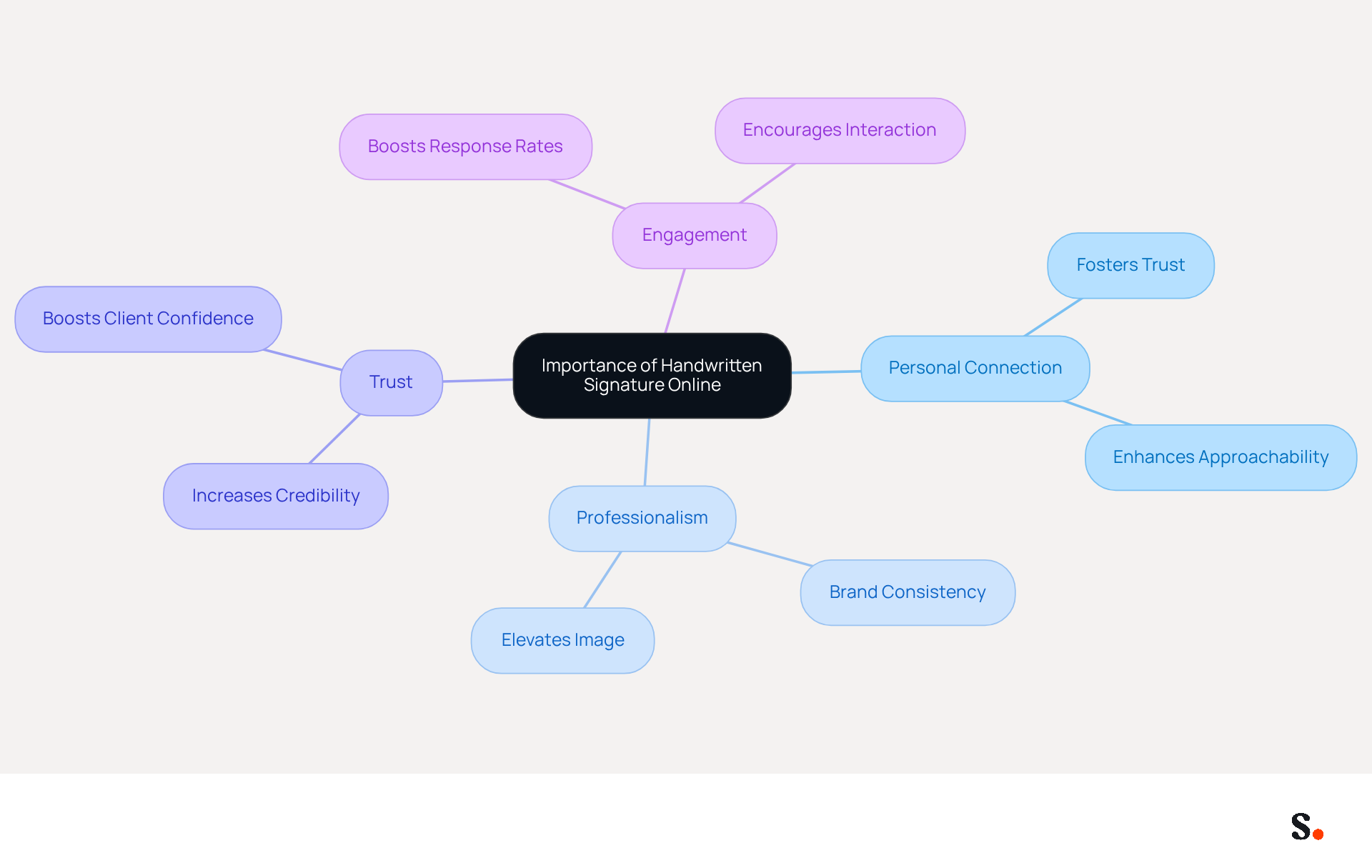
In an era dominated by digital communication, establishing a personal connection can be challenging. To create signature handwritten marks is to transcend mere identification; it embodies your personal brand and authenticity. To bring warmth and trustworthiness to your emails and documents, you can create signature handwritten marks. This personal touch not only conveys professionalism but also fosters trust among clients and colleagues.
Studies indicate that emails with handwritten elements significantly boost response rates, with branded features increasing engagement by 22%. Moreover, a distinctive mark helps you stand out in a crowded online environment, making your communications more memorable. By creating a signature handwritten mark online, you ensure that your digital presence reflects your individuality and professionalism, which is crucial in business interactions.
This strategy not only strengthens your brand image but also builds trust and approachability among your audience. Furthermore, with the seamless integration of the platform with Calendly, all modifications made to your Calendly settings automatically sync with your documents, ensuring brand consistency and effortless updates.
Scribe ensures your data is handled securely by adhering to SOC 2 Type II compliance and GDPR/CCPA standards. Incorporating promotional elements such as links to offers or social media can further enhance the effectiveness of your handwritten mark in driving engagement. Ultimately, the right personal touch can transform your digital interactions into meaningful connections.
Follow These 5 Steps to Create Your Handwritten Signature Online
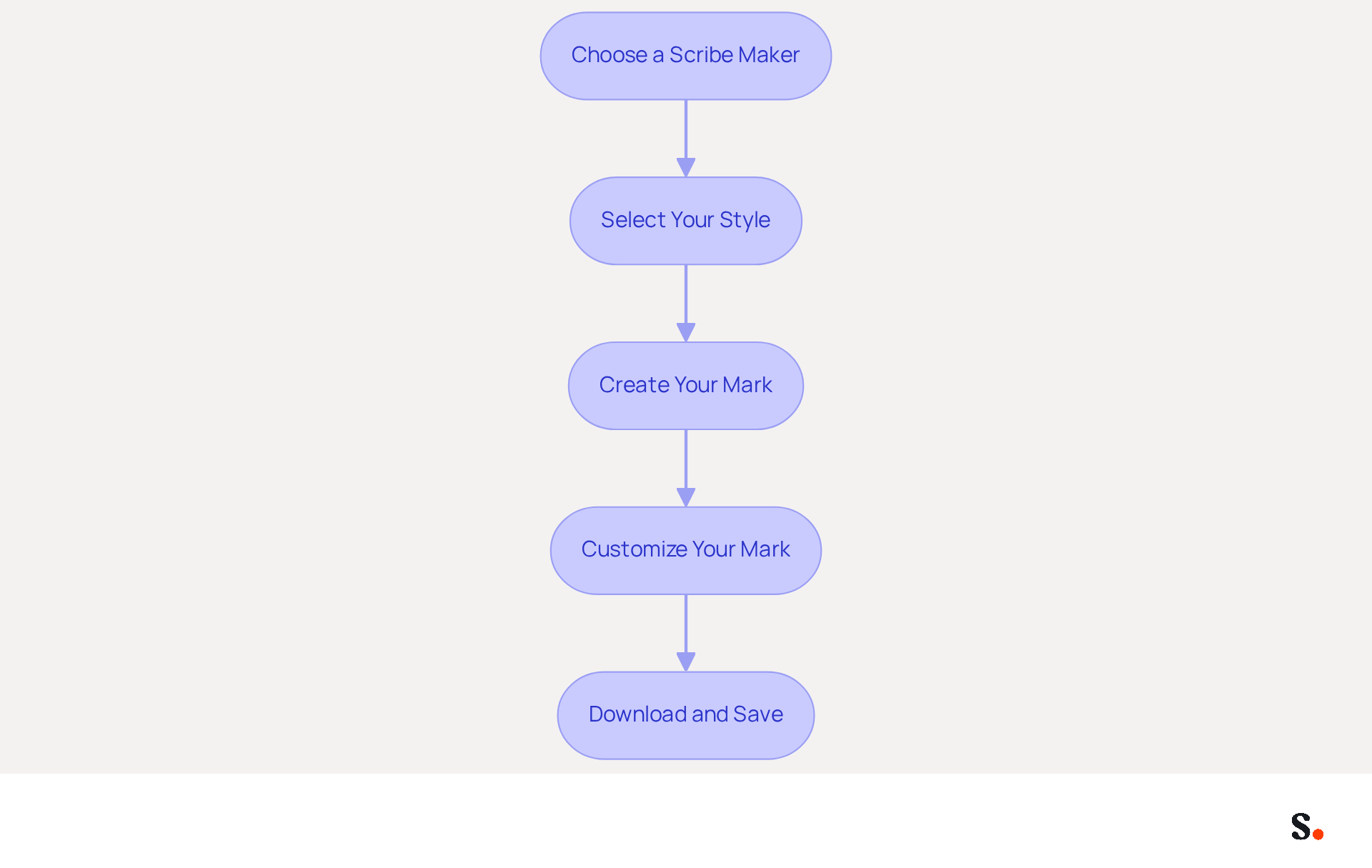
- Choose a Scribe Maker: Selecting the right online generator is crucial for effective email signature management. Options like WeSignature, Signaturely, and CocoSign are popular for their user-friendly interfaces and customization features. This tool syncs with your Google Workspace, saving time by automatically updating your teammates' contact information.
- Select Your Style: Decide whether to draw your name using a mouse or stylus, or type it out using a font that mimics handwriting. Many platforms, including Scribe, allow you to customize font style, size, and color to match your personal aesthetic.
- Create Your Mark: If you decide to draw, feel free to use your finger, stylus, or mouse to create your mark. Take your time to ensure it accurately reflects your personal style. If typing, select a font that best represents your handwriting.
- Customize Your Mark: After creating your mark, enhance it by adding elements such as your title, company name, or a personal tagline. This can elevate its professional appearance and make it more recognizable. With Scribe, any modifications in your Google Workspace, such as relocating teammates or updating their details, will be automatically reflected in your email footers.
- Download and Save: Once you are satisfied with your mark, download it in your preferred format (PNG, JPG, etc.). Ensure you save it in an easily accessible location for future use in emails and documents. Remember, electronic autographs are legally binding in over 60 nations, and embracing electronic signatures not only enhances professionalism but also significantly reduces operational costs.
Troubleshoot Common Issues When Creating Your Signature
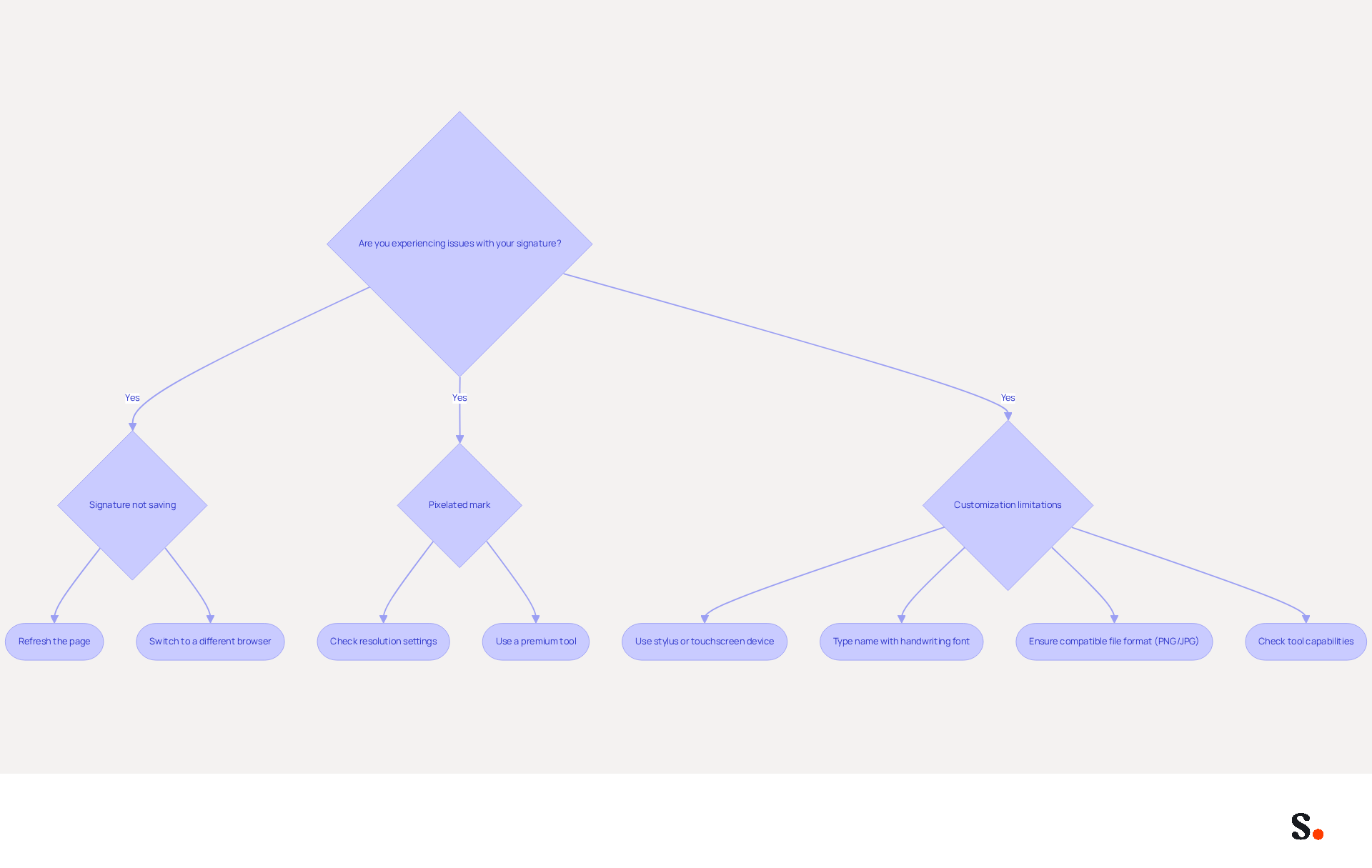
Many users experience issues with their signatures not saving, often due to unstable internet connections. Refreshing the page or switching to a different browser may resolve this issue. Notably, 60% of e-signature users find it easier to work with other systems through integrations, which can streamline the process.
Users often achieve better results when using a stylus or touchscreen device to create handwritten signatures. Alternatively, typing your name with a handwriting font can be a feasible option. Research indicates that users who utilize updated browsers or mobile applications experience a smoother signing process, minimizing challenges.
To ensure the document appears correctly, confirm that you are downloading in a compatible file format (PNG or JPG) for your intended use. Standardized templates can help prevent format-related issues, ensuring that every required field is correctly placed.
If you cannot customize your mark as desired, check if the tool you’re using supports those features. Some free tools may have limitations compared to premium versions. Understanding the capabilities of your chosen platform can help you avoid frustration.
If the mark appears pixelated or of low quality, try increasing the resolution settings in the maker before downloading. Enhancing the quality of your electronic signatures can lead to a substantial reduction in signing errors, ultimately improving your workflow efficiency.
Explore Recommended Tools for Creating Handwritten Signatures
In an era where digital signatures are becoming essential, various tools have emerged to meet the growing demand for secure and efficient signature management.
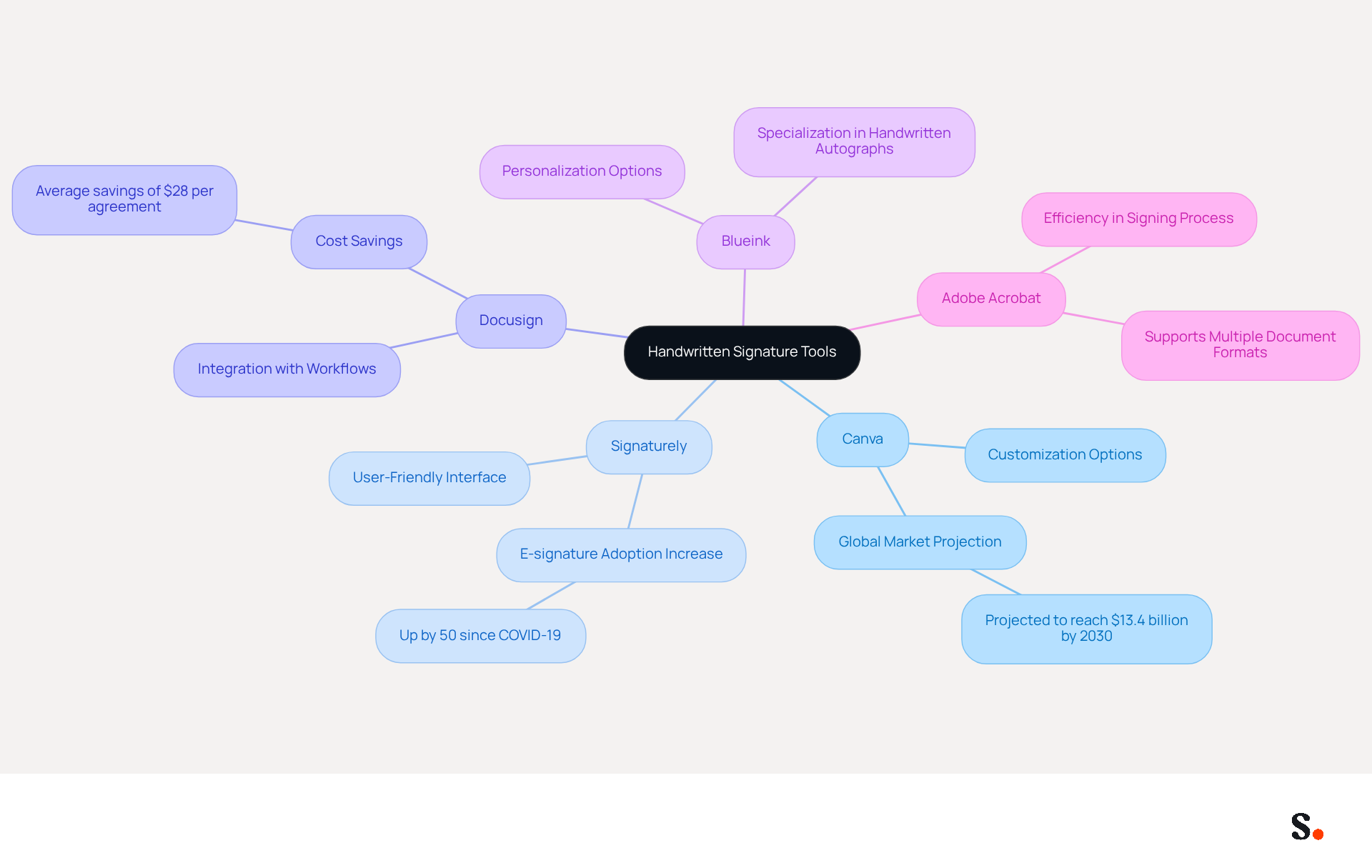
- Canva: Known for its design capabilities, Canva offers a generator that allows users to draw or type their autographs with various customization options. This tool is appealing, especially with the global digital authentication market projected to reach $13.4 billion by 2030. This reflects a growing demand for reliable solutions.
- Signaturely: This tool provides a simple interface for creating and managing your marks, with options to type or draw your sign securely. As businesses increasingly adopt e-signatures - up by 50% since the onset of the COVID-19 pandemic - Signaturely stands out for its user-friendly approach.
- Docusign: A popular choice for businesses, Docusign not only allows for the creation of electronic approvals but also integrates with document signing workflows, making it ideal for professional use. On average, e-signatures save $28 per agreement signed. This cost-effectiveness can significantly impact a business's bottom line, making Docusign an essential tool for modern operations.
- Blueink: This platform specializes in creating signature handwritten autographs and offers a variety of styles to choose from, ensuring a personalized touch. The growing need for electronic authentication in fields such as healthcare and BFSI highlights the importance of tools like Blueink.
- For those who frequently work with PDFs, Adobe Acrobat’s signature tool allows users to create signature handwritten and insert them directly into documents, streamlining the signing process. This efficiency is vital; organizations that embrace advanced digital documentation are far less likely to lose customers than those stuck with manual processes.
As the landscape of digital authentication evolves, leveraging these tools can provide businesses with a competitive edge in efficiency and security.
Conclusion
A handwritten signature is more than just a visual element; it plays a crucial role in personal branding and effective communication. By following the outlined steps, many individuals find it challenging to create a signature that truly represents their identity while fostering trust and professionalism in their interactions. This personal touch can enhance the impact of emails and documents, making them stand out in a crowded inbox.
The article detailed a straightforward five-step process to create a handwritten signature, emphasizing the importance of:
- Choosing the right tools
- Customizing styles
- Troubleshooting common issues
It also highlighted the benefits of using platforms like Scribe, which ensure seamless integration with existing systems and compliance with security standards such as SOC 2 Type II, GDPR, and CCPA. These features not only enhance user experience but also contribute to brand consistency and operational efficiency.
In a world where digital communication is paramount, the significance of a well-crafted handwritten signature cannot be overstated. Think of it as a bridge that connects your personal touch with your professional image. Embracing this practice can lead to improved engagement and a stronger brand presence. Ultimately, a distinctive handwritten signature can transform how individuals and organizations are perceived in the digital realm.
Frequently Asked Questions
Why is a handwritten signature important in online communication?
A handwritten signature transcends mere identification; it embodies your personal brand and authenticity, bringing warmth and trustworthiness to your emails and documents.
How does a handwritten signature affect response rates?
Studies indicate that emails with handwritten elements significantly boost response rates, with branded features increasing engagement by 22%.
What benefits does a distinctive handwritten mark provide?
A distinctive handwritten mark helps you stand out in a crowded online environment, making your communications more memorable and fostering trust among clients and colleagues.
How does creating a handwritten signature impact brand image?
Creating a handwritten signature strengthens your brand image and builds trust and approachability among your audience.
What integration features does Scribe offer with Calendly?
Scribe seamlessly integrates with Calendly, ensuring that all modifications made to your Calendly settings automatically sync with your documents for brand consistency and effortless updates.
How does Scribe ensure data security?
Scribe ensures data is handled securely by adhering to SOC 2 Type II compliance and GDPR/CCPA standards.
Can promotional elements be included in a handwritten signature?
Yes, incorporating promotional elements such as links to offers or social media can enhance the effectiveness of your handwritten mark in driving engagement.
What is the overall impact of a handwritten signature on digital interactions?
The right personal touch of a handwritten signature can transform digital interactions into meaningful connections.
List of Sources
- Understand the Importance of a Handwritten Signature Online
- 40+ Email Signature Statistics for 2026 (Data + Insights) (https://wavecnct.com/blogs/email-signature-statistics)
- The Benefits of Adding a Handwritten Digital Signature to Business Emails (https://morebusiness.com/benefits-of-adding-a-handwritten-digital-signature-to-business-emails)
- Email signature statistics: Why every business should optimize their email signatures — Stripo.email (https://stripo.email/blog/email-signature-statistics-why-every-business-should-optimize-their-email-signatures)
- Best Email Signature Quotes (2026) - HubSpot (https://hubspot.com/email-signature-generator/best-signature-quotes)
- Has the hand-written signature had its day? (https://bbc.com/news/business-37824227)
- Follow These 5 Steps to Create Your Handwritten Signature Online
- Signature Generator – Free Online Digital Signature Maker | Docusign (https://docusign.com/signature-generator)
- How to Create a Handwritten Signature Online in 2026 | WeSignature (https://wesignature.com/blog/how-to-create-handwritten-signature-online)
- Best Online Signature Makers | Fill eSignature (https://fillhq.com/blog/best-online-signature-makers-free-paid)
- Free Online Signature Generator (Type or Draw) | Signaturely (https://signaturely.com/online-signature)
- Troubleshoot Common Issues When Creating Your Signature
- 25+ Eye-opening e-signature statistics for 2025 (https://forms.app/en/blog/e-signature-statistics)
- 6 statistics about e-signatures: How do they help you in business? (https://nfqes.com/blog/statistics-about-electronic-signatures)
- eSignature Not Working? 5 Troubleshooting Tricks to Try (https://greenfiling.com/blog/esignature-not-working-5-troubleshooting-tricks-to-try)
- Why Digital Signature Is Not Working: Common Causes | SignNow (https://resources.signnow.com/info-esignature/why-digital-signature-is-not-working)
- Explore Recommended Tools for Creating Handwritten Signatures
- Digital Signature Market Size, Share & Global Report [2034] (https://fortunebusinessinsights.com/industry-reports/digital-signature-market-100356)
- Online signature generator: Create an online signature | Adobe Acrobat (https://adobe.com/acrobat/guides/online-signature-generator.html)
- Signature Generator – Free Online Digital Signature Maker | Docusign (https://docusign.com/signature-generator)
- Digital Signature Market Size, Share & Growth Report, 2032 (https://persistencemarketresearch.com/market-research/digital-signature-market.asp)
- 20+ E-Signature and Digital Document Statistics (https://explodingtopics.com/blog/esignature-stats)
Get started with Scribe
Manage signatures across your whole team
Free 14-day trial — no credit card.