Create Your Outlook Signature for Mac in 4 Easy Steps
A professional email signature in Outlook for Mac serves as a crucial branding tool that shapes recipient perceptions of a business. With studies showing that
Sophie Grant
Email Signature Specialist, Scribe
Introduction
A professional email signature in Outlook for Mac serves as a crucial branding tool that shapes recipient perceptions of a business. With studies showing that a well-crafted signature can enhance trust and engagement, it is important for organizations to know how to create and customize this digital identifier effectively.
Many users find it difficult to create signatures that effectively represent their brand and engage recipients. Navigating these challenges is essential for maximizing the effectiveness of email communications and enhancing brand perception.
Create Your Email Signature in Outlook for Mac
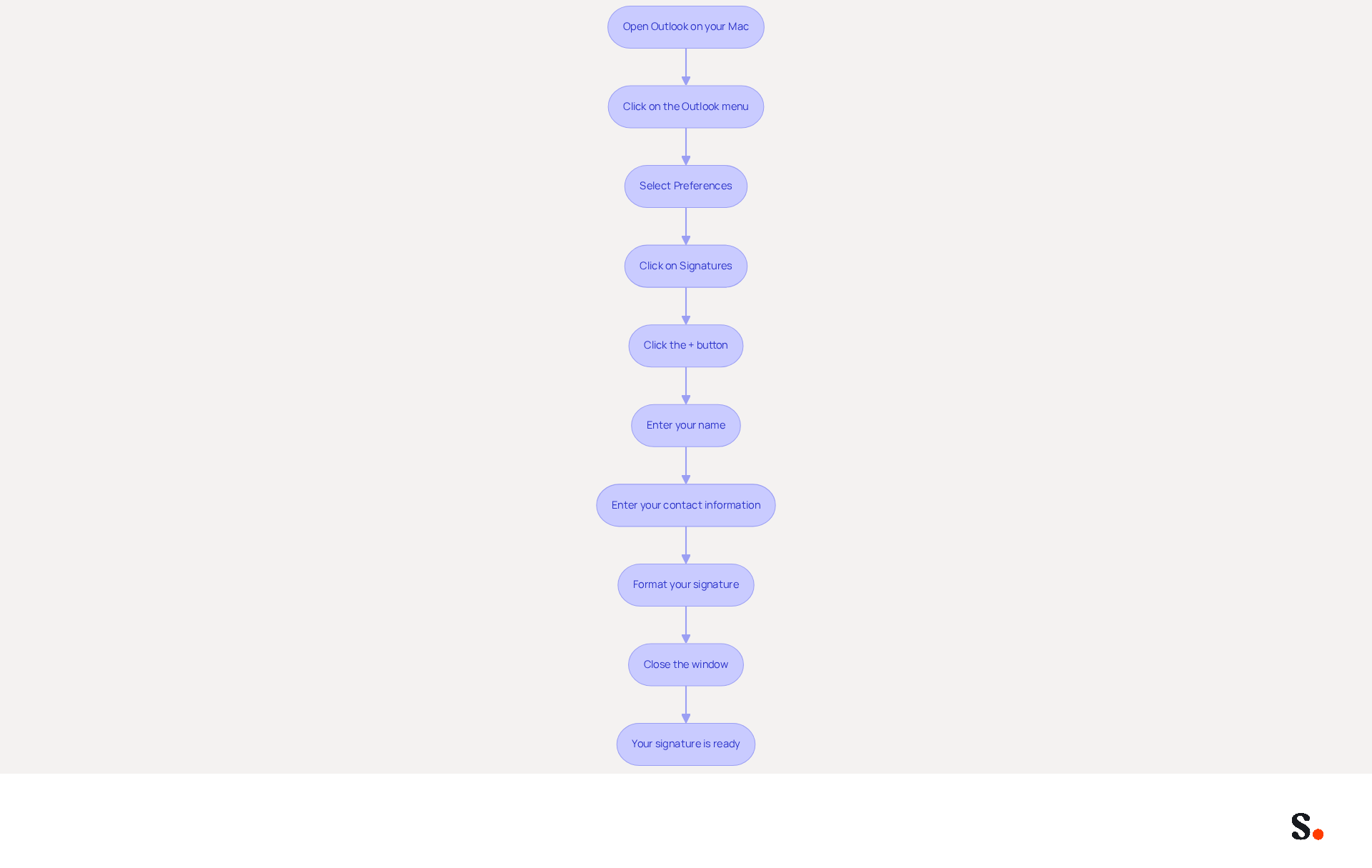
- Open Outlook on your Mac.
- Click on the 'Outlook' menu in the top left corner.
- Select 'Preferences' from the dropdown menu.
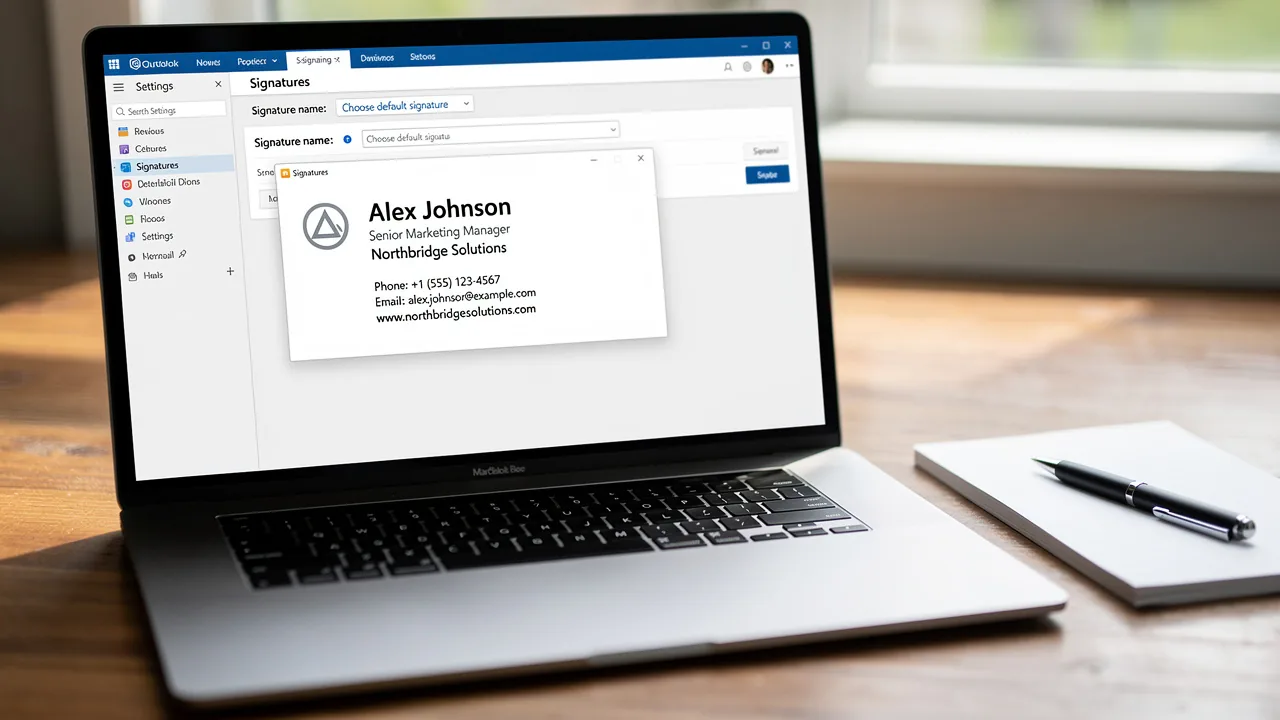
- In the Preferences window, click on 'Signatures' to set up your Outlook signature for Mac.
- Click the '+' button to create a new signature.
- Enter your name in the 'Name' field.
- In the text box, enter your name, title, company name, and contact information.
- Format your signature using the available tools (font size, color, etc.) to match your brand's style.
- Once satisfied, close the window to save your changes.
- Your new Outlook signature for Mac is now ready to be used in your messages.
In a competitive business landscape, the way you present your communication can significantly influence perceptions. Statistics indicate that 42% of consumers have a negative perception of a business when they receive a message lacking a branded signature, emphasizing the significance of this branding opportunity. Moreover, companies using branded digital identifiers can experience a 15% rise in website click-through rates compared to those that do not.
Case studies indicate that 76% of marketers believe branded identifiers enhance sender trust, leading to a 22% boost in response rates. This highlights the effectiveness of a well-designed communication footer as a key asset, rather than merely a formality. Ultimately, a well-crafted email signature can be a decisive factor in how your brand is perceived in the digital space.
Customize Your Signature for Brand Consistency
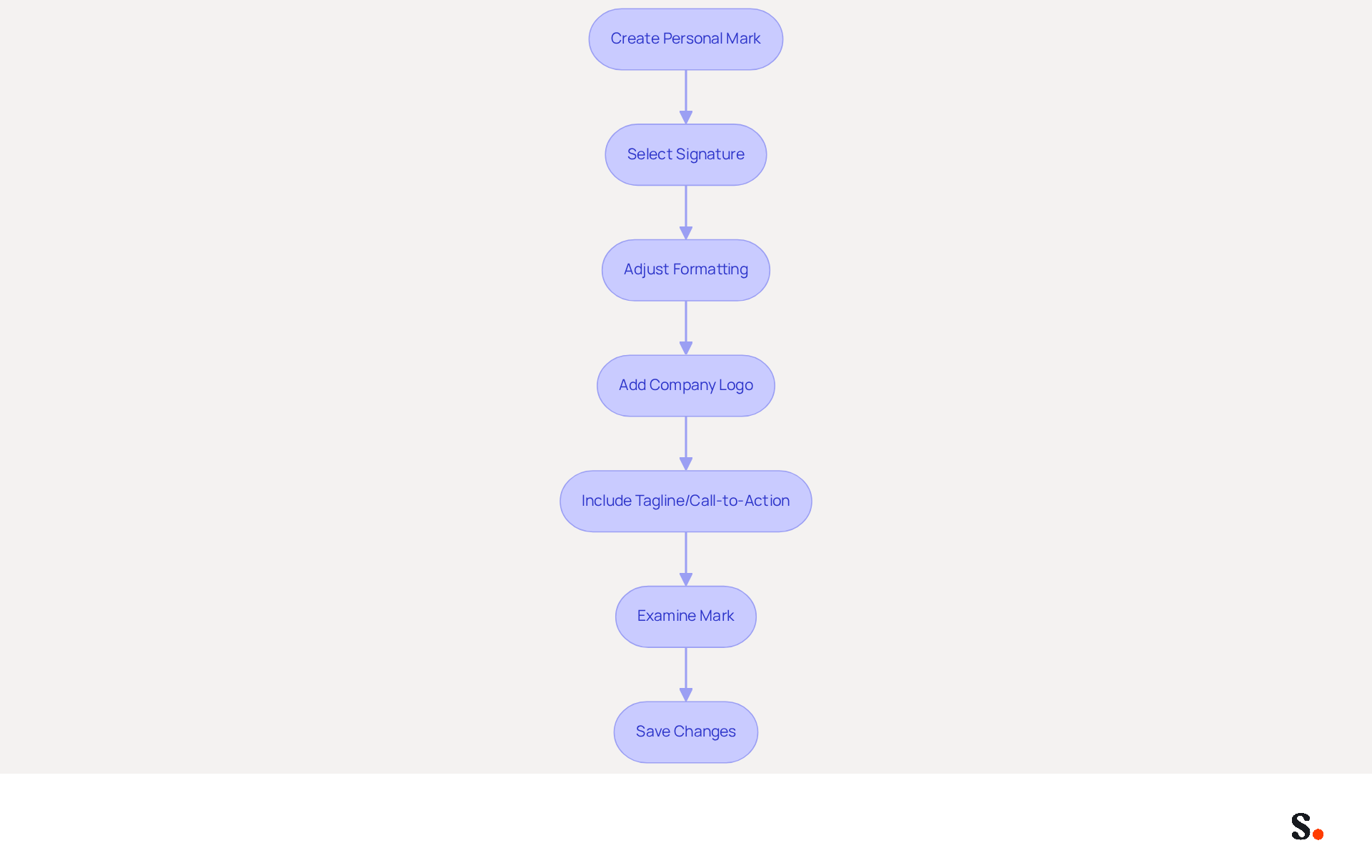
- After creating your personal mark, return to the 'Signatures' section in the Outlook signature for Mac Preferences.
- Select the Outlook signature for Mac that you just created.
- Use the formatting tools to adjust the font style, size, and color to match your company’s branding guidelines.
- Consider adding your company logo by clicking on the image icon in the formatting toolbar.
- Ensure that your mark includes essential elements such as your company’s tagline or a call-to-action (e.g., 'Visit our website!').
- Examine your mark to ensure it represents your identity and is visually appealing.
- Save your changes to finalize the customization of your Outlook signature for Mac.
As digital communication evolves, the need for consistent branding becomes increasingly critical. Companies that prioritize consistent identity will see an 85% improvement in identity consistency and a threefold increase in campaign engagement. This effective management not only enhances brand perception but also drives customer engagement. A well-designed electronic communication footer serves as not just a professional touchpoint, but also a strategic marketing tool, transforming every message into an opportunity to reinforce your identity. With your email signatures automatically synchronized with your business phone system, any updates made in your Aircall configuration are ensured to be reflected in real-time. This effortless management allows marketing teams to maintain consistency while ensuring secure data handling, as Scribe is SOC 2 Type II compliant. Branding experts highlight the importance of balancing standardization with personalization, ensuring that every communication reinforces the overall brand image.
Add Your Signature to Emails in Outlook for Mac
Maintaining updated email signatures is crucial for effective communication and brand representation.
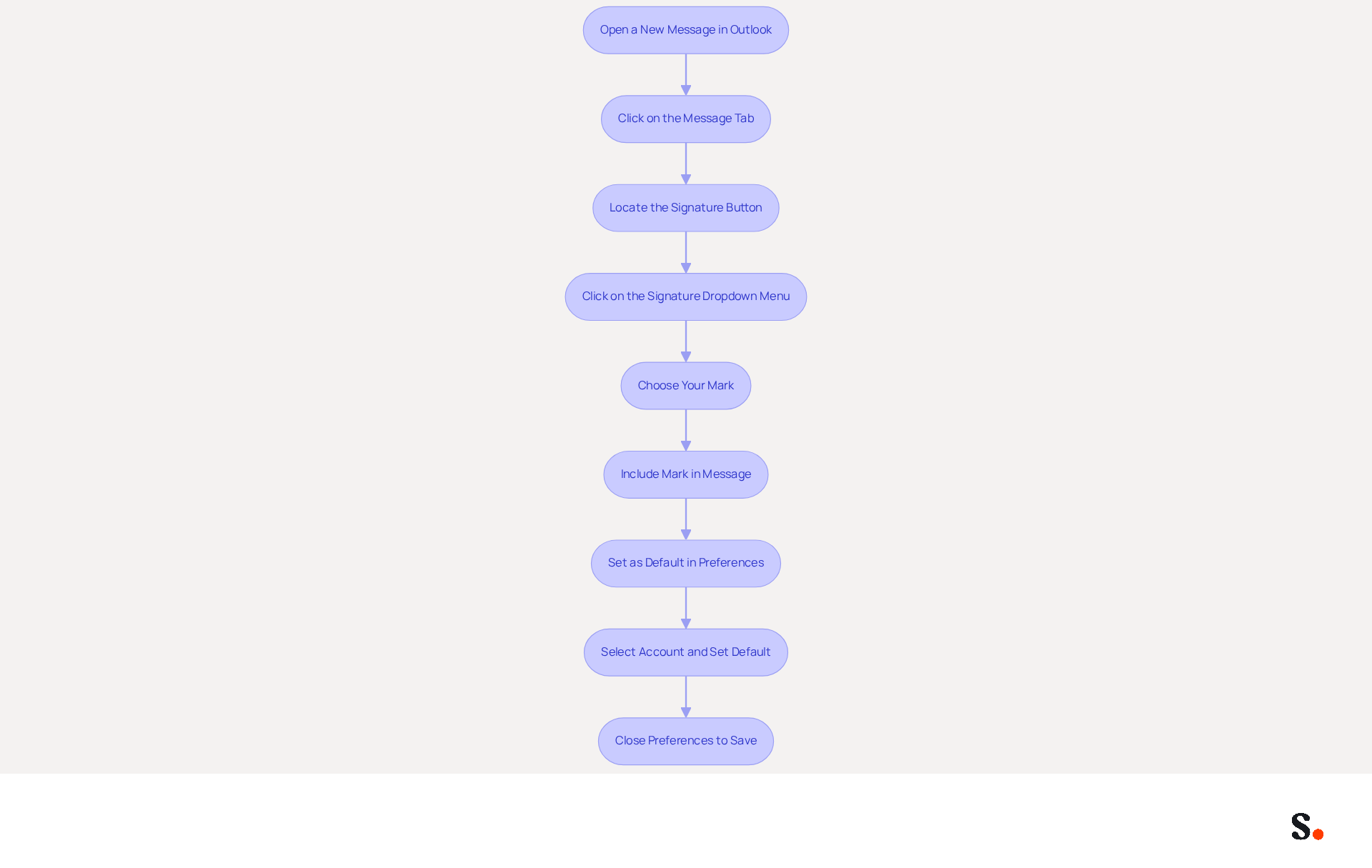
- Open a new message in Outlook.
- In the new message window, click on the 'Message' tab.
- Locate the 'Signature' button in the toolbar.
- Click on the 'Signature' dropdown menu.
- Choose the mark you created from the list.
- Your mark will now be included in the content of the message.
- To set this mark as the default for all new messages, navigate to 'Preferences' > 'Signatures'.
- Under 'Choose default designation', select your account and set your new mark as the default for new messages and replies/forwards.
- Close the Preferences window to save your settings.
Recent data reveals that nearly half of users update their contact details two to four times a year, underscoring the need for regular updates. Furthermore, integrating dynamic components such as banners can result in a 22% rise in click-through rates, while branded identifiers contribute to a 22% boost in response rates and a 15% increase in click-through rates to company websites, enhancing the effectiveness of your communications. Regular audits of signatures are essential, as 42% of organizations do not track performance, creating a significant blind spot in measuring engagement.
Grant Scribe permission to connect with your messaging provider for seamless one-click synchronization. You need to be a Super Admin of your service provider to provide these permissions. Scribe streamlines the synchronization of your messaging identifiers, ensuring all updates are reflected instantly. This feature not only enhances consistency but also ensures compliance with data security standards, as Scribe is SOC 2 Type II certified. By following these steps, you can ensure that your Outlook signature for Mac not only reflects your brand identity but also acts as a powerful marketing tool.
Failing to keep your email signatures updated can lead to missed opportunities for engagement and brand representation.
Troubleshoot Common Signature Issues in Outlook for Mac
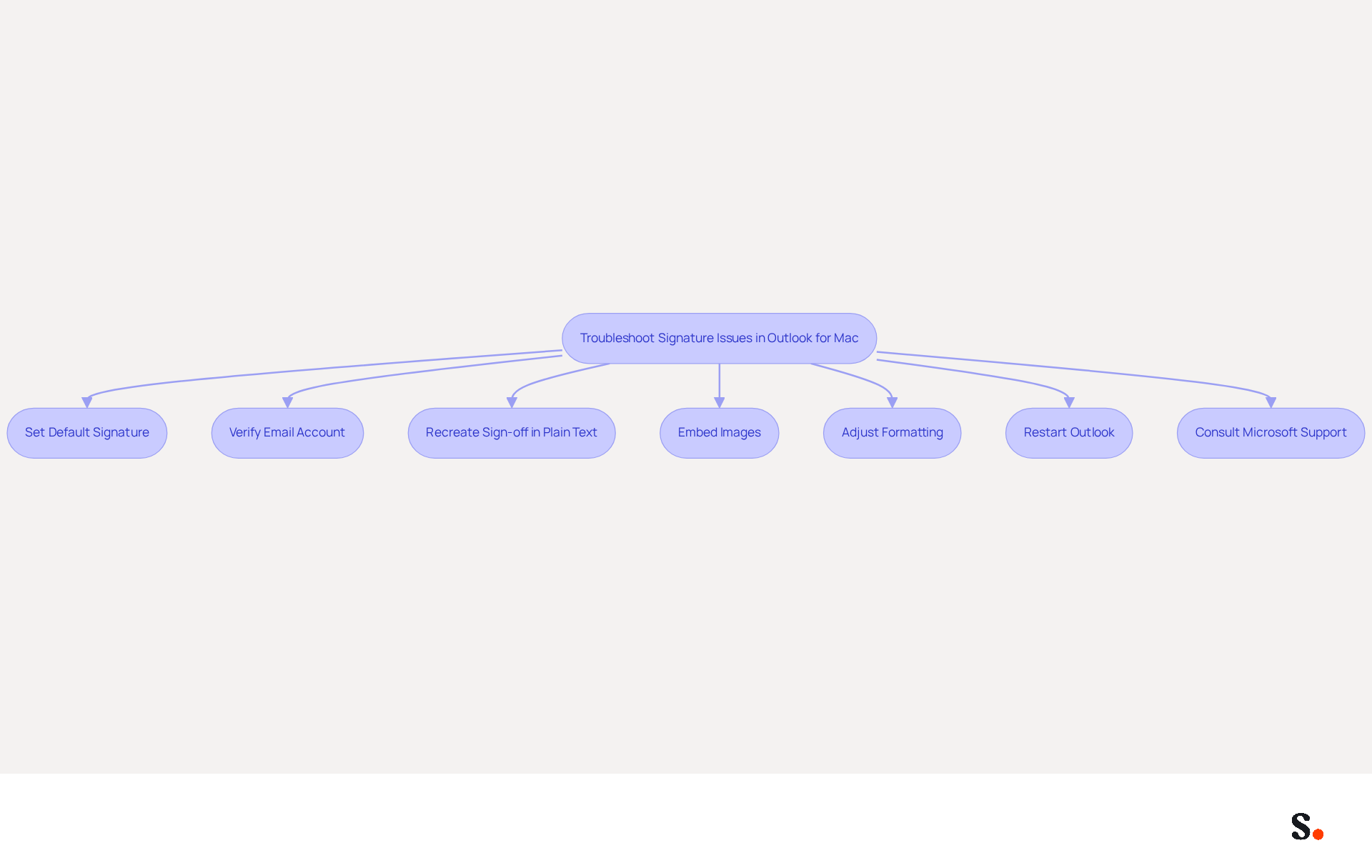
To ensure your mark appears in messages, confirm that your Outlook signature for Mac is set as the default in the 'Signatures' preferences. If you have multiple accounts, verify that you are using the correct email account for sending. For formatting issues, start by recreating the sign-off in plain text, then apply your desired formatting. Ensure any images in the email footer are properly embedded instead of linked from external sources, as linked images may not display correctly. To resolve spacing issues, adjust the formatting directly in the editor and ensure you save your changes. Restart Outlook to check if the changes take effect. If issues persist, consult the Microsoft support page for additional assistance.
Many users find that a strong digital identifier is crucial for effective communication, which underscores the importance of addressing these common issues. Case studies reveal that users often face challenges such as double spacing or images not appearing, which can be mitigated by following these troubleshooting steps. Furthermore, as 31.6% of users update their contact details infrequently, regular upkeep is essential to avoiding common issues and ensuring that your correspondence remains effective.
Syncing Google Workspace with Scribe not only saves time but also ensures that any updates to your team’s information are automatically reflected in your emails. This integration allows for effortless updates, ensuring brand consistency across all communications. Moreover, with Scribe's smooth integration with Calendly, any modifications in your scheduling tool will also sync with your contact details, enhancing your professional image while saving valuable time. Importantly, Scribe is SOC 2 Type II compliant, ensuring secure data handling and compliance with GDPR and CCPA, which adds an extra layer of trust in managing your email signatures. Addressing these issues promptly is crucial to maintaining a professional image and ensuring effective communication.
Conclusion
Crafting a professional email signature in Outlook for Mac is essential for establishing brand consistency and enhancing communication. By following the outlined steps, users can create a signature that conveys essential contact information while reinforcing their brand identity. This process transforms a simple footer into a powerful marketing tool that enhances communication and builds trust with recipients.
The guide emphasizes that a well-designed email signature can improve consumer perception and engagement rates. Moreover, the ability to customize signatures ensures alignment with company branding, which is crucial for effective communication. Regular updates and troubleshooting tips further highlight the importance of maintaining a professional image in every correspondence.
A well-crafted email signature isn't just about looks; it's a strategic asset in how we communicate digitally. Organizations are encouraged to prioritize the creation and management of their email signatures, leveraging tools like Scribe for seamless integration and compliance with security standards. By doing so, they can ensure every email sent is a strategic opportunity for brand engagement.
Frequently Asked Questions
How do I create an email signature in Outlook for Mac?
To create an email signature in Outlook for Mac, open Outlook, click on the 'Outlook' menu, select 'Preferences', then click on 'Signatures'. Click the '+' button to create a new signature, enter your name in the 'Name' field, and add your name, title, company name, and contact information in the text box. Format your signature as desired and close the window to save your changes.
Why is having a branded email signature important?
Having a branded email signature is important because 42% of consumers have a negative perception of a business when they receive a message without a branded signature. Additionally, companies with branded digital identifiers can see a 15% increase in website click-through rates.
What impact do branded email signatures have on trust and response rates?
Branded email signatures enhance sender trust, with 76% of marketers believing they contribute to this effect. This can lead to a 22% boost in response rates, making a well-designed email signature a valuable asset for communication.
What elements should be included in an effective email signature?
An effective email signature should include your name, title, company name, and contact information, formatted to match your brand's style.
List of Sources
- Create Your Email Signature in Outlook for Mac
- Creating and Setting Signatures in Outlook for Mac (https://canr.msu.edu/news/creating-and-setting-signatures-in-outlook-for-mac)
- Email Signature Statistics: A Closer Look at Email Signatures in 2026 (https://mysignature.io/blog/email-signature-statistics)
- 40+ Email Signature Statistics for 2026 (Data + Insights) (https://wavecnct.com/blogs/email-signature-statistics)
- Email signature statistics: Why every business should optimize their email signatures — Stripo.email (https://stripo.email/blog/email-signature-statistics-why-every-business-should-optimize-their-email-signatures)
- Customize Your Signature for Brand Consistency
- Why brand consistency matters more than virality in 2026 - Agility PR Solutions (https://agilitypr.com/pr-news/branding-reputation/why-brand-consistency-matters-more-than-virality-in-2026)
- Top email signature trends for companies in 2026 (https://bybrand.io/blog/trends-email-signatures)
- Email Signature Best Practices for 2026 (+ 15 Pro Examples) (https://wavecnct.com/blogs/email-signature-best-practices-2026)
- Why Email Signatures Must Be In Your 2026 Marketing Plan | Rocketseed (https://rocketseed.com/blog/what-are-the-biggest-email-trends-for-2026)
- 2026 Email Signature Trends for Companies | Bybrand posted on the topic | LinkedIn (https://linkedin.com/posts/bybrand_top-email-signature-trends-for-companies-activity-7458274214513483776-q9NB)
- Add Your Signature to Emails in Outlook for Mac
- Email signature statistics: Why every business should optimize their email signatures — Stripo.email (https://stripo.email/blog/email-signature-statistics-why-every-business-should-optimize-their-email-signatures)
- 40+ Email Signature Statistics for 2026 (Data + Insights) (https://wavecnct.com/blogs/email-signature-statistics)
- Email Signature Statistics: A Closer Look at Email Signatures in 2026 (https://mysignature.io/blog/email-signature-statistics)
- Email Signature Trends in Numbers: Infographic [2026] (https://mailtrap.io/blog/email-signature-trends)
- Troubleshoot Common Signature Issues in Outlook for Mac
- Email Signature Statistics: A Closer Look at Email Signatures in 2026 (https://mysignature.io/blog/email-signature-statistics)
- 40+ Email Signature Statistics for 2026 (Data + Insights) (https://wavecnct.com/blogs/email-signature-statistics)
- Fixes or workarounds for recent issues in Outlook for Mac | Microsoft Support (https://support.microsoft.com/en-us/support/known-issues/fixes-or-workarounds-for-recent-issues-in-outlook-for-mac)
- How to solve problems with email signatures in Microsoft 365? (https://mail-signatures.com/articles/problems-email-signatures-office-365)
- Email signature edits are not saved in the new settings pane in Outlook for Mac | Microsoft Support (https://support.microsoft.com/en-us/support/known-issues/signature-edits-not-saved-new-settings-pane)
Get started with Scribe
Create your signature in minutes
Free 14-day trial — no credit card.