Discover the Best Size for Email Signature Across Major Clients
In a digital landscape where first impressions are crucial, the size of email signatures plays a pivotal role in effective communication and brand
Sophie Grant
Email Signature Specialist, Scribe
On this page
Introduction
In a digital landscape where first impressions are crucial, the size of email signatures plays a pivotal role in effective communication and brand representation. With varying requirements across major email clients like Gmail, Outlook, and Apple Mail, marketers often struggle to meet the diverse specifications of email clients, risking brand inconsistency. Organizations need to find ways to navigate these diverse specifications to keep their brand consistent and engage users effectively. This article provides authoritative insights into best practices for email signature dimensions, offering insights that can transform digital communications into powerful branding tools.
Standard Email Signature Dimensions Across Major Clients
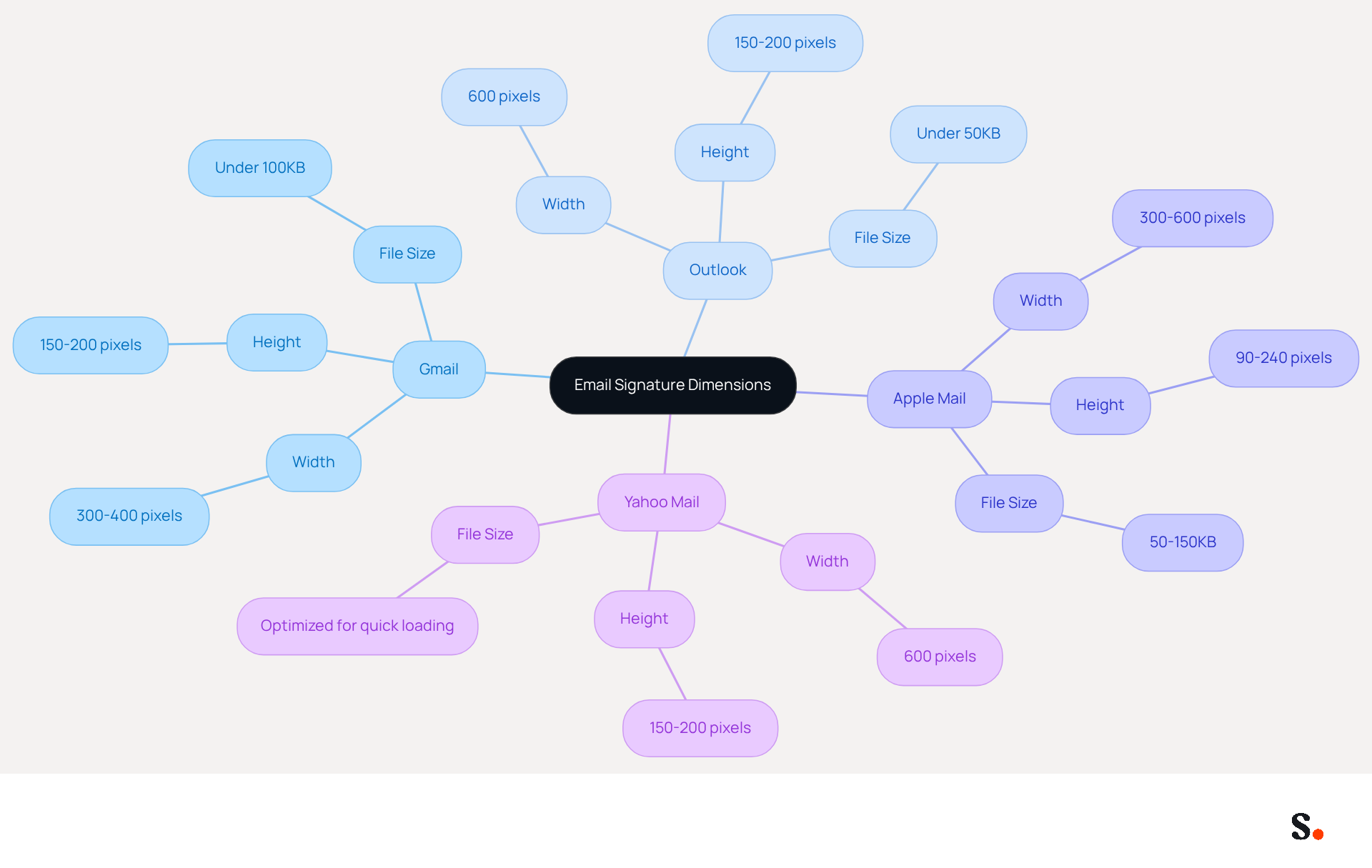
To ensure effective communication and brand representation, it is crucial to adhere to the best size for email signature. The standard dimensions for email signatures vary slightly across major email clients, but following common guidelines can ensure optimal display and brand consistency:
- Gmail: Recommended dimensions are approximately 300-400 pixels wide and 150-200 pixels high. Images should ideally be under 100KB for fast loading, as oversized images may fail to load and result in empty boxes in the recipient's inbox. Outlook indicates that the best size for email signature is approximately 600 units wide and 150-200 units high, with a maximum file weight of 50KB to prevent slow loading times. The best size for email signature is important because signatures wider than 400px may get cropped or rescaled on mobile screens, affecting layout visibility.
- Apple Mail: Typically, identifiers should be 300-600 units wide and 90-240 units high, with images sized between 50-150KB. Keeping images under 100KB minimizes deliverability risks and enhances loading efficiency.
- Yahoo Mail: The best size for email signature is recommended to be 600 units wide and 150-200 units high, ensuring that images are optimized for quick loading.
By following these guidelines, organizations can significantly enhance their email communications' professionalism and effectiveness.
Client-Specific Size Requirements and Limitations
Marketers face significant challenges in creating email signatures that meet the diverse requirements of various email clients. Each email client has its own specific requirements and limitations regarding email signature sizes:
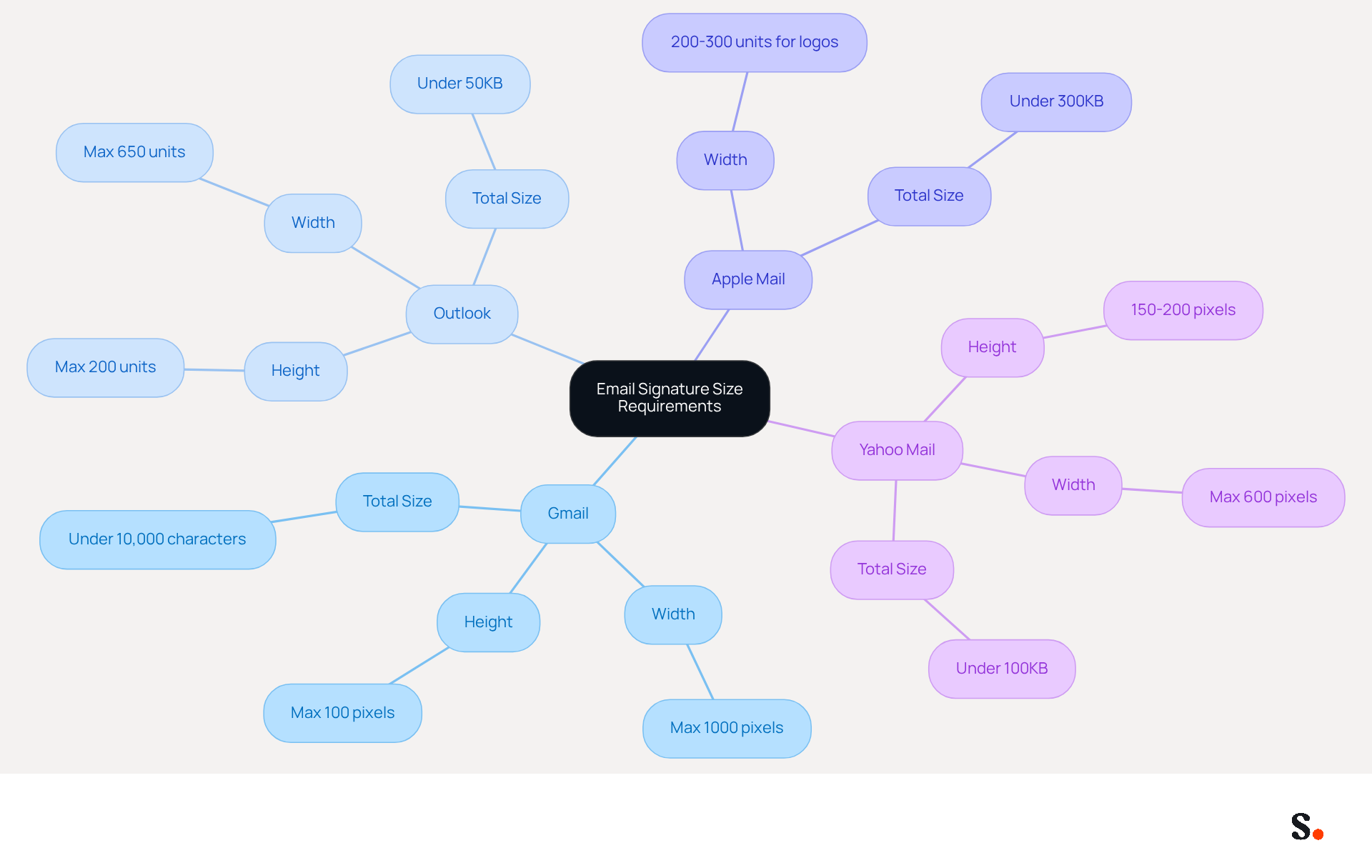
- Gmail: Images should not exceed 100 pixels in height and 1000 pixels in width. The total mark should remain under 10,000 characters, which is the best size for email signature.
- Outlook: The best size for email signature includes a maximum width of 650 units and a height that should not exceed 200 units. To ensure quick loading and avoid being flagged as spam, it is important to keep the best size for email signature under 50KB.
- Apple Mail: The best size for email signature images is recommended to be 200-300 units wide for logos, with a total file weight under 300KB to avoid distortion.
- Yahoo Mail: The best size for email signature is ideally 150-200 pixels high and 600 pixels wide, with a total file weight under 100KB to ensure proper display.
Understanding these constraints is crucial for ensuring that digital identifiers enhance brand visibility and professionalism.
Impact of Email Signature Size on Performance and User Experience
The size of an email signature significantly impacts both performance and user experience:
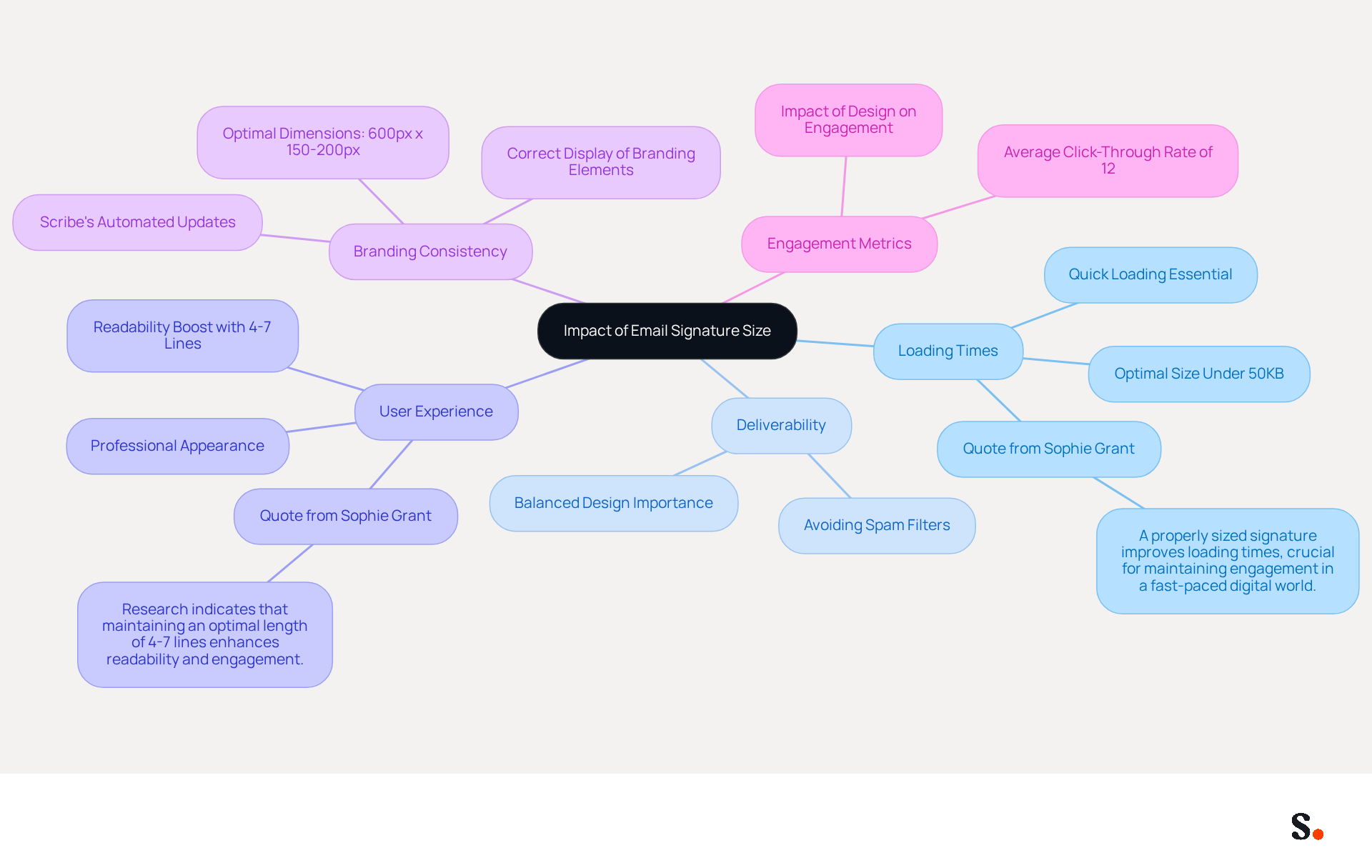
- Loading Times: Keeping signatures under 50KB is essential for ensuring quick loading times. Larger signatures can hinder message delivery, causing frustration and reducing engagement. As Sophie Grant, an Email Signature Specialist, notes, "A properly sized signature improves loading times, crucial for maintaining engagement in a fast-paced digital world."
- Deliverability: Excessively large signatures may activate spam filters, reducing the likelihood of messages reaching the intended inbox. A high image-to-text ratio can raise red flags for spam detection systems, emphasizing the importance of maintaining a balanced design.
- User Experience: Signatures that are oversized or poorly formatted can distract from the main content of the email, making it challenging for recipients to focus on the message. A well-sized signature that represents the best size for email signature enhances readability and maintains a professional appearance. Studies show that the best size for email signature is between 4-7 lines, as this boosts readability and engagement.
- Branding Consistency: Properly sized signatures ensure that branding elements, such as logos and banners, are displayed correctly, reinforcing brand identity and fostering trust among recipients. With Scribe, any changes you make in your Aircall settings will automatically update your email signatures, keeping your branding consistent across all communications. The best size for email signature is typically 600 pixels wide and 150 to 200 pixels tall, which aids in achieving this consistency.
Marketers must strike a balance between aesthetics and functionality to create designs that not only enhance user experience but also effectively promote their brand. Organizations adopting optimal practices for digital signatures have experienced an average click-through rate of 12% on banner displays, emphasizing the potential for enhanced engagement through refined designs.
Best Practices for Optimizing Email Signature Dimensions
To create effective email signatures, marketers must adhere to specific best practices that optimize dimensions and enhance user experience:
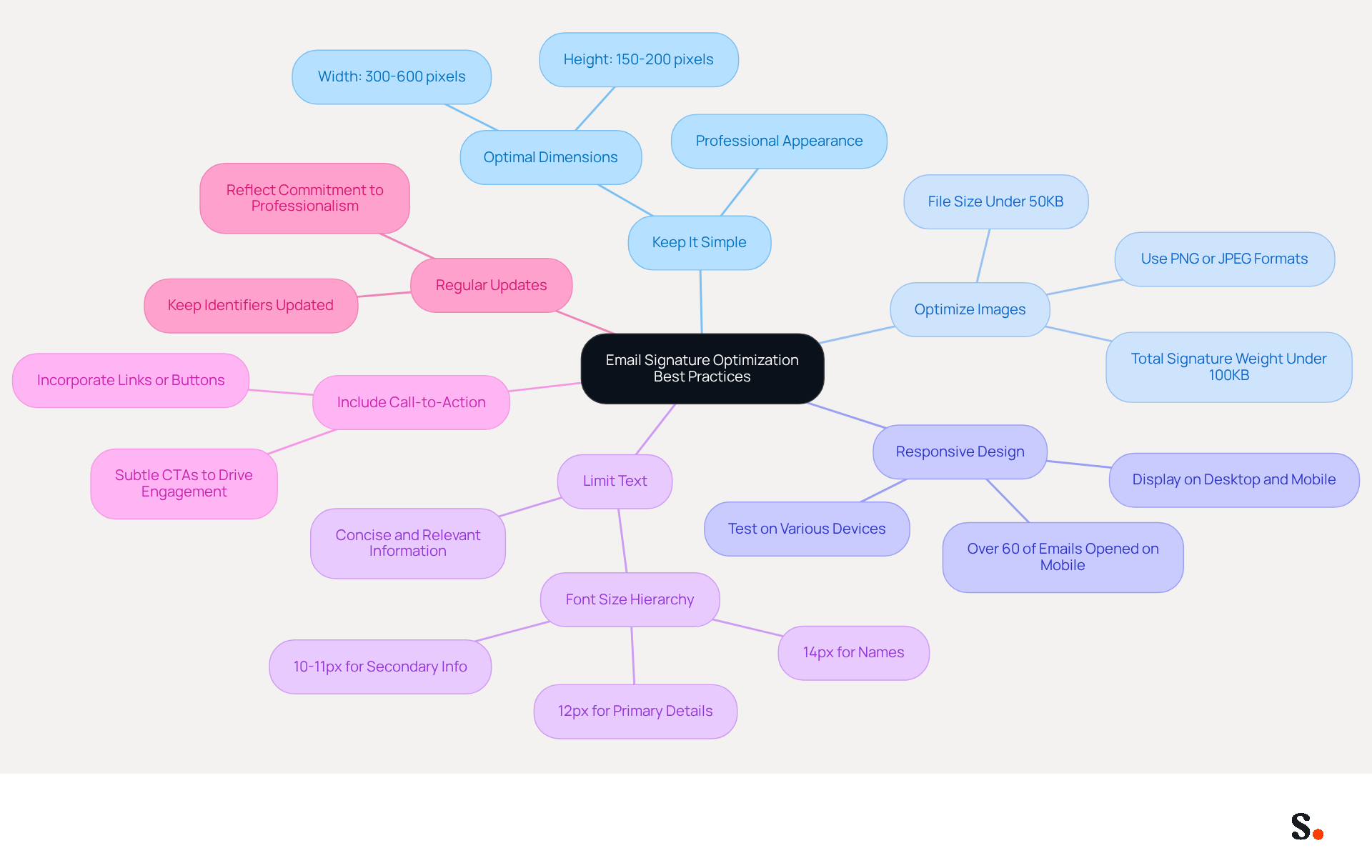
- Keep It Simple: Aim for a width of 300-600 pixels and a height of 150-200 pixels. This range promotes compatibility with most email clients, enhancing both readability and professionalism, and is considered the best size for email signature.
- Optimize Images: Use image formats like PNG or JPEG and keep file sizes under 50KB to ensure quick loading and prevent spam filtering. Additionally, keeping the total file weight under 100KB is crucial for optimal performance, as loading issues can arise, resulting in images not displaying properly in recipients' inboxes.
- Responsive Design: Design elements to be responsive, ensuring they display well on both desktop and mobile devices. With over 60% of emails accessed on mobile, testing email footers on various devices is essential for ensuring proper formatting.
- Limit Text: Keep text concise and relevant, avoiding excessive information that can clutter the closing. A clean design enhances readability and maintains user engagement. For optimal clarity, use a font size hierarchy of 14px for names, 12px for primary contact details, and 10-11px for secondary information.
- Include Call-to-Action: If applicable, incorporate a call-to-action button or link within the email footer to drive engagement without overwhelming the design. Subtle CTAs can effectively enhance marketing efforts.
- Regular Updates: When organizations keep their identifiers updated, it shows their dedication to professionalism and brand consistency, with research showing that standardized digital identifiers significantly improve brand consistency.
Additionally, remember that each change made in your Aircall configuration will automatically be reflected in your Scribe profiles, as we are syncing the data from there. By implementing these strategies, marketers can create effective email signatures that not only boost brand visibility but also cultivate lasting relationships with customers.
Conclusion
The size of email signatures can make or break effective communication and brand representation. By following precise dimensions and file size limits, organizations can ensure their email signatures are visually appealing and functional, enhancing user experience and engagement.
Key insights from the article highlight the recommended dimensions for major email clients, such as Gmail, Outlook, Apple Mail, and Yahoo Mail. Each client has distinct requirements, making it crucial to keep images within specified file sizes to prevent loading delays and spam filtering. Additionally, the impact of email signature size on performance, including loading times and deliverability, underscores the need for marketers to balance aesthetics with functionality.
This can lead to enhanced brand perception and increased customer trust. When organizations implement these strategies, they create email signatures that not only look professional but also build trust and improve communication. Embracing tools like Scribe can further streamline this process, allowing marketing teams to maintain brand consistency and optimize their email signatures efficiently.
Frequently Asked Questions
What are the recommended dimensions for email signatures in Gmail?
The recommended dimensions for email signatures in Gmail are approximately 300-400 pixels wide and 150-200 pixels high.
What is the ideal image size for email signatures in Gmail?
Images in Gmail email signatures should ideally be under 100KB for fast loading.
What are the best dimensions for email signatures in Outlook?
The best size for email signatures in Outlook is approximately 600 units wide and 150-200 units high.
What is the maximum file weight for images in Outlook email signatures?
The maximum file weight for images in Outlook email signatures is 50KB to prevent slow loading times.
Why is it important to adhere to the recommended email signature sizes?
Adhering to the recommended sizes is important because signatures wider than 400px may get cropped or rescaled on mobile screens, affecting layout visibility.
What are the recommended dimensions for email signatures in Apple Mail?
In Apple Mail, the recommended dimensions for email signatures are typically 300-600 units wide and 90-240 units high.
What is the ideal image size for email signatures in Apple Mail?
Images in Apple Mail email signatures should be sized between 50-150KB, with keeping them under 100KB minimizing deliverability risks.
What are the best dimensions for email signatures in Yahoo Mail?
The best size for email signatures in Yahoo Mail is recommended to be 600 units wide and 150-200 units high.
How can following these email signature guidelines benefit organizations?
Following these guidelines can significantly enhance the professionalism and effectiveness of email communications for organizations.
List of Sources
- Standard Email Signature Dimensions Across Major Clients
- 40+ Email Signature Statistics for 2026 (Data + Insights) (https://wavecnct.com/blogs/email-signature-statistics)
- Correct Email Signature Dimensions: Width, Height & File Size (https://wisestamp.com/guides/what-are-correct-email-signature-dimensions)
- What Size Should Email Signature Be? Key Insights for Marketers (https://scribe-mail.com/en-US/blog/what-size-should-email-signature-be-key-insights-for-marketers)
- Client-Specific Size Requirements and Limitations
- The ultimate guide to email signatures in 2026 (https://signitic.com/en/resources/email-signature)
- The Complete Email Signature Guide 2026: Best Practices and Policy (https://opensense.com/complete-email-signature-guide)
- Email Signature Size and Layout Tips (https://linkedin.com/pulse/email-signature-size-layout-tips-bulksignature-nuy7f)
- Correct Email Signature Dimensions: Width, Height & File Size (https://wisestamp.com/guides/what-are-correct-email-signature-dimensions)
- Email Signature Design Trends in 2026: What Works and What to Drop (https://bulksignature.com/blog/email-signature-design-trends)
- Impact of Email Signature Size on Performance and User Experience
- What Size Should Email Signature Be? Key Insights for Marketers (https://scribe-mail.com/en-US/blog/what-size-should-email-signature-be-key-insights-for-marketers)
- Cold emailing and deliverability: the often ignored role of the email signature (https://signitic.com/en/resources/cold-emailing-and-deliverability-the-role-of-the-email-signature)
- The Complete Email Signature Guide 2026: Best Practices and Policy (https://opensense.com/complete-email-signature-guide)
- Email Signatures & How They Impact Deliverability (https://instantly.ai/blog/email-signature-deliverability-guide)
- Do Email Signatures Actually Matter in 2026? (https://community.constantcontact.com/faqs/post/do-email-signatures-actually-matter-in-2026-Ka01TMi6sBKzXMl)
- Best Practices for Optimizing Email Signature Dimensions
- What Size Should Email Signature Be? Key Insights for Marketers (https://scribe-mail.com/en-US/blog/what-size-should-email-signature-be-key-insights-for-marketers)
- Correct Email Signature Dimensions: Width, Height & File Size (https://wisestamp.com/guides/what-are-correct-email-signature-dimensions)
- Email Signature Design Trends in 2026: What Works and What to Drop (https://bulksignature.com/blog/email-signature-design-trends)
- Email Signature Size and Layout Tips (https://linkedin.com/pulse/email-signature-size-layout-tips-bulksignature-nuy7f)
- Email Signature Best Practices - NEWOLDSTAMP (https://newoldstamp.com/blog/email-signature-best-practices)
Get started with Scribe
See why teams switch to Scribe
Free 14-day trial — no credit card.