Discover the Best Size for Logo in Email Signature Across Clients
Choosing the right logo size for email signatures is not merely a design choice; it is a critical factor that influences brand perception and engagement. With
Sophie Grant
Email Signature Specialist, Scribe

Introduction
Choosing the right logo size for email signatures is not merely a design choice; it is a critical factor that influences brand perception and engagement. With the appropriate dimensions, organizations can enhance their professional image while ensuring that their messages resonate with recipients. Organizations often struggle to meet the diverse logo size requirements of various email clients, which can lead to inconsistent branding. Getting the logo size right not only enhances brand visibility but also improves recipient engagement, leading to better email performance.
Define Optimal Logo Dimensions for Email Signatures
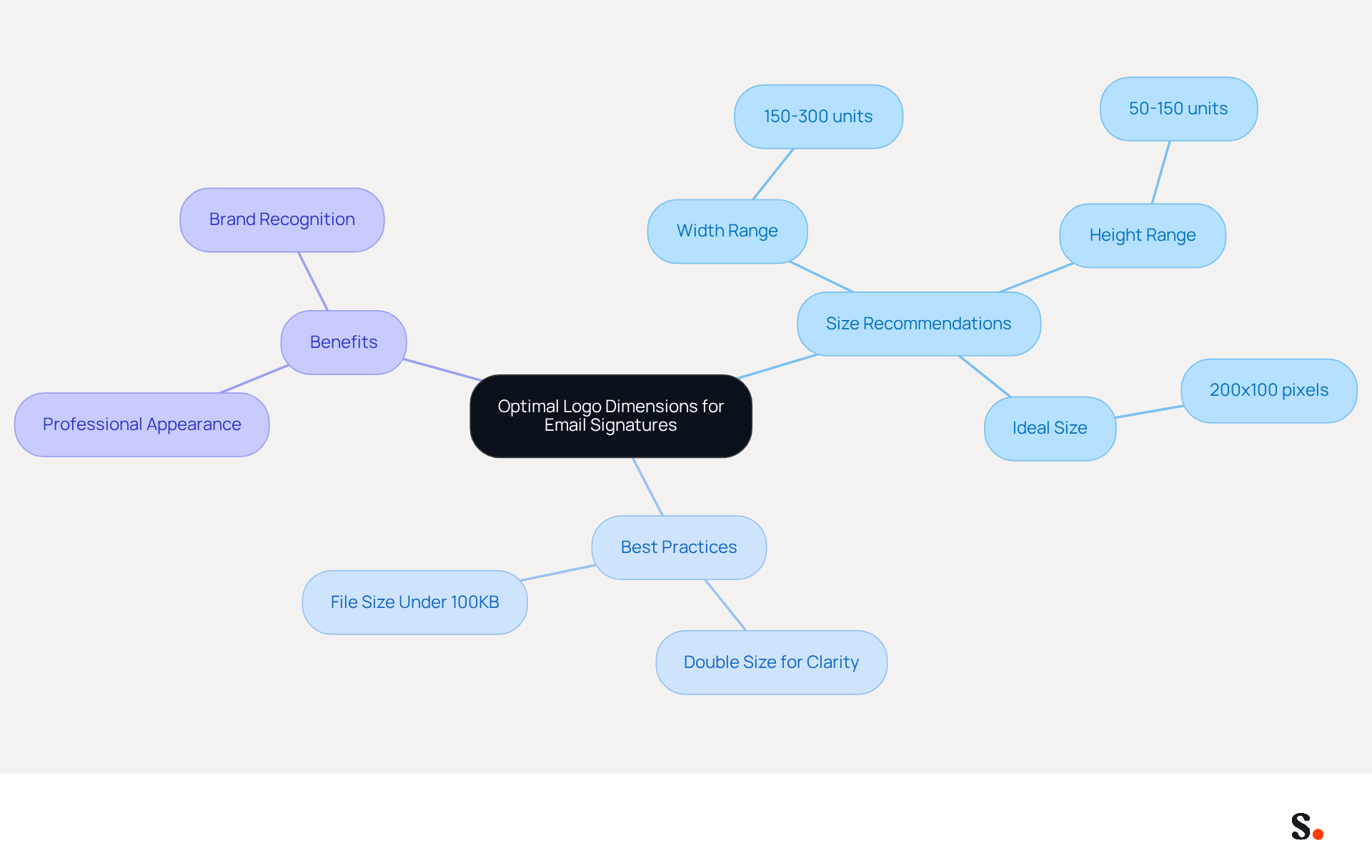
The dimensions of email signatures play a crucial role in ensuring effective communication and brand representation. The best size for logo in email signature typically ranges from 150 to 300 units in width and 50 to 150 units in height. Maintaining appropriate dimensions for emblems is essential for visibility while ensuring the email content remains uncluttered. For instance, the best size for logo in email signature is 200 pixels wide and 100 pixels tall, which effectively balances visibility and subtlety, enhancing branding without distracting from the message.
Furthermore, images should be uploaded at precisely double their intended display size to ensure clarity on high-DPI screens, which are now standard in most modern devices. Following these guidelines not only maintains a professional appearance but also greatly enhances brand recognition in communications.
Research indicates that organizations that use centralized management tools, such as Scribe, have found that they can achieve an 85% improvement in brand consistency, emphasizing the significance of these specifications. Moreover, keeping image file sizes under 100KB is essential for optimal loading times, ensuring that messages load swiftly and sustain engagement.
Consistently assessing and adjusting graphic dimensions can improve overall message effectiveness. By adhering to these specifications, organizations can significantly elevate their professional image and brand recognition in every correspondence.
Examine Logo Size Requirements by Email Client
Understanding the best size for logo in email signature is crucial for effective email signature design across different email clients. Different email clients impose specific requirements for the best size for logo in email signature, which can significantly influence how images are displayed. For instance:
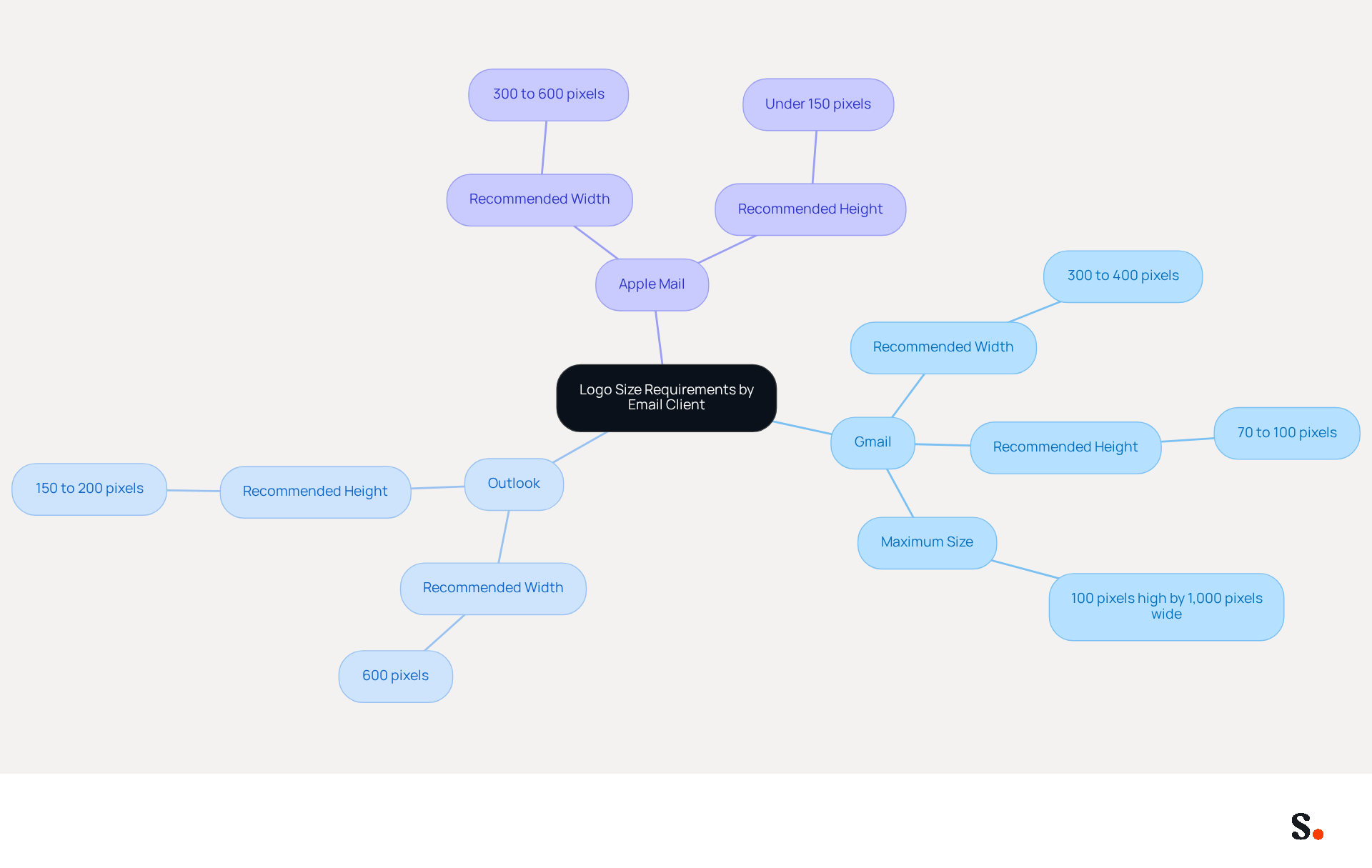
- Gmail: Recommends logos be sized between 300 to 400 pixels wide and 70 to 100 pixels tall. Logos exceeding these dimensions may disrupt the layout by pushing other content down.
- Outlook: Generally showcases images most effectively at the best size for logo in email signature, which is 600 units wide and between 150 to 200 units high, ensuring clarity and visibility across various devices.
- Apple Mail: Similar to Outlook, it supports images sized around 300 to 600 pixels wide, but users should keep the height under 150 pixels to achieve the best size for logo in email signature and prevent distortion.
Failing to meet these specifications can result in distorted images and a lack of professionalism in communications. Keeping file sizes under 20 KB enhances user experience by ensuring faster loading on mobile devices. Moreover, utilizing transparent backgrounds for symbols is crucial to ensure visibility in dark mode, which is essential for maintaining visibility and professionalism in modern email communications.
Grasping these requirements is essential for marketers looking to create logos that are the best size for logo in email signature, ensuring uniform branding and a professional look across all communications. Syncing your Google Workspace with Scribe streamlines how you manage your email identifiers, conserving time and ensuring that any updates to your teammates' information are automatically reflected in Scribe. This integration enables effortless upkeep of your identifiers, including auto-filling details using our attribute feature, enhancing engagement and improving the overall effectiveness of your marketing campaigns.
Analyze Impact of Logo Size on Email Performance
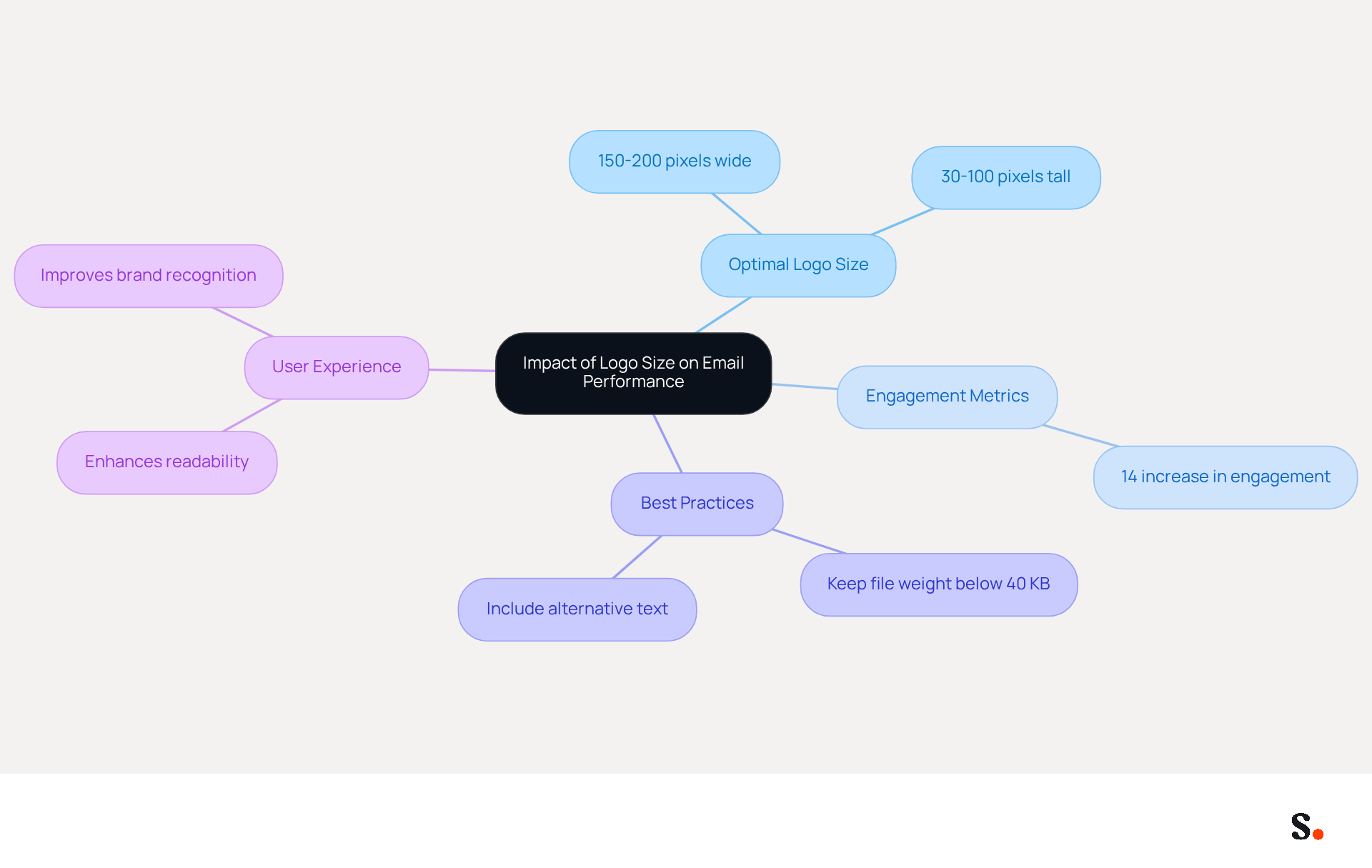
The dimensions of graphics, specifically the best size for logo in email signature, play a crucial role in determining message performance metrics. Studies show that when graphics are sized just right, messages see better open and click-through rates. Specifically, the best size for logo in email signature is between 150 and 200 pixels wide and 30 to 100 pixels tall, as this size strikes a balance between visibility and integration with the content.
A study revealed that messages with graphics within this range experienced a 14% increase in engagement compared to those with images that were either too large or too small, particularly when organizations adhere to proper image sizing best practices. If logos are the best size for logo in email signature, they won't take attention away from the main message, which can enhance engagement, while those that are too small may fail to make a lasting impression, diminishing brand recognition.
It's also important to keep a good balance between graphic size and design; a messy signature can make it hard to read and lower conversion rates. Organizations that follow these best practices not only enhance their brand image but also boost user engagement, as shown by a significant rise in click-through rates for messages with appropriately sized graphics.
Additionally, keeping the total file weight for images below 40 KB ensures rapid loading times, further enhancing user experience. Including alternative text for symbols also enhances accessibility, making the message more user-friendly. Ultimately, businesses that prioritize graphic sizing and design can transform their email signatures into effective branding assets that resonate with recipients.
Implement Best Practices for Logo Size Optimization
To ensure logos enhance email signatures effectively, marketers must follow specific best practices:
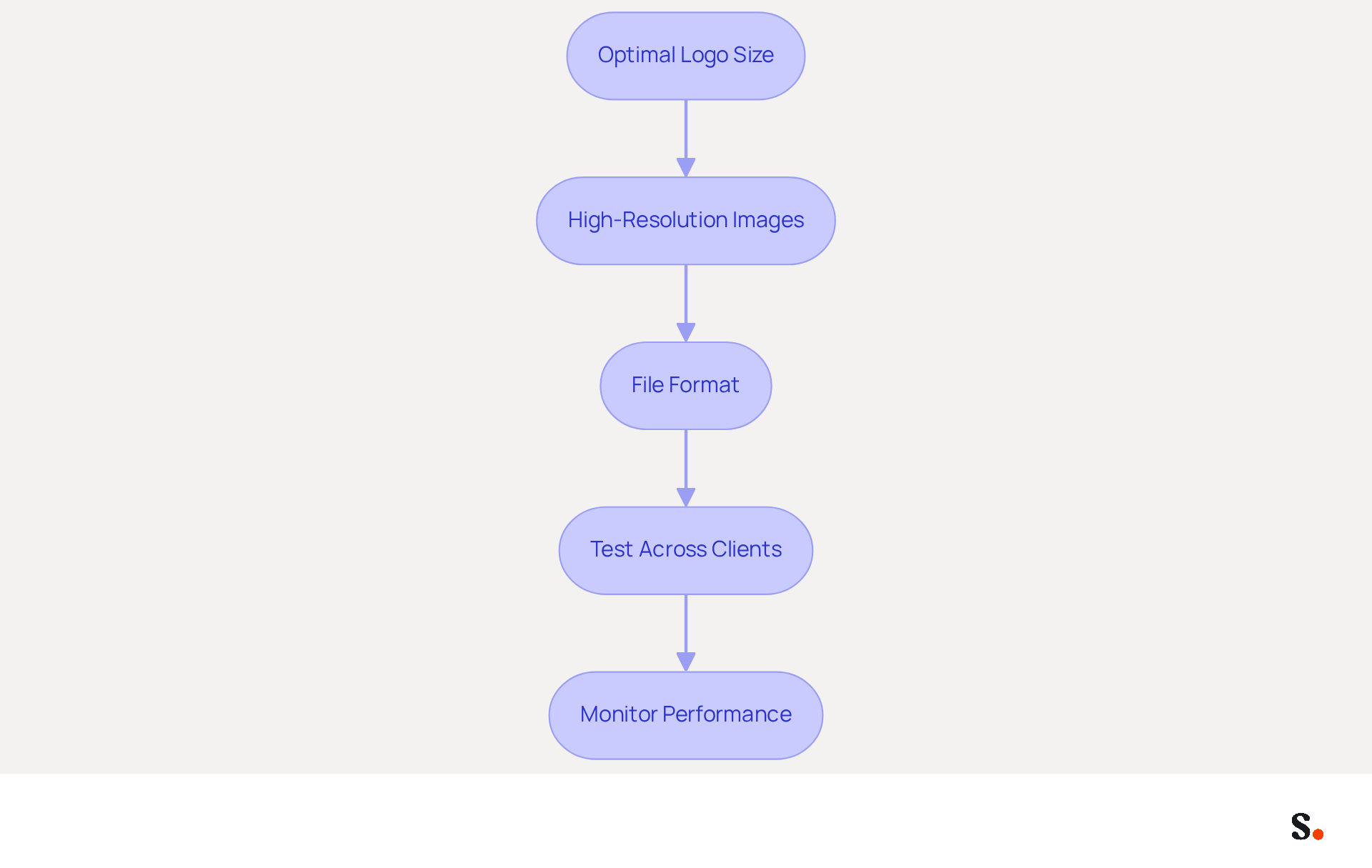
- To ensure clarity, use the best size for logo in email signature, which is recommended to be between 150-300 pixels wide and 50-150 pixels tall. This ensures graphics are clear and do not overshadow the content, maintaining a professional appearance.
- High-Resolution Images: Save graphics at a higher resolution (144 DPI) to maintain clarity on high-DPI screens. This enhances the professional appearance of the signature, ensuring it stands out in crowded inboxes.
- File Format: Utilize PNG or JPEG formats for images, ensuring they remain under 50KB. Slow loading times can frustrate users and lead to decreased engagement.
- Test Across Clients: Always check how graphics appear in various messaging clients, such as Gmail, Outlook, and Apple Mail. This helps ensure consistent branding and visibility, allowing marketers to identify any rendering issues that may arise.
- Monitor Performance: Regularly analyze performance metrics to assess the impact of graphic size on engagement rates. By making these adjustments, marketers can significantly boost engagement and strengthen their brand presence.
Implementing these strategies can lead to measurable improvements in email engagement and brand visibility.
Conclusion
Choosing the right logo size for email signatures is crucial for effective branding and communication. By adhering to specific dimensions, typically between 150 to 300 pixels in width and 50 to 150 pixels in height, organizations can ensure their logos are both visible and professional. This careful consideration enhances brand recognition and creates a polished appearance in email communications.
We explored the varying requirements of different email clients, such as Gmail, Outlook, and Apple Mail. Navigating the diverse specifications of email clients can pose challenges for maintaining logo consistency. Each platform has its own specifications that can significantly impact how logos are displayed, emphasizing the importance of testing and optimizing logo sizes accordingly. Additionally, neglecting to optimize logo sizes may result in diminished engagement metrics, ultimately affecting communication effectiveness.
Ultimately, prioritizing the right logo size in email signatures is a strategic move that can lead to improved brand consistency and user engagement. By implementing best practices and leveraging tools like Scribe, organizations can streamline their email signature management, ensuring that every correspondence reflects their brand effectively. By prioritizing logo size, organizations can transform their email signatures into impactful branding tools that enhance engagement.
Frequently Asked Questions
What are the recommended dimensions for logos in email signatures?
The best size for a logo in an email signature typically ranges from 150 to 300 units in width and 50 to 150 units in height. A commonly recommended size is 200 pixels wide and 100 pixels tall.
Why is it important to maintain appropriate dimensions for logos in email signatures?
Maintaining appropriate dimensions for logos is essential for visibility while ensuring that the email content remains uncluttered. This balance enhances branding without distracting from the message.
How should images be uploaded for email signatures to ensure clarity?
Images should be uploaded at precisely double their intended display size to ensure clarity on high-DPI screens, which are standard in most modern devices.
What is the significance of using centralized management tools like Scribe for logo dimensions?
Research indicates that organizations using centralized management tools, such as Scribe, can achieve an 85% improvement in brand consistency, highlighting the importance of adhering to logo dimension specifications.
What is the recommended file size for images in email signatures?
It is essential to keep image file sizes under 100KB for optimal loading times, ensuring that messages load swiftly and maintain engagement.
How can consistently assessing and adjusting graphic dimensions impact email communication?
Consistently assessing and adjusting graphic dimensions can improve overall message effectiveness, significantly elevating an organization's professional image and brand recognition in every correspondence.
List of Sources
- Define Optimal Logo Dimensions for Email Signatures
- The comprehensive guide to email signature sizes (https://signature.email/guides/comprehensive-guide-email-signature-sizes)
- Email Signature Size and Image Best Practices (https://maileditor.net/blog/email-signature-size-and-image-best-practices)
- Correct Email Signature Dimensions: Width, Height & File Size (https://wisestamp.com/guides/what-are-correct-email-signature-dimensions)
- What Size Should Email Signature Be? Key Insights for Marketers (https://scribe-mail.com/en-US/blog/what-size-should-email-signature-be-key-insights-for-marketers)
- Best Dimensions for Email Signature: Optimize Your Marketing Strategy (https://scribe-mail.com/en-US/blog/best-dimensions-for-email-signature-optimize-your-marketing-strategy)
- Examine Logo Size Requirements by Email Client
- Email Signature Image and Logo Size: Specs That Display Everywhere (https://patronum.io/email-signature-image-size)
- Email Image Sizes for Banners, Headers and Logos (https://topol.io/blog/what-size-should-email-images-be)
- Email Design Size Guide 2026: Complete Specifications (https://digitalapplied.com/blog/email-design-size-guide-2026-templates)
- Email design best practices: The complete guide (2026) — Stripo.email (https://stripo.email/blog/email-design-best-practices)
- Analyze Impact of Logo Size on Email Performance
- Best Image Size for Email Signature: Optimize for Performance and Branding (https://scribe-mail.com/en-US/blog/best-image-size-for-email-signature-optimize-for-performance-and-branding)
- Email Image Sizes for Banners, Headers and Logos (https://topol.io/blog/what-size-should-email-images-be)
- 4 Email Design Shortcuts That Kill Performance | Zeta (https://zetaglobal.com/resource-center/email-design-shortcuts-to-avoid)
- 49 Top Email Marketing Statistics (https://forbes.com/advisor/business/software/email-marketing-statistics)
- Email Marketing Statistics 2026: Benchmarks and Limits (https://digitalapplied.com/blog/email-marketing-statistics-2026-data-points)
- Implement Best Practices for Logo Size Optimization
- Email Signature Best Practices Guide With Examples - MailerLite (https://mailerlite.com/blog/email-signature-best-practices)
- Email Signature Size and Image Best Practices (https://maileditor.net/blog/email-signature-size-and-image-best-practices)
- Best Email Signature Size - Guide to Email Signatures Size - MySignature (https://mysignature.io/email-signature-size)
- What Size Should Email Signature Be? Key Insights for Marketers (https://scribe-mail.com/en-US/blog/what-size-should-email-signature-be-key-insights-for-marketers)
- Using the Right Email Signature Size | Exclaimer (https://exclaimer.com/email-signature-handbook/using-the-right-email-signature-size)
Get started with Scribe
Manage signatures across your whole team
Free 14-day trial — no credit card.