How to Add Signature in Apple Mail on iPhone: A Step-by-Step Guide
In a world where digital communication defines professional identity, the significance of email signatures cannot be overstated. For users of Apple Mail on
Sophie Grant
Email Signature Specialist, Scribe

On this page
Introduction
In a world where digital communication defines professional identity, the significance of email signatures cannot be overstated. For users of Apple Mail on iPhone, mastering the art of crafting an effective signature is essential for maintaining a cohesive brand image across communications. Many users struggle with the complexities of setting up their email signatures, raising questions about best practices and troubleshooting. This guide provides a detailed, step-by-step approach to adding and optimizing email signatures in Apple Mail, helping users maintain professionalism and brand consistency in every message.
Understand the Basics of Email Signatures in Apple Mail
In the realm of digital communication, email footers serve as essential tools for establishing professional identity. They typically include the sender's name, title, company name, contact information, and sometimes a logo or a personal touch like a quote.
In Apple Mail, users can discover how to add signature in Apple Mail iPhone to personalize each email account, which helps maintain a professional appearance across various communications. This tool simplifies managing your email footers by automatically syncing with your business phone system and Google Workspace, eliminating the need for manual updates. Without automated synchronization, keeping email signatures updated can be a tedious task. This leads to a more polished and cohesive brand image across all communications.
Additionally, Scribe's SOC 2 Type II compliance ensures your data remains secure, allowing you to use digital identifiers for both identification and branding, which strengthens your professional image and maintains consistency in your communications.
Create Your Email Signature on iPhone: Step-by-Step Instructions
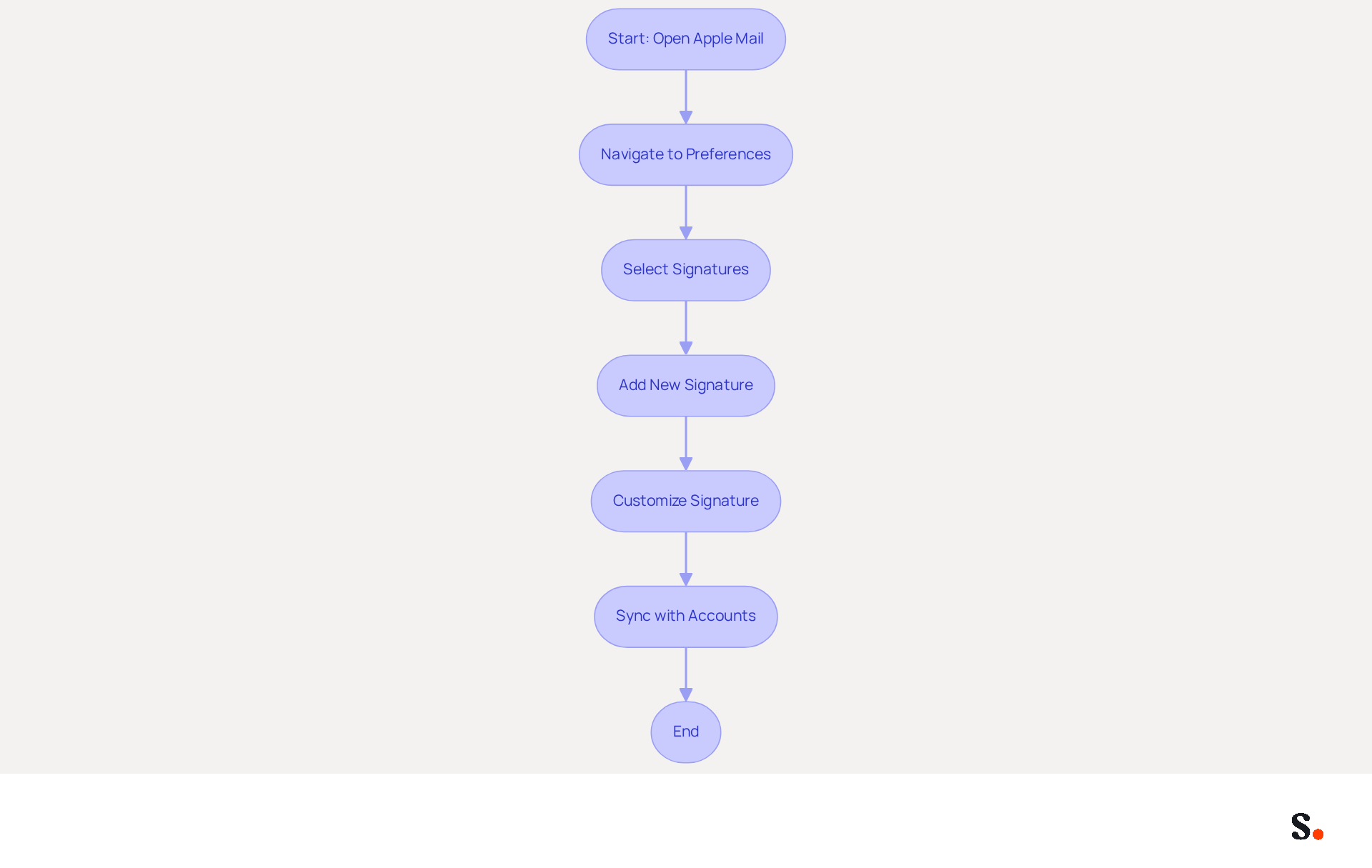
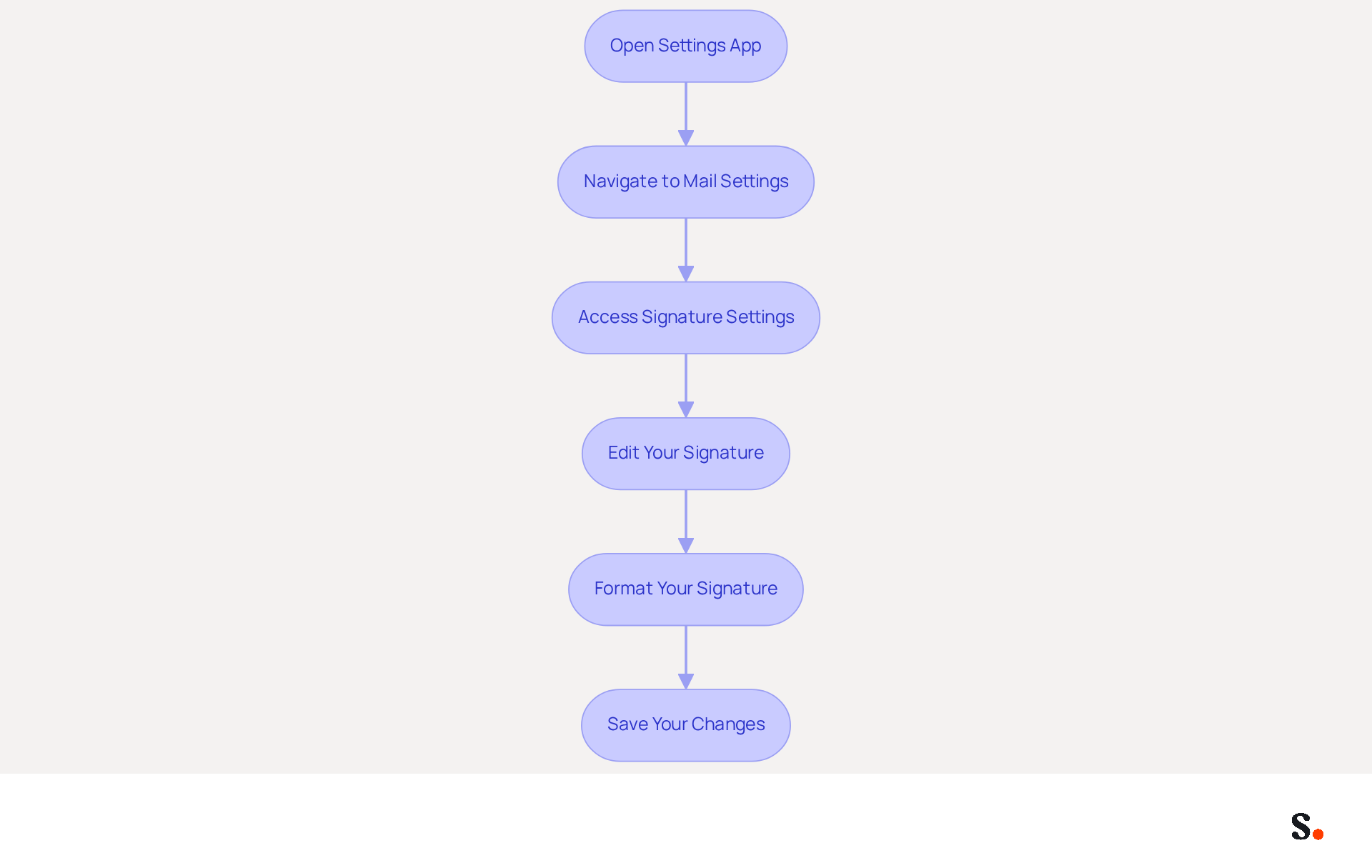
Knowing how to add signature in Apple Mail on your iPhone is essential for effective communication. To create your email signature, follow these steps:
- Open the Settings App: Locate the Settings app on your iPhone and tap to open it.
- Navigate to Mail Settings: Scroll down and select 'Mail' from the list of options.
- Access Signature Settings: Under the 'Composing' section, tap on 'Signature'. Here, you can choose to set a mark for 'All Accounts' or customize it for individual accounts.
- Edit Your Signature: Tap the text field to enter your desired sign-off. Include essential elements such as your name, job title, company name, and contact information. To add a logo or image, copy it from another source and paste it here, as current iOS versions do not allow direct image uploads.
- Format Your Signature: While Apple Mail does not support rich text formatting directly, you can paste formatted text from another app. Create your personal mark in a text editor, format it as desired, then copy and paste it into the identification field.
- Save Your Changes: Once satisfied with your mark, simply exit the settings. Your changes will be saved automatically.
By following these steps, you will understand how to add signature in Apple Mail iPhone, allowing you to craft a polished email signature that enhances your communication. Remember, a well-designed message footer can greatly enhance trust and engagement, with studies indicating that organizations utilizing branded footers experience a 22% higher response rate. Regular updates to your branding are also crucial, as 44.4% of professionals refresh theirs only 2-4 times a year, highlighting the need for consistent branding. Additionally, consider including legal disclaimers if your industry requires them, as this can further enhance your professionalism and compliance.
Furthermore, by syncing your Google Workspace with the application, you can save time and ensure that any modifications made to your teammates' details are automatically reflected in your email footers. This automated synchronization not only streamlines the management process but also enhances brand consistency across all communications, aligning with Scribe's commitment to SOC 2 Type II compliance for secure data handling. Neglecting to update your branding may result in diminished engagement and trust from your audience.
Troubleshoot Common Issues When Adding Signatures
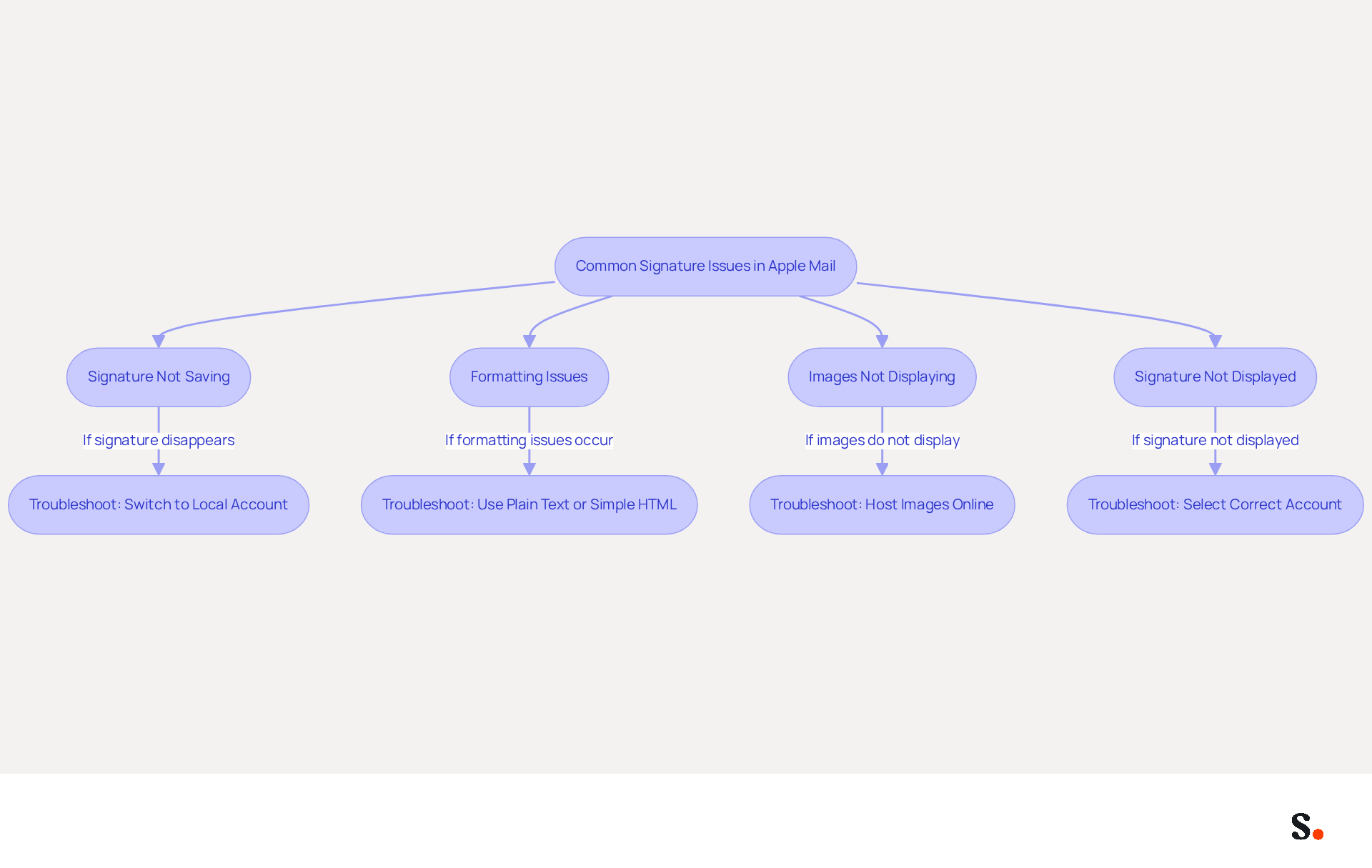
When users are figuring out how to add signature in Apple Mail on iPhone, they frequently encounter common issues that can disrupt their email signature management. Here are some troubleshooting tips:
- Signature Not Saving: If your signature disappears after closing the settings, it may be due to syncing issues with your iCloud account. To resolve this, you can learn how to add signature in apple mail iphone by temporarily switching to a local account to ensure your signature is saved. It has been observed that disabling iCloud for Mail, creating customizations, and then re-enabling iCloud can help resolve this issue. Additionally, knowing how to add signature in apple mail iphone can prevent such issues by ensuring that your teammates' data is automatically updated, saving you time and effort.
- Formatting Issues: If your sign-off appears differently when sent, this could be due to the recipient's messaging client. For consistent formatting, using plain text or a straightforward HTML layout is advisable. Remember, maintaining professionalism and consistency in email formats is crucial for effective branding. Utilizing Scribe's features can assist in ensuring that your signatures are formatted correctly across all platforms.
- Images Not Displaying: If images in your email footer do not show up, ensure they are hosted online and that you are using the correct URL. Apple Mail may not support embedded images directly, which can lead to display issues. To troubleshoot, verify your HTML code and consider using a management tool like Scribe to create error-free signatures that are automatically updated with any changes in your Google Workspace.
- If your signature is not displayed in messages, you should learn how to add signature in apple mail iphone and ensure that you have selected the correct account in the signature settings. Additionally, ensure that the 'Always match my default message font' option is unchecked to maintain your custom formatting. By syncing with Scribe, any modifications made in your Google Workspace will be reflected in your signatures without extra input, streamlining your management process.
Addressing these common issues not only enhances the functionality of your email signatures but also reinforces your brand's professionalism in communications. Statistics show that users have saved an average of 1.1 hours by addressing these issues, resulting in enhanced consistency and professionalism in their communications.
Enhance Your Email Signature: Best Practices and Features
To maximize the impact of your email signature, it's essential to adopt best practices that enhance both professionalism and effectiveness:
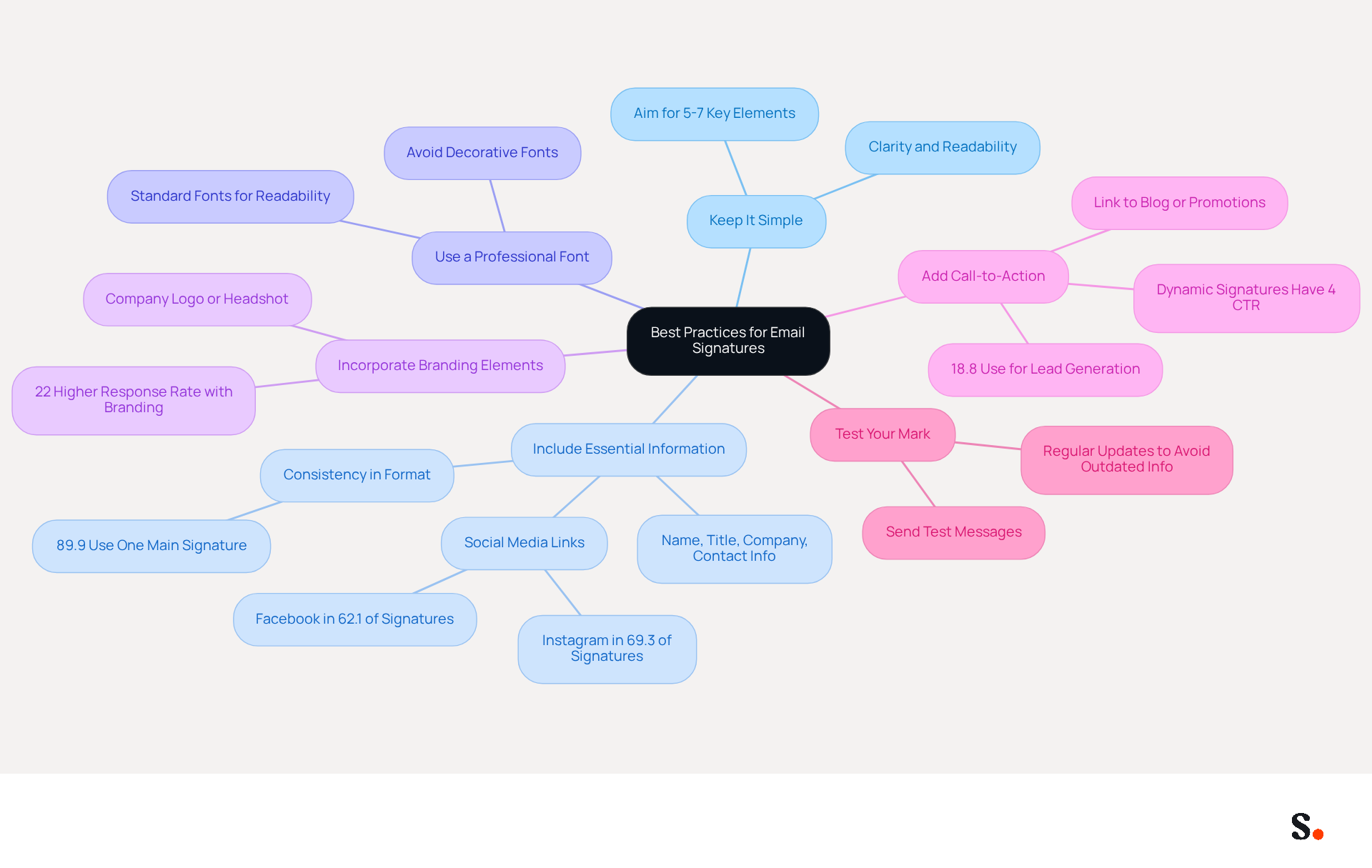
- Keep It Simple: A clean and concise mark is more effective. Aim for 5 to 7 key elements in your email signature to ensure clarity and readability.
- Include Essential Information: Ensure your mark contains your name, title, company name, and contact information. You may also include links to your social media profiles or company website. This highlights the importance of maintaining a consistent email format, as 89.9% of individuals stick to a single primary style.
- Use a Professional Font: Stick to standard fonts that are easy to read. Avoid overly decorative fonts that may not render well on all devices. This ensures that your signature retains its polished appearance across various platforms.
- Incorporate Branding Elements: If applicable, include your company logo or a professional headshot. Ensure that these images are optimized for messaging to avoid loading issues. Branded digital identifiers can achieve a 22% higher response rate than those lacking, reinforcing the significance of brand visibility (Yuliia Savchuk, Content Writer at Stripo).
- Add Call-to-Action: Consider including a call-to-action, such as a link to your latest blog post or a promotional offer. This can transform your mark into a marketing tool, as 18.8% of businesses utilize digital identifiers mainly for generating leads. Furthermore, dynamic digital identifiers have an average click-through rate (CTR) of 4%, in contrast to approximately 2.5% for standard marketing communications, emphasizing their effectiveness.
- Test Your Mark: Send test messages to yourself and colleagues to see how your mark appears on different devices and messaging clients. Adjust as necessary to ensure consistency. Without regular updates, your email signature may become outdated, leading to potential miscommunication. Regular updates to electronic correspondences are crucial for keeping information current and pertinent, which can greatly influence communication effectiveness.
Ultimately, a well-crafted email signature can be a powerful asset in your marketing strategy, driving engagement and reinforcing your brand.
Conclusion
Many users find it challenging to create a signature that effectively represents their brand. By following the outlined steps, users can create personalized email signatures that not only reflect their identity but also enhance brand consistency across all communications. Scribe makes this process easier with automated synchronization, so updates happen without you having to lift a finger.
The article delves into the essential steps for creating an email signature, troubleshooting common issues, and implementing best practices to maximize effectiveness. Key insights include:
- The importance of simplicity
- The inclusion of essential information
- The use of professional branding elements
Additionally, the significance of regular updates and testing for consistency cannot be overstated, as these practices contribute to a polished and professional appearance in all email interactions.
In conclusion, prioritizing your email signature strategy can transform your communications and enhance your brand's visibility. By leveraging Scribe's capabilities, organizations can achieve consistent branding and track the impact of their email signatures on engagement. Embracing these best practices not only elevates individual communications but also strengthens the overall brand image.
Frequently Asked Questions
What is the purpose of email signatures in digital communication?
Email signatures serve as essential tools for establishing professional identity, typically including the sender's name, title, company name, contact information, and sometimes a logo or personal touch like a quote.
How can users add a signature in Apple Mail on iPhone?
Users can discover how to add a signature in Apple Mail on iPhone to personalize each email account, which helps maintain a professional appearance across various communications.
What benefits does automated synchronization of email signatures provide?
Automated synchronization simplifies managing email footers by syncing with your business phone system and Google Workspace, eliminating the need for manual updates and ensuring a polished and cohesive brand image.
Why is it important to keep email signatures updated?
Keeping email signatures updated is important to maintain a polished and cohesive brand image across all communications, as outdated signatures can detract from professionalism.
How does Scribe ensure data security for email signatures?
Scribe's SOC 2 Type II compliance ensures that your data remains secure, allowing you to use digital identifiers for both identification and branding, which strengthens your professional image and maintains consistency in communications.
List of Sources
- Understand the Basics of Email Signatures in Apple Mail
- How an email signature can boost your professional image – Daily Business (https://dailybusinessgroup.co.uk/2026/03/how-an-email-signature-can-boost-your-professional-image)
- The impact of email signatures on your branding (https://signitic.com/en/resources/the-impact-of-email-signatures-on-your-branding)
- 30 Ways to Improve Your Email Signature | MySigMail (https://mysigmail.com/blog/30-ways-to-enhance-your-email-signature-and-boost-your-professional-image)
- Why Email Signatures Must Be In Your 2026 Marketing Plan | Rocketseed (https://rocketseed.com/blog/2026-marketing-plan-email-signatures)
- Create Your Email Signature on iPhone: Step-by-Step Instructions
- 40+ Email Signature Statistics for 2026 (Data + Insights) (https://wavecnct.com/blogs/email-signature-statistics)
- Email signature statistics: Why every business should optimize their email signatures — Stripo.email (https://stripo.email/blog/email-signature-statistics-why-every-business-should-optimize-their-email-signatures)
- How to create an email signature in iPhone, Mac, iPad & Watch (https://signitic.com/en/resources/email-signature-apple)
- Email signature statistics and trends in 2024 (https://wisestamp.com/blog/email-signature-statistics)
- Troubleshoot Common Issues When Adding Signatures
- Why does my Apple Mail signature sometimes disappear? | Email Signature Rescue Blog (https://emailsignaturerescue.com/blog/why-does-my-apple-mail-signature-sometimes-disappear)
- Apple Mail Removes Signature Images? Fix Explained (https://support.xink.io/support/solutions/articles/1000264530-apple-mail-removes-signature-images-fix-explained)
- How to fix images not showing in Apple Mail email signature (https://bybrand.io/blog/images-not-showing-apple-mail)
- Mail loses signatures (https://discussions.apple.com/thread/254556408)
- Enhance Your Email Signature: Best Practices and Features
- Email signature statistics: Why every business should optimize their email signatures — Stripo.email (https://stripo.email/blog/email-signature-statistics-why-every-business-should-optimize-their-email-signatures)
- Why Email Signatures Must Be In Your 2026 Marketing Plan | Rocketseed (https://rocketseed.com/blog/what-are-the-biggest-email-trends-for-2026)
- 8 Steps to Conquer Email Signature Marketing - Gimmio (https://blog.gimm.io/email-signature-marketing)
- Email signature marketing: everything you need to know (https://templafy.com/email-signature-marketing-everything-you-need-to-know)
- 12 clever ways to use your email signature to support your marketing campaigns (https://blog.hubspot.com/blog/tabid/6307/bid/31054/10-clever-ways-your-email-signature-can-support-your-marketing.aspx)
Get started with Scribe
Create your signature in minutes
Free 14-day trial — no credit card.