How to Add Signature in Outlook Classic: 4 Easy Steps
Many professionals underestimate the power of a well-crafted email signature in digital communication. Studies show that a branded signature can enhance a
Sophie Grant
Email Signature Specialist, Scribe
Introduction
Many professionals underestimate the power of a well-crafted email signature in digital communication. Studies show that a branded signature can enhance a company's identity and increase engagement rates. Therefore, mastering the art of signature creation in Outlook Classic is essential for professionals. This guide will walk you through how to add and customize email signatures, making sure every message you send reflects professionalism and acts as a strategic marketing tool. Organizations that neglect this aspect of their communication may find themselves losing ground in brand recognition and trust.
Access Signature Settings in Outlook Classic
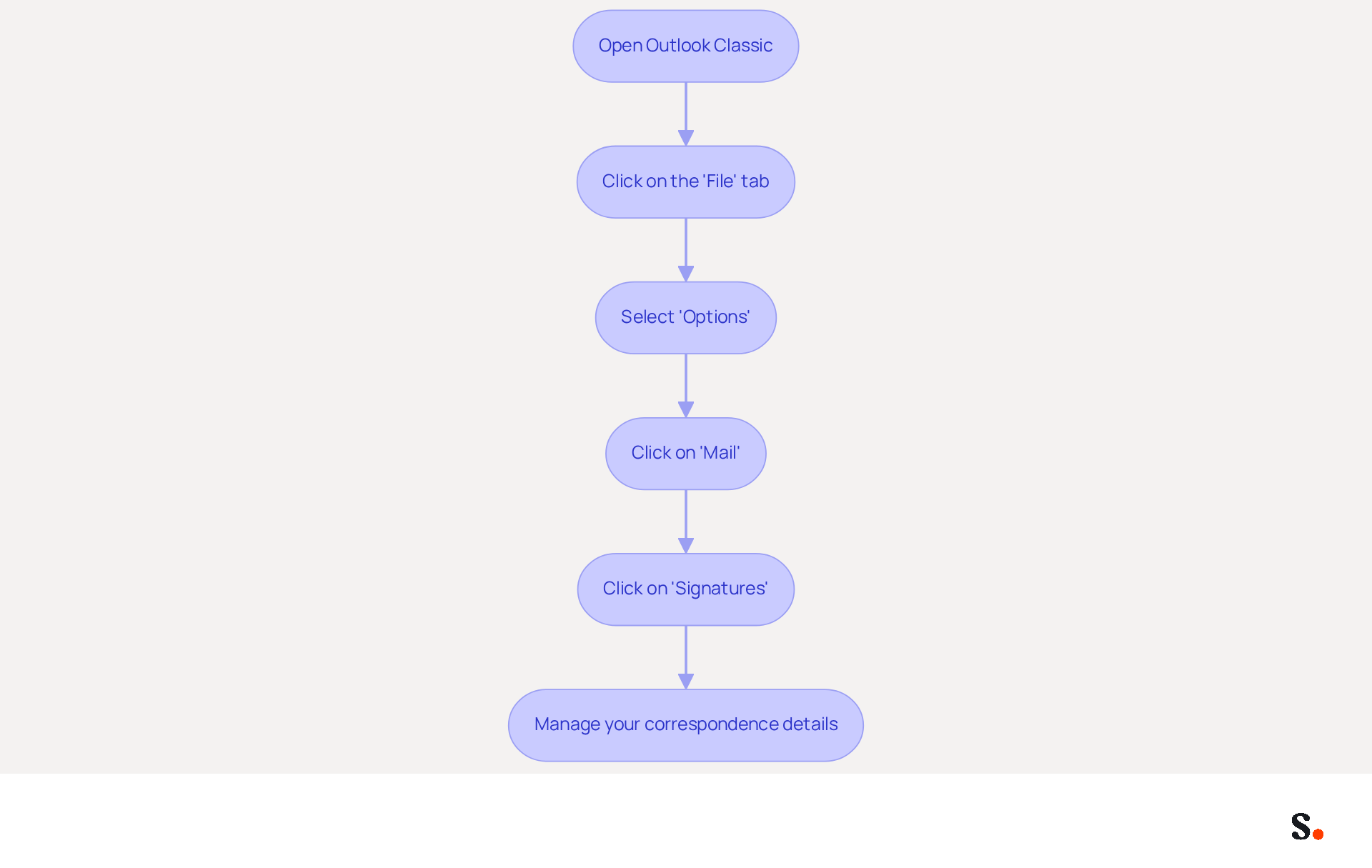
- Open Outlook Classic on your computer.
- Click on the 'File' tab located in the top-left corner of the window.
- From the menu that appears, select 'Options'.
- In the Outlook Options window, click on 'Mail' from the left sidebar.
- Look for the 'Signatures' button and click on it to open the Signatures and Stationery dialog box. This is where you will manage your correspondence details.
In an increasingly digital world, the management of email identifiers is crucial for effective branding and communication. Research shows that a significant 80% of people believe a branded electronic identifier is vital for a company's identity, while 42% hold a negative view of businesses lacking one. Furthermore, companies that utilize branded logos can experience a 15% increase in click-through rates to their websites. This underscores the necessity of maintaining professional and consistent digital identifiers in all communications.
Research indicates that 25.1% of organizations prioritize standardized identifiers to enhance corporate communication, reflecting a growing acknowledgment of the role digital identifiers play in marketing and brand awareness. By following these steps on how to add signature in Outlook Classic, you can access and manage your email identifiers, positioning your business for greater credibility and engagement in the marketplace.
Create and Customize Your Email Signature
Creating a professional email signature is essential for effective communication and brand representation. To understand how to add a signature in Outlook Classic, follow these steps:
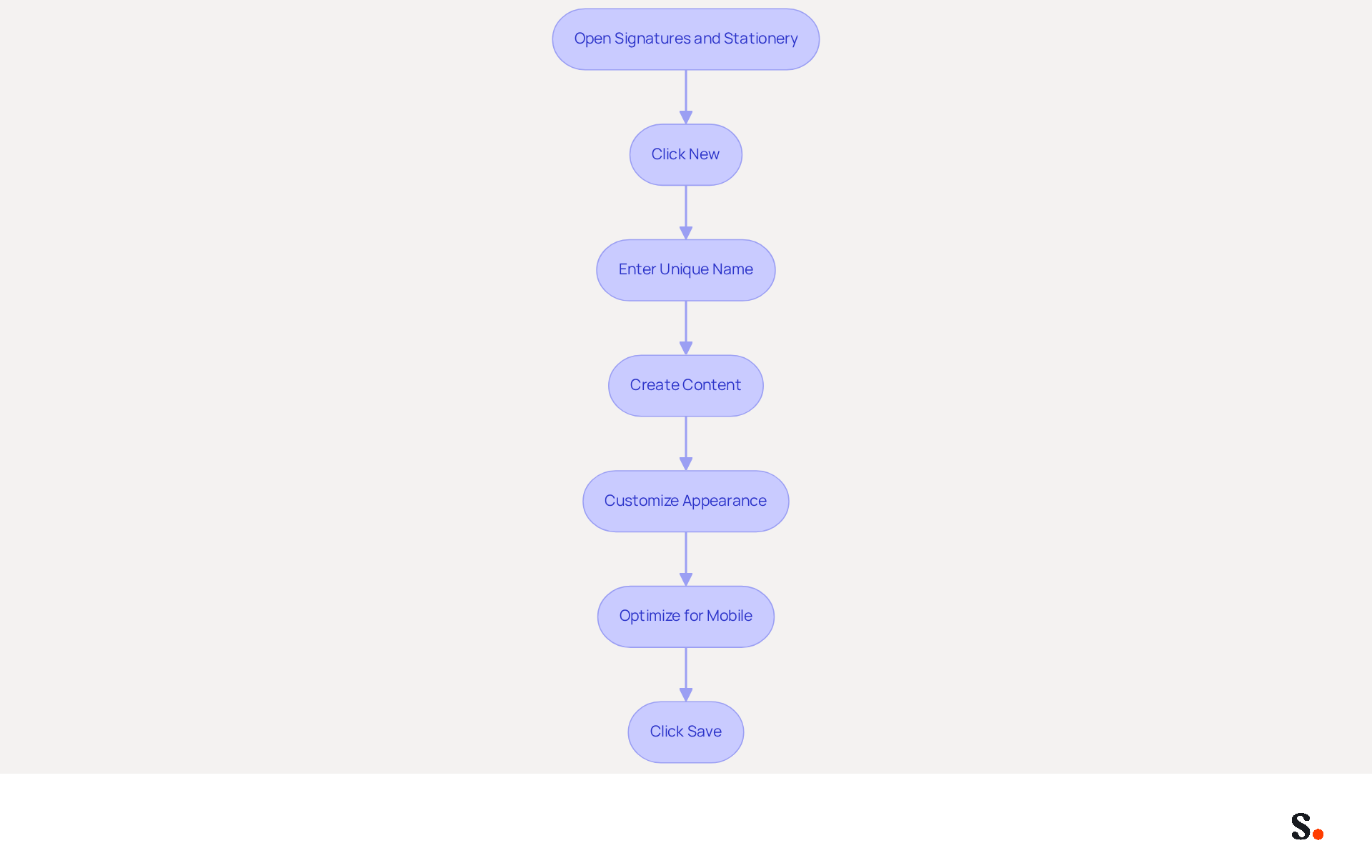
- Open the Signatures and Stationery dialog box.
- Click on 'New' to begin creating a new label.
- In the pop-up window, enter a unique name for your mark and click 'OK' to proceed.
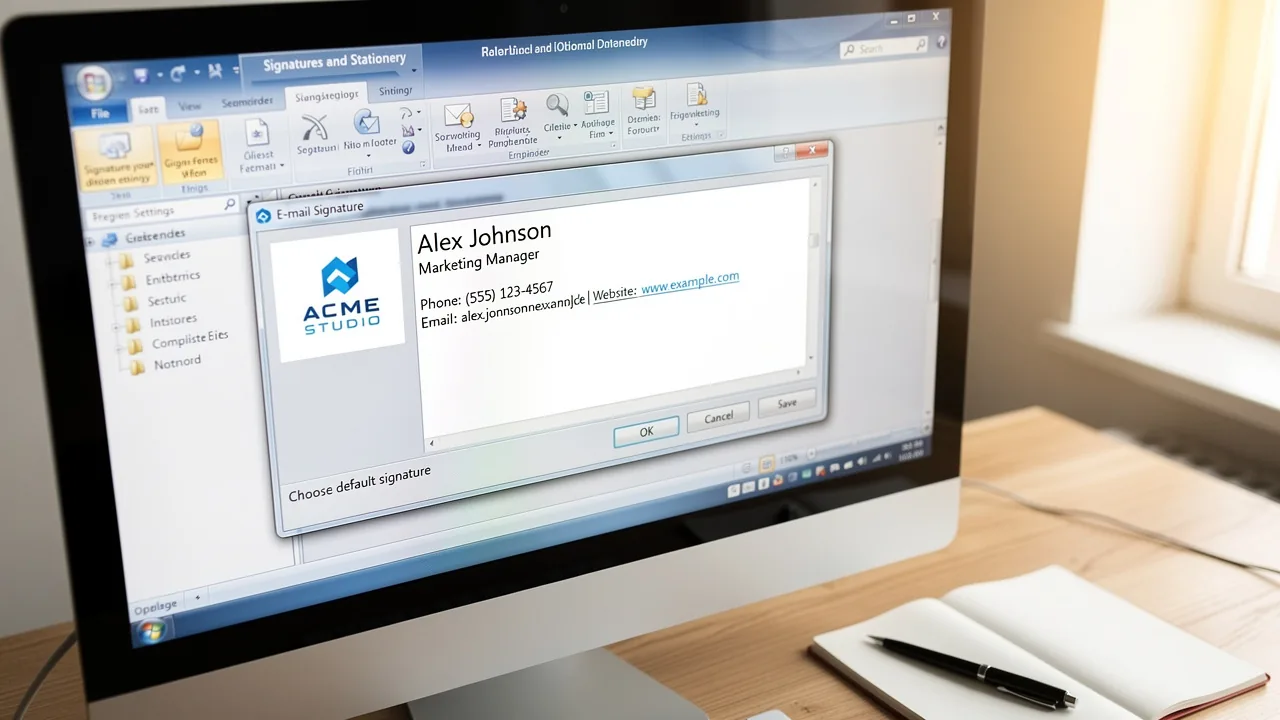
- In the 'Edit label' box, create your content, ensuring to follow an information hierarchy by presenting crucial details first, such as your name, title, company name, and contact information.
This structure is essential for maintaining professionalism and ensuring recipients can easily reach you. Utilize the formatting tools to customize the appearance of your sign-off. Adjust the font, size, color, and style to align with your identity. Remember to limit your mark to two colors to maintain focus and brand consistency. You can also enhance your mark by adding images or logos through the image icon.
After completing your design, consider that many recipients access messages on mobile devices, making mobile optimization crucial. Click 'Save' to store your changes. A well-crafted sign-off reinforces your brand and acts as a powerful marketing tool that can boost engagement and response rates. Incorporating a call to action can significantly enhance its effectiveness.
With Scribe, you can save time by automating the management of your email identifiers. Any modifications made in your business phone system, such as Aircall, are automatically reflected in your email footers. This real-time synchronization means your team can focus on their work without worrying about outdated information in their email footers. Scribe also meets SOC 2 Type II compliance standards, which means your data is handled securely, crucial for maintaining trust and compliance in your marketing efforts. By leveraging Scribe, you ensure your email signatures are not only current but also a strategic asset in your marketing toolkit.
Set Default Signature Preferences for Consistency
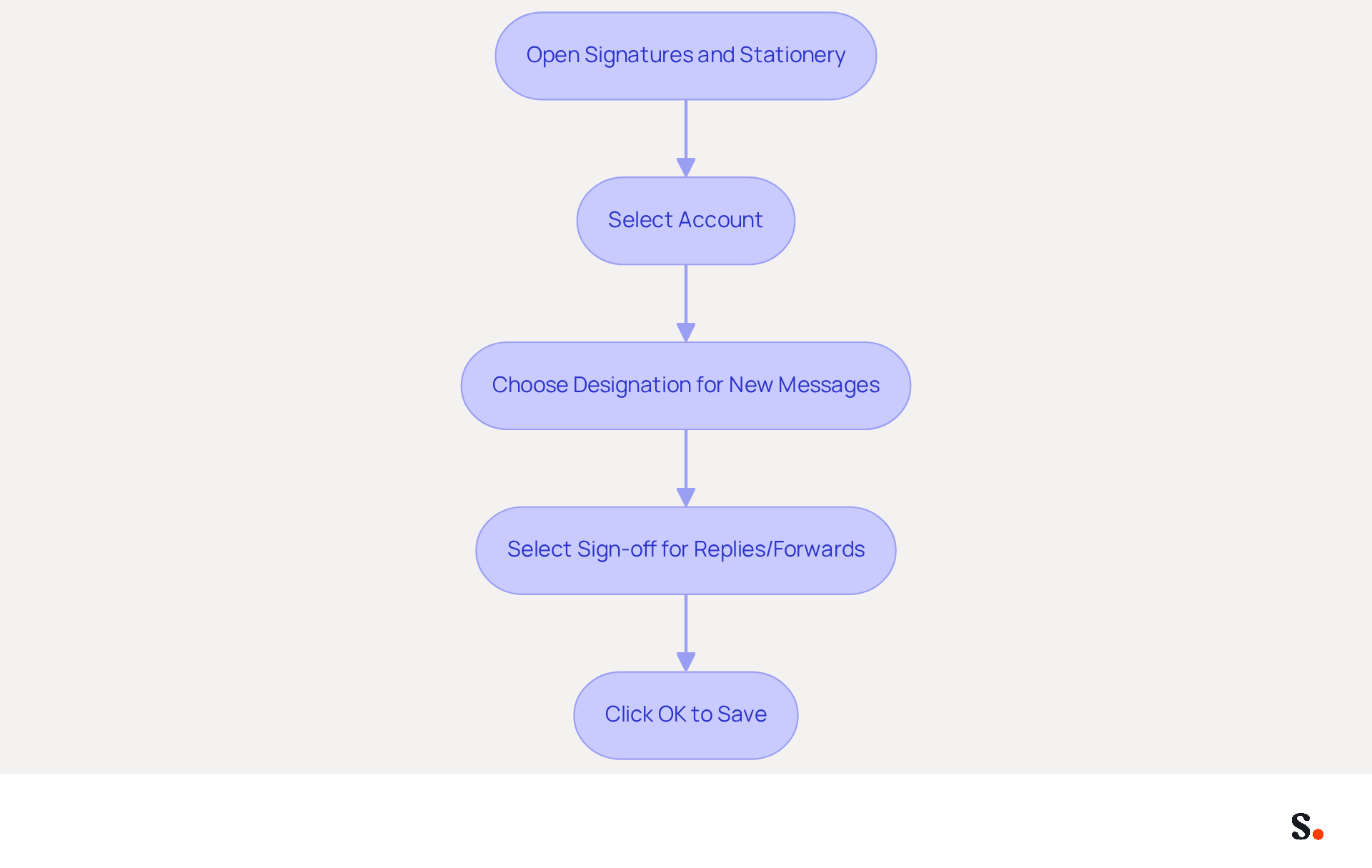
To maintain a consistent brand image in your email communications, it is crucial to set a default email signature in Outlook Classic:
- Open the Signatures and Stationery dialog box and locate the 'Choose default option' section.
- If you handle multiple accounts, select the one you wish to link with the sign-off from the drop-down menu.
- Under 'New messages', choose the designation you created from the drop-down list. This action will automatically include your mark in all new messages, reinforcing your brand identity with each communication.
- Optionally, select a sign-off for 'Replies/forwards' to ensure consistency throughout your correspondence.
- Click 'OK' to save your settings and close the dialog box.
Establishing a default sign-off is essential. Research shows that 76% of recipients believe a branded sign-off enhances their trust in the sender. Additionally, companies with consistent branding see a 22% increase in response rates. By learning how to add a signature in Outlook Classic, you not only enhance your professional image but also utilize every message as an opportunity to promote your brand effectively.
Furthermore, to streamline the management of signatures across your organization, you can sync your Google Workspace with Scribe. To achieve this, grant Scribe permission to connect with your service provider; this step requires Super Admin access. Once synced, you can choose which teammates to sync with Scribe, ensuring that any modifications made in your provider are automatically reflected in Scribe without manual input. This integration not only saves time but also reinforces your brand's credibility in every interaction while maintaining compliance with security standards, as Scribe is SOC 2 Type II certified.
Incorporate Marketing Elements into Your Signature
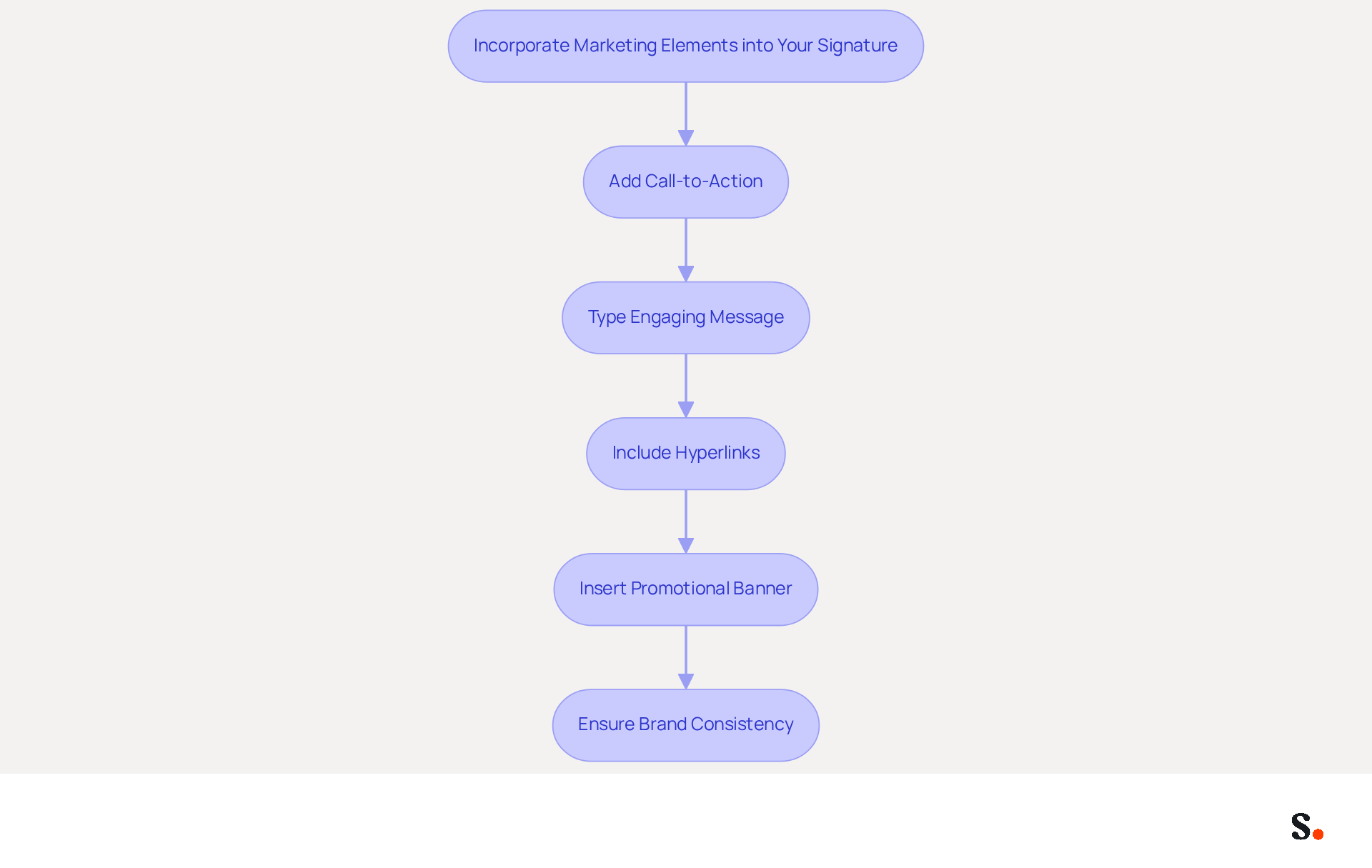
Integrating promotional elements into your email signature can significantly enhance interaction and brand visibility. Here’s how to do it effectively in Outlook Classic:
- While modifying your sign-off in the 'Edit sign-off' box, consider adding elements such as a call-to-action (CTA) or promotional banner. A good CTA is short and action-driven, like 'Check out our latest offers!' Utilizing specific action verbs can remove uncertainty for the recipient and enhance click-through rates. This can lead to click-through rates averaging around 4%, which is much higher than typical promotional messages.
- To add a CTA, type a brief message encouraging recipients to visit your website or check out a specific product. Make sure your wording is clear and engaging; this clarity really helps boost interaction.
- You can also include hyperlinks by highlighting the text you want to link, clicking the hyperlink icon, and entering the URL. This enables you to monitor engagement efficiently, as message footers can produce an average click rate of 7 to 15%, exceeding traditional display advertisements.
- If you have a promotional banner, insert it as an image by clicking the image icon and selecting the file from your computer. A well-designed banner can increase clicks by 22%, making it a powerful tool for driving traffic to your campaigns.
- Ensure that all promotional elements align with your visual identity and messaging for a cohesive appearance. Consistency in branding is crucial, as it reinforces recognition and professionalism, helping to establish trust with your audience. Furthermore, consider adding legal disclaimers in your correspondence to ensure compliance in regulated industries.
Ultimately, a well-crafted email signature can serve as a powerful marketing asset, driving substantial returns on investment.
Conclusion
A professional email signature in Outlook Classic serves as a vital tool for enhancing brand visibility and credibility. By following the outlined steps, users can effectively manage their email identifiers, ensuring that every communication reflects their brand's identity and professionalism. This approach builds trust with recipients and helps businesses turn their email signatures into effective marketing tools.
Key insights from the article highlight the importance of consistency in branding, the benefits of incorporating marketing elements, and the ease of managing signatures through tools like Scribe. Incorporating promotional elements, such as special offers, can lead to a measurable increase in engagement, as evidenced by studies showing higher click-through rates. With Scribe's capabilities, organizations can automate updates and maintain compliance with security standards, ensuring that their email signatures are always current and effective.
In a competitive digital landscape, every email sent is an opportunity to reinforce brand identity and drive engagement. By mastering email signatures in Outlook Classic, businesses can turn a simple sign-off into a strategic asset that communicates professionalism and boosts marketing efforts. By prioritizing effective email signature management, organizations can ensure they leave a memorable impact with every communication.
Frequently Asked Questions
How do I access the signature settings in Outlook Classic?
To access the signature settings in Outlook Classic, open Outlook Classic on your computer, click on the 'File' tab in the top-left corner, select 'Options' from the menu, click on 'Mail' in the Outlook Options window, and then click on the 'Signatures' button to open the Signatures and Stationery dialog box.
Why is managing email identifiers important for branding and communication?
Managing email identifiers is crucial for effective branding and communication because 80% of people believe a branded electronic identifier is vital for a company's identity. Additionally, 42% of individuals have a negative view of businesses that lack one.
What impact can branded logos have on a company's website traffic?
Companies that utilize branded logos can experience a 15% increase in click-through rates to their websites, highlighting the importance of maintaining professional and consistent digital identifiers.
What percentage of organizations prioritize standardized identifiers for corporate communication?
Research indicates that 25.1% of organizations prioritize standardized identifiers to enhance corporate communication, reflecting the growing acknowledgment of the role digital identifiers play in marketing and brand awareness.
List of Sources
- Access Signature Settings in Outlook Classic
- 40+ Email Signature Statistics for 2026 (Data + Insights) (https://wavecnct.com/blogs/email-signature-statistics)
- The State Of Business Email Marketing | Report by Newoldstamp - NEWOLDSTAMP (https://newoldstamp.com/email-marketing-report)
- Email Signature Statistics: A Closer Look at Email Signatures in 2026 (https://mysignature.io/blog/email-signature-statistics)
- Email signature statistics: Why every business should optimize their email signatures — Stripo.email (https://stripo.email/blog/email-signature-statistics-why-every-business-should-optimize-their-email-signatures)
- Email Signature Trends in Numbers: Infographic [2026] (https://mailtrap.io/blog/email-signature-trends)
- Create and Customize Your Email Signature
- Email Signature Best Practices - NEWOLDSTAMP (https://newoldstamp.com/blog/email-signature-best-practices)
- Create an email signature in Outlook - Microsoft Support (https://support.microsoft.com/en-us/topic/create-an-email-signature-in-outlook-0f6ec33a-94dc-c87b-ad05-3bd04e89f51c)
- Email Signature Design Guide: Best Practices and Examples (https://designmodo.com/email-signature)
- How to add and change an email signature in Outlook | Microsoft Support (https://support.microsoft.com/en-us/outlook/mail/how-to-add-and-change-an-email-signature-in-outlook)
- How to Add a Signature in Outlook (New & Classic) (https://fitsmallbusiness.com/add-a-signature-outlook)
- Set Default Signature Preferences for Consistency
- Exclaimer Research: 67% of Marketers Expect Email Signatures to Support With Lead Gen In 2023 (https://businesswire.com/news/home/20230612141095/en/Exclaimer-Research-67-of-Marketers-Expect-Email-Signatures-to-Support-With-Lead-Gen-In-2023)
- The impact of email signatures on your branding (https://signitic.com/en/resources/the-impact-of-email-signatures-on-your-branding)
- Email Signature Branding: Consistency and Impact | Crossware365 (https://crossware365.com/blog/mastering-email-signature-branding-market-presence)
- Master Corporate Email Signature Management for Brand Consistency (https://scribe-mail.com/en-US/blog/master-corporate-email-signature-management-for-brand-consistency)
- Why Are Email Signatures Key to Brand Awareness? | QuickMail (https://quickmail.com/role-of-email-signatures-in-brand-awareness)
- Incorporate Marketing Elements into Your Signature
- 10 ideas for marketing campaigns in email signatures (https://signitic.com/en/resources/10-ideas-for-marketing-campaigns-in-email-signatures)
- The Ultimate Guide to Email Signature Call-to-Action - NEWOLDSTAMP (https://newoldstamp.com/blog/the-ultimate-guide-to-email-signature-call-to-action)
- Leveraging email signatures for marketing (https://revolgy.com/insights/blog/leveraging-email-signatures-for-marketing)
- Create Effective CTA Email Signatures (Examples & Templates) (https://wisestamp.com/examples/cta-email-signature)
- Using Email Signatures as a Marketing Tool: Ideas for Generating Leads and Promoting Business (https://blog.ringostat.com/en/using-email-signatures-as-a-marketing-tool-ideas-for-generating-leads-and-promoting-business)
Get started with Scribe
Create your signature in minutes
Free 14-day trial — no credit card.