How to Change Your Signature in Outlook: A Step-by-Step Guide
Despite their often-overlooked status, email signatures can serve as powerful branding tools in professional communication. A well-designed signature not only
Sophie Grant
Email Signature Specialist, Scribe
Introduction
Despite their often-overlooked status, email signatures can serve as powerful branding tools in professional communication. A well-designed signature not only conveys essential contact information but also enhances brand visibility and fosters trust with recipients. As organizations seek to enhance their marketing efforts, it is crucial to understand how to effectively change and optimize email signatures in Outlook for maximum impact. This guide explores the step-by-step process of updating email signatures, addressing the challenges many professionals face, and highlighting best practices that can elevate a simple sign-off into a strategic marketing asset.
Understand Email Signatures and Their Importance in Marketing
Email identifiers serve a critical role beyond mere contact information; they are essential tools for enhancing brand visibility and engagement. A well-crafted email signature can:
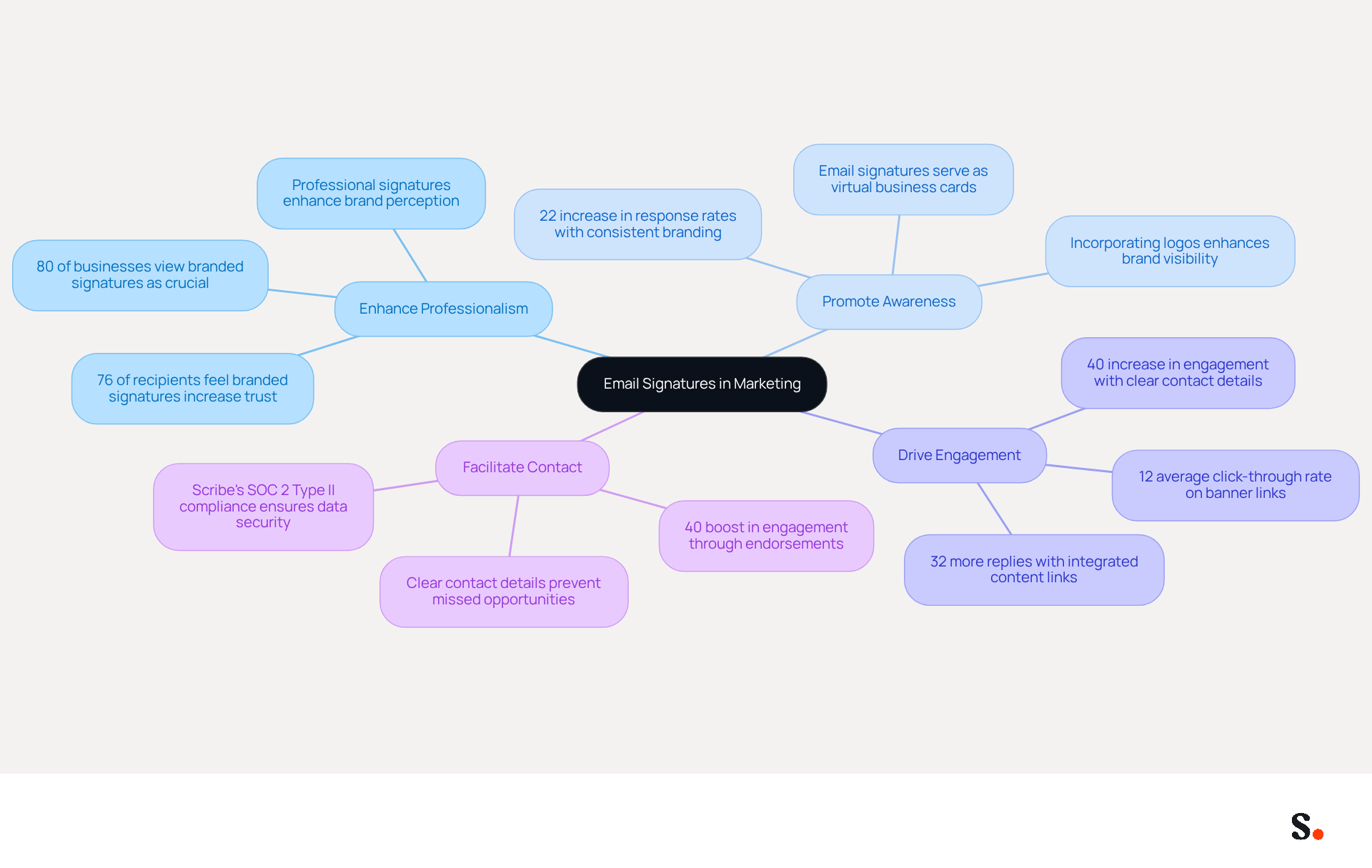
- Enhance Professionalism: Consistent signatures across all communications establish credibility and professionalism, reinforcing trust with recipients. Interestingly, research indicates that 80% of businesses view branded signatures as crucial for building trust, with 76% of recipients recognizing their beneficial effect on sender credibility.
- Promote Awareness of Your Identity: Incorporating your company logo and branding elements in every message helps solidify identity. Consistent visual elements can result in a 22% increase in response rates, making each interaction a potential touchpoint for recognition.
- Drive Engagement: By integrating links to your website, social media, or promotional campaigns, you can encourage recipients to engage further with your identity. Utilizing well-designed digital identifiers can yield a 12% average click-through rate on banner links, significantly enhancing marketing effectiveness. Scribe automatically syncs your communication identifiers with your business phone system, so any updates in your Aircall configuration are reflected instantly. Additionally, Scribe saves time by auto-filling your teammates' identifiers, eliminating the need for manual updates and enhancing brand consistency.
- Facilitate Contact: Without clear contact details, recipients may struggle to reach out, leading to missed opportunities. This accessibility can lead to a 40% increase in engagement when endorsements are strategically utilized for marketing purposes. Furthermore, Scribe's SOC 2 Type II compliance guarantees that your data is secure, enabling you to concentrate on maximizing the impact of your communications.
Incorporating these elements into your message footer can transform it into a strategic marketing tool, maximizing the impact of every correspondence you send. Organizations that leverage digital identifiers effectively position themselves for greater brand recognition and customer loyalty in the competitive landscape of 2026.
Access Email Signature Settings in Outlook
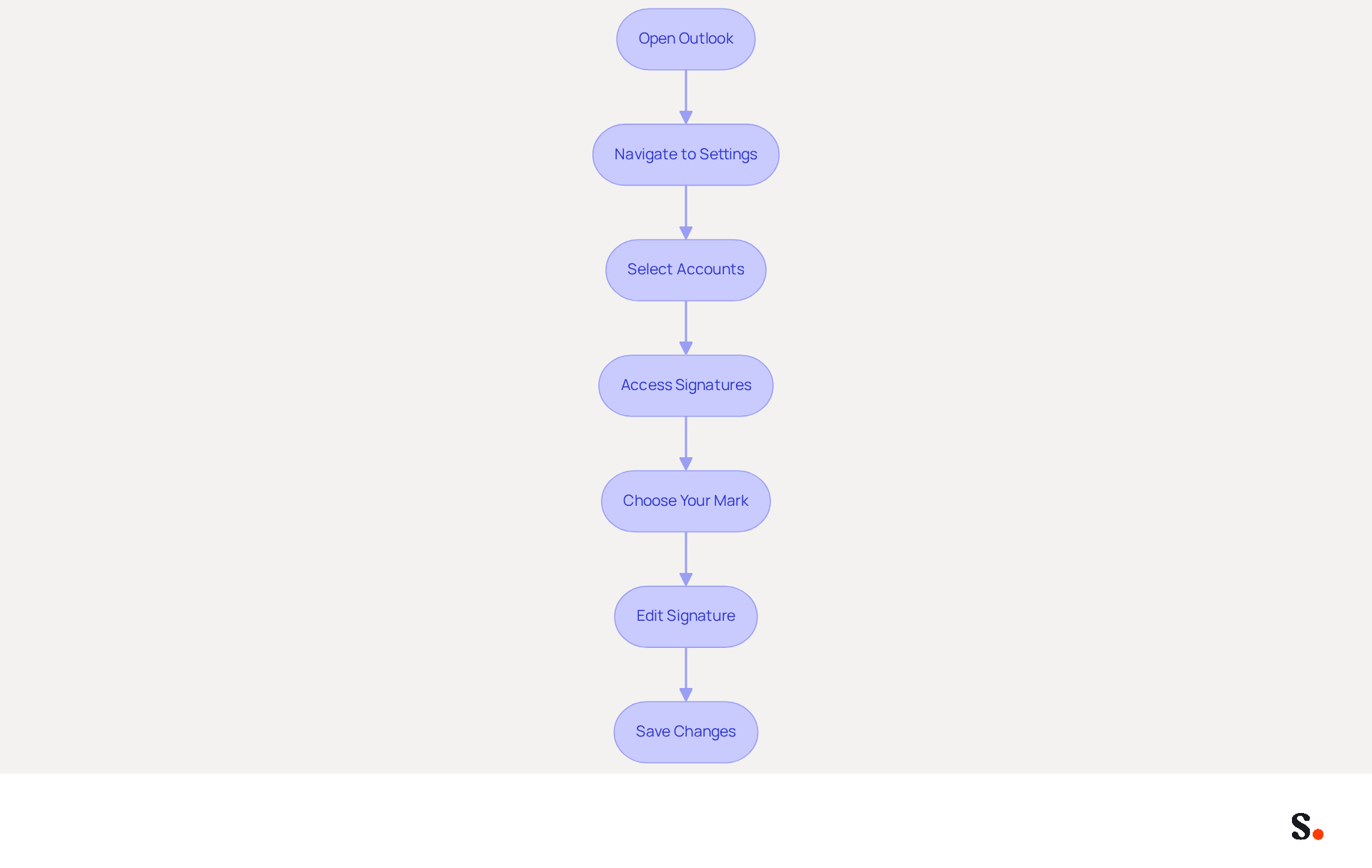
To enhance your professional communication, it's important to know how do you change signature in Outlook, as it is a straightforward process. To do so, follow these steps:
- Open Outlook: Launch the Outlook application on your computer.
- Navigate to Settings: Click on the gear icon (⚙️) located in the top-right corner of the window.
- Select Accounts: From the dropdown menu, choose 'Accounts'.
- Access Signatures: Click on 'Signatures' to open the signing settings.
- Choose Your Mark: If you have multiple marks, select the one you wish to edit or create a new one by clicking 'New'.
- Edit Signature: In the editing box, you can type your name and format it using the available tools (fonts, colors, images, etc.).
- Save Changes: After making your edits, ensure you click 'Save' to apply the changes.
These steps will help you quickly access and adjust your settings in Outlook, specifically addressing how do you change signature in Outlook. Utilizing Scribe not only simplifies this task but also ensures your contact information is always up-to-date, reflecting your current role accurately.
Create or Edit Your Email Signature
Creating a professional email signature in Outlook can significantly impact your brand's communication effectiveness. To create or edit your email signature, follow these detailed steps:
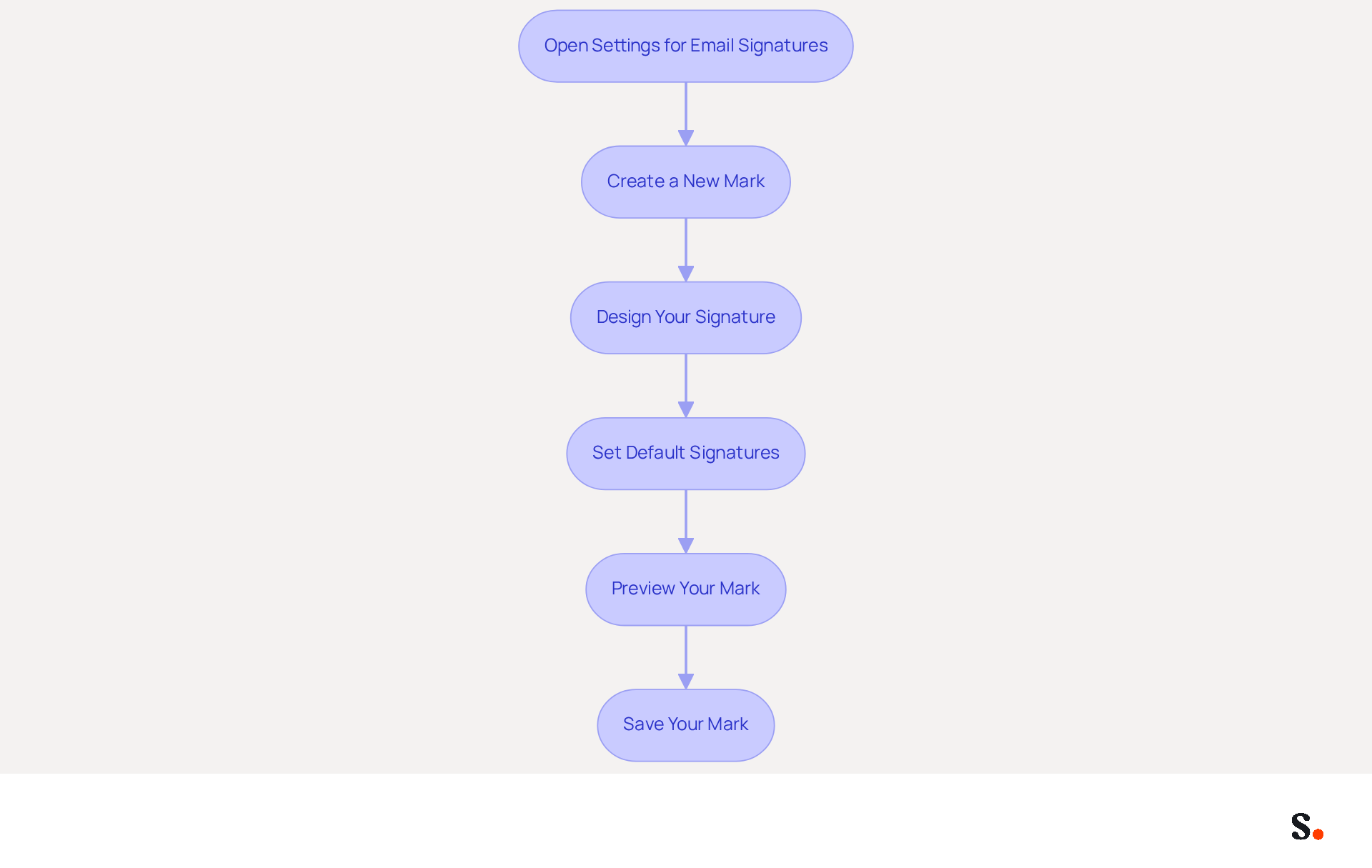
- Open Settings for Email Signatures: Navigate to the settings for email signatures in Outlook by accessing the 'File' menu and selecting 'Options'.
- Create a New Mark: Click on 'New' to start a new mark. Enter a name for your mark to identify it easily.
- Design Your Signature: In the editing box:
- Add Text: Type your full name, job title, company name, and any other relevant information.
- Format Text: Use the formatting options to adjust the font style, size, and color to align with your brand identity. Recommended font sizes are between 14-16px for readability.
- Insert Images: Just click the image icon to add your company logo or any other relevant images, ensuring they are high-quality and appropriately sized (e.g., logos should be no larger than 600px wide).
- Add Links: Include hyperlinks to your website or social media profiles to drive traffic and engagement. Ensure that these links are functional and relevant to your audience.
- Set Default Signatures: Choose whether this identifier should be the default for new messages and replies/forwards by selecting the appropriate options in the settings.
- Preview Your Mark: Before saving, preview how your mark will look in emails to ensure it appears professional and aligned with your branding. This step is essential for maintaining a consistent image across communications.
- Save Your Mark: Click 'Save' to finalize your mark.
Following these steps helps you create a professional email signature that boosts your brand's visibility and engages your audience, which is important when you consider how do you change signature in outlook. Remember to regularly review and update your sign-off to reflect any changes in your contact information or branding, ensuring it remains effective and relevant. Regularly updating your email signature ensures it remains a powerful tool for engagement and brand representation. Including a clear call-to-action (CTA) can significantly boost engagement, as strategic CTAs can drive 40% more meeting bookings. Additionally, Scribe's SOC 2 Type II compliance ensures secure data handling throughout this process.
Troubleshoot Common Issues with Email Signatures
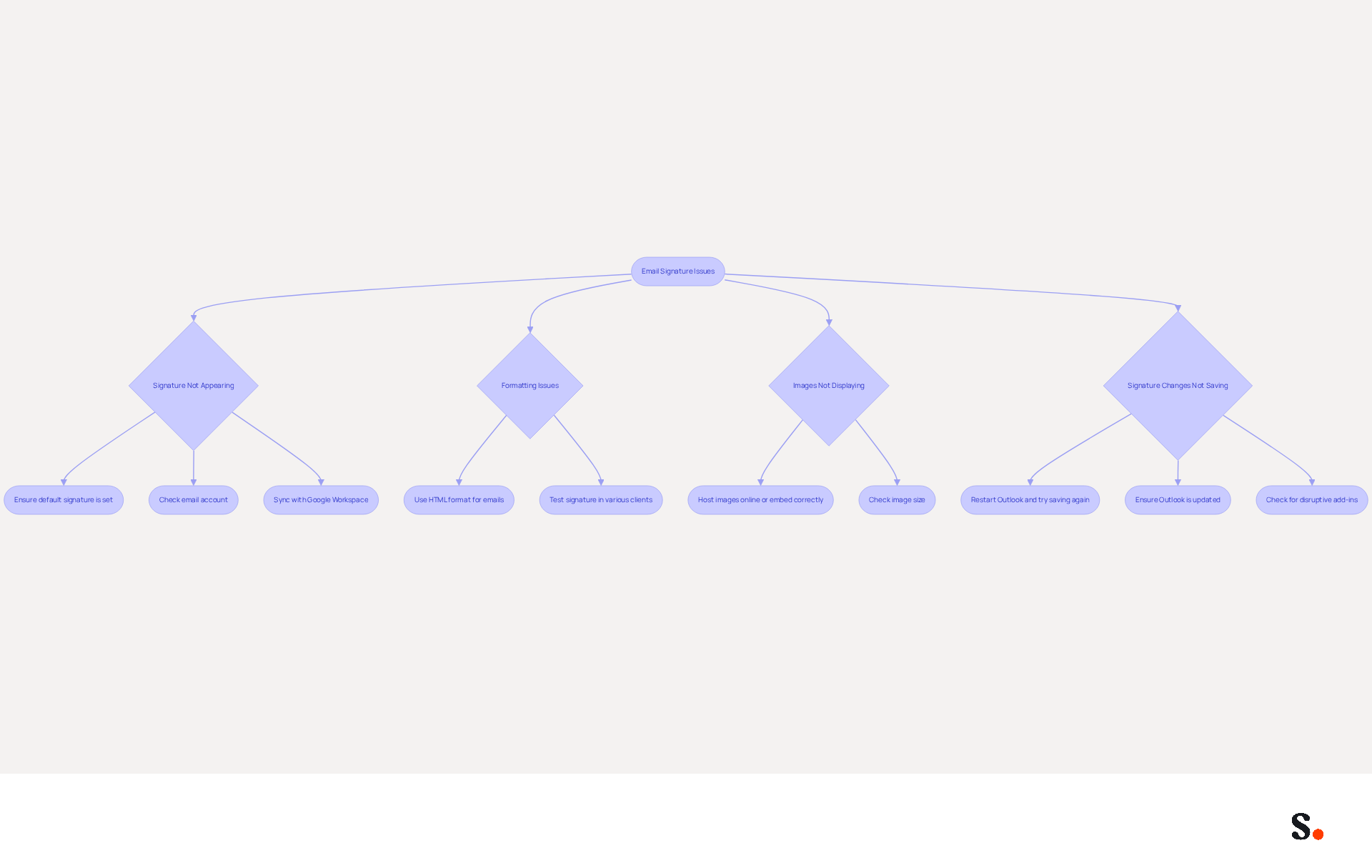
Creating or modifying your Outlook message footer can present several challenges, particularly when you need to know how do you change signature in Outlook. Here are troubleshooting tips to resolve them:
-
Signature Not Appearing: If your signature is not showing up in emails:
- Ensure you have set it as the default for new messages and replies/forwards in the signature settings.
- Check if you are using the correct email account if you have multiple accounts configured. Note that shared mailboxes may have the same identifier, which can lead to confusion.
- If you sync your Google Workspace with Scribe, your teammates' identification information will be automatically updated, reducing the chances of discrepancies.
-
Formatting Issues: If your signature looks different when sent:
- Make sure you are using HTML format for your emails, as plain text may strip formatting. Many users face formatting issues when they create their signatures in Word, which can lead to layout problems after sending.
- Test your signature by sending messages to various clients to see how it appears. This highlights the importance of ensuring your signature is effective, as dynamic identifiers can significantly improve engagement.
-
Images Not Displaying: If images in your signature are not showing:
- Ensure the images are hosted online or embedded correctly in the signature settings. Large images can lead to delays in the application, particularly in lengthy message threads.
- Check the image size; large images may not load properly.
-
Signature Changes Not Saving: If you find that your changes to the signature are not saving, you are not alone; this is a common issue:
- Restart Outlook and try saving again. Some users have reported needing to re-save their initials daily for them to appear in new emails and replies, similar to a case where a user faced this issue repeatedly.
- Make sure you have the latest version of Outlook, as this can often resolve persistent issues with managing your email identifiers. Furthermore, verify for any add-ins that may disrupt configuration settings.
By following these troubleshooting tips, you can effectively resolve common issues and understand how do you change signature in Outlook to ensure your message footer functions as intended. By implementing these strategies, you can enhance the effectiveness of your email communications and ensure your signature reflects your professionalism.
Conclusion
An email signature serves as more than just a digital sign-off; it is a vital marketing asset that can significantly enhance brand visibility and engagement. Effectively managing your email signature in Outlook is crucial for ensuring that every email reflects your brand's identity and professionalism. This guide walks you through the essential steps to create, edit, and troubleshoot your email signatures, emphasizing the importance of maintaining consistency and clarity in communications.
Key insights discussed include:
- The significant impact of email signatures on brand recognition
- The necessity of integrating links for increased engagement
- The importance of troubleshooting common issues to maintain a professional appearance
Utilizing tools like Scribe can streamline this process, ensuring that signatures are not only visually appealing but also compliant with security standards such as SOC 2 Type II, GDPR, and CCPA. Moreover, the ability to manage signatures independently after initial IT setup empowers marketing teams to maintain brand consistency effortlessly.
By prioritizing email signature management, organizations can not only elevate their marketing efforts but also cultivate deeper connections with their audience. Leveraging these insights and tools can enhance email marketing strategies, ensuring that every interaction contributes to a cohesive brand image.
Frequently Asked Questions
What is the role of email signatures in marketing?
Email signatures serve as essential tools for enhancing brand visibility and engagement, going beyond mere contact information.
How do email signatures enhance professionalism?
Consistent signatures across all communications establish credibility and professionalism, reinforcing trust with recipients. Research shows that 80% of businesses view branded signatures as crucial for building trust.
What impact do email signatures have on sender credibility?
76% of recipients recognize the beneficial effect of branded signatures on sender credibility, which helps in establishing trust.
How can email signatures promote awareness of a company's identity?
Incorporating a company logo and branding elements in every message helps solidify identity, potentially resulting in a 22% increase in response rates.
In what ways can email signatures drive engagement?
By integrating links to websites, social media, or promotional campaigns, email signatures encourage recipients to engage further, yielding an average click-through rate of 12% on banner links.
How does Scribe enhance the management of email signatures?
Scribe automatically syncs communication identifiers with the business phone system, reflecting updates instantly and saving time by auto-filling teammates' identifiers for brand consistency.
Why is clear contact information important in email signatures?
Clear contact details prevent recipients from struggling to reach out, which can lead to missed opportunities. Strategic endorsements can increase engagement by 40%.
What security measures does Scribe provide for email signatures?
Scribe's SOC 2 Type II compliance guarantees that your data is secure, allowing you to focus on maximizing the impact of your communications.
How can organizations benefit from effectively leveraging digital identifiers in email signatures?
Organizations that effectively use digital identifiers can achieve greater brand recognition and customer loyalty in the competitive landscape of 2026.
List of Sources
- Understand Email Signatures and Their Importance in Marketing
- The ultimate guide to email signatures in 2026 (https://signitic.com/en/resources/email-signature)
- 2026 Marketing Trends: Email Signatures as a Marketing Tool (https://bluechiptt.com/blog/5-marketing-trends-for-2026-and-how-your-email-signature-fits-in)
- Why Email Signatures Must Be In Your 2026 Marketing Plan | Rocketseed (https://rocketseed.com/blog/2026-marketing-plan-email-signatures)
- The impact of email signatures on your branding (https://signitic.com/en/resources/the-impact-of-email-signatures-on-your-branding)
- All the Best Email Signature Practices for Marketing Success (https://scribe-mail.com/en-US/blog/all-the-best-email-signature-practices-for-marketing-success)
- Access Email Signature Settings in Outlook
- Email Signature Statistics: A Closer Look at Email Signatures in 2026 (https://mysignature.io/blog/email-signature-statistics)
- Email signature statistics: Why every business should optimize their email signatures — Stripo.email (https://stripo.email/blog/email-signature-statistics-why-every-business-should-optimize-their-email-signatures)
- Email Signatures vanishing - New Outlook | Microsoft Community Hub (https://techcommunity.microsoft.com/discussions/outlookgeneral/email-signatures-vanishing---new-outlook/4418809)
- 40+ Email Signature Statistics for 2026 (Data + Insights) (https://wavecnct.com/blogs/email-signature-statistics)
- Create or Edit Your Email Signature
- The ultimate guide to email signatures in 2026 (https://signitic.com/en/resources/email-signature)
- 4 Best Practices for Your Outlook Signature Line in Marketing (https://scribe-mail.com/en-US/blog/4-best-practices-for-your-outlook-signature-line-in-marketing)
- Email Signature Best Practices for 2026 (+ 15 Pro Examples) (https://wavecnct.com/blogs/email-signature-best-practices-2026)
- Email Signature Best Practices - NEWOLDSTAMP (https://newoldstamp.com/blog/email-signature-best-practices)
- "Email Signature Trends for 2026: What's In, What's Out" | Crossware posted on the topic | LinkedIn (https://linkedin.com/posts/crossware-ltd_new-year-new-trends-even-for-your-email-activity-7394554686046908416-vD_O)
- Troubleshoot Common Issues with Email Signatures
- Email signature statistics: Why every business should optimize their email signatures — Stripo.email (https://stripo.email/blog/email-signature-statistics-why-every-business-should-optimize-their-email-signatures)
- 40+ Email Signature Statistics for 2026 (Data + Insights) (https://wavecnct.com/blogs/email-signature-statistics)
- How to solve problems with email signatures in Microsoft 365? (https://mail-signatures.com/articles/problems-email-signatures-office-365)
- Images are not displayed in emails, newsletters, or signatures in classic Outlook | Microsoft Support (https://support.microsoft.com/en-us/support/known-issues/images-are-not-displayed-in-emails-newsletters-or-signatures-in-classic-outlook)
Get started with Scribe
Create your signature in minutes
Free 14-day trial — no credit card.