How to Customize Email Signature in Outlook: A Step-by-Step Guide
Email signatures serve as crucial elements in professional communication, impacting both brand identity and the perception of professionalism. This guide
Sophie Grant
Email Signature Specialist, Scribe
Introduction
Email signatures serve as crucial elements in professional communication, impacting both brand identity and the perception of professionalism. This guide delves into the essential steps for customizing email signatures in Outlook, offering insights into how a well-crafted signature can elevate professional interactions. Many users struggle with the intricacies of customizing their email signatures, leading to inconsistent branding. What common pitfalls do they face, and how can these be addressed to maintain a polished brand image?
Understand the Importance of Email Signatures in Outlook
Email footers serve a critical role in professional communications, functioning as digital business cards that convey essential contact information and reinforce brand identity. With Scribe's automated synchronization with Aircall, every modification made in your Aircall setup will automatically be reflected in your Scribe configurations, ensuring consistency across all communications.
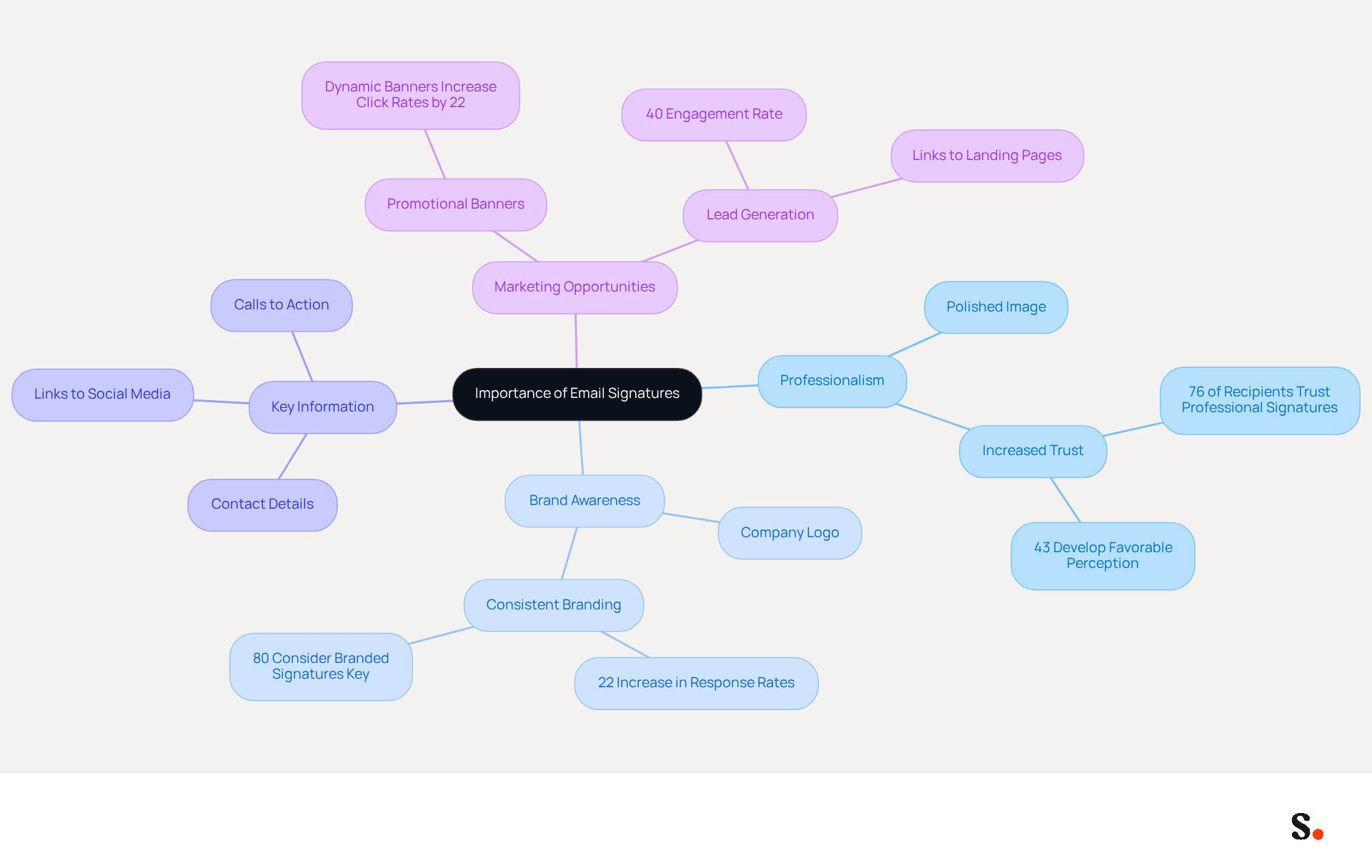
One of the primary benefits of a well-designed email signature is its ability to enhance professionalism. A consistent signature across all emails presents a polished image to clients and colleagues. Additionally, it promotes brand awareness; including your company logo and tagline can help reinforce brand recognition with every message sent.
Furthermore, signatures can provide key information, such as your name, title, contact details, and links to social media or company websites, making it easy for recipients to connect with you. Lastly, by incorporating promotional banners or calls to action, you can turn every message into a marketing opportunity, driving traffic to your website or upcoming events.
Recognizing these advantages, along with how Scribe integrates with Aircall, can inspire you to craft an email signature that is both visually appealing and strategically effective.
Create and Customize Your Email Signature in Outlook
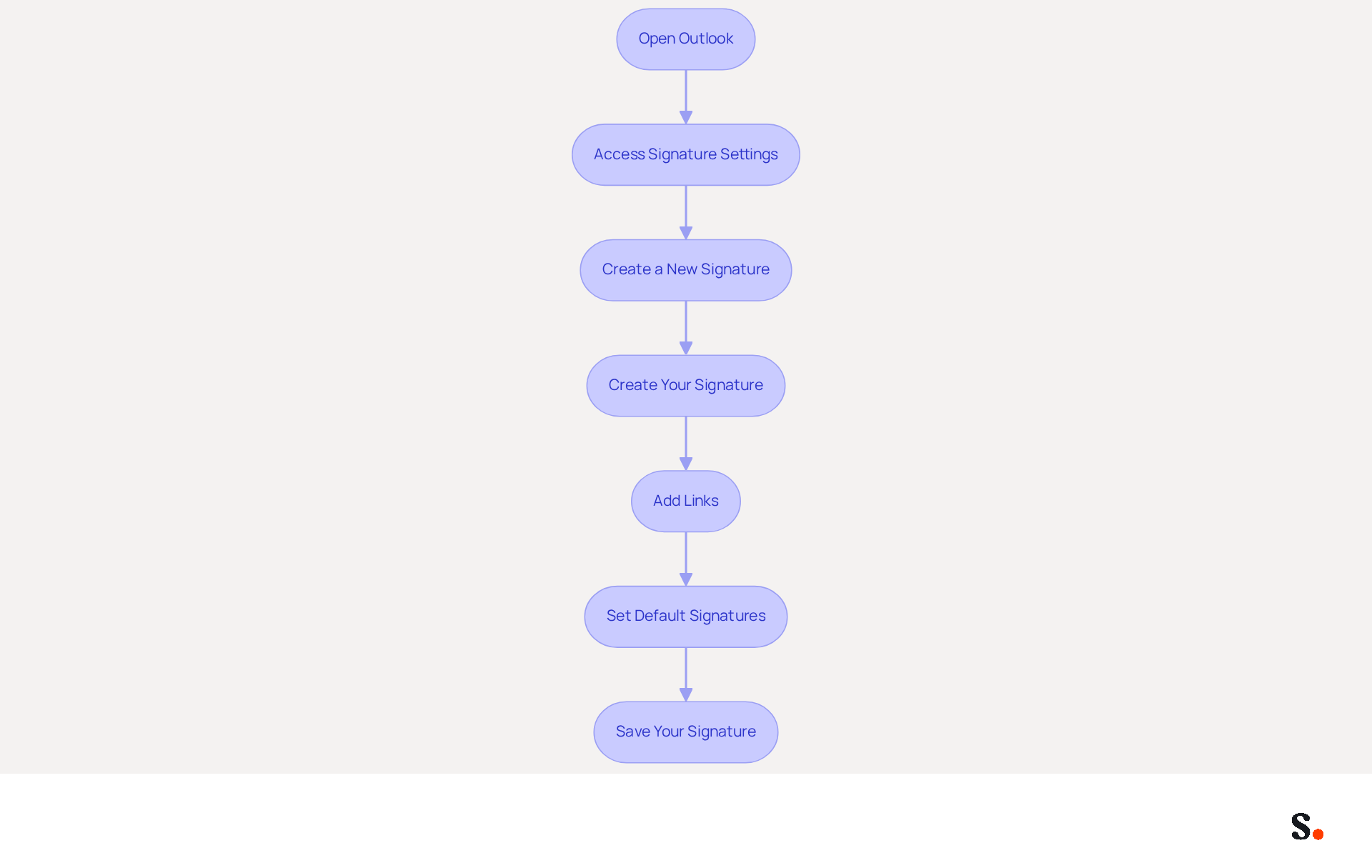
To create and customize your email signature in Outlook, follow these steps:
- Open Outlook: Launch the Outlook application on your computer.
- Access Signature Settings: Click on 'File' in the top-left corner, then select 'Options'. In the Mail category, click on 'Signatures'.
- Create a New Signature: In the Signatures and Stationery window, click 'New'. Enter a name for your signature and click 'OK'.
- Create Your Signature: In the 'Edit signature' box, type your signature. Use the formatting tools to customize the font, size, color, and alignment. You can also add images, such as your company logo, by selecting the image icon. Recommended logo dimensions are 150x50 pixels, and files should be under 50KB for optimal delivery.
- Add Links: To include hyperlinks (e.g., to your website or social media), highlight the text you want to link, click the hyperlink icon, and enter the URL. To enhance your signature, consider adding social media icons, as 75.8% of users include them in their email footers.
- Set Default Signatures: Choose your new signature as the default for new messages and replies/forwards if desired. Each account can have its own default configuration for personal identifiers.
- Save Your Signature: Click 'OK' to save your changes and close the window.
By learning how to customize email signature in Outlook, you will create a personalized electronic identifier that reflects your professional identity and enhances your communications. A well-crafted email signature not only reflects your professionalism but also significantly influences how your communications are perceived by recipients.
Troubleshoot Common Issues with Email Signatures
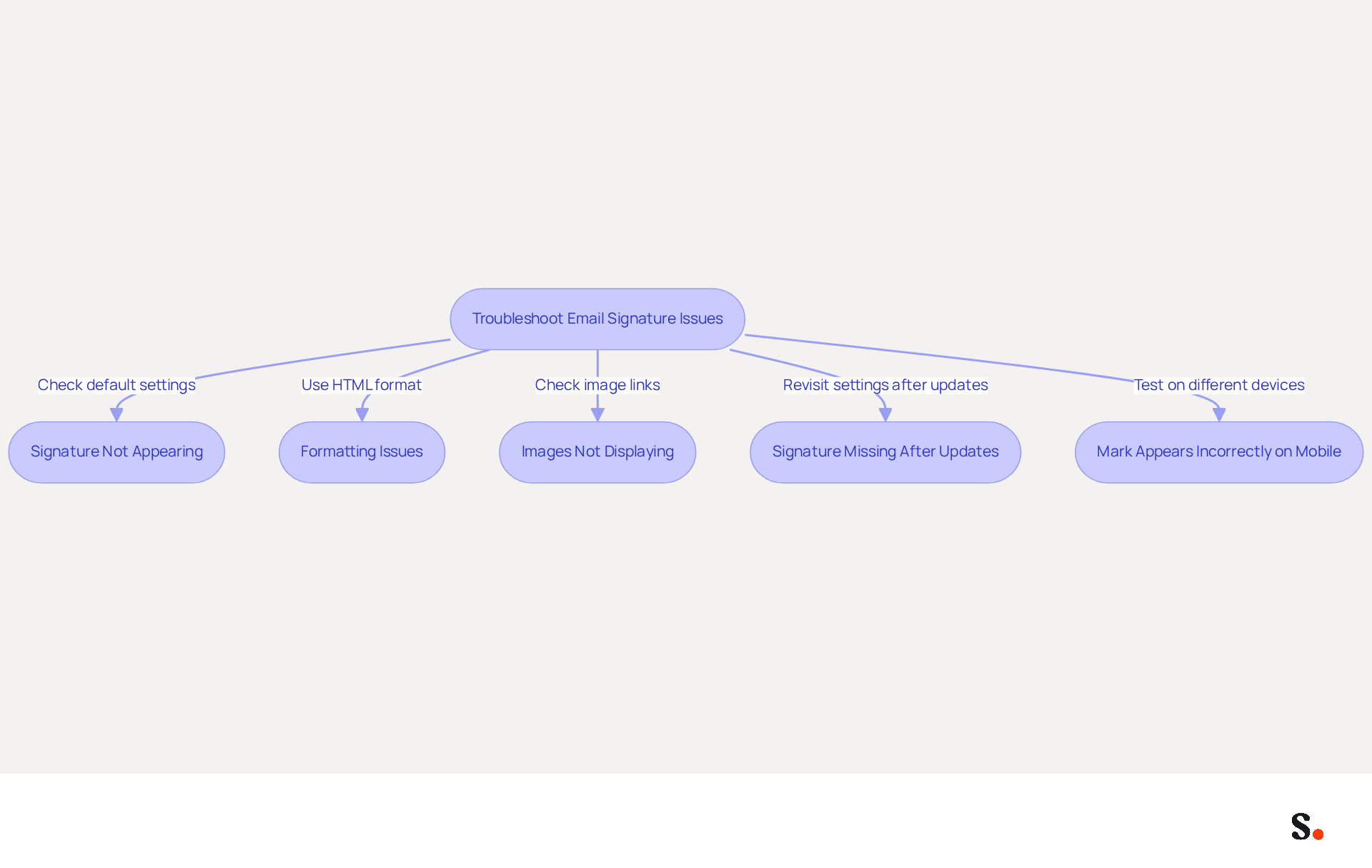
Experiencing issues with how to customize email signature in Outlook can disrupt your professional communication. Consider the following troubleshooting tips:
- Signature Not Appearing: Ensure that your signature is set as the default for new messages and replies/forwards in the signature settings. This is a frequent oversight that can result in names not appearing as intended.
- Formatting Issues: Check if you are using HTML format for your messages. If your identifier appears differently when sent, this may be the cause.
- Images Not Displaying: Make sure that images are properly linked and not embedded. If they are not showing, try re-uploading them or using a different image format, as some email clients may block linked images.
- Signature Missing After Updates: Many users find that their settings revert unexpectedly after an update, leading to confusion. Revisit the settings for your sign-off to ensure it is still configured correctly, particularly if you are learning how to customize email signature in Outlook, as many users have reported needing to re-save their sign-offs after updates.
- Mark Appears Incorrectly on Mobile: Test your mark on different devices. Mobile messaging applications may display content differently, so modify your design accordingly to uphold a professional look across platforms.
Addressing these common issues is essential for maintaining a polished and professional image in your email correspondence.
Explore Tools for Enhanced Email Signature Management
To optimize your email signature management, leveraging specialized tools can significantly enhance efficiency and brand consistency:
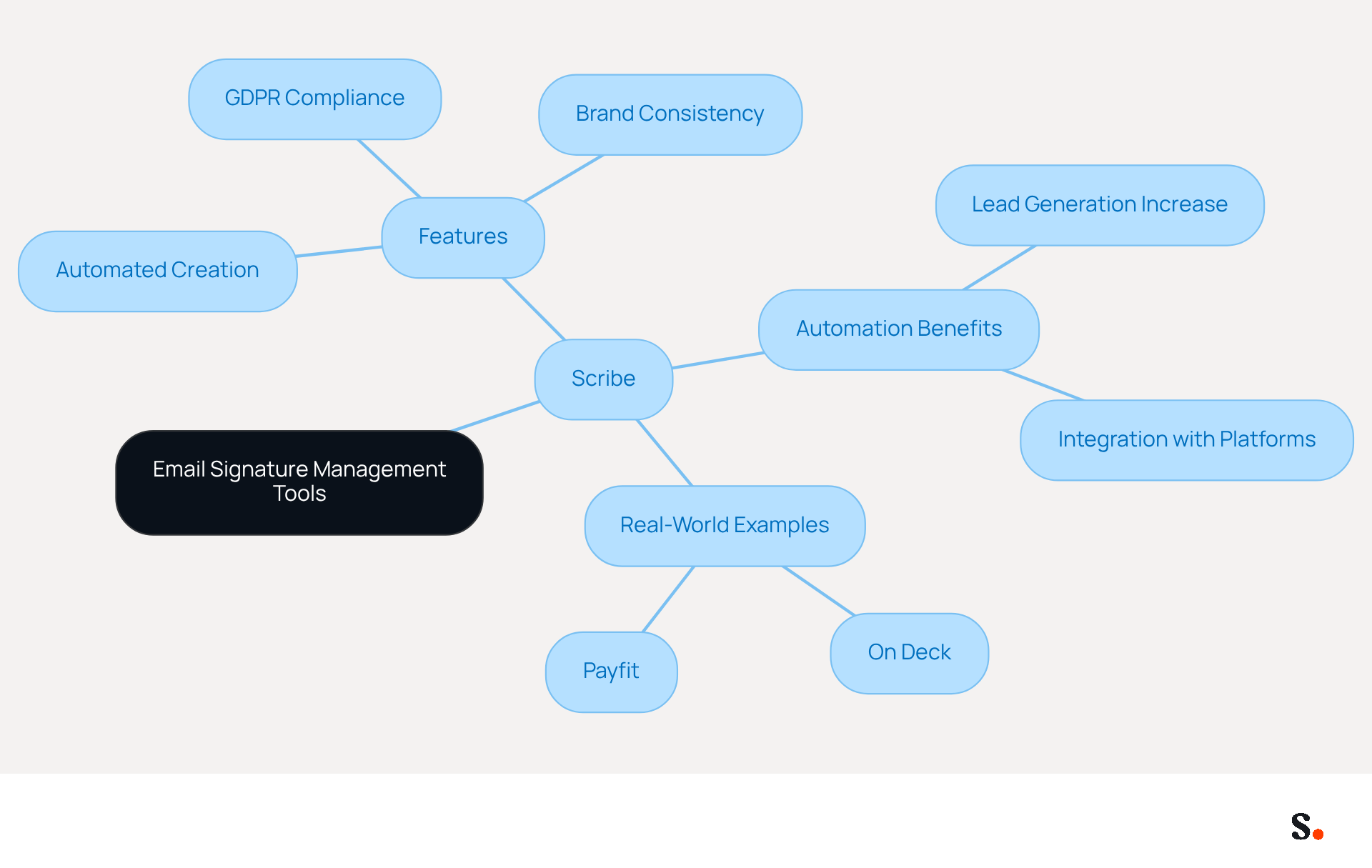
- Scribe: This innovative platform automates the creation and management of email signatures, ensuring brand consistency across all communications. With the tool, you can modify team signatures with a single click, making it perfect for businesses of all sizes. Automating this process saves time and boosts professionalism, ensuring every message reflects a unified brand image. Additionally, Scribe's integration with SAML single sign-on ensures secure access for employees, while its GDPR compliance and SOC 2 Type II certification guarantee that your data handling practices meet rigorous privacy and security standards.
- Automation Benefits: Studies show that organizations using automated email management can see lead generation increase by as much as 14%, which is particularly valuable for marketing teams looking to maximize their outreach without the burden of manual updates. Scribe's automated synchronization with business phone systems and integrations with platforms like Google Workspace and Microsoft 365 ensure that information is always current, further improving uniformity.
- Real-World Examples: Companies like On Deck and Payfit have successfully utilized Scribe to ensure consistency in their branding and streamline their messaging processes. These companies have turned their email signatures into effective marketing tools, strengthening their identity with each interaction.
By leveraging tools like Scribe, businesses can ensure that their email signatures are not only professional but also effective in promoting their identity and engaging their audience. Ultimately, adopting automated solutions like Scribe can transform your email signatures into strategic assets that drive engagement and reinforce your brand identity.
Conclusion
A well-crafted email signature is essential for establishing a professional image and enhancing brand recognition. By utilizing the steps provided, professionals can design signatures that not only showcase their expertise but also maintain uniformity in all communications. The integration of tools like Scribe further amplifies this process, allowing for seamless management and updates.
Throughout this guide, key insights have been shared, including:
- The importance of a well-designed signature
- Troubleshooting common issues
- The benefits of utilizing specialized tools for email signature management
Scribe simplifies the process of creating and managing email signatures while ensuring they meet essential security standards like GDPR and SOC 2 Type II. This positions organizations to maintain a polished image while maximizing marketing opportunities through every email sent.
In conclusion, organizations that prioritize their email signatures will not only enhance their professional image but also unlock new avenues for engagement and brand loyalty. Embracing tools like Scribe can transform email signatures into powerful marketing assets, driving engagement and reinforcing brand identity. It is crucial for organizations to take action now, ensuring their email communications reflect the quality and consistency that their brand represents.
Frequently Asked Questions
What is the role of email signatures in professional communications?
Email signatures serve as digital business cards that convey essential contact information and reinforce brand identity.
How does Scribe enhance email signature management?
Scribe's automated synchronization with Aircall ensures that any modifications made in your Aircall setup are automatically reflected in your Scribe configurations, maintaining consistency across all communications.
What are the benefits of having a well-designed email signature?
A well-designed email signature enhances professionalism, promotes brand awareness, provides key information, and can include promotional banners or calls to action.
How does a consistent email signature impact professionalism?
A consistent signature across all emails presents a polished image to clients and colleagues, enhancing the overall professionalism of communications.
What key information should be included in an email signature?
An email signature should include your name, title, contact details, and links to social media or company websites to facilitate easy connections with recipients.
How can email signatures be used for marketing purposes?
By incorporating promotional banners or calls to action, email signatures can turn every message into a marketing opportunity, driving traffic to your website or upcoming events.
Why is it important to recognize the advantages of email signatures?
Recognizing the advantages can inspire you to craft an email signature that is both visually appealing and strategically effective, enhancing your professional communications.
List of Sources
- Understand the Importance of Email Signatures in Outlook
- Research Recap: Branded Email Signatures Increase Company Recognition, Trust - Demand Gen Report (https://demandgenreport.com/industry-news/research-recap-branded-email-signatures-increase-company-recognition-trust/47252)
- The impact of email signatures on your branding (https://signitic.com/en/resources/the-impact-of-email-signatures-on-your-branding)
- How email signatures can drive brand awareness and organic traffic - NEWOLDSTAMP (https://newoldstamp.com/blog/email-signature-brand-awareness)
- Why Email Signatures Must Be In Your 2026 Marketing Plan | Rocketseed (https://rocketseed.com/blog/2026-marketing-plan-email-signatures)
- Create and Customize Your Email Signature in Outlook
- Email signature statistics and trends in 2024 (https://wisestamp.com/blog/email-signature-statistics)
- Email Signature Statistics: A Closer Look at Email Signatures in 2026 (https://mysignature.io/blog/email-signature-statistics)
- How To Add An Email Signature in Outlook (2026) (https://hubspot.com/email-signature-generator/add-signature-outlook)
- 40+ Email Signature Statistics for 2026 (Data + Insights) (https://wavecnct.com/blogs/email-signature-statistics)
- Troubleshoot Common Issues with Email Signatures
- Troubleshooting Email Signature Issues in Outlook (https://justanswer.com/email/lyeqn-email-signatures-no-longer-loading-automatically.html)
- How to solve problems with email signatures in Microsoft 365? (https://mail-signatures.com/articles/problems-email-signatures-office-365)
- Email Signatures vanishing - New Outlook | Microsoft Community Hub (https://techcommunity.microsoft.com/discussions/outlookgeneral/email-signatures-vanishing---new-outlook/4418809)
- Explore Tools for Enhanced Email Signature Management
- Company-Wide Email Signature Management | CloudM (https://cloudm.io/resources/blog/optimize-your-process-with-company-wide-email-signature-management)
- Email Signature Manager for Any Scale | WiseStamp (https://wisestamp.com)
- Market-leading Email Signature Software | Exclaimer (https://exclaimer.com)
- Best Email Signature Management Software (Evaluated May 2026) (https://wisestamp.com/guides/best-email-signature-management-software)
- Best Email Signature Managers for 2026 (https://textexpander.com/blog/best-email-signature-managers)
Get started with Scribe
Create your signature in minutes
Free 14-day trial — no credit card.