How to Edit Your Outlook Signature for Maximum Branding Impact
Email signatures, often underestimated, are crucial for defining a brand's identity and professionalism in business communications. Effectively editing an
Sophie Grant
Email Signature Specialist, Scribe
Introduction
Email signatures, often underestimated, are crucial for defining a brand's identity and professionalism in business communications. Effectively editing an Outlook signature allows organizations to present essential contact information while transforming this space into a powerful marketing tool. This struggle often leads to ineffective signatures that fail to represent the brand accurately. Without effective customization, brands miss opportunities for engagement and connection with clients. This leads to the critical question: how can one ensure their email signature reflects their brand and fosters engagement and trust among recipients? Ensuring your email signature is both reflective of your brand and engaging can significantly impact client relationships.
Understand the Importance of Email Signatures in Outlook
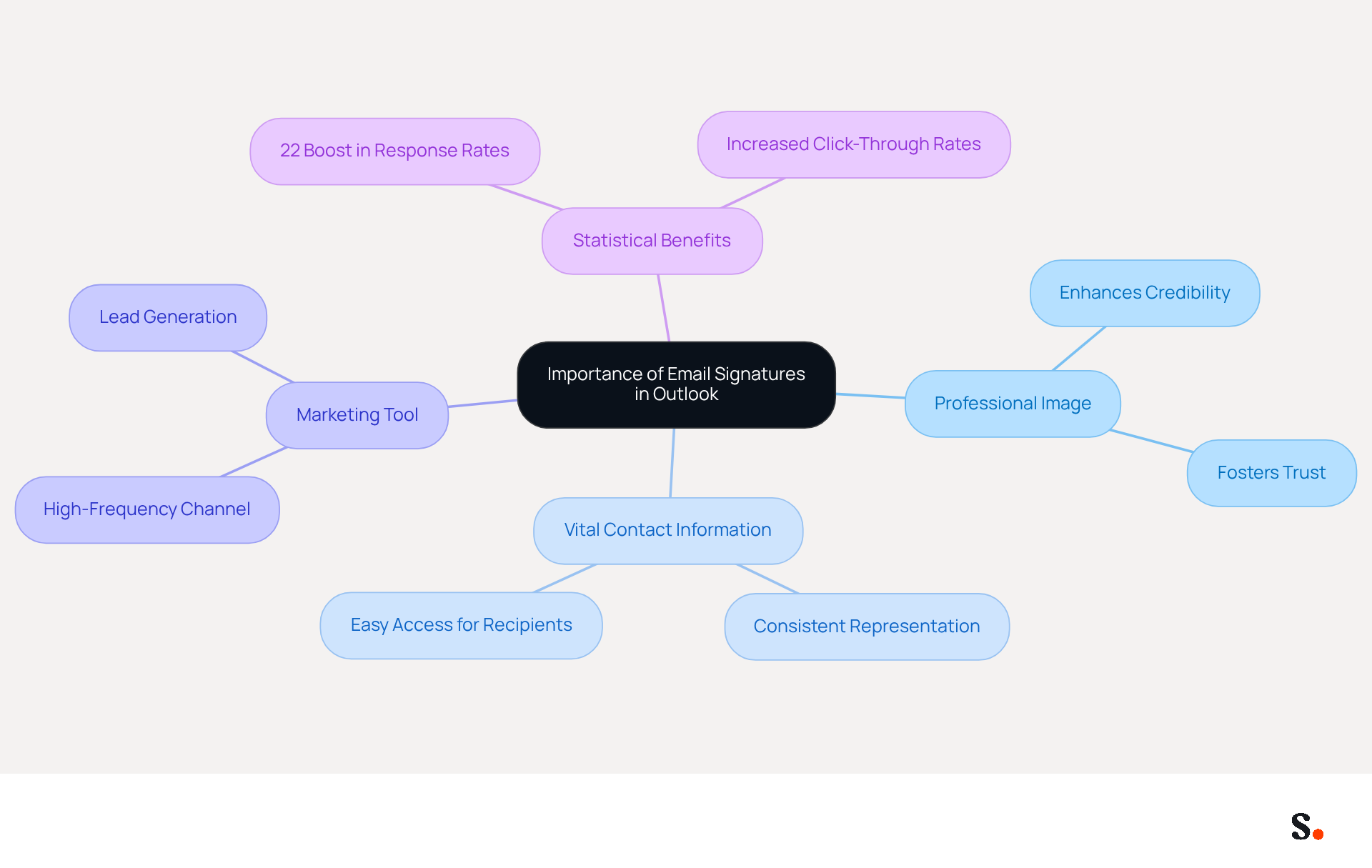
Many businesses underestimate the power of email identifiers in shaping their branding strategy. To enhance your professional image, provide vital contact information, and act as a marketing tool, it is essential to edit your Outlook signature.
In Outlook, you can edit your Outlook signature, which is automatically included in every email to ensure consistent representation of your identity. This uniformity fosters recognition and trust among recipients, which is crucial in business communications.
Research shows that businesses using consistent messaging formats see a 22% boost in response rates and increased click-through rates, highlighting the strategic significance of such formats in branding. Recognizing the strategic role of your message footer can significantly enhance your brand's visibility and impact in every communication.
Access and Edit Your Email Signature in Outlook
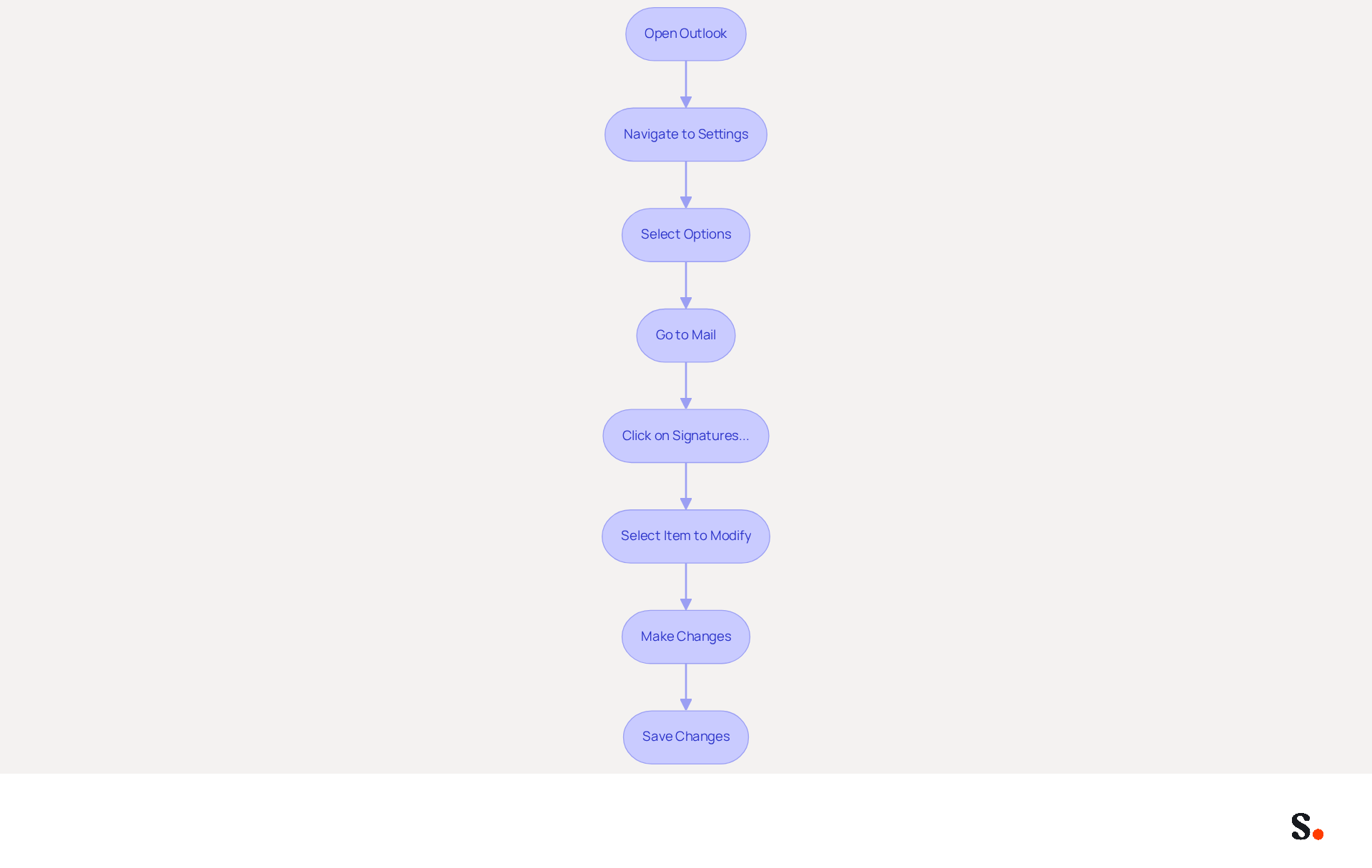
To ensure your email communications remain professional and up-to-date, follow these steps to edit your signature in Outlook:
- Open Outlook: Launch the Outlook application on your computer.
- Navigate to Settings: Click on the 'File' tab in the top left corner.
- Select Options: In the left sidebar, choose 'Options'.
- Go to Mail: In the Outlook Options window, click on 'Mail'.
- To edit Outlook signature, click on the 'Signatures...' button located in the 'Compose messages' section.
- In the Signatures and Stationery window, select the item you wish to modify to edit the Outlook signature. Click on the 'Edit' button to change your sign-off.
- Make Changes: Use the formatting tools to add or modify text, visuals, or links as needed.
- Save Changes: Once you are satisfied with your edits, click 'OK' to save your changes and exit the window.
It's important to keep your contact information fresh, as 44.4% of users do so 2-4 times a year, while 31.6% update their details only once every few years. This variability in user behavior emphasizes the significance of maintaining a consistent and professional electronic communication format, which 69% of consumers consider essential for a company's image. Scribe automates message synchronization with Google Workspace and Aircall. This means any updates to your teammates' information are automatically reflected in Scribe. This not only saves time but also enhances brand consistency across your organization. Furthermore, Scribe's adherence to SOC 2 Type II and GDPR/CCPA guarantees secure data management, making it a trustworthy option for handling your messages. Keeping your email signature current reinforces your brand's professionalism and enhances communication effectiveness.
Enhance Your Signature with Branding Elements
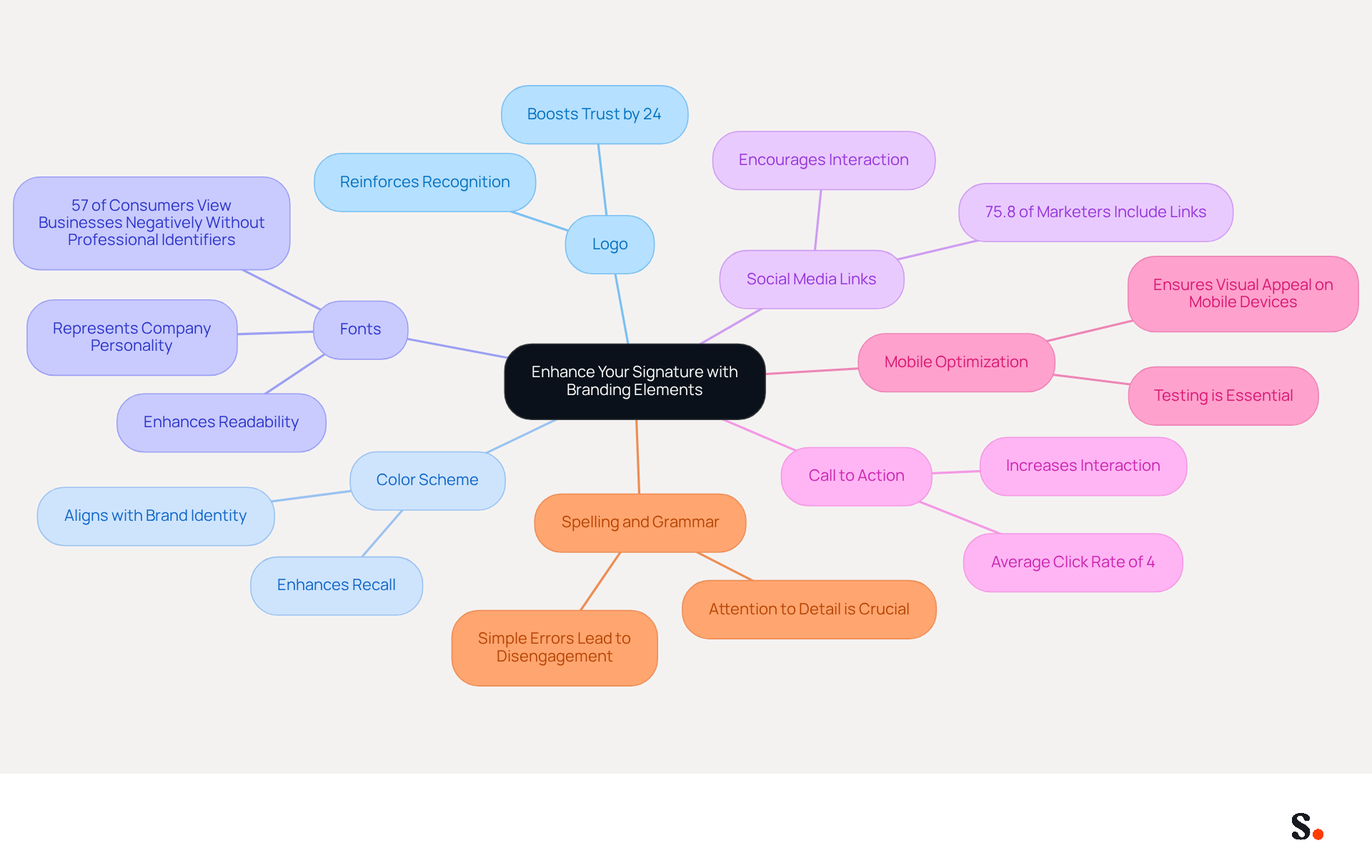
To effectively enhance your brand's visibility through email signatures, it is crucial to incorporate specific branding elements:
- Logo: Including your company logo is essential for reinforcing recognition of your identity. Make sure it is sized and positioned well for visibility; signatures with branding can boost trust by 24%.
- Color Scheme: Utilize colors that align with your identity. Consistency in color aids in creating a cohesive appearance across all communications, enhancing recall.
- Fonts: Choose typefaces that represent your company's personality. Restricting yourself to one or two font styles enhances readability and professionalism, which is essential since 57% of consumers view businesses unfavorably that send messages without professional identifiers.
- Social Media Links: Incorporate icons linking to your company’s social media profiles. This motivates recipients to interact with your brand on various platforms, with 75.8% of marketers incorporating links to their social networks in their correspondence.
- Call to Action: Consider adding a call to action, such as a link to your latest blog post or a promotional offer. This approach can significantly increase interaction and website visits, as personalized identifiers have an average click rate of 4%, doubling the usual results in the sector.
- Mobile Optimization: Ensure your closing is visually appealing on mobile devices, as many recipients will view messages on their phones. Testing message identifiers on various devices is essential to uphold a professional appearance across platforms.
- Spelling and Grammar: Pay attention to spelling and grammar in your message footer. Consumers often disengage due to simple errors, highlighting the importance of meticulous attention to detail.
By implementing these strategies, your email signature can significantly enhance your brand's professional image. Ultimately, a well-crafted email signature not only reflects professionalism but also serves as a strategic asset in your marketing efforts.
Troubleshoot Common Issues When Editing Signatures
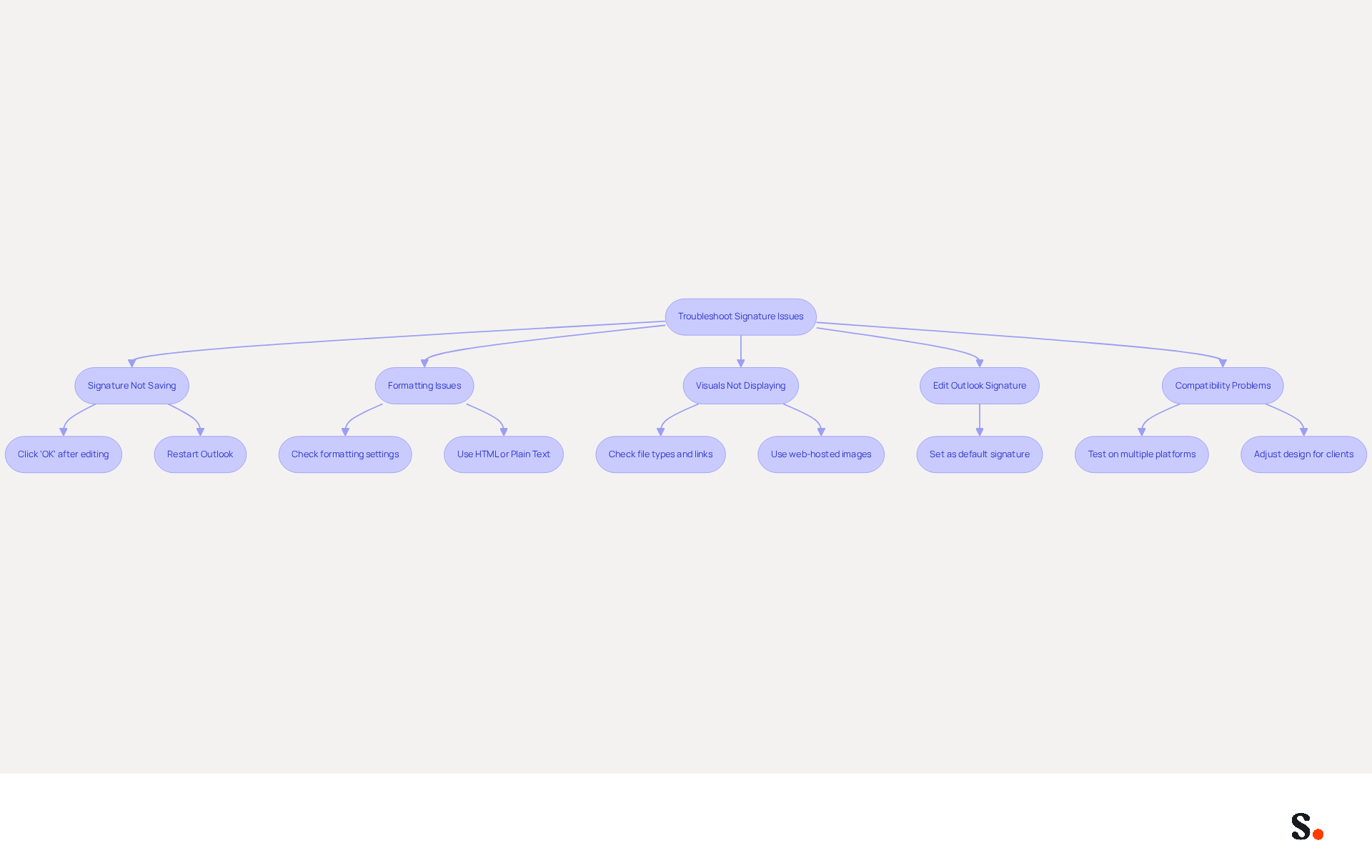
When you edit your Outlook signature, it can present challenges that, if not addressed, may undermine your professional image. Here are effective solutions to help you troubleshoot:
- Signature Not Saving: If your changes aren't saving, make sure to click 'OK' after editing. If the problem persists, you may need to restart Outlook to edit the Outlook signature and often resolve the issue.
- Formatting Issues: If your mark appears differently than expected, check the formatting settings. Using compatible formats like HTML or Plain Text is crucial, as many users encounter formatting issues, often due to hidden elements when copying from other programs.
- Visuals Not Displaying: If visuals in your email are not appearing, check that the file types are accessible and properly linked. Utilizing web-hosted images can improve reliability, as embedded images may not render properly across all messaging clients.
- Edit Outlook Signature: If your signature isn't appearing in new emails, make sure to edit your outlook signature settings to set it as the default. Regularly checking these settings can prevent confusion and maintain professionalism.
- Compatibility Problems: If your mark appears different on various devices, test it on multiple platforms to ensure consistency. Adjust the design as necessary to accommodate different messaging clients, as discrepancies can arise from varying interpretations of HTML.
Additionally, syncing your Google Workspace with Scribe can significantly streamline this process. By automatically updating your teammates' information, any changes made in Google Workspace - such as job position updates or group changes - will be reflected in Scribe without manual input. This not only conserves time but also guarantees that your correspondence identifiers are always up-to-date and uniform, improving your organization's reputation in every interaction. By proactively addressing these common issues, you can elevate your email communications and strengthen your brand's reputation.
Conclusion
Neglecting your Outlook signature can undermine your brand's professional image and recognition. Editing your Outlook signature is not just a technical task; it is a vital step in reinforcing your brand identity and enhancing your professional image. A consistent and well-crafted email signature can greatly enhance recognition and trust, leading to improved engagement and response rates.
This guide presents essential strategies to optimize your email signature for maximum branding impact. From incorporating key branding elements like logos and color schemes to troubleshooting common issues that may arise during the editing process, each step is designed to ensure that your email communications reflect professionalism and align with your brand's identity. Additionally, leveraging tools like Scribe can streamline the management of email signatures, ensuring that updates are automatically synchronized and compliant with security standards such as SOC 2 Type II and GDPR/CCPA.
In conclusion, the importance of a well-designed email signature cannot be overstated. It serves as a powerful marketing tool that not only enhances your brand's visibility but also fosters trust and professionalism in every interaction. When businesses invest time in editing and optimizing their Outlook signatures, they truly enhance their email communications, driving engagement and reinforcing their brand message with every email sent. Embrace these best practices and transform your email signature into a strategic asset that contributes to your overall marketing success.
Frequently Asked Questions
Why are email signatures important in Outlook?
Email signatures are important because they enhance your professional image, provide vital contact information, and act as a marketing tool, shaping your branding strategy.
How does editing your Outlook signature benefit your business?
Editing your Outlook signature ensures consistent representation of your identity in every email, fostering recognition and trust among recipients, which is crucial for effective business communications.
What impact does consistent messaging in email signatures have on response rates?
Research shows that businesses using consistent messaging formats see a 22% boost in response rates and increased click-through rates, highlighting the strategic significance of such formats in branding.
How can a well-designed email signature enhance brand visibility?
A well-designed email signature acts as a message footer that can significantly enhance your brand's visibility and impact in every communication.
List of Sources
- Understand the Importance of Email Signatures in Outlook
- How an email signature can boost your professional image – Daily Business (https://dailybusinessgroup.co.uk/2026/03/how-an-email-signature-can-boost-your-professional-image)
- Email signature statistics: Why every business should optimize their email signatures — Stripo.email (https://stripo.email/blog/email-signature-statistics-why-every-business-should-optimize-their-email-signatures)
- The impact of email signatures on your branding (https://signitic.com/en/resources/the-impact-of-email-signatures-on-your-branding)
- Why Email Signatures Must Be In Your 2026 Marketing Plan | Rocketseed (https://rocketseed.com/blog/2026-marketing-plan-email-signatures)
- "Email Signature Trends for 2026: What's In, What's Out" | Crossware posted on the topic | LinkedIn (https://linkedin.com/posts/crossware-ltd_new-year-new-trends-even-for-your-email-activity-7394554686046908416-vD_O)
- Access and Edit Your Email Signature in Outlook
- Email Signature Statistics: A Closer Look at Email Signatures in 2026 (https://mysignature.io/blog/email-signature-statistics)
- 40+ Email Signature Statistics for 2026 (Data + Insights) (https://wavecnct.com/blogs/email-signature-statistics)
- Email signature statistics: Why every business should optimize their email signatures — Stripo.email (https://stripo.email/blog/email-signature-statistics-why-every-business-should-optimize-their-email-signatures)
- Enhance Your Signature with Branding Elements
- Research Recap: Branded Email Signatures Increase Company Recognition, Trust - Demand Gen Report (https://demandgenreport.com/industry-news/research-recap-branded-email-signatures-increase-company-recognition-trust/47252)
- 7 ways email signatures boost brand image (https://signitic.com/en/resources/7-ways-email-signatures-boost-brand-image)
- Why Email Signatures Must Be In Your 2026 Marketing Plan | Rocketseed (https://rocketseed.com/blog/what-are-the-biggest-email-trends-for-2026)
- Top email signature trends for companies in 2026 (https://bybrand.io/blog/trends-email-signatures)
- Troubleshoot Common Issues When Editing Signatures
- Troubleshooting Email Signature Issues in Outlook (https://justanswer.com/email/lyeqn-email-signatures-no-longer-loading-automatically.html)
- How to solve problems with email signatures in Microsoft 365? (https://mail-signatures.com/articles/problems-email-signatures-office-365)
- How to Change Your Email Signature in Microsoft Outlook (https://prioritymanagement.com.au/change-email-signature-outlook)
- Email Signature Troubleshooting - Problems & Solutions - Gimmio (https://blog.gimm.io/email-signature-troubleshooting)
Get started with Scribe
Create your signature in minutes
Free 14-day trial — no credit card.