How to Put Signature in Yahoo Mail: A Step-by-Step Guide
Email signatures are often overlooked, yet they play a crucial role in digital marketing effectiveness. Knowing how to set up a signature in Yahoo Mail
Sophie Grant
Email Signature Specialist, Scribe
On this page
Introduction
Email signatures are often overlooked, yet they play a crucial role in digital marketing effectiveness. Knowing how to set up a signature in Yahoo Mail enhances communication and turns each email into a branding opportunity, reinforcing professionalism and trust.
However, many users struggle with the signature setup process in Yahoo Mail, which often raises questions about effective setup and common issues. This guide will walk you through the steps to effectively master Yahoo Mail signatures, ensuring that every email sent reflects a cohesive brand identity while maximizing marketing impact.
Mastering this process can significantly enhance your brand's visibility and professionalism in every email.
Get started with Scribe
Manage signatures across your whole team
Free 14-day trial — no credit card.
Understand the Importance of Email Signatures in Marketing
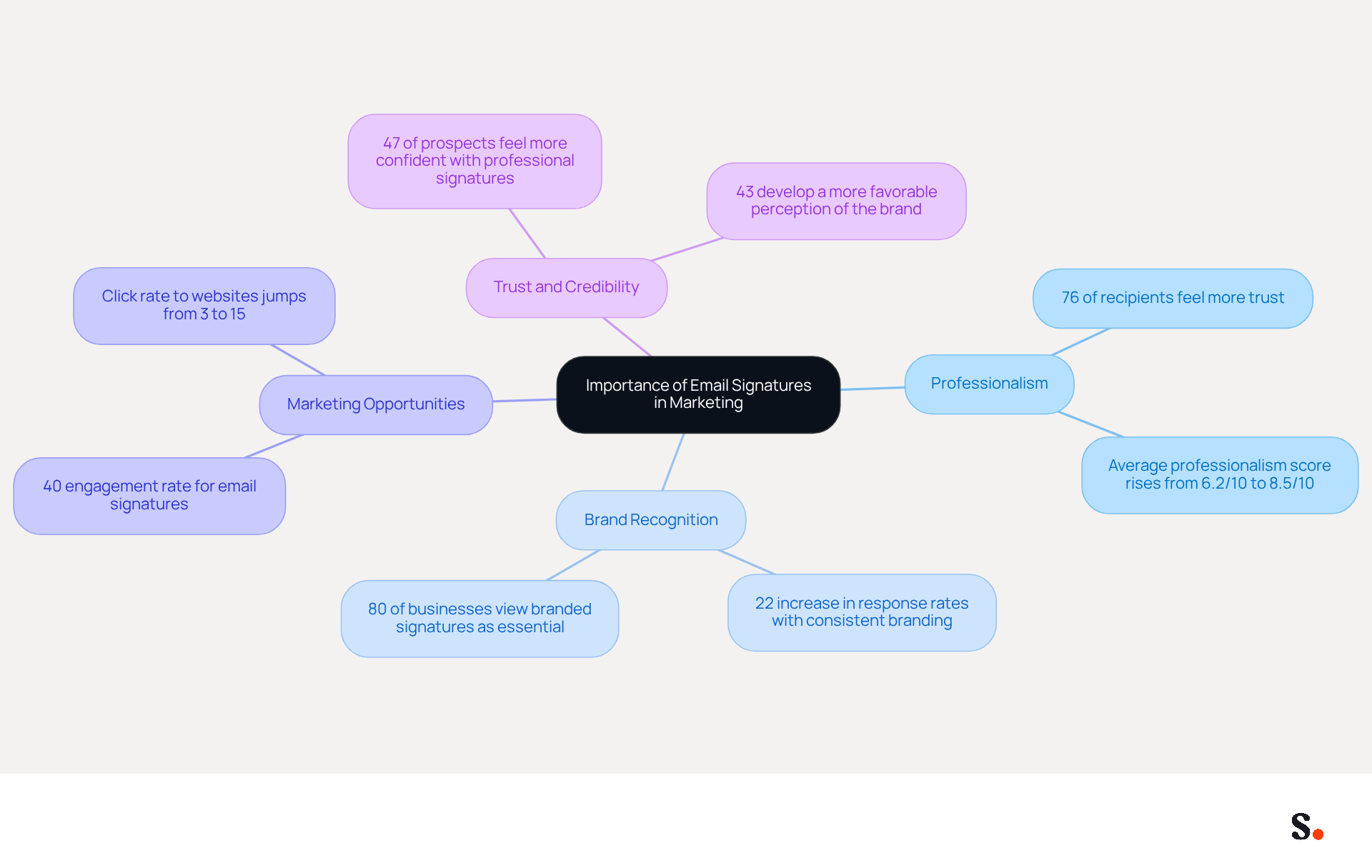
Despite their often-overlooked status, email footers play a crucial role in effective digital marketing strategies. Knowing how to put signature in yahoo mail is essential, as a well-crafted email signature provides vital contact information and acts as a powerful branding tool, enhancing your company's visibility. Here are several key points to consider:
- Professionalism: A consistent and professional email signature positively reflects on your brand, creating a strong first impression on recipients. Studies indicate that 76% of recipients feel more trust when they see professional endorsements, which boosts engagement and response rates.
- Brand Recognition: Integrating your logo and company colors into your closing reinforces identity with every message sent. Consistent branding can lead to a 22% increase in response rates, making it a strategic investment in brand recognition.
- Marketing Opportunities: Email footers can include links to your website, social media profiles, or promotional campaigns, turning each email into a valuable marketing opportunity. Statistics indicate that electronic correspondence has an engagement rate of 40%, considerably higher than conventional marketing campaigns.
- Trust and Credibility: A well-crafted sign-off enhances your credibility, making recipients more likely to engage with your content. In fact, 47% of prospects report feeling more confident in a brand when they see a professional communication format.
With Scribe, you can automate management of electronic signatures effortlessly. By syncing your teammates' signature information with your business phone system, the platform ensures that any modifications made in your Aircall configuration are automatically reflected in your email signatures. This real-time synchronization not only saves time but also guarantees brand consistency across all communications. Furthermore, the platform is compliant with SOC 2 Type II, ensuring that your data is managed securely. Understanding how to put signature in yahoo mail is strategically important and can significantly enhance your marketing effectiveness.
Add Your Signature in Yahoo Mail: Step-by-Step Instructions
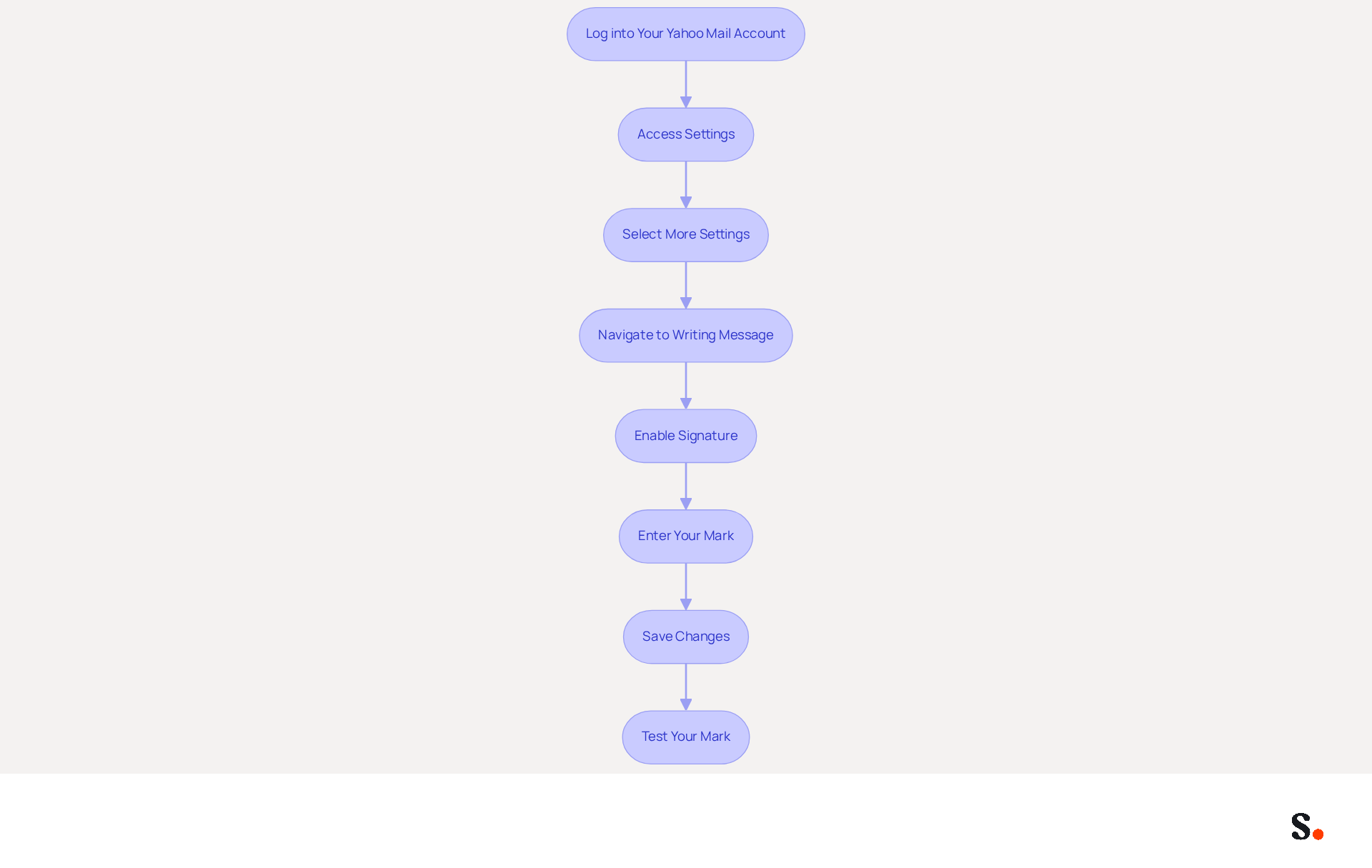
To effectively represent your brand in Yahoo Mail, follow these essential steps for adding your email signature through Scribe's automated management:
- Log into Your Yahoo Mail Account: Open your preferred web browser and navigate to the Yahoo Mail login page. Enter your credentials to access your inbox.
- Access Settings: Click on the Settings gear icon located in the top right corner of the page.
- Select More Settings: From the dropdown menu, click on More Settings to open the settings panel.
- Navigate to Writing Message: In the left sidebar, select Writing message. This section contains options related to your email composition settings.
- Enable Signature: Look for the Signature toggle button. Click it to activate the feature.
- Enter Your Mark: In the text box provided, type or paste your desired mark. You can format the text, add links, and even include images if needed. Yahoo Mail allows HTML formatting, which lets you include logos and social media links to boost your visibility. With Scribe, any modifications made to your communication footer will automatically sync, ensuring brand consistency across all interactions.
- Save Changes: Once you are satisfied with your mark, ensure to save your changes before exiting the settings. Changes are saved automatically, so you can proceed without additional confirmation.
- Test Your Mark: Send a trial message to yourself or a colleague to ensure that your mark appears as intended. This step is crucial because a well-crafted signature enhances professionalism and fosters meaningful engagement across devices.
Studies indicate that 47% of individuals feel professional signatures enhance trust, and 43% view the company more favorably. By learning how to put signature in Yahoo Mail, you not only enhance your communication but also strengthen your brand's professional image. Furthermore, Scribe's SOC 2 Type II compliance guarantees that your data is managed securely, offering peace of mind as you handle your email identifiers. Yahoo Mail also allows users to switch between different sign-offs easily, providing flexibility for various communication needs.
Troubleshoot Common Issues When Adding Signatures
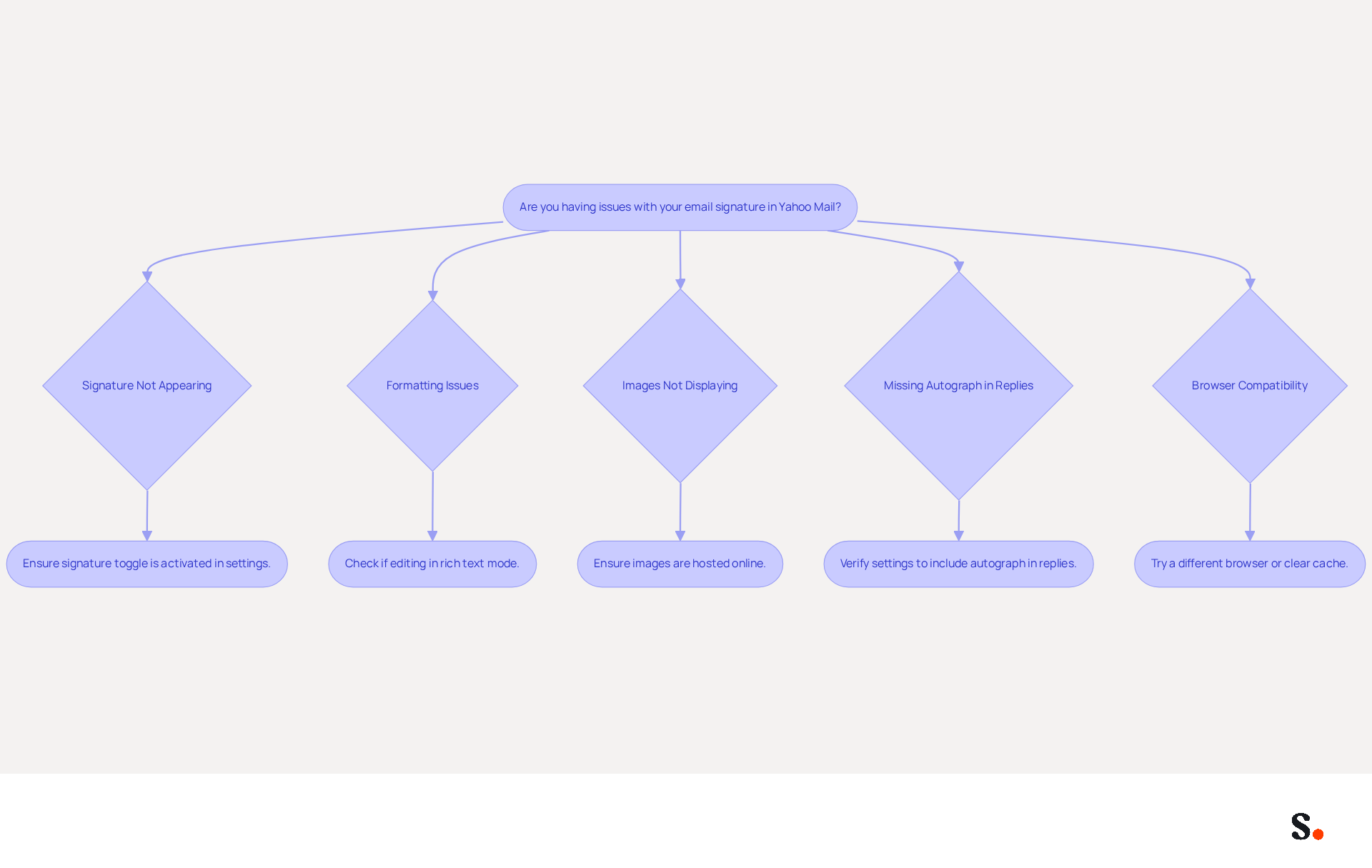
While understanding how to put signature in Yahoo Mail is typically straightforward, users often face challenges that can undermine their email professionalism. Here are troubleshooting tips to help you resolve them:
- Signature Not Appearing: Ensure that the signature toggle is activated in the settings. If it’s off, your name won’t appear in outgoing emails.
- Formatting Issues: If your name appears differently than expected, check if you are editing in rich text mode. Switching to plain text can strip formatting, leading to discrepancies.
- Images Not Displaying: If images in your email are not appearing, ensure they are hosted online rather than uploaded directly from your computer. Using a reliable image hosting service can prevent display issues.
- Missing Autograph in Replies: Yahoo Mail may not automatically include your autograph in replies. Verify your settings to ensure it’s enabled for replies as well.
- Browser Compatibility: If you experience issues, try using a different web browser or clearing your browser's cache. Some browsers may have compatibility issues with Yahoo Mail.
This highlights the importance of maintaining accurate email signatures for effective communication. Statistics indicate that 44.4% of users refresh their contact details 2-4 times annually, underscoring the significance of keeping a functional identifier for brand consistency and marketing effectiveness. Furthermore, 52% of users believe a strong digital footer is essential for client interactions, emphasizing how addressing footer issues can improve communication and trust. Scribe's automated synchronization with Google Workspace saves you time by automatically updating your teammates' information in their email signatures. This seamless integration not only streamlines the management process but also reinforces brand consistency across all communications. Additionally, Scribe's SOC 2 Type II certification and adherence to GDPR and CCPA guarantee that your data management is secure and dependable. By following these troubleshooting steps, you can understand how to put signature in Yahoo Mail, ensuring it functions correctly and effectively represents your brand.
Leverage Automation Tools for Efficient Signature Management
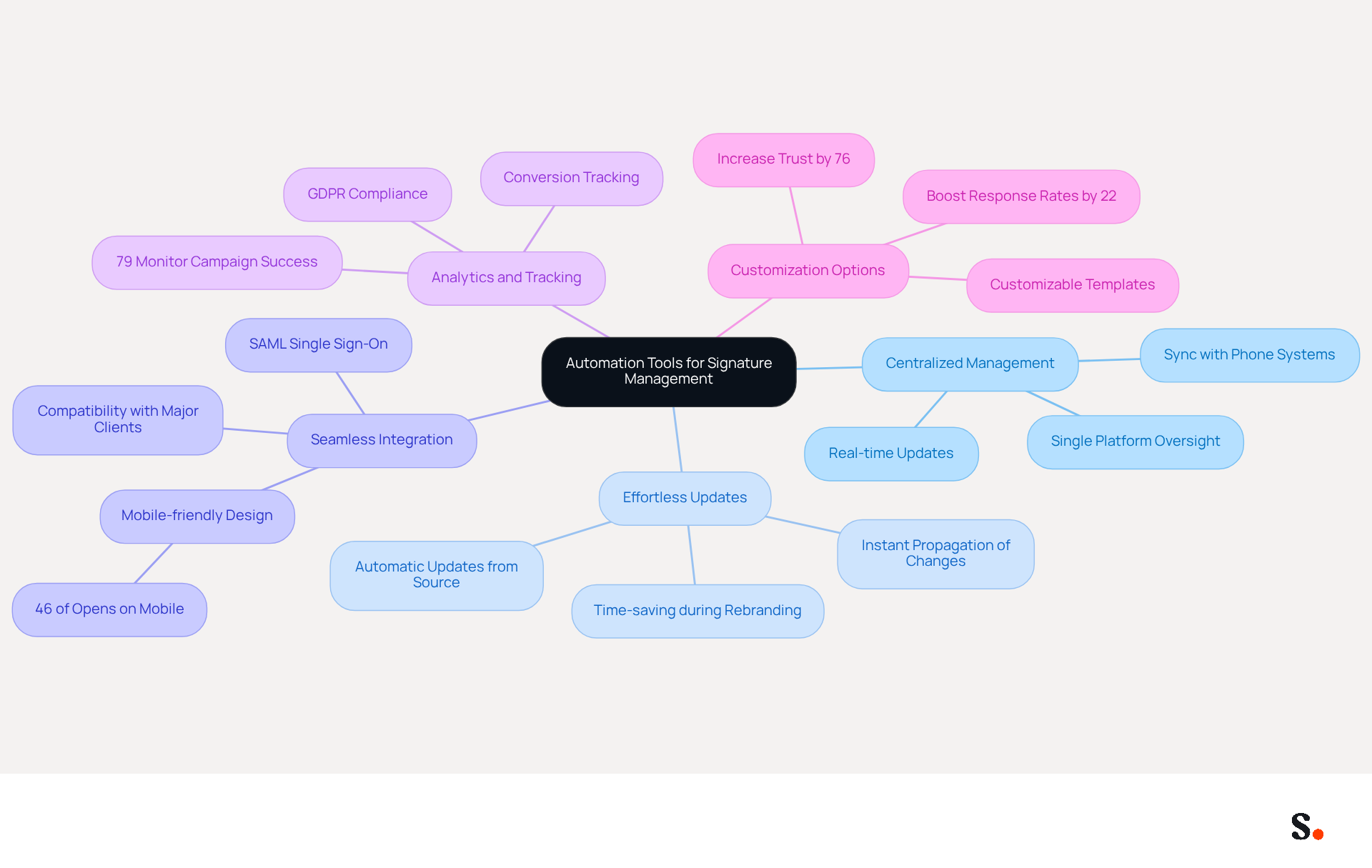
For businesses seeking to optimize their email management, automation tools like Scribe offer significant advantages. Here are the key benefits of utilizing these tools:
- Centralized Management: Automation tools enable you to oversee signatures for all employees from a single platform, ensuring brand consistency across your organization. This centralized approach is particularly beneficial for companies with remote teams, as it allows for real-time updates without in-person coordination. Scribe's integration with your business phone system guarantees that signing information is consistently synced, requiring no effort from your teammates.
- Effortless Updates: When changes arise, such as a new logo or updated contact details, you can implement updates in one location, and they will automatically propagate across all signatures. This efficiency is vital, particularly during rebranding or company-wide campaigns, as manual updates can be time-consuming. With the tool, modifications in your connected source will be automatically updated, enhancing the process.
- Seamless Integration: Scribe integrates effortlessly with popular communication clients, including Yahoo Mail, Google Workspace, and Microsoft 365, simplifying the setup process and ensuring that every message reflects a professional appearance, while also providing guidance on how to put signature in yahoo mail. This integration is essential as mobile-friendly messages will be important in 2024, with 46% of all openings happening on mobile devices. Additionally, Scribe's SAML single sign-on integration improves security and user access management, ensuring that only authorized individuals can make modifications to documents.
- Analytics and Tracking: Interestingly, 79% of users monitor their campaign success through click tracking, providing insights that can shape future marketing strategies and boost engagement. Scribe's capabilities also support conversion tracking, linking engagement to revenue, and its compliance with GDPR ensures that your data is handled securely.
- Customization Options: Automation platforms often feature customizable templates that align with your brand identity, enabling personalized marks that can significantly boost engagement. Branded autographs have been shown to increase trust by 76% and enhance response rates by 22%. Scribe's adherence to SOC 2 Type II and GDPR guarantees that your data remains secure while you handle these customizations.
By utilizing automation tools like Scribe, businesses can save time, ensure consistency in their identity, and transform their email elements into powerful marketing assets, ultimately enhancing their overall communication strategy. Additionally, automation simplifies the process of updating signatures during mergers and acquisitions, ensuring a unified brand image across all communications.
Conclusion
Creating an effective email signature in Yahoo Mail is more than a simple task; it’s a strategic decision that can significantly elevate your brand's presence. A well-crafted email signature serves as a powerful marketing tool, reinforcing your brand identity and fostering trust with recipients. By implementing these steps, users can create signatures that not only appear professional but also reinforce their brand identity, contributing to a cohesive brand image.
This guide has emphasized several key insights, such as:
- The role of professional email signatures in building credibility
- The potential for increased engagement through branding
- The advantages of utilizing automation tools like Scribe for seamless management
The step-by-step instructions provided simplify the process, while troubleshooting tips address common issues that may arise, ensuring that users can maintain a polished and effective email presence.
In a world where digital communication is paramount, leveraging email signatures as a branding opportunity is essential. By adopting tools that automate and streamline signature management, organizations can save time and ensure consistency across all communications. Ultimately, neglecting the power of email signatures could mean missing out on vital opportunities to connect and engage with your audience.
Frequently Asked Questions
Why are email signatures important in marketing?
Email signatures play a crucial role in digital marketing by providing vital contact information and acting as a branding tool, enhancing a company's visibility.
How does a professional email signature affect brand perception?
A consistent and professional email signature creates a strong first impression and positively reflects on the brand, leading to increased trust among recipients.
What impact does branding in email signatures have on response rates?
Integrating your logo and company colors into email signatures can lead to a 22% increase in response rates, reinforcing brand recognition with every message sent.
How can email footers serve as marketing opportunities?
Email footers can include links to websites, social media profiles, or promotional campaigns, turning each email into a valuable marketing opportunity with an engagement rate of 40%.
How does a well-crafted email signature enhance trust and credibility?
A professional email signature enhances credibility, making recipients more likely to engage with the content. About 47% of prospects feel more confident in a brand when they see a professional communication format.
How does Scribe help with managing email signatures?
Scribe automates the management of electronic signatures by syncing teammates' signature information with the business phone system, ensuring real-time synchronization and brand consistency across communications.
Is Scribe compliant with data security standards?
Yes, Scribe is compliant with SOC 2 Type II, ensuring that your data is managed securely.
List of Sources
- Understand the Importance of Email Signatures in Marketing
- demandgenreport.com (https://demandgenreport.com/industry-news/research-recap-branded-email-signatures-increase-company-recognition-trust/47252)
- Why Are Email Signatures Key to Brand Awareness? | QuickMail (https://quickmail.com/role-of-email-signatures-in-brand-awareness)
- How email signatures can drive brand awareness and organic traffic - NEWOLDSTAMP (https://newoldstamp.com/blog/email-signature-brand-awareness)
- The impact of email signatures on your branding (https://signitic.com/en/resources/the-impact-of-email-signatures-on-your-branding)
- Why Email Signatures Must Be In Your 2026 Marketing Plan | Rocketseed (https://rocketseed.com/blog/what-are-the-biggest-email-trends-for-2026)
- Add Your Signature in Yahoo Mail: Step-by-Step Instructions
-
Email Signature Statistics: A Closer Look at Email Signatures in 2026 (https://mysignature.io/blog/email-signature-statistics)
-
How to Change Your Yahoo Mail Signature in 5 Simple Steps (https://scribe-mail.com/en-US/blog/how-to-change-your-yahoo-mail-signature-in-5-simple-steps)
-
How to add a signature in Yahoo | Signitic (https://signitic.com/en/resources/email-signature-yahoo)
-
How To Add A Signature In Yahoo Mail (2026) (https://hubspot.com/email-signature-generator/add-signature-yahoo-mail)
-
Add, edit, or disable your signature in Yahoo Mail |
Yahoo Help (https://help.yahoo.com/kb/SLN28060.html)
-
- Troubleshoot Common Issues When Adding Signatures
- Email Signature Trends in Numbers: Infographic [2026] (https://mailtrap.io/blog/email-signature-trends/amp)
- Email Signature Statistics (2026) (https://emailsignature.to/statistics/email-signature-statistics)
- Email Signature Statistics: A Closer Look at Email Signatures in 2026 (https://mysignature.io/blog/email-signature-statistics)
- 40+ Email Signature Statistics for 2026 (Data + Insights) (https://wavecnct.com/blogs/email-signature-statistics)
- Email signature statistics and trends in 2024 (https://wisestamp.com/blog/email-signature-statistics)
- Leverage Automation Tools for Efficient Signature Management
- Email Signature Trends 2026: Centralized Control & Automation | SIGNandGO posted on the topic | LinkedIn (https://linkedin.com/posts/signngo_email-signature-trends-to-watch-in-2026-activity-7401523471786217473-zAVL)
- Email signature statistics and trends in 2024 (https://wisestamp.com/blog/email-signature-statistics)
- Automating Email Signatures: How IT Teams Streamline Processes & Reduce Risk (https://exclaimer.com/blog/streamlining-it-processes-automated-email-signatures)
- 40+ Email Signature Statistics for 2026 (Data + Insights) (https://wavecnct.com/blogs/email-signature-statistics)
Get started with Scribe
Manage signatures across your whole team
Free 14-day trial — no credit card.