How to Remove Signature from Gmail: A Step-by-Step Guide
Despite the importance of email signatures in projecting professionalism, many users find Gmail's settings challenging. With over 62% of users relying on Gmail
Sophie Grant
Email Signature Specialist, Scribe

Introduction
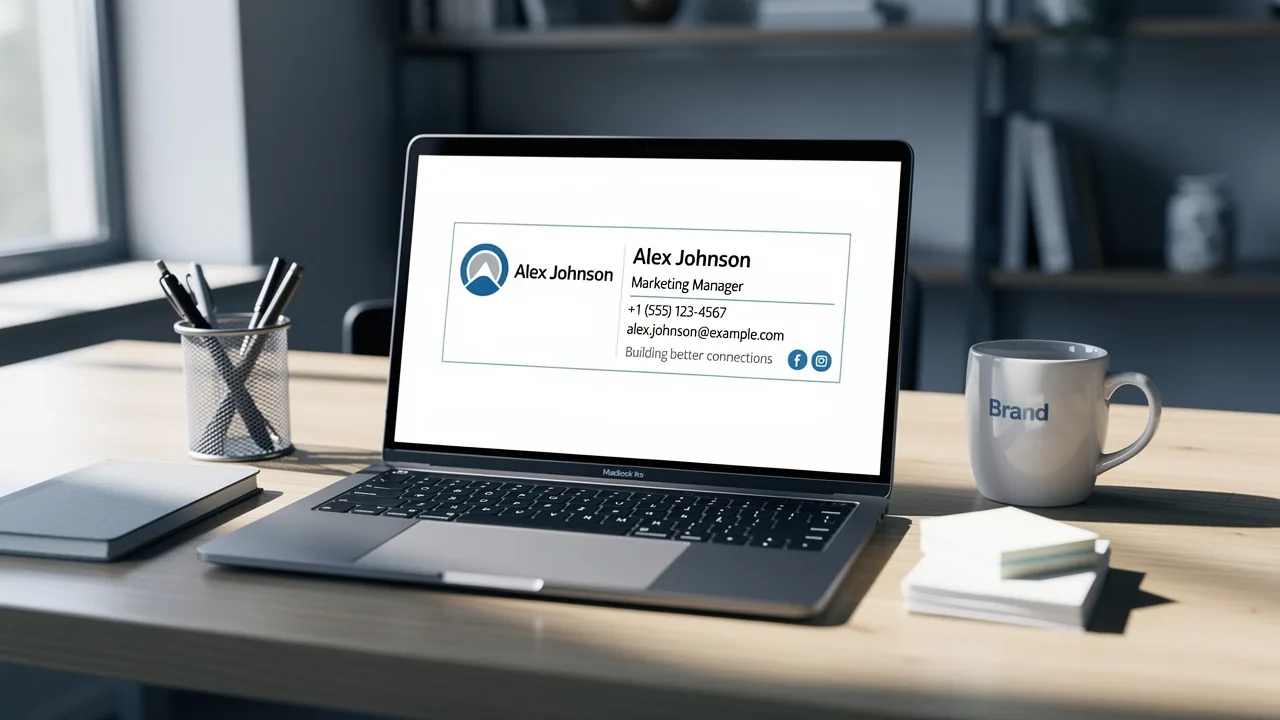
Despite the importance of email signatures in projecting professionalism, many users find Gmail's settings challenging. With over 62% of users relying on Gmail for communication, mastering signature management is vital for effective marketing. Despite its importance, many users struggle with Gmail's signature settings, resulting in lost marketing potential.
What strategies can users employ to navigate Gmail's signature settings effectively?
Access Gmail Signature Settings
Accessing your Gmail settings is essential for understanding how to remove signature from Gmail effectively.
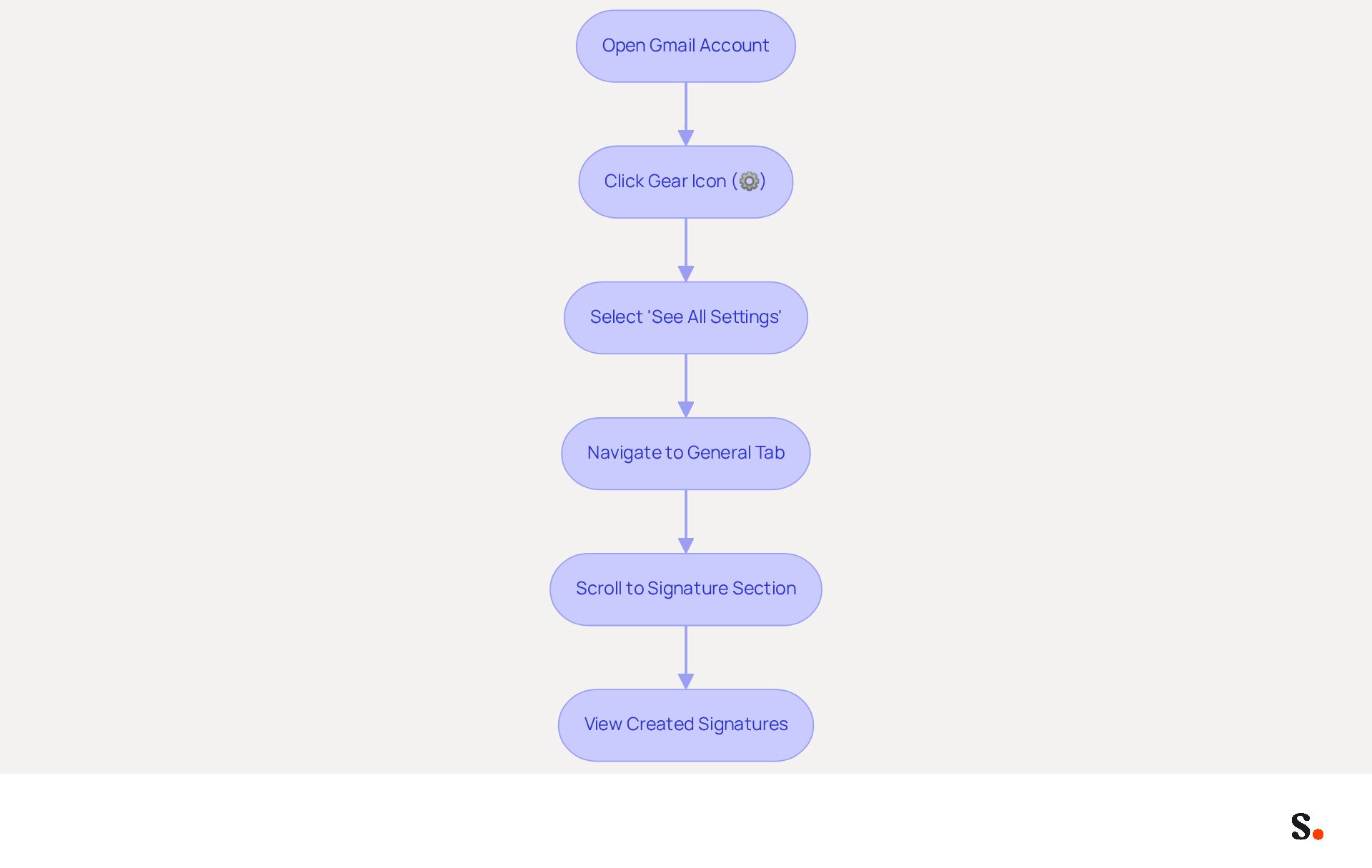
- Open your Gmail account in a web browser.
- In the top right corner, click on the gear icon (⚙️) to open the Settings menu.
- Select 'See all settings' from the dropdown menu.
- Navigate to the 'General' tab.
- Scroll down until you find the 'Signature' section.
- Here, you will see all the autographs you have created.
Following these steps allows you to access the settings necessary for understanding how to remove signature from Gmail.
As of 2026, Gmail is the client of choice for 62.2% of users, demonstrating its significant market presence. Significantly, 89.9% of users uphold a single electronic identifier, underscoring the importance of consistency in branding through digital communications. This consistency is essential for businesses aiming to present a unified image.
A recent survey indicated that 44.4% of users modify their digital identifiers 2-4 times a year. This inconsistency can lead to missed branding opportunities, as regular updates are essential to ensure that your electronic communications align with your current marketing messages and brand identity. Furthermore, 42.2% of users view this form of marketing as one of the top three most effective promotional channels, highlighting the significance of well-designed digital identifiers in enhancing engagement.
Consider adding call-to-action buttons and social media links to enhance the effectiveness of your digital communications. For example, 32.3% of users incorporate call-to-action buttons, while 69.3% add Instagram links, showcasing the potential for email footers to function as effective marketing tools.
By accessing and managing your Gmail settings effectively, you can discover how to remove signature from Gmail to ensure that your communications reflect your identity consistently and capitalize on marketing opportunities. With Scribe, you can ensure that your email signatures not only reflect your brand identity but also adapt seamlessly to changes in your marketing strategy. Scribe also holds SOC 2 Type II certification and complies with GDPR and CCPA, ensuring that your email management is secure and trustworthy.
Delete or Modify Your Email Signature
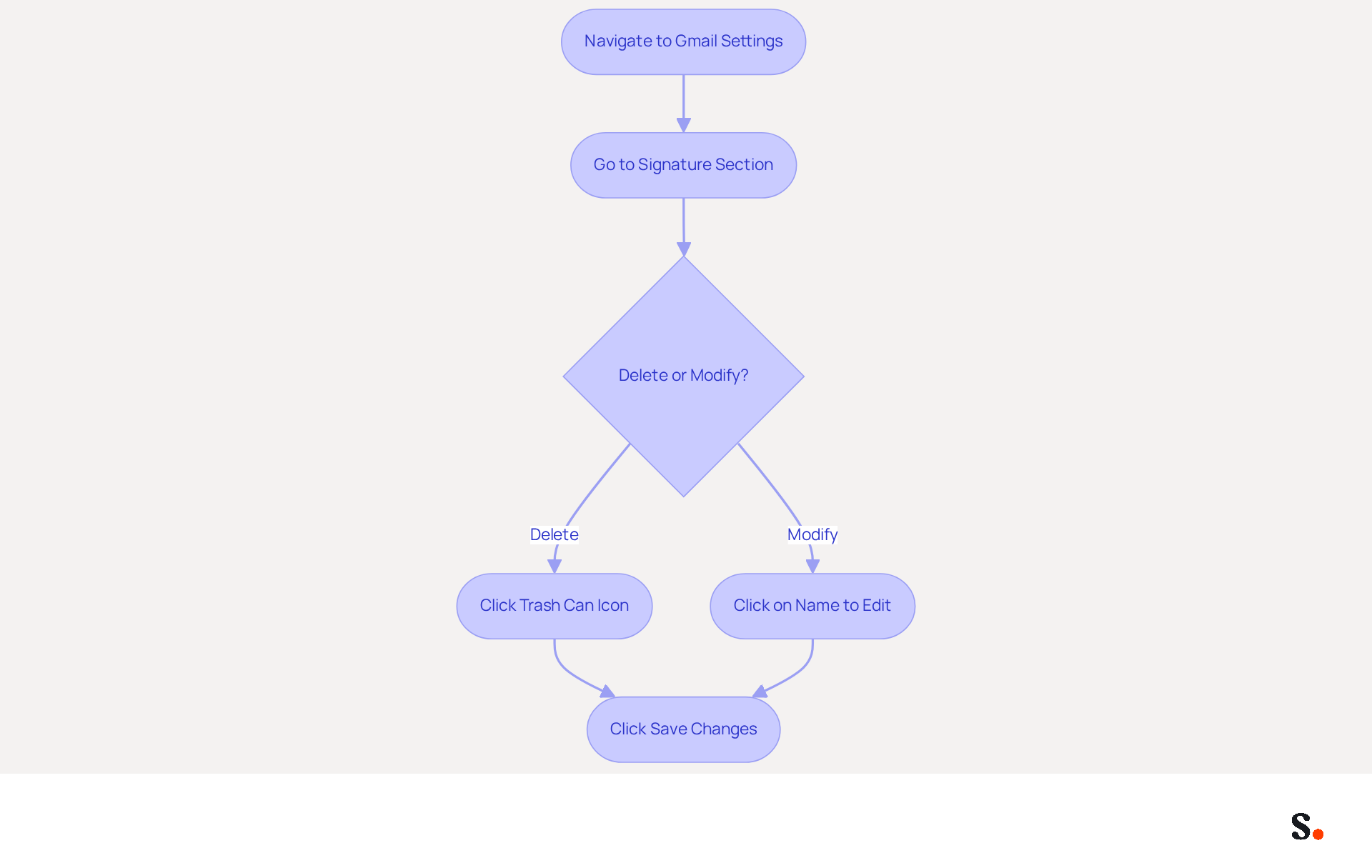
Understanding how to remove signature from Gmail is a straightforward yet essential task for maintaining your professional image. To understand how to remove signature from Gmail, navigate to the 'Signature' section within your Gmail settings to find the text you wish to delete or modify. To remove the mark, simply click on the trash can icon located next to the name. If you prefer to alter the name, click on it to access the editing interface. After making your desired changes, scroll down and click 'Save Changes' at the bottom of the page.
You can easily find out how to remove signature from Gmail or update it to reflect your current branding. To enable one-click synchronization, it's crucial to have Super Admin permissions, as this grants access to your email provider and ensures seamless updates. You can also select specific teammates to sync with the platform, ensuring that any modifications made are automatically updated across your organization. Scribe's SOC 2 Type II compliance guarantees that your data remains secure throughout this process. Ensuring proper permissions not only streamlines the process but also enhances your organization's branding consistency.
Troubleshoot Signature Removal Issues
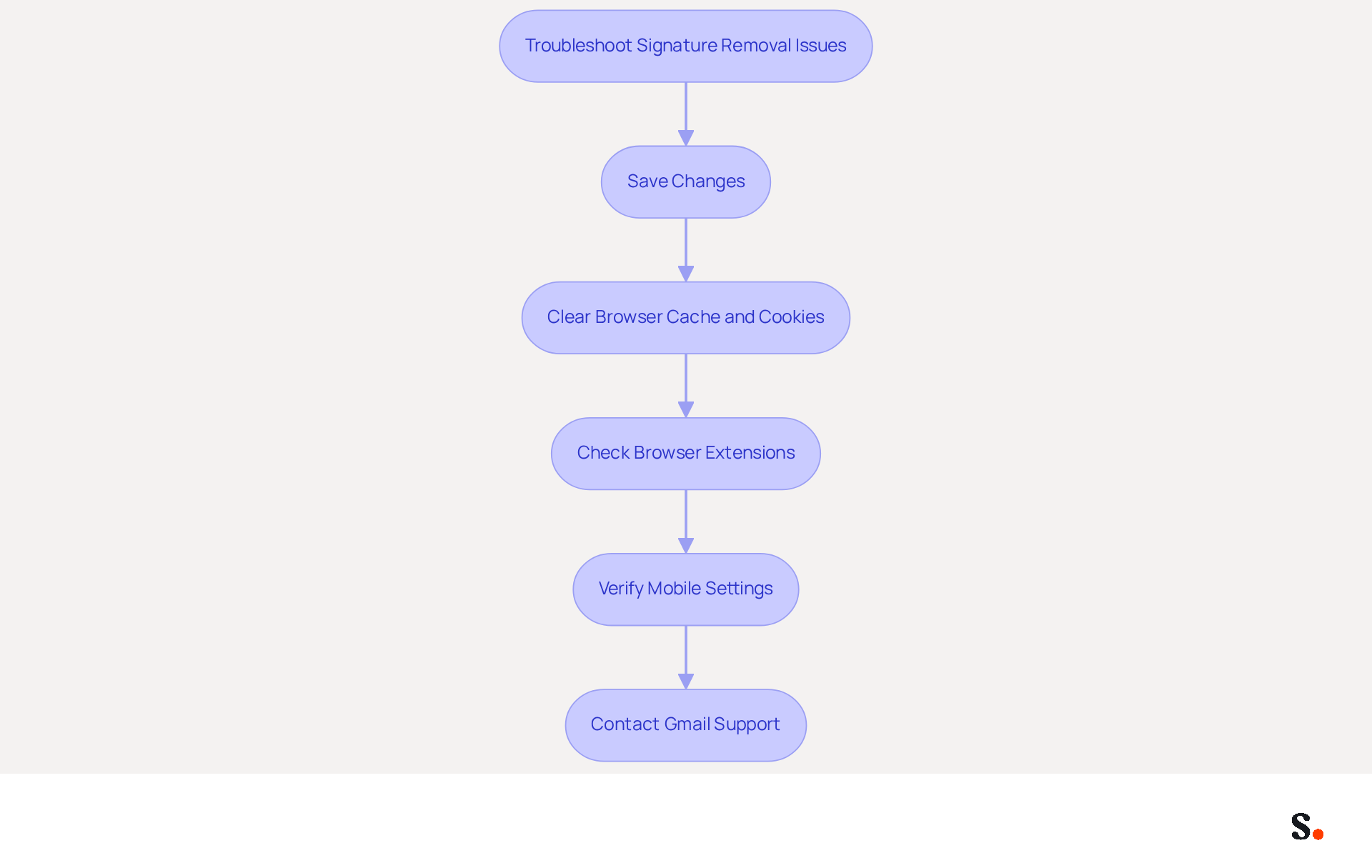
Managing digital identifiers can often present challenges that require careful attention. If your mark keeps reappearing after deletion, ensure that you are saving changes after making adjustments. This is a common oversight that can lead to frustration. Clear your browser's cache and cookies. This can resolve many issues during the removal process. Additionally, check for any browser extensions that might interfere with Gmail. Disabling them temporarily can help identify if they are causing the problem. When using the Gmail app on mobile, confirm that you are following the correct steps for mobile settings, as these can differ from the desktop version. If persistent issues hinder your productivity, consider reaching out to Gmail support for expert intervention.
These troubleshooting tips address common issues related to how to remove signature from Gmail. They ensure a smoother experience. Remember, around 62% of individuals utilize digital identifiers for marketing, emphasizing the significance of effectively managing them. Messages that feature a branded footer receive a 22% higher response rate than those lacking it, making it essential to keep your footer updated. In fact, 44.4% of users update their electronic identifiers 2-4 times per year, so regular checks on your settings can improve your communication. By syncing your Google Workspace with Scribe, you save time. It ensures that updates to your teammates' information automatically reflect in their email footers, streamlining management and enhancing coherence. Effective management of your email signatures not only streamlines communication but also enhances your professional image.
Explore Scribe for Efficient Signature Management
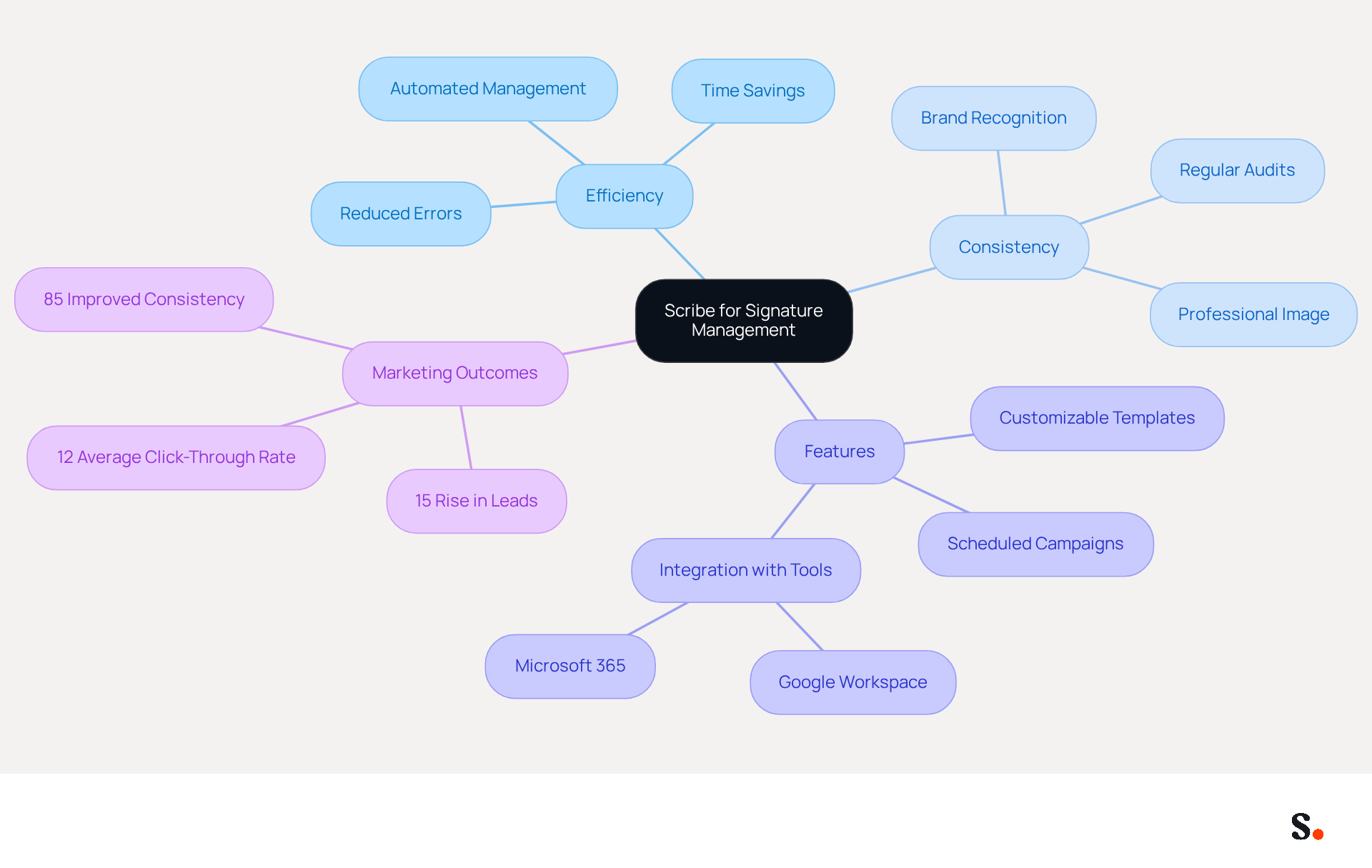
Consider the challenges of managing digital identifiers manually, which can hinder efficiency and consistency. Utilizing Scribe for automated management enhances efficiency and consistency while ensuring data security with SOC 2 Type II compliance and adherence to GDPR and CCPA.
With Scribe, you can easily create and manage digital signatures for your entire team with just a few clicks, ensuring that they all represent your corporate identity. This tool simplifies updates by allowing easy synchronization across all identifiers, helping maintain a consistent image. This distinctive positioning allows Marketing to manage digital identifiers independently after the initial IT setup.
Explore features such as:
- Customizable templates
- Scheduled marketing campaigns
- Seamless integration with tools like Google Workspace and Microsoft 365
These features have been shown to enhance engagement and conversion rates in various case studies. Indeed, organizations employing centralized management solutions such as Scribe experience 85% improved consistency and can observe up to a 15% rise in leads, along with a 12% average click-through rate on banners.
By leveraging Scribe, you can improve your communications and avoid the common pitfalls associated with manual management, ultimately driving better marketing outcomes. By adopting Scribe, organizations can not only streamline their processes but also enhance their overall marketing effectiveness.
Conclusion
Managing email signatures effectively is vital for maintaining a professional digital presence and ensuring brand consistency. By utilizing the provided guidelines, users can navigate their signature settings, make necessary modifications, or remove signatures as needed. This ensures that email communications accurately reflect current branding and marketing strategies.
It's clear that effectively managing digital identifiers is crucial for any organization. With a significant percentage of users frequently updating their signatures, leveraging tools like Scribe can streamline this process. Scribe not only simplifies the management of email signatures but also ensures compliance with security standards such as SOC 2 Type II, GDPR, and CCPA. By enabling Marketing teams to independently manage signatures post-IT setup, Scribe enhances brand consistency and marketing ROI.
In conclusion, adopting Scribe not only streamlines signature management but also fortifies your brand's digital identity in a competitive landscape. By doing so, organizations can ensure that their digital communications remain aligned with their marketing goals, ultimately driving engagement and improving overall marketing effectiveness.
Frequently Asked Questions
How do I access the Gmail signature settings?
To access the Gmail signature settings, open your Gmail account in a web browser, click on the gear icon (⚙️) in the top right corner to open the Settings menu, select 'See all settings' from the dropdown menu, navigate to the 'General' tab, and scroll down to find the 'Signature' section.
Why is it important to manage my Gmail signature?
Managing your Gmail signature is important for maintaining consistency in branding through digital communications, which is essential for businesses to present a unified image. Regular updates to your signature can help align your communications with current marketing messages and brand identity.
What percentage of users modify their digital identifiers frequently?
A recent survey indicated that 44.4% of users modify their digital identifiers 2-4 times a year.
How can I enhance the effectiveness of my email communications?
You can enhance the effectiveness of your email communications by adding call-to-action buttons and social media links. For example, 32.3% of users incorporate call-to-action buttons, while 69.3% add Instagram links in their email footers.
What is Scribe's role in managing email signatures?
Scribe helps ensure that your email signatures reflect your brand identity and can adapt seamlessly to changes in your marketing strategy. Additionally, Scribe holds SOC 2 Type II certification and complies with GDPR and CCPA, ensuring secure and trustworthy email management.
List of Sources
- Access Gmail Signature Settings
- Email Signature Statistics: A Closer Look at Email Signatures in 2026 (https://mysignature.io/blog/email-signature-statistics)
- Google announces major change to the way you use Gmail (https://masslive.com/news/2026/01/google-announces-major-change-to-the-way-you-use-gmail.html)
- Google just dropped a bombshell about Gmail and everyone needs to pay attention (https://pennlive.com/life/2026/02/google-just-dropped-a-bombshell-about-gmail-and-everyone-needs-to-pay-attention.html)
- Delete or Modify Your Email Signature
- How to add, change, or remove a signature in Gmail (https://ablebits.com/office-addins-blog/email-signature-gmail)
- How to Change Email Signature in Gmail? A Step by Step Guide (https://certinal.com/blog/how-to-change-email-signature-in-gmail)
- How To Remove An Email Signature From Gmail In 2026 (https://clean.email/blog/email-signature/how-to-remove-email-signature-from-gmail)
- Troubleshoot Signature Removal Issues
- Email signature statistics: Why every business should optimize their email signatures — Stripo.email (https://stripo.email/blog/email-signature-statistics-why-every-business-should-optimize-their-email-signatures)
- 40+ Email Signature Statistics for 2026 (Data + Insights) (https://wavecnct.com/blogs/email-signature-statistics)
- Email signature statistics and trends in 2024 (https://wisestamp.com/blog/email-signature-statistics)
- Best Email Signature Quotes (2026) - HubSpot (https://hubspot.com/email-signature-generator/best-signature-quotes)
- Explore Scribe for Efficient Signature Management
- 4 Best Practices for Your Work Email Signature Strategy (https://scribe-mail.com/en-US/blog/4-best-practices-for-your-work-email-signature-strategy)
- 40+ Email Signature Statistics for 2026 (Data + Insights) (https://wavecnct.com/blogs/email-signature-statistics)
- Maximize Your Email Signature Program with These 4 Best Practices (https://scribe-mail.com/en-US/blog/maximize-your-email-signature-program-with-these-4-best-practices)
- Market Dynamics and Trends: An In-Depth Look at the Email Signature Software Market with Projected CAGR of 13.2% from 2026 to 2033 (https://linkedin.com/pulse/market-dynamics-trends-in-depth-look-email-signature-software-spkpf)
Get started with Scribe
Create your signature in minutes
Free 14-day trial — no credit card.