Optimize Your Email Signatures for Outlook Mobile Success
Many organizations find it challenging to create email signatures that effectively represent their brand and yield tangible outcomes. Establishing a strong
Sophie Grant
Email Signature Specialist, Scribe
On this page
- Introduction
- Establish Brand Consistency Through Signature Design
- Create On-Brand Signature Templates for All Team Members
- Integrate Email Signatures with Existing Tools for Seamless Management
- Schedule Marketing Campaigns Directly Through Email Signatures
- Conclusion
- Frequently Asked Questions
- List of Sources
Introduction
Many organizations find it challenging to create email signatures that effectively represent their brand and yield tangible outcomes. Establishing a strong brand presence in every communication is crucial for businesses aiming to foster trust and engagement. Email signatures, often overlooked, serve as a powerful tool for reinforcing brand consistency and enhancing marketing efforts.
In this article, we’ll explore best practices for optimizing email signatures specifically for Outlook mobile, focusing on:
- Design
- Integration
- Strategic marketing
Optimizing email signatures can turn every email into a strategic touchpoint that enhances brand visibility and fosters deeper connections with clients.
Establish Brand Consistency Through Signature Design
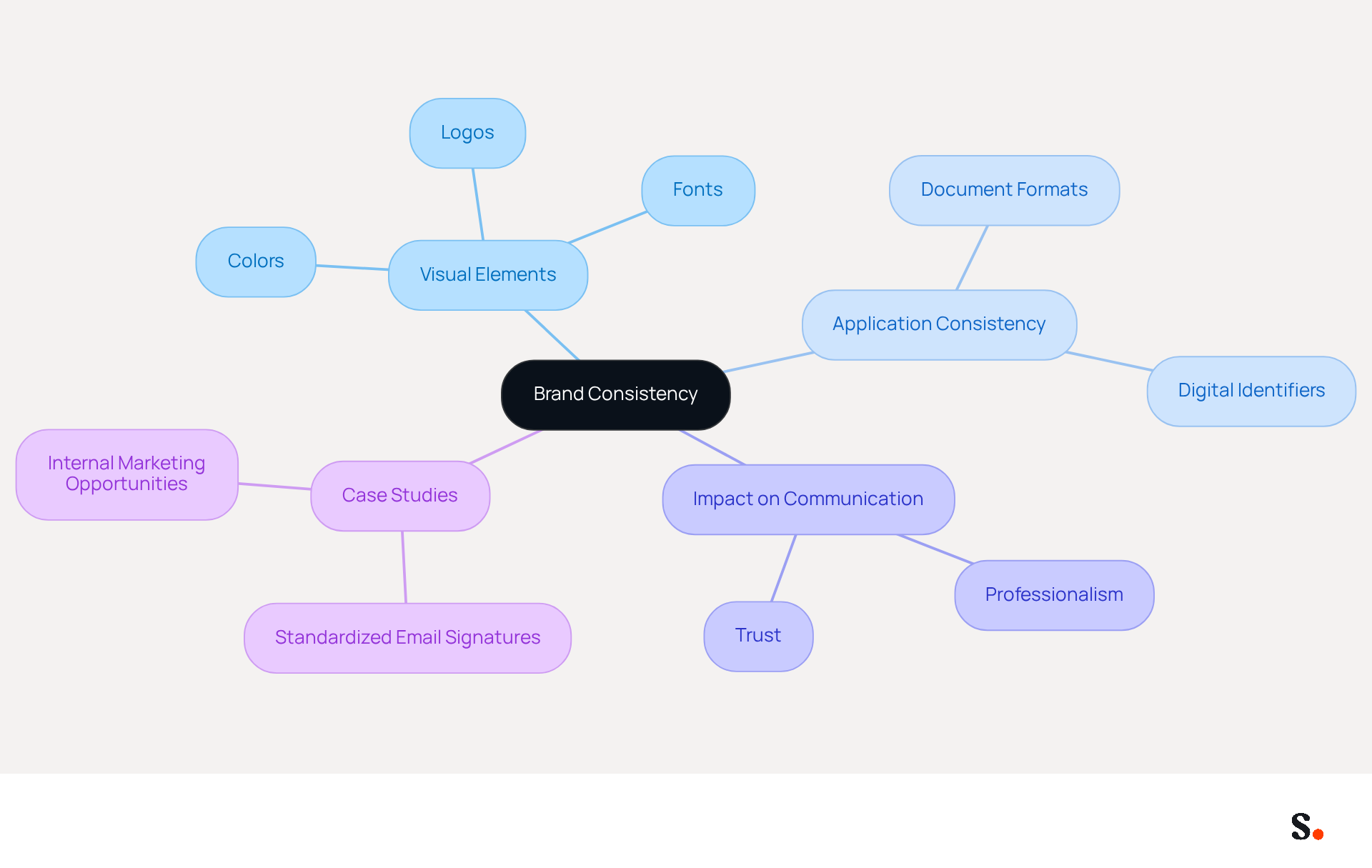
To establish brand consistency, it is essential to define and apply your brand's visual elements consistently across all communications. This includes colors, fonts, and logos. An organized layout conveys professionalism and reinforces brand identity. Consistent application of these elements across all documents is crucial; for instance, using the same font type and size for all team members and prominently incorporating the company logo. This consistency is crucial, as 78% of marketers believe it enhances effective communication.
Each change made in your Aircall configuration will automatically be reflected in your Scribe branding, as we are syncing the data from there, ensuring that your branding remains consistent across all platforms. Testing identifiers across various devices, particularly mobile, is vital to ensure they render correctly and maintain their intended appearance.
A leading tech firm standardized its correspondence formats across all employee communications, significantly enhancing brand perception and trust. Aligning digital identifiers with marketing strategies turns every message into a branding opportunity, boosting customer engagement and loyalty. It is also crucial to recognize the potential pitfalls of inconsistent branding in email footers, which can undermine professional image and trust among recipients.
Create On-Brand Signature Templates for All Team Members
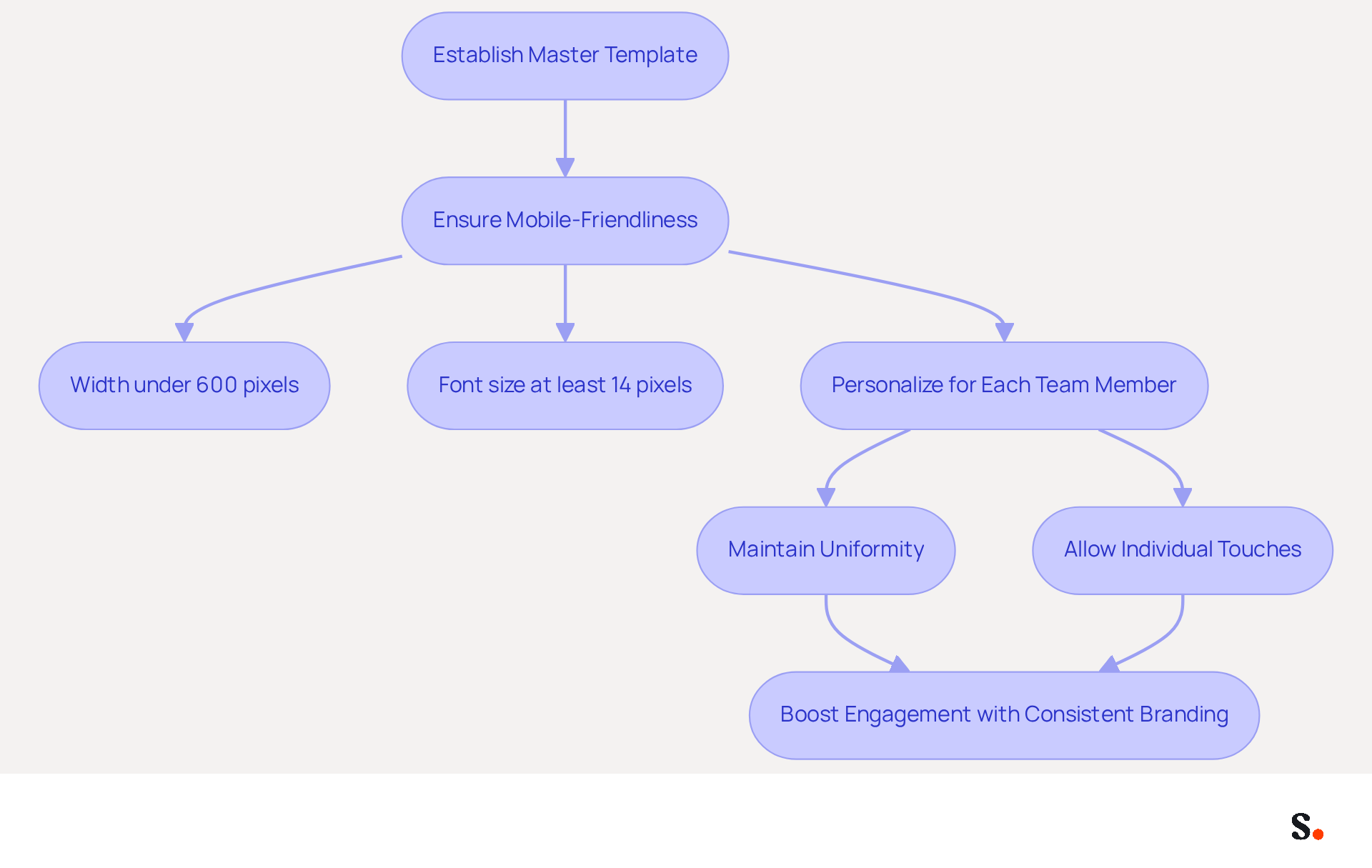
Creating effective on-brand email templates requires a systematic approach to ensure consistency and professionalism. To enhance usability, ensure the template is mobile-friendly by keeping the width under 600 pixels and using a font size of at least 14 pixels for optimal readability on smaller screens.
Once the master template is established, personalize it for each team member, maintaining uniformity while allowing for individual touches. This approach simplifies the creation process while reinforcing brand recognition in all communications.
Studies indicate that using consistent digital identifiers can boost response rates by 22%, highlighting the significance of a well-crafted sign-off in building trust and engagement with your audience. Ultimately, a well-designed email signature can be a powerful tool in fostering trust and enhancing engagement with your audience.
Integrate Email Signatures with Existing Tools for Seamless Management
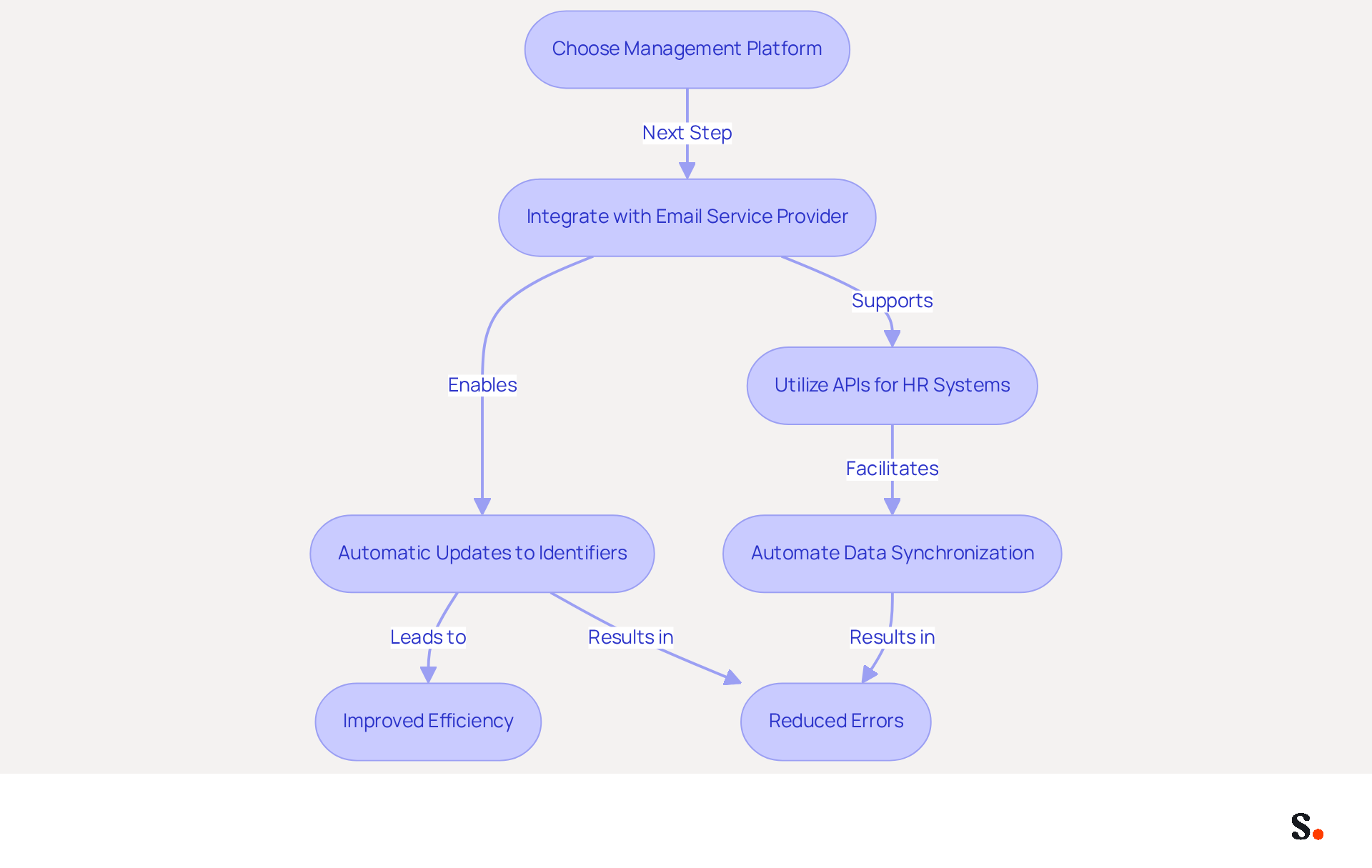
Integrating message identifiers with existing tools is essential for enhancing management efficiency. Start by choosing a management platform that integrates smoothly with your email service provider, such as Scribe with Microsoft 365 or Google Workspace. This integration allows for automatic updates to identifiers when employee information or branding changes, keeping your communications professional and consistent. With Scribe, every modification made in your Aircall configuration is automatically reflected in your team members' details, saving time by auto-filling your colleagues' information using your business phone system as a data source.
Utilizing APIs to connect your HR systems with the document management tool is also advantageous. This method ensures that the marks are consistently up to date without requiring manual intervention, which not only conserves time but also reduces the likelihood of errors in contact details. For instance, companies using communication analytics have seen a remarkable 73% boost in campaign performance, highlighting the benefits of effectively managing digital identifiers.
Case studies show that organizations connecting their communication footers with HR systems achieve improved operational efficiency. For example, automating data synchronization reduces manual changes and significantly lowers the risk of errors, reinforcing trust in communications. By adopting these strategies, businesses not only streamline their processes but also position themselves for greater market impact.
Schedule Marketing Campaigns Directly Through Email Signatures
Effectively scheduling marketing campaigns through email footers requires a robust management tool that integrates seamlessly with existing systems. Utilize a management tool that supports campaign scheduling and automated synchronization with Aircall. Syncing your Google Workspace with Scribe saves time by automatically updating your teammates' data, ensuring seamless integration of their personal information. You can rest assured that your data management is secure and trustworthy, thanks to Scribe's compliance with SOC 2 Type II, GDPR, and CCPA.
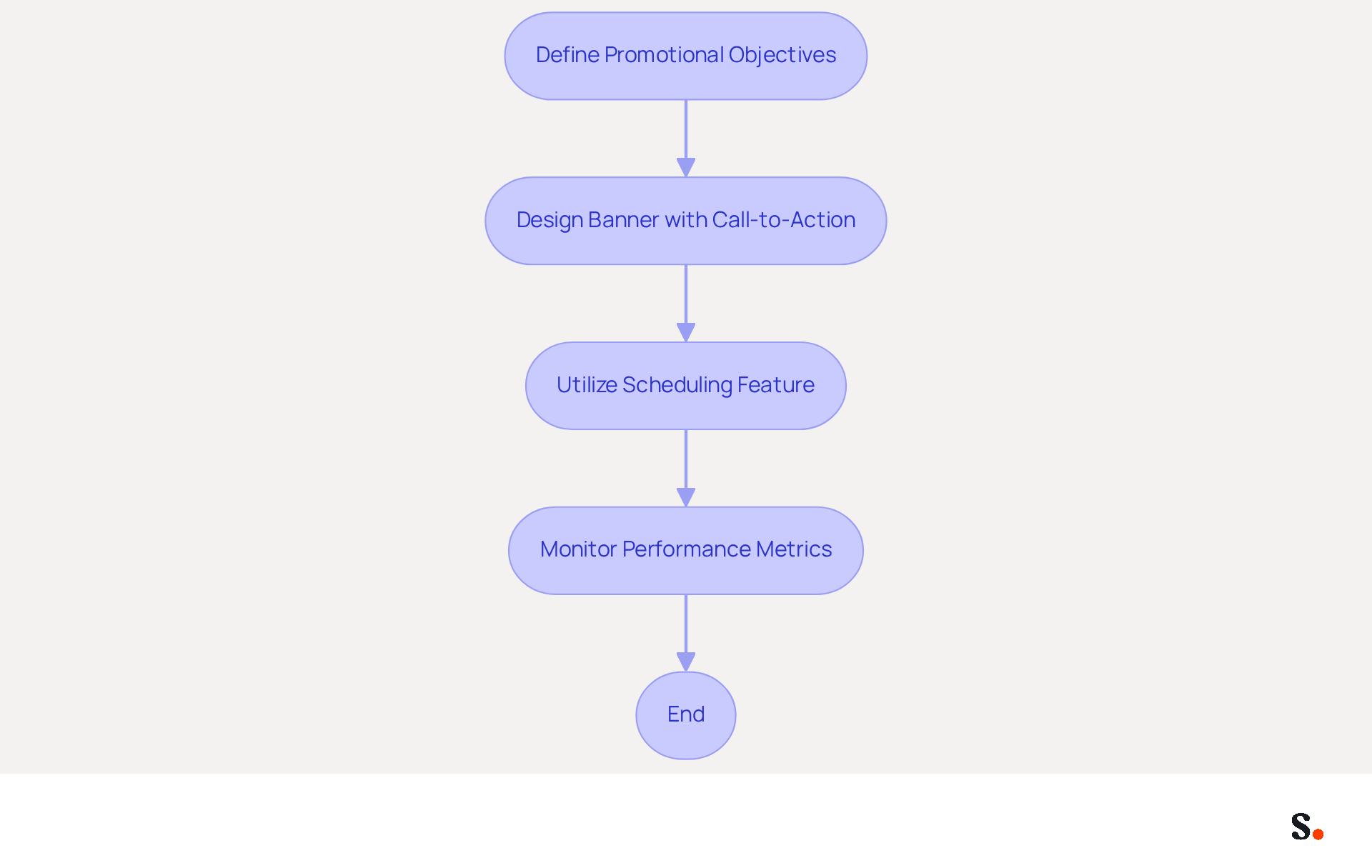
Begin by defining your promotional objectives and pinpointing key messages to feature in your signatures. For example, if you're launching a new product, design a banner that showcases the product and includes a compelling call-to-action link. Utilize the scheduling feature to set specific times for the campaign, ensuring alignment with your broader promotional strategy. Regularly assess the performance of these campaigns by monitoring metrics such as click-through rates and engagement levels. This method transforms every email into a strategic promotional opportunity, greatly improving the effectiveness of your communications.
Statistics indicate that businesses utilizing electronic correspondence footer promotions can experience a 32% rise in responses on messages with optimized footers. Furthermore, the average click-through rate for campaigns related to signatures stands at 2.91%, suggesting significant potential for engagement. By adopting a systematic method for scheduling and utilizing Scribe's automated synchronization features, businesses can enhance their promotional efforts and achieve improved outcomes with each message sent. With over 10,000 marketing and IT teams using Scribe worldwide, you can trust that you are utilizing a proven solution for effective email signature management. Embracing Scribe not only simplifies email signature management but also transforms every communication into a strategic marketing opportunity.
Conclusion
Establishing brand consistency through email signatures is a strategic necessity for organizations seeking to enhance their professional image and build client trust. When businesses apply visual elements like colors, fonts, and logos consistently across all communications, they can greatly enhance brand perception and engagement. This means every email becomes a chance to showcase the company's identity and values.
Key strategies discussed include:
- Creating on-brand signature templates that are mobile-friendly
- Integrating email signatures with existing tools for seamless management
Utilizing platforms like Scribe allows for automatic updates and synchronization, ensuring that all team members' signatures reflect the latest branding and contact information. Moreover, scheduling marketing campaigns directly through email signatures can lead to higher response rates, as studies indicate that optimized footers can lead to a significant increase in engagement.
Optimizing email signatures not only enhances brand consistency but also drives marketing effectiveness. By leveraging tools like Scribe, organizations can streamline their email signature management, ensuring that every communication not only looks professional but also serves as a strategic marketing asset. Adopting these practices will not only streamline operations but also elevate the organization’s marketing effectiveness and client relationships.
Frequently Asked Questions
What is the importance of brand consistency?
Brand consistency is essential as it enhances effective communication and reinforces brand identity. It helps convey professionalism and builds trust with customers.
What elements should be defined and applied for brand consistency?
Key elements include colors, fonts, and logos. These visual elements should be used consistently across all communications.
How can changes in Aircall configuration affect Scribe branding?
Changes made in your Aircall configuration will automatically reflect in your Scribe branding, ensuring consistency across all platforms.
Why is it important to test identifiers across various devices?
Testing identifiers across devices, especially mobile, is vital to ensure they render correctly and maintain their intended appearance.
Can you provide an example of successful brand consistency?
A leading tech firm standardized its correspondence formats across all employee communications, which significantly enhanced brand perception and trust.
How does aligning digital identifiers with marketing strategies benefit a brand?
Aligning digital identifiers with marketing strategies turns every message into a branding opportunity, boosting customer engagement and loyalty.
What are the potential pitfalls of inconsistent branding?
Inconsistent branding, particularly in email footers, can undermine a professional image and erode trust among recipients.
List of Sources
- Establish Brand Consistency Through Signature Design
- Why Email Signatures Must Be In Your 2026 Marketing Plan | Rocketseed (https://rocketseed.com/blog/2026-marketing-plan-email-signatures)
- How Consistent Email Signatures Strengthen Company Identity - Signite (https://signite.io/blog/how-consistent-email-signatures-strengthen-company-identity)
- Email Signature Branding: Consistency and Impact | Crossware365 (https://crossware365.com/blog/mastering-email-signature-branding-market-presence)
- The impact of email signatures on your branding (https://signitic.com/en/resources/the-impact-of-email-signatures-on-your-branding)
- 4 Best Practices for Brand Consistency in Email Signatures (https://scribe-mail.com/en-US/blog/4-best-practices-for-brand-consistency-in-email-signatures)
- Create On-Brand Signature Templates for All Team Members
- The benefits of a branded email signature (https://bybrand.io/blog/branded-email-signature)
- Why Team Email Signatures Matter More Than You Think: The Hidden Impact on Brand Trust and Customer Experience (https://getmailbird.com/why-team-email-signatures-matter-brand-trust)
- The impact of email signatures on your branding (https://signitic.com/en/resources/the-impact-of-email-signatures-on-your-branding)
- Email signature statistics: Why every business should optimize their email signatures — Stripo.email (https://stripo.email/blog/email-signature-statistics-why-every-business-should-optimize-their-email-signatures)
- Integrate Email Signatures with Existing Tools for Seamless Management
- How to Automate Email Signature Updates | Exclaimer (https://exclaimer.com/email-signature-handbook/automate-email-signature-updates)
- 4 Best Practices for Using Email Signature Software for Marketing (https://scribe-mail.com/en-US/blog/4-best-practices-for-using-email-signature-software-for-marketing)
- Top Software Integrations to Supercharge Your Email Signature Management (https://mysignature.io/blog/software-for-email-signature-management)
- Turn Email Signature Data into a Shared Win for IT & HR (https://exclaimer.com/resources/videos/email-signature-data-it-hr)
- Schedule Marketing Campaigns Directly Through Email Signatures
- Exclaimer Research: 67% of Marketers Expect Email Signatures to Support With Lead Gen In 2023 (https://businesswire.com/news/home/20230612141095/en/Exclaimer-Research-67-of-Marketers-Expect-Email-Signatures-to-Support-With-Lead-Gen-In-2023)
- What Is Email Signature Marketing? | Rocketseed (https://rocketseed.com/blog/what-is-email-signature-marketing)
- Email Signature Marketing 101: Run Campaigns That Drive ROI (https://wisestamp.com/guides/how-to-do-email-signature-marketing)
- 5 Steps to Schedule Email Signature Marketing Campaigns with Scribe (https://scribe-mail.com/en-US/blog/5-steps-to-schedule-email-signature-marketing-campaigns-with-scribe)
- Schedule automatic email marketing campaigns (https://codetwo.com/email-signatures/schedule-email-marketing-campaign)
Get started with Scribe
Create your signature in minutes
Free 14-day trial — no credit card.