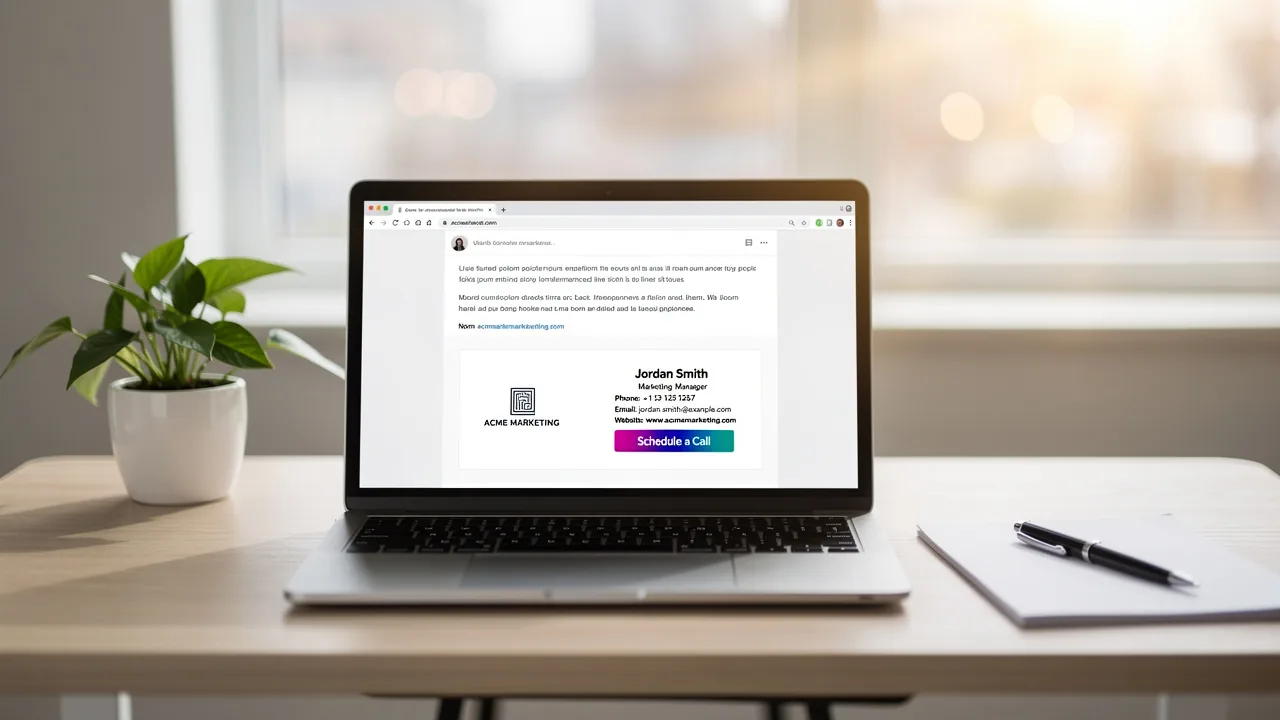
How to Update Signature: A Step-by-Step Guide for Marketing Managers
While often overlooked, email signatures can significantly impact a marketing manager's effectiveness. They convey essential contact information, reinforce
Sophie Grant
Email Signature Specialist, Scribe

Introduction
While often overlooked, email signatures can significantly impact a marketing manager's effectiveness. They convey essential contact information, reinforce brand identity, and create marketing opportunities with every email sent. Marketing managers often struggle to keep email signatures current and compliant, risking brand inconsistency.
How can they effectively navigate the complexities of email signature management to maximize their impact? This guide provides a step-by-step approach to:
- Updating email signatures
- Troubleshooting common issues
- Leveraging tools that enhance brand consistency and professionalism
Addressing these challenges not only enhances brand consistency but also safeguards against potential legal pitfalls.
Understand the Importance of Email Signature Management
Email footers are often undervalued, yet they are crucial to your communication strategy. A well-crafted email footer communicates essential contact details and strengthens your identity with each message. Here are key reasons why managing email signatures is crucial:
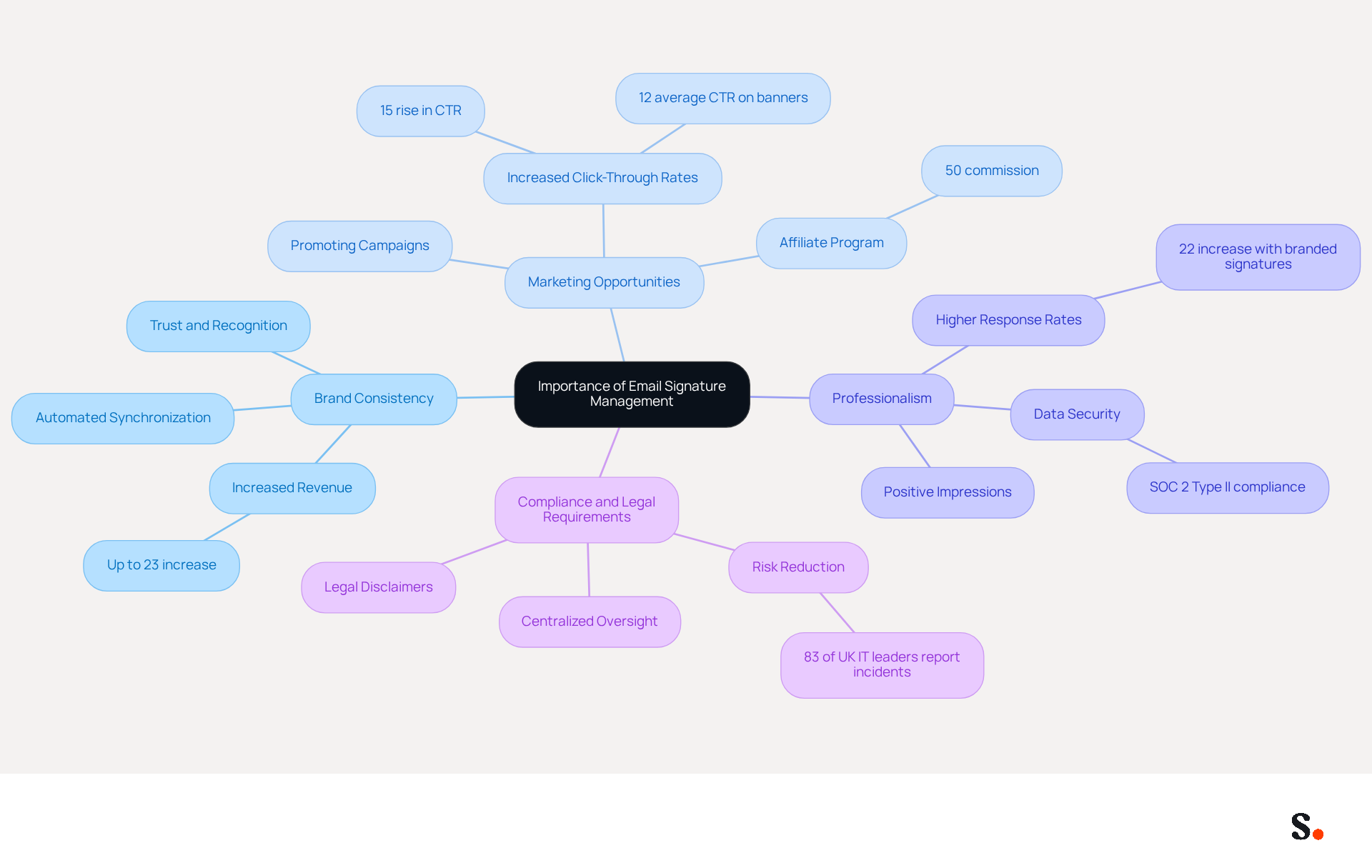
- Brand Consistency: Maintaining consistent branding across all communications fosters trust and recognition. Ensure that your email footers reflect your organization's colors, fonts, and logos, as this can significantly enhance recall. Research indicates that consistent presentation of a product can increase revenue by up to 23%. With Scribe's automated synchronization, your team's marks are always current, reflecting any modifications made in your business phone system, thus enhancing brand consistency effortlessly.
- Marketing Opportunities: Email footers serve as a valuable platform for promoting campaigns, events, or new products. Incorporating a call-to-action or a banner can effectively drive traffic and engagement. Businesses employing branded footers have reported a 15% rise in website click-through rates, and Scribe's average click-through rate on footer banners is 12%, demonstrating the significant impact this often-overlooked marketing channel can have. By joining Scribe's affiliate program, you can earn a 50% commission while providing a $30 credit to new users, transforming your contact details into a powerful marketing tool.
- Professionalism: A standardized email format enhances the professionalism of your communications, leaving a positive impression on clients and partners. Emails with branded closing lines receive a 22% higher response rate than those without, highlighting the importance of a polished presentation. Scribe's SOC 2 Type II compliance ensures that your data is secure, allowing you to focus on maintaining a professional image without compromising on security.
- Compliance and Legal Requirements: Failing to include necessary legal disclaimers can lead to significant compliance issues. Many organizations are required to include legal disclaimers in their email footers. Proper management includes knowing how to update signature to ensure compliance with regulations and reduce the risk of legal issues. With 83% of UK IT leaders reporting at least one email-related security incident, maintaining standardized email formats can also enhance security by making it easier to identify spoofed emails. Without centralized oversight, organizations risk legal repercussions and damage to their reputation. Automated updates from your Aircall configuration further enhance this process, ensuring that your identifiers remain compliant and consistent.
By leveraging Scribe's solutions, organizations can transform their email footers into strategic assets that enhance both compliance and brand identity.
Follow Step-by-Step Instructions to Update Signatures
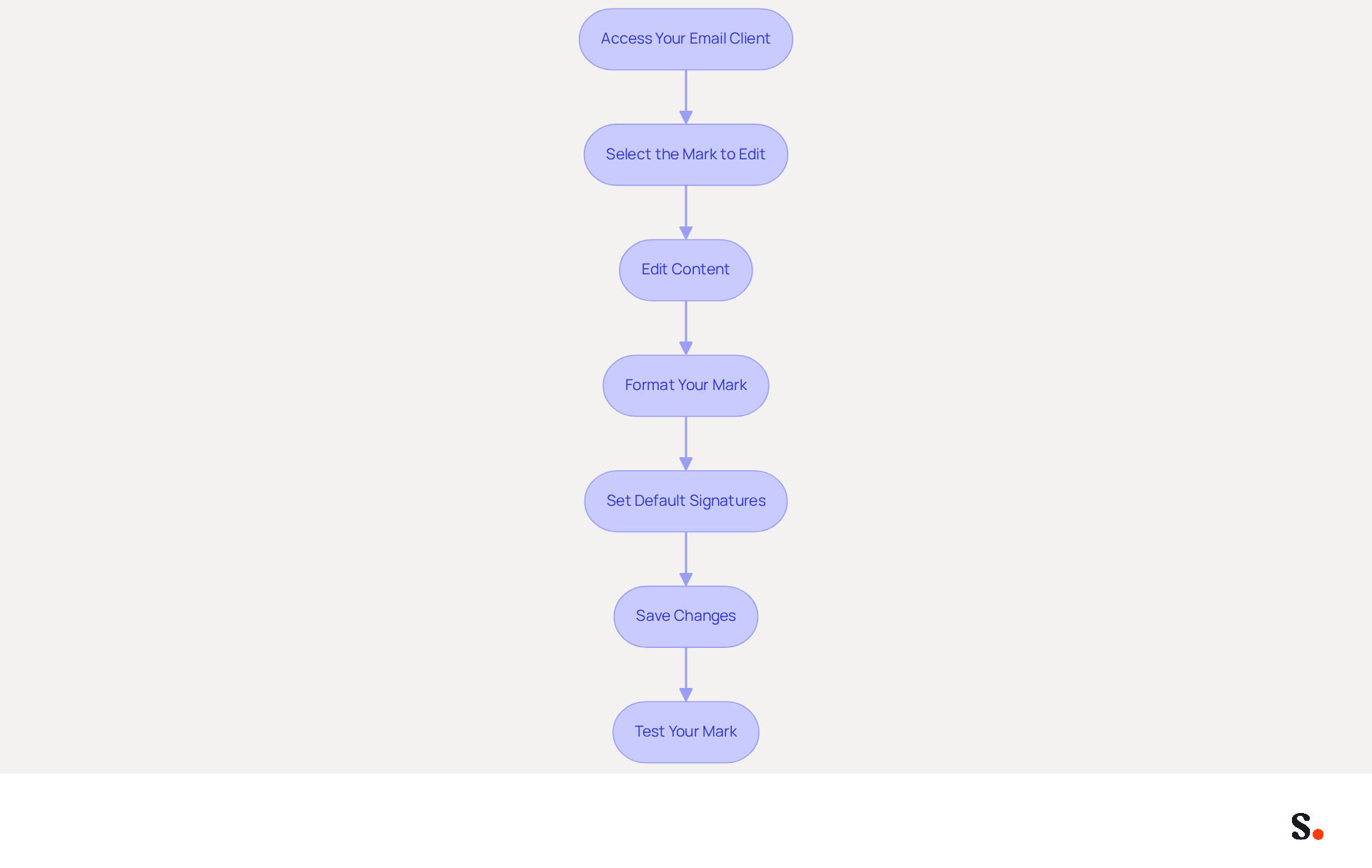
It is essential for maintaining professionalism and ensuring effective communication to know how to update signature in email signatures with the correct contact details. Follow these steps to ensure your email signatures are current and effective:
- Access Your Email Client: Open your email client (e.g., Outlook, Gmail, etc.). For example, in Outlook, go to 'File' > 'Options' > 'Mail' > 'Signatures'.
- Select the Mark to Edit: Choose the mark you wish to update from the list. If you need to create a new one, click 'New' and name your mark.
- Edit Content: In the editing box, update your details with the latest information, including your name, title, contact details, and any promotional banners or calls to action. Incorporating links to high-performing guides or new case studies can enhance visibility and drive traffic to valuable resources.
- Format Your Mark: Use the formatting tools to ensure your mark is visually appealing. Stick to your brand's guidelines for fonts and colors. A well-crafted sign-off can significantly increase engagement; messages with a call-to-action can boost clicks by 371% and sales by 1617%.
- Set Default Signatures: If applicable, designate your updated sign-off as the default for new messages and replies/forwards to ensure consistency in how to update signature. This helps maintain a professional image across all communications.
- Save Changes: After making your updates, click 'Save' or 'OK' to apply the changes.
- Test Your Mark: Send a test message to yourself or a colleague to ensure the mark appears correctly and all links function. Regular testing is crucial, as 76% of people feel more confident in a sender when their messages are branded.
Organizations can enhance their brand image and ensure every communication serves as a powerful marketing tool by learning how to update signature regularly.
Troubleshoot Common Issues During Signature Updates
Updating contact details can often lead to unexpected challenges, even with clear guidance. Here are some common problems and how to troubleshoot them:
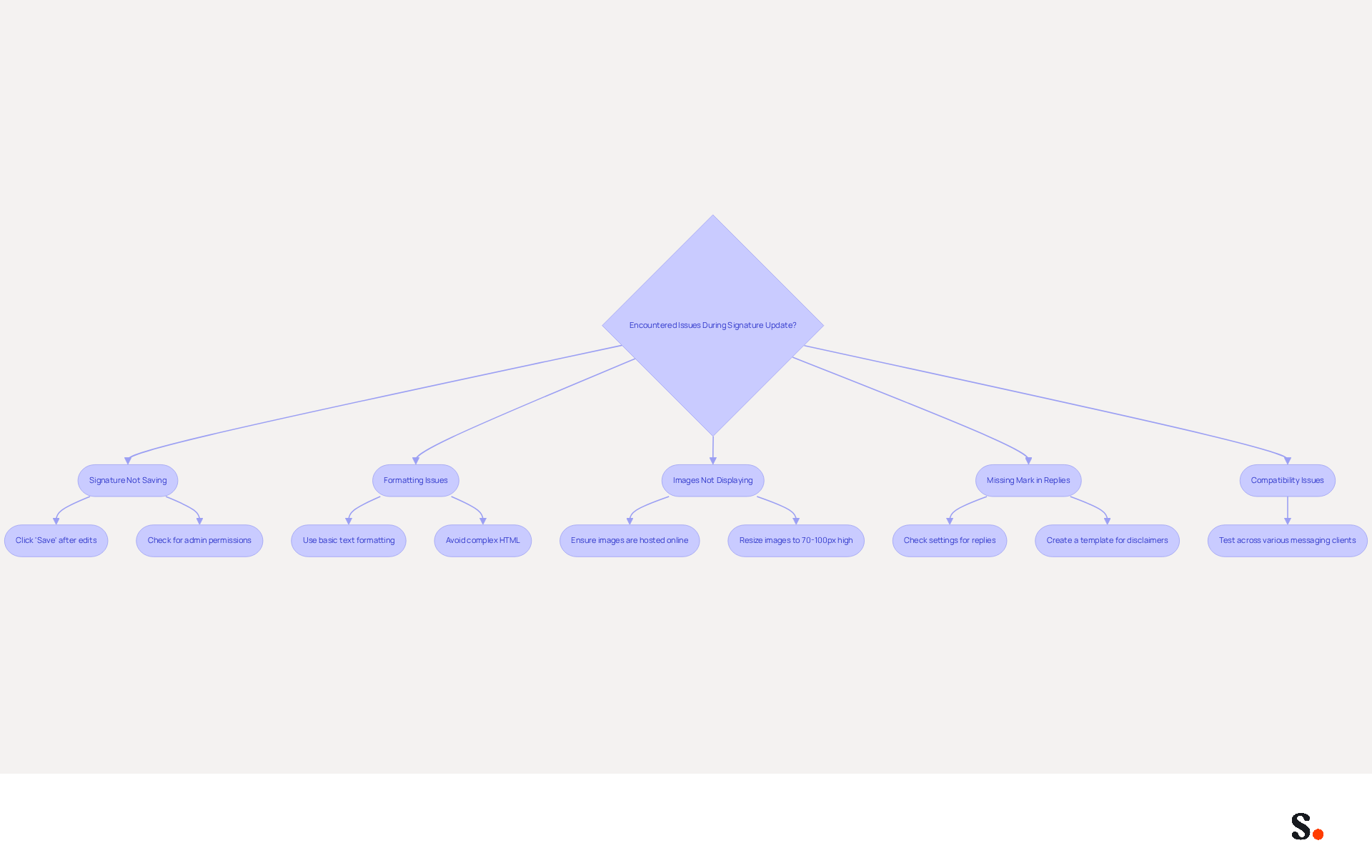
- Signature Not Saving: Be sure to click 'Save' after making any edits to ensure your changes are applied. Additionally, check if your messaging client requires administrative permissions to make changes.
- Formatting Issues: If your identifier appears differently in messages than in the editor, it may be due to unsupported formatting. Stick to basic text formatting and avoid complex HTML for consistency.
- Images Not Displaying: Ensure images in your email footer are hosted online and accessible. Large images may not load properly; the recommended size is 70-100 pixels high by 300-400 pixels wide to avoid display issues.
- Missing Mark in Replies: If your mark is not showing in replies, check your settings to ensure the correct mark is configured for replies and forwards. Many users struggle with marks not appearing in replies, leading to potential miscommunication. This oversight could expose organizations to legal risks if disclaimers are not properly displayed. A solution is to create a template for users to insert disclaimers manually.
- Compatibility Issues: Various messaging clients may display personal marks in different ways. Testing your mark across various clients can help identify and resolve discrepancies.
With Scribe's integration with Google Workspace, marketing managers can efficiently manage how to update signature information for their teammates, ensuring that signatures reflect the latest changes. Additionally, syncing with Aircall enhances brand consistency, as updates are seamlessly managed without manual input. Being aware of these common issues and their solutions enables marketing managers to quickly resolve problems and maintain effective communication. Addressing these issues promptly is crucial to maintaining compliance and effective communication.
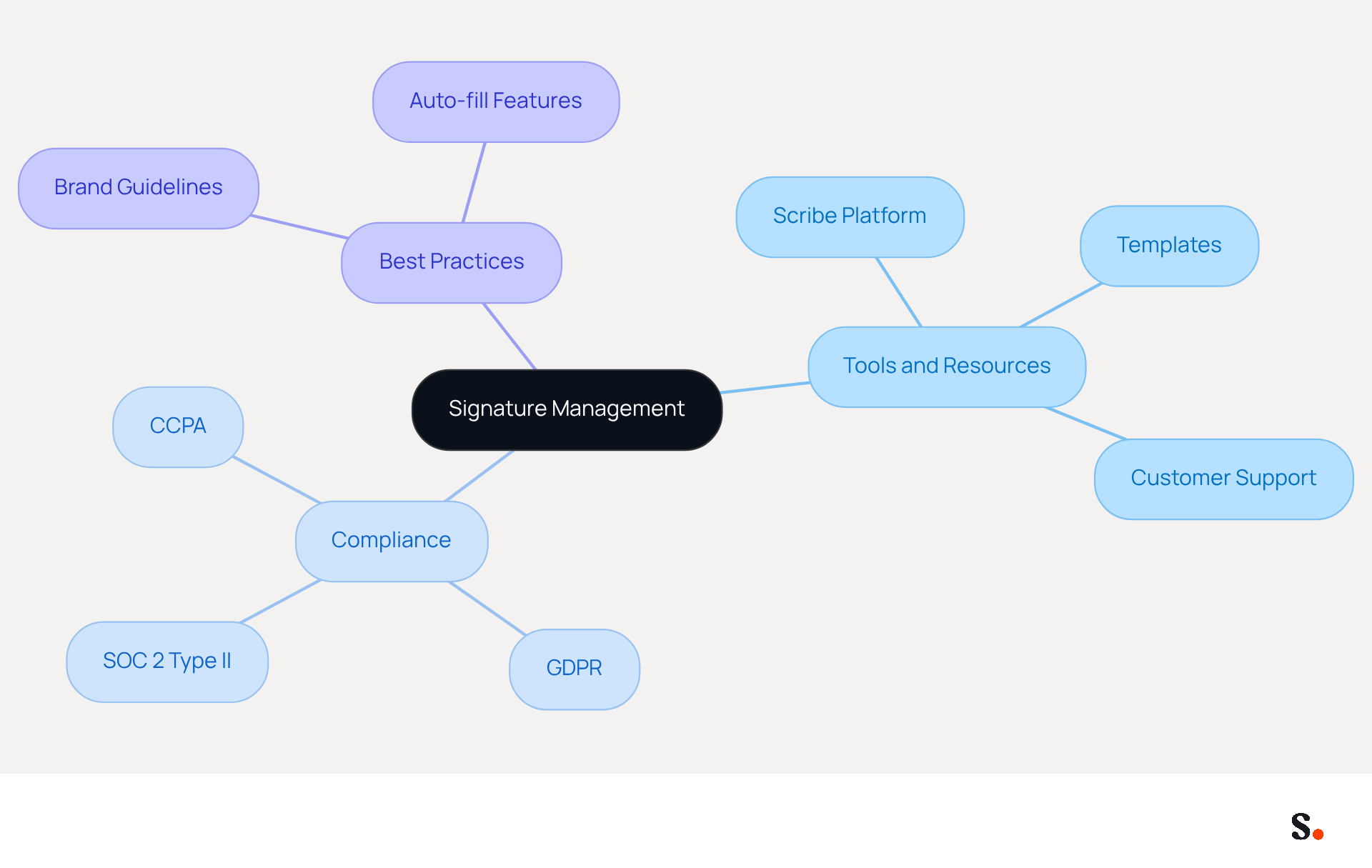
Utilize Tools and Resources for Efficient Signature Management
Managing email signatures manually can lead to inconsistencies and missed branding opportunities, but Scribe's innovative platform offers a solution. This platform automates the creation and management of email signatures, providing guidance on how to update signatures seamlessly across your organization. This tool helps maintain brand consistency while allowing you to seize marketing opportunities with ease, as evidenced by its application in over 10,000 companies generating 15 million daily brand impressions. They prioritize outstanding customer support, ensuring you can speak with a real person rather than navigating automated systems, which allows for swift and effective issue resolution.
Signature Management Software: Dedicated software solutions provide centralized control over email signatures, ensuring compliance and uniformity across all employees. This approach is crucial for maintaining a professional image and enhancing brand visibility. Furthermore, the organization directs 1% of its revenue to support emerging carbon removal technologies through Stripe Climate, reflecting its commitment to environmental sustainability. The platform also complies with SOC 2 Type II standards, guaranteeing that your data is protected and that it meets the highest levels of data security, including adherence to GDPR and CCPA.
Templates and Best Practices: Utilizing templates that align with your brand guidelines is essential. Resources such as Scribe's blog provide valuable insights into optimal practices for email branding and management, assisting in streamlining the process. With features that auto-fill teammates' contact details using your business phone system as a data source, the tool ensures that this information is always current without requiring action from your teammates. This automated synchronization, combined with Scribe's SOC 2 Type II compliance, guarantees that your data is secure while enhancing team collaboration.
By utilizing these tools and resources, marketing managers can discover how to update signature management, ensuring all communications are on-brand and impactful.
Conclusion
Email signatures serve as a crucial element in a comprehensive marketing strategy, extending beyond mere digital sign-offs. By effectively managing email signatures, organizations can enhance brand consistency, seize marketing opportunities, and maintain professionalism in their communications. The insights provided in this guide highlight the importance of keeping email signatures updated and aligned with brand identity, ensuring that every email sent serves as a powerful marketing tool.
Throughout the article, key steps for updating email signatures were outlined, including:
- Accessing email clients
- Editing content
- Troubleshooting common issues
The significance of utilizing tools like Scribe for automated management was emphasized, showcasing how over 10,000 marketing and IT teams benefit from its capabilities. Scribe not only simplifies the process of maintaining compliance and brand consistency but also enhances marketing effectiveness through features like click-through tracking and seamless integration with popular platforms.
Ultimately, effective email signature management is key to maximizing your brand's impact. By implementing these best practices, marketing managers can ensure that their communications are not only professional but also impactful. Embracing these strategies will lead to improved brand visibility and engagement, ultimately driving better results for the organization. Taking action now to refine email signature management can elevate your brand's presence and effectiveness in the marketplace.
Frequently Asked Questions
Why is email signature management important?
Email signature management is crucial because it helps maintain brand consistency, provides marketing opportunities, enhances professionalism, and ensures compliance with legal requirements.
How does brand consistency affect communication?
Maintaining consistent branding across all communications fosters trust and recognition, significantly enhancing recall. Research shows that consistent presentation can increase revenue by up to 23%.
What marketing opportunities do email footers provide?
Email footers can promote campaigns, events, or new products. Incorporating calls-to-action or banners can drive traffic and engagement, with businesses reporting a 15% rise in website click-through rates.
How does Scribe enhance email signature management?
Scribe automates synchronization of email signatures, ensuring that your team's branding is always current and reflects any modifications made in your business phone system.
What impact does a standardized email format have on professionalism?
A standardized email format enhances professionalism, leaving a positive impression on clients and partners. Emails with branded closing lines receive a 22% higher response rate than those without.
What are the compliance and legal requirements related to email signatures?
Many organizations must include legal disclaimers in their email footers to avoid compliance issues. Proper management ensures that signatures are updated to comply with regulations and reduce legal risks.
How does Scribe help with compliance and security in email signatures?
Scribe's automated updates from your Aircall configuration ensure that email identifiers remain compliant and consistent, enhancing security by making it easier to identify spoofed emails.
What is the benefit of joining Scribe's affiliate program?
By joining Scribe's affiliate program, you can earn a 50% commission while providing a $30 credit to new users, turning your contact details into a powerful marketing tool.
List of Sources
- Understand the Importance of Email Signature Management
- Exclaimer Research: 67% of Marketers Expect Email Signatures to Support With Lead Gen In 2023 (https://businesswire.com/news/home/20230612141095/en/Exclaimer-Research-67-of-Marketers-Expect-Email-Signatures-to-Support-With-Lead-Gen-In-2023)
- Why Email Signatures Must Be In Your 2026 Marketing Plan | Rocketseed (https://rocketseed.com/blog/2026-marketing-plan-email-signatures)
- Why Team Email Signatures Matter More Than You Think: The Hidden Impact on Brand Trust and Customer Experience (https://getmailbird.com/why-team-email-signatures-matter-brand-trust)
- Email signature statistics: Why every business should optimize their email signatures — Stripo.email (https://stripo.email/blog/email-signature-statistics-why-every-business-should-optimize-their-email-signatures)
- 10 Strategies for Increasing User Engagement with Business Email Signatures (https://exclaimer.com/blog/email-signatures-key-business-tool)
- Follow Step-by-Step Instructions to Update Signatures
- Email signature marketing: everything you need to know (https://templafy.com/email-signature-marketing-everything-you-need-to-know)
- How to Run a Successful Email Signature Marketing Campaign - NEWOLDSTAMP - NEWOLDSTAMP (https://newoldstamp.com/blog/email-signature-marketing-guide)
- Improve Email Signature Marketing Campaign Management | CloudM (https://cloudm.io/blog/how-to-improve-email-signature-marketing-campaign-management)
- Boost Engagement with Effective Marketing Email Signature Practices (https://scribe-mail.com/en-US/blog/boost-engagement-with-effective-marketing-email-signature-practices)
- 6 Ways to Use Email Signature to Support Marketing Campaigns (https://clearout.io/blog/use-email-signature-to-support-marketing-campaigns)
- Troubleshoot Common Issues During Signature Updates
- justanswer.com (https://justanswer.com/email/lyeqn-email-signatures-no-longer-loading-automatically.html)
- How to solve problems with email signatures in Microsoft 365? (https://mail-signatures.com/articles/problems-email-signatures-office-365)
- Troubleshoot issues with Gmail signatures - Gmail Help (https://support.google.com/mail/answer/11468381?hl=en)
- Email Signature Troubleshooting - Problems & Solutions - Gimmio (https://blog.gimm.io/email-signature-troubleshooting)
- My Outlook auto signature is not working on some email accounts, and I can't access Signature Edit. any ideas? - Microsoft Q&A (https://learn.microsoft.com/en-us/answers/questions/5563621/my-outlook-auto-signature-is-not-working-on-some-e)
- Utilize Tools and Resources for Efficient Signature Management
- Why Email Signature Management Software is Essential for Marketing Success (https://scribe-mail.com/en-US/blog/why-email-signature-management-software-is-essential-for-marketing-success)
- Email Signature Design Trends in 2026: What Works and What to Drop (https://bulksignature.com/blog/email-signature-design-trends)
- Best Email Signature Management Software: Top 12 Tools (2026)
- NEWOLDSTAMP (https://newoldstamp.com/blog/email-signature-software)
- Best Email Signature Management Software (Evaluated May 2026) (https://wisestamp.com/guides/best-email-signature-management-software)
- Top 10 Email Signature Management Tools in 2026 (Compared) (https://mailbutler.io/blog/email/email-signature-management-tools)
Get started with Scribe
Signatures for every role on your team
Free 14-day trial — no credit card.