Implement Centralized Email Signature Management in 6 Simple Steps
Centralized email signature management is essential for organizations seeking to establish a cohesive identity in their communications. By implementing this
Sophie Grant
Email Signature Specialist, Scribe

Introduction
Centralized email signature management is essential for organizations seeking to establish a cohesive identity in their communications. By implementing this system, companies can enhance brand consistency, streamline updates, and ensure compliance, ultimately transforming every email into a powerful marketing opportunity. Organizations often face obstacles in achieving effective centralized management, and addressing these challenges is crucial for maximizing communication potential.
Understand Centralized Email Signature Management
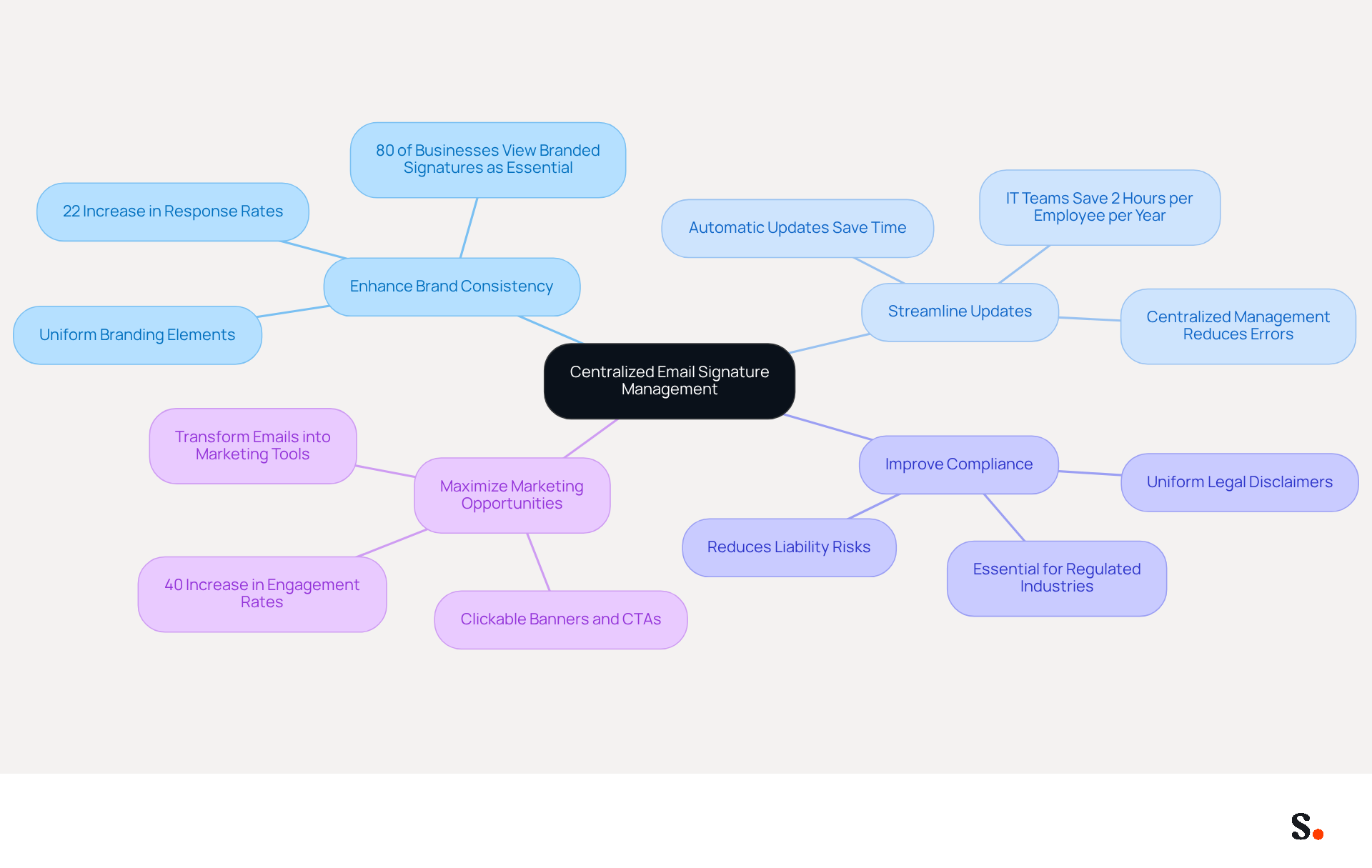
Centralized email signature management is essential for maintaining a cohesive organizational identity. This approach guarantees that all employees maintain consistent branding, legal disclaimers, and promotional messages in their communications. Implementing centralized management brings several significant benefits:
- Enhance Brand Consistency: Uniform email signatures ensure that all outgoing emails reflect the same branding elements - logos, colors, and fonts - reinforcing the company’s identity. Research shows that consistent email formats can lead to a 22% increase in response rates, emphasizing their importance in effective communication.
- Streamline Updates: Modifications to identifiers can be executed in one location and automatically applied to all users, reducing the risk of inconsistencies and errors. This efficiency is vital, as IT teams can save an average of two hours per employee per year by automating update processes.
- Improve Compliance: Legal disclaimers and compliance information can be uniformly applied, significantly reducing the risk of non-compliance. In regulated industries, automatic compliance disclaimers are essential in every outbound message to avoid legal repercussions.
Maximizing marketing opportunities is achievable with centralized email signature management, as it enables the integration of promotional campaigns directly into communication footers, transforming every message into a potential marketing tool. Companies utilizing digital identifiers in their markings have observed engagement rates increase by 40%, showcasing the effectiveness of this strategy.
Comprehending these advantages is the initial step toward effectively implementing a centralized communication system. Ultimately, a centralized communication system not only strengthens brand integrity but also transforms every interaction into a strategic opportunity.
Follow These 6 Steps for Implementation
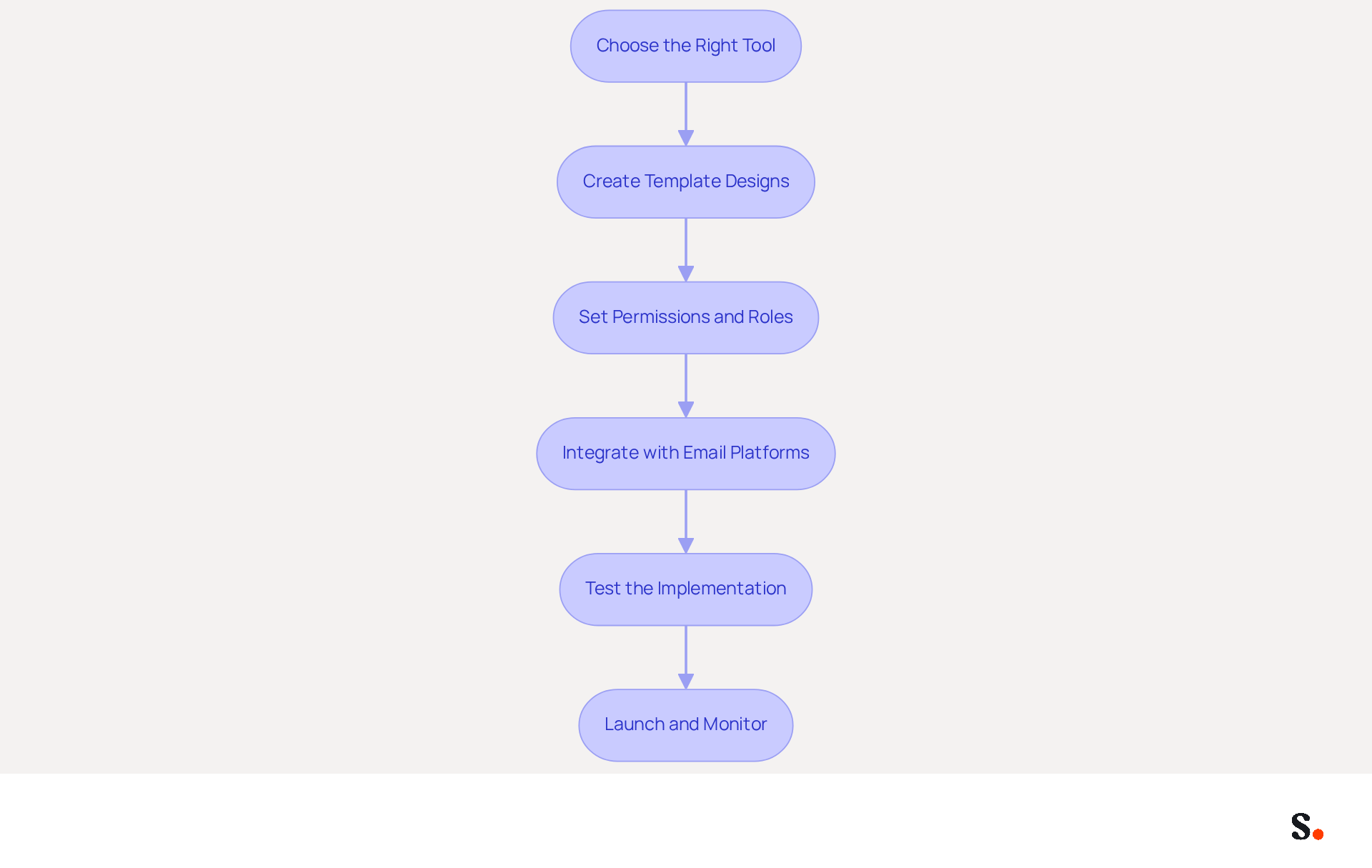
The implementation of centralized email signature management can significantly enhance brand consistency and communication efficiency. Implementing this process can be streamlined through the following six steps:
- Choose the Right Tool: Select a signature management tool that aligns with your organization’s requirements. Prioritize features such as integration with existing email platforms like Microsoft 365 and Google Workspace, along with user-friendly interfaces. This tool integrates seamlessly with Google Workspace, allowing for quick synchronization that saves time and ensures brand consistency.
- Create Template Designs: Develop on-brand template designs that incorporate essential elements, including the company logo, employee name, title, and contact information. Ensure the design is responsive and visually appealing to enhance brand perception. With Scribe, you can auto-fill signing details using attributes from your synchronized Google Workspace data, improving efficiency.
- Set Permissions and Roles: Establish clear permissions regarding who can create, edit, and approve signatures within your organization. This control mechanism ensures that only authorized personnel can make changes, maintaining brand integrity. To grant Scribe permission to connect with your service provider, you must be a Super Admin of your service provider.
- Integrate with Email Platforms: Connect your selected tool with your email system. This may involve configuring settings in platforms like Microsoft Exchange or Google Workspace to ensure that email footers are applied automatically and consistently. The integration ensures that any modifications in your Google Workspace, such as relocating teammates or updating their details, are automatically shown in the email footers without manual input.
- Test the Implementation: Before a full rollout, conduct tests to verify that identifiers display correctly across various email clients and devices. Check for formatting issues and ensure that all links function properly. Scribe’s daily sync feature ensures that your identifiers are accurate and functional across all platforms.
- Launch and Monitor: After successful testing, implement the new identifiers organization-wide. Monitor their usage and gather feedback for necessary adjustments. Regularly review and update your identifiers to keep them current and relevant. With Scribe’s SOC 2 Type II compliance, you can be confident that your information is secure while managing your correspondence effectively. This compliance not only secures your information but also builds trust in your communications.
Following these steps will enable a seamless execution of centralized email signature management, which will ultimately improve brand visibility and engagement.
Leverage Tools for Effective Management
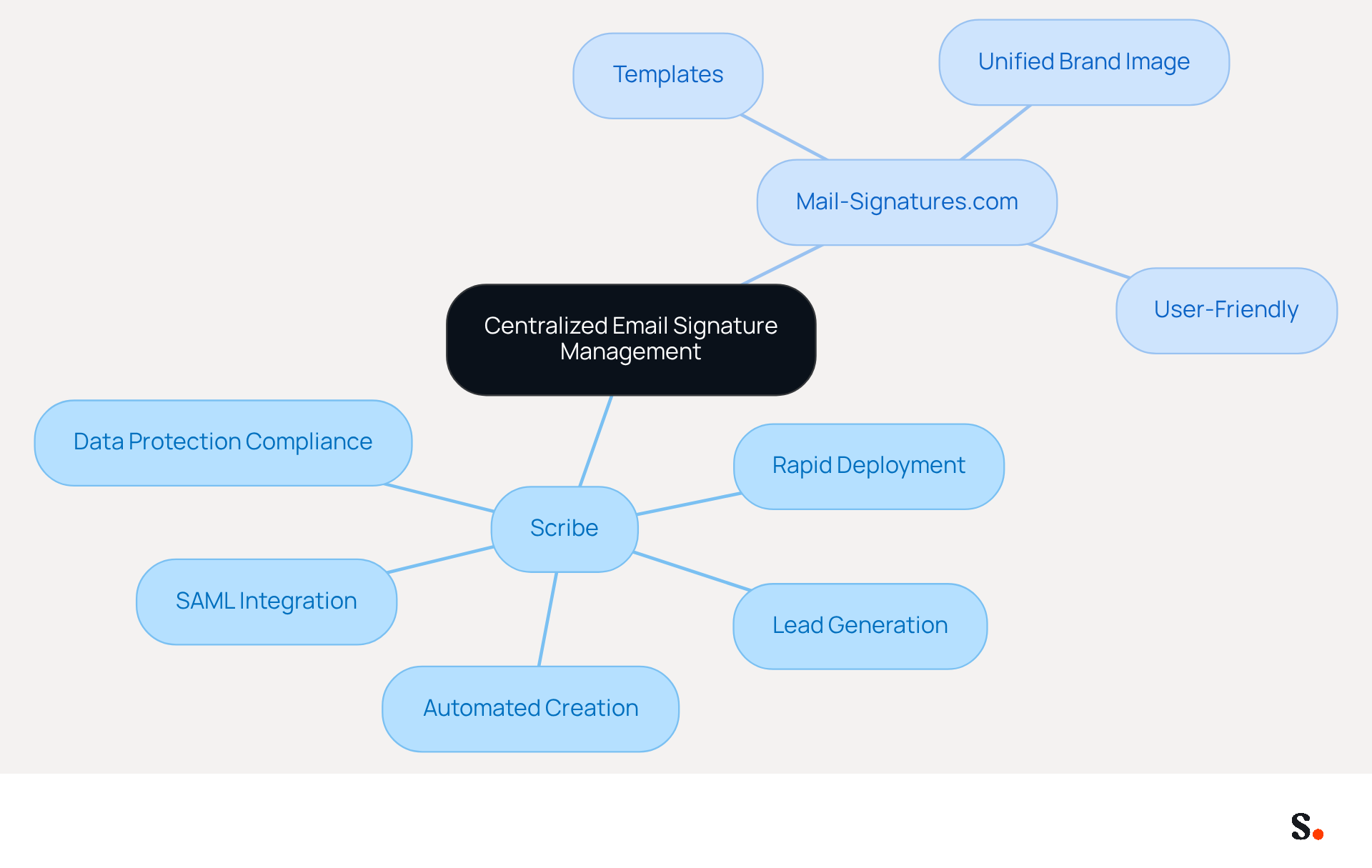
Centralized email signature management is crucial for effectively managing email signatures, which helps maintain a professional brand image and ensures consistent communication. To achieve this, consider leveraging the following tools:
- Scribe: An innovative platform that automates the creation and management of email signatures. Its automated approach can help businesses generate up to 14% more leads, making it a top choice. Additionally, Scribe provides SAML single sign-on integration, allowing for secure access through your identity provider. It is fully compliant with GDPR, CCPA, and holds SOC 2 Type II certification, ensuring that your management of digital branding adheres to the highest standards of data protection. Its rapid deployment and simplicity enable Marketing teams to manage their messaging identities independently after the initial IT setup.
- Mail-Signatures.com: A resourceful site that offers templates and tools for creating professional digital identifiers. This platform assists organizations in maintaining a unified brand image across all communications, making it especially beneficial for teams aiming to improve their communication without extensive technical expertise.
Without effective tools, centralized email signature management can result in inconsistencies and missed opportunities. However, using these tools can simplify oversight, reduce errors, and enhance your messaging strategy. With 52% of prospects favoring messages as their primary communication method, investing in these tools not only streamlines your processes but also elevates your brand's credibility in the eyes of your audience.
Troubleshoot Common Implementation Challenges
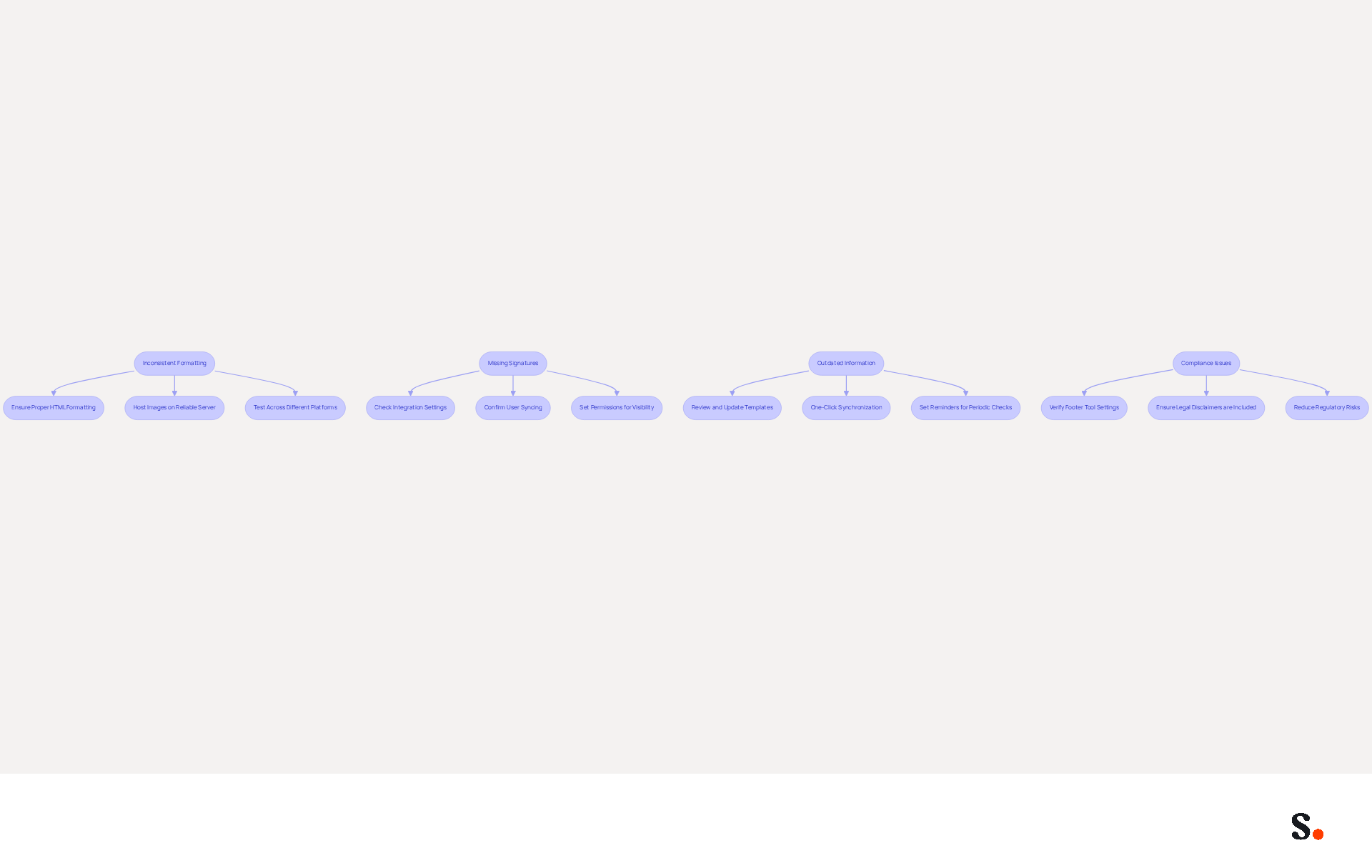
Centralized management of digital identifiers often reveals several challenges that require effective troubleshooting. Here are some tips to address them:
- Inconsistent Formatting: Inconsistent formatting across email clients can lead to confusion and a lack of professionalism. Ensure that the HTML code is properly formatted and that all images are hosted on a reliable server. Testing identifiers across different messaging platforms helps identify inconsistencies and ensures uniformity, which is crucial for maintaining a cohesive brand identity across all teams.
- Missing Signatures: If some users do not have their signatures appearing, check the integration settings with your platform. Confirm that all users are correctly synced and that permissions are suitably set to allow visibility of the signatures. This tool allows for seamless synchronization with Google Workspace, ensuring that all teammates' information is automatically refreshed and preventing unofficial versions of the email branding.
- Outdated Information: Regularly review and update template designs to maintain current information. The tool's one-click synchronization enables automatic updates from your Google Workspace, meaning any changes made-such as job position updates-will be reflected in real-time. Setting reminders for periodic checks can help prevent outdated contact details or promotional messages from being sent. As noted by Sophie Grant, outdated endorsements misrepresent the organization and pose compliance risks if legal disclaimers are missing or incorrect.
- Compliance Issues: If legal disclaimers are not being applied correctly, verify that the settings in your communication footer tool are configured to include these elements in all outgoing messages. Scribe ensures compliance with legal obligations, including SOC 2 Type II certification and adherence to GDPR and CCPA, reducing regulatory risks. Research shows that 73% of US organizations faced a communication-related security incident in the past year, highlighting the significance of proper oversight in digital identifiers.
By anticipating these challenges and preparing solutions in advance, organizations can facilitate a smoother implementation process and enhance the effectiveness of their centralized communication management. Addressing these challenges not only streamlines communication but also reinforces the organization's professional image.
Conclusion
Centralized email signature management is essential for organizations seeking to maintain brand consistency and enhance communication effectiveness. By implementing this approach, companies can ensure that every email sent reflects a unified identity, complete with legal disclaimers and promotional messages, ultimately transforming each interaction into a strategic opportunity.
The article outlines six essential steps for successful implementation:
- Selecting the right tool
- Creating on-brand templates
- Setting permissions
- Integrating with email platforms
- Testing the implementation
- Launching while monitoring performance
Each step is designed to streamline the process, reduce errors, and maintain compliance, with Scribe standing out as a robust solution that empowers marketing teams to manage email signatures independently after initial IT setup.
Given the critical role of digital communication, investing in centralized email signature management is essential for organizations today. Organizations can leverage tools like Scribe to ensure brand integrity, enhance engagement, and ultimately drive measurable marketing ROI. By adopting these strategies, businesses can position themselves for success, ensuring that every email serves as a testament to their professionalism and marketing acumen.
Frequently Asked Questions
What is centralized email signature management?
Centralized email signature management is a system that ensures all employees maintain consistent branding, legal disclaimers, and promotional messages in their email communications.
Why is brand consistency important in email signatures?
Brand consistency is important because uniform email signatures reflect the same branding elements, such as logos, colors, and fonts, which can lead to a 22% increase in response rates.
How does centralized email signature management streamline updates?
It allows modifications to be executed in one location, automatically applying changes to all users, which reduces the risk of inconsistencies and saves IT teams an average of two hours per employee per year.
How does centralized email signature management improve compliance?
It ensures that legal disclaimers and compliance information are uniformly applied, significantly reducing the risk of non-compliance, especially in regulated industries.
What marketing opportunities does centralized email signature management provide?
It enables the integration of promotional campaigns directly into email footers, turning every message into a potential marketing tool, with companies observing engagement rates increase by 40%.
What are the overall benefits of implementing a centralized communication system?
A centralized communication system strengthens brand integrity and transforms every interaction into a strategic opportunity for the organization.
List of Sources
- Understand Centralized Email Signature Management
- The impact of email signatures on your branding (https://signitic.com/en/resources/the-impact-of-email-signatures-on-your-branding)
- Why Email Signature Management Matters for Your Business (https://vectorchoice.com/blog/why-email-signature-management-is-more-important-than-you-think)
- Master Company-Wide Email Signature Management for Brand Consistency (https://scribe-mail.com/en-US/blog/master-company-wide-email-signature-management-for-brand-consistency)
- Company-Wide Email Signature Management | CloudM (https://cloudm.io/blog/optimize-your-process-with-company-wide-email-signature-management)
- Research Recap: Branded Email Signatures Increase Company Recognition, Trust - Demand Gen Report (https://demandgenreport.com/industry-news/research-recap-branded-email-signatures-increase-company-recognition-trust/47252)
- Follow These 6 Steps for Implementation
- Email Signature Trends 2026: Centralized Control & Automation | SIGNandGO posted on the topic | LinkedIn (https://linkedin.com/posts/signngo_email-signature-trends-to-watch-in-2026-activity-7401523471786217473-zAVL)
- Best Practices for Google Workspace Signature Management in Marketing (https://scribe-mail.com/en-US/blog/best-practices-for-google-workspace-signature-management-in-marketing)
- Email Signature Standardization & Centralization Guide - Signitic (https://signitic.com/en/resources/email-signature-checklist)
- Create Organization-wide Email Signatures and Disclaimers - Microsoft 365 admin (https://learn.microsoft.com/en-us/microsoft-365/admin/setup/create-signatures-and-disclaimers?view=o365-worldwide)
- The True Cost of Manual Email Signature Management (2026) (https://exclaimer.com/email-signature-handbook/manual-email-signature-management-costs)
- Leverage Tools for Effective Management
- Top 10 Email Signature Management Tools in 2026 (Compared) (https://mailbutler.io/blog/email/email-signature-management-tools)
- 40+ Email Signature Statistics for 2026 (Data + Insights) (https://wavecnct.com/blogs/email-signature-statistics)
- Best Email Signature Management Software: Top 12 Tools (2026)
- NEWOLDSTAMP (https://newoldstamp.com/blog/email-signature-software)
- Email signature management for teams & AI agents (https://scribe-mail.com/en-US)
- Troubleshoot Common Implementation Challenges
- Challenges in Managing Email Signatures Across Teams - Signite (https://signite.io/learn/problem-based-topics/challenges-in-managing-email-signatures-across-teams)
- Best Practices for Company Wide Email Signature Management (https://scribe-mail.com/en-US/blog/best-practices-for-company-wide-email-signature-management)
- Exclaimer Research: 67% of Marketers Expect Email Signatures to Support With Lead Gen In 2023 (https://businesswire.com/news/home/20230612141095/en/Exclaimer-Research-67-of-Marketers-Expect-Email-Signatures-to-Support-With-Lead-Gen-In-2023)
- Company Email Signature Management (2026) (https://hubspot.com/email-signature-generator/email-signature-management)
- Common email signature management challenges | Focus Group (https://focusgroup.co.uk/resources/blog/email-signature-management-challenges)
Get started with Scribe
Manage signatures across your whole team
Free 14-day trial — no credit card.