Master Email Banner Size Standards for Effective Marketing Campaigns
Marketers often struggle to find the right balance between visual appeal and effective communication in their email campaigns. Understanding the nuances of
Sophie Grant
Email Signature Specialist, Scribe
On this page
Introduction
Marketers often struggle to find the right balance between visual appeal and effective communication in their email campaigns. Understanding the nuances of email banner size standards is crucial for any marketing campaign aiming to capture attention and drive engagement. With the right dimensions, brands can ensure their visuals not only display correctly across devices but also enhance readability and interaction rates.
In this article, we’ll explore best practices for mastering email banner sizes, offering insights that can transform marketing strategies and elevate campaign performance. Mastering email banner sizes is essential for enhancing engagement and driving conversions in today's competitive digital landscape.
Understand the Importance of Email Banner Size Standards
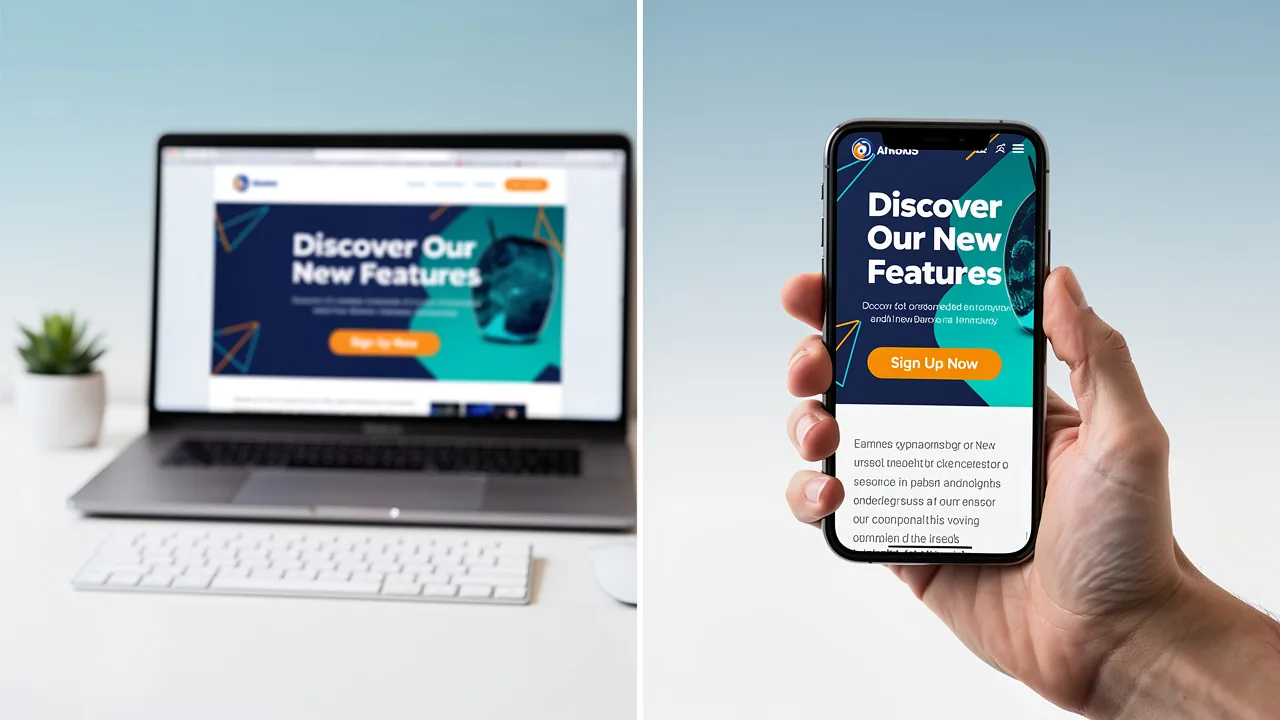
The size and design of visual graphics are critical factors in the effectiveness of marketing communications. Properly sized visuals ensure that your emails display correctly across various devices, enhancing readability and engagement. For instance, if visuals are too large, they can cause horizontal scrolling on mobile devices, which frustrates users and may lead to disengagement. Conversely, small visuals can lead to miscommunication, leaving the audience confused about the message.
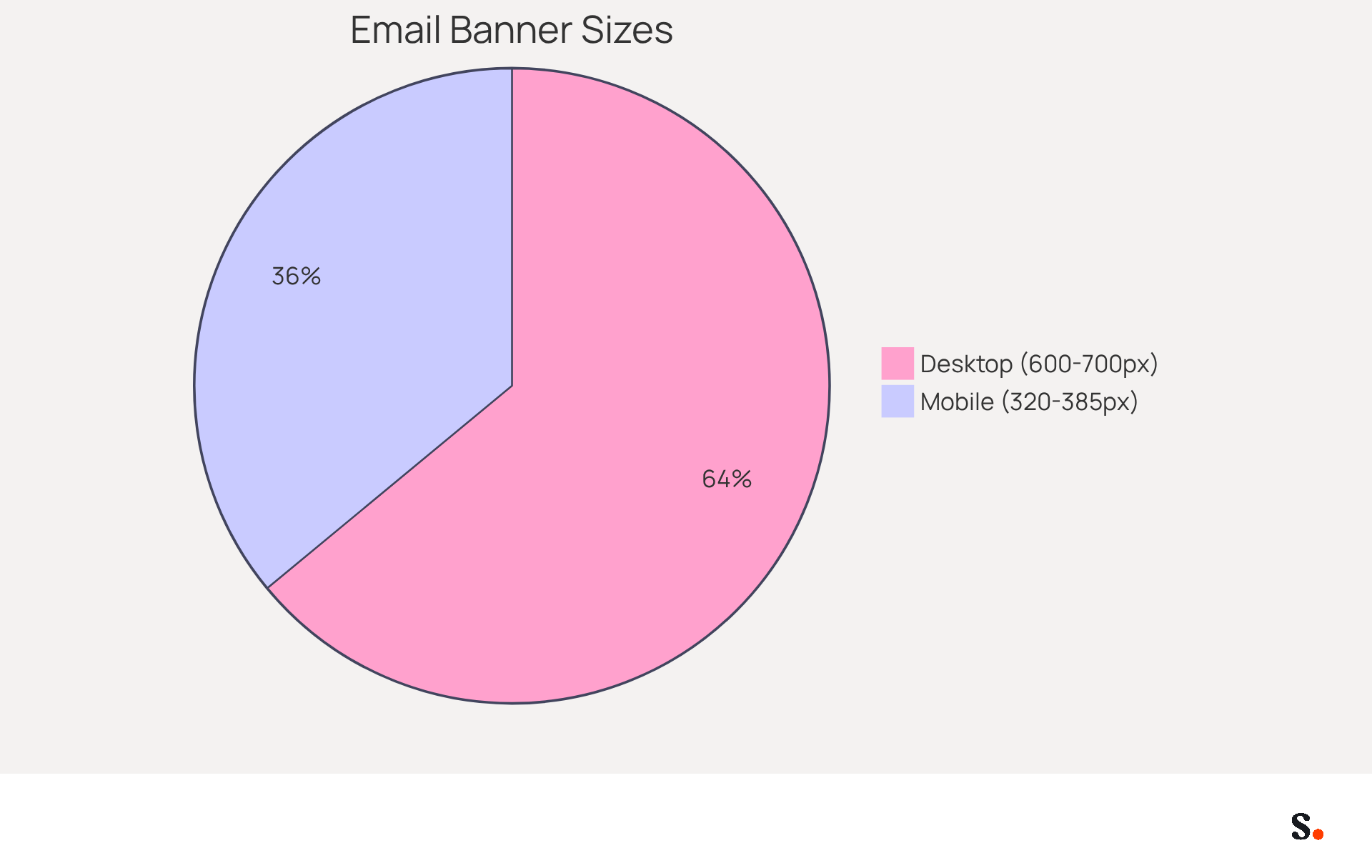
Adhering to the email banner size standard, which recommends:
- 600-700 pixels wide for desktop
- 320-385 pixels for mobile
can greatly enhance the visual appeal of your messages, resulting in increased open and click-through rates. Studies indicate that well-designed digital headers can yield engagement rates between 5-10%, compared to an average click-through rate of only 1.4% for typical messages. This attention to size can significantly enhance engagement metrics, resulting in improved campaign performance.
Implement Recommended Dimensions for Different Email Banner Types
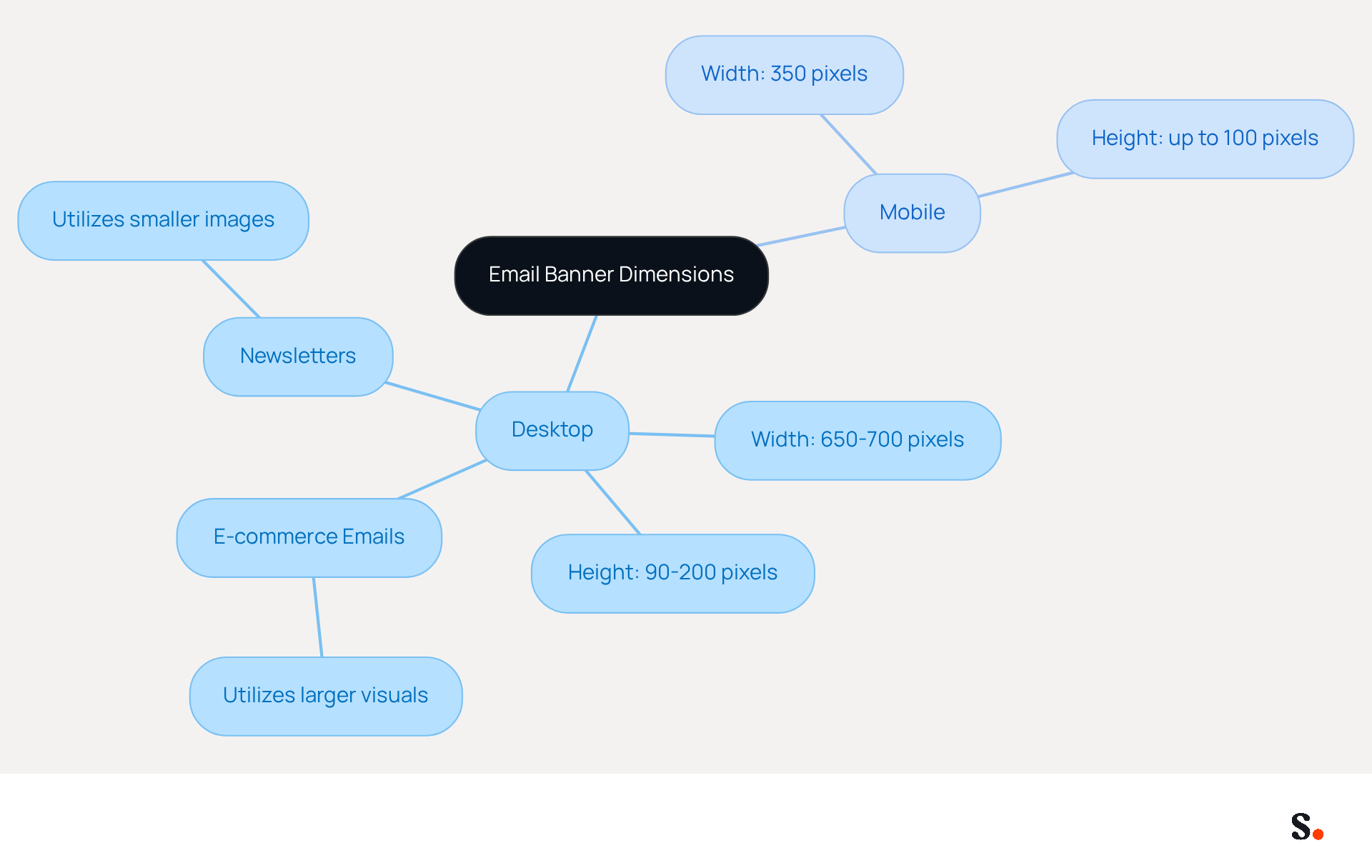
To maximize the impact of your promotional graphics, it is essential to adhere to the email banner size standard. According to the email banner size standard, the ideal width for desktop users ranges from 650 to 700 pixels, with a height of 90 to 200 pixels. For mobile devices, the email banner size standard should aim for a width of 350 pixels and a height of up to 100 pixels. These dimensions adhere to the email banner size standard, ensuring your visuals are visually appealing and function effectively on various messaging platforms.
E-commerce emails, for example, benefit from larger visuals that can effectively showcase products, while newsletters may utilize smaller images to maintain a clean layout in accordance with the email banner size standard. According to research by Milda Bernatavičiūtė, graphics sized between 650 and 700 pixels wide can significantly enhance click-through performance, achieving engagement levels between 5% and 10%. Furthermore, case studies emphasize the significance of the email banner size standard; poorly sized displays can distort messages and confuse users, leading to lost sales.
Consistently applying these dimensions in accordance with the email banner size standard can lead to improved deliverability and engagement rates, as users are more likely to interact with well-structured content. Additionally, it is essential to maintain the file size of digital graphics at 40 KB or less to guarantee fast loading times. By adhering to these recommendations, you can create promotional graphics that not only attract attention but also foster significant interaction. Ultimately, well-sized graphics can transform user engagement and drive conversions.
Adopt Design Best Practices for Engaging Email Banners
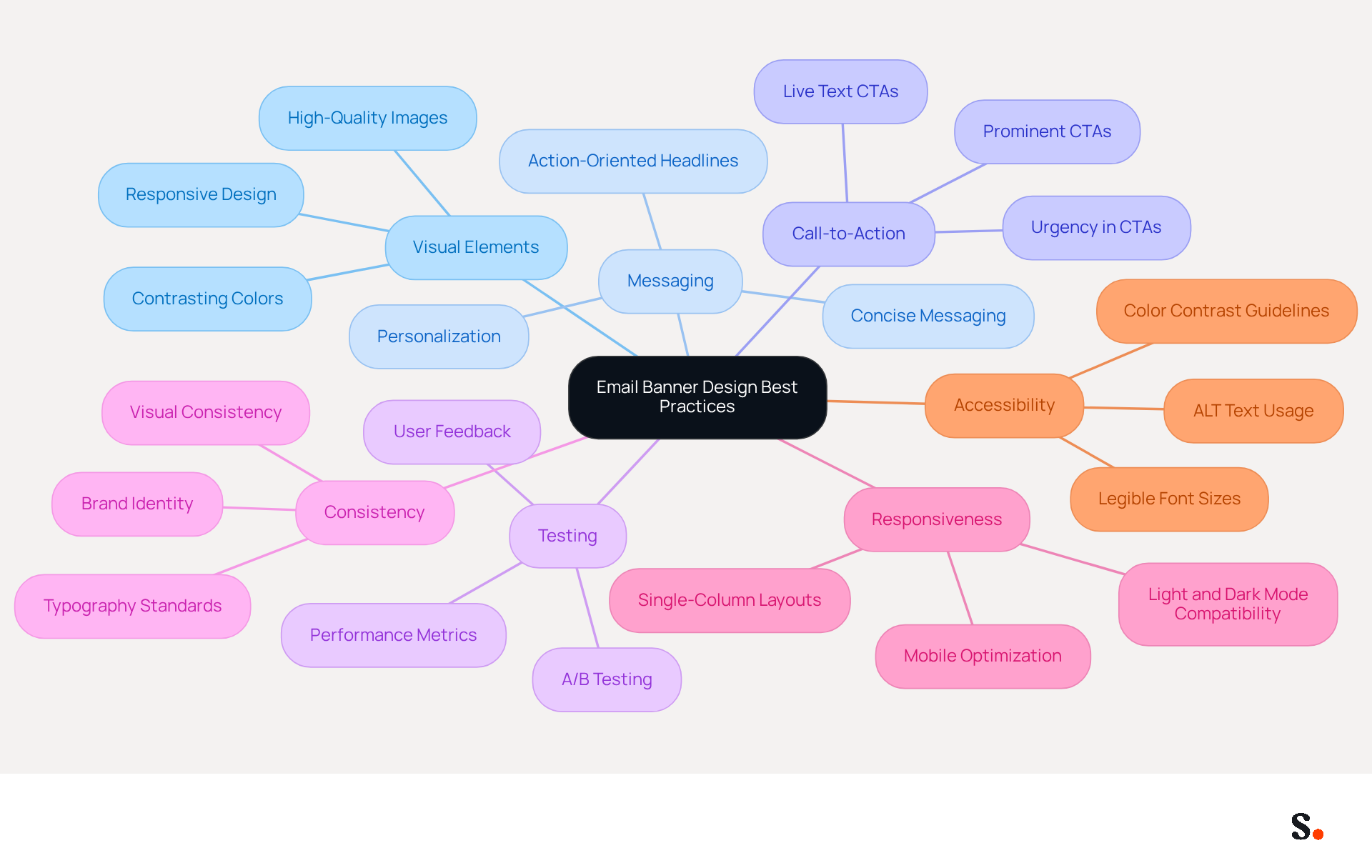
Designing effective email graphics can be challenging without a clear strategy. Start with high-quality images and graphics that align with your brand message. Ensure your displays feature concise messaging - aim for a clear, action-oriented headline that communicates the value proposition quickly. Utilizing contrasting colors enhances readability, making your text stand out against the background. A clear call-to-action (CTA) is essential; for instance, a prominent 'Shop Now' button can significantly boost click-through rates. Customized CTAs can increase conversion rates by as much as 202%, while research indicates that well-crafted graphics can double conversion rates for over 64% of marketers. A/B testing different designs is crucial, providing insights into what users prefer and how they engage; brands utilizing A/B testing can observe a 12% enhancement in performance metrics.
Furthermore, maintaining a consistent visual identity across communication campaigns fosters trust and recognition among recipients, enhancing overall effectiveness. As mobile devices represent over 50% of message openings, ensuring that banners are responsive and optimized for both light and dark modes is essential for user experience. It's also vital to think about accessibility in digital design, as over 1.3 billion people experience some level of visual impairment. By concentrating on these optimal strategies, businesses can significantly enhance their outreach effectiveness.
Integrate Email Banners into Your Overall Marketing Strategy
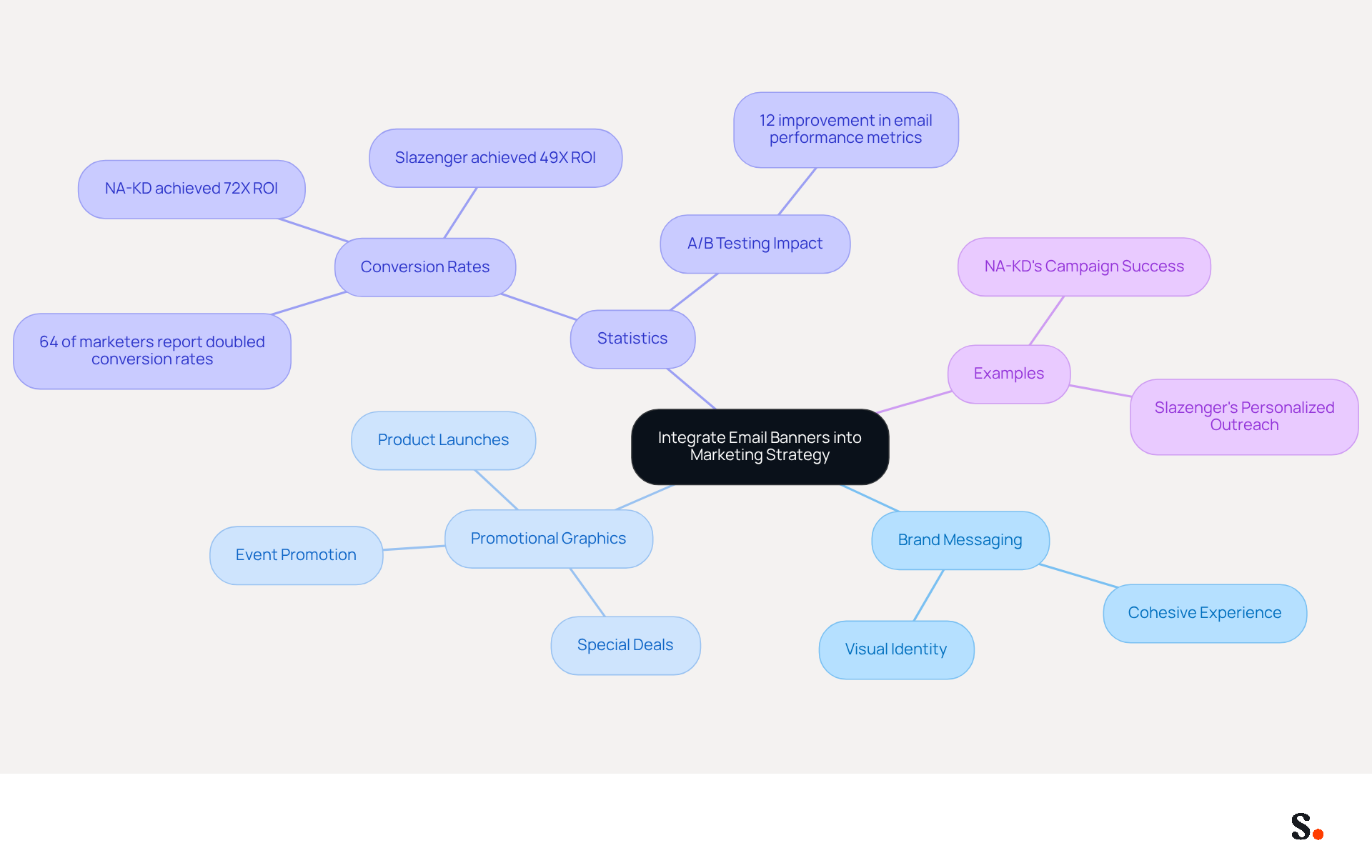
To maximize the impact of promotional graphics, they must be seamlessly integrated into your marketing strategy. This integration ensures that your advertisements align with your brand's messaging and visual identity across all platforms. For example, if a promotional campaign is active on social media, your visual advertisements should reflect the same theme and messaging, creating a cohesive experience for your audience. Promotional graphics can effectively showcase upcoming events, new product launches, and special deals. This approach drives traffic to your website and enhances conversions.
Statistics show that effective promotional graphics can significantly boost user engagement and conversion rates. Recent findings indicate that over 64% of marketers report doubled conversion rates after implementing appealing designs. Monitoring the performance of your promotional graphics through analytics provides valuable insights into their effectiveness, enabling ongoing improvement of your strategy. When you treat digital visuals as a key part of your promotional strategy, you enhance brand visibility and build stronger connections with your audience.
Examples demonstrate the effectiveness of incorporating digital advertisements into promotional strategies. For instance, NA-KD achieved a remarkable 72X ROI through personalized omnichannel campaigns, showcasing the power of tailored messaging. Similarly, Slazenger's use of customer information for personalized outreach resulted in a 49X ROI in just eight weeks, highlighting the effectiveness of strategic banner integration. As Chris Baldwin, VP of Promotion, emphasizes, "To enhance communication campaigns, focus on personalization, segmentation, and engaging content tailored to your audience’s preferences." By leveraging these insights and concentrating on personalization, segmentation, and engaging content, brands can significantly enhance their email marketing efforts in 2026. Ultimately, the strategic use of promotional graphics can redefine how brands connect with their audience.
Conclusion
Understanding the standards for email banner sizes is crucial for maximizing marketing effectiveness. Properly sized banners enhance email visuals and significantly boost engagement rates. By adhering to recommended dimensions - 600-700 pixels wide for desktop and 320-385 pixels for mobile - marketers can ensure their messages are displayed correctly across devices, leading to better readability and user interaction.
This article highlighted the critical role of adhering to email banner size standards. The recommended dimensions for various types of emails, such as promotional graphics and newsletters, were emphasized, showcasing how well-sized visuals can drive engagement and conversions. Additionally, best practices for designing engaging email banners were discussed, including the use of high-quality images, clear messaging, and effective calls-to-action. Bringing these elements together in your marketing strategy can really boost how your brand connects with its audience.
Ultimately, the significance of email banner size standards cannot be overstated. As marketing professionals strive for 100% brand consistency and measurable ROI, adhering to these guidelines will not only improve campaign performance but also foster stronger relationships with audiences. By following these guidelines, marketers can expect improved campaign performance and stronger audience connections.
Frequently Asked Questions
Why is the size of email banners important?
The size of email banners is important because it affects how visuals display across various devices, enhancing readability and engagement. Properly sized visuals prevent issues like horizontal scrolling on mobile devices, which can frustrate users and lead to disengagement.
What are the recommended email banner sizes for different devices?
The recommended email banner sizes are 600-700 pixels wide for desktop and 320-385 pixels for mobile.
How does adhering to email banner size standards impact engagement rates?
Adhering to email banner size standards can significantly enhance the visual appeal of messages, resulting in increased open and click-through rates. Well-designed digital headers can yield engagement rates between 5-10%, compared to an average click-through rate of only 1.4% for typical messages.
What can happen if email visuals are too large or too small?
If email visuals are too large, they can cause horizontal scrolling on mobile devices, frustrating users. If they are too small, it can lead to miscommunication, leaving the audience confused about the message.
List of Sources
- Understand the Importance of Email Banner Size Standards
- Do banner images in emails improve click rates? (https://commonslibrary.org/do-banner-images-in-emails-improve-click-rates)
- What’s the Ideal Email Banner Size? [+Design Tips & Examples] | Unlayer (https://unlayer.com/blog/email-banner-size)
- Optimal Email Banner Size & Design Tips (https://beefree.io/hub/html-email-creation/email-banner-size)
- Email Banner Size: Recommended Dimensions for 2026 (https://beanstalkconsulting.co/blogs/email-banner-size-guide)
- Email Banner Dimensions: Compare Industry Standards and Impact (https://scribe-mail.com/en-US/blog/email-banner-dimensions-compare-industry-standards-and-impact)
- Implement Recommended Dimensions for Different Email Banner Types
- Optimal Email Banner Size & Design Tips (https://beefree.io/hub/html-email-creation/email-banner-size)
- Email Banner Size: Updated Dimensions For 2026 (https://omnisend.com/blog/email-banner-size)
- Email Design Size Guide 2026: Complete Specifications (https://digitalapplied.com/blog/email-design-size-guide-2026-templates)
- Ideal Email Banner Size with the Best Examples & Tips for 2026 (https://designmodo.com/email-banner-size)
- Email Banner Dimensions: Compare Industry Standards and Impact (https://scribe-mail.com/en-US/blog/email-banner-dimensions-compare-industry-standards-and-impact)
- Adopt Design Best Practices for Engaging Email Banners
- Email Design Best Practices for 2026 – GetResponse (https://getresponse.com/blog/email-design-best-practices)
- Email Design Trends and Best Practices in 2026 | Mailjet (https://mailjet.com/blog/email-best-practices/email-design-trends)
- Email design best practices: The complete guide (2026) — Stripo.email (https://stripo.email/blog/email-design-best-practices)
- 4 Best Practices for Creating Effective Email Banners (https://scribe-mail.com/en-US/blog/4-best-practices-for-creating-effective-email-banners)
- 15 Top Email Design Best Practices & Tips for 2026 - Klaviyo (https://klaviyo.com/blog/email-design-tips)
- Integrate Email Banners into Your Overall Marketing Strategy
- 4 Best Practices for Creating Effective Email Banners (https://scribe-mail.com/en-US/blog/4-best-practices-for-creating-effective-email-banners)
- Email marketing best practices in 2024 | Insider (https://insiderone.com/email-marketing-best-practices)
- On Top of It: How Email Banners Can Elevate Your Marketing (https://pathfind.media/blog/email-banners-elevate-marketing)
- Email marketing in 2026, what businesses need to know (https://redcmarketing.com/article/email-marketing-in-2026-what-businesses-need-to-know)
- 5 Ways to Effectively Use Email Banner Communications (https://salesandmarketing.com/5-ways-effectively-use-email-banner-communications)
Get started with Scribe
Build a professional email signature
Free 14-day trial — no credit card.