Master Email Signature Outlook Dimensions for Brand Consistency
While often overlooked, email signatures are critical to effective communication and brand representation in every email sent. Mastering the ideal dimensions
Sophie Grant
Email Signature Specialist, Scribe
Introduction
While often overlooked, email signatures are critical to effective communication and brand representation in every email sent. Mastering the ideal dimensions for email signatures in Outlook is not merely about aesthetics; it plays a crucial role in maintaining brand consistency and professionalism. Organizations often struggle to maintain a consistent brand image across different devices and formats. This article explores best practices for optimizing email signature dimensions, maintaining brand integrity, and utilizing automation tools like Scribe to improve management and engagement. Without proper optimization, organizations risk undermining their brand's professionalism and coherence in digital communications.
Understand Ideal Email Signature Dimensions
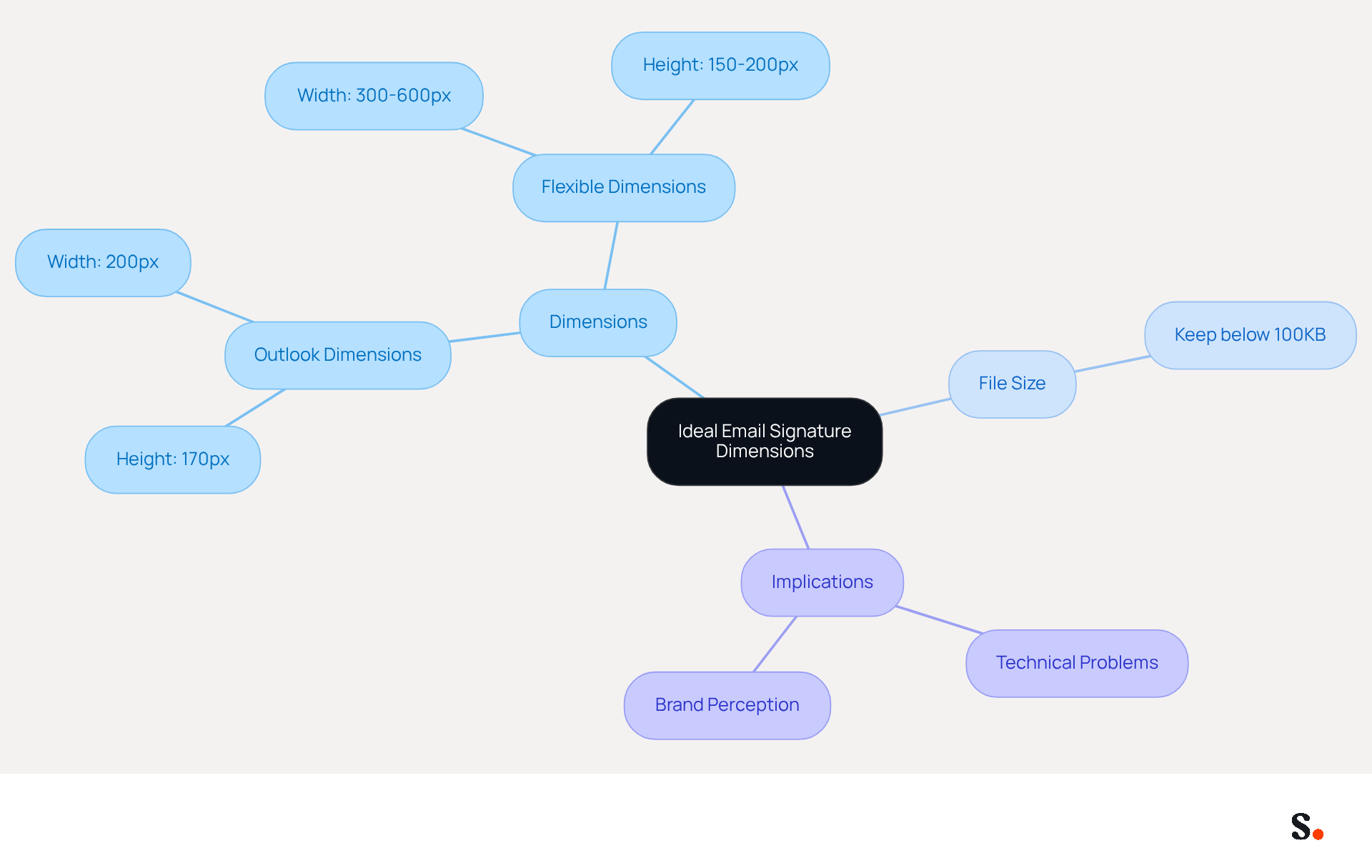
Effective email signatures hinge on adhering to specific dimensions that enhance both functionality and professionalism. The ideal email signature outlook dimensions for Outlook are generally around 170 units in height and 200 units in width. However, a more flexible approach suggests that the email signature outlook dimensions should have a width of 300-600 pixels and a height of 150-200 pixels. Keeping the total file size for signatures below 100KB ensures quick loading times and compatibility across devices.
Adhering to these size guidelines enhances visual appeal and ensures a professional layout. Signatures exceeding 600 pixels in width can cause technical problems that undermine professionalism, leading to rendering issues, horizontal scrolling, or cropping. By following these guidelines, you can significantly improve how your brand is perceived. Regularly checking your digital identifiers helps ensure you stick to these guidelines, ultimately enhancing recipient engagement and brand integrity.
Optimize Layout for Desktop and Mobile Views
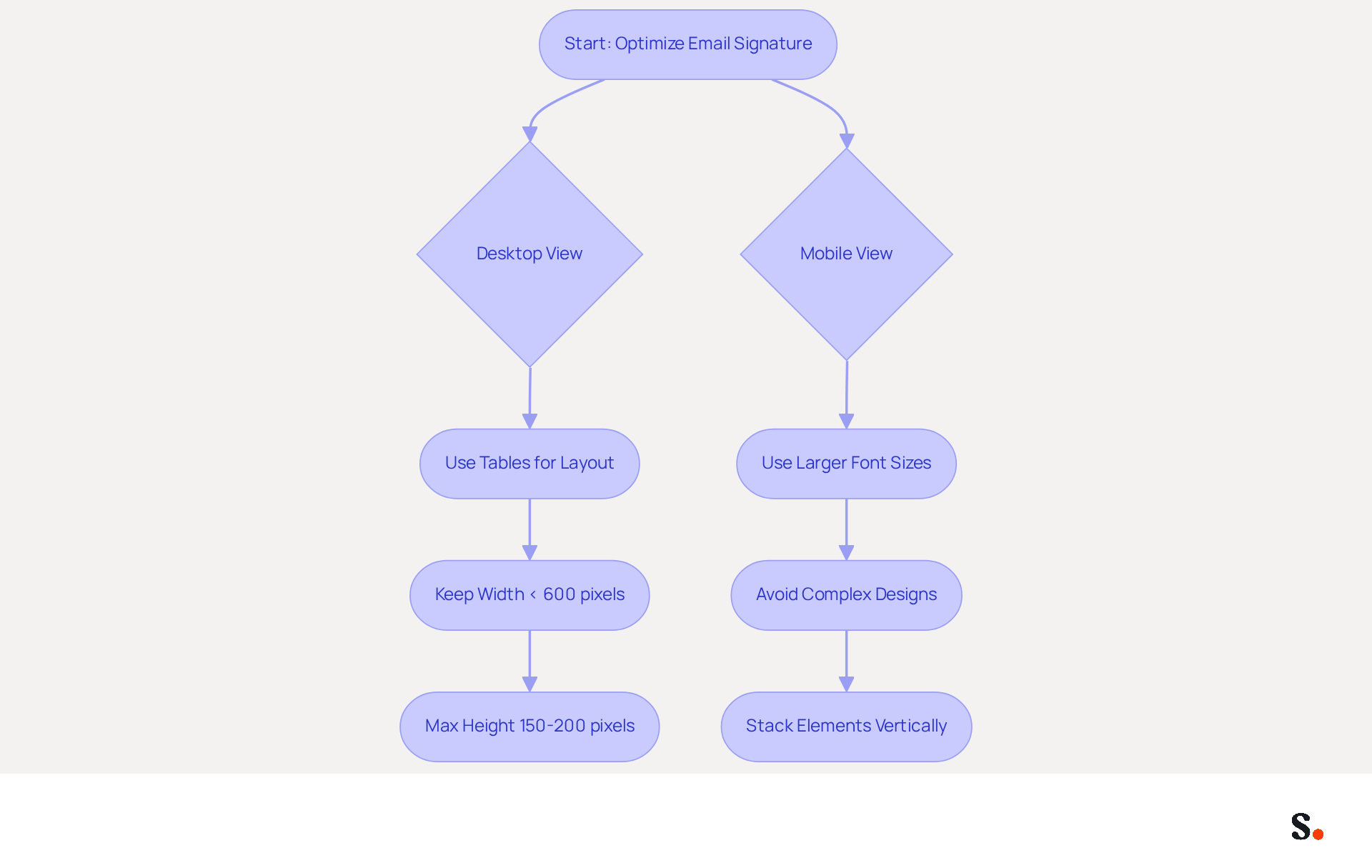
To maximize the effectiveness of your email signature outlook dimensions across devices, a responsive design approach is crucial. Using tables for layout gives you better control over how elements display in different email clients. To avoid frustrating horizontal scrolling on desktops and enhance user experience, it is important to keep the email signature outlook dimensions below 600 pixels in width, with a recommended maximum height of 150-200 pixels for optimal visibility. For mobile views, legibility is key; therefore, larger font sizes should be used, and overly complex designs should be avoided to maintain appropriate email signature outlook dimensions. A straightforward layout with clear contact information and branding elements, such as the email signature outlook dimensions, can greatly improve user experience, as evidenced by case studies. For instance, a well-optimized design that considers email signature outlook dimensions might stack elements vertically on mobile devices, ensuring that all information is easily accessible without the need for zooming or scrolling.
By syncing your Google Workspace with Scribe, you enhance how you manage your messaging identifiers. This integration saves time as it eliminates the need for manual updates; any changes in your Google Workspace, such as moving teammates from one group to another or updating their information, will be automatically reflected in Scribe. Furthermore, the auto-fill function enables rapid updates to identification details, ensuring that your sign-offs remain uniform and current, improving communication efficiency.
Case studies highlight the effectiveness of mobile optimization. Organizations that adopted responsive designs reported a 22% increase in engagement rates, illustrating the effect of well-crafted elements. Expert insights suggest that prioritizing essential components, such as clear contact details and strategic calls-to-action, can further drive meaningful interactions with recipients. As Maria Dahlqvist Canton highlights, "Modifying your electronic correspondences so they display correctly on both iOS and Android mobile devices is essential." Statistics indicate that almost 75% of message openings happen on mobile devices, underscoring the importance of email signature outlook dimensions that adapt effortlessly to various screen sizes. Furthermore, incorporating legal disclaimers in your correspondence is essential for compliance and professionalism. By concentrating on these optimal methods, marketing managers can significantly enhance their communication effectiveness and brand representation.
Ensure Brand Consistency in Email Signatures
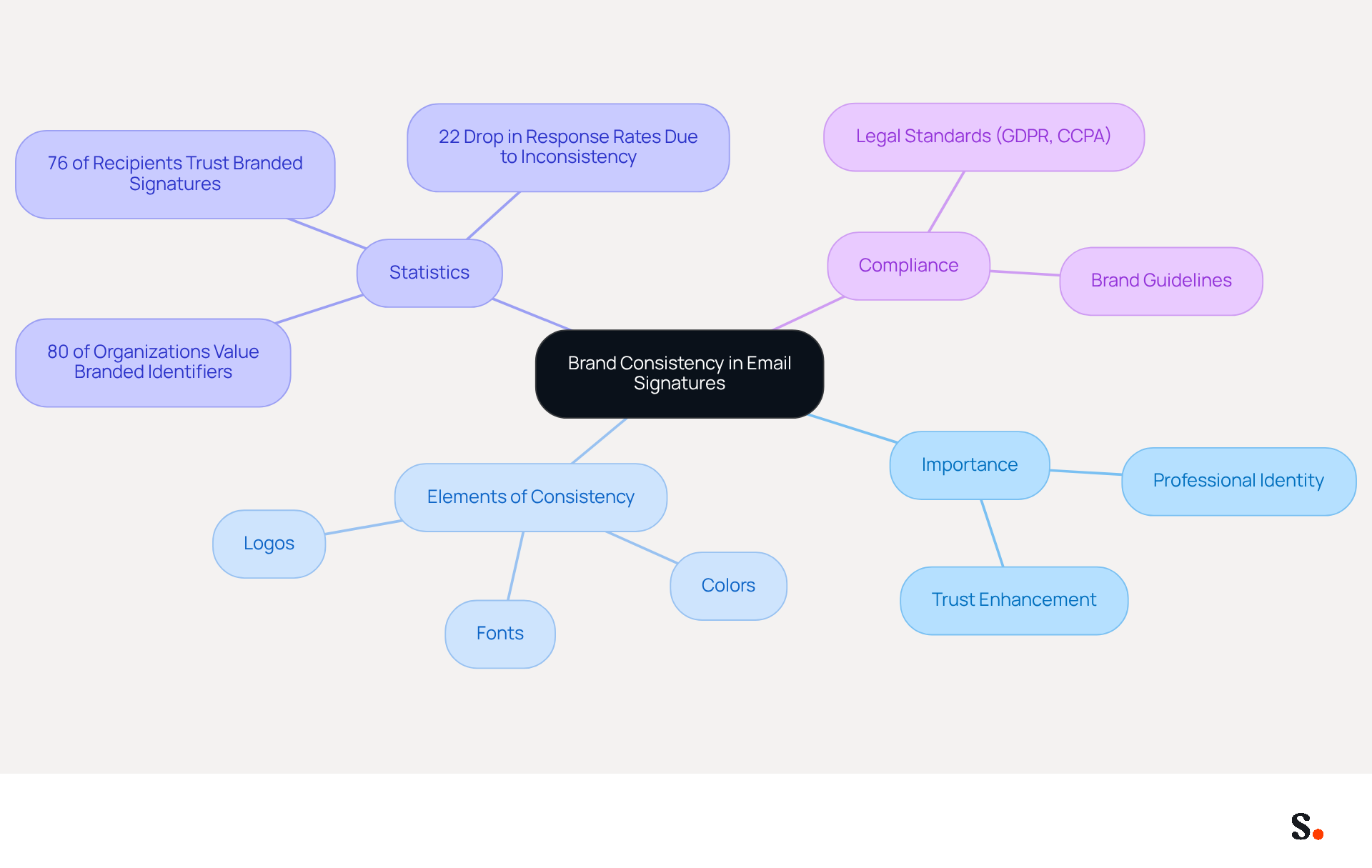
Inconsistent email formats can undermine professional identity and diminish trust among recipients. Achieving consistency in email formats is essential for reinforcing identity and enhancing professionalism. This can be accomplished by utilizing consistent logos, colors, and fonts across all email footers. For instance, if your colors are blue and white, ensure that these hues are reflected in the text and graphical elements of your signature. Prominently displaying your logo in accordance with guidelines is crucial, as it strengthens recognition and trust among recipients.
Adding a tagline or call-to-action can strengthen your messaging, turning each email into a subtle marketing opportunity. Regular evaluations of digital identifiers throughout your organization are essential for maintaining this consistency; without them, inconsistencies can lead to confusion and weaken brand identity. This consistency not only reinforces brand identity but also fosters trust among clients and partners.
With Scribe, every modification made in your Aircall setup will automatically be reflected in your digital identifiers, ensuring seamless synchronization and improved consistency. Plus, with Scribe's integration with Calendly, your contact details update automatically, making it easier to maintain consistency. Research shows that 80% of organizations view branded digital identifiers as crucial for establishing trust in professional communications. As Sophie Grant, an Email Signature Specialist, notes, "80% of organizations acknowledge branded digital identifiers as crucial for building trust, highlighting their significance in professional communications." Moreover, 76% of recipients indicate that branded digital identifiers enhance their trust in the sender, underscoring the importance of maintaining a consistent corporate image. A research analysis emphasized that a tech firm standardized its communication identifiers, leading to enhanced brand perception and engagement rates, illustrating the concrete advantages of prioritizing brand consistency. By ensuring legal compliance in digital identifiers, including adherence to SOC 2 Type II, GDPR, and CCPA, organizations can further enhance their professional image and foster stronger connections with their audience.
Leverage Automation for Efficient Signature Management
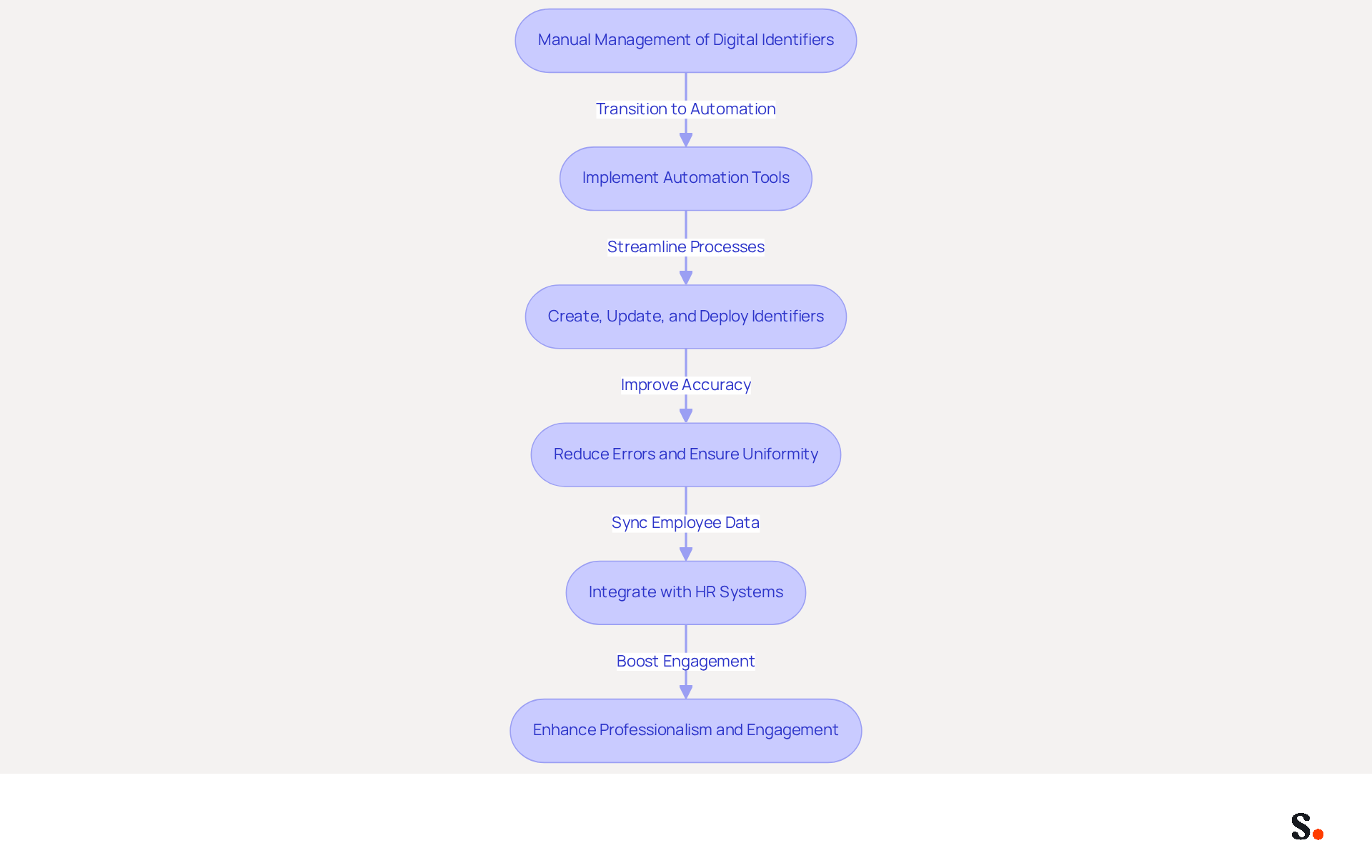
Managing digital identifiers manually can lead to inefficiencies and inconsistencies that hinder organizational effectiveness. Employing automation tools for managing digital identifiers greatly improves efficiency and uniformity. Platforms like Scribe enable organizations to create, update, and deploy email identifiers across all users with just a few clicks. By automating updates, organizations reduce the chances of errors and ensure that all endorsements are aligned with the latest branding. For instance, when a company refreshes its logo or tagline, an automated system can promptly implement these modifications to all employee email footers, preserving a unified corporate image.
Integrating with HR systems further enhances professionalism by ensuring that identifiers display current employee information. Case studies indicate that organizations utilizing automated communication identifiers, such as Nike and Headspace, have reported an 85% enhancement in consistency of identity, highlighting how consistent communication can significantly boost engagement rates due to the automatic synchronization of communication identifiers across all users. Additionally, businesses that maintained consistent communication formats experienced a 22% increase in response rates, demonstrating the effectiveness of uniformity in digital communications.
Scribe's compliance with SOC 2 Type II, GDPR, and CCPA ensures that organizations can trust their email signature management is secure and compliant with industry standards. By leveraging automation, businesses can not only maintain brand integrity but also save valuable time and resources, allowing IT teams to focus on higher-priority projects and strategic initiatives. As Dave Willis, Senior Content Manager, puts it, "Automation lets IT teams concentrate on what truly matters: enhancing security, modernizing infrastructure, and fostering business innovation.
Conclusion
While many organizations recognize the importance of brand consistency, achieving it through email signatures often presents challenges. By adhering to the ideal email signature dimensions for Outlook, businesses can ensure that their communications are not only visually appealing but also functional across various devices. This attention to detail builds trust and recognition among recipients, strengthening the brand's identity in every interaction.
Key insights from the article highlight the importance of optimizing email signatures for both desktop and mobile views, utilizing responsive design principles to enhance user experience. Consistency in branding elements, such as logos, colors, and fonts, is crucial for maintaining a professional appearance. Companies that adopt best practices in email signature design often see improved engagement rates and stronger connections with their audience. Furthermore, using automation tools like Scribe makes managing digital identifiers easier, helping ensure updates happen quickly and accurately, which cuts down on errors and inconsistencies.
In a world where first impressions matter, organizations must prioritize the creation of professional email signatures that reflect their brand identity. Ultimately, the effectiveness of email signatures in reinforcing brand identity can significantly influence client perceptions and engagement.
Frequently Asked Questions
What are the ideal dimensions for an email signature in Outlook?
The ideal email signature dimensions for Outlook are generally around 170 units in height and 200 units in width.
What is a more flexible approach to email signature dimensions?
A more flexible approach suggests that email signature dimensions should have a width of 300-600 pixels and a height of 150-200 pixels.
What is the recommended file size for email signatures?
It is recommended to keep the total file size for email signatures below 100KB to ensure quick loading times and compatibility across devices.
Why is it important to adhere to email signature size guidelines?
Adhering to size guidelines enhances visual appeal and ensures a professional layout, improving how your brand is perceived.
What issues can arise from signatures exceeding 600 pixels in width?
Signatures exceeding 600 pixels in width can cause technical problems such as rendering issues, horizontal scrolling, or cropping, which undermine professionalism.
How can regularly checking digital identifiers benefit email signatures?
Regularly checking your digital identifiers helps ensure adherence to size guidelines, ultimately enhancing recipient engagement and brand integrity.
List of Sources
- Understand Ideal Email Signature Dimensions
- Email Signature Size and Layout Tips (https://linkedin.com/pulse/email-signature-size-layout-tips-bulksignature-nuy7f)
- What Is The Best Email Signature Size? | Rocketseed (https://rocketseed.com/resources/email-design-guidelines)
- Best Dimensions for Email Signature: Optimize Your Marketing Strategy (https://scribe-mail.com/en-US/blog/best-dimensions-for-email-signature-optimize-your-marketing-strategy)
- Email Signature Size and Image Best Practices (https://maileditor.net/blog/email-signature-size-and-image-best-practices)
- Email Signature Best Practices Guide With Examples - MailerLite (https://mailerlite.com/blog/email-signature-best-practices)
- Optimize Layout for Desktop and Mobile Views
- Optimise Your Email Signature for Mobile Devices (https://globalbankingandfinance.com/why-optimising-brand-email-signatures-for-mobile-devices-is-essential-for-hybrid-working)
- 20 best email signature design examples for 2026 — Stripo.email (https://stripo.email/blog/10-best-email-signature-design-examples)
- Email signature design guide: elements, layout & tips (https://exclaimer.com/email-signature-handbook/email-signature-design)
- Best Mobile Email Signatures: Key Practices for Marketing Managers (https://scribe-mail.com/en-US/blog/best-mobile-email-signatures-key-practices-for-marketing-managers)
- 40+ Email Signature Statistics for 2026 (Data + Insights) (https://wavecnct.com/blogs/email-signature-statistics)
- Ensure Brand Consistency in Email Signatures
- Exclaimer Research: 67% of Marketers Expect Email Signatures to Support With Lead Gen In 2023 (https://businesswire.com/news/home/20230612141095/en/Exclaimer-Research-67-of-Marketers-Expect-Email-Signatures-to-Support-With-Lead-Gen-In-2023)
- Email Signature Branding: Consistency and Impact | Crossware365 (https://crossware365.com/blog/mastering-email-signature-branding-market-presence)
- The impact of email signatures on your branding (https://signitic.com/en/resources/the-impact-of-email-signatures-on-your-branding)
- Master Corporate Email Signature Management for Brand Consistency (https://scribe-mail.com/en-US/blog/master-corporate-email-signature-management-for-brand-consistency)
- Why Are Email Signatures Key to Brand Awareness? | QuickMail (https://quickmail.com/role-of-email-signatures-in-brand-awareness)
- Leverage Automation for Efficient Signature Management
- Automating Email Signatures: How IT Teams Streamline Processes & Reduce Risk (https://exclaimer.com/blog/streamlining-it-processes-automated-email-signatures)
- Maximize ROI with Effective Email Signature Services Strategies (https://scribe-mail.com/en-US/blog/maximize-roi-with-effective-email-signature-services-strategies)
- Central and automatic email signatures for Office 365 (https://codetwo.com/email-signatures/central-and-automatic)
- Maximize Marketing Impact with Automated Email Signatures Best Practices (https://scribe-mail.com/en-US/blog/maximize-marketing-impact-with-automated-email-signatures-best-practices)
- Scribe Integration (https://front.com/integrations/scribe)
Get started with Scribe
Create your signature in minutes
Free 14-day trial — no credit card.