Master How to Insert Signature in Email for Effective Marketing
Despite their potential, email signatures often go overlooked, leaving organizations to miss out on significant marketing opportunities. By mastering the art
Sophie Grant
Email Signature Specialist, Scribe
Introduction
Despite their potential, email signatures often go overlooked, leaving organizations to miss out on significant marketing opportunities. By mastering the art of crafting effective email signatures, professionals can transform routine communications into strategic marketing tools that resonate with recipients. Many professionals struggle to create email signatures that effectively represent their brand and drive engagement.
What strategies can organizations implement to optimize their email signatures for maximum marketing impact?
Understand the Importance of Email Signatures in Marketing
Email footers are often overlooked, yet they hold substantial potential as a marketing tool that can enhance brand visibility and engagement. Here’s why they are essential:
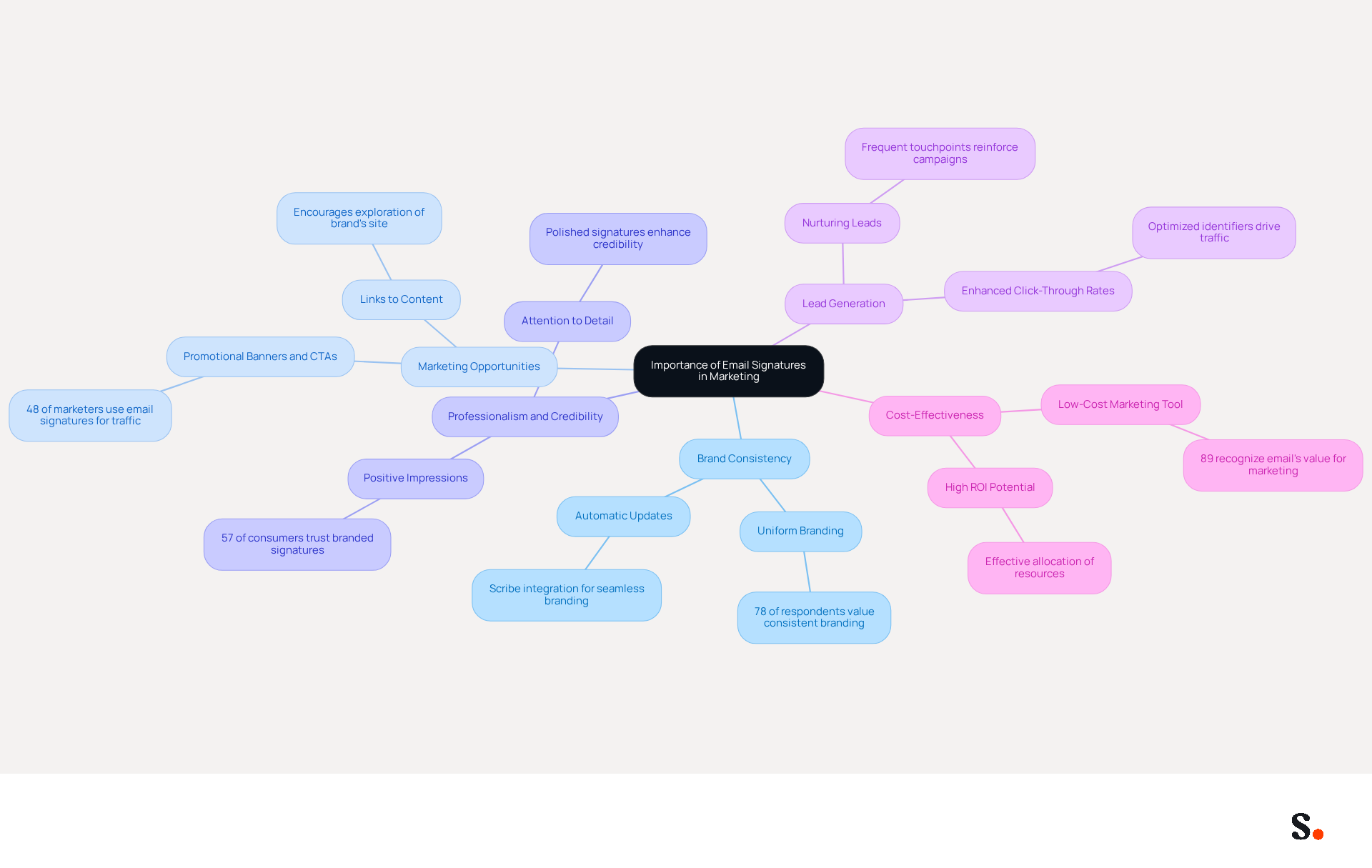
- Brand Consistency: Each message sent is an opportunity to reinforce your brand identity. A well-designed mark ensures that your branding stays consistent across all communications, which is vital as 78% of respondents rated uniform branding as one of the most significant functions of a digital footer. With Scribe, every modification made in your Aircall configuration will automatically be reflected in your branding, ensuring seamless brand consistency.
- Marketing Opportunities: Promotional banners, calls-to-action (CTAs), and links to your latest content or offers can be incorporated into your messages, effectively transforming every communication into a marketing channel. This strategic positioning can increase traffic to websites, with 48% of marketers using digital identifiers for this purpose. Email footers can drive traffic to websites by including links to a brand's site, blog, or portfolio, encouraging recipients to explore further.
- Professionalism and Credibility: A well-designed communication footer not only conveys professionalism but also establishes credibility, ensuring a positive impression on recipients. A well-crafted identifier boosts trust; in fact, 57% of consumers say that branded digital identifiers are crucial for trusting a business's message.
- Lead Generation: Optimized digital identifiers can enhance click-through rates and drive traffic to your website, contributing to lead generation efforts. Research indicates that effective electronic identifiers can greatly enhance engagement, making them an essential element of your promotional strategy.
- Cost-Effectiveness: Utilizing digital identifiers for promotion is a low-cost approach that can generate significant returns, making it an efficient allocation of resources. With 89% of participants acknowledging the importance of electronic communication for promotion and customer interaction, investing in optimizing digital footers is a wise decision for any business. Furthermore, 44.4% of users modify their contact details two to four times annually, emphasizing the significance of consistent updates to enhance engagement opportunities.
Recognizing these advantages underscores the necessity of investing time in crafting an effective digital identifier that aligns with your marketing objectives. Investing in a well-crafted digital identifier can transform your email communications into a powerful marketing asset, ultimately driving brand success.
Set Up Your Email Signature in Gmail
Many professionals overlook the impact of a well-designed email signature on their communication effectiveness. With Scribe, you can ensure that your email identifiers are automatically synchronized with your business phone system, providing brand consistency without requiring additional action from your teammates. Follow these steps to create a signature that not only represents your brand but also supports your marketing efforts:
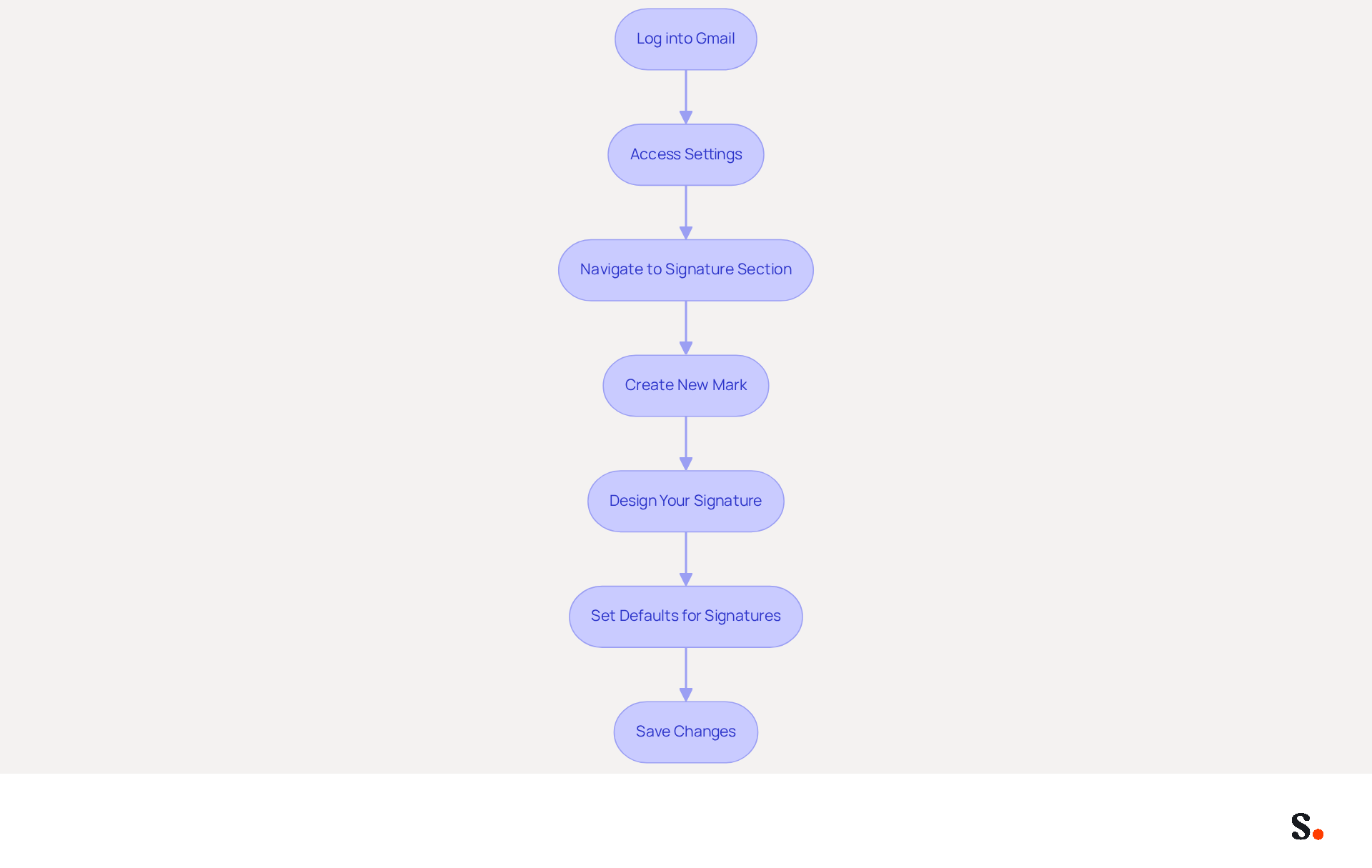
- Log into Gmail: Open your web browser and sign in to your Gmail account.
- Access Settings: Click on the gear icon in the top right corner of the Gmail interface and select 'See all settings'.
- Navigate to Signature Section: In the 'General' tab, scroll down to the 'Signature' section.
- Create New Mark: Click on 'Create new' and enter a name for your mark.
- Design Your Signature: In the text box, add your name, job title, company name, and any other relevant information. Utilize the formatting tools to customize the font, color, and layout. You can also add images or links to your social media profiles. This can significantly enhance engagement; research shows that messages featuring branded identifiers achieve a 22% higher response rate. Incorporating social media links is a common practice, with 75.8% of users adding them to their profiles.
- Set Defaults for Signatures: Select whether you want this sign-off to show for new messages, replies, or both.
- Save Changes: Scroll down and click 'Save Changes' at the bottom of the page.
By following these steps on how to insert signature in email, you will create a professional communication footer that enhances your interactions and serves as a powerful marketing tool. Regular updates to your branding are essential; 44.4% of users refresh their branding every six months or less, ensuring that their identity remains consistent and effective. This practice can result in heightened trust and involvement, as nearly 55% of employees are more inclined to open a message with a well-crafted design. Furthermore, with Scribe's automated management of digital signatures, any modifications made in your Aircall configuration will be reflected in your identifiers, ensuring real-time synchronization and compliance with SOC 2 Type II standards for data security, which protects your information and enhances user trust. Embracing this practice can significantly elevate your professional interactions and strengthen your brand's presence.
Utilize Scribe for Automated Email Signature Management
Inconsistent email signatures can undermine a company's professionalism and brand identity. This platform automates email signature management, helping businesses maintain professionalism and brand consistency. Here’s how to utilize Scribe effectively:
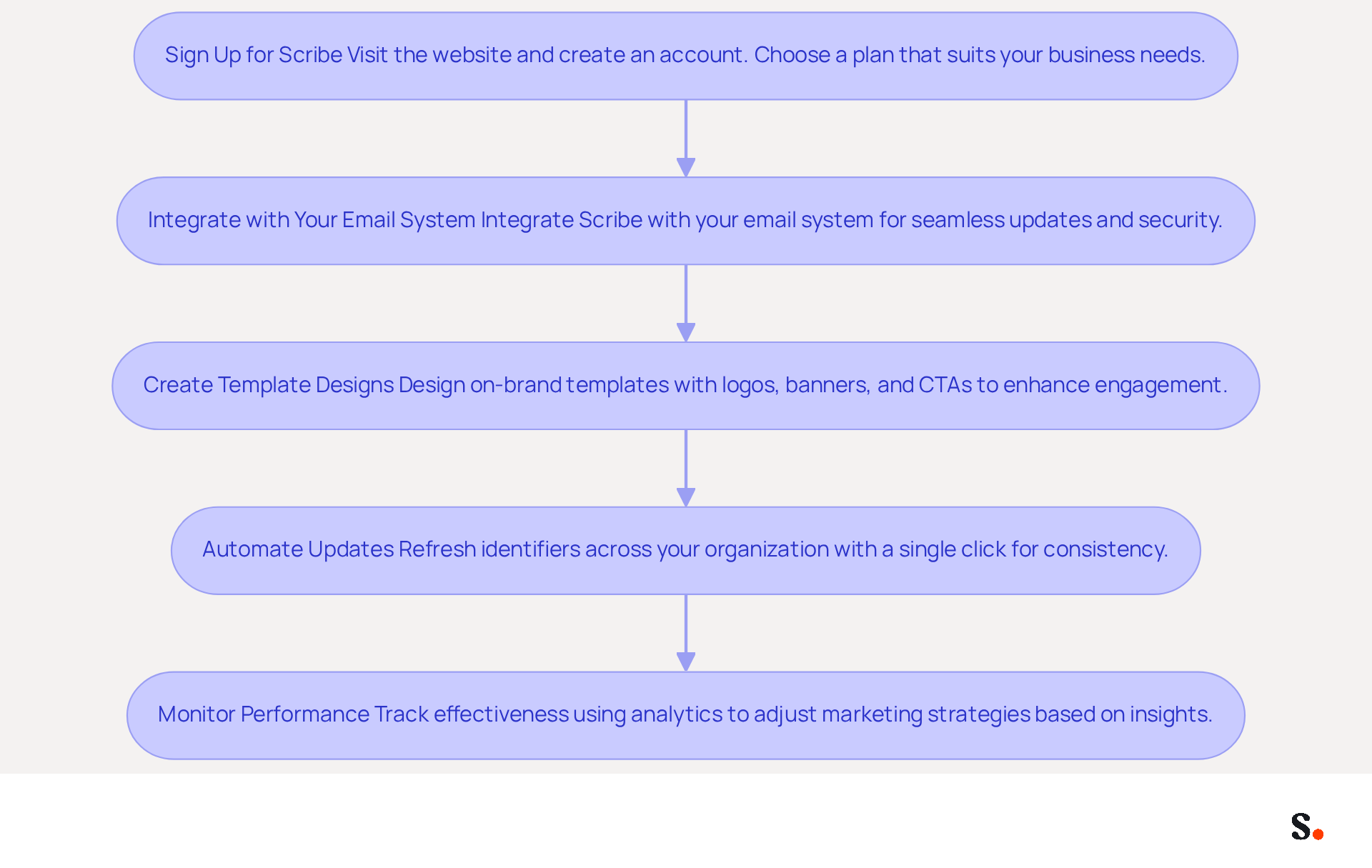
- Sign Up for Scribe: Visit the website and create an account. Choose a plan that suits your business needs.
- Integrate with Your Email System: Scribe integrates seamlessly with your email system, ensuring your identifiers are always up-to-date without requiring extra effort from your team. Additionally, the platform supports SAML single sign-on integration, improving security and convenience for your team.
- Create Template Designs: Use Scribe’s intuitive interface to design on-brand template layouts. Incorporate logos, banners, and calls to action (CTAs) to enhance engagement. Significantly, 52.6% of users incorporate CTAs in their email footers, which can significantly boost engagement with your audience. Furthermore, approximately 41% of users employ digital identifiers to enhance branding and improve brand visibility, in line with your promotional objectives.
- Automate Updates: With Scribe, you can refresh identifiers across your organization with a single click, ensuring that all employees have the latest branding and communication messages. Many businesses face challenges in maintaining consistent branding across different platforms, which can confuse customers and weaken brand identity. This feature addresses that challenge, as 78% of marketers deem consistent branding essential. Moreover, Scribe is compliant with SOC 2 Type II, guaranteeing that your information is secure while you manage digital identifiers. 70% of users with a professional closing believe that having a polished closing enhances their credibility, which is essential for your marketing efforts. Scribe's distinct positioning enables Marketing to handle digital identifiers autonomously after the initial IT configuration, further enhancing the process.
- Monitor Performance: Utilize Scribe’s analytics features to track the effectiveness of your digital identifiers. Monitoring metrics such as click-through rates and engagement rates allows you to adjust your marketing strategies based on data-driven insights. Approximately 79% of brands monitor the success of their campaigns, emphasizing the significance of performance analysis. As Yuliia Savchuk, a content writer at Stripo, observes, "A message footer plays a crucial role in upholding a brand and generating leads, so you should approach its design thoughtfully."
By implementing Scribe, businesses can learn how to insert signature in email, ensuring their email signatures reflect their brand identity and fostering trust and recognition among clients. This automated method not only improves brand visibility but also aids in lead generation, with 67% of users anticipating that digital identifiers will assist in this area. Furthermore, Scribe's adherence to GDPR guarantees that your employee data management needs are fulfilled, offering reassurance as you automate your correspondence processes.
Troubleshoot Common Email Signature Issues
Despite best efforts, issues with digital identifiers can arise, impacting communication effectiveness. Here are some common problems and how to troubleshoot them:
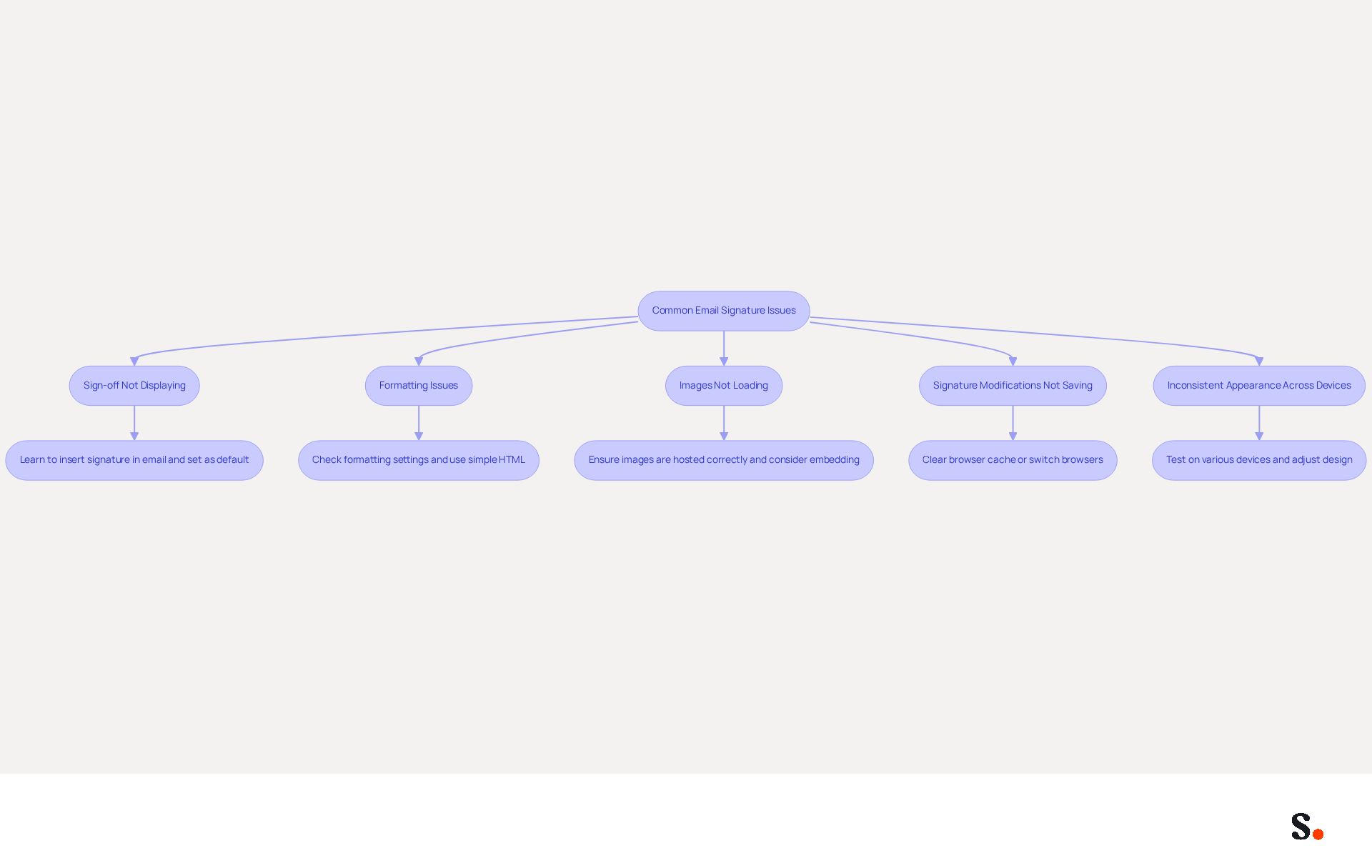
- If your sign-off isn’t displaying, you may need to learn how to insert signature in email and ensure it’s set as the default in your settings. Furthermore, 42% of consumers have a negative perception of a business when receiving a message lacking a branded identifier, highlighting the importance of maintaining a visible brand.
- Formatting Issues: If your sign-off appears different in replies or forwards, check the formatting settings. Utilize straightforward HTML for improved compatibility across messaging clients. Many users encounter disrupted formatting due to hidden issues from creating identifiers in word processors, which can interfere with layout when messages are sent.
- Images Not Loading: If images in your email footer aren’t displaying, ensure they are hosted on a reliable server and that the links are correct. Consider using embedded graphics instead of linked images to avoid visibility issues, as hotlinking can prevent images from displaying in various email clients.
- Signature Modifications Not Saving: If your changes aren’t saving, clear your browser cache or switch to a different browser. Registry settings in Windows may also block changes, so check for any relevant values that might be impacting your ability to save your marks.
- Inconsistent Appearance Across Devices: Test your mark on various devices and messaging clients to ensure it displays correctly everywhere. Adjust the design as needed to maintain consistency. A 100-employee company generates 60,000-80,000 branded impressions per month, emphasizing the need for a professional appearance across all platforms.
Addressing these issues not only enhances professionalism but also strengthens brand perception in every interaction.
Conclusion
Email signatures serve as essential marketing tools that can significantly impact brand perception and engagement. Well-crafted digital identifiers help businesses enhance brand visibility, establish professionalism, and drive engagement. With Scribe, organizations can easily manage their email signatures, ensuring that every communication reflects a consistent brand identity while maximizing marketing opportunities.
Throughout this guide, the importance of email signatures has been underscored, highlighting their role in brand consistency, lead generation, and cost-effectiveness. Steps for setting up signatures in Gmail have been detailed, along with the advantages of using Scribe for automated management. Additionally, common issues and troubleshooting tips have been provided to ensure that email signatures function optimally, reinforcing the brand's credibility and professionalism.
Many organizations overlook the strategic potential of email signatures, missing out on powerful marketing tools. Organizations are encouraged to invest in this often-overlooked aspect of communication, utilizing Scribe's capabilities to maintain brand consistency and enhance marketing effectiveness. Failing to invest in email signature management can lead to missed opportunities in engagement and brand consistency.
Frequently Asked Questions
Why are email signatures important in marketing?
Email signatures are important because they enhance brand visibility and engagement, serving as a marketing tool that reinforces brand identity and transforms communications into marketing channels.
How does brand consistency relate to email signatures?
Brand consistency in email signatures ensures that branding remains uniform across all communications, which is vital for reinforcing brand identity. A well-designed signature reflects modifications made in configurations, maintaining seamless brand consistency.
What marketing opportunities can be included in email signatures?
Email signatures can incorporate promotional banners, calls-to-action (CTAs), and links to the latest content or offers, effectively turning every email into a marketing channel that can drive traffic to websites.
How do email signatures contribute to professionalism and credibility?
A well-designed email signature conveys professionalism and establishes credibility, creating a positive impression on recipients. Branded digital identifiers are crucial for building trust in a business's message.
Can email signatures help with lead generation?
Yes, optimized email signatures can enhance click-through rates and drive traffic to websites, contributing to lead generation efforts and increasing engagement.
What is the cost-effectiveness of using email signatures for promotion?
Utilizing email signatures for promotion is a low-cost approach that can yield significant returns, making it an efficient use of resources. Many participants recognize the importance of electronic communication for promotion and customer interaction.
How often should email signatures be updated?
It is significant to consistently update email signatures, as 44.4% of users modify their contact details two to four times annually, which enhances engagement opportunities.
List of Sources
- Understand the Importance of Email Signatures in Marketing
- Why Are Email Signatures Key to Brand Awareness? | QuickMail (https://quickmail.com/role-of-email-signatures-in-brand-awareness)
- Using Email Signatures for Marketing | CloudM (https://cloudm.io/resources/blog/using-email-signatures-for-marketing-how-every-email-can-boost-your-brand)
- How email signatures can drive brand awareness and organic traffic - NEWOLDSTAMP (https://newoldstamp.com/blog/email-signature-brand-awareness)
- Why Email Signatures Must Be In Your 2026 Marketing Plan | Rocketseed (https://rocketseed.com/blog/2026-marketing-plan-email-signatures)
- Set Up Your Email Signature in Gmail
- Email Signature Statistics: A Closer Look at Email Signatures in 2026 (https://mysignature.io/blog/email-signature-statistics)
- How to create custom Gmail signature (https://foxnews.com/tech/how-to-create-custom-gmail-signature)
- Email signature statistics and trends in 2024 (https://wisestamp.com/blog/email-signature-statistics)
- How To Add A Signature In Gmail (2026) (https://hubspot.com/email-signature-generator/add-signature-gmail)
- Email signature statistics: Why every business should optimize their email signatures — Stripo.email (https://stripo.email/blog/email-signature-statistics-why-every-business-should-optimize-their-email-signatures)
- Utilize Scribe for Automated Email Signature Management
- Email signature statistics and trends in 2024 (https://wisestamp.com/blog/email-signature-statistics)
- 40+ Email Signature Statistics for 2026 (Data + Insights) (https://wavecnct.com/blogs/email-signature-statistics)
- Email signature statistics: Why every business should optimize their email signatures — Stripo.email (https://stripo.email/blog/email-signature-statistics-why-every-business-should-optimize-their-email-signatures)
- Scribe Integration (https://front.com/integrations/scribe)
- Troubleshoot Common Email Signature Issues
- How to solve problems with email signatures in Microsoft 365? (https://mail-signatures.com/articles/problems-email-signatures-office-365)
- 40+ Email Signature Statistics for 2026 (Data + Insights) (https://wavecnct.com/blogs/email-signature-statistics)
- Troubleshooting Email Signature Issues in Outlook (https://justanswer.com/email/lyeqn-email-signatures-no-longer-loading-automatically.html)
- Email Signature Troubleshooting - Problems & Solutions - Gimmio (https://blog.gimm.io/email-signature-troubleshooting)
- Unable to send or receive emails – possible issue with new signature - Microsoft Q&A (https://learn.microsoft.com/en-us/answers/questions/5491301/unable-to-send-or-receive-emails-possible-issue-wi)
Get started with Scribe
Manage signatures across your whole team
Free 14-day trial — no credit card.