Compare Email Signature Management Solutions for Your Marketing Needs
In a market flooded with email signature management solutions, organizations face the daunting task of selecting the right tool to enhance branding and
Sophie Grant
Email Signature Specialist, Scribe

On this page
- Introduction
- Key Evaluation Criteria for Email Signature Management Solutions
- Feature Comparison of Leading Email Signature Management Tools
- Pros and Cons of Each Email Signature Management Solution
- Scribe
- CodeTwo
- Exclaimer
- WiseStamp
- Suitability of Solutions for Different Business Types and Sizes
- Conclusion
- Frequently Asked Questions
- List of Sources
Introduction
In a market flooded with email signature management solutions, organizations face the daunting task of selecting the right tool to enhance branding and operational efficiency. With numerous choices, organizations often struggle to identify the most suitable email signature management solution, raising the question of how to maximize marketing ROI. This article will explore the comparative landscape of email signature management tools, focusing on essential evaluation criteria and the strengths and weaknesses of leading solutions to assist organizations in their selection process.
Key Evaluation Criteria for Email Signature Management Solutions
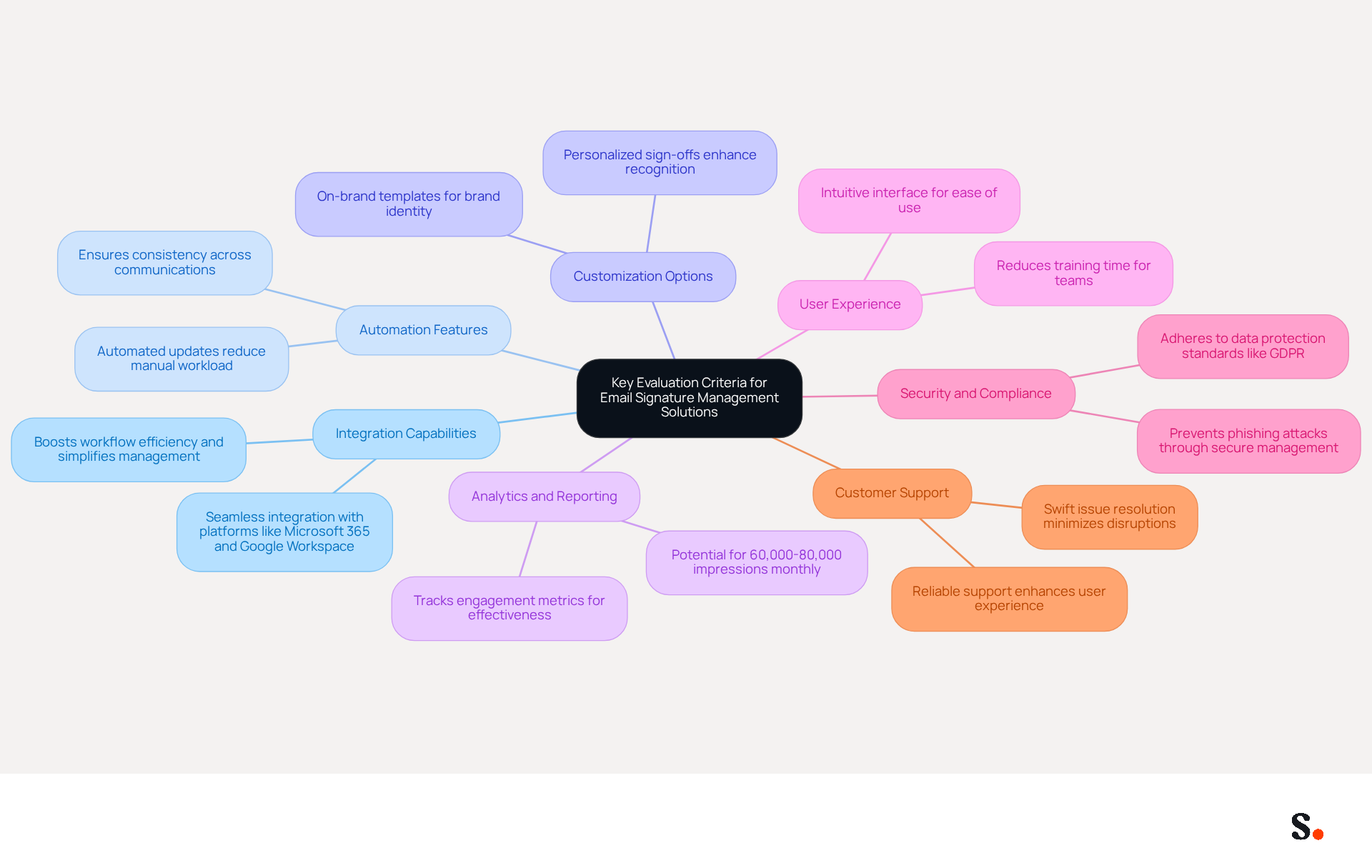
When selecting an email signature management solution, organizations must prioritize several critical criteria to ensure effective branding and operational efficiency:
- Integration Capabilities: Seamless integration with existing communication platforms, such as Microsoft 365 and Google Workspace, is essential for smooth operations. A well-integrated solution boosts workflow efficiency and simplifies updates and management for multiple users.
- Automation Features: Solutions that provide automated updates and management lessen manual workload and ensure consistency across all electronic communications. Managing email signatures manually can lead to inconsistencies and increased workload for IT departments. Automation can save IT departments valuable time, allowing them to focus on more strategic initiatives.
- Customization Options: The ability to create on-brand templates and personalize sign-offs is vital for maintaining brand identity. Customizable templates allow businesses to showcase their distinct branding in every message, enhancing recognition and trust among recipients.
- Analytics and Reporting: Robust analytics tools that track engagement metrics are crucial for assessing the effectiveness of digital identifiers as marketing tools. Businesses using branded digital identifiers can generate approximately 60,000-80,000 impressions each month, emphasizing the potential reach of well-managed branding.
- User Experience: An intuitive user interface is essential for ease of use, especially for teams without technical expertise. A user-friendly platform helps teams get up to speed faster, cutting down on training time.
- Security and Compliance: Ensure that the solution adheres to industry standards for data protection and compliance, such as GDPR. Security features are becoming more crucial, as message identifiers can be a means for phishing attacks if not properly managed.
- Customer Support: Reliable customer support can significantly enhance the user experience, especially during setup and troubleshooting. A robust support system guarantees that any issues can be addressed swiftly, minimizing disruptions to operations.
By adhering to these standards, organizations can maximize the impact of their email signatures as a powerful branding tool using email signature management solutions.
Feature Comparison of Leading Email Signature Management Tools
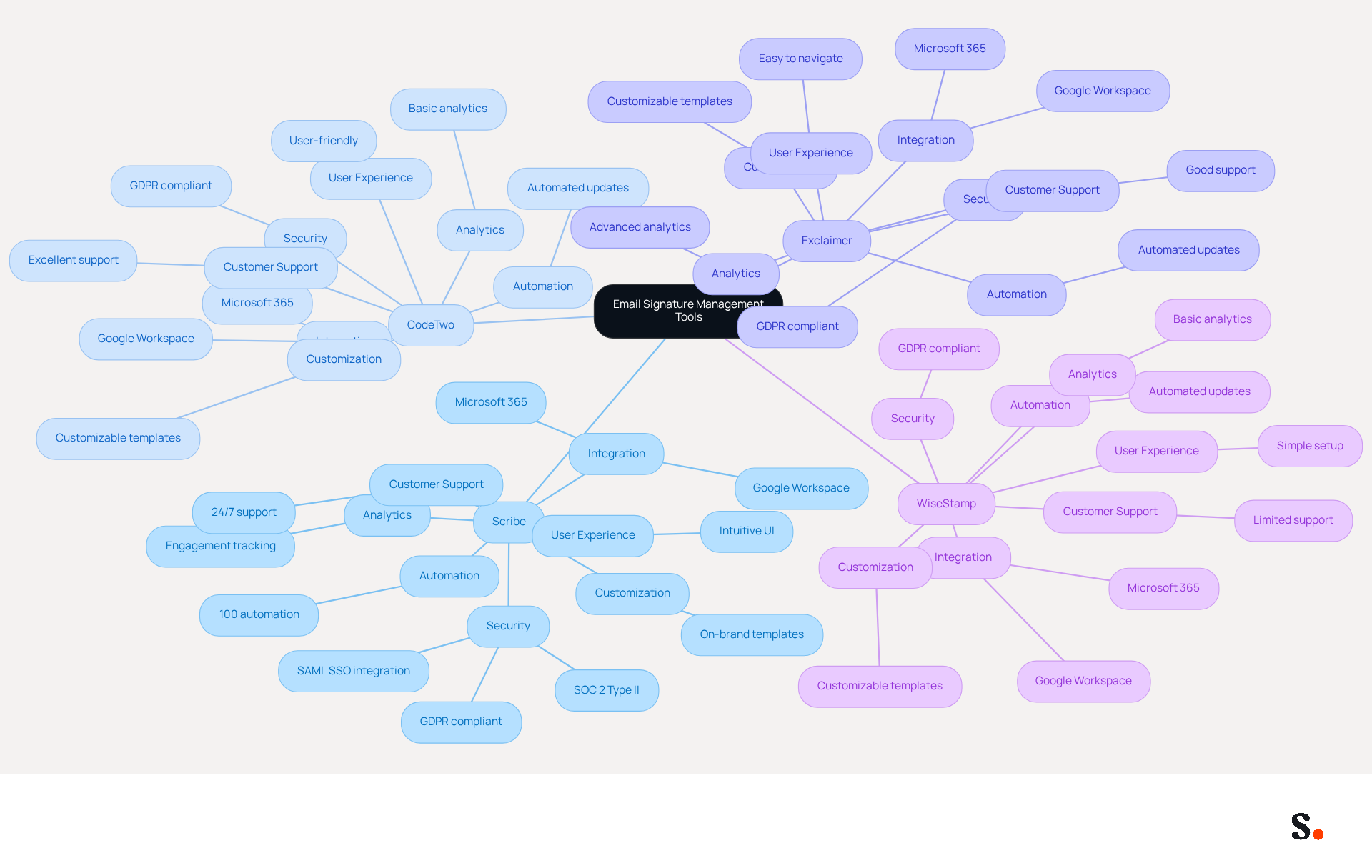
Choosing the right email signature management solutions can significantly impact your marketing effectiveness. The following compares key features of four leading solutions: Scribe, CodeTwo, Exclaimer, and WiseStamp.
- Feature:
- Integration:
- Scribe: Google Workspace, Microsoft 365
- CodeTwo: Microsoft 365, Google Workspace
- Exclaimer: Microsoft 365, Google Workspace
- WiseStamp: Google Workspace, Microsoft 365
- Automation:
- Scribe: 100% automation
- CodeTwo: Automated updates
- Exclaimer: Automated updates
- WiseStamp: Automated updates
- Customization:
- Scribe: On-brand templates
- CodeTwo: Customizable templates
- Exclaimer: Customizable templates
- WiseStamp: Customizable templates
- Analytics:
- Scribe: Engagement tracking
- CodeTwo: Basic analytics
- Exclaimer: Advanced analytics
- WiseStamp: Basic analytics
- User Experience:
- Scribe: Intuitive UI
- CodeTwo: User-friendly
- Exclaimer: Easy to navigate
- WiseStamp: Simple setup
- Security:
- Scribe: SOC 2 Type II, GDPR compliant, SAML SSO integration
- CodeTwo: GDPR compliant
- Exclaimer: GDPR compliant
- WiseStamp: GDPR compliant
- Customer Support:
- Scribe: 24/7 support
- CodeTwo: Excellent support
- Exclaimer: Good support
- WiseStamp: Limited support
- Integration:
By examining these features, businesses can better identify which tool aligns with their marketing needs.
Pros and Cons of Each Email Signature Management Solution
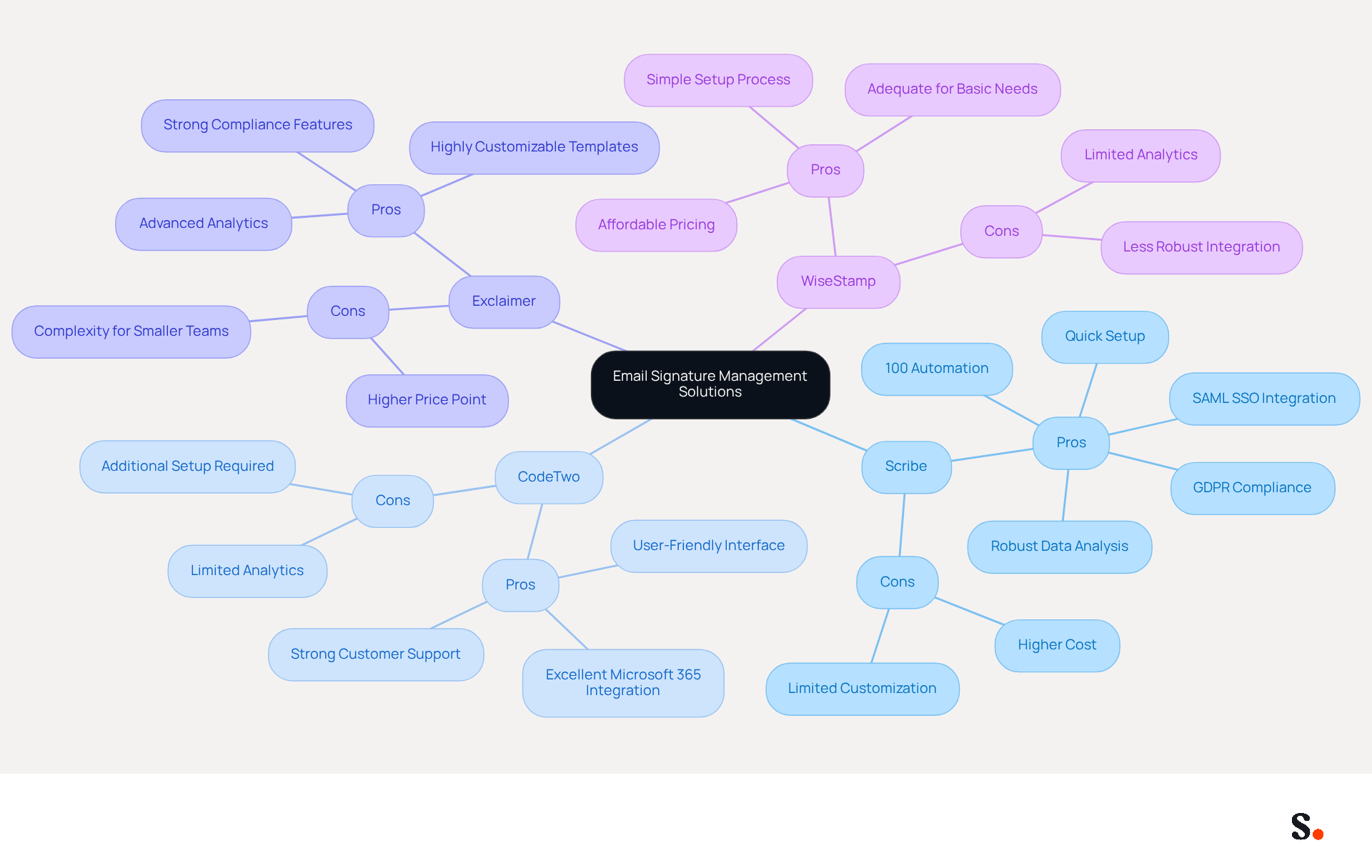
Choosing the right email signature management solutions involves weighing various pros and cons that can significantly impact organizational efficiency.
Scribe
Pros:
- 100% automation significantly reduces manual workload, allowing teams to focus on core tasks.
- Robust data analysis provides valuable insights into engagement metrics, enhancing marketing effectiveness, with an average click-through rate of 12% on signature banners.
- Quick and easy setup requires no technical expertise, making it accessible for all users.
- SAML single sign-on integration enhances security and simplifies access for employees.
- Scribe meets GDPR standards and holds SOC 2 Type II certification, which helps protect user data and privacy.
Cons:
- While Scribe offers robust features, its higher cost may be a concern for businesses with tight budgets.
- Limited customization options may not meet the needs of advanced users seeking extensive design flexibility.
CodeTwo
Pros:
- Excellent integration with Microsoft 365 facilitates seamless management for users within that ecosystem.
- User-friendly interface simplifies the management process, making it easy for teams to navigate.
- Strong customer support ensures assistance is readily available when needed.
Cons:
- Limited analytics capabilities may hinder detailed performance tracking compared to other solutions.
- Additional setup may be required for advanced features, potentially complicating initial implementation.
Exclaimer
Pros:
- Advanced analytics offer detailed insights, helping businesses optimize their email signature strategies.
- Highly customizable templates allow for tailored branding, enhancing corporate identity.
- Strong compliance features ensure adherence to legal requirements, which is crucial for regulated industries.
Cons:
- Complexity may pose challenges for smaller teams, making it less accessible for those without dedicated IT resources.
- Higher price point for advanced features could deter budget-sensitive organizations.
WiseStamp
Pros:
- Affordable pricing makes it a viable option for small businesses looking to manage email signatures.
- Simple setup process allows for quick deployment, minimizing disruption to daily operations.
- Adequate for fundamental communication needs, offering essential functionality without unnecessary complexity.
Cons:
- Limited analytics and reporting features may restrict insights into campaign performance.
- Less robust integration options compared to other solutions could limit its effectiveness in larger ecosystems.
Ultimately, the right choice hinges on aligning the strengths of email signature management solutions with the specific needs and budget constraints of the organization.
Suitability of Solutions for Different Business Types and Sizes
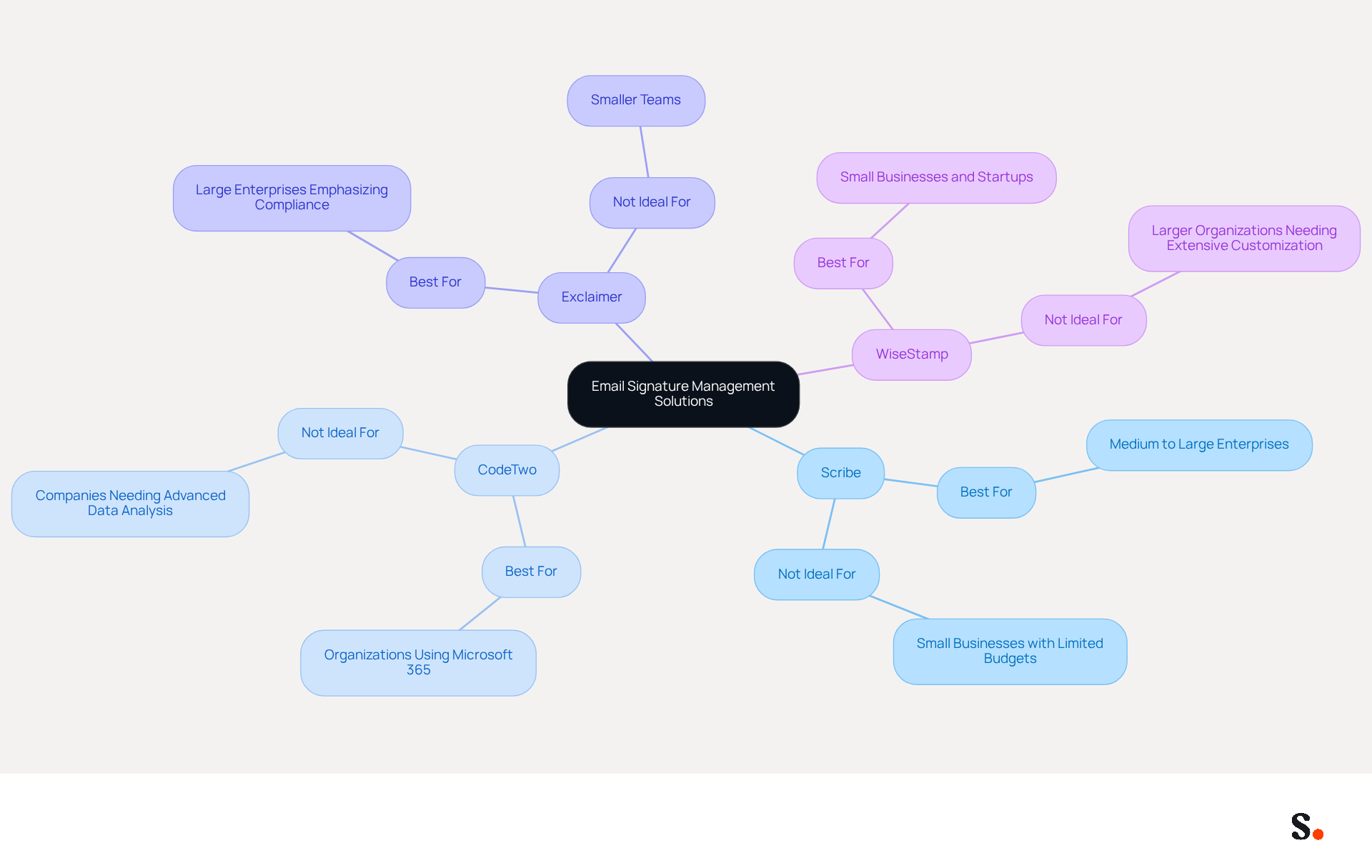
Selecting the right email signature management solution is essential for ensuring effective communication and brand representation:
-
- Best For: Medium to large enterprises seeking comprehensive automation and analytics capabilities. Scribe's robust features allow for seamless integration and real-time updates, making it ideal for organizations that prioritize brand consistency and lead generation.
- Not Ideal For: Small businesses with limited budgets may find Scribe's extensive features more than they require.
-
CodeTwo
- Best For: Organizations utilizing Microsoft 365 that need strong integration and user-friendly management. CodeTwo excels in providing a straightforward interface for managing email signatures across teams.
- Not Ideal For: Companies looking for advanced data analysis features may find CodeTwo lacking in this area.
-
Exclaimer
- Best For: Large enterprises that emphasize compliance and require advanced analytics. Exclaimer is tailored for organizations needing strict governance and legal compliance in their email communications.
- Not Ideal For: Smaller teams may find the complexity of Exclaimer overwhelming, making it less suitable for their needs.
-
WiseStamp
- Best For: Small businesses and startups in search of an affordable and easy-to-use solution. WiseStamp offers essential features that cater to the basic needs of smaller organizations.
- Not Ideal For: Larger organizations that demand extensive customization and detailed analytics may find WiseStamp insufficient.
This breakdown helps businesses pinpoint the email signature management solutions that fit their needs and marketing goals, ensuring effective communication and brand representation.
Conclusion
Selecting the right email signature management solution is essential for organizations striving to enhance their branding and operational efficiency. Understanding the unique features of various email signature management tools enables businesses to make informed decisions that align with their marketing objectives.
Key evaluation criteria such as:
- Integration capabilities
- Automation features
- Customization options
- Robust analytics
play a significant role in determining the effectiveness of an email signature management solution. Scribe distinguishes itself through complete automation, a user-friendly interface, and adherence to stringent security standards such as SOC 2 Type II and GDPR. In contrast, other solutions like CodeTwo, Exclaimer, and WiseStamp offer their own strengths and weaknesses, catering to different business sizes and requirements.
Ultimately, choosing an email signature management solution should reflect what your organization truly needs, whether that’s robust analytics, user-friendliness, or budget constraints. As businesses increasingly recognize the importance of consistent branding across all communications, leveraging the right tools can significantly enhance brand recognition and operational efficiency. Embracing a solution like Scribe not only ensures brand consistency but also equips marketing teams to independently manage their email signatures, ultimately driving measurable ROI.
Frequently Asked Questions
What are the key evaluation criteria for selecting an email signature management solution?
The key evaluation criteria include integration capabilities, automation features, customization options, analytics and reporting, user experience, security and compliance, and customer support.
Why are integration capabilities important in an email signature management solution?
Integration capabilities are essential for seamless operations with existing communication platforms like Microsoft 365 and Google Workspace, boosting workflow efficiency and simplifying updates for multiple users.
How do automation features benefit email signature management?
Automation features reduce manual workload and ensure consistency across communications, saving IT departments time and allowing them to focus on more strategic initiatives.
What role do customization options play in email signature management?
Customization options allow businesses to create on-brand templates and personalize sign-offs, which helps maintain brand identity and enhances recognition and trust among recipients.
Why is analytics and reporting important in email signature management solutions?
Robust analytics tools track engagement metrics, helping businesses assess the effectiveness of their digital identifiers as marketing tools, potentially generating significant impressions each month.
What is the significance of user experience in an email signature management solution?
An intuitive user interface is crucial for ease of use, especially for non-technical teams, as it helps them get up to speed faster and reduces training time.
How does security and compliance factor into email signature management solutions?
Security and compliance are vital to ensure adherence to industry standards for data protection, such as GDPR, as poorly managed message identifiers can be exploited for phishing attacks.
Why is customer support important for email signature management solutions?
Reliable customer support enhances the user experience, especially during setup and troubleshooting, ensuring that any issues can be addressed quickly to minimize operational disruptions.
List of Sources
- Key Evaluation Criteria for Email Signature Management Solutions
- 40+ Email Signature Statistics for 2026 (Data + Insights) (https://wavecnct.com/blogs/email-signature-statistics)
- MSP Guide to Choosing the Right Email Signature Management Solution (https://channelpronetwork.com/2025/09/21/email-signature-management-msp-guide)
- Best Email Signature Management Software: Top 12 Tools (2026)
- NEWOLDSTAMP (https://newoldstamp.com/blog/email-signature-software)
- Why Email Signature Management Software is Essential for Marketing Success (https://scribe-mail.com/en-US/blog/why-email-signature-management-software-is-essential-for-marketing-success)
- Best Email Signature Management Software (Evaluated May 2026) (https://wisestamp.com/guides/best-email-signature-management-software)
- Feature Comparison of Leading Email Signature Management Tools
- Scribe vs. Competitors: Best Email Signature Management Tools Compared (https://scribe-mail.com/en-US/blog/scribe-vs-competitors-best-email-signature-management-tools-compared)
- Top 10 Email Signature Management Tools in 2026 (Compared) (https://mailbutler.io/blog/email/email-signature-management-tools)
- Best Email Signature Software for Google Workspace and Microsoft 365 in 2026 (https://bulksignature.com/blog/best-email-signature-software)
- Best Email Signature Management Software (Evaluated May 2026) (https://wisestamp.com/guides/best-email-signature-management-software)
- Best Email Signature Management Software: Top 12 Tools (2026)
- NEWOLDSTAMP (https://newoldstamp.com/blog/email-signature-software)
- Pros and Cons of Each Email Signature Management Solution
- Compare 5 Software for Email Signature: Features and Benefits for Marketers (https://scribe-mail.com/en-US/blog/compare-5-software-for-email-signature-features-and-benefits-for-marketers)
- 10 Best Email Signature Software Reviewed In 2026 (https://thecmo.com/tools/best-email-signature-software)
- Best Email Signature Management Software (Evaluated May 2026) (https://wisestamp.com/guides/best-email-signature-management-software)
- Best Email Signature Management Software: Top 12 Tools (2026)
- NEWOLDSTAMP (https://newoldstamp.com/blog/email-signature-software)
- Top 10 Email Signature Management Tools in 2026 (Compared) (https://mailbutler.io/blog/email/email-signature-management-tools)
- Suitability of Solutions for Different Business Types and Sizes
- Email signature statistics: Why every business should optimize their email signatures — Stripo.email (https://stripo.email/blog/email-signature-statistics-why-every-business-should-optimize-their-email-signatures)
- Best Email Signature Management Software (Evaluated May 2026) (https://wisestamp.com/guides/best-email-signature-management-software)
- Best Email Signature Management Software: Top 12 Tools (2026)
- NEWOLDSTAMP (https://newoldstamp.com/blog/email-signature-software)
- Top 10 Email Signature Management Tools in 2026 (Compared) (https://mailbutler.io/blog/email/email-signature-management-tools)
Get started with Scribe
Manage signatures across your whole team
Free 14-day trial — no credit card.