Master the Formal Way to End an Email: Best Practices for Professionals
Concluding an email effectively is not merely a formality; it plays a vital role in shaping perceptions and building professional relationships. In this
Sophie Grant
Email Signature Specialist, Scribe

Introduction
Concluding an email effectively is not merely a formality; it plays a vital role in shaping perceptions and building professional relationships. In this article, we will explore best practices for ending emails effectively, focusing on:
- Tone
- Sign-offs
- Professional signatures
Many professionals struggle to create email sign-offs that are both impactful and consistent with their brand image. Without effective sign-offs, professionals may miss opportunities and weaken their relationships.
Match Tone to Context
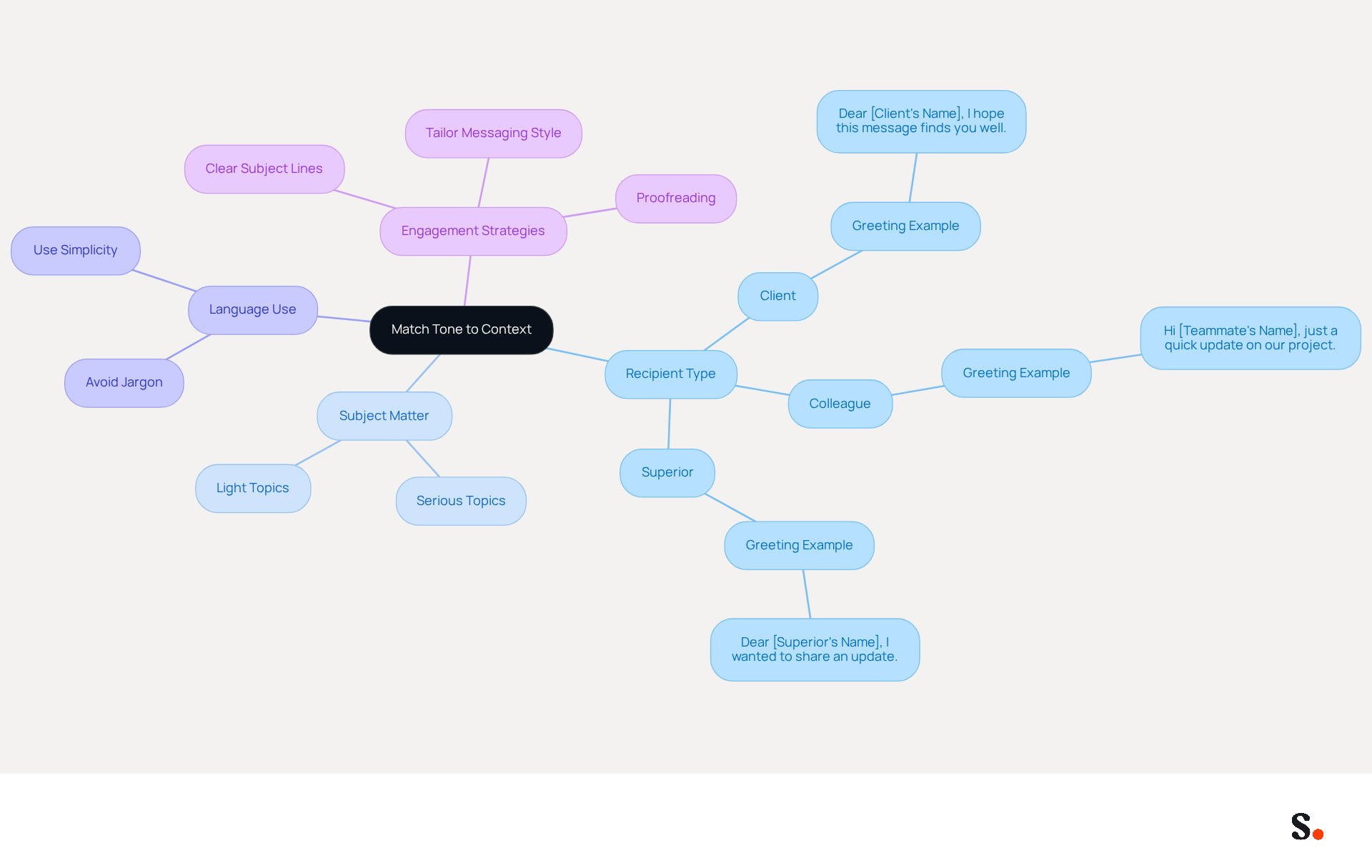
Matching your email style to the context and recipient's expectations is crucial for effective communication. For example, when updating a client on a project, starting with a respectful greeting like 'Dear [Client's Name], I hope this message finds you well,' sets a positive tone. Conversely, a more casual approach may be suitable for internal communications among colleagues, such as beginning with 'Hi [Teammate's Name], just a quick update on our project.'
Assessing your relationship with the recipient is essential. Are they a client, a colleague, or a superior? Adjust your style accordingly. Additionally, consider the subject matter; serious topics require a more formal approach, while lighter subjects can be approached with a friendly demeanor. This distinction helps convey the appropriate level of professionalism.
Use language wisely by avoiding jargon or overly complex terms unless they are common in your industry. Simplicity often enhances clarity and ensures your message is easily understood.
Studies show that organizations tailoring their messaging style to fit the audience see better engagement and response rates. By adhering to these optimal strategies, you can improve your correspondence and cultivate stronger professional connections. Ultimately, adapting your communication style can significantly enhance your professional relationships and outcomes.
Choose Appropriate Sign-Offs
The formal way to end an email significantly influences the recipient's perception, making the selection of this sign-off a critical aspect of professional communication. Here are some best practices:
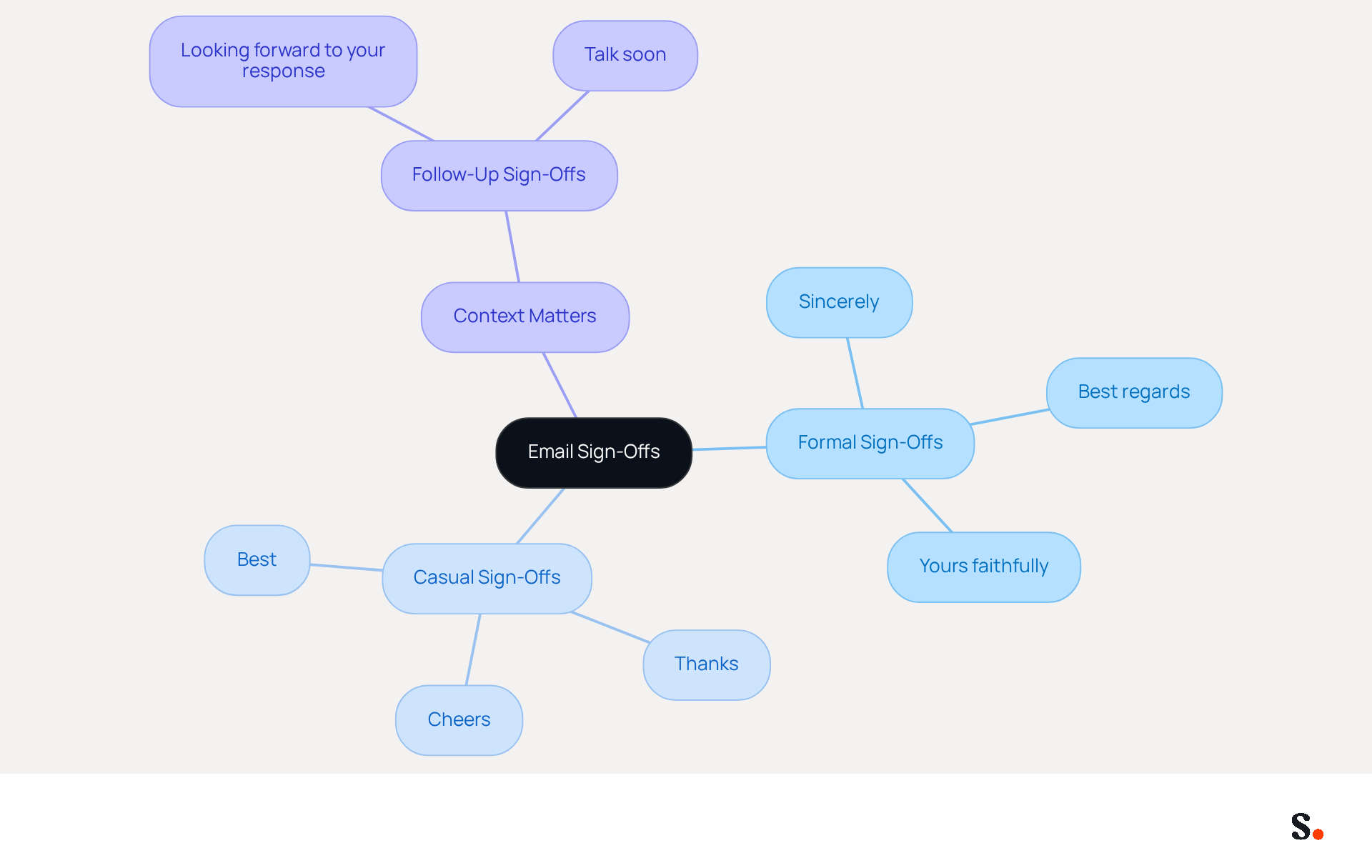
- Formal Sign-Offs: Use sign-offs like "Sincerely," "Best regards," or "Yours faithfully" for formal communications, especially when addressing clients or higher-ups. These sign-offs represent a formal way to end an email, conveying professionalism and respect, which is crucial in business interactions.
- Casual Sign-Offs: For more informal emails, consider using "Cheers," "Thanks," or "Best" to convey a friendly tone. These options work well for established relationships and internal chats, creating a friendly vibe.
- Context Matters: If you are following up on a previous conversation, a sign-off like "Looking forward to your response" can encourage engagement. This method not only strengthens the ongoing dialogue but also conveys enthusiasm for further interaction.
- Avoid Common Pitfalls: Be cautious of using overly casual or passive-aggressive sign-offs, as these can create misunderstandings or come across as unprofessional. For instance, phrases like "Stay awesome" or ambiguous sign-offs can detract from your message's effectiveness.
For example, when sending a proposal to a potential client, you might say, "Thank you for considering our proposal. Best regards, [Your Name]." This keeps it professional while showing appreciation. Studies indicate that messages ending with gratitude often receive more responses, making considerate sign-offs a strategic component in effective interaction.
In 2026, mastering the art of sign-offs will be essential for effective communication and relationship building. By following these best practices, you can improve your communications and leave a lasting positive impression.
Create a Professional Signature
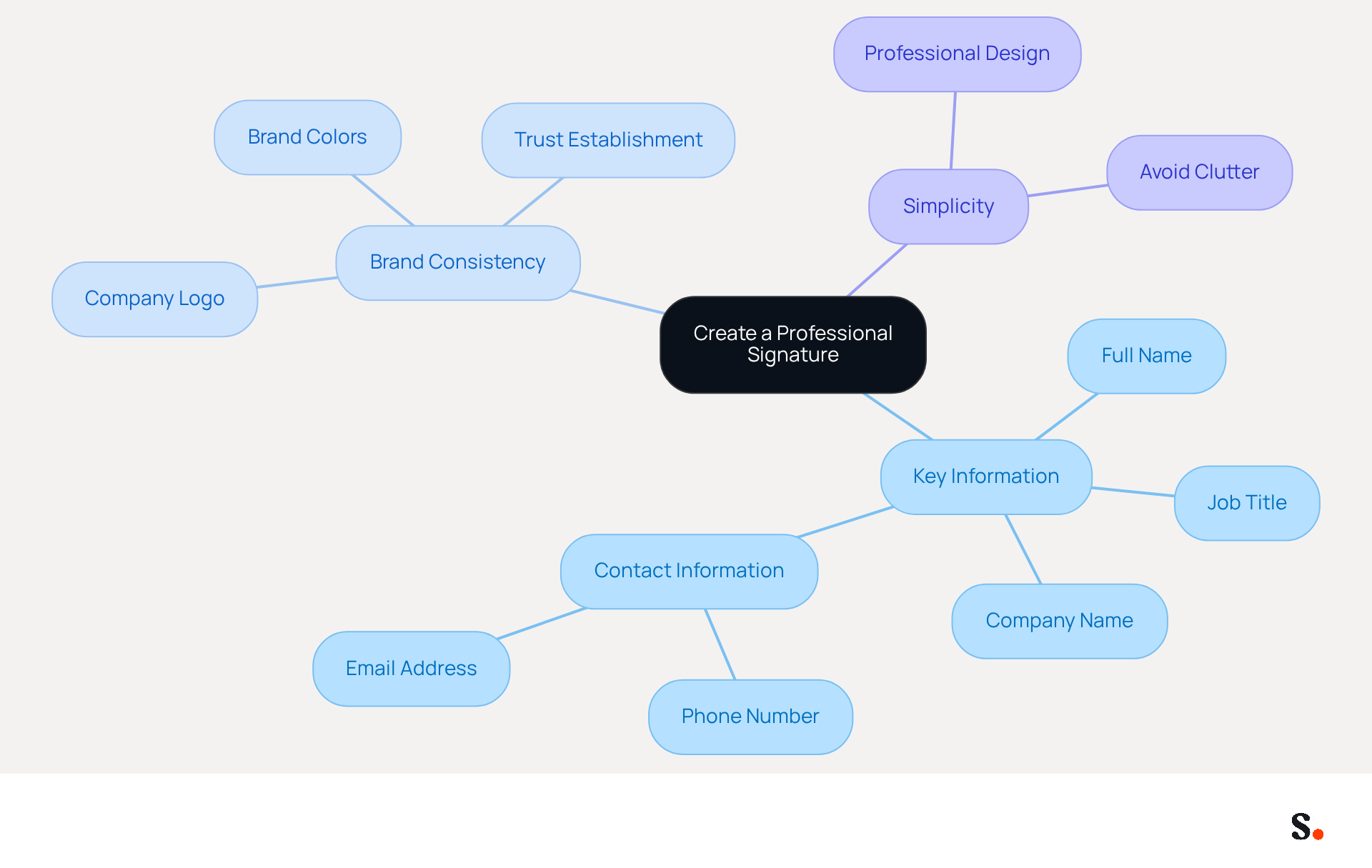
A well-crafted digital identifier acts as a vital business card, delivering essential information about the sender while reinforcing brand identity. To create an effective signature with Scribe's automated management, consider the following best practices:
- Include Key Information: Your signature should contain your full name, job title, company name, and contact information (phone number and email address). This ensures recipients can easily identify you and your role, facilitating better communication.
- Brand Consistency: Incorporate your company’s logo and colors to maintain brand consistency. This approach enhances professionalism and significantly boosts brand recognition, as evidenced by 80% of businesses considering branded email identifiers crucial for establishing trust. Scribe ensures that all approvals are consistent across your organization, eliminating the risk of discrepancies that can harm your brand image.
- Keep It Simple: Avoid cluttering your sign-off with excessive information or graphics. A clean, straightforward design is more effective. Research shows that messages with professionally branded signatures can enhance consumer confidence by 47% and positive brand perception by 43%.
Granting Scribe permission to connect with your service provider is essential for enabling one-click synchronization. You need to be a Super Admin of your service provider to grant these permissions. This enables seamless updates and synchronization, ensuring that any modifications made in your provider directory will automatically sync with Scribe, keeping your team’s identifiers current and compliant with security standards, including SOC 2 Type II.
For example, a signature might look like this:
John Doe
Digital Marketing Specialist
Scribe
Phone: (123) 456-7890
Email: john.doe@scribe.com
[Company Logo]
This format ensures clarity and professionalism, making it easier for recipients to engage with your communications. By implementing these strategies, organizations can transform their digital identifiers into effective marketing assets that significantly enhance brand engagement.
Include Relevant Contact Information
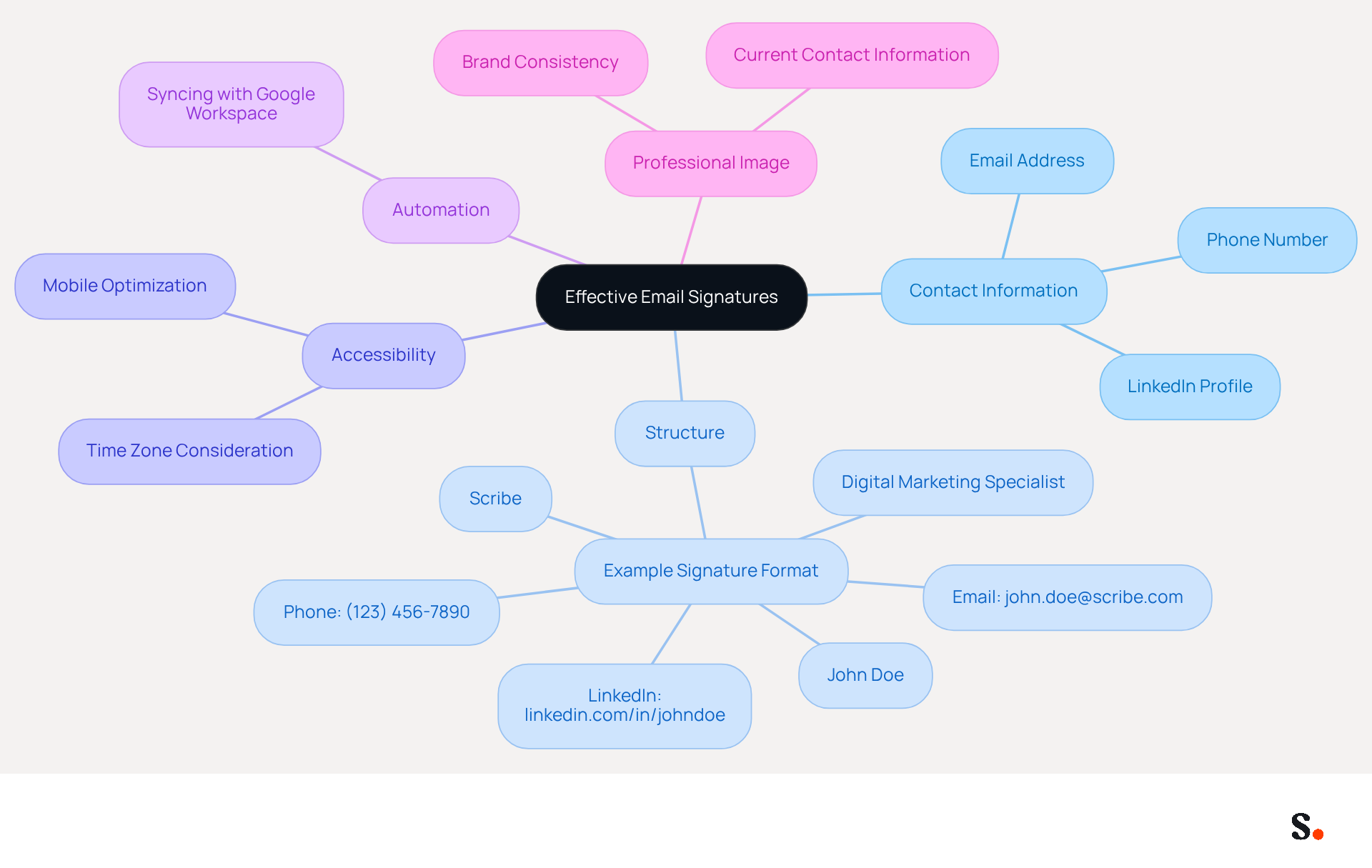
Providing relevant contact details in your message footer is crucial for effective communication and professional representation. Including essential details in your email signature is vital for facilitating connections. Always provide your phone number, email address, and relevant contact methods, such as a LinkedIn profile. A well-structured signature might look like this:
John Doe
Digital Marketing Specialist
Scribe
Phone: (123) 456-7890
Email: john.doe@scribe.com
LinkedIn: linkedin.com/in/johndoe
This structured format offers various contact options while reinforcing your professional image.
Ensure that your contact information is current. Outdated contact details can hinder effective communication and result in lost opportunities. Regular updates are essential, especially after job changes or when launching new campaigns. With Scribe, syncing your Google Workspace ensures that any changes to your teammates' information are automatically reflected in their email footers, saving time and maintaining brand consistency. This automation not only streamlines updates but also reinforces your brand's professionalism.
Think about accessibility: Including your time zone or availability can guide recipients on when to reach out effectively. This consideration can significantly improve response rates, as it shows respect for the recipient's time. Furthermore, ensure your mark is optimized for mobile use, as many messages are accessed on mobile devices. A well-designed mark should be no wider than 600 pixels to ensure proper display across various platforms.
By adhering to these best practices and utilizing Scribe's automated synchronization features, you can ensure your contact information not only acts as a means of communication but also boosts your professional credibility and engagement. Remember, email signatures are often overlooked marketing tools that can effectively promote your brand and drive conversions. Furthermore, Scribe's commitment to security is underscored by its SOC 2 Type II certification and compliance with GDPR and CCPA, ensuring that your data is handled with the utmost care.
Conclusion
Concluding an email effectively is vital for professionalism and impactful communication. How an email concludes can greatly affect how the recipient perceives it and responds, so it's essential to follow best practices that suit the context and relationship.
Key strategies include:
- Matching the tone of the email to the context
- Selecting appropriate sign-offs
- Creating a professional signature that reinforces brand identity
Tailoring the language and sign-off to match the audience-whether formal or casual-can significantly improve engagement and strengthen connections. Additionally, including relevant contact information in a well-structured signature not only facilitates communication but also boosts credibility and brand recognition.
Ultimately, the importance of effective email communication cannot be overstated. When professionals implement these best practices, they can make sure their emails leave a positive impression, encourage responses, and help build successful business relationships. Embracing these strategies can transform how professionals communicate, ultimately shaping the success of their business interactions.
Frequently Asked Questions
Why is it important to match the tone of an email to the context and recipient's expectations?
Matching the tone of an email to the context and recipient's expectations is crucial for effective communication, as it helps convey the appropriate level of professionalism and fosters better engagement and response rates.
How should I start an email when updating a client on a project?
When updating a client on a project, it is advisable to start with a respectful greeting, such as "Dear [Client's Name], I hope this message finds you well," to set a positive tone.
What approach is suitable for internal communications among colleagues?
For internal communications among colleagues, a more casual approach is suitable, such as beginning with "Hi [Teammate's Name], just a quick update on our project."
How can I assess my relationship with the email recipient?
You can assess your relationship with the recipient by determining whether they are a client, a colleague, or a superior, and then adjusting your email style accordingly.
What should I consider regarding the subject matter of my email?
When considering the subject matter, serious topics require a more formal approach, while lighter subjects can be approached with a friendly demeanor.
What language should I use in my emails?
It is best to avoid jargon or overly complex terms unless they are common in your industry. Using simple language enhances clarity and ensures your message is easily understood.
What benefits do organizations see from tailoring their messaging style?
Organizations that tailor their messaging style to fit the audience experience better engagement and response rates, leading to improved correspondence and stronger professional connections.
List of Sources
- Match Tone to Context
- How to Use Proper Email Etiquette in 2026 (https://linkedin.com/pulse/how-use-proper-email-etiquette-2026-get-ahead-by-linkedin-news-v5zke)
- Email Etiquette in the Workplace (https://adminvc.ucla.edu/news/email-etiquette-workplace)
- Trouver le ton d’e-mail adapté à votre audience | Mailchimp (https://mailchimp.com/resources/email-tone)
- CRM Article: Mastering Email Communication: The Power of Tone and Style - Smallbizcrm (https://smallbizcrm.com/blog/crm-article-mastering-email-communication-the-power-of-tone-and-style)
- Choose Appropriate Sign-Offs
- How to end an email: 70+ professional sign-offs & examples (https://blog.superhuman.com/how-to-end-an-email)
- Mastering Professional Email Sign-Offs in 2026 (https://linkedin.com/pulse/mastering-professional-email-sign-offs-2026-bulksignature-qsr4e)
- Email Sign Offs for Every Industry and Situation | Mailchimp (https://mailchimp.com/resources/email-sign-offs)
- 80+ Professional Email Sign-Offs for Every Situation, Role, and Industry (https://syncsignature.com/blog/email-sign-offs)
- 50 Best Email Sign-Offs to End an Email Properly in [year] (https://elementor.com/blog/best-email-sign-offs)
- Create a Professional Signature
- Email Signature Best Practices for 2026 (+ 15 Pro Examples) (https://wavecnct.com/blogs/email-signature-best-practices-2026)
- Research Recap: Branded Email Signatures Increase Company Recognition, Trust - B2BMX INSIGHTS (https://demandgenreport.com/industry-news/research-recap-branded-email-signatures-increase-company-recognition-trust/47252)
- Why Email Signatures Must Be In Your 2026 Marketing Plan | Rocketseed (https://rocketseed.com/blog/2026-marketing-plan-email-signatures)
- Best practices for business email signatures in 2026 (https://bybrand.io/blog/best-practices)
- The impact of email signatures on your branding (https://signitic.com/en/resources/the-impact-of-email-signatures-on-your-branding)
- Include Relevant Contact Information
- Top 10+ best practices for email signatures design in 2026 (https://mysignature.io/blog/email-signature-best-practices)
- Email Signature Best Practices for 2026 (+ 15 Pro Examples) (https://wavecnct.com/blogs/email-signature-best-practices-2026)
- Why Email Signatures Must Be In Your 2026 Marketing Plan | Rocketseed (https://rocketseed.com/blog/what-are-the-biggest-email-trends-for-2026)
- The ultimate guide to email signatures in 2026 (https://signitic.com/en/resources/email-signature)
- Best practices for business email signatures in 2026 (https://bybrand.io/blog/best-practices)
Get started with Scribe
Build a professional email signature
Free 14-day trial — no credit card.