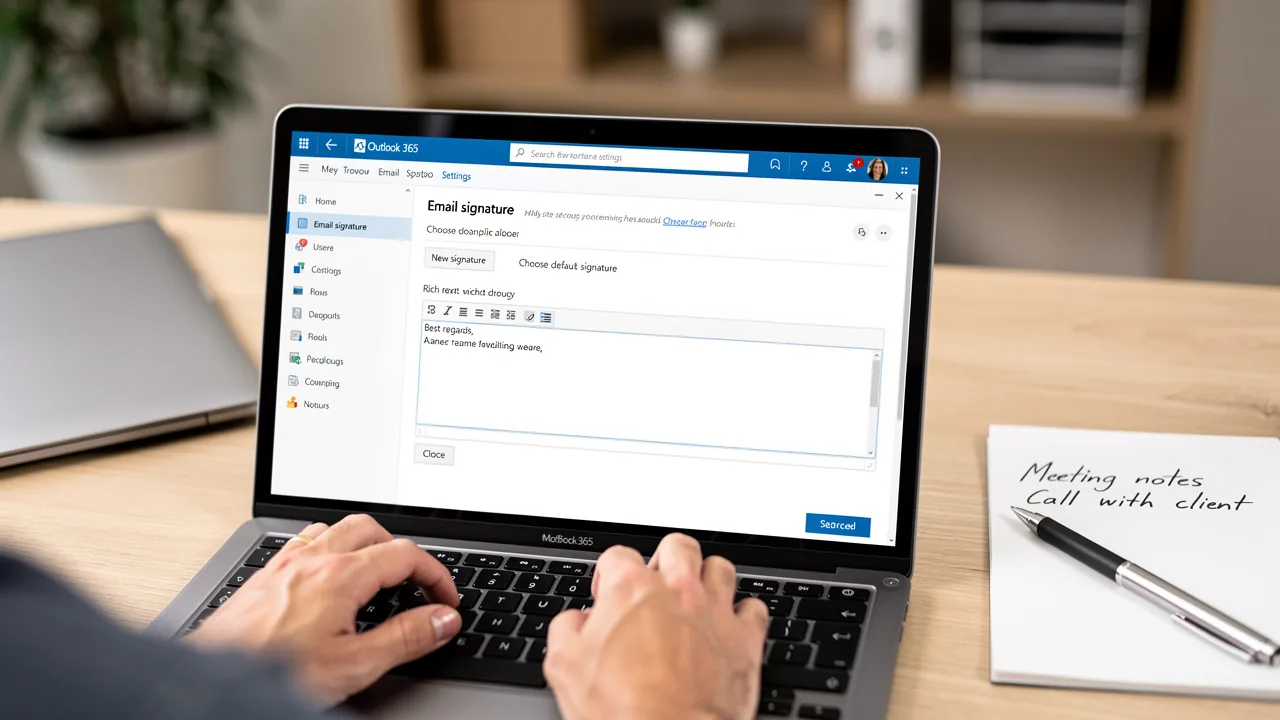
Master Updating Signature in Outlook: A Step-by-Step Guide
The effectiveness of digital communication hinges on the details, and a well-crafted email signature is a critical component of professional correspondence
Sophie Grant
Email Signature Specialist, Scribe
On this page
- Introduction
- Understand the Importance of Email Signatures in Outlook
- Key Benefits of Email Signatures:
- Access Signature Settings in Different Outlook Versions
- Troubleshoot Common Signature Update Issues
- Signature Not Saving:
- Signature Not Appearing in Emails:
- Formatting Issues:
- Signature Sync Issues:
- Leverage Automation Tools for Efficient Signature Management
- Scribe:
- Benefits of Automation:
- Conclusion
- Frequently Asked Questions
- List of Sources
Introduction
The effectiveness of digital communication hinges on the details, and a well-crafted email signature is a critical component of professional correspondence. These digital footers serve not only as a means of contact but also as a powerful branding tool that can enhance credibility and drive engagement. This guide delves into the essential steps for updating email signatures in Outlook, offering insights into best practices and troubleshooting common issues.
Many professionals encounter issues with email signatures not displaying as intended, leading to confusion and a lack of professionalism. Mastering signature management in Outlook is essential for ensuring that every email reflects your professionalism and brand identity.
Understand the Importance of Email Signatures in Outlook
In a digital landscape where first impressions matter, email footers serve as crucial touchpoints for brand identity. Email footers act as digital business cards, providing essential contact details while reinforcing your brand identity with every email sent. A thoughtfully designed emblem not only enhances professionalism but also serves as a powerful marketing tool by incorporating links to your website or social media profiles. By updating your signature in Outlook, you can personalize sign-offs to reflect your brand's image, ensuring consistency across all communications. By acknowledging the importance of digital identifiers, you can utilize them to leave a memorable impact on your recipients, ultimately aiding in your business's success.
This tool simplifies email management by automating updates that sync in real-time with your business phone system. Without automation, maintaining consistent branding across multiple platforms can be a daunting task. This automation not only saves time but also guarantees cohesive and professional branding. Furthermore, the platform is SOC 2 Type II compliant, ensuring that your data is managed securely, which helps safeguard against phishing and identity theft, a growing concern for businesses today. Notably, Scribe empowers Marketing teams to manage email branding independently after the initial IT setup, streamlining the process and enhancing brand consistency.
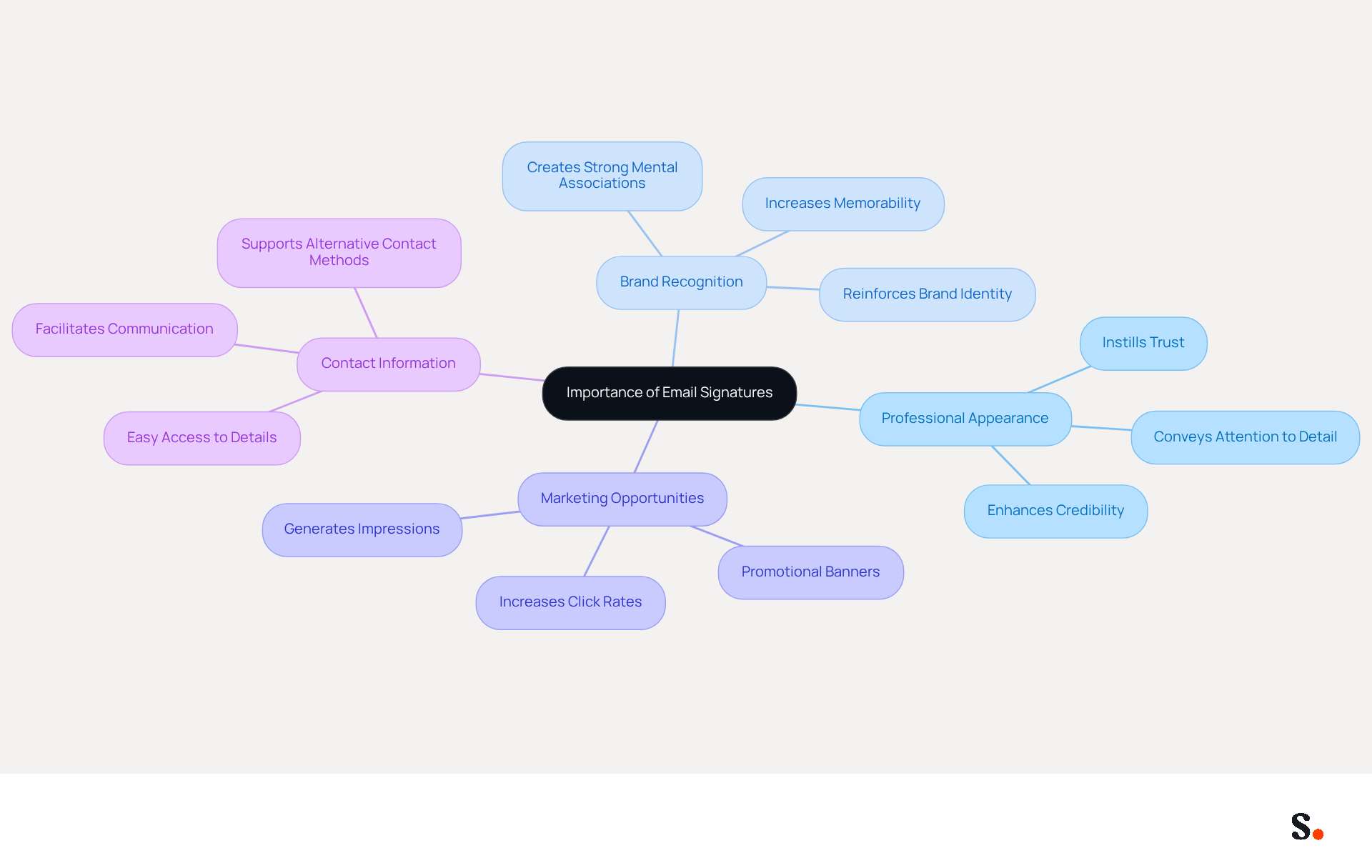
Key Benefits of Email Signatures:
- Professional Appearance: A consistent and well-crafted signature enhances your credibility, instilling trust in your recipients.
- Brand Recognition: Including your logo and brand colors reinforces your brand identity, making it more memorable.
- Marketing Opportunities: Email footers can feature promotional banners or links, driving traffic to your website or specific campaigns, with studies showing that branded footers can increase click rates significantly. Moreover, electronic identifiers offer ongoing brand exposure and can generate around 7,500 impressions weekly for a company with 100 employees sending 10-20 messages each day.
- Contact Information: They provide recipients with easy access to your contact details, facilitating better communication and engagement.
Understanding these benefits can motivate you to keep your email footers fresh and aligned with your branding efforts. By leveraging these digital identifiers, you position your brand for greater recognition and trust in every interaction.
Access Signature Settings in Different Outlook Versions
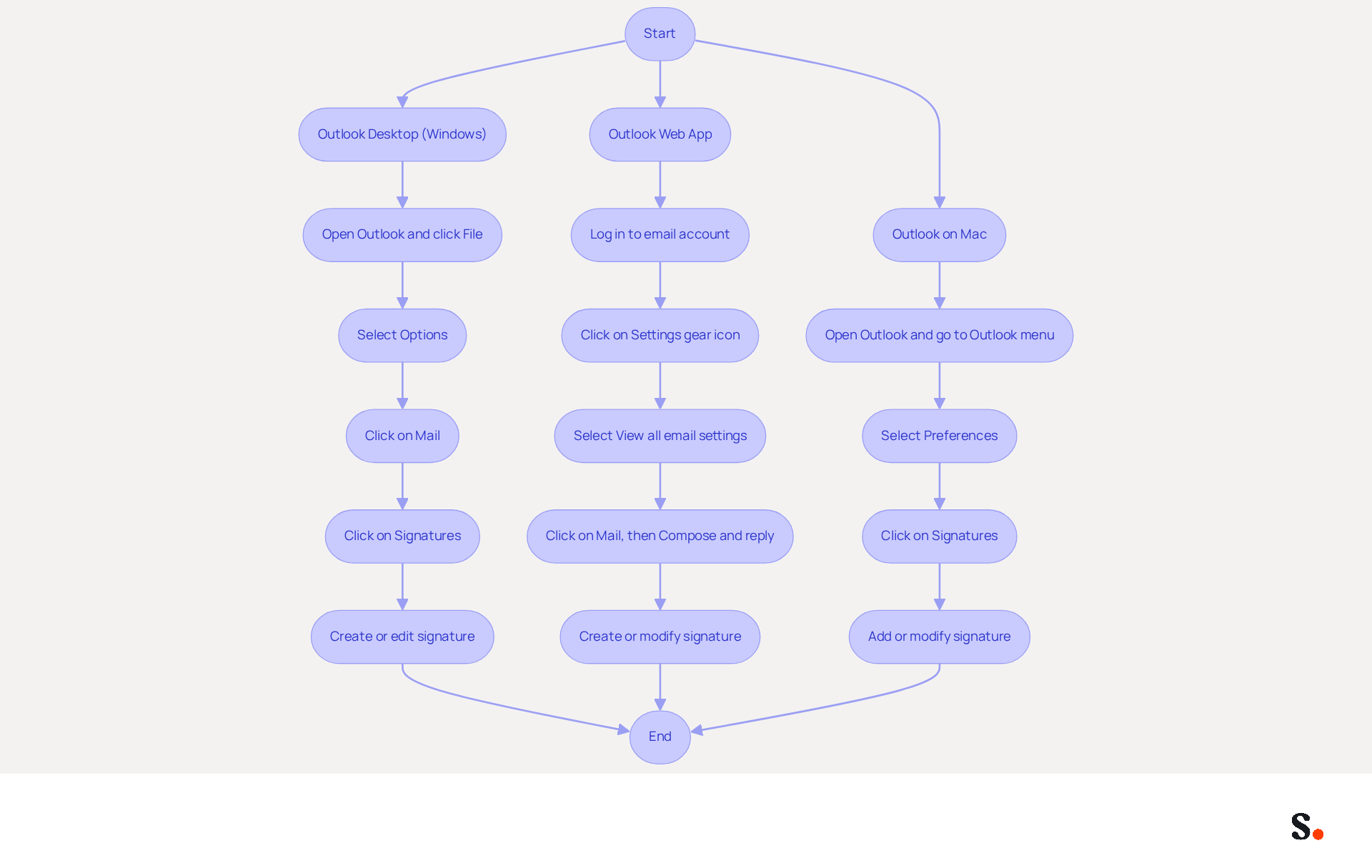
Updating your email signature is crucial for maintaining professionalism in your communications. To perform updating signature in Outlook, access the signature settings, which vary slightly by version. Here’s a step-by-step guide:
For Outlook Desktop (Windows):
- Open the email application and click on File in the top left corner.
- Select Options from the menu.
- In the Options window, click on Mail.
- Click on the Signatures button.
- In the Signatures and Stationery window, create a new signature or edit an existing one.
For Outlook Web App:
- Log in to your email account.
- Click on the Settings gear icon in the top right corner.
- Select View all email settings.
- Click on Mail, then Compose and reply.
- Here, you can create or modify your email signature.
For Outlook on Mac:
- Open Outlook and go to the Outlook menu.
- Select Preferences.
- Click on Signatures.
- Add a new mark or modify an existing one from this window.
Important Considerations:
- Ensure your signature is set as the default for new messages and replies to avoid it not appearing in outgoing emails.
- Users can create multiple designs for various purposes, such as a complete version for new messages and a shorter one for responses.
- Without testing, you risk sending emails with incorrect signatures, which can undermine professionalism. Send a test message to ensure your sign-off displays correctly across various mail clients.
- For your emails, it's best to stick with standard fonts like Arial, Verdana, or Times New Roman, along with including vital contact information like a website link and telephone number.
With Scribe, any changes you make in your Aircall settings will automatically update your communication identifiers, keeping your brand consistent. This means you can focus more on your communication rather than the technicalities of signature management. By following these steps, you can effectively manage and update your identifiers in Scribe, enhancing your branding and ensuring consistent communication. Effective management through updating signature in Outlook can significantly enhance your brand's image and communication consistency.
Troubleshoot Common Signature Update Issues
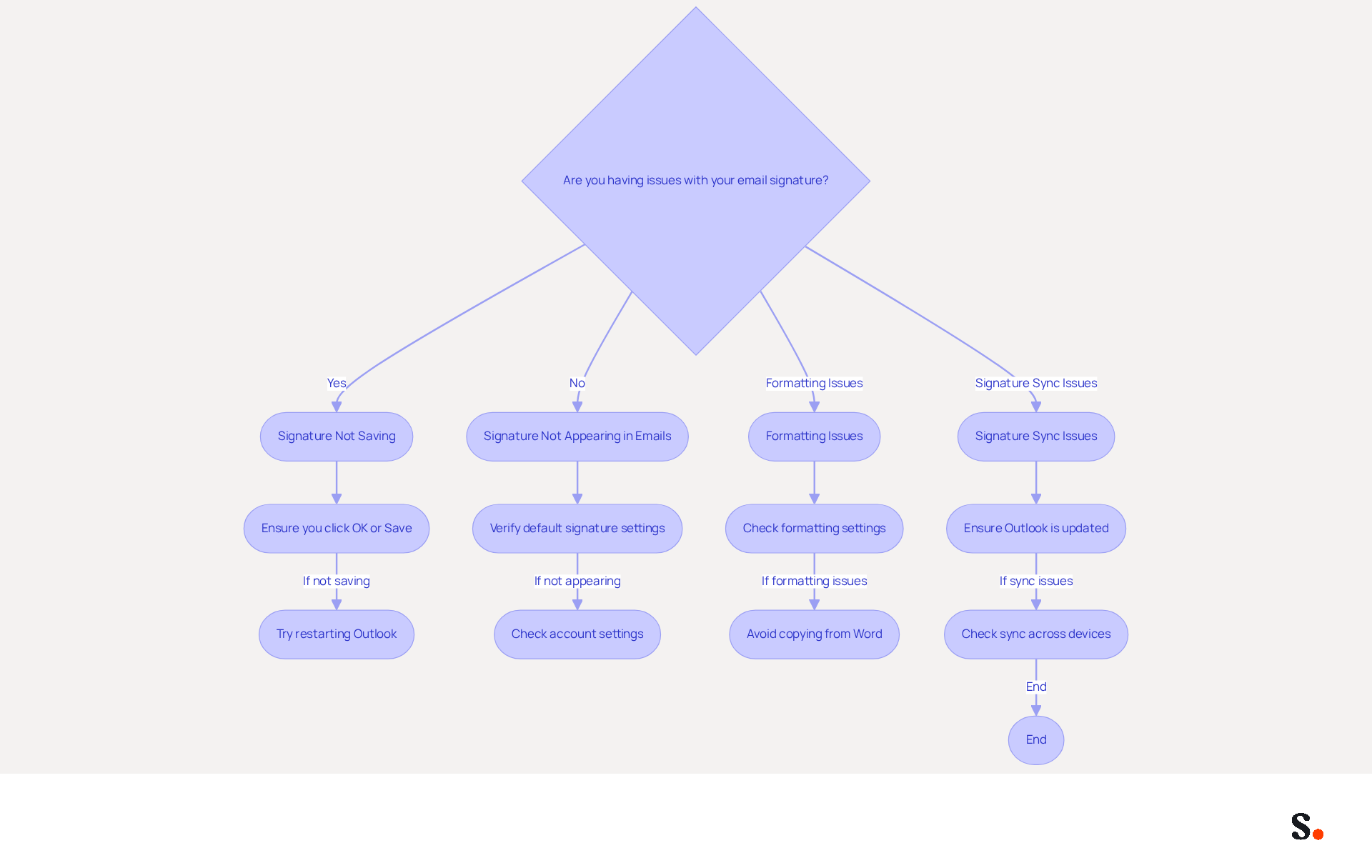
Many users encounter challenges when modifying their messaging footer in Scribe, but solutions are available to help troubleshoot these issues:
Signature Not Saving:
- Ensure you click OK or Save after making changes. If the sign-off still doesn’t save, try restarting Outlook to resolve the issue.
Signature Not Appearing in Emails:
- Verify that the correct signature is set as default for new emails and replies/forwards in the signature settings.
- If you have multiple accounts set up, make sure you're using the right one.
Formatting Issues:
- If your signature appears differently when sent, check the formatting settings. Consistently use either plain text or HTML format.
- Avoid copying and pasting from Word or other applications, as this can introduce unwanted formatting.
Signature Sync Issues:
- For users on multiple devices, ensure that Outlook is updated across all platforms. Signatures may not sync properly between the desktop and web versions.
By mastering these troubleshooting steps, users can significantly enhance their email signature management experience.
Leverage Automation Tools for Efficient Signature Management
For businesses managing multiple digital identifiers, the integration of automation tools is essential for enhancing operational efficiency. Here’s a closer look at Scribe and its advantages:
Scribe:
- Scribe automates the creation and management of email signatures, allowing you to update all team signatures with a single click. This ensures brand consistency and enhances marketing opportunities in every message. With an average click-through rate of 12% on branded banners, this platform transforms email footers into effective marketing channels. Without Scribe, organizations risk losing valuable engagement opportunities, potentially missing out on around 2,520 clicks each month.
Benefits of Automation:
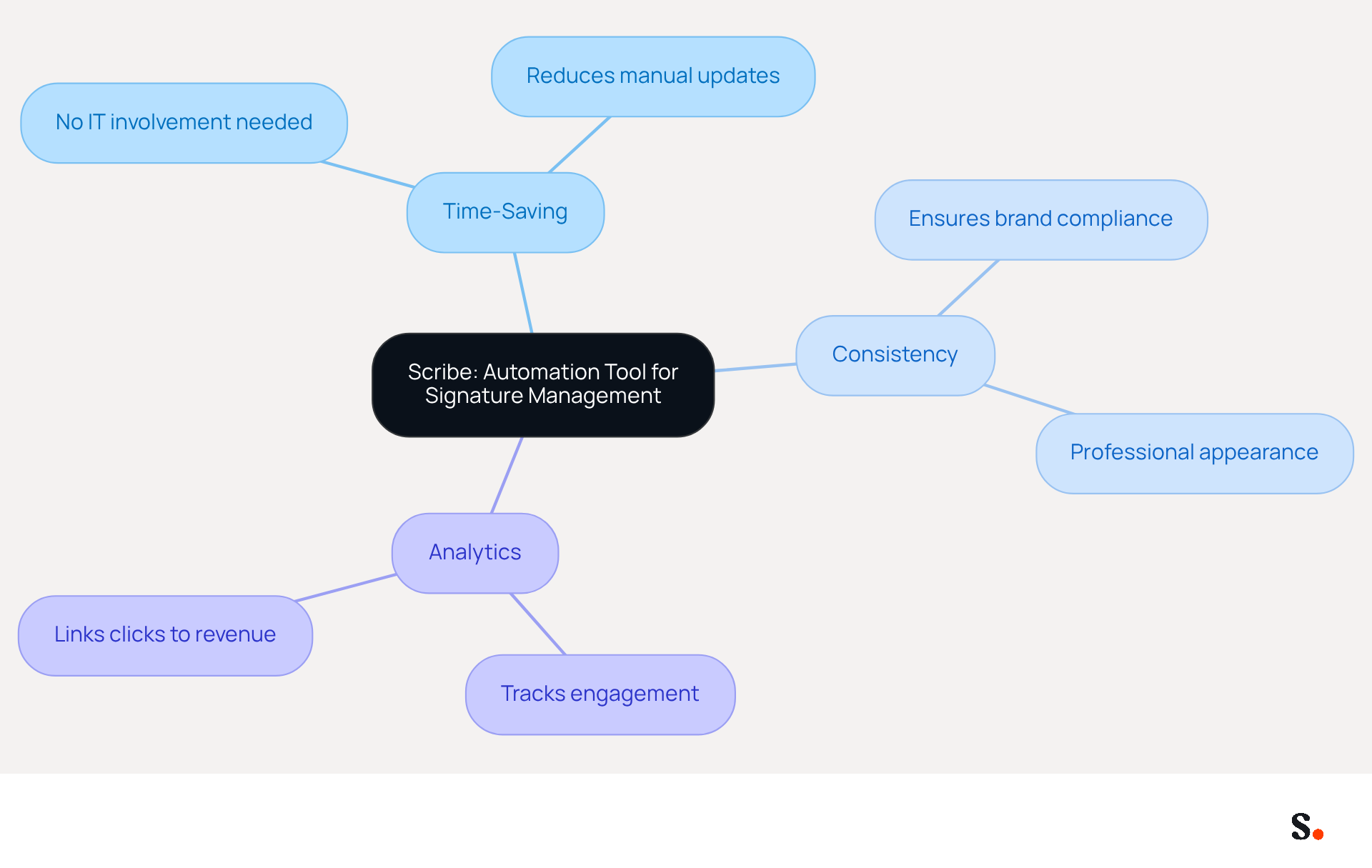
- Time-Saving: Automating signature updates can save organizations significant time. Scribe's platform is designed to remove the need for IT involvement after the initial setup, enabling marketing teams to manage their branding independently. This helps cut down the time spent on manual updates, reducing errors and inconsistencies.
- Consistency: The platform ensures that all endorsements comply with company branding, enhancing professionalism. Inconsistent message formats can harm client trust and create a disorganized appearance, but with Scribe, every correspondence sent reflects the current branding and correct formatting.
- Analytics: Scribe provides powerful analytics capabilities that monitor engagement and effectiveness of digital marks as marketing tools. By linking unique clicks to revenue through its tracking SDK, businesses can assess the effect of their communications and refine their strategies accordingly. This platform is also compliant with GDPR and CCPA, ensuring that your correspondence management adheres to necessary security and privacy standards.
By utilizing Scribe's automation features, you can simplify the process of updating signatures in Outlook, enabling you to concentrate on other significant areas of your business. By embracing Scribe, organizations can not only streamline their processes but also elevate their brand presence in every communication.
Conclusion
Effective email signatures are essential for projecting a professional image and reinforcing brand identity in every communication. Following the detailed steps in this guide allows users to accurately and consistently reflect their brand in email footers, thereby enhancing credibility and engagement with recipients.
The article delves into the importance of email signatures, highlighting their role as digital business cards that provide essential contact information while promoting brand recognition. It offers a comprehensive step-by-step guide for updating signatures across different Outlook versions, troubleshooting common issues, and leveraging automation tools like Scribe for efficient signature management. Scribe stands out by enabling marketing teams to independently manage email branding after initial IT setup, ensuring that every email sent aligns with the company's branding strategy.
The importance of well-managed email signatures is clear in today’s digital communication landscape. Organizations should consider adopting tools like Scribe to simplify signature management, boost brand consistency, and take advantage of marketing opportunities. Embracing tools like Scribe not only enhances brand consistency but also positions businesses to seize valuable marketing opportunities.
Frequently Asked Questions
Why are email signatures important in Outlook?
Email signatures are important because they serve as digital business cards, providing essential contact details and reinforcing brand identity with every email sent. They enhance professionalism and act as a marketing tool by incorporating links to websites or social media profiles.
How can email signatures impact brand identity?
A well-designed email signature enhances credibility and instills trust in recipients. Including your logo and brand colors reinforces brand identity, making it more memorable and recognizable.
What marketing opportunities do email signatures provide?
Email signatures can feature promotional banners or links, driving traffic to websites or specific campaigns. Studies show that branded footers can significantly increase click rates and generate ongoing brand exposure, potentially leading to around 7,500 impressions weekly for a company with 100 employees sending 10-20 messages each day.
How does automation benefit email signature management?
Automation simplifies email management by syncing updates in real-time with your business phone system, saving time and ensuring consistent branding across multiple platforms. This helps maintain cohesive and professional branding without the need for constant manual updates.
What security measures are in place for email signature management?
The platform is SOC 2 Type II compliant, ensuring that data is managed securely, which helps safeguard against phishing and identity theft, addressing growing concerns for businesses today.
Who can manage email branding after the initial setup?
Scribe empowers Marketing teams to manage email branding independently after the initial IT setup, streamlining the process and enhancing brand consistency.
List of Sources
- Understand the Importance of Email Signatures in Outlook
- Best practices for business email signatures in 2026 (https://bybrand.io/blog/best-practices)
- Using Email Signatures for Marketing | CloudM (https://cloudm.io/resources/blog/using-email-signatures-for-marketing-how-every-email-can-boost-your-brand)
- Why Team Email Signatures Matter More Than You Think: The Hidden Impact on Brand Trust and Customer Experience (https://getmailbird.com/why-team-email-signatures-matter-brand-trust)
- The impact of email signatures on your branding (https://signitic.com/en/resources/the-impact-of-email-signatures-on-your-branding)
- Why Email Signatures Must Be In Your 2026 Marketing Plan | Rocketseed (https://rocketseed.com/blog/2026-marketing-plan-email-signatures)
- Access Signature Settings in Different Outlook Versions
- How To Change An Email Signature In Outlook (https://forbes.com/sites/darreonnadavis/2023/07/15/how-to-change-an-email-signature-in-outlook)
- Email Signatures vanishing - New Outlook | Microsoft Community Hub (https://techcommunity.microsoft.com/discussions/outlookgeneral/email-signatures-vanishing---new-outlook/4418809)
- How to Update Your Outlook Signature (2026) (https://getinboxzero.com/blog/post/how-to-update-signature-in-outlook)
- mail-signatures.com (https://mail-signatures.com/articles/mail-signature-outlook-on-the-web)
- New email signature management and editor features in Outlook on the web | Topedia Blog (https://blog-en.topedia.com/2026/01/new-email-signature-management-and-editor-features-in-outlook-on-the-web)
- Troubleshoot Common Signature Update Issues
- Email Signatures vanishing - New Outlook | Microsoft Community Hub (https://techcommunity.microsoft.com/discussions/outlookgeneral/email-signatures-vanishing---new-outlook/4418809)
- How to solve problems with email signatures in Microsoft 365? (https://mail-signatures.com/articles/problems-email-signatures-office-365)
- Email Signature Troubleshooting - Problems & Solutions - Gimmio (https://blog.gimm.io/email-signature-troubleshooting)
- Outlook Signature Disappears? 6 Common Problems + Fixes (https://conbool.com/blog/outlook-signature-disappears-fixes-problems)
- Leverage Automation Tools for Efficient Signature Management
- Email signature management for teams & AI agents (https://scribe-mail.com/en-US)
- Company-Wide Email Signature Management | CloudM (https://cloudm.io/resources/blog/optimize-your-process-with-company-wide-email-signature-management)
- Why Email Signatures Must Be In Your 2026 Marketing Plan | Rocketseed (https://rocketseed.com/blog/what-are-the-biggest-email-trends-for-2026)
- WiseStamp Sets a New Standard for Email Signature Creation (https://prnewswire.com/news-releases/wisestamp-sets-a-new-standard-for-email-signature-creation-302689811.html)
- Email Signature Trends 2026: Centralized Control & Automation | SIGNandGO posted on the topic | LinkedIn (https://linkedin.com/posts/signngo_email-signature-trends-to-watch-in-2026-activity-7401523471786217473-zAVL)
Get started with Scribe
Create your signature in minutes
Free 14-day trial — no credit card.