Maximize Brand Impact with a LinkedIn Button for Email Signature
Organizations often struggle to make their LinkedIn button effective amidst numerous options, yet it remains a crucial element for enhancing visibility and
Sophie Grant
Email Signature Specialist, Scribe

Introduction
Organizations often struggle to make their LinkedIn button effective amidst numerous options, yet it remains a crucial element for enhancing visibility and engagement. This article delves into the strategic benefits of adding a LinkedIn button, offering insights on how it can drive traffic, foster connections, and ultimately contribute to brand growth. To ensure their LinkedIn button stands out and aligns with marketing objectives, organizations must adopt a strategic approach.
Define Objectives for LinkedIn Button Integration
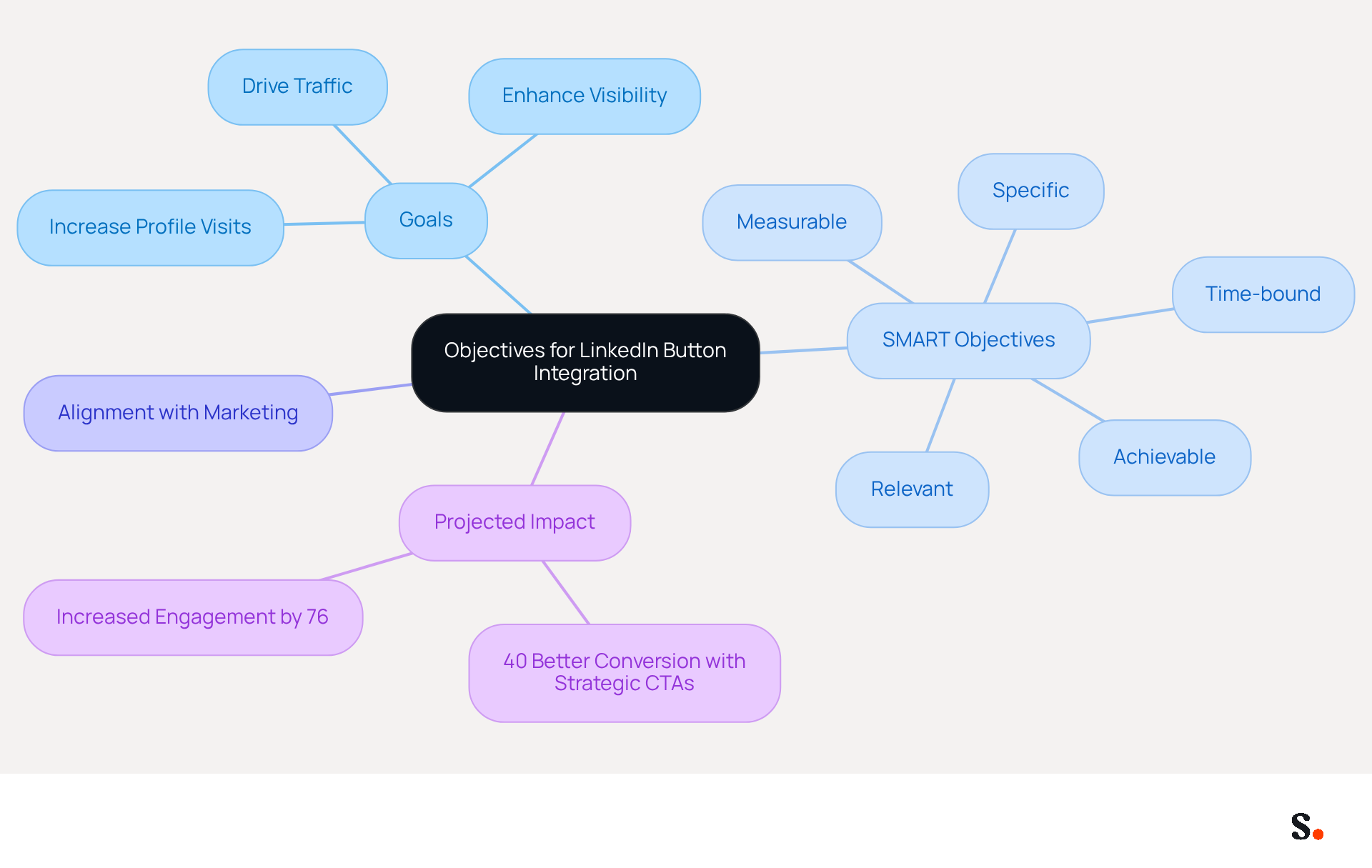
To maximize the impact of the LinkedIn button for email signature, defining clear objectives is crucial. Consider what you aim to achieve: increasing profile visits, enhancing visibility, or driving traffic to your company page. Establishing SMART objectives - Specific, Measurable, Achievable, Relevant, and Time-bound - will effectively guide your integration process. For instance, targeting a 20% increase in profile visits over the next quarter provides a concrete goal to measure success and adjust strategies as necessary. Aligning these objectives with your broader marketing goals ensures consistency across all channels, reinforcing your brand's presence and effectiveness in communications.
By 2026, organizations that incorporate the LinkedIn button for email signature are projected to experience significant engagement, as studies show that strategic CTAs convert 40% better than generic links. This underscores the need to tailor objectives specifically to your audience and marketing strategy. Regular updates to communication identifiers are essential to maintain relevance and seize new opportunities, ensuring that your messages remain effective and engaging. Syncing your Google Workspace with Scribe makes this process easier, saving you time and ensuring your team’s information is always up to date in your emails. This integration enhances your marketing efforts and ensures brand consistency.
Implement Technical Steps for Button Integration
Incorporating a LinkedIn button for email signature into your email footer can significantly enhance your visibility and credibility. To effectively integrate this feature, follow these technical steps:
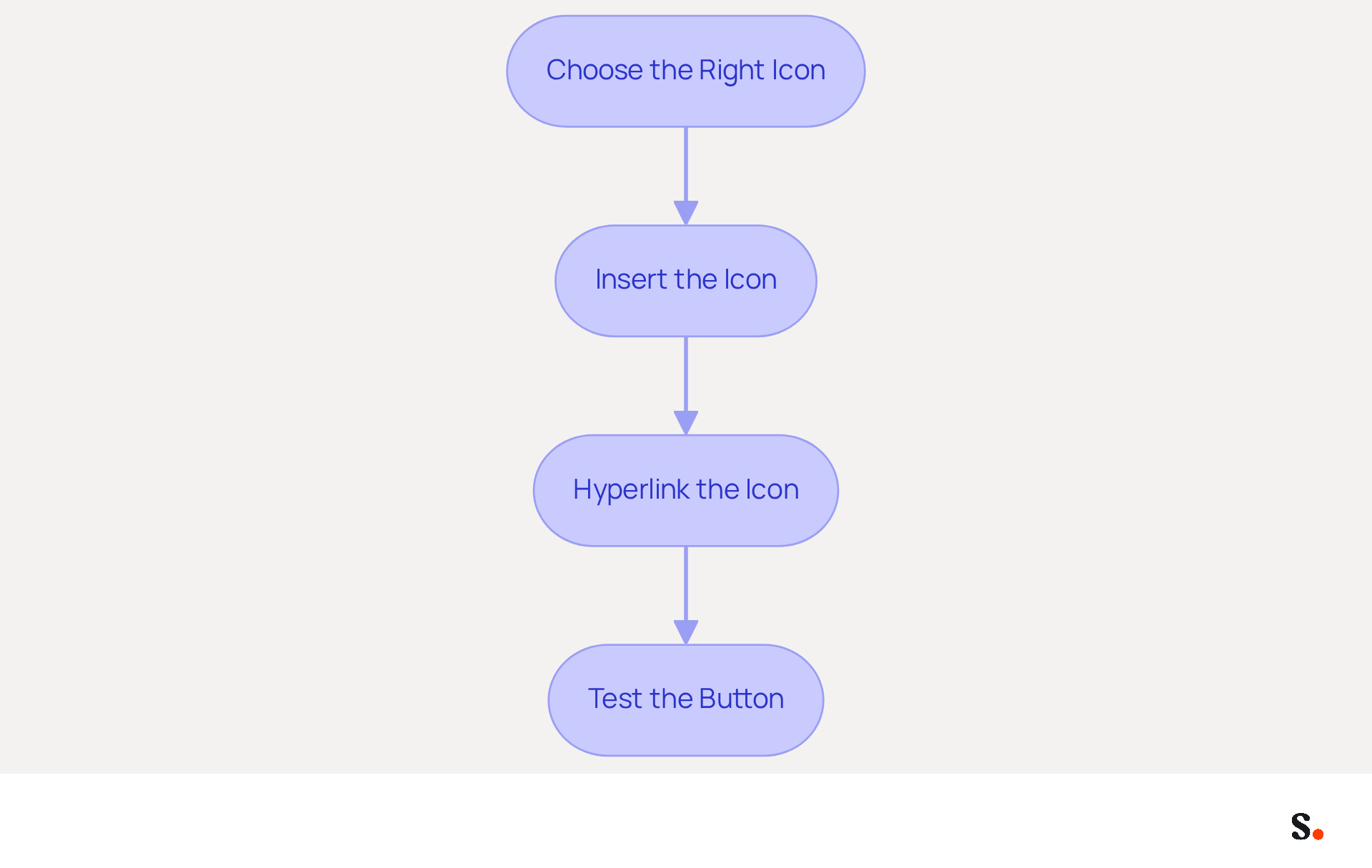
- Choose the Right Icon: Download the official logo from the platform's Brand Guidelines to ensure compliance with branding standards.
- Insert the Icon: Access the signature settings in your messaging client and upload the logo image from your professional profile.
- Hyperlink the Icon: Highlight the icon, click the hyperlink option, and paste your LinkedIn profile URL.
- Test the Button: Send a test message to yourself to confirm that the button is functional and visually appealing.
Following these steps not only keeps you compliant but also enhances your professional presence by adding a LinkedIn button for email signature. Additionally, many users encounter issues with incorrect URLs or images not displaying properly, so addressing these issues is crucial for maintaining a polished professional image. With Scribe, any modifications made to your Calendly setup automatically sync with your correspondence identifiers, ensuring brand consistency and effortless updates while maintaining SOC 2 Type II compliance for secure data handling.
Evaluate Performance and Optimize Engagement
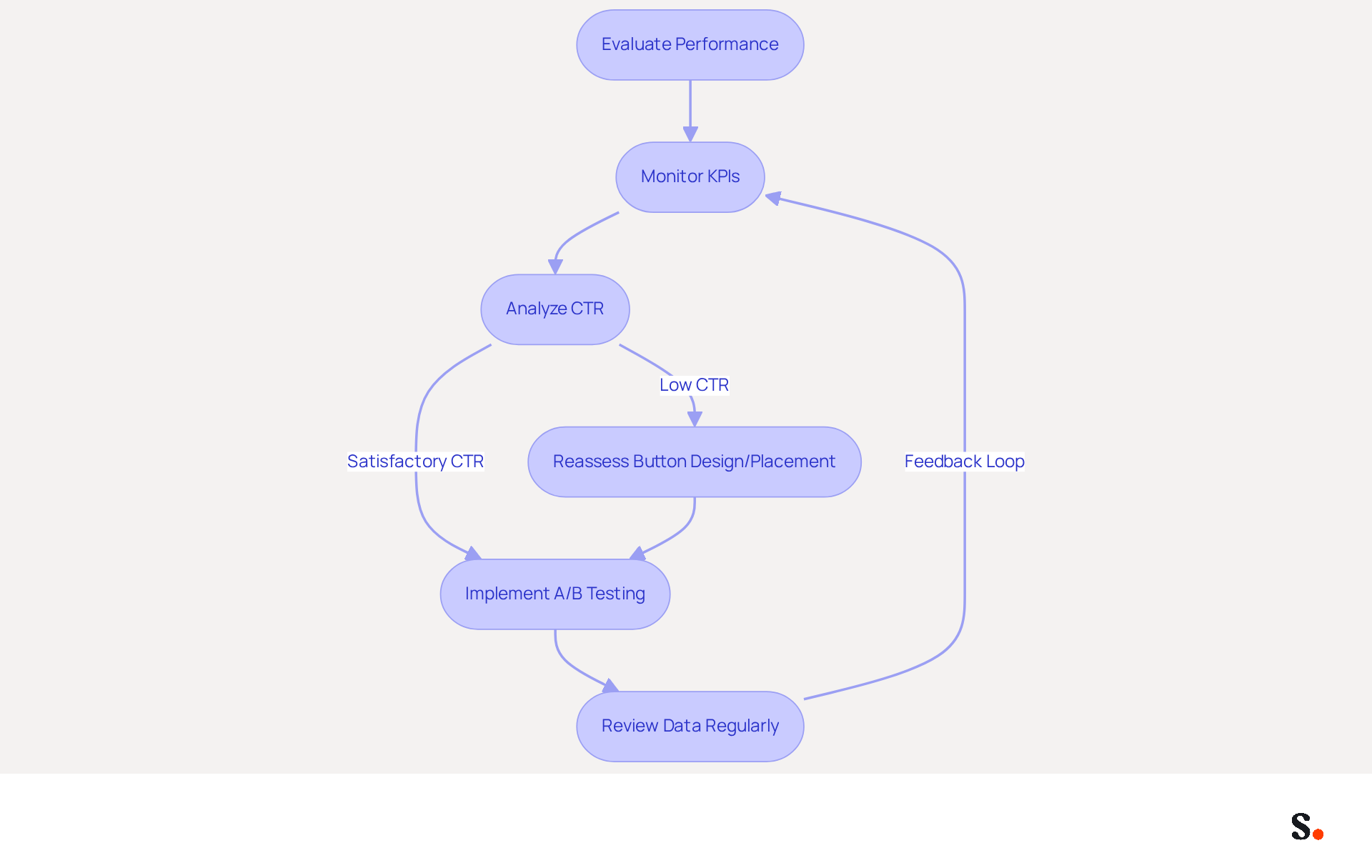
To accurately evaluate the effectiveness of your signature button, monitoring key performance indicators (KPIs) is crucial. Industry insights indicate that the average CTR for sponsored content ads is approximately 0.39%, providing a benchmark for evaluating your performance. Utilizing tools like Google Analytics or specialized tracking software can help you gather valuable data. If you observe a low CTR, consider reassessing the button's placement or design to improve visibility and engagement.
By regularly reviewing this data, you can spot trends and adjust your strategy accordingly. Implementing A/B testing is a powerful method to determine which design or placement resonates best with your audience. As noted by industry experts, "If I'm offering something of real value, I'm probably going to get in excess of 15% conversion rates." By experimenting with various alternatives, you can enhance your method and maximize the effect of the button in your correspondence. This iterative process not only enhances engagement but also contributes to a more effective marketing strategy. Additionally, be mindful of common pitfalls, such as neglecting to regularly review data, which can hinder your evaluation process. Failing to regularly review your data can lead to stagnation in your marketing efforts, ultimately affecting your overall success.
Leverage Benefits of LinkedIn Button for Brand Growth
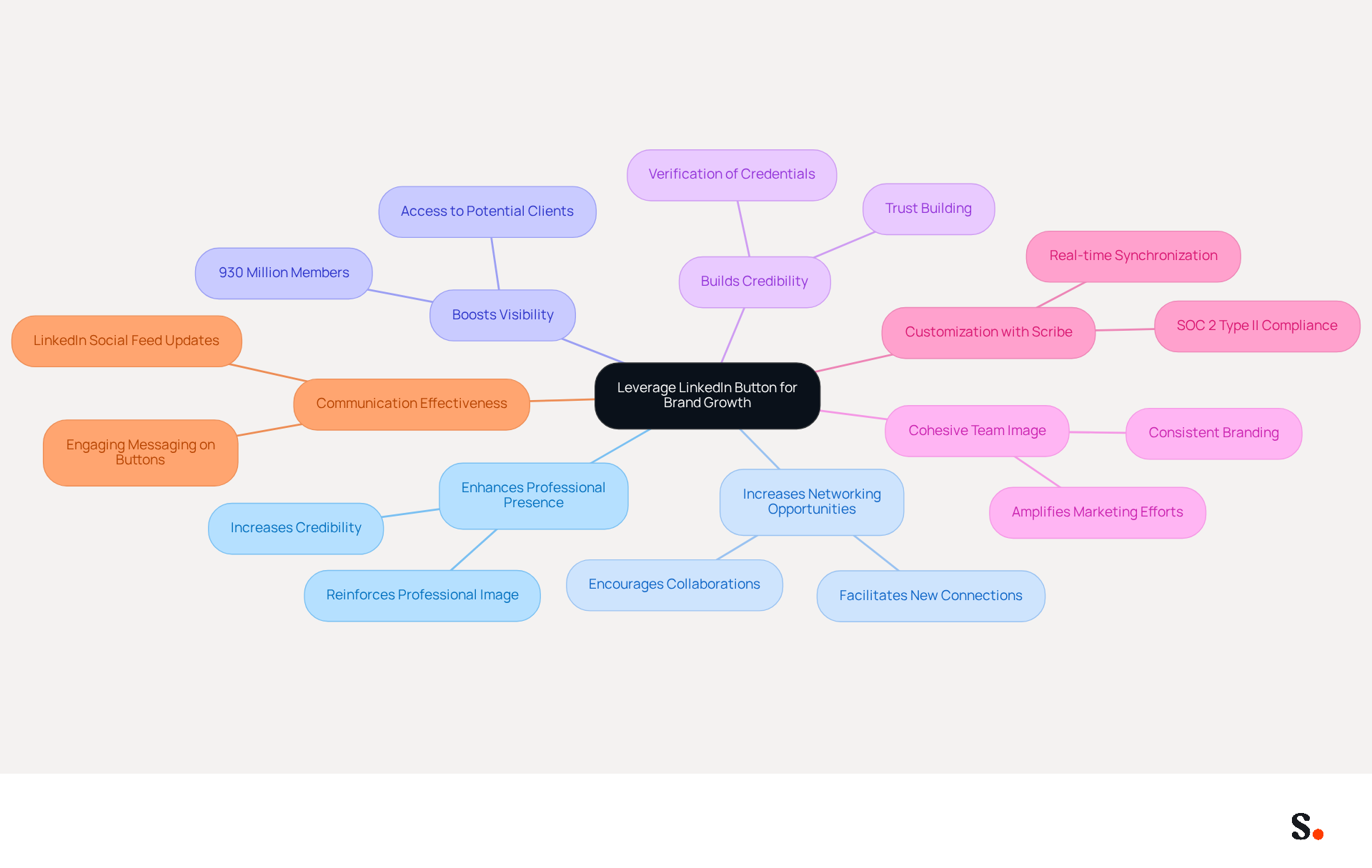
Incorporating a professional networking button into your email signature can significantly enhance your business outreach. This addition enhances your professional presence. It also simplifies how recipients can connect with you, fostering increased networking opportunities and potential collaborations. By directing traffic to your profile, you boost your visibility within your industry, which is crucial given the platform's vast network of over 930 million members.
Moreover, showcasing your professional presence bolsters your credibility and authority. Research indicates that incorporating a professional icon into correspondence can lead to new connections and business collaborations, thereby expanding the sender's professional network. Consistent use of the button across your team’s communications cultivates a cohesive image, amplifying your marketing efforts and ensuring that your identity remains top-of-mind for recipients.
Using software like Scribe makes it easier to add buttons from your profile, allowing for customization that aligns with your brand’s visual identity. Scribe's automated management of digital signatures ensures that your teammates' information is always synced with your business phone system, requiring no action from them. This real-time synchronization not only maintains visual consistency but also encourages engagement through strong messaging on buttons, enticing recipients to connect or view posts.
Furthermore, the LinkedIn Social Feed feature, which refreshes automatically every four hours, can enhance your communication effectiveness by displaying your latest posts without manual updates. With Scribe's SOC 2 Type II compliance, you can be assured that your data is safe while transforming your email signatures into powerful marketing tools that contribute to brand growth. Failing to adopt these strategies could leave you trailing behind in a fast-paced digital world.
Conclusion
Integrating a LinkedIn button into email signatures presents a unique opportunity for organizations to enhance their brand visibility and engagement. By clearly defining objectives and aligning them with broader marketing goals, organizations can effectively leverage this tool to drive traffic and increase profile visits. Without clear objectives, organizations risk ineffective use of the LinkedIn button, leading to missed opportunities for engagement. A well-executed integration process is crucial; it ensures branding compliance and strengthens professional presence.
Evaluating performance through key performance indicators (KPIs) and optimizing engagement strategies are essential for maximizing the LinkedIn button's effectiveness. Regularly monitoring click-through rates and employing A/B testing can lead to improved visibility and interaction with the LinkedIn button. Additionally, the benefits of fostering networking opportunities and enhancing credibility through consistent use of the button across communications are crucial for brand growth.
This strategic enhancement can lead to measurable improvements in brand visibility and engagement. Organizations that embrace this practice can expect to see increased engagement and a stronger professional presence in their respective industries. Organizations that overlook this opportunity may find themselves at a competitive disadvantage in their industries. By utilizing tools like Scribe, which ensures seamless integration and compliance, businesses can transform their email signatures into powerful marketing assets that drive brand success.
Frequently Asked Questions
Why is it important to define objectives for LinkedIn button integration in email signatures?
Defining clear objectives is crucial to maximize the impact of the LinkedIn button, as it helps in achieving specific goals such as increasing profile visits, enhancing visibility, or driving traffic to your company page.
What are SMART objectives, and how do they relate to LinkedIn button integration?
SMART objectives are Specific, Measurable, Achievable, Relevant, and Time-bound goals that guide the integration process. For example, targeting a 20% increase in profile visits over the next quarter provides a concrete goal to measure success.
How can aligning LinkedIn button objectives with broader marketing goals benefit a brand?
Aligning these objectives ensures consistency across all channels, reinforcing the brand's presence and effectiveness in communications.
What is the projected impact of incorporating the LinkedIn button for email signatures by 2026?
Organizations that incorporate the LinkedIn button are projected to experience significant engagement, as studies indicate that strategic CTAs convert 40% better than generic links.
Why is it important to tailor objectives specifically to your audience and marketing strategy?
Tailoring objectives to your audience and marketing strategy ensures that your messages remain effective and engaging, allowing you to seize new opportunities.
How does syncing Google Workspace with Scribe facilitate LinkedIn button integration?
Syncing Google Workspace with Scribe makes the process easier by saving time and ensuring that your team’s information is always up to date in emails, enhancing marketing efforts and ensuring brand consistency.
List of Sources
- Define Objectives for LinkedIn Button Integration
- 2026 Email Signature Trends: Centralized Control & Automation | SIGNandGO posted on the topic | LinkedIn (https://linkedin.com/posts/signngo_email-signature-trends-to-watch-in-2026-activity-7401523471786217473-zAVL)
- How to Include LinkedIn in Your Email Signature: A Step-by-Step Guide (https://scribe-mail.com/en-US/blog/how-to-include-linkedin-in-your-email-signature-a-step-by-step-guide)
- Email Signature Best Practices for 2026 (+ 15 Pro Examples) (https://wavecnct.com/blogs/email-signature-best-practices-2026)
- The ultimate guide to email signatures in 2026 (https://signitic.com/en/resources/email-signature)
- 2026 Email Signature Trends for Companies | Bybrand posted on the topic | LinkedIn (https://linkedin.com/posts/bybrand_top-email-signature-trends-for-companies-activity-7458274214513483776-q9NB)
- Implement Technical Steps for Button Integration
- 40+ Email Signature Statistics for 2026 (Data + Insights) (https://wavecnct.com/blogs/email-signature-statistics)
- How to Add LinkedIn Logo to Email Signature - Newoldstamp - NEWOLDSTAMP (https://newoldstamp.com/blog/add-linkedin-logo-email-signature)
- How to Put LinkedIn on Your Email Signature: A Step-by-Step Guide (https://scribe-mail.com/en-US/blog/how-to-put-linkedin-on-your-email-signature-a-step-by-step-guide)
- How to Add Your LinkedIn Profile to Your Email Signature (https://topechelon.com/blog/how-add-linkedin-email-signature-button)
- How to Add LinkedIn to Your Email Signature (Gmail, Outlook, Mac) (https://exclaimer.com/email-signature-handbook/add-linkedin-to-email-signature)
- Evaluate Performance and Optimize Engagement
- LinkedIn for Email Marketing: Strategies to Boost Engagement and Grow Your List - GlockApps (https://glockapps.com/blog/linkedin-for-email-marketing)
- Email marketing industry news updates (https://linkedin.com/top-content/marketing/marketing-technology-trends/email-marketing-industry-news-updates)
- How to Analyze Your LinkedIn Ad Performance : Social Media Examiner (https://socialmediaexaminer.com/how-to-analyze-linkedin-ad-performance)
- Is your newsletter's click-through rate stuck at 0.5-1%? | Nathan May (https://linkedin.com/posts/nathan-may1_is-your-newsletters-click-through-rate-stuck-activity-7346174158742908928-F2TB)
- Leverage Benefits of LinkedIn Button for Brand Growth
- How to Add LinkedIn to Your Email Signature (Gmail, Outlook, Mac) (https://exclaimer.com/email-signature-handbook/add-linkedin-to-email-signature)
- How to Add LinkedIn Logo to Email Signature - Newoldstamp - NEWOLDSTAMP (https://newoldstamp.com/blog/add-linkedin-logo-email-signature)
Get started with Scribe
See why teams switch to Scribe
Free 14-day trial — no credit card.